sensor ACURA ILX 2022 User Guide
[x] Cancel search | Manufacturer: ACURA, Model Year: 2022, Model line: ILX, Model: ACURA ILX 2022Pages: 632, PDF Size: 20.56 MB
Page 57 of 632
55
uuAirbags uAirbag Care
Safe Driving
Airbag Care
You do not need to, and should not, perform any maintenance on or replace any
airbag system components yourself. However, you should have your vehicle
inspected by a dealer in the following situations:
■When the airbags have deployed
If an airbag has inflated, the control unit and other related parts must be replaced.
Similarly, once an automatic seat belt te nsioner has been activated, it must be
replaced.
■When the vehicle has been in a moderate-to-severe collision
Even if the airbags did not inflate, have yo ur dealer inspect the following: the driver’s
seat position sensor, weight sensors in the passenger’s seat, front seat belt
tensioners, and each seat belt that was worn during the crash.
■Do not remove or modify a front seat without consulting a dealer
This would likely disable or affect the proper operation of the driver’s seat position
sensor or the weight sensors in the passenge r’s seat. If it is necessary to remove or
modify a front seat to accommodate a pe rson with disabilities, contact an Acura
dealer, or for U.S. vehicles, Acura Client Relations at 1-800-382-2238 and for
Canadian vehicles, Acura Client Services at 1-888-9-ACURA-9.
1Airbag Care
We recommend against the use of salvaged airbag
system components, includi ng the airbag, tensioners,
sensors, and control unit.
22 ACURA ILX-31TX66900.book 55 ページ 2021年4月26日 月曜日 午前11時27分
Page 60 of 632
58
uuChild Safety uSafety of Infants and Small Children
Safe Driving
Safety of Infants and Small Children
An infant must be properly restrained in a rear-facing child seat until the infant
reaches the seat manufacturer’s weig ht or height limit for the seat.
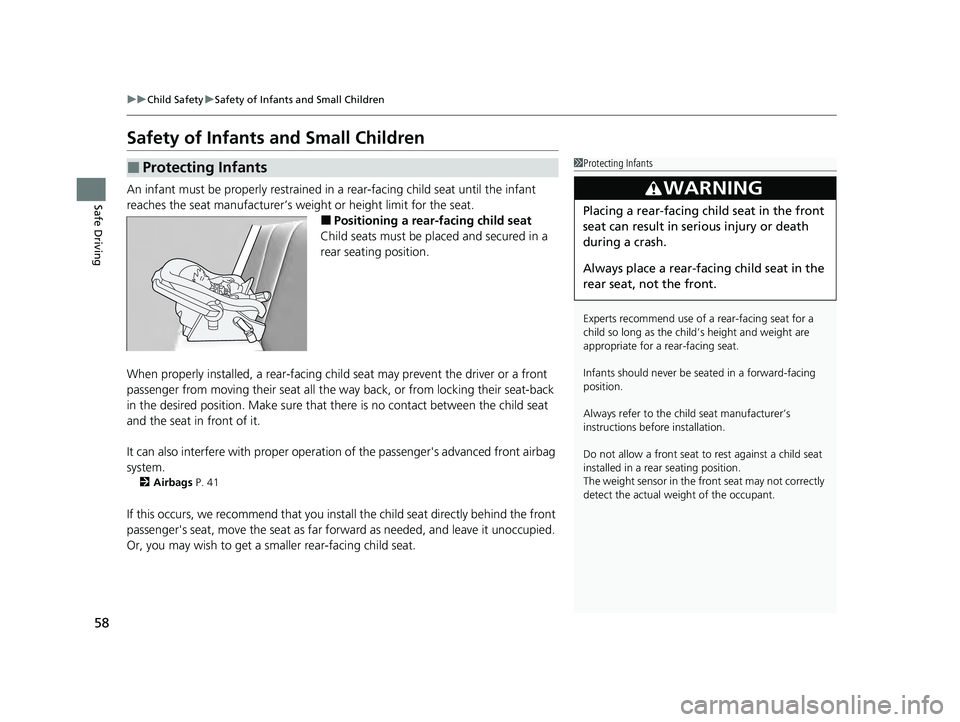
■Positioning a rear-facing child seat
Child seats must be placed and secured in a
rear seating position.
When properly installed, a rear-facing child seat may prevent the driver or a front
passenger from moving their seat all the way back, or from locking their seat-back
in the desired position. Make sure that th ere is no contact between the child seat
and the seat in front of it.
It can also interfere with pr oper operation of the passenger's advanced front airbag
system.
2 Airbags P. 41
If this occurs, we recommend that you install the child seat directly behind the front
passenger's seat, move the seat as far fo rward as needed, and leave it unoccupied.
Or, you may wish to get a sm aller rear-facing child seat.
■Protecting Infants1Protecting Infants
Experts recommend use of a rear-facing seat for a
child so long as the child’ s height and weight are
appropriate for a rear-facing seat.
Infants should never be s eated in a forward-facing
position.
Always refer to the child seat manufacturer’s
instructions before installation.
Do not allow a front seat to rest against a child seat
installed in a rear seating position.
The weight sensor in the fr ont seat may not correctly
detect the actual weight of the occupant.
3WARNING
Placing a rear-facing child seat in the front
seat can result in serious injury or death
during a crash.
Always place a rear-fac ing child seat in the
rear seat, not the front.
22 ACURA ILX-31TX66900.book 58 ページ 2021年4月26日 月曜日 午前11時27分
Page 77 of 632
75
uuIndicators u
Continued
Instrument Panel
IndicatorNameOn/BlinkingExplanationMessage
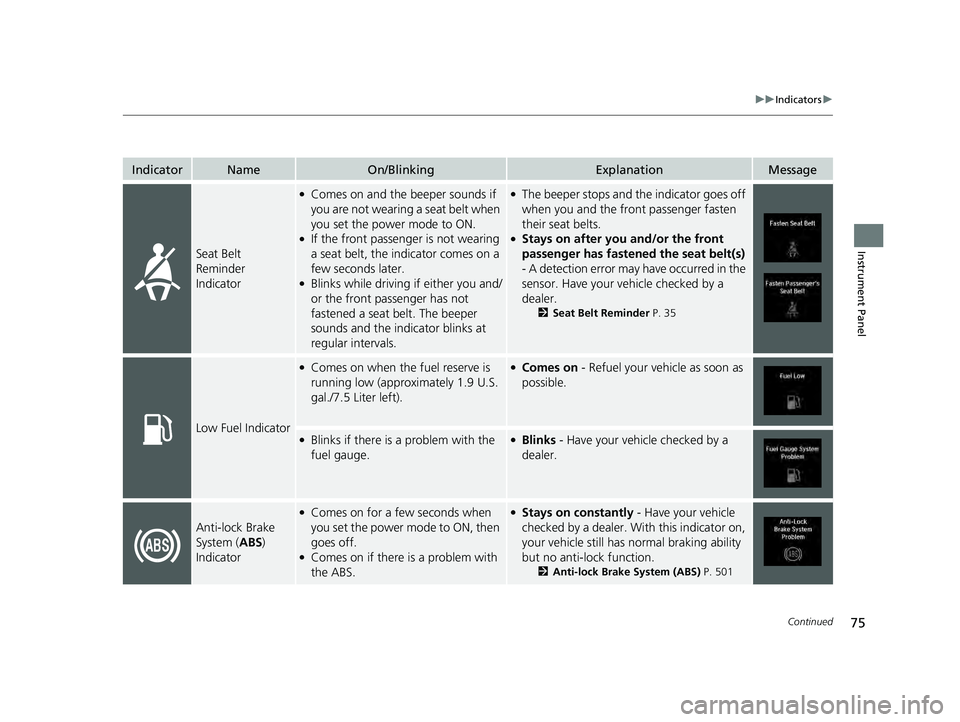
Seat Belt
Reminder
Indicator
●Comes on and the beeper sounds if
you are not wearing a seat belt when
you set the power mode to ON.
●If the front passenger is not wearing
a seat belt, the indicator comes on a
few seconds later.
●Blinks while driving if either you and/
or the front passenger has not
fastened a seat belt. The beeper
sounds and the indicator blinks at
regular intervals.
●The beeper stops and the indicator goes off
when you and the front passenger fasten
their seat belts.
●Stays on after you and/or the front
passenger has fastened the seat belt(s)
- A detection error may have occurred in the
sensor. Have your vehicle checked by a
dealer.
2 Seat Belt Reminder P. 35
Low Fuel Indicator
●Comes on when the fuel reserve is
running low (approximately 1.9 U.S.
gal./7.5 Liter left).●Comes on - Refuel your vehicle as soon as
possible.
●Blinks if there is a problem with the
fuel gauge.●Blinks - Have your vehicle checked by a
dealer.
Anti-lock Brake
System ( ABS)
Indicator
●Comes on for a few seconds when
you set the power mode to ON, then
goes off.
●Comes on if there is a problem with
the ABS.
●Stays on constantly - Have your vehicle
checked by a dealer. Wi th this indicator on,
your vehicle still has normal braking ability
but no anti-lock function.
2 Anti-lock Brake System (ABS) P. 501
22 ACURA ILX-31TX66900.book 75 ページ 2021年4月26日 月曜日 午前11時27分
Page 82 of 632
80
uuIndicators u
Instrument Panel
IndicatorNameOn/BlinkingExplanationMessage
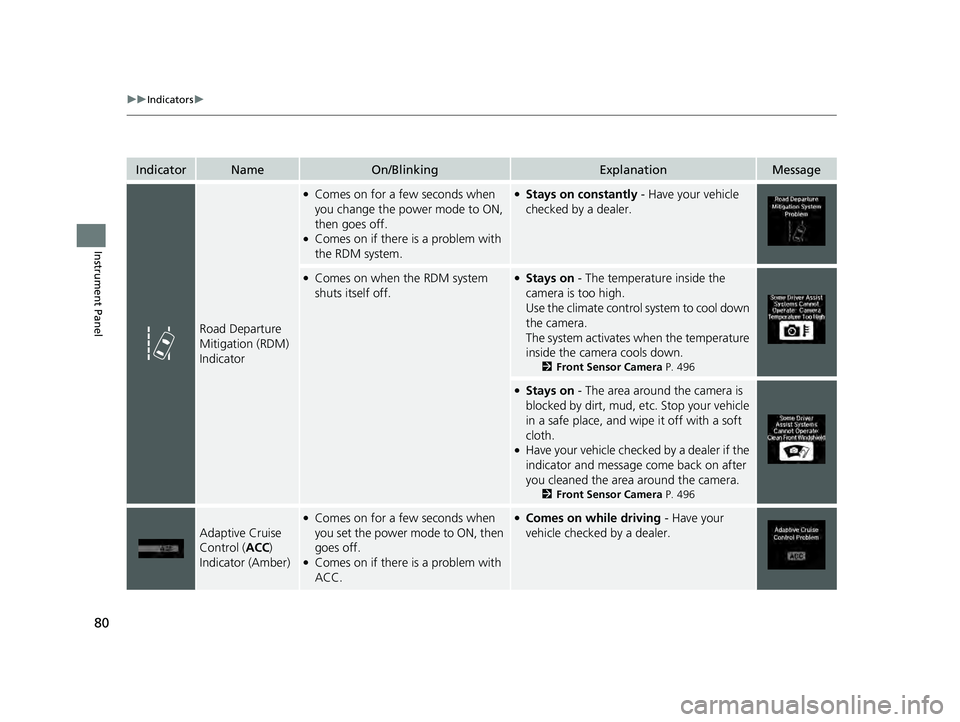
Road Departure
Mitigation (RDM)
Indicator
●Comes on for a few seconds when
you change the power mode to ON,
then goes off.
●Comes on if there is a problem with
the RDM system.
●Stays on constantly - Have your vehicle
checked by a dealer.
●Comes on when the RDM system
shuts itself off.●Stays on - The temperature inside the
camera is too high.
Use the climate control system to cool down
the camera.
The system activates when the temperature
inside the camera cools down.
2 Front Sensor Camera P. 496
●Stays on - The area around the camera is
blocked by dirt, mud, etc. Stop your vehicle
in a safe place, and wipe it off with a soft
cloth.
●Have your vehicle checked by a dealer if the
indicator and message come back on after
you cleaned the area around the camera.
2 Front Sensor Camera P. 496
Adaptive Cruise
Control (ACC)
Indicator (Amber)
●Comes on for a few seconds when
you set the power mode to ON, then
goes off.
●Comes on if there is a problem with
ACC.
●Comes on while driving - Have your
vehicle checked by a dealer.
22 ACURA ILX-31TX66900.book 80 ページ 2021年4月26日 月曜日 午前11時27分
Page 83 of 632
81
uuIndicators u
Continued
Instrument Panel
IndicatorNameOn/BlinkingExplanationMessage
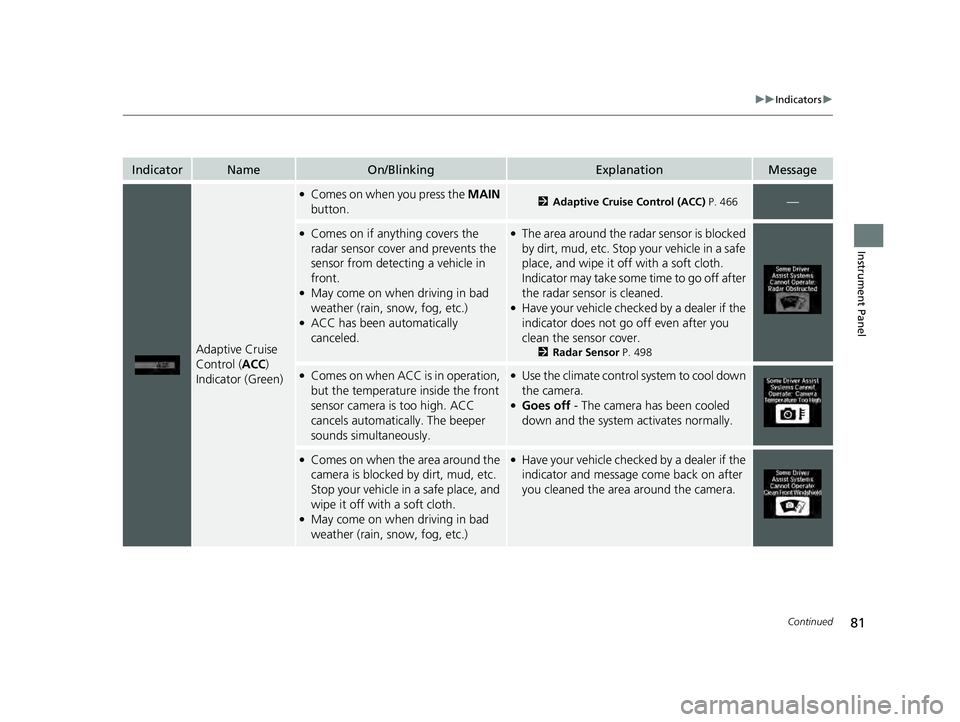
Adaptive Cruise
Control (ACC)
Indicator (Green)
●Comes on when you press the MAIN
button.2 Adaptive Cruise Control (ACC) P. 466—
●Comes on if anything covers the
radar sensor cover and prevents the
sensor from detecting a vehicle in
front.
●May come on when driving in bad
weather (rain, snow, fog, etc.)
●ACC has been automatically
canceled.
●The area around the radar sensor is blocked
by dirt, mud, etc. Stop your vehicle in a safe
place, and wipe it off with a soft cloth.
Indicator may take some time to go off after
the radar sensor is cleaned.
●Have your vehicle checked by a dealer if the
indicator does not go off even after you
clean the sensor cover.
2Radar Sensor P. 498
●Comes on when ACC is in operation,
but the temperature inside the front
sensor camera is too high. ACC
cancels automatica lly. The beeper
sounds simultaneously.●Use the climate control system to cool down
the camera.
●Goes off - The camera has been cooled
down and the system activates normally.
●Comes on when the area around the
camera is blocked by dirt, mud, etc.
Stop your vehicle in a safe place, and
wipe it off with a soft cloth.
●May come on when driving in bad
weather (rain, snow, fog, etc.)
●Have your vehicle checked by a dealer if the
indicator and message come back on after
you cleaned the area around the camera.
22 ACURA ILX-31TX66900.book 81 ページ 2021年4月26日 月曜日 午前11時27分
Page 84 of 632
82
uuIndicators u
Instrument Panel
IndicatorNameOn/BlinkingExplanationMessage
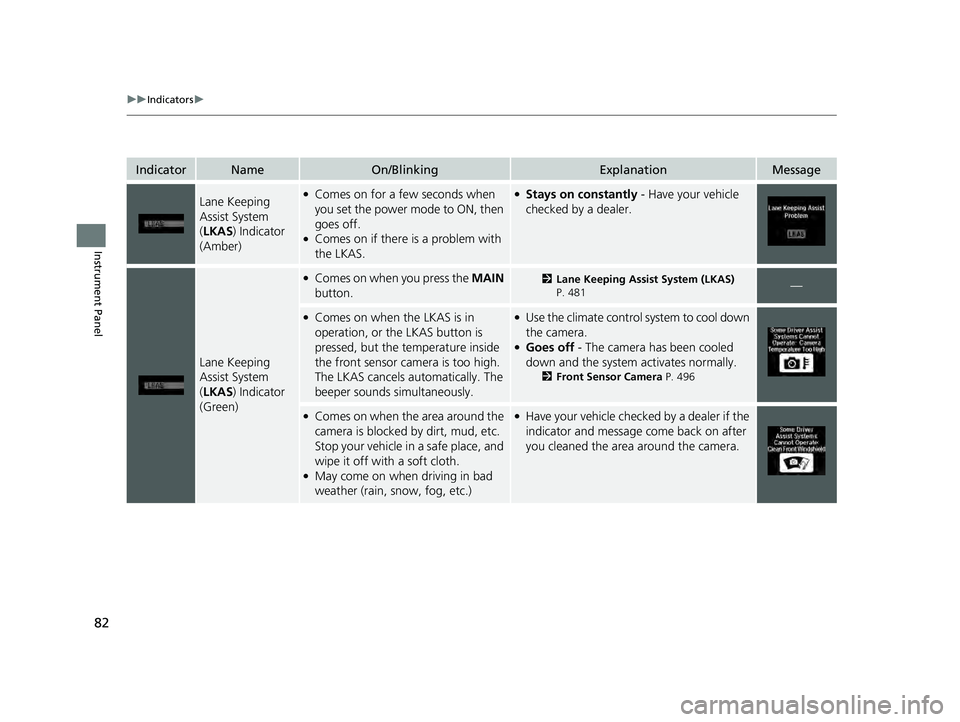
Lane Keeping
Assist System
(LKAS ) Indicator
(Amber)●Comes on for a few seconds when
you set the power mode to ON, then
goes off.
●Comes on if there is a problem with
the LKAS.
●Stays on constantly - Have your vehicle
checked by a dealer.
Lane Keeping
Assist System
( LKAS ) Indicator
(Green)
●Comes on when you press the MAIN
button.2 Lane Keeping Assist System (LKAS)
P. 481—
●Comes on when the LKAS is in
operation, or the LKAS button is
pressed, but the temperature inside
the front sensor camera is too high.
The LKAS cancels automatically. The
beeper sounds simultaneously.●Use the climate control system to cool down
the camera.
●Goes off - The camera has been cooled
down and the system activates normally.
2 Front Sensor Camera P. 496
●Comes on when the area around the
camera is blocked by dirt, mud, etc.
Stop your vehicle in a safe place, and
wipe it off with a soft cloth.
●May come on when driving in bad
weather (rain, snow, fog, etc.)
●Have your vehicle checked by a dealer if the
indicator and message come back on after
you cleaned the area around the camera.
22 ACURA ILX-31TX66900.book 82 ページ 2021年4月26日 月曜日 午前11時27分
Page 85 of 632

83
uuIndicators u
Continued
Instrument Panel
IndicatorNameOn/BlinkingExplanationMessage
Blind spot
information
System Indicator
*
●Comes on for a few seconds when
you change the power mode to ON,
then goes off.
●Stays on while blind spot information
system is turned off.
2Customized Features P. 99
●Comes on when mud, snow, or ice
accumulates in the vicinity of sensor.●Comes on while driving - Remove the
obstacle in the vicinity of sensor.
2 Blind spot information System* P. 445
●Comes on if there is a problem with
the system.●Comes on while driving - Have your
vehicle checked by a dealer.
Collision
Mitigation Braking
System
TM
(CMBSTM)
Indicator
●Comes on for a few seconds when
you change the power mode to ON,
then goes off.
●Comes on when you deactivate the
CMBSTM. A multi-information display
message appears for five seconds.
●Comes on if there is a problem with
the CMBSTM.
●Stays on constant ly without the
CMBSTM off - Have your vehicle checked by
a dealer.
2 Collision Mitigation Braking SystemTM
(CMBSTM) P. 455
* Not available on all models
22 ACURA ILX-31TX66900.book 83 ページ 2021年4月26日 月曜日 午前11時27分
Page 86 of 632
84
uuIndicators u
Instrument Panel
IndicatorNameOn/BlinkingExplanationMessage
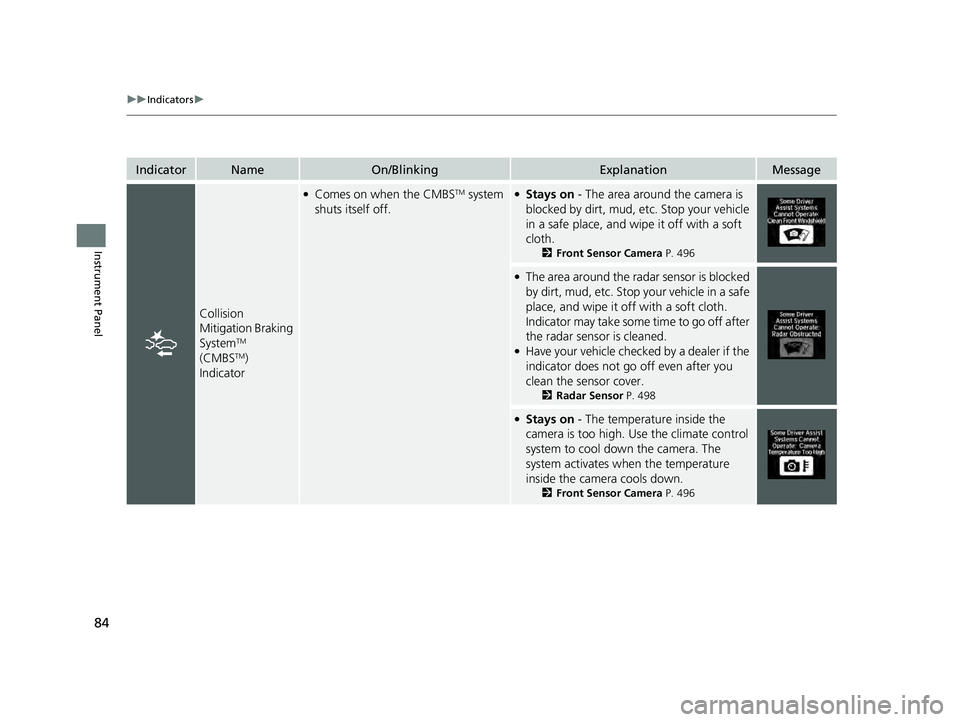
Collision
Mitigation Braking
System
TM
(CMBSTM)
Indicator
●Comes on when the CMBSTM system
shuts itself off.●Stays on - The area around the camera is
blocked by dirt, mud, etc. Stop your vehicle
in a safe place, and wipe it off with a soft
cloth.
2 Front Sensor Camera P. 496
●The area around the radar sensor is blocked
by dirt, mud, etc. Stop your vehicle in a safe
place, and wipe it off with a soft cloth.
Indicator may take some time to go off after
the radar sensor is cleaned.
●Have your vehicle checked by a dealer if the
indicator does not go off even after you
clean the sensor cover.
2Radar Sensor P. 498
●Stays on - The temperature inside the
camera is too high. Use the climate control
system to cool down the camera. The
system activates wh en the temperature
inside the camera cools down.
2 Front Sensor Camera P. 496
22 ACURA ILX-31TX66900.book 84 ページ 2021年4月26日 月曜日 午前11時27分
Page 88 of 632

86
uuIndicators uMulti-Information Display Warn ing and Information Messages
Instrument Panel
MessageConditionExplanation
●Appears when the starter system has a problem.●As a temporary measure, press and hold the ENGINE
START/STOP button for 15 seconds while pressing the
brake pedal and manually start the engine.
Have your vehicle checked by a dealer.
●Appears when the engine coolant temperature gets
abnormally high.
2 Overheating P. 594
●Appears when there is a problem with the sensor on the
battery.●Have your vehicle checked by a dealer.
2Checking the Battery P. 551
U.S.
Canada
22 ACURA ILX-31TX66900.book 86 ページ 2021年4月26日 月曜日 午前11時27分
Page 98 of 632

uuGauges and Multi-Information Display uMulti-Information Display
96
Instrument Panel
Shows the total number of miles or kilome ters that your vehicle has accumulated.
Shows the total number of miles or kilomete rs driven since the last reset. Meters A
and B can be used to measure two separate trips.
■Resetting a trip meter
To reset a trip meter, display it, then press and hold the SEL/RESET button. The trip
meter is reset to 0.0.
Shows the outside temperature in Fahr enheit (U.S.) or Celsius (Canada).
■Adjusting the outside temperature display
Adjust the temperature reading up to ± 5°F (U.S.) or ± 3°C (Canada) if the
temperature reading seems incorrect.
Shows the estimated average fuel economy of each trip meter in mpg (U.S.) or
l/100 km (Canada). The display is updated at set intervals. When a trip meter is reset,
the average fuel economy is also reset.
■Odometer
■Trip Meter
■Outside Temperature
■Average Fuel Economy
1 Trip Meter
Switch between trip meter A and trip meter B by
pressing the SEL/RESET button.
1Outside Temperature
The temperature sensor is in the front bumper.
Road heat and exhaust from another vehicle can
affect the temperature reading when your vehicle
speed is less than 19 mph (30 km/h).
It may take several minutes for the display to be
updated after the temperature reading has stabilized.
Use the multi-information display’s customized
features to correct the temperature.
2 Customized Features P. 99, 316
1Average Fuel Economy
You can change when to reset the average fuel
economy.
2 Customized Features P. 99, 316
22 ACURA ILX-31TX66900.book 96 ページ 2021年4月26日 月曜日 午前11時27分