steering ACURA ILX 2022 Service Manual
[x] Cancel search | Manufacturer: ACURA, Model Year: 2022, Model line: ILX, Model: ACURA ILX 2022Pages: 632, PDF Size: 20.56 MB
Page 271 of 632
269
uuAudio System Basic Operation uSiri Eyes Free
Features
Siri Eyes Free
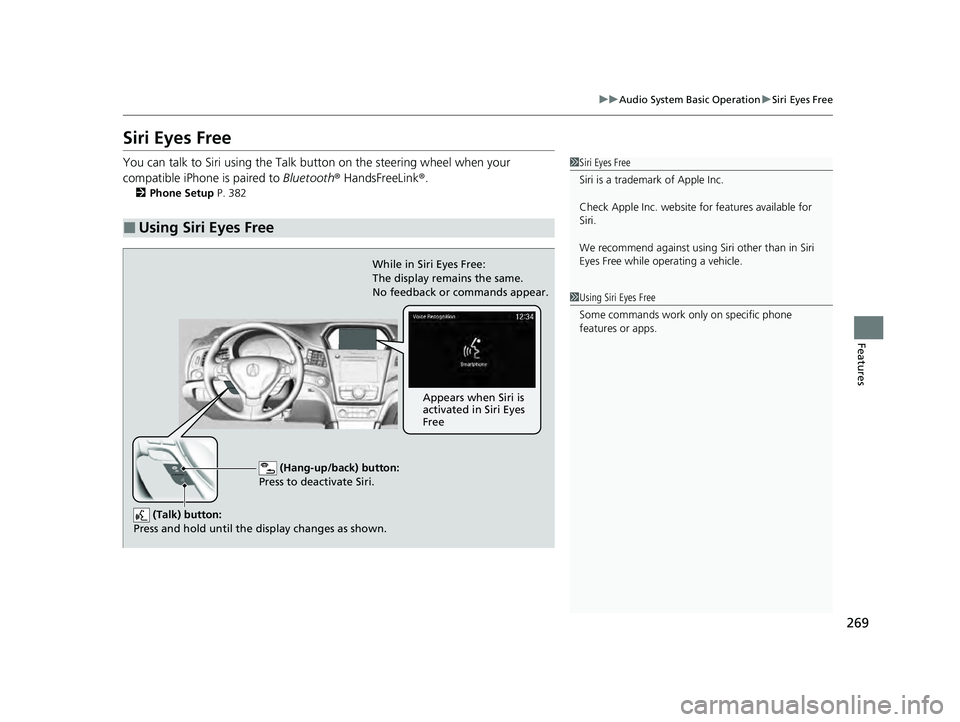
You can talk to Siri using the Talk bu tton on the steering wheel when your
compatible iPhone is paired to Bluetooth® HandsFreeLink ®.
2Phone Setup P. 382
■Using Siri Eyes Free
1Siri Eyes Free
Siri is a trademark of Apple Inc.
Check Apple Inc. website for features available for
Siri.
We recommend against using Si ri other than in Siri
Eyes Free while operating a vehicle.
1 Using Siri Eyes Free
Some commands work only on specific phone
features or apps.
(Hang-up/back) button:
Press to deactivate Siri.
(Talk) buttonY
Press and hold until the display changes as shown.
While in Siri Eyes Free:
The display remains the same.
No feedback or commands appear.
Appears when Siri is
activated in Siri Eyes
Free
22 ACURA ILX-31TX66900.book 269 ページ 2021年4月26日 月曜日 午前11時27分
Page 293 of 632
291
Features
General Information on the Audio System
SiriusXM® Radio Service*
1.You need your radio ID ready before regist ering for subscription. To see the ID in
the On Demand Multi-Use DisplayTM, select channel up/down icons until CH 000
and the radio ID appears.
2. Have your radio ID and credit card numb er ready, and either call or visit the
SiriusXM ® website to subscribe.
Switch to the SiriusXM ® mode by pressing the MODE button on the steering wheel,
or through the On Demand Multi-Use Display
TM, and stay in this mode for about 30
minutes until the service is activated. Make sure your vehicle is in an open area with
good reception.
Loading...:
SiriusXM ® is loading the audio or program information.
No Signal:
The signal is too weak in the current location.
Unsubscribed channel:
You are not subscribed to the channel selected.
Unavailable channel:
No such channel exists, the channel is not part of your subscription, or the artist or
title information is unavailable.
Check the antenna, Disconnect ed antenna, Shorted antenna:
There is a problem with the SiriusXM ® antenna. Contact a dealer.
■Subscribing to SiriusXM® Radio
■Receiving SiriusXM ® Radio
■SiriusXM ® Radio Display Messages
1 Subscribing to SiriusXM ® Radio
Contact Information for SiriusXM ® Radio:
•U.S.: SiriusXM ® Radio at www.siriusxm.com/
subscribenow , or 1-866-635-2349.
•Canada: SiriusXM ® Canada at www.siriusxm.ca/
subscribe-now , or 1-877-209-0079.
1Receiving SiriusXM ® Radio
The SiriusXM ® satellites are in orbit over the equator;
therefore, objects south of the vehicle may cause
satellite reception interruptions. Sa tellite signals are
more likely to be blocked by tall buildings and
mountains the farther north you travel from the
equator.
You may experience rece ption problems under the
following circumstances:
•In a location with an obstruction to the south of
your vehicle.
•In tunnels
•On the lower level of a multi-tiered road
•Large items carried on the roof rack
* Not available on all models
22 ACURA ILX-31TX66900.book 291 ページ 2021年4月26日 月曜日 午前11時27分
Page 421 of 632
Continued419
uuAcuraLink ®*u
Features
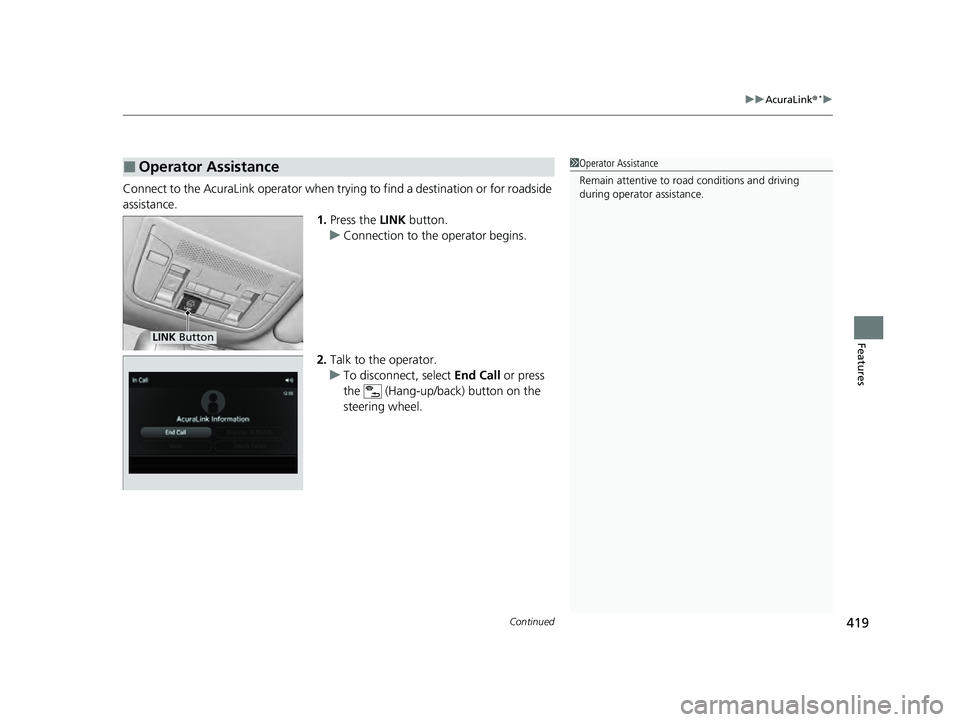
Connect to the AcuraLink operator when trying to find a destination or for roadside
assistance.
1.Press the LINK button.
u Connection to the operator begins.
2. Talk to the operator.
u To disconnect, select End Call or press
the (Hang-up/back) button on the
steering wheel.
■Operator Assistance1 Operator Assistance
Remain attentive to road conditions and driving
during operator assistance.
LINK Button
22 ACURA ILX-31TX66900.book 419 ページ 2021年4月26日 月曜日 午前11時27分
Page 429 of 632
Continued427
uuBefore Driving uDriving Preparation
Driving
• Store or secure all items on board properly.
u Carrying too much cargo, or improperly storing it, can affect your vehicle's
handling, stability, sto pping distance, and tires, and make it unsafe.
2Maximum Load Limit P. 429
•Do not pile items higher than the seat height.
u They can block your view and may be thrown forward in the event of sudden
braking.
• Do not place anything in the front seat footwells. Make sure to secure the floor
mat.
u An object or unsecured floor mat can in terfere with your brake and accelerator
pedal operation while driving.
• If you have any animals on board, do not let them move around in the vehicle.
u They may interfere with driving and a crash could occur.
• Securely close and lock all doors and the trunk.
2 Locking/Unlocking the Doors from the Inside P. 124
•Adjust your seating position properly.
u Adjust the head restraint, too.
2Adjusting the Seats P. 158
2 Adjusting the Front and Rear Outer Head Restraint Positions P. 162
•Adjust the mirrors and steering wheel properly.
u Adjust them while sitting in the proper driving position.
2 Mirrors P. 156
2 Adjusting the Steering Wheel P. 153
■Interior Checks1Interior Checks
The headlight aim is set by the factory, and does not
need to be adjusted. Howeve r, if you regularly carry
heavy items in the trunk ha ve the aiming readjusted
at a dealer or by a qualified technician.
22 ACURA ILX-31TX66900.book 427 ページ 2021年4月26日 月曜日 午前11時27分
Page 439 of 632
437
uuWhen Driving uPrecautions While Driving
Driving
Precautions While Driving
Avoid driving in deep water and on flooded roads. This can damage the engine or
driveline, or cause electrical component failure.
If there is a strong impact with something under the vehicle, stop in a safe location.
Check the underside of the vehicle for damage or any fluid leaks.
■In Rain
■Other Precautions
1Precautions While Driving
NOTICE
Do not operate the shift lever while pressing the
accelerator pedal. You could damage the transmission.
NOTICE
If you repeatedly turn the steering wheel at an
extremely low speed, or hold the steering wheel in
the full left or right position for a while, the electric
power steering (EPS) system heats up. The system
goes into a protective mode, and limits its
performance. The steering wheel becomes harder
and harder to operate. Once the system cools down,
the EPS system is restored.
Repeated operation under these conditions can
eventually damage the system.
If the power mode is set to ACCESSORY while
driving, the engine will shut down and all steering
and brake power assist functi ons will stop, making it
difficult to control the vehicle.
Do not select
( N while driving as you will lose engine
braking (and accelera tion) performance.
During the first 600 miles (1,000 km) of operation,
avoid sudden acceleration or full throttle operation so
as not to damage the engine or powertrain.
Avoid hard braking for the first 200 miles (300 km)
after purchasing your new vehicle or replacing the
brake pads or rotors, to allow for proper break-in.
22 ACURA ILX-31TX66900.book 437 ページ 2021年4月26日 月曜日 午前11時27分
Page 443 of 632
441
uuWhen Driving uShifting
Continued
Driving
Use the paddle shifters to change between 1st and 8th gears without releasing your
hands from the steering wheel. The transmission will switch to the sequential mode.
■When the transmi ssion is in (D:
The vehicle will go into the sequential m ode momentarily, and the gear position
indicator will come on.
Once you start traveling at a constant speed , the sequential mode will automatically
switch off, and the gear position indicator will go off.
Hold the
(+ paddle shifter for two seconds to return to normal drive.
■When the transmi ssion is in (S:
The vehicle will go into th e sequential mode, and the M (sequential mode) indicator
and gear position indicator will come on. At speeds of 2 mph (4 km/h) or less, the
vehicle automatically shifts down into 1st gear. It will not automatically shift up,
even if vehicle speed increases.
If you are in 1st through 6th gears and do not operate the paddle shifters as engine
speed approaches the tachometer red zone, the transmission automatically shifts up
to the next gear.
When switching out of the sequential mode, move the shift lever from
(S to (D.
When the sequential mode is canceled, the M indicator and gear position indicator
will turn off.
■Sequential Mode
22 ACURA ILX-31TX66900.book 441 ページ 2021年4月26日 月曜日 午前11時27分
Page 457 of 632

455
uuAcuraWatchTMuCollision Mitigation Braking SystemTM (CMBSTM)
Continued
Driving
Collision Mitigation Braking SystemTM (CMBSTM)
The system can assist you when it determines there is a possibility of your vehicle
colliding with a vehicle or a pedestrian dete cted in front of your vehicle. The CMBSTM
is designed to alert you when the potential for a collision is determined, as well as to
reduce your vehicle speed to help minimize collision severity when a collision is
deemed unavoidable.
1 Collision Mitigation Braking SystemTM (CMBSTM)
Important Safety Reminder
The CMBS
TM is designed to reduce the severity of an
unavoidable collision. It does not prevent collisions
nor stop the vehicle automati cally. It is still your
responsibility to operate th e brake pedal and steering
wheel appropriately acco rding to the driving
conditions.
The CMBS
TM may not activate or may not detect a
vehicle in front of y our vehicle under certain
conditions:
2 CMBS
TM Conditions and Limitations P. 460
You can read about handling information for the
camera equipped with this system. 2 Front Sensor Camera P. 496
For directions on the prop er handling of the radar
sensor, refer to the following page. 2 Radar Sensor P. 498
When the CMBS
TM activates, it may automatically
apply the brake. It will be canceled when your vehicle
stops or a potential coll ision is not determined.
22 ACURA ILX-31TX66900.book 455 ページ 2021年4月26日 月曜日 午前11時27分
Page 469 of 632
Continued467
uuAcuraWatchTMuAdaptive Cruise Control (ACC)
Driving
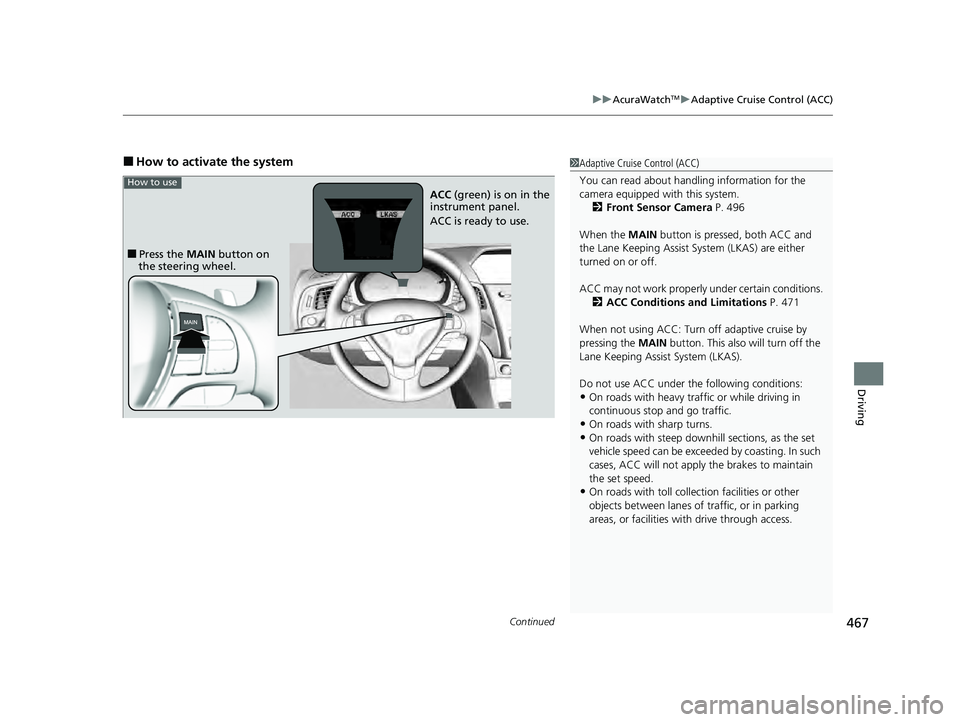
■How to activate the system1Adaptive Cruise Control (ACC)
You can read about handling information for the
camera equipped with this system.
2 Front Sensor Camera P. 496
When the MAIN button is pressed, both ACC and
the Lane Keeping Assist System (LKAS) are either
turned on or off.
ACC may not work properly under certain conditions. 2 ACC Conditions and Limitations P. 471
When not using ACC: Turn off adaptive cruise by
pressing the MAIN button. This also will turn off the
Lane Keeping Assist System (LKAS).
Do not use ACC under the following conditions:
•On roads with heavy traf fic or while driving in
continuous stop and go traffic.
•On roads with sharp turns.
•On roads with steep downhill sections, as the set
vehicle speed can be exceeded by coasting. In such
cases, ACC will not apply the brakes to maintain
the set speed.
•On roads with toll collection facilities or other
objects between lanes of traffic, or in parking
areas, or faci lities with driv e through access.
■Press the MAIN button on
the steering wheel. ACC
(green) is on in the
instrument panel.
ACC is ready to use.
How to use
22 ACURA ILX-31TX66900.book 467 ページ 2021年4月26日 月曜日 午前11時27分
Page 476 of 632

uuAcuraWatchTMuAdaptive Cruise Control (ACC)
474
Driving
Increase or decrease the vehicle speed using the RES/ACCEL or DECEL/SET buttons
on the steering wheel.
• Each time you press the button, the vehicl e speed is increased or decreased by
about 1 mph or 1 km/h accordingly.
• If you keep the button pressed, the vehicl e speed increases or decreases by about
5 mph or 5 km/h accordingly.
■To Adjust the Vehicle Speed1 To Adjust the Vehicle Speed
If a vehicle detected ahead is going at a speed slower
than your increased set speed, ACC may not
accelerate your vehicle. This is to maintain the set
interval between your vehi cle and the vehicle ahead.
You can switch the displayed set speed
measurements on the multi- information display or
information screen between mph and km/h.
2 Customized Features P. 99, 316
To increase speed
To decrease speed
22 ACURA ILX-31TX66900.book 474 ページ 2021年4月26日 月曜日 午前11時27分
Page 480 of 632

uuAcuraWatchTMuAdaptive Cruise Control (ACC)
478
Driving
■Automatic cancellation
The beeper sounds and a me ssage appears on the multi-information display when
ACC is automatically canceled. Any of these conditions may cause the ACC to
automatically cancel:
• Bad weather (rain, fog, snow, etc.)
• When the radar sensor behind the emblem gets dirty.
• The vehicle ahead of you cannot be detected.
• An abnormal tire condition is detected, or the tires are skidding.
• Driving on a mountainous road, or driving off road for extended periods.
• Abrupt steering wheel movement.
• When the ABS, VSA ® or CMBS
TM is activated.
• When the ABS or VSA ® system indicator comes on.
• When you manually apply the parking brake.
• When the detected vehicle within the ACC range is too close to your vehicle.
• The camera behind the rearview mirror, or the area around the camera, including
the windshield, gets dirty.
1Automatic cancellation
Even though ACC has been automatically canceled,
you can still resume the prior set speed. Wait until the
condition that caused ACC to cancel improves, then
press the RES/ACCEL button.
22 ACURA ILX-31TX66900.book 478 ページ 2021年4月26日 月曜日 午前11時27分