USB ACURA ILX 2022 Owners Manual
[x] Cancel search | Manufacturer: ACURA, Model Year: 2022, Model line: ILX, Model: ACURA ILX 2022Pages: 632, PDF Size: 20.56 MB
Page 10 of 632
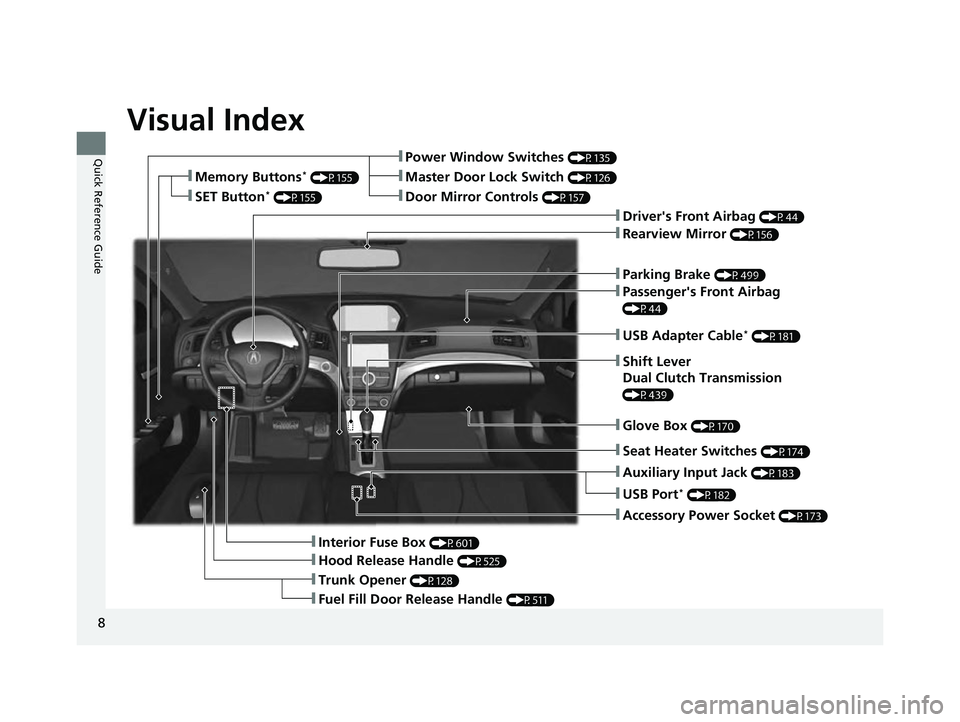
Visual Index
8
Quick Reference Guide
❚Parking Brake (P499)
❚Power Window Switches (P135)
❚Driver's Front Airbag (P44)
❚Trunk Opener (P128)
❚Hood Release Handle (P525)
❚Interior Fuse Box (P601)
❚Passenger's Front Airbag
(P44)
❚USB Adapter Cable* (P181)
❚Shift Lever
Dual Clutch Transmission
(P439)
❚Glove Box (P170)
❚Accessory Power Socket (P173)
❚Rearview Mirror (P156)
❚Auxiliary Input Jack (P183)
❚Door Mirror Controls (P157)
❚Master Door Lock Switch (P126)❚Memory Buttons* (P155)
❚SET Button* (P155)
❚Fuel Fill Door Release Handle (P511)
❚USB Port* (P182)
❚Seat Heater Switches (P174)
22 ACURA ILX-31TX66900.book 8 ページ 2021年4月26日 月曜日 午前11時27分
Page 21 of 632
19
Quick Reference Guide
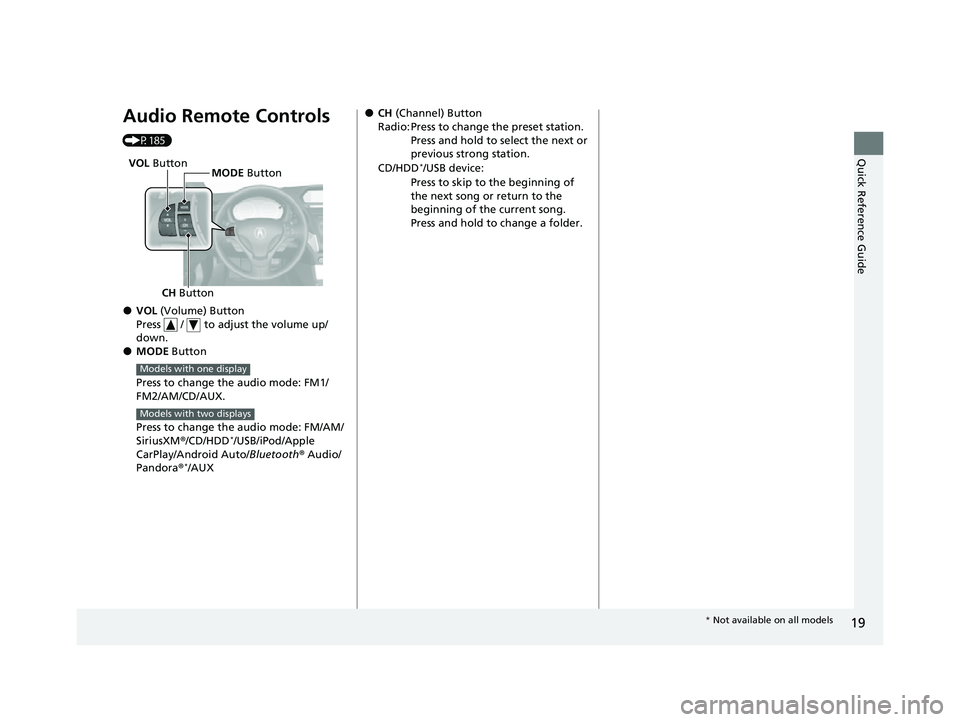
Audio Remote Controls
(P185)
●VOL (Volume) Button
Press / to adjust the volume up/
down.
●MODE Button
Press to change the audio mode: FM1/
FM2/AM/CD/AUX.
Press to change the audio mode: FM/AM/
SiriusXM ®/CD/HDD
*/USB/iPod/Apple
CarPlay/Android Auto/ Bluetooth® Audio/
Pandora ®
*/AUX
CH Button MODE
Button
VOL
Button
Models with one display
Models with two displays
●CH (Channel) Button
Radio: Press to change the preset station. Press and hold to select the next or
previous strong station.
CD/HDD
*/USB device:
Press to skip to the beginning of
the next song or return to the
beginning of the current song.
Press and hold to change a folder.
* Not available on all models
22 ACURA ILX-31TX66900.book 19 ページ 2021年4月26日 月曜日 午前11時27分
Page 181 of 632
179
Features
This chapter describes how to operate technology features.
Audio System.................................... 180
USB Adapter Cable*........................ 181
USB Port*........................................ 182
Auxiliary Input Jack .......................... 183
Audio System Theft Protection ......... 184
Audio Remote Controls .................... 185
Audio System Basic Operation ........ 187
Audio/Information Screen ................ 188
Playing AM/FM Radio ....................... 194
Playing a CD .................................... 196
Playing an iPod ................................ 199
Playing Pandora ®
*1........................... 202
Playing a USB Flash Drive ................. 205
Models with one display
Playing Bluetooth ® Audio................. 208
Audio System Basic Operation ........ 210
On Demand Multi-Use Display
TM...... 211
Information Screen .......................... 215
Display Setup ................................... 221
Playing AM/FM Radio ....................... 225
Playing SiriusXM ® Radio ................... 228
Playing a CD .................................... 239
Playing Hard Disk Drive (HDD) Audio ... 242
Playing an iPod ................................ 255
Song By Voice
TM (SBV) ...................... 258
Playing Pandora ®*1........................... 262
Playing a USB Flash Drive ................. 264
Models with two displaysPlaying Bluetooth ® Audio ................ 267
Siri Eyes Free .................................... 269
Apple CarPlay .................................. 270
Android Auto .................................. 275
Audio Error Messages ...................... 280
General Information on the Audio System ............................................. 291
HomeLink® Universal Transceiver*......342Customized Features ................ 310, 316
Bluetooth® HandsFreeLink® ..... 345, 374
AcuraLink®
*....................................... 416
*1: Available only on U.S. models.
* Not available on all models
22 ACURA ILX-31TX66900.book 179 ページ 2021年4月26日 月曜日 午前11時27分
Page 182 of 632
180
Features
Audio System
About Your Audio System
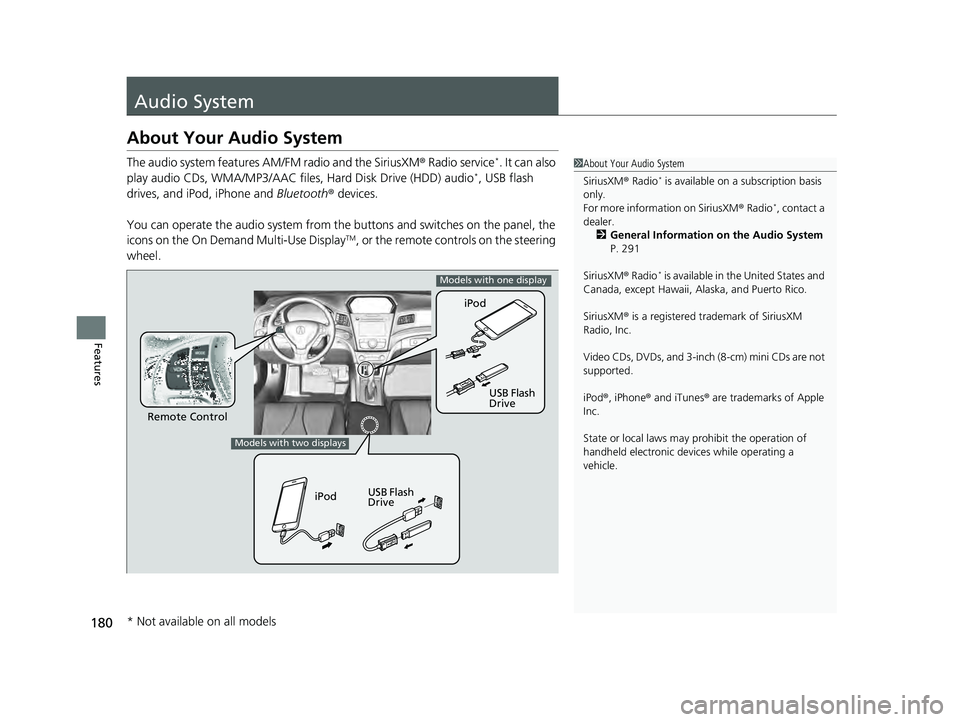
The audio system features AM/FM radio and the SiriusXM® Radio service*. It can also
play audio CDs, WMA/MP3/AAC files, Hard Disk Drive (HDD) audio*, USB flash
drives, and iPod, iPhone and Bluetooth® devices.
You can operate the audio system from the buttons and switches on the panel, the
icons on the On Demand Multi-Use Display
TM, or the remote controls on the steering
wheel.
1 About Your Audio System
SiriusXM ® Radio
* is available on a subscription basis
only.
For more information on SiriusXM ® Radio
*, contact a
dealer. 2 General Information on the Audio System
P. 291
SiriusXM ® Radio
* is available in the United States and
Canada, except Ha waii, Alaska, and Puerto Rico.
SiriusXM ® is a registered trademark of SiriusXM
Radio, Inc.
Video CDs, DVDs, and 3-inch (8-cm) mini CDs are not
supported.
iPod ®, iPhone ® and iTunes ® are trademarks of Apple
Inc.
State or local laws may pr ohibit the operation of
handheld electronic devices while operating a
vehicle.
Remote Control iPod
USB Flash
Drive
iPod USB Flash
Drive
Models with one display
Models with two displays
* Not available on all models
22 ACURA ILX-31TX66900.book 180 ページ 2021年4月26日 月曜日 午前11時27分
Page 183 of 632
181
uuAudio System uUSB Adapter Cable*
Features
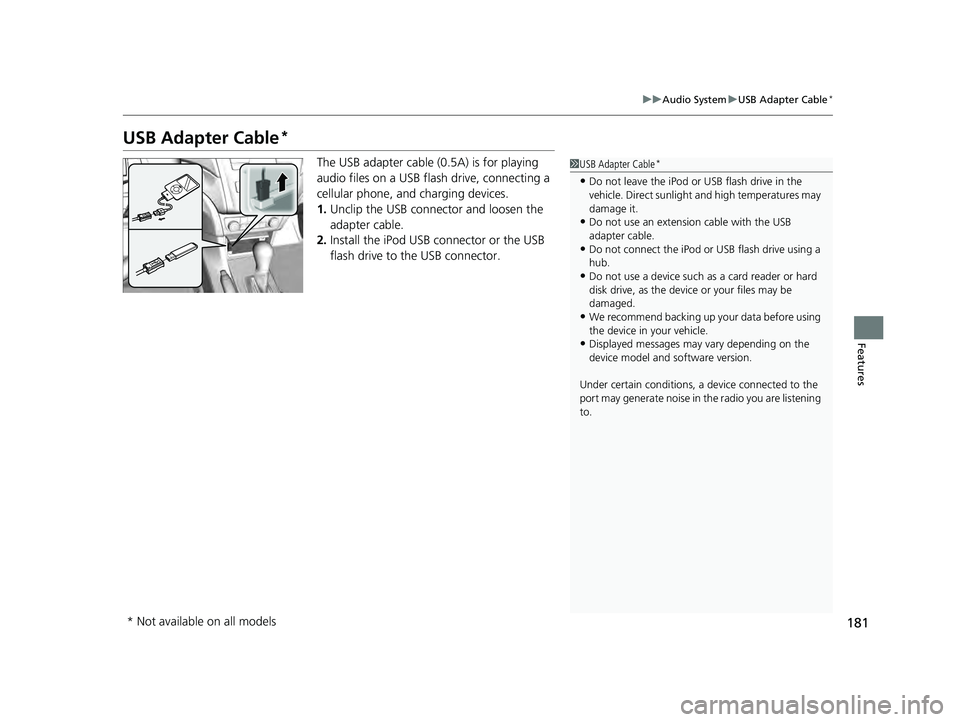
USB Adapter Cable*
The USB adapter cable (0 .5A) is for playing
audio files on a USB flas h drive, connecting a
cellular phone, and charging devices.
1. Unclip the USB connec tor and loosen the
adapter cable.
2. Install the iPod USB connector or the USB
flash drive to the USB connector.1USB Adapter Cable*
•Do not leave the iPod or USB flash drive in the
vehicle. Direct sunlight and high temperatures may
damage it.
•Do not use an extension cable with the USB
adapter cable.
•Do not connect the iPod or USB flash drive using a
hub.
•Do not use a device such as a card reader or hard
disk drive, as the device or your files may be
damaged.
•We recommend backing up yo ur data before using
the device in your vehicle.
•Displayed messages may vary depending on the
device model and software version.
Under certain condi tions, a device connected to the
port may generate noise in the radio you are listening
to.
* Not available on all models
22 ACURA ILX-31TX66900.book 181 ページ 2021年4月26日 月曜日 午前11時27分
Page 184 of 632
182
uuAudio System uUSB Port*
Features
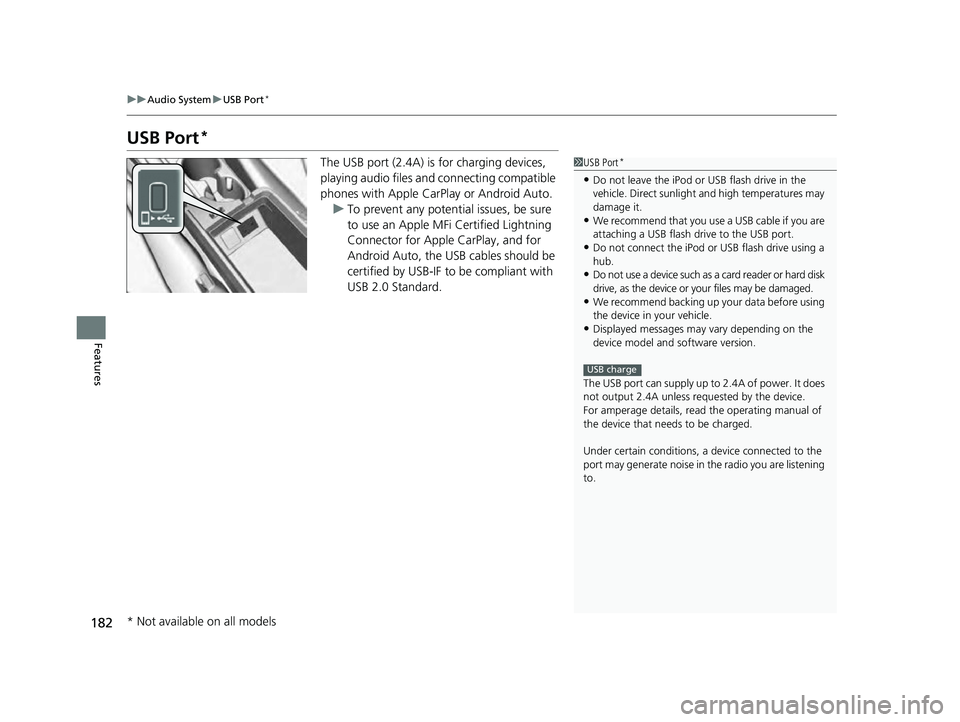
USB Port*
The USB port (2.4A) is for charging devices,
playing audio files and connecting compatible
phones with Apple CarPlay or Android Auto. u To prevent any potential issues, be sure
to use an Apple MFi Certified Lightning
Connector for Apple CarPlay, and for
Android Auto, the USB cables should be
certified by USB-IF to be compliant with
USB 2.0 Standard.1 USB Port*
•Do not leave the iPod or USB flash drive in the
vehicle. Direct sunlight and high temperatures may
damage it.
•We recommend that you us e a USB cable if you are
attaching a USB flash drive to the USB port.
•Do not connect the iPod or USB flash drive using a
hub.
•Do not use a device such as a card reader or hard disk
drive, as the device or your files may be damaged.
•We recommend backing up yo ur data before using
the device in your vehicle.
•Displayed messages may vary depending on the
device model and software version.
The USB port can supply up to 2.4A of power. It does
not output 2.4A unless requested by the device.
For amperage details, read the operating manual of
the device that ne eds to be charged.
Under certain condi tions, a device connected to the
port may generate noise in the radio you are listening
to.
USB charge
* Not available on all models
22 ACURA ILX-31TX66900.book 182 ページ 2021年4月26日 月曜日 午前11時27分
Page 187 of 632
185
uuAudio System uAudio Remote Controls
Continued
Features
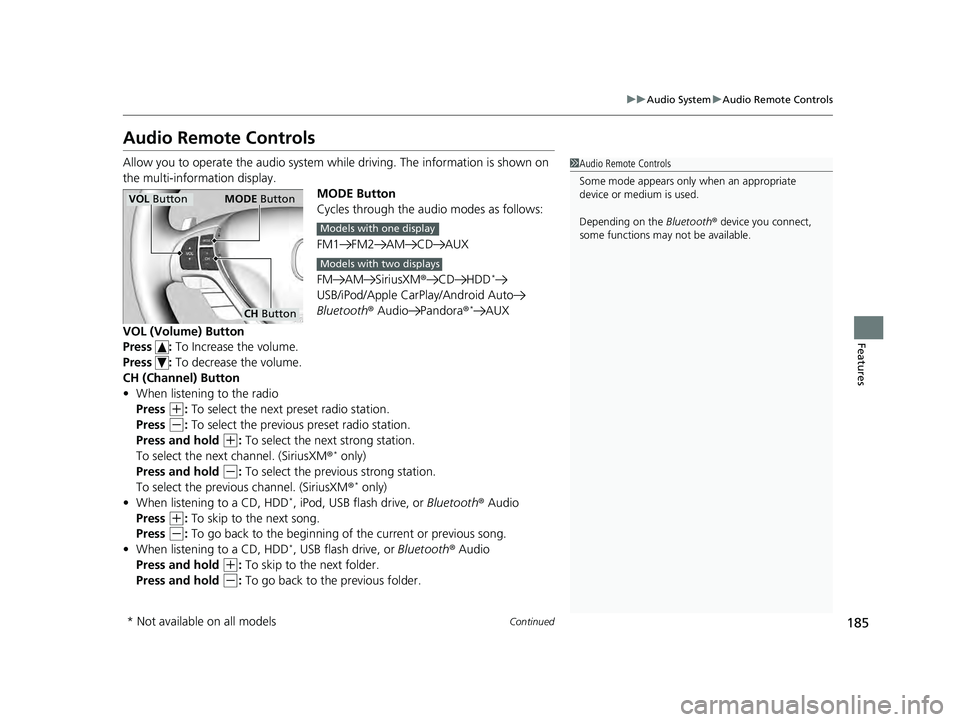
Audio Remote Controls
Allow you to operate the audio system whil e driving. The information is shown on
the multi-information display. MODE Button
Cycles through the audio modes as follows:
FM1 FM2 AM CD AUX
FM AM SiriusXM®CD HDD
*
USB/iPod/Apple CarPlay/Android Auto
Bluetooth ® Audio Pandora ®*AUX
VOL (Volume) Button
Press : To Increase the volume.
Press : To decrease the volume.
CH (Channel) Button
• When listening to the radio
Press
(+: To select the next preset radio station.
Press
(-: To select the previous preset radio station.
Press and hold
(+: To select the next strong station.
To select the next channel. (SiriusXM ®* only)
Press and hold
(-: To select the previous strong station.
To select the previous channel. (SiriusXM ®* only)
• When listening to a CD, HDD*, iPod, USB flash drive, or Bluetooth® Audio
Press
(+: To skip to the next song.
Press
(-: To go back to the beginning of the current or previous song.
• When listening to a CD, HDD*, USB flash drive, or Bluetooth ® Audio
Press and hold
(+: To skip to the next folder.
Press and hold
(-: To go back to the previous folder.
1 Audio Remote Controls
Some mode appears only when an appropriate
device or medium is used.
Depending on the Bluetooth® device you connect,
some functions may not be available.
VOL Button MODE Button
CH Button
Models with one display
Models with two displays
* Not available on all models
22 ACURA ILX-31TX66900.book 185 ページ 2021年4月26日 月曜日 午前11時27分
Page 192 of 632

uuAudio System Basic Operation uAudio/Information Screen
190
Features
You can change, store and delete the wallpaper on the audio/information screen.
■Import wallpaper
You can import up to three images, one at a time, for wallpaper from a USB flash
drive. 1.Connect the USB flash drive to the adapter
cable.
2 USB Adapter Cable* P. 181
2.Press the SETUP button.
3. Rotate to select Display Setup, then
press .
4. Rotate to select Wallpaper, then press
.
5. Rotate to select Import, then press .
6. Rotate to select a desired picture, then
press .
u The preview of the imported data is
displayed.
■Wallpaper Setup1Wallpaper Setup
•When importing wallpaper f iles, the image must be
in the USB flash drive’s root directory.
Images in a folder cannot be imported.
•The file format of the im age that can be imported
is BMP (bmp) or JPEG (jpg).
•Each image file can be up to 2 MB.
•The maximum image size is 1,680 x 936 pixels. If
the image size is less than 420 x 234 pixels, the
image is displayed in the middle of the screen with
the extra area appearing in black.
•Up to 255 files can be selected.
If the USB flash drive doe s not have any pictures, No
compatible images were found. See Owner's
Manual. will appear.
* Not available on all models
22 ACURA ILX-31TX66900.book 190 ページ 2021年4月26日 月曜日 午前11時27分
Page 201 of 632

199
uuAudio System Basic Operation uPlaying an iPod
Continued
Features
Playing an iPod
Using your USB connector, connect the iPod to the USB adapter cable, then select
the USB mode.
2 USB Adapter Cable* P. 181
AUX Button
Press to select iP od (if connected).
Album Art
USB Indicator
Appears when an iPod is connected.
Selector Knob
Turn to change songs. Turn to select an item,
then press to set your selection. BACK Button
Press to go back to the previous display. VOL/ (Volume/Power) Knob
Press to turn the audio system on and off.
Turn to adjust the volume.
SKIP Bar
Press or to change songs.
Press and hold to move rapidly within a
song.
SETUP Button
Press to display menu items.
* Not available on all models
22 ACURA ILX-31TX66900.book 199 ページ 2021年4月26日 月曜日 午前11時27分
Page 202 of 632

uuAudio System Basic Operation uPlaying an iPod
200
Features
1. Press to display the iPod menu.
2. Rotate to select a menu.
3. Press to display the items on that menu.
4. Rotate to select an item, then press .
■How to Select a File from the iPod Menu1Playing an iPod
Available operating functi ons vary on models or
versions. Some functions ma y not be available on the
vehicle's audio system.
If there is a problem, you may see an error message
on the audio/information screen. 2 iPod/USB Flash Drive P. 283
iPod Menu
22 ACURA ILX-31TX66900.book 200 ページ 2021年4月26日 月曜日 午前11時27分