audio ACURA ILX 2022 Owners Manual
[x] Cancel search | Manufacturer: ACURA, Model Year: 2022, Model line: ILX, Model: ACURA ILX 2022Pages: 632, PDF Size: 20.56 MB
Page 6 of 632
Contents
This owner’s manual should be considered a permanent part of the
vehicle and should remain with the vehicle when it is sold.
The Navigation Manual is available online at owners.acura.com
(U.S.) or acura.ca (Canada). If you are the firs t registered owner
of your vehicle, you may request a complimentary printed
copy of the Navigation Manual within the first six months of
vehicle purchase. To request a copy, visit owners.acura.com. In
Canada, please request a copy from your Acura dealer.
This owner’s manual covers all models of your vehicle. You may find
descriptions of equipment and features that are not on your
particular model.
Images throughout this owner’s ma nual (including the front cover)
represent features and equipment that are available on some, but
not all, models. Your particular mo del may not have some of these
features.
This owner’s manual is for vehicles sold in the United States and
Canada.
The information and specifications in cluded in this publication were
in effect at the time of approval for printing. Honda Motor Co., Ltd.
reserves the right, however, to discontinue or change specifications
or design at any time without notice and without incurring any
obligation.2 Safe Driving P. 29
For Safe Driving P. 30 Seat Belts P. 34 Airbags P. 41
2Instrument Panel P. 71
Indicators P. 72 Gauges and Multi-Information Display P. 92
2Controls P. 109
Clock P. 110 Locking and Unlocking the Doors P. 112
Moonroof P. 138
Adjusting the Seats P. 158
2 Features P. 179
Audio System P. 180 Audio System Basic Operation P. 187, 210
Customized Features P. 310, 316 HomeLink ® Universal Transceiver* P. 342
2 Driving P. 425
Before Driving P. 426 Towing a Trailer P. 431
Parking Your Vehicle P. 503 Multi-View Rear Camera P. 508
2Maintenance P. 515
Before Performing Maintenance P. 516 Maintenance MinderTM P. 519
Checking and Maintaining Wiper Blades P. 540
Climate Control System Main tenance P. 554 Cleaning P. 555
2Handling the Unexpected P. 563
Tools P. 564 If a Tire Goes Flat P. 565
Overheating P. 594 Indicator, Coming On/Blinking P. 596
2Information P. 605
Specifications P. 606 Identification Numbers P. 608
Warranty Coverages P. 613 Authorized Manuals P. 616
22 ACURA ILX-31TX66900.book 4 ページ 2021年4月26日 月曜日 午前11時27分
Page 7 of 632
Contents
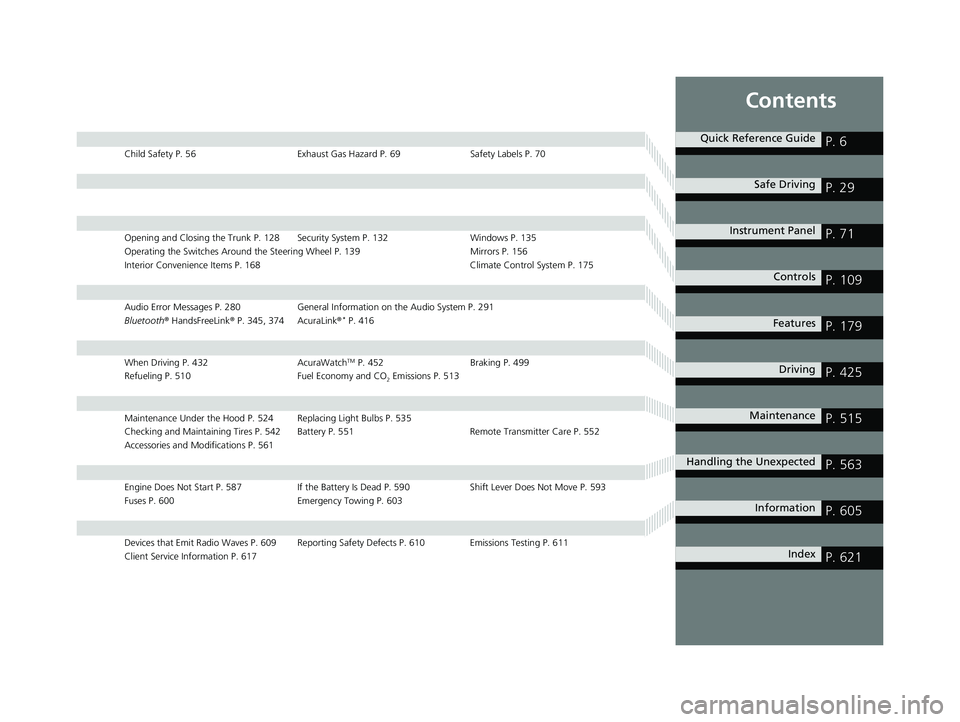
Child Safety P. 56Exhaust Gas Hazard P. 69Safety Labels P. 70
Opening and Closing the Trunk P. 128 Security System P. 132 Windows P. 135
Operating the Switches Around the Steering Wheel P. 139 Mirrors P. 156
Interior Convenience Items P. 168 Climate Control System P. 175
Audio Error Messages P. 280General Information on the Audio System P. 291
Bluetooth ® HandsFreeLink ® P. 345, 374 AcuraLink ®* P. 416
When Driving P. 432 AcuraWatchTM P. 452Braking P. 499
Refueling P. 510 Fuel Economy and CO
2 Emissions P. 513
Maintenance Under the Hood P. 524 Replacing Light Bulbs P. 535
Checking and Maintaining Tires P. 542 Battery P. 551 Remote Transmitter Care P. 552
Accessories and Modifications P. 561
Engine Does Not Start P. 587If the Battery Is Dead P. 590 Shift Lever Does Not Move P. 593
Fuses P. 600 Emergency Towing P. 603
Devices that Emit Radio Waves P. 609 Reporting Safety Defects P. 610 Emissions Testing P. 611
Client Service Information P. 617
Quick Reference GuideP. 6
Safe DrivingP. 29
Instrument PanelP. 71
ControlsP. 109
FeaturesP. 179
DrivingP. 425
MaintenanceP. 515
Handling the UnexpectedP. 563
InformationP. 605
IndexP. 621
22 ACURA ILX-31TX66900.book 5 ページ 2021年4月26日 月曜日 午前11時27分
Page 8 of 632
6
Quick Reference Guide
Quick Reference Guide
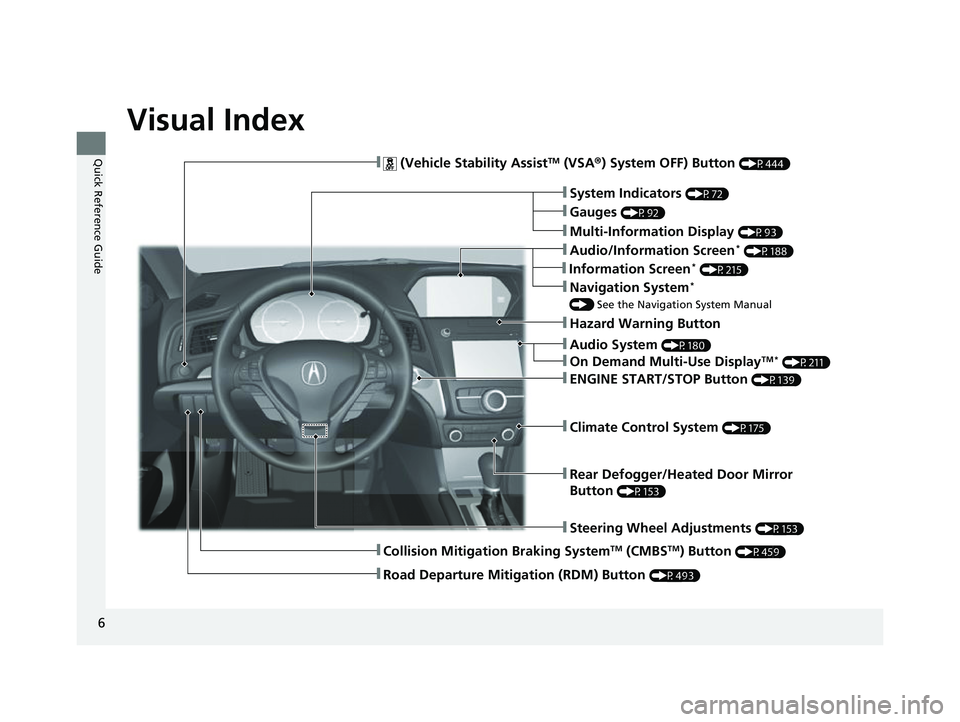
Visual Index
❚Audio System (P180)
❚Rear Defogger/Heated Door Mirror
Button
(P153)
❚Steering Wheel Adjustments (P153)
❚ (Vehicle Stability AssistTM (VSA®) System OFF) Button (P444)
❚Climate Control System (P175)
❚System Indicators (P72)
❚Gauges (P92)
❚Multi-Information Display (P93)
❚Hazard Warning Button
❚ENGINE START/STOP Button (P139)
❚Navigation System*
() See the Navigation System Manual
❚Audio/Information Screen* (P188)
❚On Demand Multi-Use DisplayTM * (P211)
❚Collision Mitigation Braking SystemTM (CMBSTM) Button (P459)
❚Road Departure Mitigation (RDM) Button (P493)
❚Information Screen* (P215)
22 ACURA ILX-31TX66900.book 6 ページ 2021年4月26日 月曜日 午前11時27分
Page 9 of 632
7
Quick Reference Guide
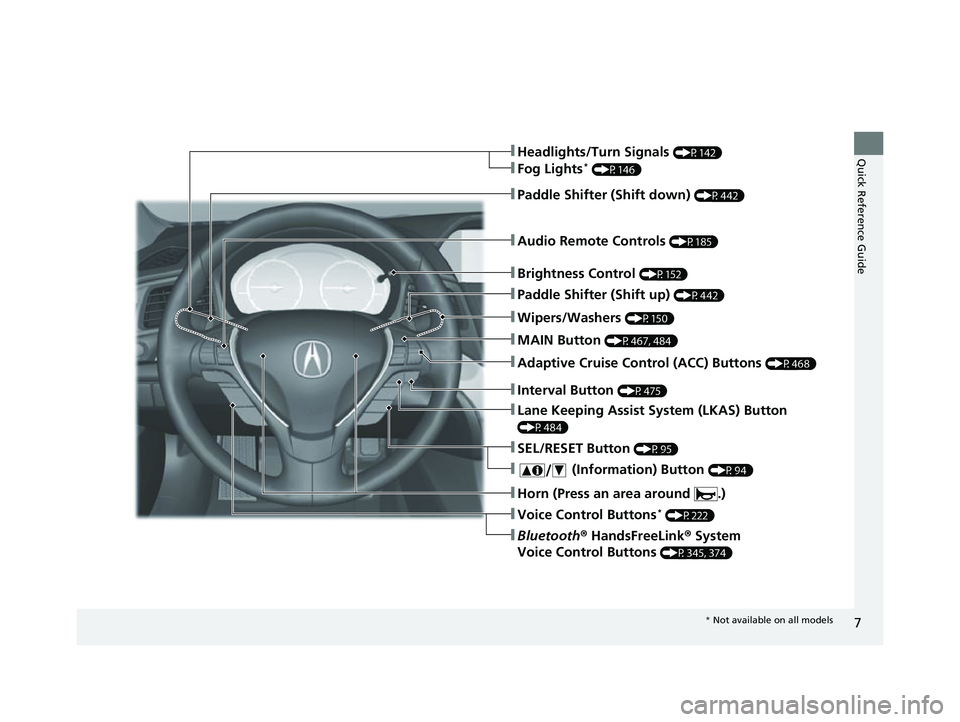
❚Wipers/Washers (P150)
❚Audio Remote Controls (P185)
❚Brightness Control (P152)
❚Headlights/Turn Signals (P142)
❚Fog Lights* (P146)
❚Paddle Shifter (Shift down) (P442)
❚Paddle Shifter (Shift up) (P442)
❚Horn (Press an area around .)
❚Voice Control Buttons* (P222)
❚Bluetooth® HandsFreeLink ® System
Voice Control Buttons
(P345, 374)
❚SEL/RESET Button (P95)
❚ (Information) Button (P94)
❚Lane Keeping Assist System (LKAS) Button
(P484)
❚Interval Button (P475)
❚MAIN Button (P467, 484)
❚Adaptive Cruise Control (ACC) Buttons (P468)
* Not available on all models
22 ACURA ILX-31TX66900.book 7 ページ 2021年4月26日 月曜日 午前11時27分
Page 15 of 632
13
Quick Reference Guide
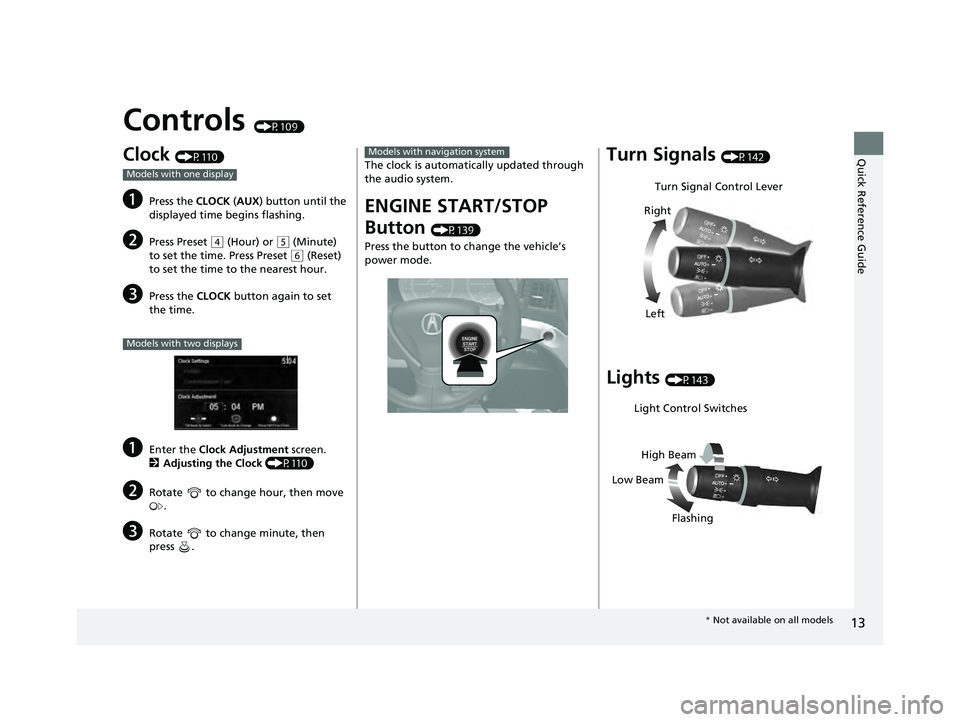
Controls (P109)
Clock (P110)
aPress the CLOCK (AUX ) button until the
displayed time begins flashing.
bPress Preset ( 4 (Hour) or (5 (Minute)
to set the time. Press Preset
( 6 (Reset)
to set the time to the nearest hour.
cPress the CLOCK button again to set
the time.
aEnter the Clock Adjustment screen.
2 Adjusting the Clock (P110)
bRotate to change hour, then move
.
cRotate to change minute, then
press .
Models with one display
Models with two displays
The clock is automati cally updated through
the audio system.
ENGINE START/STOP
Button
(P139)
Press the button to ch ange the vehicle’s
power mode.
Models with navigation systemTurn Signals (P142)
Lights (P143)
Turn Signal Control Lever
Right
Left
Light Control Switches
Low Beam High Beam
Flashing
* Not available on all models
22 ACURA ILX-31TX66900.book 13 ページ 2021年4月26日 月曜日 午前11時27分
Page 19 of 632
17
Quick Reference Guide
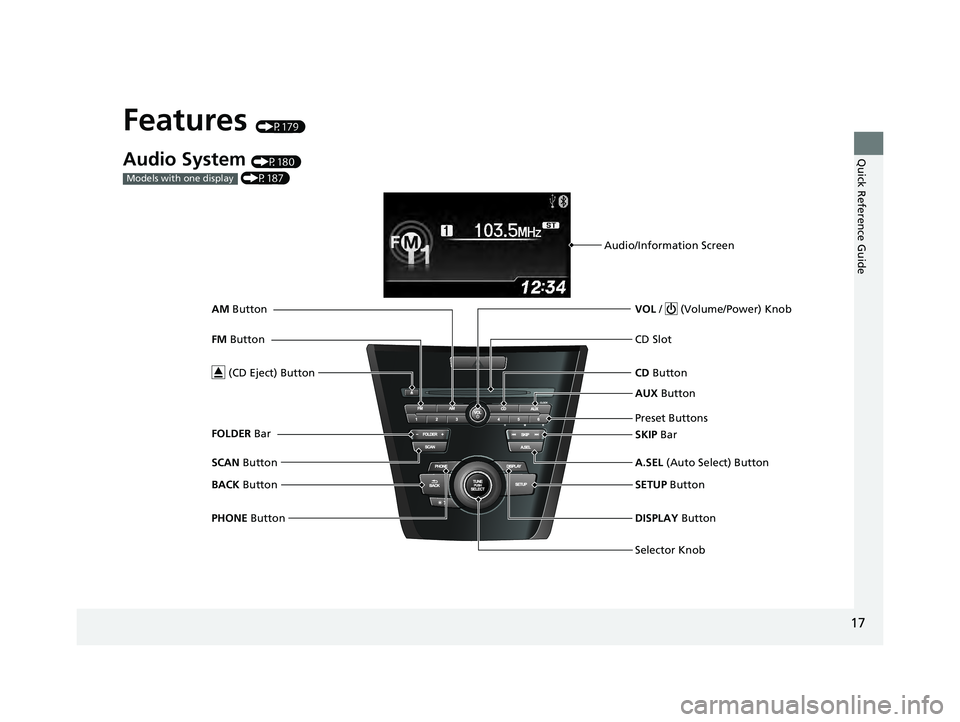
Features (P179)
Audio System (P180)
(P187)
Models with one display
Audio/Information Screen
Selector Knob VOL / (Volume/Power) Knob
CD Button
CD Slot
(CD Eject) Button
Preset Buttons
SETUP Button
PHONE Button DISPLAY Button
A.SEL
(Auto Select) Button
SKIP Bar AUX
Button
BACK Button
SCAN
Button
FM
Button
AM
Button
FOLDER Bar
22 ACURA ILX-31TX66900.book 17 ページ 2021年4月26日 月曜日 午前11時27分
Page 20 of 632
18
Quick Reference Guide
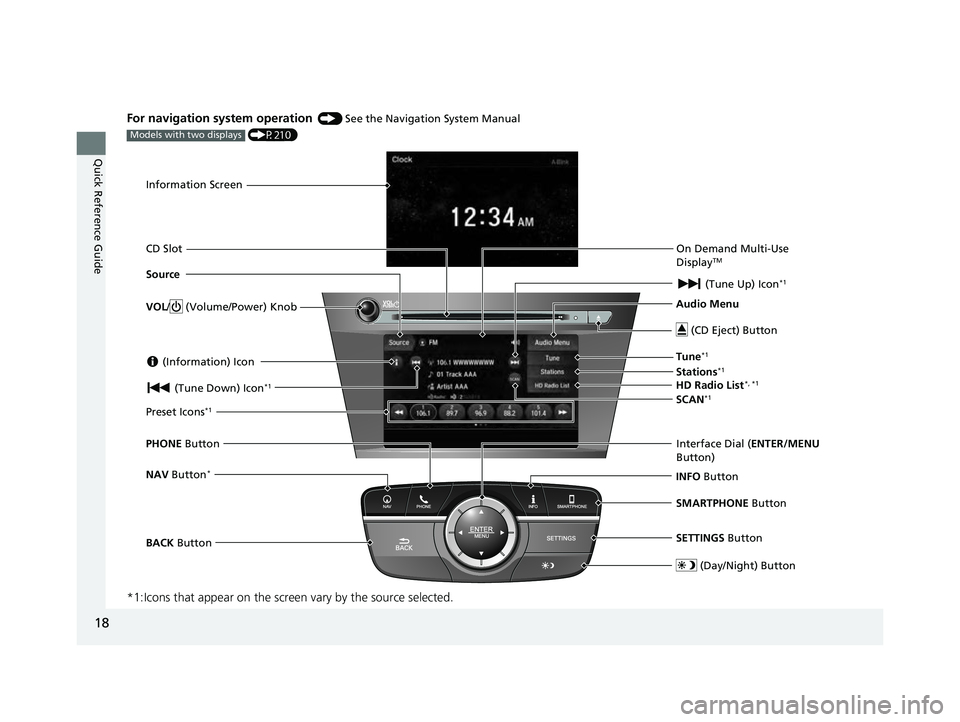
For navigation system operation () See the Navigation System Manual
(P210)
*1:Icons that appear on the screen vary by the source selected.
Models with two displays
Information Screen
Audio Menu (CD Eject) Button
VOL / (Volume/Power) Knob
BACK Button Interface Dial (
ENTER/MENU
Button)
INFO Button
On Demand Multi-Use
Display
TM
PHONE
Button
(Tune Down) Icon
*1
Source
(Day/Night) Button
Tune*1
CD Slot (Information) Icon
Preset Icons*1
(Tune Up) Icon*1
Stations*1
SCAN*1
SMARTPHONE Button
SETTINGS Button
NAV Button*
HD Radio List*, *1
22 ACURA ILX-31TX66900.book 18 ページ 2021年4月26日 月曜日 午前11時27分
Page 21 of 632
19
Quick Reference Guide
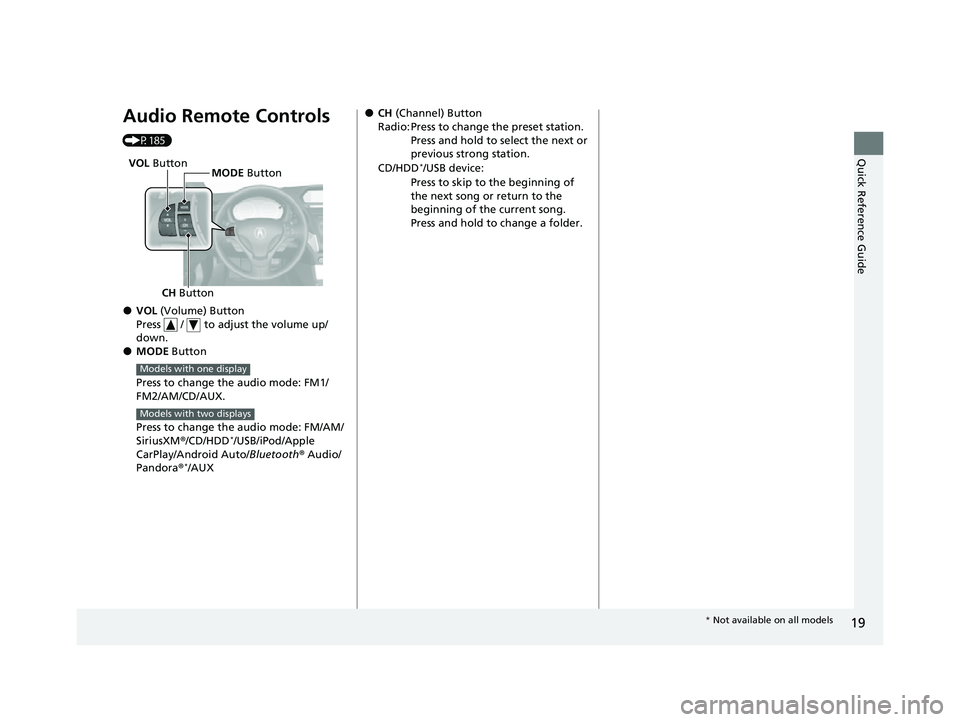
Audio Remote Controls
(P185)
●VOL (Volume) Button
Press / to adjust the volume up/
down.
●MODE Button
Press to change the audio mode: FM1/
FM2/AM/CD/AUX.
Press to change the audio mode: FM/AM/
SiriusXM ®/CD/HDD
*/USB/iPod/Apple
CarPlay/Android Auto/ Bluetooth® Audio/
Pandora ®
*/AUX
CH Button MODE
Button
VOL
Button
Models with one display
Models with two displays
●CH (Channel) Button
Radio: Press to change the preset station. Press and hold to select the next or
previous strong station.
CD/HDD
*/USB device:
Press to skip to the beginning of
the next song or return to the
beginning of the current song.
Press and hold to change a folder.
* Not available on all models
22 ACURA ILX-31TX66900.book 19 ページ 2021年4月26日 月曜日 午前11時27分
Page 112 of 632
110
Controls
Clock
Adjusting the Clock
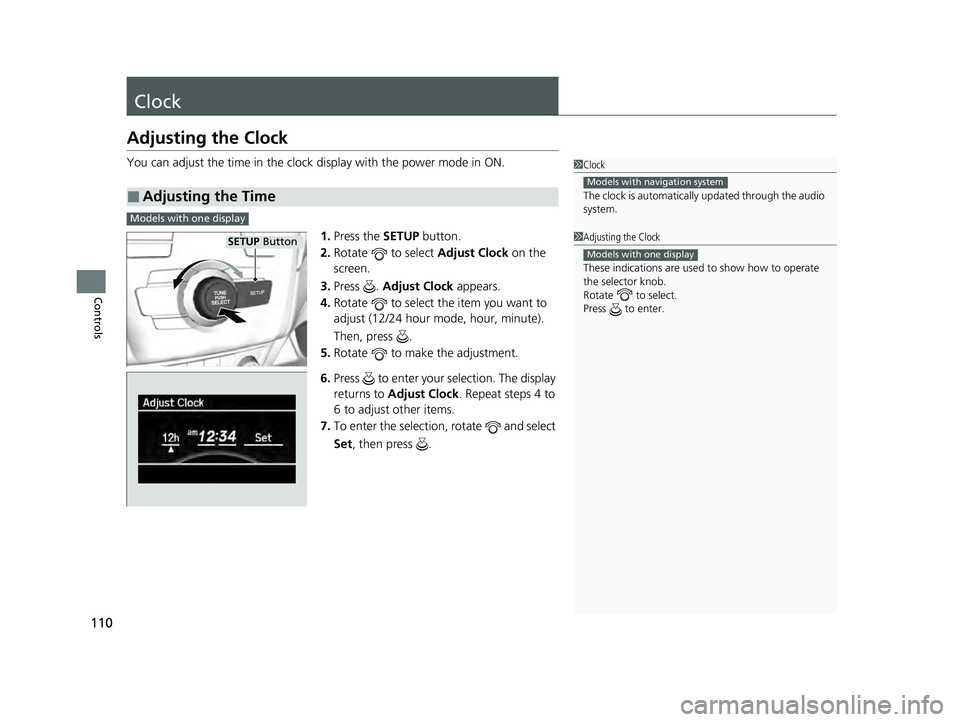
You can adjust the time in the clock display with the power mode in ON.
1. Press the SETUP button.
2. Rotate to select Adjust Clock on the
screen.
3. Press . Adjust Clock appears.
4. Rotate to select the item you want to
adjust (12/24 hour mode, hour, minute).
Then, press .
5. Rotate to make the adjustment.
6. Press to enter your selection. The display
returns to Adjust Clock . Repeat steps 4 to
6 to adjust other items.
7. To enter the selection, rotate and select
Set , then press .
■Adjusting the Time
1Clock
The clock is automatically updated through the audio
system.
Models with navigation system
1Adjusting the Clock
These indications are used to show how to operate
the selector knob.
Rotate to select.
Press to enter.
Models with one display
Models with one display
SETUo Button
22 ACURA ILX-31TX66900.book 110 ページ 2021年4月26日 月曜日 午前11時27分
Page 134 of 632

132
Controls
Security System
Immobilizer System
This system prevents a key that has not been pre-registered from starting the
engine.
Pay attention to the follo wing when pressing the ENGINE START/STOP button:
• Do not allow objects that emit strong radio waves near the ENGINE START/
STOP button.
• Make sure the key is not covered by or touching a metal object.
• Do not bring a key from another vehi cle’s immobilizer system near the ENGINE
START/STOP button.
• Do not put the key near magnetic items. Electronic devices, such as televisions
and audio systems emit strong magnetic fields. Note that even a key chain can
become magnetic.
Security System Alarm
The security system alarm activates wh en the trunk, hood or doors are forcibly
opened. The alarm does not activate if th e trunk or doors are opened with the key,
remote transmitter or keyless access system.
However, the alarm activates if a door is opened with the key and then the
transmission is taken out of
(P or the hood is opened before the power mode is set
to ON.
■When the security sy stem alarm activates
The horn sounds intermittently and some exterior lights flash.
1 Immobilizer System
NOTICE
Leaving the key in the vehicl e can result in theft or
accidental movement of the vehicle.
Always take the key with you whenever you leave the
vehicle unattendedM
Do not alter the system or add other devices to itM
Doing so may damage the system and make your
vehicle inoperableM
1 Security System Alarm
Do not alter the system or add other devices to it.
Doing so may damage the system and make your
vehicle inoperable.
The security system alarm continues for a maximum
of two minutes until the security system alarm
deactivates.
22 ACURA ILX-31TX66900.book 132 ページ 2021年4月26日 月曜日 午前11時27分