lock Acura ILX Hybrid 2015 Owner's Guide
[x] Cancel search | Manufacturer: ACURA, Model Year: 2015, Model line: ILX Hybrid, Model: Acura ILX Hybrid 2015Pages: 365, PDF Size: 12.67 MB
Page 78 of 365
77
uuIndicators u
Continued
Instrument Panel
Indicator
Name
On/Blinking
Explanation
Message
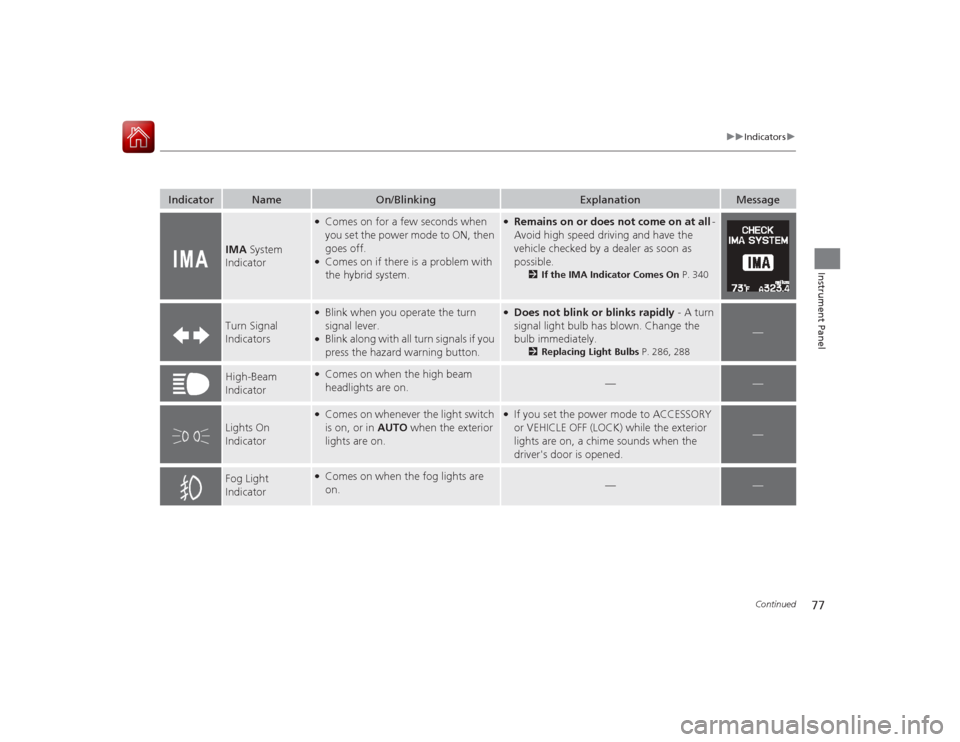
IMA System
Indicator
●Comes on for a few seconds when
you set the power mode to ON, then
goes off.●Comes on if there is a problem with
the hybrid system.
●Remains on or does not come on at all -
Avoid high speed driving and have the
vehicle checked by a dealer as soon as
possible.
2 If the IMA Indicator Comes On P. 340
Turn Signal
Indicators
●Blink when you operate the turn
signal lever.●Blink along with all turn signals if you
press the hazard warning button.
●Does not blink or blinks rapidly - A turn
signal light bulb has blown. Change the
bulb immediately.
2Replacing Light Bulbs P. 286, 288
—
High-Beam
Indicator
●Comes on when the high beam
headlights are on.
—
—
Lights On
Indicator
●Comes on whenever the light switch
is on, or in AUTO when the exterior
lights are on.
●If you set the power mode to ACCESSORY
or VEHICLE OFF (LOCK) while the exterior
lights are on, a chime sounds when the
driver's door is opened.
—
Fog Light
Indicator
●Comes on when the fog lights are
on.
—
—
Page 79 of 365
78
uuIndicators u
Instrument Panel
Indicator
Name
On/Blinking
Explanation
Message
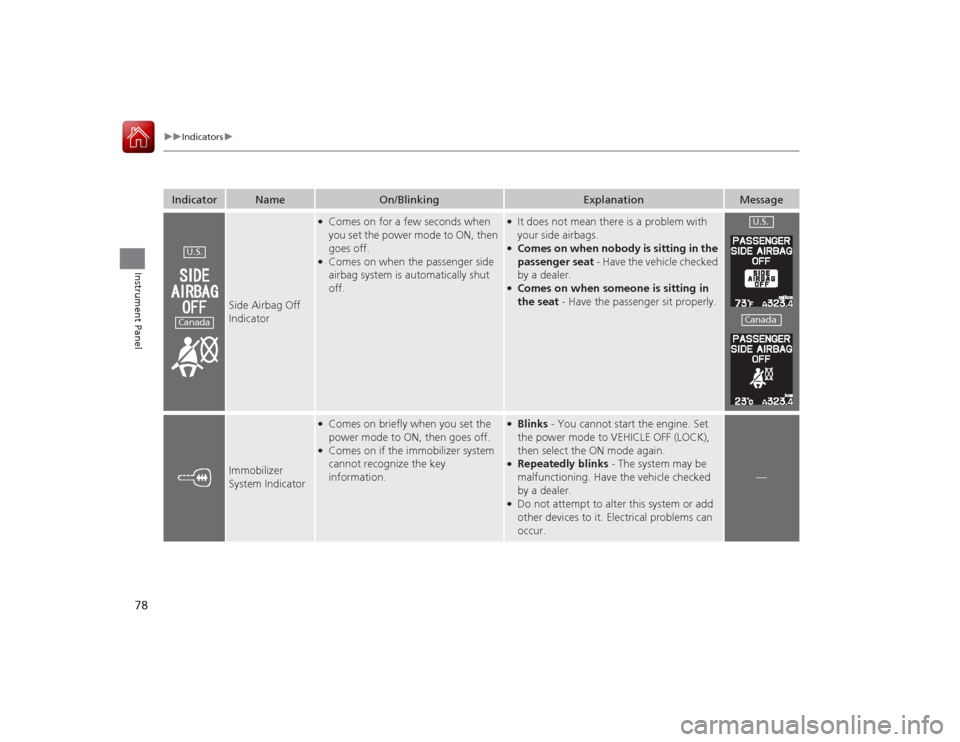
Side Airbag Off
Indicator
●Comes on for a few seconds when
you set the power mode to ON, then
goes off.●Comes on when the passenger side
airbag system is automatically shut
off.
●It does not mean there is a problem with
your side airbags.●Comes on when nobody is sitting in the
passenger seat - Have the vehicle checked
by a dealer.●Comes on when someone is sitting in
the seat - Have the passenger sit properly.
Immobilizer
System Indicator
●Comes on briefly when you set the
power mode to ON, then goes off.●Comes on if the immobilizer system
cannot recognize the key
information.
●Blinks - You cannot start the engine. Set
the power mode to VEHICLE OFF (LOCK),
then select the ON mode again.●Repeatedly blinks - The system may be
malfunctioning. Have the vehicle checked
by a dealer.●Do not attempt to alter this system or add
other devices to it. Electrical problems can
occur.
—
U.S.Canada
U.S.Canada
Page 84 of 365
83
uuIndicators uMulti-Information Display Warning and Information Messages
Continued
Instrument Panel
Message
Condition
Explanation
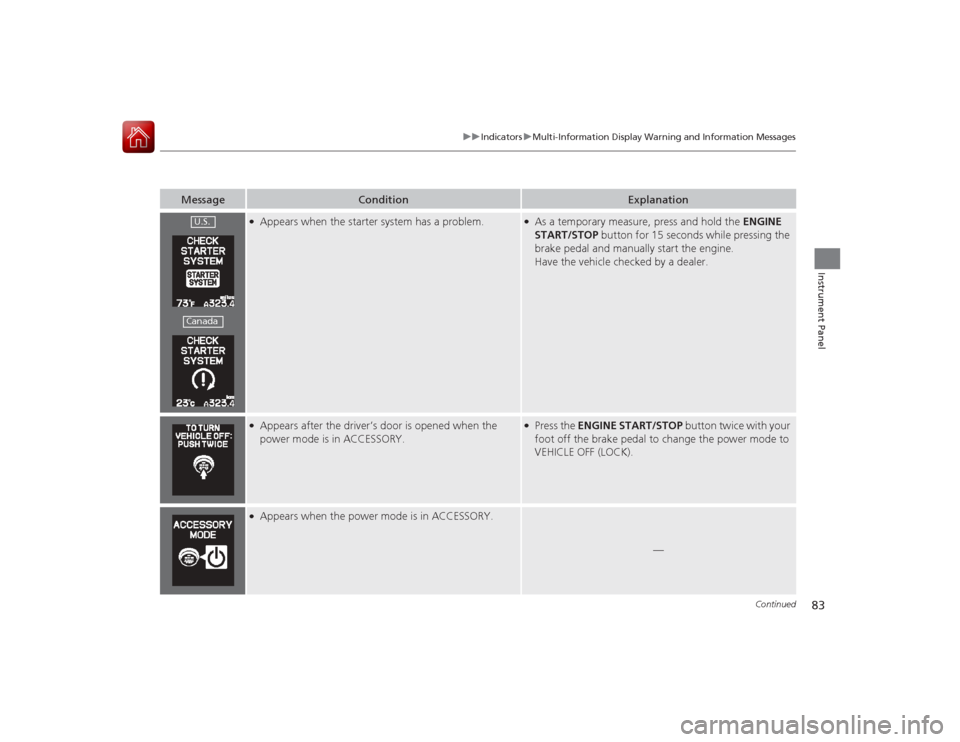
●Appears when the starter system has a problem.
●As a temporary measure, press and hold the ENGINE
START/STOP button for 15 seconds while pressing the
brake pedal and manually start the engine.
Have the vehicle checked by a dealer.
●Appears after the driver’s door is opened when the
power mode is in ACCESSORY.
●Press the ENGINE START/STOP button twice with your
foot off the brake pedal to change the power mode to
VEHICLE OFF (LOCK).
●Appears when the power mode is in ACCESSORY.
—
U.S.Canada
Page 85 of 365
84
uuIndicators uMulti-Information Display Warn ing and Information Messages
Instrument Panel
Message
Condition
Explanation
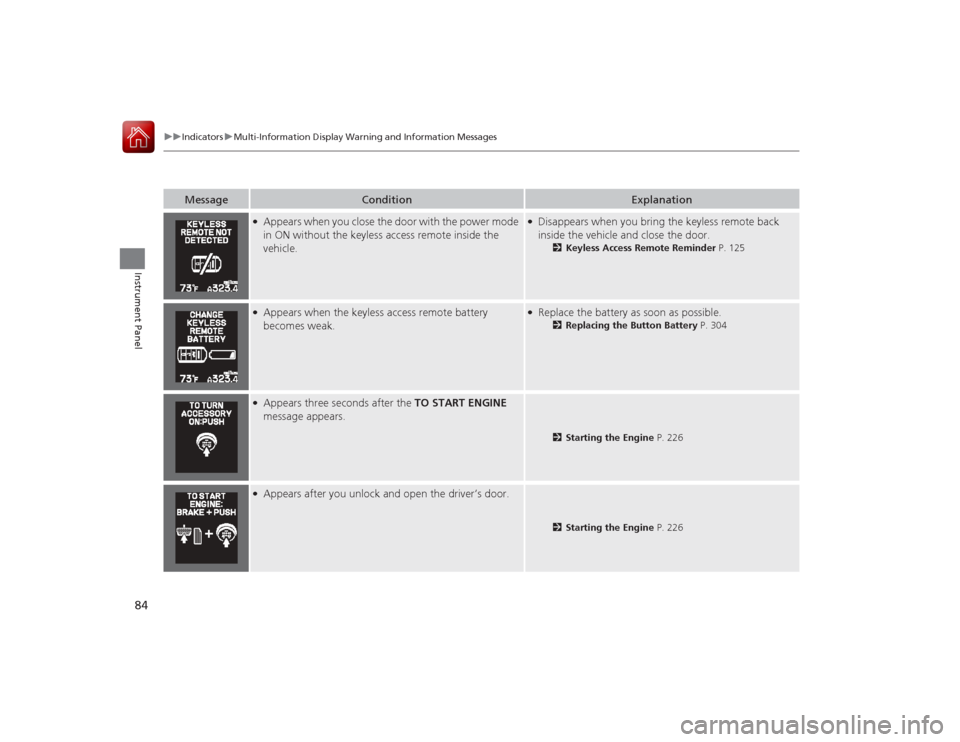
●Appears when you close the door with the power mode
in ON without the keyless access remote inside the
vehicle.
●Disappears when you bring the keyless remote back
inside the vehicle and close the door.
2Keyless Access Remote Reminder P. 125
●Appears when the keyless access remote battery
becomes weak.
●Replace the battery as soon as possible.
2Replacing the Button Battery P. 304
●Appears three seconds after the TO START ENGINE
message appears.
2 Starting the Engine P. 226
●Appears after you unlock and open the driver’s door.
2Starting the Engine P. 226
Page 86 of 365
85
uuIndicators uMulti-Information Display Warning and Information Messages
Instrument Panel
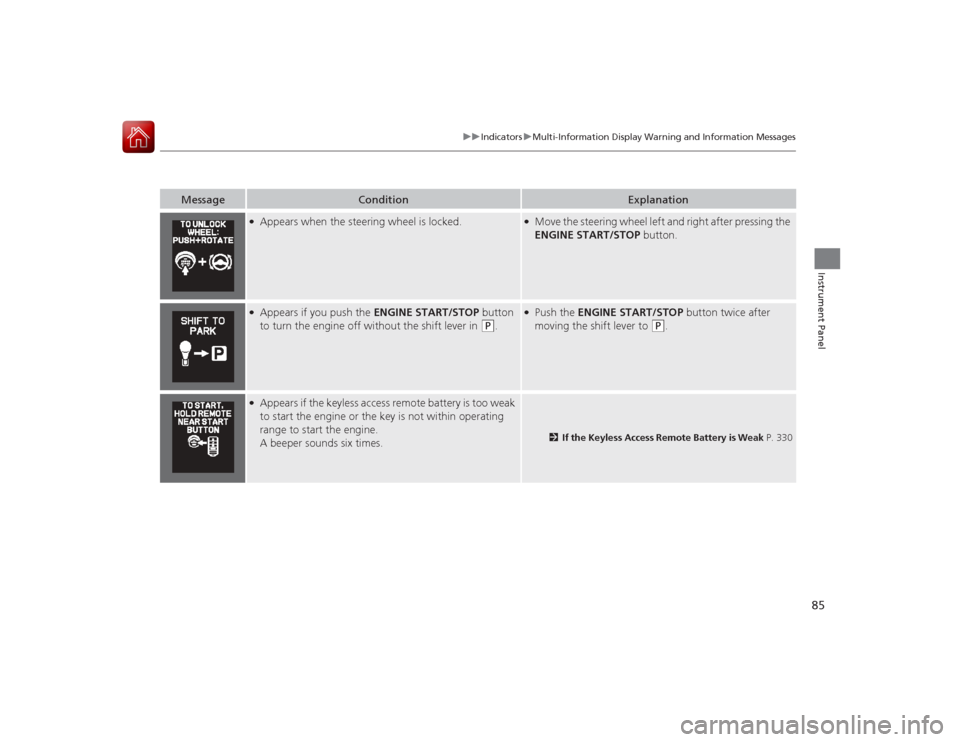
Message
Condition
Explanation
●Appears when the steering wheel is locked.
●Move the steering wheel left and right after pressing the
ENGINE START/STOP button.
●Appears if you push the ENGINE START/STOP button
to turn the engine off without the shift lever in
(P
.
●Push the ENGINE START/STOP button twice after
moving the shift lever to
(P
.
●Appears if the keyless access remote battery is too weak
to start the engine or the key is not within operating
range to start the engine.
A beeper sounds six times.
2 If the Keyless Access Remote Battery is Weak P. 330
Page 97 of 365
96
uuGauges and Multi- Information Display uMulti-Information Display
Instrument Panel
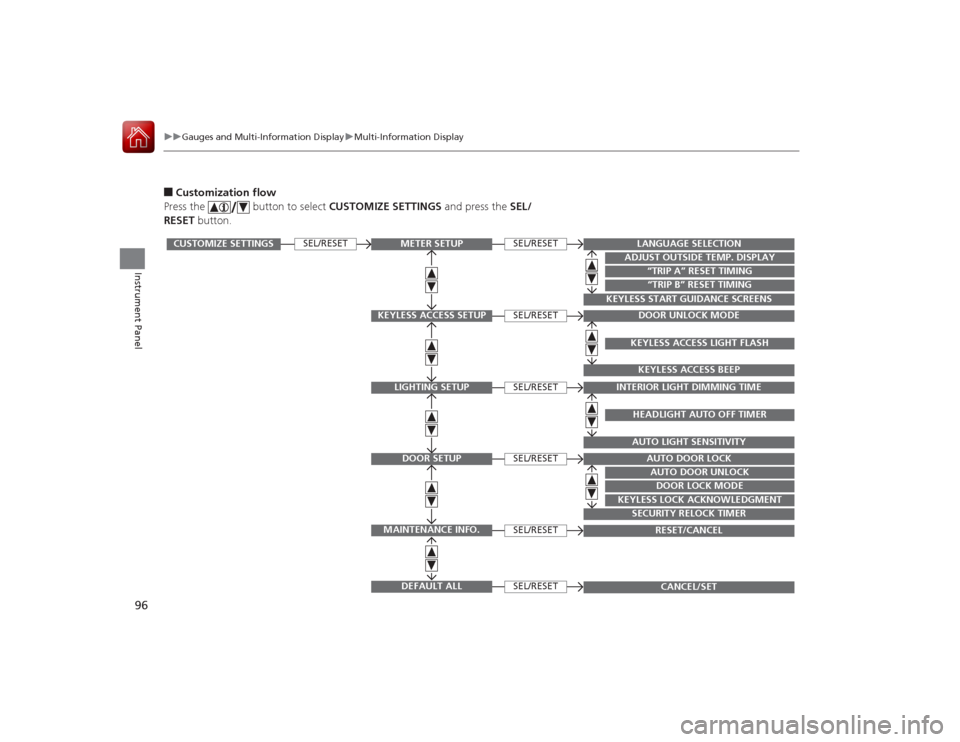
■Customization flow
Press the button to select CUSTOMIZE SETTINGS and press the SEL/
RESET button.
SEL/RESET
SEL/RESETSEL/RESETSEL/RESETSEL/RESETSEL/RESETSEL/RESET
CUSTOMIZE SETTINGS
METER SETUP
KEYLESS ACCESS SETUP
LIGHTING SETUPDOOR SETUP
MAINTENANCE INFO.
DEFAULT ALL
LANGUAGE SELECTION
ADJUST OUTSIDE TEMP. DISPLAY
“TRIP A” RESET TIMING“TRIP B” RESET TIMING
KEYLESS START GUIDANCE SCREENS
DOOR UNLOCK MODEKEYLESS ACCESS LIGHT FLASHKEYLESS ACCESS BEEP
INTERIOR LIGHT DIMMING TIME
HEADLIGHT AUTO OFF TIMERAUTO LIGHT SENSITIVITY
AUTO DOOR LOCKAUTO DOOR UNLOCKDOOR LOCK MODE
KEYLESS LOCK ACKNOWLEDGMENT
SECURITY RELOCK TIMER
RESET/CANCELCANCEL/SET
Page 98 of 365
97
uuGauges and Multi-Information Display uMulti-Information Display
Continued
Instrument Panel
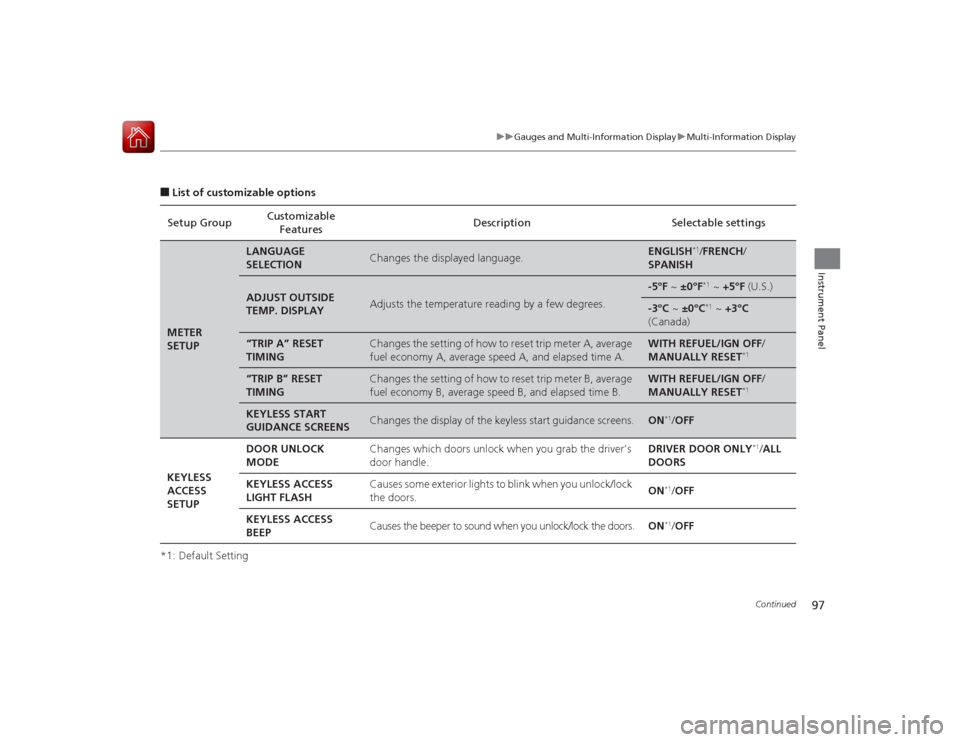
■List of customizable options
*1: Default Setting Setup Group
Customizable
Features Description Selectable settingsMETER
SETUP
LANGUAGE
SELECTION
Changes the displayed language.
ENGLISH
*1/
FRENCH /
SPANISH
ADJUST OUTSIDE
TEMP. DISPLAY
Adjusts the temperature reading by a few degrees.
-5°F ~ ±0°F
*1 ~ +5°F (U.S.)
-3°C ~ ±0°C
*1 ~ +3°C
(Canada)
“TRIP A” RESET
TIMING
Changes the setting of how to reset trip meter A, average
fuel economy A, average speed A, and elapsed time A.
WITH REFUEL/IGN OFF /
MANUALLY RESET
*1
“TRIP B” RESET
TIMING
Changes the setting of how to reset trip meter B, average
fuel economy B, average speed B, and elapsed time B.
WITH REFUEL/IGN OFF /
MANUALLY RESET
*1
KEYLESS START
GUIDANCE SCREENS
Changes the display of the keyless start guidance screens.
ON
*1/ OFF
KEYLESS
ACCESS
SETUP DOOR UNLOCK
MODE
Changes which doors unlock when you grab the driver’s
door handle. DRIVER DOOR ONLY
*1/
ALL
DOORS
KEYLESS ACCESS
LIGHT FLASH Causes some exterior lights to blink when you unlock/lock
the doors.
ON
*1/
OFF
KEYLESS ACCESS
BEEP Causes the beeper to sound when you unlock/lock the doors.
ON*1/OFF
Page 99 of 365
98
uuGauges and Multi- Information Display uMulti-Information Display
Instrument Panel
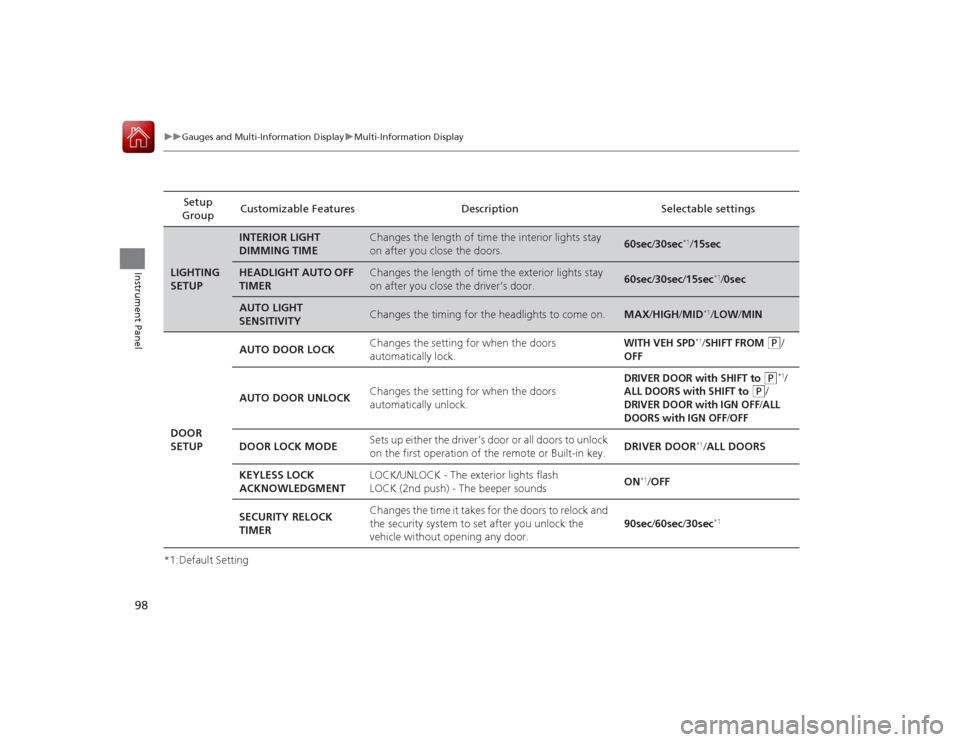
*1:Default Setting Setup
Group Customizable Features Description Selectable settingsLIGHTING
SETUP
INTERIOR LIGHT
DIMMING TIME
Changes the length of time the interior lights stay
on after you close the doors.
60sec
/30sec
*1/ 15sec
HEADLIGHT AUTO OFF
TIMER
Changes the length of time the exterior lights stay
on after you close the driver’s door.
60sec /30sec /15sec
*1/0sec
AUTO LIGHT
SENSITIVITY
Changes the timing for the headlights to come on.
MAX /HIGH/ MID
*1/LOW /MIN
DOOR
SETUP AUTO DOOR LOCK
Changes the setting for when the doors
automatically lock.
WITH VEH SPD
*1/SHIFT FROM
(P
/
OFF
AUTO DOOR UNLOCKChanges the setting for when the doors
automatically unlock.
DRIVER DOOR with SHIFT to
(P
*1/
ALL DOORS with SHIFT to
(P
/
DRIVER DOOR with IGN OFF
/ALL
DOORS with IGN OFF
/OFF
DOOR LOCK MODE Sets up either the driver’s door or all doors to unlock
on the first operation of the remote or Built-in key.
DRIVER DOOR
*1/
ALL DOORS
KEYLESS LOCK
ACKNOWLEDGMENT LOCK/UNLOCK - The exterior lights flash
LOCK (2nd push) - The beeper sounds
ON
*1/
OFF
SECURITY RELOCK
TIMER Changes the time it takes for the doors to relock and
the security system to set after you unlock the
vehicle without opening any door.
90sec
/60sec /30sec
*1
Page 104 of 365
103
Controls
This chapter explains how to operate the various controls necessary for driving.
Setting the Clock.............................. 104
Locking and Unlocking the Doors
Key Types and Functions .................. 105
Low Keyless Access Remote Signal Strength ......................................... 106
Locking/Unlocking the Doors from the Outside .......................................... 107
Locking/Unlocking the Doors from the
Inside ............................................. 111
Childproof Door Locks ..................... 112
Auto Door Locking/Unlocking .......... 113
Opening and Closing the Trunk....... 114
Security System Immobilizer System .......................... 118 Security System Alarm...................... 118
Opening and Closing the Windows
.... 120
Opening and Closing the Moonroof ... 123Operating the Switches Around the
Steering Wheel
ENGINE START/STOP Button............. 124
Turn Signals ..................................... 126
Light Switches.................................. 126
Fog Lights ........................................ 129
Daytime Running Lights ................... 129
Wipers and Washers ........................ 130
Brightness Control ........................... 131
Rear Defogger/Heated Door Mirror Button...132
Adjusting the Steering Wheel........... 132 Adjusting the Mirrors
Interior Rearview Mirror ................... 133
Power Door Mirrors ......................... 134
Adjusting the Seats Adjusting the Seat Positions ............. 135
Interior Lights/Interior Convenience ItemsInterior Lights .................................. 141
Interior Convenience Items .............. 142
Climate Control System Using Automatic Climate Control .... 146
Synchronized Mode .............................. 148
Automatic Climate Control Sensors ...... 149
Page 105 of 365
104Controls
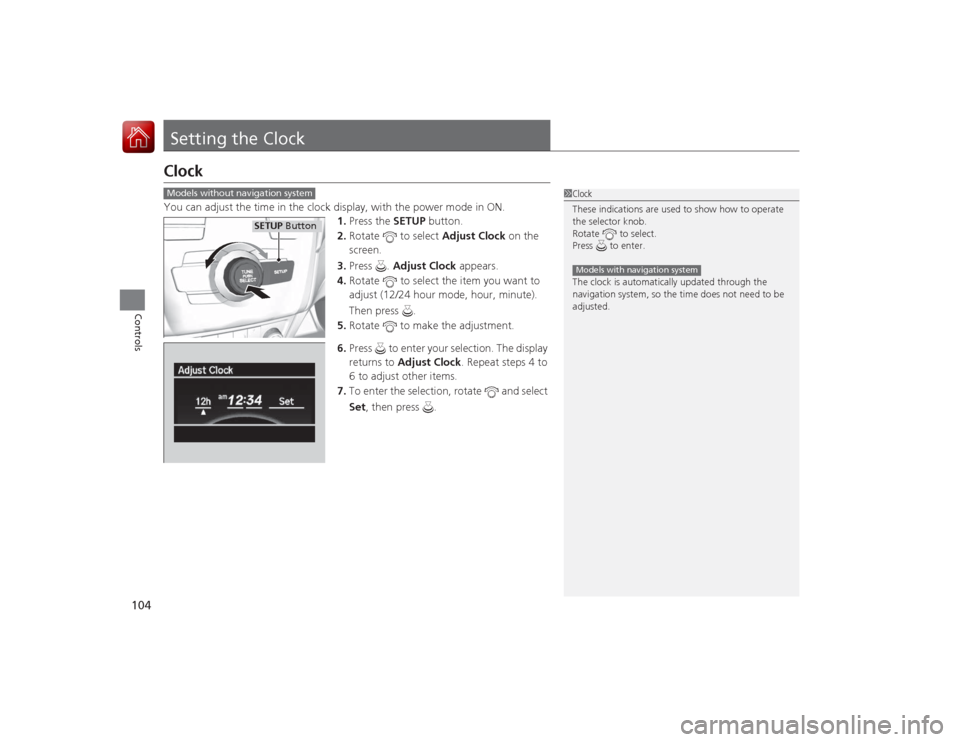
Setting the ClockClockYou can adjust the time in the clock display, with the power mode in ON.1.Press the SETUP button.
2. Rotate to select Adjust Clock on the
screen.
3. Press . Adjust Clock appears.
4. Rotate to select the item you want to
adjust (12/24 hour mode, hour, minute).
Then press .
5. Rotate to make the adjustment.
6. Press to enter your selection. The display
returns to Adjust Clock. Repeat steps 4 to
6 to adjust other items.
7. To enter the selection, rotate and select
Set , then press .
1Clock
These indications are used to show how to operate
the selector knob.
Rotate to select.
Press to enter.
The clock is automatically updated through the
navigation system, so the time does not need to be
adjusted.Models with navigation system
Models without navigation system
SETUP Button