lock Acura ILX Hybrid 2015 Owner's Manual
[x] Cancel search | Manufacturer: ACURA, Model Year: 2015, Model line: ILX Hybrid, Model: Acura ILX Hybrid 2015Pages: 365, PDF Size: 12.67 MB
Page 3 of 365
ContentsThis owner’s manual should be considered a permanent part of the
vehicle and should remain with the vehicle when it is sold.
This owner’s manual covers all models of your vehicle. You may find
descriptions of equipment and features that are not on your
particular model.
Images throughout this owner’s manual (including the front cover)
represent features and equipment that are available on some, but
not all, models. Your particular model may not have some of these
features.
This owner's manual is for vehicles sold in the United States and
Canada.
The information and specifications included in this publication were
in effect at the time of approval for printing. Honda Motor Co., Ltd.
reserves the right, however, to discontinue or change specifications
or design at any time without notice and without incurring any
obligation.
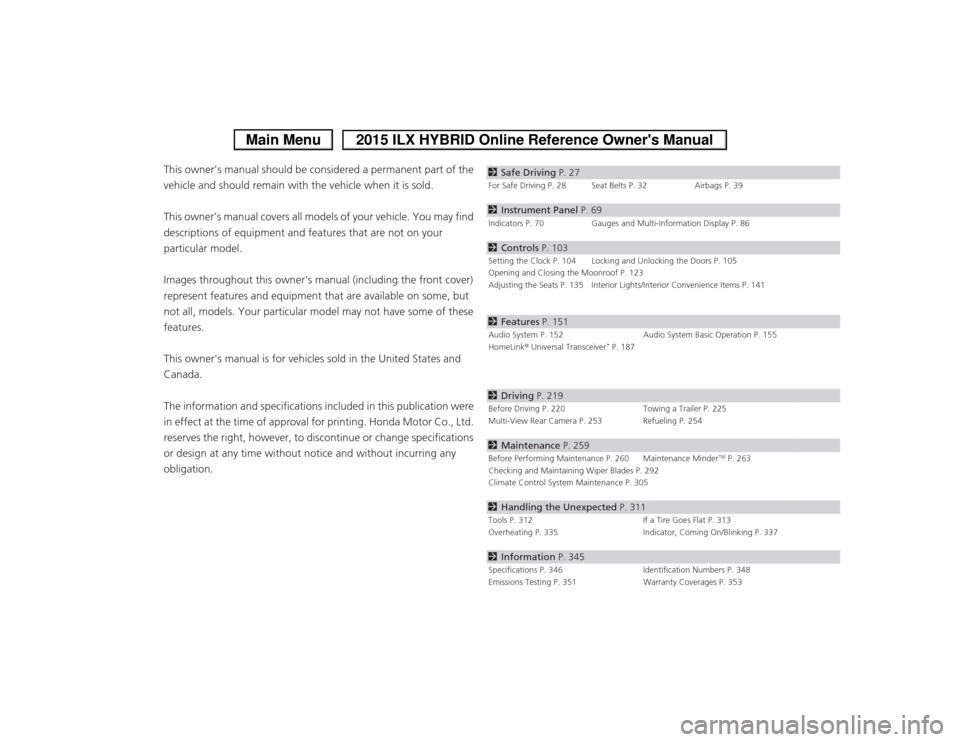
2Safe Driving P. 27For Safe Driving P. 28 Seat Belts P. 32 Airbags P. 392Instrument Panel P. 69Indicators P. 70 Gauges and Multi-Information Display P. 862Controls P. 103Setting the Clock P. 104 Locking and Unlocking the Doors P. 105
Opening and Closing the Moonroof P. 123
Adjusting the Seats P. 135 Interior Lights/Interior Convenience Items P. 1412Features P. 151Audio System P. 152 Audio System Basic Operation P. 155
HomeLink ® Universal Transceiver
* P. 187
2 Driving P. 219Before Driving P. 220 Towing a Trailer P. 225
Multi-View Rear Camera P. 253 Refueling P. 2542 Maintenance P. 259Before Performing Maintenance P. 260 Maintenance Minder
TM P. 263
Checking and Maintaining Wiper Blades P. 292
Climate Control System Maintenance P. 305
2 Handling the Unexpected P. 311Tools P. 312 If a Tire Goes Flat P. 313
Overheating P. 335 Indicator, Coming On/Blinking P. 3372Information P. 345Specifications P. 346 Identification Numbers P. 348
Emissions Testing P. 351 Warranty Coverages P. 353
Page 7 of 365
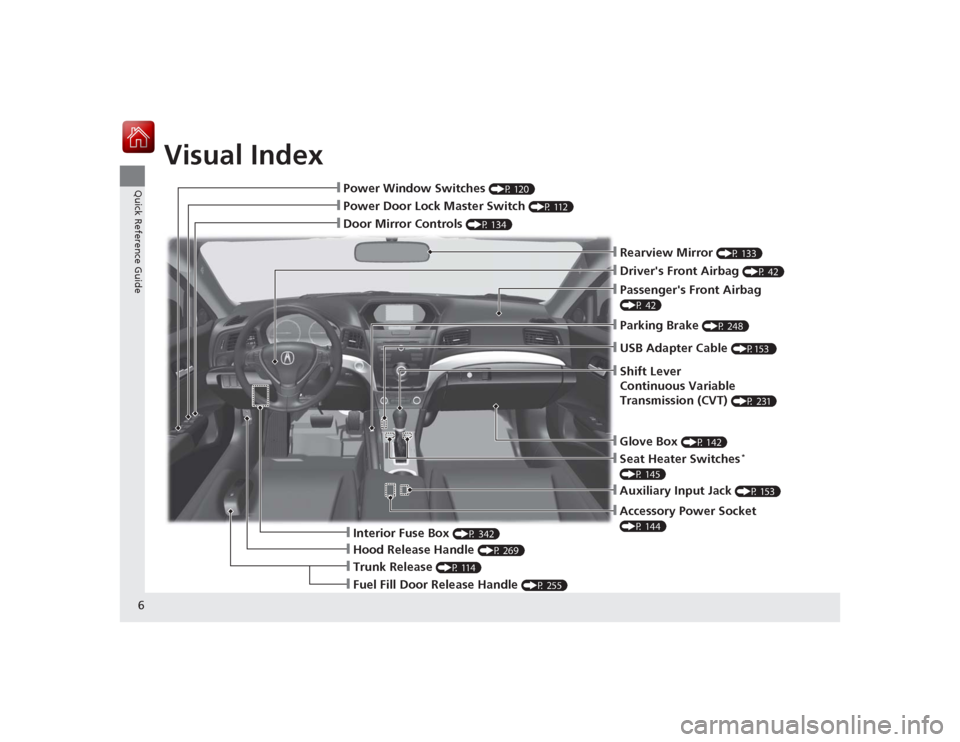
Visual Index
6Quick Reference Guide
❙Door Mirror Controls
(P 134)
❙Parking Brake
(P 248)
❙Rearview Mirror
(P 133)
❙Power Door Lock Master Switch
(P 112)
❙Power Window Switches
(P 120)
❙Driver's Front Airbag
(P 42)
❙Seat Heater Switches
*
(P 145)
❙Trunk Release
(P 114)
❙Fuel Fill Door Release Handle
(P 255)
❙Hood Release Handle
(P 269)
❙Interior Fuse Box
(P 342)
❙Passenger's Front Airbag (P 42)❙USB Adapter Cable
(P153 )
❙Shift Lever
Continuous Variable
Transmission (CVT)
(P 231)
❙Glove Box
(P 142)
❙Accessory Power Socket (P 144)❙Auxiliary Input Jack
(P 153)
Page 9 of 365
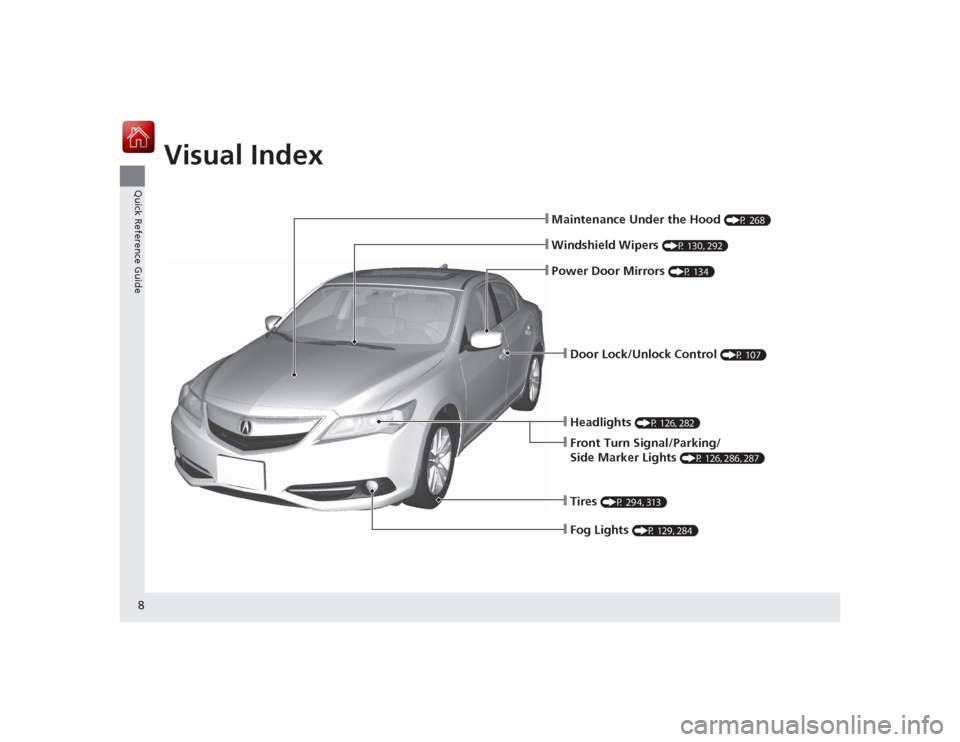
Visual Index
8Quick Reference Guide
❙Maintenance Under the Hood
(P 268)
❙Windshield Wipers
(P 130, 292)
❙Headlights
(P 126, 282)
❙Front Turn Signal/Parking/
Side Marker Lights
(P 126, 286, 287)
❙Tires
(P 294, 313)
❙Door Lock/Unlock Control
(P 107)
❙Power Door Mirrors
(P 134)
❙Fog Lights
(P 129, 284)
Page 16 of 365
15Quick Reference Guide
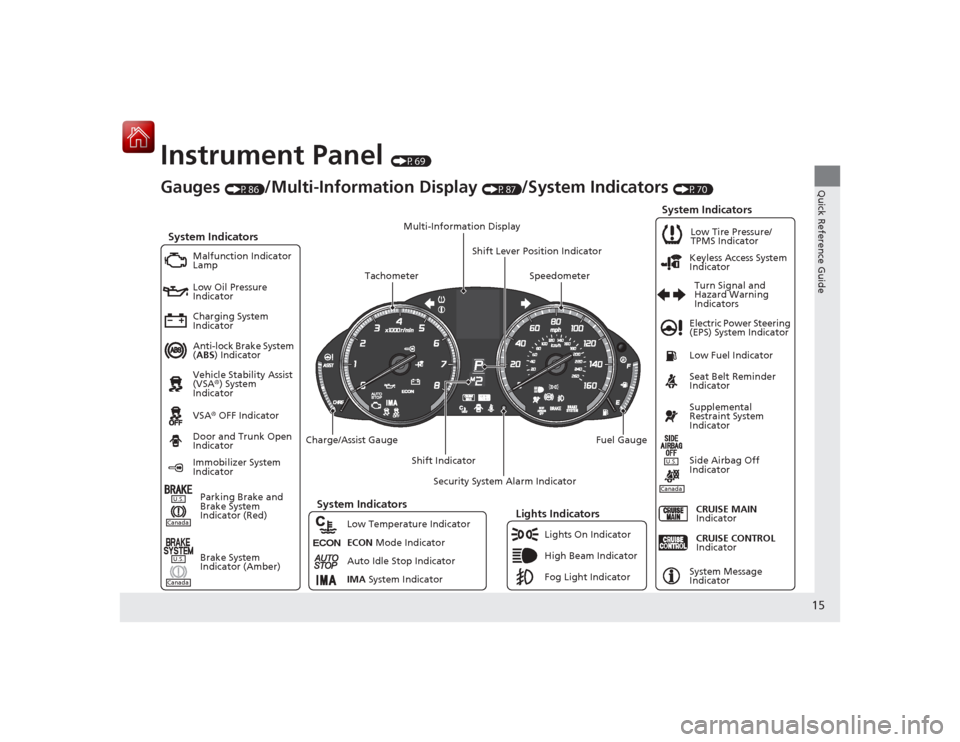
Instrument Panel
(P69)
Canada
ECON
Gauges
(P86)
/Multi-Information Display
(P87)
/System Indicators
(P70)
System Indicators
Malfunction Indicator
Lamp
Low Oil Pressure
Indicator
Charging System
Indicator
Anti-lock Brake System
(ABS ) Indicator
Vehicle Stability Assist
(VSA ®) System
Indicator
VSA ® OFF Indicator Electric Power Steering
(EPS) System Indicator
Lights Indicators
Lights On Indicator
High Beam Indicator
Fog Light Indicator
Immobilizer System
Indicator
Seat Belt Reminder
Indicator
System Indicators
CRUISE CONTROL
Indicator
System Message
Indicator
Parking Brake and
Brake System
Indicator (Red) Supplemental
Restraint System
Indicator
Side Airbag Off
Indicator
Door and Trunk Open
Indicator
CRUISE MAIN
Indicator
Low Fuel Indicator
Low Tire Pressure/
TPMS Indicator
Turn Signal and
Hazard Warning
Indicators
Keyless Access System
Indicator
Charge/Assist Gauge
Security System Alarm Indicator
Fuel Gauge
Tachometer
Multi-Information Display
Speedometer
Shift Lever Position Indicator
Shift Indicator
Low Temperature Indicator
ECON
Mode Indicator
Auto Idle Stop Indicator
IMA System Indicator
U.S.
Brake System
Indicator (Amber)
CanadaU.S.
System Indicators
CanadaU.S.
Page 18 of 365
17Quick Reference Guide
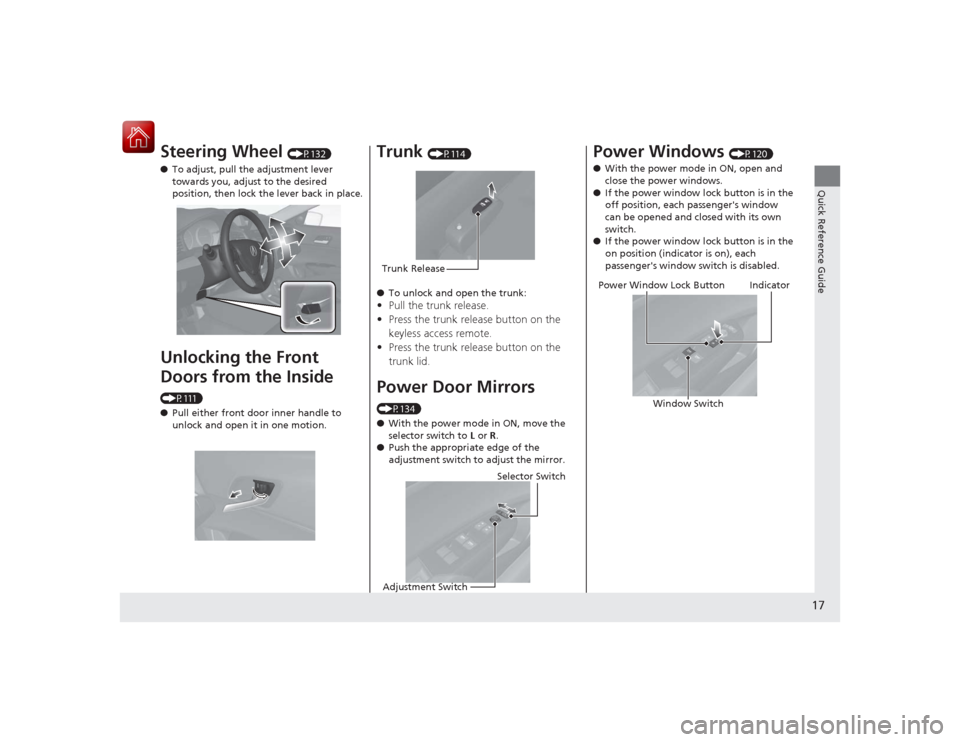
Steering Wheel
(P132)
● To adjust, pull the adjustment lever
towards you, adjust to the desired
position, then lock the lever back in place.
Unlocking the Front
Doors from the Inside (P111)
●Pull either front door inner handle to
unlock and open it in one motion.
Trunk
(P114)
● To unlock and open the trunk:
•Pull the trunk release.
• Press the trunk release button on the
keyless access remote.
• Press the trunk release button on the
trunk lid.Power Door Mirrors (P134)
● With the power mode in ON, move the
selector switch to L or R.
● Push the appropriate edge of the
adjustment switch to adjust the mirror.Trunk Release
Selector Switch
Adjustment Switch
Power Windows
(P120)
● With the power mode in ON, open and
close the power windows.
● If the power window lock button is in the
off position, each passenger's window
can be opened and closed with its own
switch.
● If the power window lock button is in the
on position (indicator is on), each
passenger's window switch is disabled.
Power Window Lock Button
Window Switch
Indicator
Page 19 of 365
18Quick Reference Guide
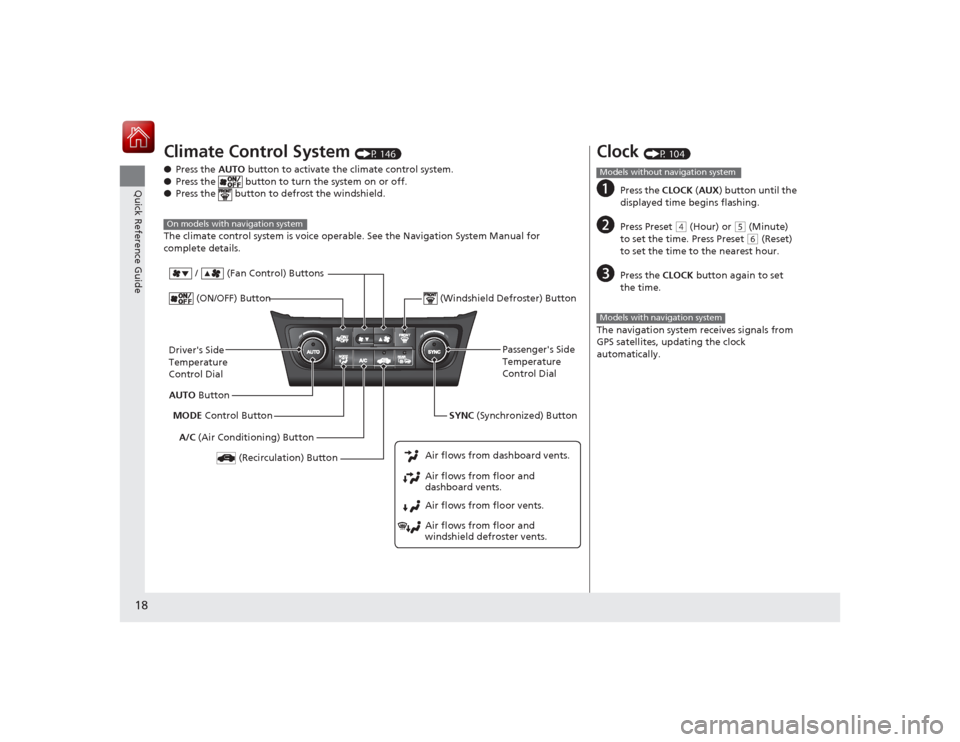
Climate Control System
(P 146)
● Press the AUTO button to activate the climate control system.
● Press the button to turn the system on or off.
● Press the button to defrost the windshield.
The climate control system is voice operable. See the Navigation System Manual for
complete details.
On models with navigation systemDriver's Side
Temperature
Control Dial
A/C (Air Conditioning) Button
Air flows from floor and
windshield defroster vents. Air flows from floor vents. Air flows from floor and
dashboard vents. Air flows from dashboard vents.AUTO Button
(Recirculation) Button
Passenger's Side
Temperature
Control Dial
MODE Control Button
(ON/OFF) Button
SYNC (Synchronized) Button
(Windshield Defroster) Button
/ (Fan Control) Buttons
Clock
(P 104)
a
Press the
CLOCK (AUX ) button until the
displayed time begins flashing.
b
Press Preset
( 4 (Hour) or
(5 (Minute)
to set the time. Press Preset ( 6 (Reset)
to set the time to the nearest hour.
c
Press the CLOCK button again to set
the time.
The navigation system receives signals from
GPS satellites, updating the clock
automatically.
Models without navigation systemModels with navigation system
Page 21 of 365
20Quick Reference Guide
Driving
(P219)
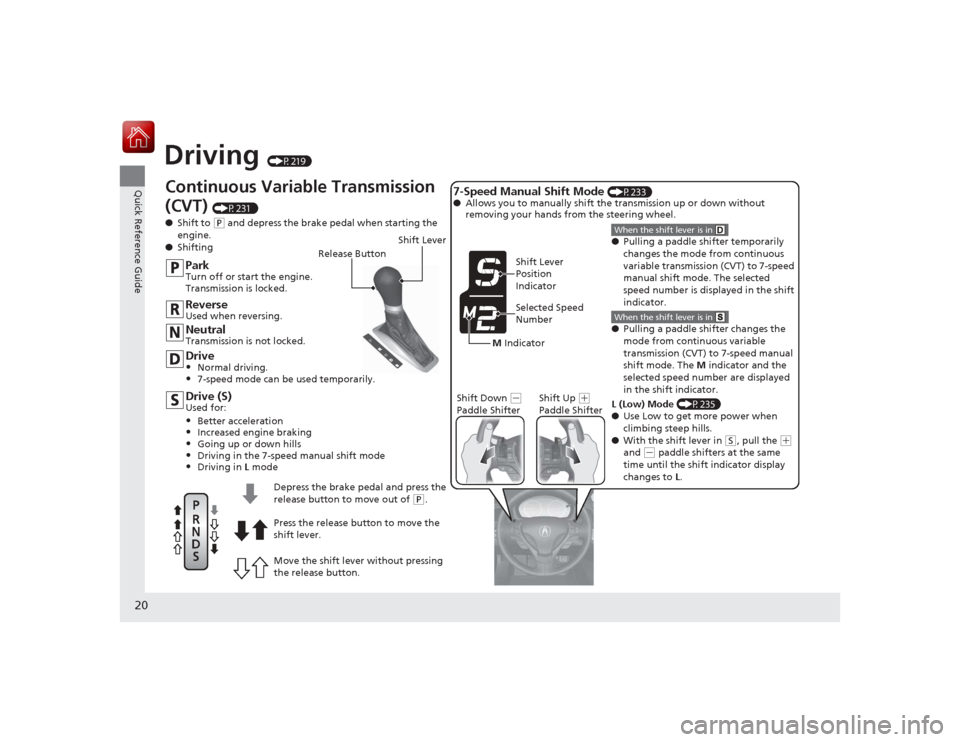
Continuous Variable Transmission
(CVT)
(P231 )
● Shift to (P and depress the brake pedal when starting the
engine.
● Shifting
M Indicator Shift Lever
Position
Indicator
Selected Speed
Number
Shift Down
(
-
Paddle Shifter Shift Up
(
+
Paddle Shifter
Drive (S)Used for:•Better acceleration•Increased engine braking•Going up or down hills•Driving in the 7-speed manual shift mode•Driving in L modeDrive•Normal driving.•7-speed mode can be used temporarily.NeutralTransmission is not locked.ReverseUsed when reversing.ParkTurn off or start the engine.
Transmission is locked.
Release Button
Shift Lever
Move the shift lever without pressing
the release button. Press the release button to move the
shift lever. Depress the brake pedal and press the
release button to move out of
(P.
● Pulling a paddle shifter temporarily
changes the mode from continuous
variable transmission (CVT) to 7-speed
manual shift mode. The selected
speed number is displayed in the shift
indicator.When the shift lever is in
7-Speed Manual Shift Mode
(P233)
● Allows you to manually shift the transmission up or down without
removing your hands from the steering wheel.●Pulling a paddle shifter changes the
mode from continuous variable
transmission (CVT) to 7-speed manual
shift mode. The M indicator and the
selected speed number are displayed
in the shift indicator.When the shift lever is in L (Low) Mode (P235)
● Use Low to get more power when
climbing steep hills.
● With the shift lever in
(S, pull the
( +
and
( - paddle shifters at the same
time until the shift indicator display
changes to L.
Page 23 of 365
22Quick Reference Guide
Maintenance
(P259)
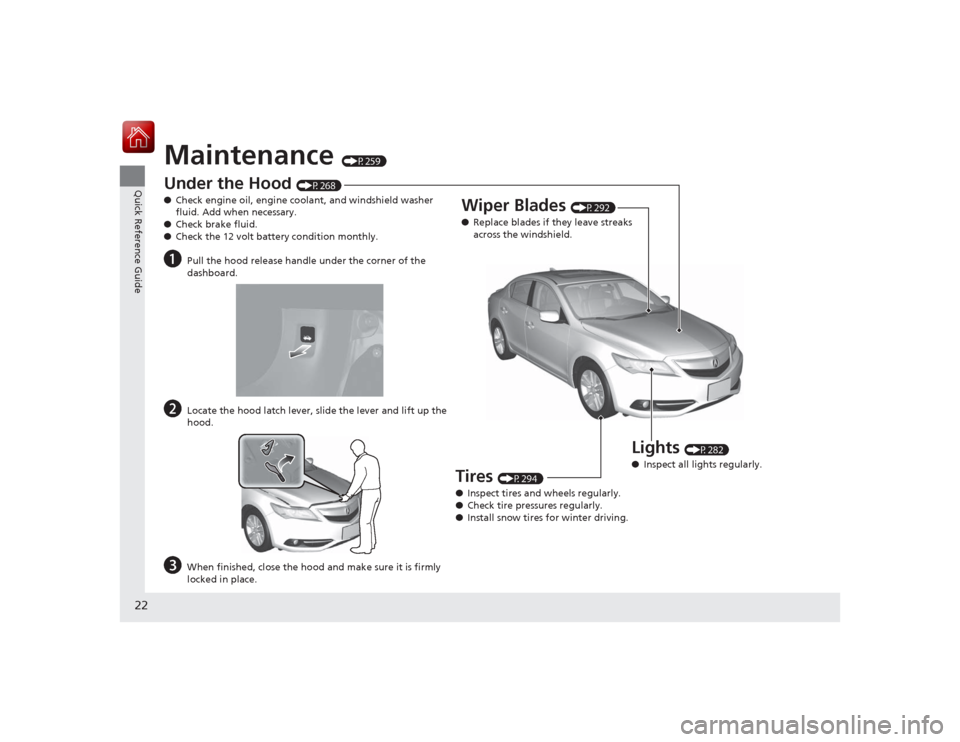
Under the Hood
(P268)
● Check engine oil, engine coolant, and windshield washer
fluid. Add when necessary.
● Check brake fluid.
● Check the 12 volt battery condition monthly.
a
Pull the hood release handle under the corner of the
dashboard.
b
Locate the hood latch lever, slide the lever and lift up the
hood.
c
When finished, close the hood and make sure it is firmly
locked in place.
Lights
(P282)
● Inspect all lights regularly.
Wiper Blades
(P292)
● Replace blades if they leave streaks
across the windshield.
Tires
(P294)
● Inspect tires and wheels regularly.
● Check tire pressures regularly.
● Install snow tires for winter driving.
Page 25 of 365
24Quick Reference Guide
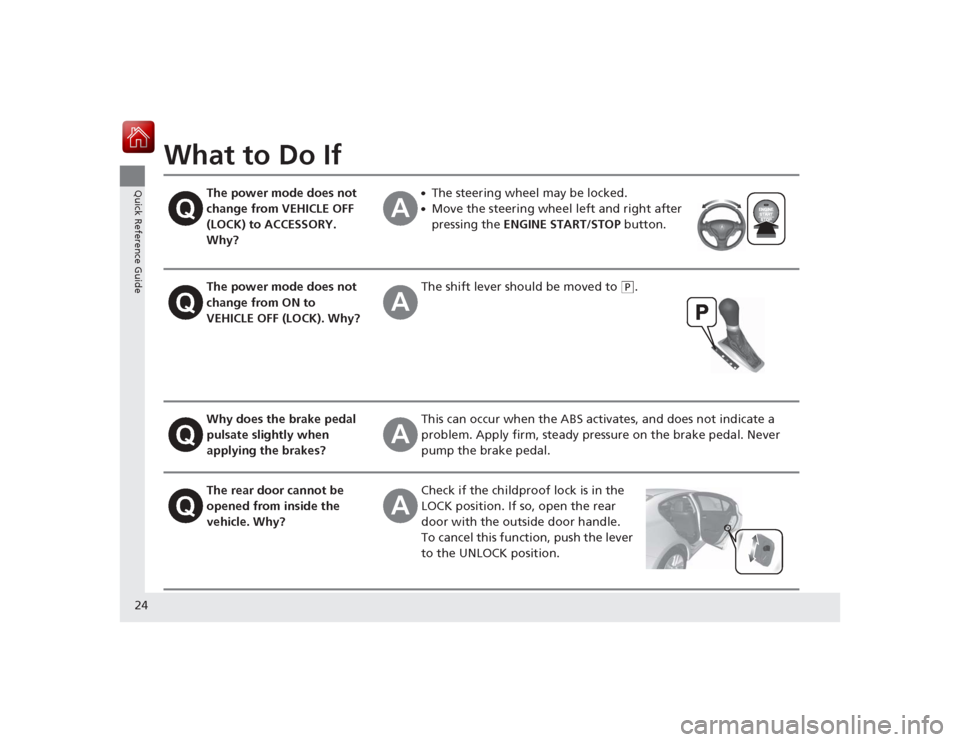
What to Do If
The power mode does not
change from VEHICLE OFF
(LOCK) to ACCESSORY.
Why?
●The steering wheel may be locked.●Move the steering wheel left and right after
pressing the ENGINE START/STOP button.
The power mode does not
change from ON to
VEHICLE OFF (LOCK). Why?
The shift lever should be moved to
(P
.
Why does the brake pedal
pulsate slightly when
applying the brakes?
This can occur when the ABS activates, and does not indicate a
problem. Apply firm, steady pressure on the brake pedal. Never
pump the brake pedal.
The rear door cannot be
opened from inside the
vehicle. Why?
Check if the childproof lock is in the
LOCK position. If so, open the rear
door with the outside door handle.
To cancel this function, push the lever
to the UNLOCK position.
Page 26 of 365
25Quick Reference Guide
Why do the doors lock
after I unlocked the doors
using a remote
transmitter?
If you do not open the doors within 30 seconds, the doors are
relocked automatically for security.
Why does the beeper
sound when I open the
driver's door?
The beeper sounds when:●The power mode is in ACCESSORY.●The exterior lights are left on.●The Auto Idle Stop is in operation.
Why does the beeper
sound when I start driving?
The beeper sounds when:●Driver and/or front passenger are not wearing their seat belts.●The parking brake lever is not fully released.
Why do I hear a screeching
sound when I apply the
brake pedal?
The brake pads may need to be replaced. Have your vehicle
inspected by a dealer.
Is it possible to use
unleaded gasoline with a
Pump Octane Number
(PON) of 87 or higher on
this vehicle?
Unleaded gasoline with a Pump Octane Number (PON) of 91 or
higher is recommended.
Use of lower octane gasoline ca n cause occasional metallic
knocking noise in the engine and will result in decreased engine
performance.
Use of gasoline with a pump octane less than 87 can lead to
engine damage.