parking brake Acura Integra 2000 Hatchback Owner's Manual
[x] Cancel search | Manufacturer: ACURA, Model Year: 2000, Model line: Integra, Model: Acura Integra 2000Pages: 279, PDF Size: 3.57 MB
Page 54 of 279
Instrument
s an d Control s
This section gives information about the controls and displays thatcontribute to the daily operation of
your Acura. All the essential controls
are within easy reach.
Control Locations............................ 52
Indicator Lights................................ 53
Gauges.............................................. 58
Speedometer................................ 58
Tachometer.................................. 58
Odometer...................................... 58
Trip Meter.................................... 58
Fuel Gauge................................... 59
Temperature Gauge.................... 59 Maintenance Required
Indicator.................................... 60
Controls Near the Steering Wheel....................................... 61
Headlights.................................... 62
Daytime Running Lights............. 62 Instrument Panel Brightness..... 63
Turn Signals................................. 63
Windshield Wipers...................... 64
Windshield Washers................... 64
Rear Window Wiper and
Washer...................................... 65
Hazard Warning .......................... 65
Rear Window Defogger
.............. 65
Steering Wheel Adjustment ...... 66
Steering Wheel Controls................ 67
Cruise Control.............................. 67
Keys and Locks................................
71
Keys...............................................
71
Immobilizer System....................
. 72
Ignition Switch............................. 73
Door Locks................................... 75
Power Door/Hatch Locks.......... 75
Hatch............................................. 76
Glove Box..................................... 78
Seat Adjustments............................ 79
Front Seat Adjustments.............. 79
Driver's Seat Height
Adjustment
.............................. 80
Driver's Lumbar Support............ 80
Rear Seat Access........................ 81
Head Restraints...........................
82
Folding Rear Seat .......................... 83 Cargo Area Cover............................ 83
Power Windows............................... 84
Moonroof.......................................... 85
Mirrors.............................................. 86
Adjusting the Power Mirrors .....
86
Parking Brake..................................
87
Digital Clock .................................... 88
Beverage Holder.............................. 89
Console Compartment.................... 90
Cigarette Lighter............................. 90
Ashtrays............................................ 91 Interior Lights.................................. 92
Instrument s an d Control s
Page 57 of 279
Indicato
r Light s
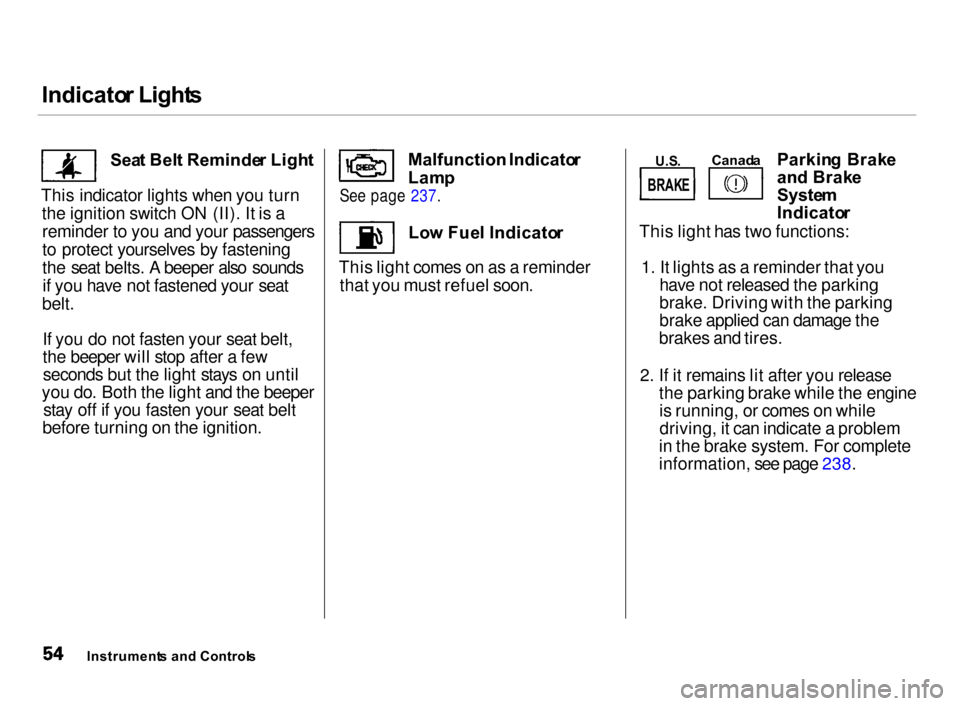
Sea t Bel t Reminde r Ligh t
This indicator lights when you turn the ignition switch ON (II). It is areminder to you and your passengers
to protect yourselves by fastening
the seat belts. A beeper also soundsif you have not fastened your seat
belt.
If you do not fasten your seat belt,
the beeper will stop after a fewseconds but the light stays on until
you do. Both the light and the beeper stay off if you fasten your seat belt
before turning on the ignition. Lo
w Fue l Indicato r
This light comes on as a reminder that you must refuel soon. Parkin
g Brak e
an d Brak e
Syste m
Indicato r
This light has two functions:
1. It lights as a reminder that youhave not released the parking
brake. Driving with the parking
brake applied can damage the
brakes and tires.
2. If it remains lit after you release
the parking brake while the engine is running, or comes on while
driving, it can indicate a problem
in the brake system. For complete
information, see page 238.
Instrument s an d Control s Malfunction
Indicator
Lam p
See page 237.
Canad
a
U.S .
BRAK E
Page 65 of 279
Control
s Nea r th e Steerin g Whee l
Headlight s
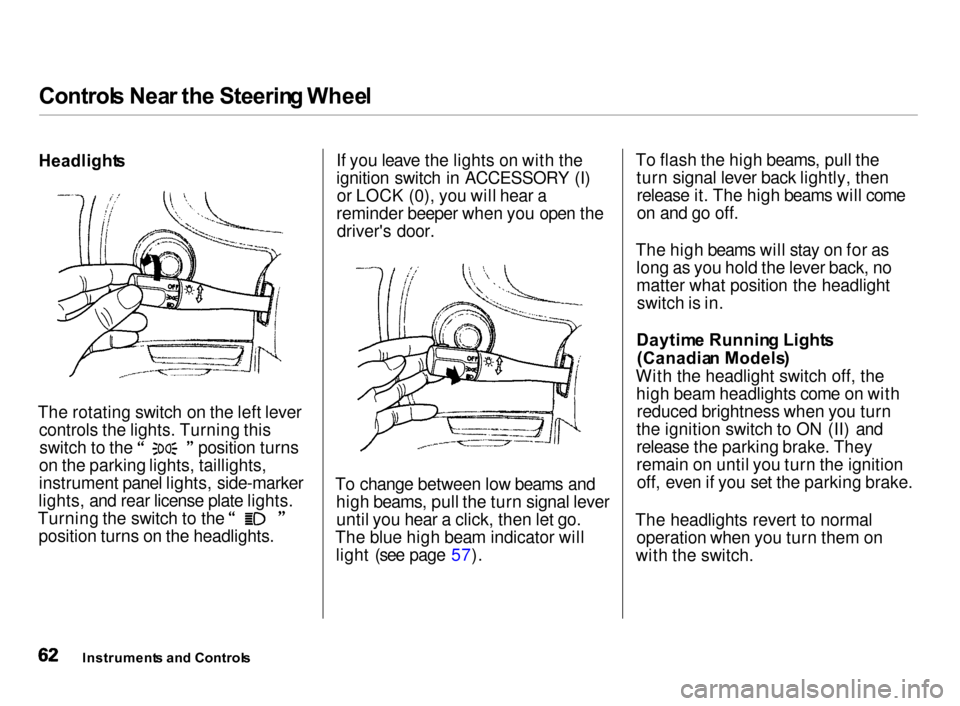
The rotating switch on the left lever controls the lights. Turning this switch to the position turns
on the parking lights, taillights,
instrument panel lights, side-marker
lights, and rear license plate lights. Turning the switch to the
position turns on the headlights. If you leave the lights on with the
ignition switch in ACCESSORY (I)
or LOCK (0), you will hear a
reminder beeper when you open the driver's door.
To change between low beams and high beams, pull the turn signal leveruntil you hear a click, then let go.
The blue high beam indicator will light (see page 57). To flash the high beams, pull the
turn signal lever back lightly, thenrelease it. The high beams will come
on and go off.
The high beams will stay on for as long as you hold the lever back, no
matter what position the headlightswitch is in.
Daytim e Runnin g Light s
(Canadia n Models )
With the headlight switch off, the high beam headlights come on with reduced brightness when you turn
the ignition switch to ON (II) and
release the parking brake. They
remain on until you turn the ignition off, even if you set the parking brake.
The headlights revert to normal operation when you turn them on
with the switch.
Instrument s an d Control s
Page 90 of 279
Mirrors
, Parking Brake
ADJUSTMEN T
SWITC H
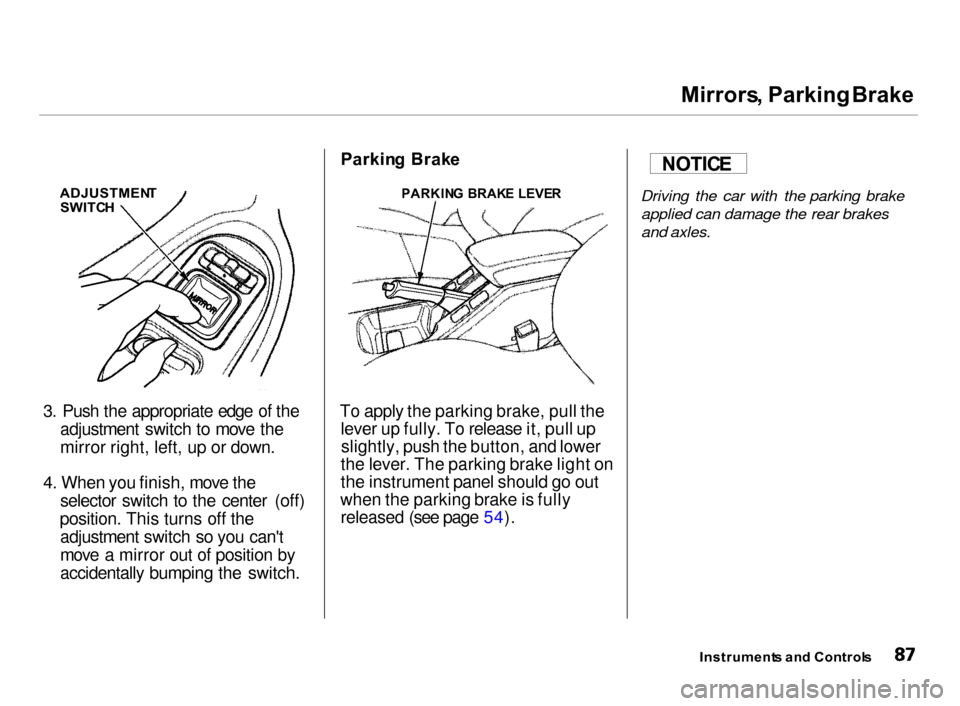
3. Push the appropriate edge of the adjustment switch to move the
mirror right, left, up or down.
4. When you finish, move the selector switch to the center (off)
position. This turns off the adjustment switch so you can't
move a mirror out of position by
accidentally bumping the switch. Parkin
g Brak e
To apply the parking brake, pull the lever up fully. To release it, pull upslightly, push the button, and lower
the lever. The parking brake light on
the instrument panel should go out
when the parking brake is fully released (see page 54).
Driving the car with the parking brake
applied can damage the rear brakes
and axles.
Instrument s an d Control s
NOTIC
E
PARKIN G BRAK E LEVE R
Page 128 of 279
Servic
e Statio n Procedure s
5. Screw the fuel fill cap back on,
tighten it until it clicks at least
three times. If you do not properly
tighten the cap, the Malfunction Indicator Lamp may come on (see
page 237).
6. Push the fuel fill door closed until
it latches.
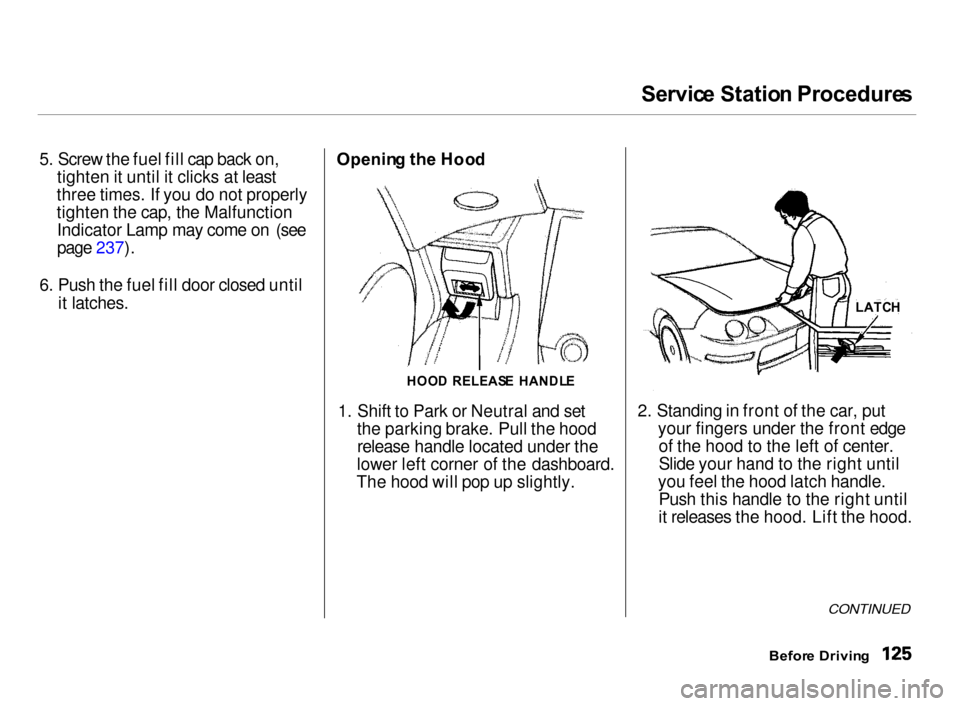
Openin g th e Hoo d
1. Shift to Park or Neutral and set
the parking brake. Pull the hood release handle located under the
lower left corner of the dashboard.
The hood will pop up slightly.
2. Standing in front of the car, put
your fingers under the front edge of the hood to the left of center.
Slide your hand to the right until
you feel the hood latch handle. Push this handle to the right until
it releases the hood. Lift the hood.
CONTINUED
Befor e Drivin g
LATC
H
HOO D RELEAS E HANDL E
Page 138 of 279
Drivin
g
This section gives you tips on starting the engine under various
conditions, and how to operate the 5-speed manual and automatic
transmissions. It also includes
important information on parking
your car, the braking system, and
facts you need if you are planning to
tow a trailer. Preparing to Drive......................... 136
Starting the Engine........................ 137
Starting in Cold Weatherat High Altitude..................... 137
5-speed Manual Transmission..... 138
Recommended Shift Points...... 139
Engine Speed Limiter............... 139
Automatic Transmission............... 140 Shift Lever Position Indicator.. 140
Shift Lever Positions................. 140
Engine Speed Limiter............... 142
Shift Lock Release..................... 143
Parking............................................ 144
The Braking System...................... 145 Brake Wear Indicators.............. 145
Brake System Design................ 146
Anti-lock Brakes........................ 146 Important SafetyReminders.......................... 147
ABS Indicator......................... 148
Limited Slip Differential............... 148
Driving in Bad Weather................ 149
Towing a Trailer............................ 151
Driving
Page 140 of 279

Startin
g th e Engin e
1. Apply the parking brake.
2. In cold weather, turn off all
electrical accessories to reduce
the drain on the battery.
3. Manual Transmission:
Push the clutch pedal down all the
way. START
(III) does not
function unless the clutch pedal is
depressed.
Automatic Transmission:
Make sure the shift lever is in
Park. Press on the brake pedal.
4. Without touching the accelerator
pedal, turn the ignition key to the
START (III) position. If the engine does not start right away, do not
hold the key in START (III) for
more than 15 seconds at a time.
Pause for at least 10 seconds
before trying again.
5. If the engine does not start within
15 seconds, or starts but stalls
right away, repeat step 4 with the
accelerator pedal pressed half-waydown. If the engine starts, release
pressure on the accelerator pedal so the engine does not race.
6. If the engine still does not start,
press the accelerator pedal all the
way down and hold it there while starting in order to clear flooding.
As before, keep the ignition key in the START (III) position for no
more than 15 seconds. Return tostep 5 if the engine does not start.
If it starts, lift your foot off the accelerator pedal so the engine
does not race.
Startin g in Col d Weathe r a t Hig h
Altitud e (Abov e 8,00 0 feet /
2,40 0 meters )
An engine is harder to start in cold weather. The thinner air found at
high altitude above 8,000 feet (2,400 meters) adds to the problem.
Use the following procedure:
1. Turn off all electrical accessories
to reduce the drain on the battery.
2. Push the accelerator pedal half-
way to the floor and hold it there
while starting the engine. Do nothold the ignition key in START (III) for more than 15 seconds.
When the engine starts, release the accelerator pedal gradually as
the engine speeds up and smooths
out.
3. If the engine fails to start in step 2,
push the accelerator pedal to the
floor and hold it there while you
try to start the engine for no more than 15 seconds. If the enginedoes not start, return to step 2.
Driving
Page 146 of 279

Automati
c Transmissio n
Shif t Loc k Releas e
This allows you to move the shift lever out of Park if the normalmethod of pushing on the brake
pedal and pressing the release
button does not work.
1. Set the Parking brake.
2. Remove the key from the ignition
switch.
3. Put a cloth on the edge of the Shift Lock Release slot cover next to
the shift lever.
Use a small flat-tipped screwdriver
or small metal plate (neither are
included in the tool kit) to remove
the cover. Carefully pry off the
edge of the cover. 4. Insert the key in the Shift Lock
Release slot.
5. Push down on the key while you press the release button on theshift lever and move the shift lever
out of Park to Neutral. 6. Remove the key from the shift
lock release slot, then reinstall the
cover.
Depress the brake pedal and
restart the engine.
If you need to use the Shift Lock
Release, it means your car is
developing a problem. Have the car
checked by your Acura dealer.
Driving
RELEAS
E BUTTO N
SHIF T LOC K
RELEAS E SLO T
Page 147 of 279
Parkin
g
Always use the parking brake when you park your car. The indicator onthe instrument panel shows that the
parking brake is not fully released; it does not indicate that the parking
brake is firmly set. Make sure the
parking brake is set firmly or your car may roll if it is parked on an
incline.
If your car has an automatic
transmission, set the parking brake
before you put the transmission inPark. This keeps the car frommoving and putting pressure on the
parking mechanism in the
transmission — making it easier to move the shift lever out of Park
when you want to drive away. If the car is facing uphill, turn the
front wheels away from the curb. If
you have a manual transmission, put it in first gear.
If the car is facing downhill, turn the
front wheels toward the curb. If you
have a manual transmission, put it in reverse gear.
Make sure the parking brake is fully
released before driving away.
Driving with the parking brake
partially set can overheat or damagethe rear brakes. Parkin
g Tip s Make sure the moonroof and the
windows are closed.
Turn off the lights. Place any packages, valuables, etc.,
in the cargo area or take them
with you.
Lock the doors.
Never park over dry leaves, tall
grass, or other flammable materials. The three way catalytic
converter gets very hot, and could
cause these materials to catch on
fire.
Drivin g
Page 158 of 279

Towin
g a Traile r
Drivin g Safel y Wit h a Traile r
The added weight, length, and height of a trailer will affect your
vehicle's handling and performance, so driving with a trailer requires
some special driving skills and
techniques.
For your safety and the safety ofothers, take time to practice driving
maneuvers before heading for the open road, and follow the guidelines
discussed below.
Towing Speeds and Gears
Driving slower than normal in all
driving situations, and obey posted
speed limits for vehicles with trailers.
Use D4 position when towing a trailer
on level roads. D3 is the proper shift
lever position to use when towing a
trailer in hilly terrain. (See "Driving on Hills" in the next column for
additional gear information.)
Making Turns and Braking
Make turns more slowly and wider
than normal. The trailer tracks a smaller arc than your vehicle, and it
can hit or run over something the
vehicle misses. Allow more time and distance for braking. Do not brake or
turn suddenly as this could cause the
trailer to jackknife or turn over.
Driving on Hills
When climbing hills, closely watch your temperature gauge. If it nearsthe red mark, turn the air conditioning off, reduce speed and, if
necessary, pull to the side of the
road to let the engine cool.
If the automatic transmission shifts
frequently between 3rd and 4th
gears while going up a hill, shift to
D3.
If you must stop when facing uphill,
use the foot brake or parking brake. Do not try to hold the vehicle in
place by pressing on the accelerator, as this can cause the transmission to
overheat.
When driving down hills, reduce
your speed and shift down to 2nd gear. Do not "ride" the brakes, and
remember it will take longer to slow down and stop when towing a trailer.
CONTINUED
Drivin g