tow Acura Integra 2000 Sedan User Guide
[x] Cancel search | Manufacturer: ACURA, Model Year: 2000, Model line: Integra, Model: Acura Integra 2000Pages: 273, PDF Size: 4.4 MB
Page 150 of 273
Towin
g a Traile r
Your Acura has been designed primarily to carry passengers and
their cargo. You can use it to tow a
trailer if you carefully observe the load limits, use the proper equipment,
and follow the guidelines in this
section.
Loa d Limit s
Tota l Traile r Weight : The total
weight of the trailer and everything loaded in it must notexceed 1,000 lbs (450 kg). Towing
a load that is too heavy can
seriously affect your vehicle's handling and performance. It can
also damage the engine and
drivetrain.
Tongu
e Load : The weight that
the tongue of a fully-loaded trailer
puts on the hitch should be approximately 10 percent of the
trailer weight. Too little tongue
load can make the trailer unstable and cause it to sway. Too much
tongue load reduces front-tire
traction and steering control.
To achieve a proper tongue load, start by loading 60 percent of the
load toward the front of the trailer and 40 percent toward the rear, then
readjust the load as needed.
Gros
s Vehicl e Weigh t Ratin g
(GVWR) :
The total weight of the vehicle, all occupants, all cargo, and the
tongue load must not exceed: 3,680 lbs (1,670 kg)
Gros
s Axl e Weigh t Ratin g
(GAWR) :
The total weight of the vehicle, all occupants, all cargo, and the
tongue load must not exceed:
1,985 lbs (900 kg)on the front axle
1,740 lbs (790 kg) on the rear axle
Driving
CONTINUED
Page 151 of 273
Towin
g a Traile r
Checking Load s
The best way to confirm that vehicle and trailer weights are within limits
is to have them checked at a public
scale.
Using a suitable scale or a special
tongue load gauge, check the tongue
load the first time you set up a towing combination (a fully-loaded
vehicle and trailer), then recheck the
tongue load whenever the conditions
change.
Towin
g Equipmen t an d
Accessorie s
Towing can require a variety of equipment, depending on the size of
your trailer, how it will be used, and
how much load you are towing.
Discuss your needs with your trailer
sales or rental agency, and follow the
guidelines in the rest of this section.
Also make sure that all equipment is properly installed and that it meets
federal, state, province, and local
regulations.
Hitches
Any hitch used on your vehicle must be properly bolted to the underbody.
Drivin g
Exceeding load limits or
improperly loading your vehicle
and trailer can cause a crash in
which you can be seriously
injured or killed.
Check the loading of your
vehicle and trailer carefully before starting to drive.
Page 152 of 273

Towin
g a Traile r
Safety Chain
Always use a safety chain. Make
sure that it is secured to both the trailer and hitch, and that it crosses
under the tongue so it can catch the
trailer if it becomes unhitched. Leave enough slack to allow the
trailer to turn corners easily, but do not let the chain drag on the ground.
Trailer Brakes
Acura recommends that any trailer having a total weight of 1,000 lbs (450 kg) or more be equipped with
its own electric or surge-type brakes.
If you choose electric brakes, be sure they are electronically actuated.
Do not attempt to tap into your
vehicle's hydraulic system. No matter how successful it may seem,
any attempt to attach trailer brakes
to your vehicle's hydraulic system
will lower braking effectiveness and
create a potential hazard.
Trailer Lights
Your vehicle has a trailer lighting connector located behind the leftside panel in the cargo area. Refer to
the drawing above for the wiring
color code and purpose of each pin.
If you use a converter, you can get
the connector and pins that mate
with the connector in your vehicle
from your Acura dealer. Since lighting and wiring vary with
trailer type and brand, you should also have a qualified technician
install a suitable connector between
the vehicle and the trailer.
CONTINUED
Drivin g
GROUN
D
(BLACK )
BACK-U
P LIGH T
(GREEN/BLACK )LEF
T TUR N SIGNA L
(GREEN/BLUE )
RIGH T TUR N SIGNA L
(GREEN/YELLOW )BRAK
E LIGH T
(GREEN/WHITE )TAILLIGH
T
(RED/BLACK )
Page 153 of 273
Towin
g a Traile r
Additional Trailer equipment
Many states and Canadian provinces
require special outside mirrors when
towing a trailer. Even if they don't,
you should install special mirrors if you cannot clearly see behind you, orif the trailer creates a blind spot.
Ask your trailer sales or rental
agency if any other items are recommended or required for your
towing situation. Pre-To
w Checklis t
When preparing to tow, and before driving away, be sure to check the
following:
The vehicle has been properlyserviced, and the tires, brakes,
suspension, and cooling system
are in good operating condition. All weights and loads are within
limits (see page 147).
The hitch, safety chain, and any other attachments are sucure. All items on and in the trailer are
properly secured and cannot shift
while you drive. The lights and brakes on your
vehicle and the trailer are working
properly. Your vehicle tires and spare are
properly inflated (see page 192 ),and the trailer tires and spare are
inflated as recommended by the trailer maker.
Drivin g
Page 154 of 273

Towin
g a Traile r
Drivin g Safel y Wit h a Traile r
The added weight, length, and height of a trailer will affect your
vehicle's handling and performance, so driving with a trailer requires
some special driving skills and
techniques.
For your safety and the safety of others, take time to practice driving
maneuvers before heading for the open road, and follow the guidelines
discussed below.
Towing Speeds and Gears
Driving slower than normal in all
driving situations, and obey posted speed limits for vehicles with trailers.
If you have automatic transmission,
use D4 position when towing a trailer
on level roads. D3 is the proper shift
lever position to use when towing a
trailer in hilly terrain. (See "Driving on Hills" in the next column for
additional gear information.)
Making Turns and Braking
Make turns more slowly and wider
than normal. The trailer tracks a smaller arc than your vehicle, and it
can hit or run over something the
vehicle misses. Allow more time and distance for braking. Do not brake or
turn suddenly as this could cause the
trailer to jackknife or turn over.
Driving on Hills
When climbing hills, closely watch your temperature gauge. If it nears the red mark, turn the air
conditioning off, reduce speed and, if necessary, pull to the side of the
road to let the engine cool.
If the automatic transmission shifts
frequently between 3rd and 4th gears while going up a hill, shift to
D3.
If you must stop when facing uphill,
use the foot brake or parking brake.
Do not try to hold the vehicle in
place by pressing on the accelerator, as this can cause the automatic
transmission to overheat.
When driving down hills, reduce
your speed and shift down to 2nd gear. Do not "ride" the brakes, andremember it will take longer to slowdown and stop when towing a trailer.
Driving
CONTINUED
Page 155 of 273

Towin
g a Traile r
Handling Crosswinds and Buffeting
Crosswinds and air turbulence
caused by passing trucks can disrupt
your steering and cause trailer
swaying. When being passed by a
large vehicle, keep a constant speed
and steer straight ahead. Do not try
to make quick steering or braking
corrections.
Backing Up
Always drive slowly and have someone guide you when backing up.
Grip the bottom of the steering
wheel; then turn the wheel to the left to get the trailer to move to the left,and turn the wheel right to move the
trailer to the right.
Parking
Follow all normal precautions when
parking, including firmly setting the
parking brake and putting the
transmission in Park (automatic) or
in 1 st or Reverse (manual). Also,
place wheel chocks at each of the
trailer's tires.
Drivin g
Page 163 of 273
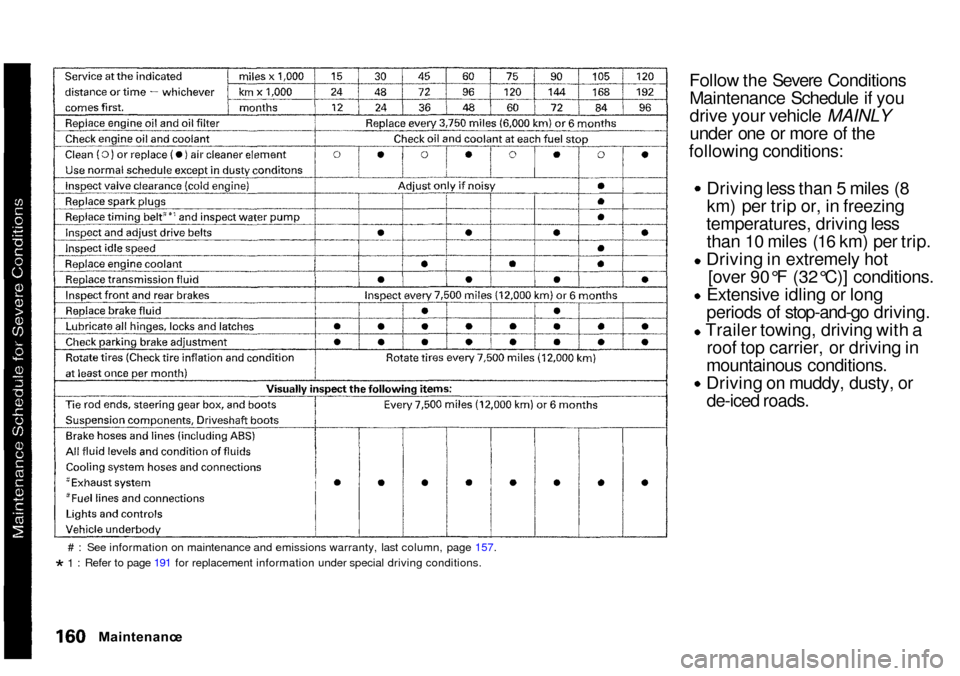
Follow the Severe Conditions
Maintenance Schedule if you
drive your vehicle MAINLY
under one or more of the
following conditions: Driving less than 5 miles (8
km) per trip or, in freezing
temperatures, driving less than 10 miles (16 km) per trip. Driving in extremely hot
[over 90°F (32°C)] conditions.
Extensive idling or long
periods of stop-and-go driving.
Trailer towing, driving with a roof top carrier, or driving in
mountainous conditions. Driving on muddy, dusty, or
de-iced roads.
# : See information on maintenance and emissions warranty, last column, page 157.* 1 : Refer to page 191 for replacement information under special driving conditions.
Maintenanc e
Page 164 of 273
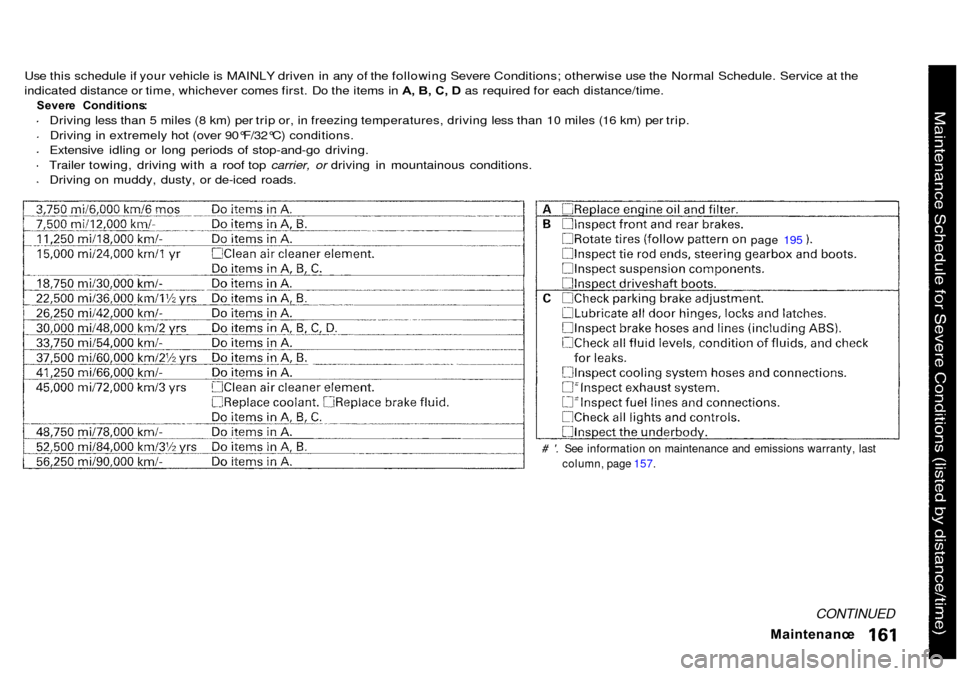
Use this schedule if your vehicle is MAINLY driven in any of the following Severe Conditions; otherwise use the Normal Schedule. Service at the
indicated distance or time, whichever comes first. Do the items in A, B, C, D as required for each distance/time.
Sever e Conditions :
Driving less than 5 miles (8 km) per trip or, in freezing temperatures, driving less than 10 miles (16 km) per trip.
Driving in extremely hot (over 90°F/32°C) conditions.
Extensive idling or long periods of stop-and-go driving.
Trailer towing, driving with a roof top carrier, or driving in mountainous conditions.
Driving on muddy, dusty, or de-iced roads.
# '. See information on maintenance and emissions warranty, lastcolumn, page 157.
Maintenance
CONTINUED
page 195
Page 189 of 273
Batter
y
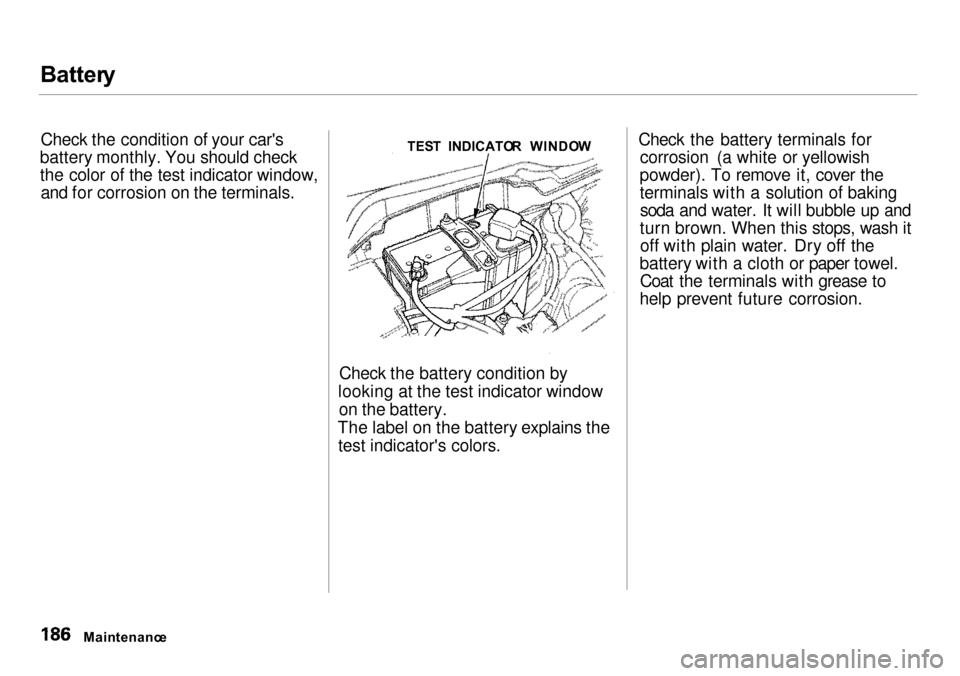
Check the condition of your car's
battery monthly. You should check
the color of the test indicator window, and for corrosion on the terminals.
Check the battery condition by
looking at the test indicator window on the battery.
The label on the battery explains the test indicator's colors. Check the battery terminals for
corrosion (a white or yellowish
powder). To remove it, cover the
terminals with a solution of baking soda and water. It will bubble up and
turn brown. When this stops, wash it off with plain water. Dry off the
battery with a cloth or paper towel. Coat the terminals with grease to
help prevent future corrosion.
Maintenanc e TES
T INDICATO R WINDO W
Page 191 of 273
Wipe
r Blade s
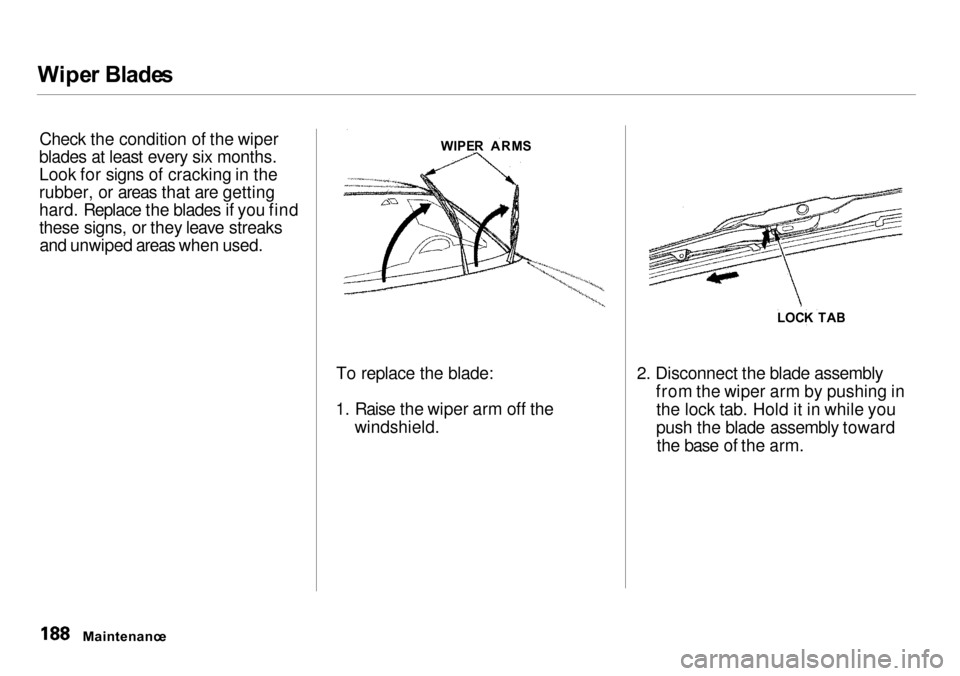
Check the condition of the wiper
blades at least every six months.
Look for signs of cracking in the
rubber, or areas that are getting
hard. Replace the blades if you find
these signs, or they leave streaks and unwiped areas when used.
To replace the blade:
1. Raise the wiper arm off the windshield. 2. Disconnect the blade assembly
from the wiper arm by pushing inthe lock tab. Hold it in while you
push the blade assembly towardthe base of the arm.
Maintenanc e
WIPE
R ARM S
LOCK TA B