light Acura Integra 2000 Sedan Owner's Guide
[x] Cancel search | Manufacturer: ACURA, Model Year: 2000, Model line: Integra, Model: Acura Integra 2000Pages: 273, PDF Size: 4.4 MB
Page 90 of 273

Interio
r Light s
Ceilin g Ligh t
The ceiling light has a three-position
switch. In the OFF position, the light
does not come on. In the center
position, the ceiling light comes on
when you open any door. In the ON position, the ceiling light stays on
continuously.
Spotlight
s
Turn on the spotlight by pushing the button next to each light. Push the
button again to turn it off.
Instruments an d Control s
DOO
R ACTIVATE D
Page 93 of 273

Heatin
g an d Coolin g
Proper use of the Heating and
Cooling system can make the
interior dry and comfortable, and
keep the windows clear for best
visibility.
Wha t Eac h Contro l Doe s
Fa n Contro l Leve r
Sliding this lever to the right
increases the fan's speed, which
increases air flow.
Temperature Contro l Leve r
Sliding this lever to the right
increases the temperature of the air
flow.
Ai r Conditionin g (A/C ) Butto n
This button turns the air condi-
tioning ON and OFF. The indicator
in the button lights when the A/C is
on.
Recirculatio
n Butto n
This button controls the source of
the air going into the system. When
the indicator in this button is lit, air
from the car's interior is sent through the system again (Recircula-
tion mode). When the indicator is off, air is brought in from outside the car
(Fresh Air mode).
Comfor t an d Convenienc e Feature s
MOD
E BUTTON S
RECIRCULATIO N
BUTTO N
AI
R CONDITIONIN G
BUTTO N
FA N CONTRO L
LEVE R
TEMPERATUR
E
CONTRO L LEVE R
Page 97 of 273

Heatin
g an d Coolin g
To Cool with A/C
1. Turn on the A/C by pressing the button. The light in the button
should come on when a fan speed
is selected.
2. Make sure the temperature control lever is set to maximum
cool.
3. Select
4. If the outside air is humid, select
Recirculation mode. If the outside
air is dry, select Fresh Air mode.
5. Set the fan to the desired speed.
Comfort an d Convenienc e Feature s FA
N CONTRO L
LEVE R
TEMPERATUR
E
CONTRO L LEVE R
MOD
E BUTTON S
RECIRCULATIO
N
BUTTO N AI
R CONDITIONIN G
BUTTO N
Page 111 of 273

Audi
o Syste m
Protectin g Compac t Disc s
Handle a CD by its edges; never
touch either surface. Contamination
from fingerprints, liquids, felt-tip pens, and labels can cause the CD to
not play properly, or possibly jam in
the drive.
When a CD is not being played, store it in its case to protect it from dust
and other contamination. To prevent
warpage, keep CDs out of direct sunlight and extreme heat. To clean a disc, use a clean soft cloth.
Wipe across the disc from the center
to the outside edge.
A new CD may be rough on the
inner and outer edges. The small
plastic pieces causing this roughness
can flake off and fall on the re-
cording surface of the disc, causing
skipping or other problems. Remove these pieces by rubbing the inner
and outer edges with the side of a pencil or pen.
Never try to insert foreign objects in
the CD player or the magazine.
Comfor t an d Convenienc e Feature s
Page 114 of 273

Audi
o Syste m
Operatin g th e Optiona l Cassett e
Playe r
The cassette system features Dolby
B* noise reduction, automatic sensing of chromium-dioxide (CrO 2)
tape, and autoreverse for continuous
play.
Make sure the tape opening on the
cassette is facing to the right, then
insert the cassette most of the way
into the slot. The system will pull itin the rest of the way, and begin to
play.
* Dolby noise reduction manufactured under
license from Dolby Laboratories Licensing Corpo-
ration. "DOLBY" and the double-D symbol
are trademarks of Dolby Laboratories
Licensing Corporation.
The tape direction indicator will light
to show you which side of the cassette is playing. The indicates
the side you inserted facing upward is now playing. If you want to play
the other side, press the PROG
button.
Dolby B noise reduction turns onwhen you insert a cassette. If the
tape was not recorded with Dolby B noise reduction, turn it off by
pressing the NR button.
When the system reaches the end of
the tape, it will automatically reverse direction and play the other side. If
you want to remove the cassette
from the drive, press the EJECT
button.
If you turn the system off while a
tape is playing, either with the PWR/
VOL knob or by turning off the
ignition, the cassette will remain in
the drive. When you turn the system
back on, the tape will begin playing
where it left off.
To switch to the radio or CD player
while a tape is playing, press the AM/FM1-2 or CD button. To change
back to the cassette player, push theCD button.
Comfor t an d Convenienc e Feature s
Page 117 of 273
Audi
o Syste m
Carin g fo r th e Cassett e Playe r
The cassette player picks up dirt and oxides from the tape. This contami-nation builds up over time and
causes the sound quality to degrade.
To prevent this, you should clean the player after every 30 hours of use.
Your dealer has a cleaning kit
available.
If you do not clean the cassette
player regularly, it may eventually
become impossible to remove the contamination with a normal cleaning kit.
The player automatically ejects cassettes that do not play properly. If
it ejects a cassette before it begins to
play, it is probably defective andshould not be inserted again. You
may have a cassette suddenly stop
playing, reverse directions once or twice and then eject. This is normallyan indication the tape is wound
unevenly. It should play after the tape is manually rewound.
Use 100-minute or shorter cassettes.
Cassettes longer than that usethinner tape that may break or jam
the drive.
Look at the cassette before you
insert it. If the tape is loose, tighten
it by turning a hub with a pencil or
your finger.
If the label is peeling off, remove it
from the cassette or it could cause the cassette to jam in the player.
Never try to insert a warped ordamaged cassette in the player.
When they are not in use, store
cassettes in their cases to protect
them from dust and moisture. Never
place cassettes where they will be exposed to direct sunlight, high heat,
or high humidity. If a cassette is
exposed to extreme heat or cold, let
it reach a moderate temperature
before inserting it in the player. Never try to insert foreign objects
into the cassette player.
Comfor t an d Convenienc e Feature s
Page 121 of 273
Break-i
n Period , Gasolin e
Break-i n Perio d
Help assure your car's future
reliability and performance by paying
extra attention to how you drive
during the first 600 miles (1,000 km).
During this period:
Avoid full-throttle starts and rapid
acceleration.
Avoid hard braking. New brakes
need to be broken-in by moderate
use for the first 200 miles (300
km).
You should follow these same re-
commendations with an overhauled
or exchanged engine, or when the
brakes are relined.
Gasolin
e
Your Acura is designed to operate on
unleaded gasoline.
We recommend gasolines containing
detergent additives that help prevent
fuel system and engine deposits.
Using gasoline containing lead will
damage your car's emissions
controls. This contributes to air
pollution.
(LS and GS models)
Use an unleaded gasoline with a
pump octane number of 86 or higher. Use of a lower octane gasoline can
cause a persistent, heavy metallic
rapping noise in the engine that can
lead to mechanical damage.
(GS-R model)
Use a premium unleaded gasoline
with a pump octane number of 91 or
higher.
If you are unable to find premium
unleaded gasoline, you may substi-
tute an unleaded regular gasoline. The engine will compensate for the
lower octane, but you may notice a slight decrease in power as a result.
Befor e Drivin g
Page 123 of 273
Servic
e Statio n Procedure s
5. Screw the fuel fill cap back on, tighten it until it clicks several
times. If you do not properly
tighten the cap, the Malfunction
Indicator Lamp may come on (see
page 233 ).
6. Push the fuel fill door closed until it latches. Openin
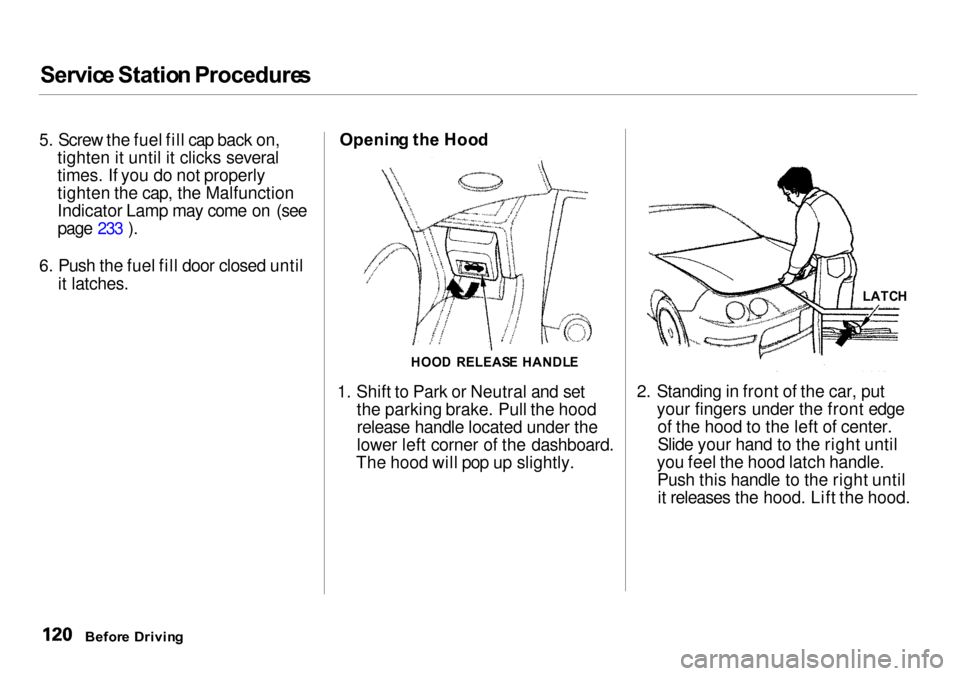
g th e Hoo d
1. Shift to Park or Neutral and set the parking brake. Pull the hood
release handle located under the
lower left corner of the dashboard.
The hood will pop up slightly. 2. Standing in front of the car, put
your fingers under the front edgeof the hood to the left of center.
Slide your hand to the right until
you feel the hood latch handle. Push this handle to the right untilit releases the hood. Lift the hood.
Befor e Drivin g
HOO
D RELEAS E HANDL E LATC
H
Page 124 of 273
Servic
e Statio n Procedure s
If you can open the hood without
lifting the hood latch handle, or the hood latch handle moves stiffly ordoes not spring back as before, the
mechanism should be cleaned and
lubricated (see page 183 ).
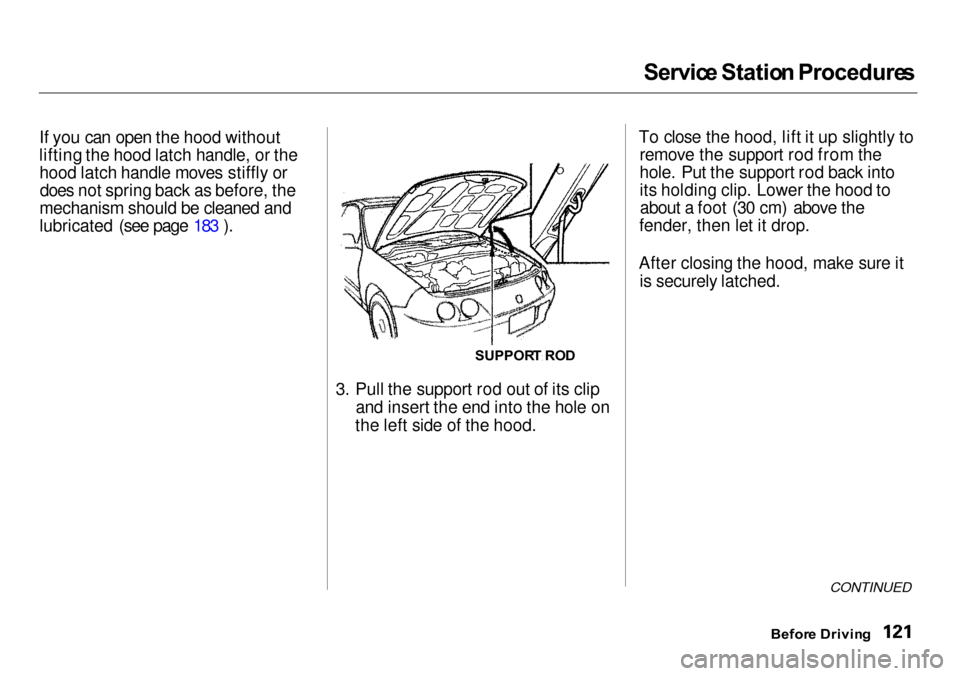
3. Pull the support rod out of its clipand insert the end into the hole on
the left side of the hood. To close the hood, lift it up slightly to
remove the support rod from the
hole. Put the support rod back into
its holding clip. Lower the hood toabout a foot (30 cm) above the
fender, then let it drop.
After closing the hood, make sure it is securely latched.
CONTINUED
Befor e Drivin g
SUPPOR
T RO D
Page 128 of 273
Accessorie
s an d Modification s
Modifying your car, or installing some non-Acura accessories, can
make your car unsafe. Before you
make any modifications or add any
accessories, be sure to read the following information.
Accessorie s
Your dealer has Genuine Acura
accessories that allow you to
personalize your car. These accessories have been designed and
approved for your car, and are
covered by warranty.
Non-Acura accessories are usually
designed for universal applications.
Although aftermarket accessories
may fit on your car, they may not
meet factory specifications, and
could adversely affect your car's
handling and stability. (See
"Modifications" on the page 126 for
additional information.) When properly installed, cellular
phones, alarms, two-way radios, and
low-powered audio systems should not interfere with your car's
computer-controlled systems, such
as the SRS and anti-lock brake
system.
However, if electronic accessories
are improperly installed, or exceed your car's electrical system capacity,
they can interfere with the operation of your car, or even cause the
airbags to deploy.
Before installing any accessory:
Make sure the accessory does not
obscure any lights, or interfere
with proper car operation or
performance. Be sure electronic accessories do
not overload electrical circuits (see page 236 ). Have the installer contact your
Acura dealer for assistance before
installing any electronic accessory.
If possible, have your dealer inspect
the final installation.
Before Drivin g
Improper accessories or
modifications can affect your
car's handling, stability and performance, and cause a
crash in which you can be hurt
or killed.
Follow all instructions in this
owner's manual regarding
accessories and modifications.