belt Acura Integra 2001 Service Manual
[x] Cancel search | Manufacturer: ACURA, Model Year: 2001, Model line: Integra, Model: Acura Integra 2001Pages: 285, PDF Size: 3.79 MB
Page 86 of 285

Foldin
g Rea r Seat , Carg o Are a Cove r
Foldin g Rea r Sea t
The back of the rear seat folds down to give you more cargo space. Eachside folds down separately. With only
half the seat folded, you can still carry a passenger in the back seat.
To unlatch either side of the seat- back, pull up on the release tab.Move the seat belt out of the way
and fold the seat-back down. To lock the seat-back upright, push
the seat-back firmly against its latch.
Tug on the seat-back to make sure it
is latched.
Do not put any heavy items on theseat-back when it is folded.
Make sure all items in the cargo area are secured. Loose items can fly
forward and cause injury if you have to brake hard. See Carryin g Carg o
on page 132. Carg
o Are a Cove r
The cargo area cover may be removed to give you more cargo
height. Place your hands, palms up, under the cover near the outside
edges. Lift it straight up.
To install the cover, line up the mounting rods with the slots, then
push down on the cover until it clips
into place. Make sure it is securely
latched so it will not come loose
while you are driving.
Instrument s an d Control s
RELEAS
E
TA B
MOUNTIN
G RO D
Page 139 of 285

Preparin
g to Driv e
You should do the following checks and adjustments every day before
you drive your car.
1. Make sure all windows, mirrors, and outside lights are clean and
unobstructed. Remove frost, snow,or ice.
2. Check that the hood and hatch are fully closed.
3. Visually check the tires. If a tire looks low, use a gauge to check its
pressure.
4. Check that any items you may be carrying with you inside are stored
properly or fastened down
securely.
5. Check the adjustment of the seat
(see page 79 ).
6. Check the adjustment of the inside and outside mirrors (see
page 86 ).
7. Check the adjustment of the steering wheel (see page 66 ).
8. Make sure the doors and hatch
are securely closed and locked.
9. Fasten your seat belt. Check that
your passengers have fastened
their seat belts (see page 16 ). 10. Turn the ignition switch ON (II).
Check the indicator lights in the
instrument panel.
11. Start the engine (see page 137).
12. Check the gauges and indicator lights in the instrument panel (see
page 53).
Drivin g
Page 162 of 285
Maintenanc
e
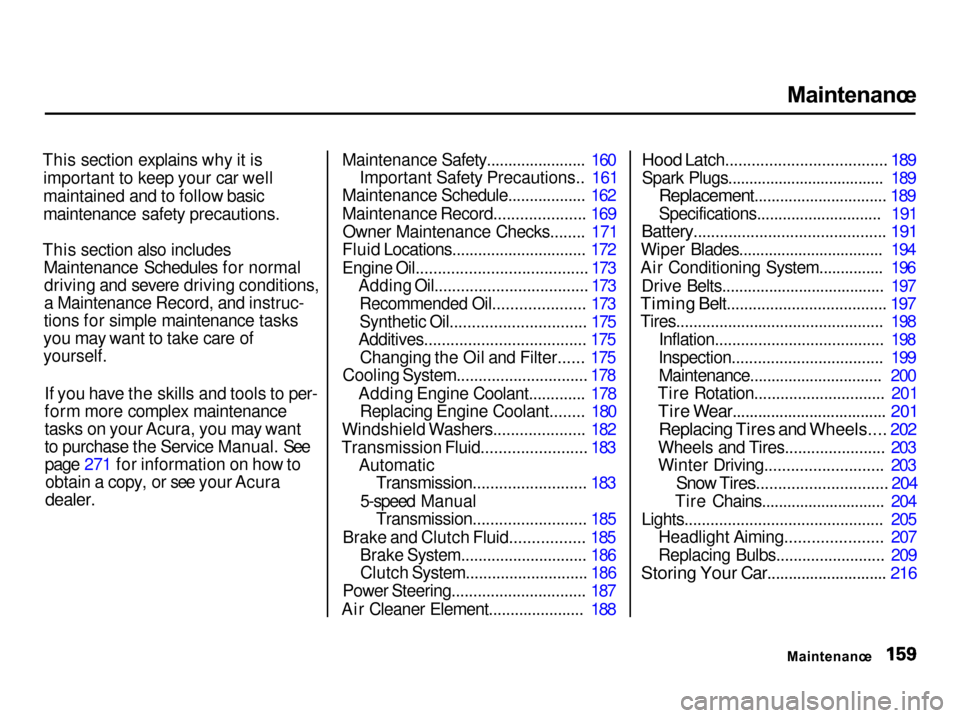
This section explains why it is important to keep your car well
maintained and to follow basic
maintenance safety precautions.
This section also includes Maintenance Schedules for normaldriving and severe driving conditions,
a Maintenance Record, and instruc-
tions for simple maintenance tasks
you may want to take care of
yourself.
If you have the skills and tools to per-
form more complex maintenance
tasks on your Acura, you may want
to purchase the Service Manual. Seepage 271 for information on how toobtain a copy, or see your Acura
dealer.
Maintenance Safety....................... 160
Important Safety Precautions.. 161
Maintenance Schedule.................. 162
Maintenance Record..................... 169
Owner Maintenance Checks........ 171
Fluid Locations............................... 172
Engine Oil....................................... 173 Adding Oil................................... 173
Recommended Oil..................... 173
Synthetic Oil............................... 175
Additives..................................... 175
Changing the Oil and Filter...... 175
Cooling System.............................. 178
Adding Engine Coolant............. 178Replacing Engine Coolant........ 180
Windshield Washers..................... 182
Transmission Fluid........................ 183 AutomaticTransmission.......................... 183
5-speed Manual Transmission.......................... 185
Brake and Clutch Fluid................. 185 Brake System............................. 186Clutch System............................ 186
Power Steering............................... 187
Air Cleaner Element...................... 188
Hood Latch..................................... 189
Spark Plugs..................................... 189
Replacement............................... 189
Specifications............................. 191
Battery............................................ 191
Wiper Blades.................................. 194
Air Conditioning System............... 196
Drive Belts...................................... 197
Timing Belt..................................... 197
Tires................................................ 198
Inflation....................................... 198
Inspection................................... 199 Maintenance............................... 200
Tire Rotation.............................. 201
Tire Wear.................................... 201
Replacing Tires and Wheels.... 202
Wheels and Tires....................... 203
Winter Driving........................... 203
Snow Tires.............................. 204
Tire Chains............................. 204
Lights.............................................. 205 Headlight Aiming...................... 207
Replacing Bulbs......................... 209
Storing Your Car............................ 216
Maintenance
Page 170 of 285
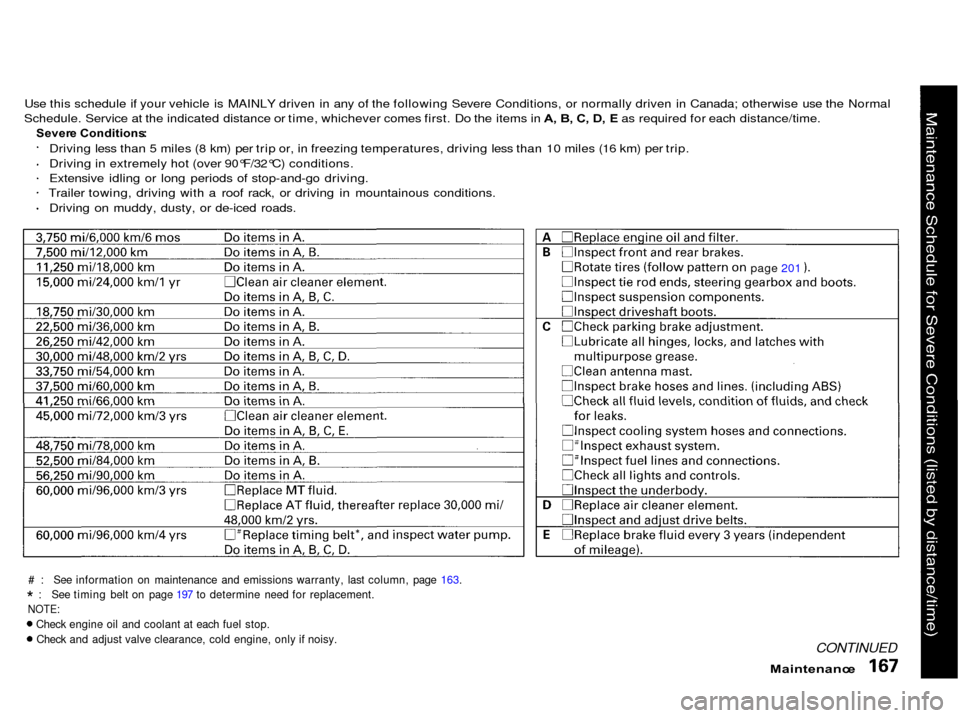
Use this schedule if your vehicle is MAINLY driven in any of the following Severe Conditions, or normally driven in Canada; otherwise use the Normal
Schedule. Service at the indicated distance or time, whichever comes first. Do the items in A , B , C , D , E as required for each distance/time.
Sever e Conditions :
Driving less than 5 miles (8 km) per trip or, in freezing temperatures, driving less than 10 miles (16 km) per trip.
Driving in extremely hot (over 90°F/32°C) conditions.
Extensive idling or long periods of stop-and-go driving.
Trailer towing, driving with a roof rack, or driving in mountainous conditions.
Driving on muddy, dusty, or de-iced roads.
# : See information on maintenance and emissions warranty, last column, page 163.
* : See timing belt on page 197 to determine need for replacement.
NOTE:
Check engine oil and coolant at each fuel stop.
Check and adjust valve clearance, cold engine, only if noisy.
CONTINUED
page
201
Maintenanc
e
Page 171 of 285
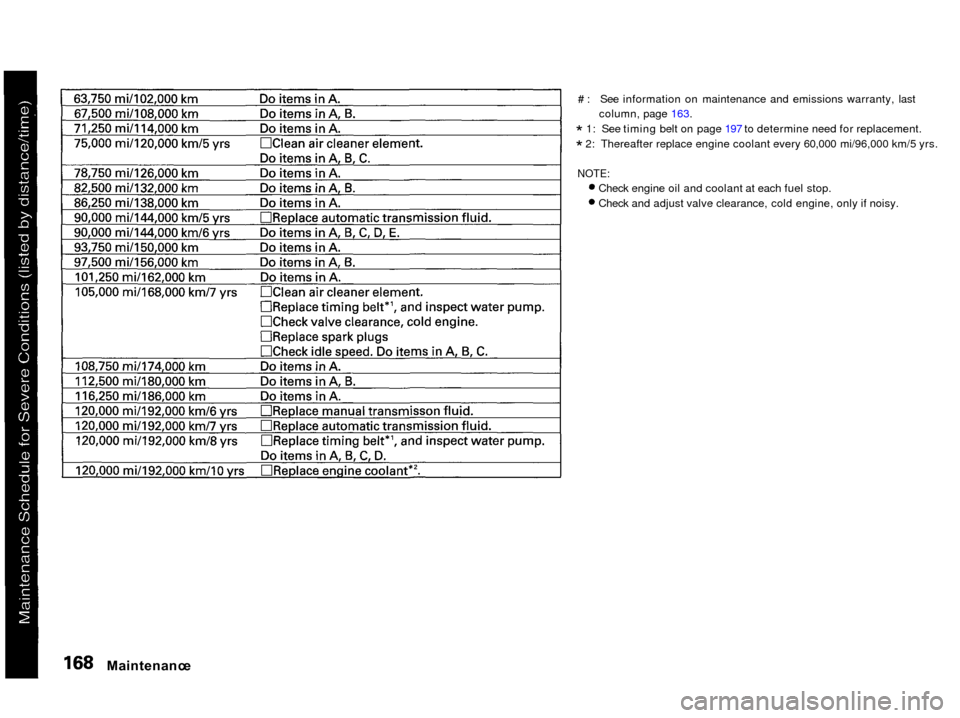
# : See information on maintenance and emissions warranty, last
column, page 163.
* 1: See timing belt on page 197 to determine need for replacement.
* 2: Thereafter replace engine coolant every 60,000 mi/96,000 km/5 yrs.
NOTE:
Check engine oil and coolant at each fuel stop.
Check and adjust valve clearance, cold engine, only if noisy.
Maintenanc
e
Page 200 of 285
Driv
e Belts , Timin g Bel t
Driv e Belt s
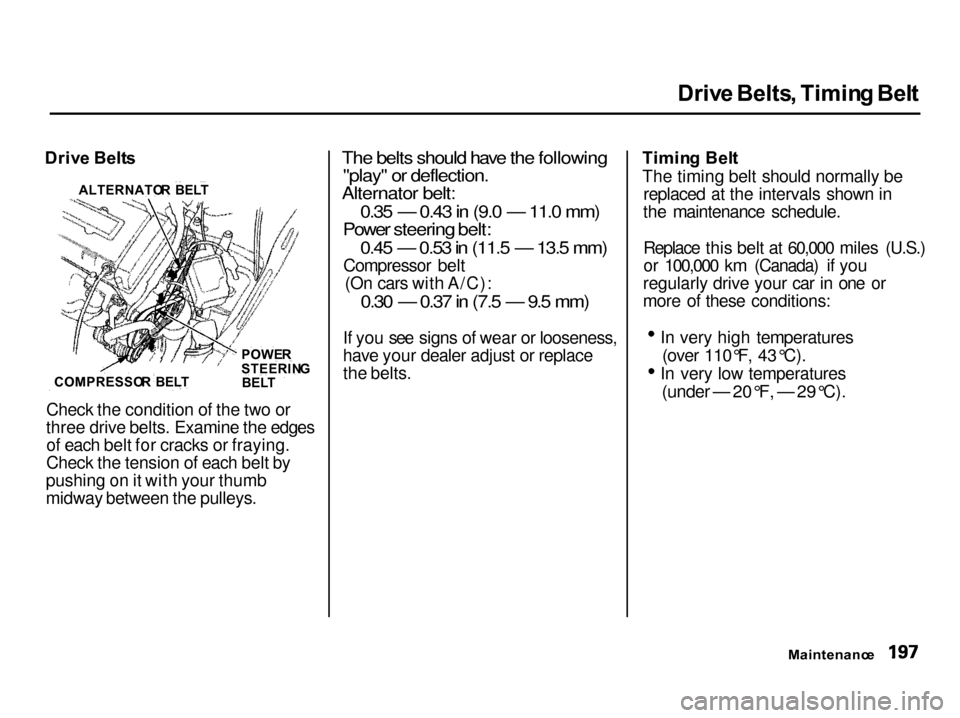
Check the condition of the two or
three drive belts. Examine the edges of each belt for cracks or fraying.
Check the tension of each belt by
pushing on it with your thumb
midway between the pulleys.
The belts should have the following
"play" or deflection.
Alternator belt:
0.35 — 0.43 in (9.0 — 11.0 mm)
Power steering belt:
0.45 — 0.53 in (11.5 — 13.5 mm)
Compressor belt (On cars with A/C):
0.30 — 0.37 in (7.5 — 9.5 mm)
If you see signs of wear or looseness,
have your dealer adjust or replace
the belts. Timin
g Bel t
The timing belt should normally be replaced at the intervals shown in
the maintenance schedule.
Replace this belt at 60,000 miles (U.S.)
or 100,000 km (Canada) if you
regularly drive your car in one or
more of these conditions: In very high temperatures
(over 110°F, 43°C). In very low temperatures
(under — 20°F, — 29°C).
Maintenance
COMPRESSO
R BEL T POWE
R
STEERIN G
BEL T
ALTERNATO
R BEL T
Page 220 of 285
Appearanc
e Car e
Regular cleaning and polishing of
your Acura helps to keep it "new" looking. This section gives you hintson how to clean your car and
preserve its appearance: the paint,
brightwork, wheels and interior. Also
included are several things you can do to help prevent corrosion. Exterior Care.................................. 218
Washing...................................... 218
Power Antenna Cleaning.......... 218
Waxing........................................ 219
Aluminum Wheels..................... 219 Paint Touch-up........................... 219
Interior Care................................... 220 Carpeting.................................... 220
Floor Mats.................................. 220
Fabric.......................................... 221
Vinyl............................................ 221
Leather........................................ 221
Seat Belts.................................... 221
Windows..................................... 222
Air Fresheners........................... 222
Corrosion Protection..................... 223
Body Repairs.................................. 224
Appearance Car e
Page 224 of 285

Interio
r Car e
Fabri c
Vacuum dirt and dust out of the material frequently. For general
cleaning, use a solution of mild soapand lukewarm water, letting it air dry.
To clean off stubborn spots, use a commercially-available fabric cleaner.
Test it on a hidden area of the fabric first, to make sure it does not bleachor stain the fabric. Follow the
instructions that come with the
cleaner.
Viny l
Remove dirt and dust with a vacuum
cleaner. Wipe the vinyl with a soft cloth dampened in a solution of mild
soap and water. Use the samesolution with a soft-bristle brush on
more difficult spots. You can also use
commercially-available spray or
foam-type vinyl cleaners. Leathe
r
On some models
Vacuum dirt and dust from the leather frequently. Pay particularattention to the pleats and seams.Clean the leather with a soft cloth
dampened with clear water, then
buff it with a clean, dry cloth. If
further cleaning is needed, use a soap specifically for leather, such as
saddle soap. Apply this soap with a
damp, soft cloth. Wipe down and
buff as described above. Sea
t Belt s
LOO P
If your seat belts get dirty, you can
use a soft brush with a mixture of
mild soap and warm water to clean
them. Do not use bleach, dye, or cleaning solvents. They can weaken
the belt material. Let the belts air- dry before you use the car.
CONTINUED
Appearanc e Car e
Page 225 of 285

Interio
r Car e
Dirt build-up in the loops of the seat
belt anchors can cause the belts to retract slowly. Wipe the insides of
the loops with a clean cloth dampened in mild soap and warm
water or isopropyl alcohol. Window
s
Clean the windows, inside and out,
with a commercially-available glass cleaner. You can also use a mixtureof one part white vinegar to ten parts
water. This will remove the haze that builds up on the inside of the
windows. Use a soft cloth or paper towels to clean all glass and clear
plastic surfaces.
The rear window defogger wires are
bonded to the inside of the glass. Wiping vigorously up-and-down can
dislodge and break the defogger wires. When cleaning the rear window, use
gentle pressure and wipe side-to-side.
Ai
r Freshener s
If you want to use an air freshener/ deodorizer in the interior of your car,
it is best to use a solid type. Some
liquid air fresheners contain chemi- cals that may cause parts of the
interior trim and fabric to crack ordiscolor.
If you use a liquid air freshener,
make sure you fasten it securely so it does not spill as you drive.
Appearanc e Car e
NOTIC
E
Page 271 of 285

Warrant
y Coverage s
U.S . Owner s
Your new Acura is covered by these warranties:
New Vehicle Limited Warranty —
covers your new vehicle, except for
the battery, emissions control systems and accessories, againstdefects in materials and
workmanship.
Emissions Control Systems Defects
Warranty and Emissions
Performance Warranty — these two
warranties cover your vehicle's emis- sions control systems. Time, mileage,
and coverage are conditional. Please
read the warranty manual for exact
information.
Original Equipment Battery Limited
Warranty — this warranty gives up
to 100 percent credit toward a
replacement battery.
Seat Belt Limited Warranty — a seat
belt that fails to function properly is covered for the useful life of the
vehicle.
Rust Perforation Limited Warranty — all exterior body panels are
covered for rust-through from the
inside for the specified time period
with no mileage limit.
Accessory Limited Warranty —
Genuine Acura Accessories are
covered under this warranty. Time and mileage limits depend on the
type of accessory and other factors. Please read your warranty manual
for details.
Replacement Parts Limited
Warranty — covers all genuine
Honda replacement parts against
defects in materials and workman-
ship.
Replacement Battery Limited
Warranty — provides prorated
coverage for a replacement battery
purchased from an Acura dealer.
Replacement Muffler Lifetime
Limited Warranty — provides
coverage for as long as the pur-
chaser of the muffler owns the car.
Restrictions and exclusions apply to all these warranties. Please read the
2001 Acura Warranty Information
booklet that came with your car for
precise information on warranty coverages. Your Acura's original
tires are covered by their
manufacturer. Tire warranty
information is in a separate booklet.
Canadia n Owner s
Please refer to the 2001 Warranty
Manual that came with your car.
Warrant y an d Custome r Relation s