Window switch Acura Integra 2001 Owner's Manual
[x] Cancel search | Manufacturer: ACURA, Model Year: 2001, Model line: Integra, Model: Acura Integra 2001Pages: 285, PDF Size: 3.79 MB
Page 54 of 285
Instrument
s an d Control s
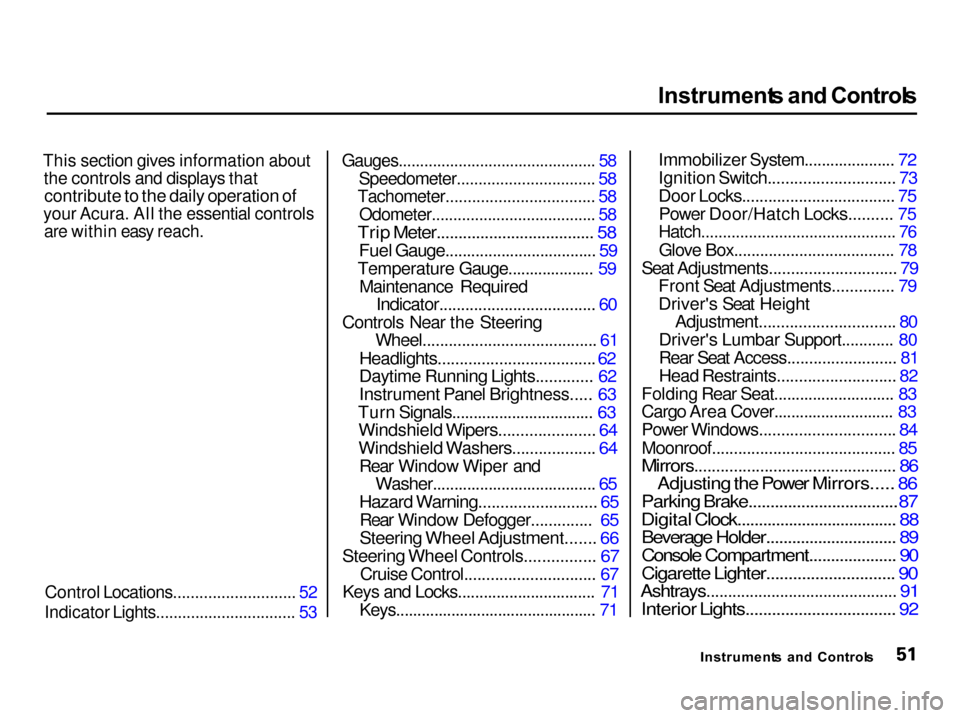
This section gives information about the controls and displays that
contribute to the daily operation of
your Acura. All the essential controls
are within easy reach.
Control Locations............................ 52
Indicator Lights................................ 53
Gauges.............................................. 58
Speedometer................................ 58
Tachometer.................................. 58
Odometer...................................... 58
Trip Meter.................................... 58
Fuel Gauge................................... 59
Temperature Gauge.................... 59 Maintenance Required
Indicator.................................... 60
Controls Near the Steering Wheel........................................ 61
Headlights....................................
62
Daytime Runnin
g Lights............. 62
Instrument Panel Brightness..... 63
Turn Signals................................. 63
Windshield Wipers...................... 64
Windshield Washers................... 64
Rear Window Wiper and
Washer...................................... 65
Hazard Warning........................... 65
Rear Window Defogger..............
65
Steering Whee
l Adjustment....... 66
Steering Wheel Controls................
67
Cruise Control.............................
.
67
Keys
an
d Locks................................
71
Keys...............................................
7
1Immobilizer System..................... 72
Ignition Switch............................. 73
Door Locks................................... 75
Power Door/Hatch Locks.......... 75
Hatch............................................. 76
Glove Box..................................... 78
Seat Adjustments............................. 79
Front Seat Adjustments.............. 79
Driver's Seat Height
Adjustment............................... 80
Driver's Lumbar Support............ 80
Rear Seat Access......................... 81
Head Restraints........................... 82
Folding Rear Seat............................ 83
Cargo Area Cover............................ 83
Power Windows............................... 84
Moonroof.......................................... 85
Mirrors.............................................. 86
Adjusting the Power Mirrors..... 86
Parking Brake..................................
87
Digital Clock....................................
. 88
Beverage Holder.............................. 89
Console Compartment.................... 90
Cigarette Lighter............................. 90
Ashtrays............................................ 91
Interior Lights.................................. 92
Instrument s an d Control s
Page 64 of 285

Control
s Nea r th e Steerin g Whee l
The two levers on the steering column contain controls for driving
features you use most often. The left
lever controls the turn signals, headlights, and high beams. The
right lever controls the windshield
washers and wipers.
The controls on the dashboard to the right of the steering column are for
the instrument panel brightness,
hazard warning lights and rear
window defogger.
The moonroof switch and cruise control switch are to the left of the
steering column.
The tilt adjustment lever on the underside of the steering columnallows you to tilt the steering wheel.
Instruments an d Control s
CRUIS
E
CONTRO L
INSTRUMEN
T PANE L
BRIGHTNES S HAZAR
D WARNIN G
LIGHT S REA
R WINDO W
DEFOGGE R
MOONROO F
HEADLIGHTS /
TUR N SIGNAL S HOR
N
BUTTON S
TIL T ADJUSTMEN T
WINDSHIEL
D
WIPERS/WASHER S
Page 87 of 285

Powe
r Window s
Your car's windows are electrically- powered. Turn the ignition switch toON (II) to raise or lower any window.
Each door has a switch that controls
its window. To open the window,
push the switch down and hold it. Release the switch when you want
the window to stop. Close the
window by pushing the switch up and holding it.
The driver's armrest has a masterpower window control panel. Toopen the passenger's window, push
down on the switch and hold it down
until the window reaches the desired
position. To close the window, push up on the window switch. Release
the switch when the window gets to
the position you want.
Instrument s an d Control s MAI
N SWITC H
DRIVER' S WINDO W SWITC H
Closing a power window on
someone's hands or fingers can
cause serious injury.
Make sure your passengers are
away from the windows before
closing them.
Page 88 of 285

Powe
r Windows , Moonroo f
The master control panel also con- tains these extra features:
AUT O — To open the driver's
window fully, push the window switch firmly down and release it.
The window automatically goes all the way down. To stop the window
from going all the way down, push the window switch up briefly.
To open the driver's window only partially, push the window switchdown lightly and hold it. The window
will stop as soon as you release the
switch.
The AUTO function only works to lower the driver's window. To raisethe window, you must push the
window switch up and hold it until the window reaches the desired
position.
The MAIN switch controls power to
the passenger's window. With thisswitch off, the passenger's window
cannot be raised or lowered. The
MAIN switch does not affect the driver's window. Keep the MAIN
switch off when you have children in
the car so they do not injure them- selves by operating the window
unintentionally. Moonroo
f
On some models
Use the switch on the dashboard to open and close the moonroof. The
ignition switch must be ON (II). Push and hold the switch to
open the moonroof. Release the
switch when the moonroof reaches
the desired position. To close the
moonroof, press and hold the
switch.
Instrument s an d Control s
CONTINUED
Page 100 of 285

Heatin
g an d Coolin g
It is best to leave the system in Fresh
Air mode under almost all conditions. Keeping the system in Recirculation
mode, particularly with the A/C off,
can cause the windows to fog up.
Switch to Recirculation mode when
you are driving through smoky or dusty conditions, then switch back to
Fresh Air mode when the condition
clears.
The outside air intakes for the heating and cooling system are at
the base of the windshield. Keepthese clear of leaves and other
debris.
Ventilation
The flow-through ventilation system draws in outside air, circulates it
through the interior, then exhausts it
through vents near the hatch. 1. Slide the temperature control lever
all the way to the left.
Make sure the A/C is off.
2. Select
and Fresh Air mode.
3. Set the fan to the desired speed.
CONTINUED
Comfor t an d Convenienc e Feature s
MOD
E BUTTON S
RECIRCULATIO
N
BUTTO N
AI
R CONDITIONIN G
BUTTO N
TEMPERATUR E
CONTRO L LEVE R
FA
N CONTRO L
LEVE R
Page 102 of 285

Heatin
g an d Coolin g
If the interior is very warm from
being parked in the sun, you can cool it down more rapidly by setting up
the controls this way:
1. Start the engine.
2. Turn on the A/C by pressing the button. Make sure the tempera-
ture control lever is all the way to
the left.
3. Set the fan to maximum speed.
4. Open the windows partially. Select and Fresh Air mode.
When the interior has cooled down to a more comfortable temperature,close the windows and set the
controls as described for normal
cooling.
Air conditioning places an extra load
on the engine. Watch the engine
coolant temperature gauge (see page 59 ) when driving in stop-and-go
traffic or climbing a long, steep hill. If it moves near the red zone, turnoff the A/C until the gauge reads
normally.
To Heat
To warm the interior:
1. Start the engine. 2. Select and Fresh Air mode.
3. Set the fan to the desired speed.
4. Adjust the warmth of the air with
the temperature control lever.
To Heat and Dehumidify with Air
Conditioning
Air conditioning, as it cools, removes moisture from the air. When used in
combination with the heater, it
makes the interior warm and dry.
1. Switch the fan on.
2. Turn on the air conditioning.
3. Select
and Fresh Air mode.
4. Adjust the temperature control
lever so the mixture of heated andcooled air feels comfortable.
This setting is suitable for all driving conditions whenever the outside
temperature is above 32°F (0°C).
CONTINUED
Comfor t an d Convenienc e Feature s
Page 103 of 285

Heatin
g an d Coolin g
To Defog and Defrost
To remove fog from the inside of the windows:
1. Switch the fan on.
2. Turn on the air conditioning. 3. Select Fresh Air mode and
4. Adjust the temperature control
lever so the air flow from thedefroster vents feels warm.
5. Turn on the rear window defogger to help clear the rear window.
Comfor t an d Convenienc e Feature s
MOD
E BUTTON S
TEMPERATUR E
CONTRO L LEVE R RECIRCULATIO
N
BUTTO N AI
R CONDITIONIN G
BUTTO N
FA N CONTRO L
LEVE R
Page 104 of 285

Heatin
g an d Coolin g
To remove exterior frost or ice from the windshield and side windowsafter the car has been sitting out in
cold weather:
1. Start the engine.
2. Select the Fresh Air mode and 3. Switch the fan and temperature
controls to maximum.
To rapidly remove exterior frost or ice from the windshield (on very colddays), first select the Recirculationmode. Once the windshield is clear,select the Fresh Air mode to avoid
fogging the windows. These settings direct all the air flow
to the defroster vents at the base ofthe windshield and the side windowdefroster vents. The air flow will get
warmer and clear the windows faster as the engine warms up. You can
close the side vents with the dial
underneath each vent. This will send
more warm air to the windshielddefroster vents.
For safety, make sure you have a clear view through all the windows
before driving away.
T
o Tur n Everythin g Of f
To shut off the system temporarily, slide the fan speed and temperature
control levers all the way to the left.
You should shut the system completely off only for the first few
minutes of driving in cold weather,
until the engine coolant warms up enough to operate the heater. Keep
the fan on at all other times so stale air does not build up in the interior.
Comfor t an d Convenienc e Feature s
Page 139 of 285

Preparin
g to Driv e
You should do the following checks and adjustments every day before
you drive your car.
1. Make sure all windows, mirrors, and outside lights are clean and
unobstructed. Remove frost, snow,or ice.
2. Check that the hood and hatch are fully closed.
3. Visually check the tires. If a tire looks low, use a gauge to check its
pressure.
4. Check that any items you may be carrying with you inside are stored
properly or fastened down
securely.
5. Check the adjustment of the seat
(see page 79 ).
6. Check the adjustment of the inside and outside mirrors (see
page 86 ).
7. Check the adjustment of the steering wheel (see page 66 ).
8. Make sure the doors and hatch
are securely closed and locked.
9. Fasten your seat belt. Check that
your passengers have fastened
their seat belts (see page 16 ). 10. Turn the ignition switch ON (II).
Check the indicator lights in the
instrument panel.
11. Start the engine (see page 137).
12. Check the gauges and indicator lights in the instrument panel (see
page 53).
Drivin g
Page 242 of 285

Chargin
g Syste m Indicato r
This indicator should come on when the ignition switch is ON (II), and goout after the engine starts. If it
comes on brightly when the engine
is running, it indicates that the
charging system has stopped
charging the battery. Immediately turn off all electrical
accessories: radio, heater, A/C, rear
defogger, cruise control, etc. Try not
to use other electrically-operated controls such as the power windows.Keep the engine running and take
extra care not to stall it. Starting the
engine will discharge the battery
rapidly. By eliminating as much of the
electrical load as possible, you can
drive several miles (kilometers)
before the battery is too discharged
to keep the engine running. Drive to a service station or garage where
you can get technical assistance.
Takin g Car e o f th e Unexpecte d
CHARGIN
G SYSTE M INDICATO R