wheel ACURA INTEGRA 2023 Owners Manual
[x] Cancel search | Manufacturer: ACURA, Model Year: 2023, Model line: INTEGRA, Model: ACURA INTEGRA 2023Pages: 740, PDF Size: 22.94 MB
Page 685 of 740

683
uuIf a Tire Goes Flat uChanging a Flat Tire
Continued
Handling the Unexpected
1. Pull the strap on the cargo area floor lid and
open the lid.
2. Take the tool case out of the cargo area.
3. Take the jack, wheel nut wrench, and jack
handle bar out of the tool case.
4. Unscrew the wing bolt, and remove the
spacer cone. Then, remove the spare tire.
5. Place a wheel block or rock in front and rear
of the wheel diagonal to the flat tire.
■Getting Ready to Replace the Flat Tire
Strap
Tool Case
Spare Tire
Wheel
Blocks
The tire to be replaced.
23 ACURA INTEGRA-313S56000_03.book 683 ページ 2022年3月18日 金曜日 午前11時47分
Page 686 of 740

684
uuIf a Tire Goes Flat uChanging a Flat Tire
Handling the Unexpected
6. Place the compact spare tire (wheel side up)
under the vehicle body, near the tire that
needs to be replaced.
7. Loosen each wheel nut about one turn
using the wheel nut wrench.
23 ACURA INTEGRA-313S56000_03.book 684 ページ 2022年3月18日 金曜日 午前11時47分
Page 687 of 740
Continued685
uuIf a Tire Goes Flat uChanging a Flat Tire
Handling the Unexpected
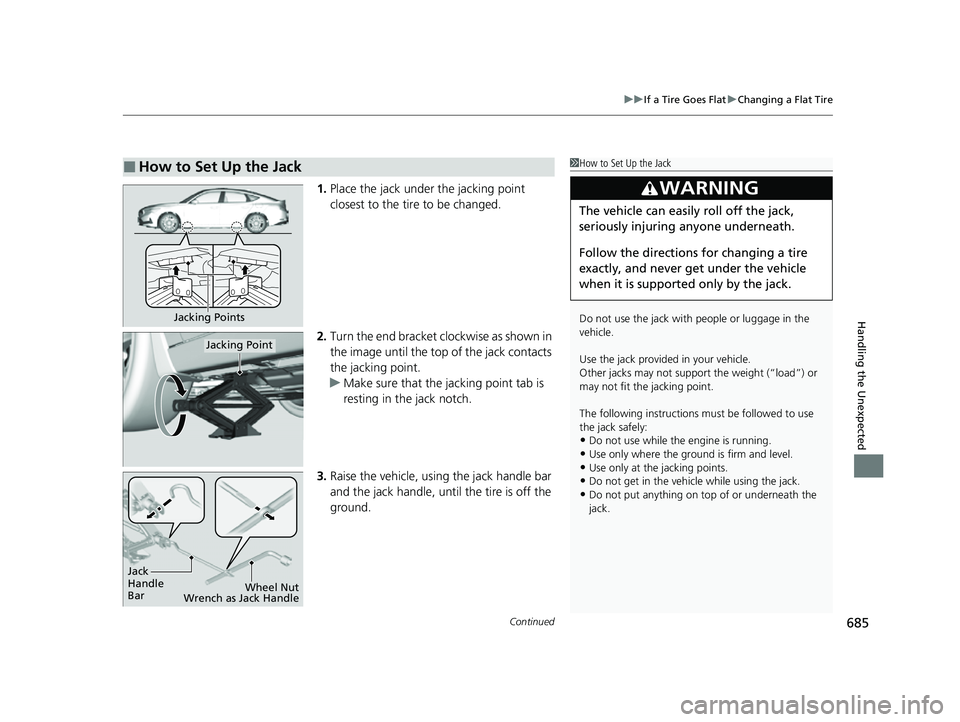
1. Place the jack under the jacking point
closest to the tire to be changed.
2. Turn the end bracket cl ockwise as shown in
the image until the top of the jack contacts
the jacking point.
u Make sure that the jacking point tab is
resting in the jack notch.
3. Raise the vehicle, using the jack handle bar
and the jack handle, until the tire is off the
ground.
■How to Set Up the Jack1How to Set Up the Jack
Do not use the jack with people or luggage in the
vehicle.
Use the jack provided in your vehicle.
Other jacks may not support the weight (“load”) or
may not fit the jacking point.
The following instructions must be followed to use
the jack safely:
•Do not use while the engine is running.
•Use only where the ground is firm and level.
•Use only at the jacking points.•Do not get in the vehicl e while using the jack.
•Do not put anything on top of or underneath the
jack.
3WARNING
The vehicle can easily roll off the jack,
seriously injuring anyone underneath.
Follow the directions for changing a tire
exactly, and never get under the vehicle
when it is supported only by the jack.
Jacking Points
Jacking Point
Jack
Handle
Bar Wheel Nut
Wrench as Jack Handle
23 ACURA INTEGRA-313S56000_03.book 685 ページ 2022年3月18日 金曜日 午前11時47分
Page 688 of 740
uuIf a Tire Goes Flat uChanging a Flat Tire
686
Handling the Unexpected
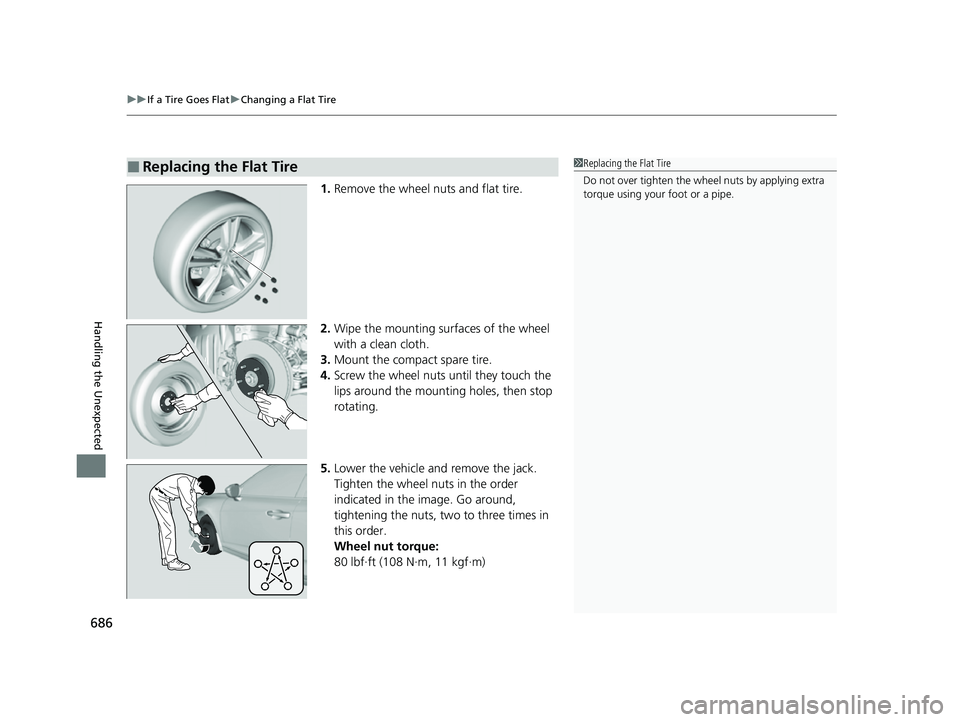
1. Remove the wheel nuts and flat tire.
2. Wipe the mounting surfaces of the wheel
with a clean cloth.
3. Mount the compact spare tire.
4. Screw the wheel nuts until they touch the
lips around the mounting holes, then stop
rotating.
5. Lower the vehicle and remove the jack.
Tighten the wheel nuts in the order
indicated in the image. Go around,
tightening the nuts, two to three times in
this order.
Wheel nut torque:
80 lbf∙ft (108 N∙m, 11 kgf∙m)
■Replacing the Flat Tire1Replacing the Flat Tire
Do not over tighten the wheel nuts by applying extra
torque using your foot or a pipe.
23 ACURA INTEGRA-313S56000_03.book 686 ページ 2022年3月18日 金曜日 午前11時47分
Page 689 of 740

Continued687
uuIf a Tire Goes Flat uChanging a Flat Tire
Handling the Unexpected
1. Remove the center cap.
2. Place the flat tire face down in the spare tire
well.
3. Remove the spacer cone from the wing
bolt, flip it over, and insert it back on the
bolt. Secure the flat tire with the wing bolt.
4. Securely store the jack, wheel nut wrench,
and jack handle bar back in the tool case.
Store the case in the cargo area.
■Storing the Flat Tire1Storing the Flat Tire
3WARNING
Loose items can fly around the interior in a
crash and can seriously injure the
occupants.
Store the wheel, jack, and tools securely
before driving.
Center Cap
Spacer Cone
Wing Bolt
For
compact
spare tireFor full-
size tire
23 ACURA INTEGRA-313S56000_03.book 687 ページ 2022年3月18日 金曜日 午前11時47分
Page 695 of 740
693
uuEngine Does Not StartuEmergency Engine Stop
Handling the Unexpected
Emergency Engine Stop
The ENGINE START/STOP button may be used to stop the engine due to an
emergency situation even while driving. If you must stop the engine, do either of the
following operations:
• Press and hold the ENGINE START/STOP button for about two seconds.
• Firmly press the ENGINE START/STOP button three times.
The steering wheel will not lock. However, because turning off the engine disables
the power assist the engine provides to the steering and braking systems, it will
require significantly more physical effort an d time to steer and slow the vehicle. Use
both feet on the brake pedal to slow down the vehicle and stop immediately in a
safe place. With manual transmission models you can also downshift the
transmission to utilize engine braking.
The power mode is in ACCESSORY when the engine is stopped.
To change the mode to VEHICLE OFF, put the transmission into
(P after the vehicle
comes to a complete stop.
The power mode changes to VEHICLE OFF.
1 Emergency Engine Stop
Do not press the ENGINE START/STOP button while
driving unless it is absolute ly necessary for the engine
to be turned off.
If you press the ENGINE START/STOP button while
driving, the beeper sounds.
Continuously variable transmission models
Manual transmission models
23 ACURA INTEGRA-313S56000_03.book 693 ページ 2022年3月18日 金曜日 午前11時47分
Page 713 of 740

711
Handling the Unexpected
Emergency Towing
Call a professional towing service if you need to tow your vehicle.
■Flatbed equipment
The operator loads your vehicle on the back of a truck.
This is the best way to transport your vehicle.
■Wheel lift equipment
The tow truck uses two pivoti ng arms that go under the front tires and lift them off
the ground. The rear tires remain on the ground. This is an acceptable way to
tow your vehicle.
1 Emergency Towing
NOTICE
Trying to lift or tow your vehicle by the bumpers will
cause serious damage. The bumpers are not designed
to support the vehicle's weight.
Make sure the parking brake is released. If you
cannot release the parking brake, your vehicle must
be transported by the flatbed equipment. 2 Parking Brake P. 584
NOTICE
Improper towing such as towing behind a
motorhome or other motor vehicle can damage the
transmission.
Never tow your vehicle with just a rope or chain.
It is very dangerous since ropes or chains may shift
from side to side or break.
23 ACURA INTEGRA-313S56000_03.book 711 ページ 2022年3月18日 金曜日 午前11時47分
Page 719 of 740
717
uuSpecifications u
Information
■
Brake/Clutch* Fluid
■ Continuously Variable Transmission
Fluid
*
■ Manual Transmi ssion Fluid*
SpecifiedAcura Heavy Duty Brake Fluid DOT 3
SpecifiedAcura HCF-2
Capacity Change 3.9 US qt (3.7 L)
SpecifiedAcura MTF
Capacity Change 2.0 US qt (1.9 L)
■ Engine Oil
■ Engine Coolant
*1: Continuously Variable Transmission models
*2: Manual Transmission models
Recommended·Acura Genuine Motor Oil 0W-20
·API service SN or higher grade 0W-20
Capacity Change 3.4 US qt (3.2 L)
Change
including
filter
3.7 US qt (3.5 L)
SpecifiedAcura Long-Life Antifreeze/Coolant Type 2
Ratio 50/50 with distilled water
Capacity
1.51 US gal (5.72 L)*1
1.48 US gal (5.59 L)*2
(change including the remaining
0.17 US gal (0.65 L) in the reserve tank)
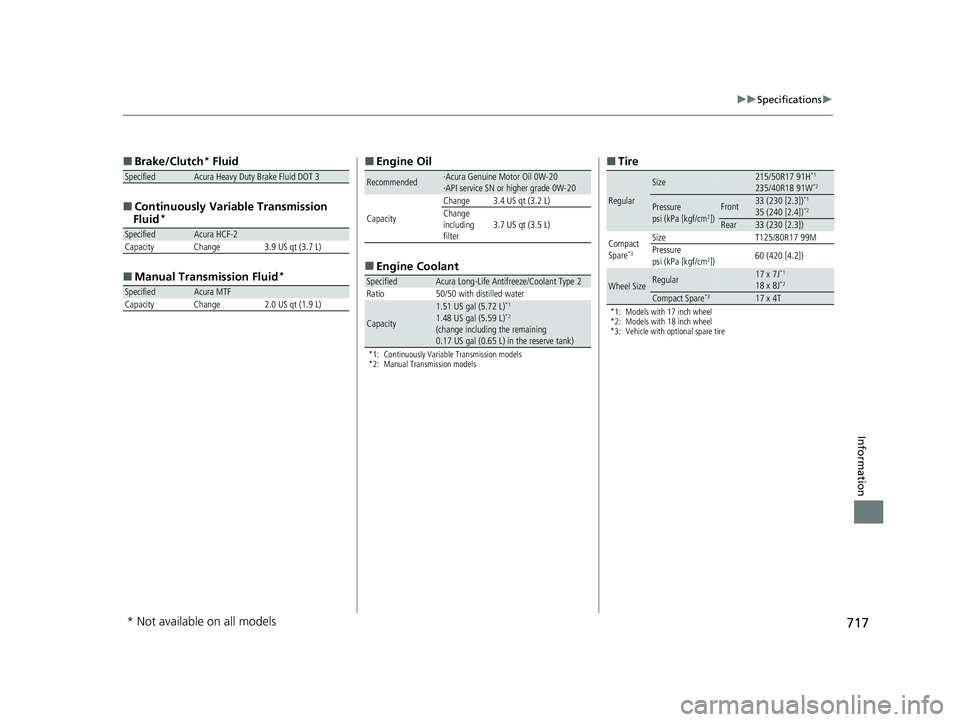
■ Tire
*1: Models with 17 inch wheel
*2: Models with 18 inch wheel
*3: Vehicle with optional spare tire
Regular
Size215/50R17 91H*1
235/40R18 91W*2
Pressure
psi (kPa [kgf/cm2])Front33 (230 [2.3])*1
35 (240 [2.4])*2
Rear33 (230 [2.3])
Compact
Spare
*3
Size T125/80R17 99M
Pressure
psi (kPa [kgf/cm
2]) 60 (420 [4.2])
Wheel SizeRegular17 x 7J*1
18 x 8J*2
Compact Spare*317 x 4T
* Not available on all models
23 ACURA INTEGRA-313S56000_03.book 717 ページ 2022年3月18日 金曜日 午前11時47分
Page 731 of 740
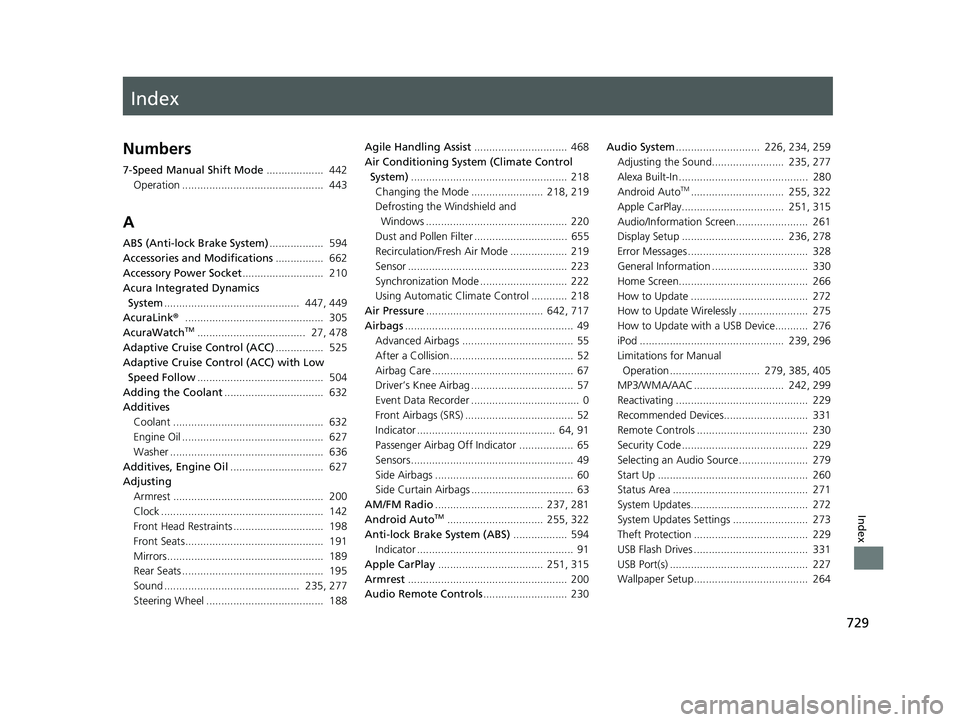
Index
729
Index
Index
Numbers
7-Speed Manual Shift Mode................... 442
Operation ............................................... 443
A
ABS (Anti-lock Brake System) .................. 594
Accessories and Modifications ................ 662
Accessory Power Socket ........................... 210
Acura Integrated Dynamics
System ............................................. 447, 449
AcuraLink® .............................................. 305
AcuraWatch
TM.................................... 27, 478
Adaptive Cruise Control (ACC) ................ 525
Adaptive Cruise Control (ACC) with Low Speed Follow .......................................... 504
Adding the Coolant ................................. 632
Additives
Coolant .................................................. 632
Engine Oil ............................................... 627
Washer ................................................... 636
Additives, Engine Oil ............................... 627
Adjusting Armrest .................................................. 200
Clock ...................................................... 142
Front Head Restraints .............................. 198
Front Seats.............................................. 191
Mirrors.................................................... 189
Rear Seats ............................................... 195
Sound ............................................. 235, 277
Steering Wheel ....................................... 188 Agile Handling Assist
............................... 468
Air Conditioning System (Climate Control
System) .................................................... 218
Changing the Mode ........................ 218, 219
Defrosting the Windshield and
Windows ............................................... 220
Dust and Pollen Filter ............................... 655
Recirculation/Fresh Air Mode ................... 219
Sensor ..................................................... 223
Synchronization Mode ............................. 222
Using Automatic Climate Control ............ 218
Air Pressure ....................................... 642, 717
Airbags ........................................................ 49
Advanced Airbags ..................................... 55
After a Collision ......................................... 52
Airbag Care ............................................... 67
Driver’s Knee Airbag .................................. 57
Event Data Recorder .................................... 0
Front Airbags (SRS) .................................... 52
Indicator .............................................. 64, 91
Passenger Airbag Off Indicator .................. 65
Sensors ...................................................... 49
Side Airbags .............................................. 60
Side Curtain Airbags .................................. 63
AM/FM Radio .................................... 237, 281
Android Auto
TM................................ 255, 322
Anti-lock Brake System (ABS) .................. 594
Indicator .................................................... 91
Apple CarPlay ................................... 251, 315
Armrest ..................................................... 200
Audio Remote Controls ............................ 230 Audio System
............................ 226, 234, 259
Adjusting the Sound........................ 235, 277
Alexa Built-In ........................................... 280
Android Auto
TM............................... 255, 322
Apple CarPlay.................................. 251, 315
Audio/Information Screen........................ 261
Display Setup .................................. 236, 278
Error Messages ........................................ 328
General Information ................................ 330
Home Screen........................................... 266
How to Update ....................................... 272
How to Update Wirelessly ....................... 275
How to Update with a USB Device........... 276
iPod ................................................ 239, 296
Limitations for Manual Operation .............................. 279, 385, 405
MP3/WMA/AAC .............................. 242, 299
Reactivating ............................................ 229
Recommended Devices............................ 331
Remote Controls ..................................... 230
Security Code .......................................... 229
Selecting an Audio Source ....................... 279
Start Up .................................................. 260
Status Area ............................................. 271
System Updates....................................... 272
System Updates Settings ......................... 273
Theft Protection ...................................... 229
USB Flash Drives ...................................... 331
USB Port(s) .............................................. 227
Wallpaper Setup...................................... 264
23 ACURA INTEGRA-313S56000_03.book 729 ページ 2022年3月18日 金曜日 午前11時47分
Page 734 of 740

732
Index
F
Features..................................................... 225
Filters Dust and Pollen ....................................... 655
Oil ........................................................... 630
Flat Tire ..................................................... 667
Floor Mats ................................................. 657
Fluids
Brake ....................................................... 635
Continuously Variable Transmission ......... 634
Engine Coolant ........................................ 632
Manual Transmission ............................... 634
Windshield Washer .................................. 636
FM/AM Radio .................................... 237, 281
Fog Light Indicator ..................................... 93
Folding Down the Rear Seats ................... 195
Foot Brake ................................................. 588
Front Airbags (SRS) ..................................... 52
Front Head Restraints ............................... 198
Front Seat Heaters .................................... 216
Front Seats Adjusting ................................................. 191
Front Wide View Camera ......................... 581
Fuel ...................................................... 26, 608
Average Fuel Economy............................. 114
Economy ................................................. 611
Gauge ..................................................... 105
Instant Fuel Economy ............................... 114
Low Fuel Indicator ..................................... 91
Range ...................................................... 114
Recommendation .................................... 608 Refueling......................................... 608, 714
Fuel Economy ........................................... 611
Fuel Fill Door ...................................... 26, 609
Fuses .......................................................... 705
Inspecting and Changing......................... 709
Locations......................................... 705, 707
G
Gasoline (Fuel)
Average Fuel Economy ............................ 114
Economy ................................................. 611
Gauge ..................................................... 105
Information ............................................. 608
Instant Fuel Economy .............................. 114
Low Fuel Indicator ..................................... 91
Refueling......................................... 608, 714
Gauge Display Settings ............................ 125
Gauges ...................................................... 104
Gear Shift Lever Positions Manual Transmission ............................... 444
Glass (care) ........................................ 657, 660
Glove Box .................................................. 202
H
Handling the Unexpected ........................ 665
HandsFreeLink ® (HFL) ....................... 383, 403
Automatic Import of Cellular
Phonebook and Call History........... 395, 413
Automatic Transferring.................... 393, 412 Favorite Contacts ............................ 396, 414
HFL Buttons .................................... 383, 403
HFL Menus...................................... 386, 406
HFL Status Display ........................... 385, 405
In Case of Emergency ............................. 420
Limitations for Manual Operation .... 385, 405
Making a Call ................................. 398, 416
Options During a Call...................... 402, 419
Phone Setup ................................... 388, 408
Receiving a Call............................... 401, 418
Ring Tone ....................................... 393, 412
Hatch ........................................................ 162
Light Bulb ............................................... 716
Unable to Open ...................................... 713
Hazard Warning Button .............................. 6
HD Radio
TM............................................... 282
Headlights ................................................ 176
Aiming.................................................... 637
Auto High-Beam ..................................... 180
Automatic Operation .............................. 177
Dimming................................................. 176
Operating ............................................... 176
Head-Up Display ...................................... 135
Heated Steering Wheel ........................... 215
Heaters (Front Seat) ................................. 216
Heaters (Rear Seat) .................................. 217
HFL (HandsFreeLink ®) ...................... 383, 403
High Beam Indicator .................................. 93
Hill Start Assist System ............................. 436
Honda App License Agreement .............. 332
23 ACURA INTEGRA-313S56000_03.book 732 ページ 2022年3月18日 金曜日 午前11時47分