wheel ACURA INTEGRA 2023 Owners Manual
[x] Cancel search | Manufacturer: ACURA, Model Year: 2023, Model line: INTEGRA, Model: ACURA INTEGRA 2023Pages: 740, PDF Size: 22.94 MB
Page 561 of 740

Continued559
uuAcuraWatchTMuTraffic Jam Assist*
Driving
Traffic Jam Assist is activated when all of the following conditions exist:
• LKAS is activated.
• The lane in which you are driving has detectable lane markers on both sides, and
your vehicle is in the center of the lane.
• The vehicle is traveling between about 0 and 45mph (0 and 72km/h).
• You are driving on a straight or slightly curved road.
• The driver is grippi ng the steering wheel.
• The shift position is in
(D or (S.
Do not use Traffic Jam Assist in any of the following situations:
• You are traveling on a ro ad with sharp curves.
u The system may not allow your vehicle to respond in a manner best suited for
the road conditions.
• You are entering a toll booth, inte rchange, service area, or parking area.
• You are driving in adverse weat her (rain, fog, snow, etc.).
• The surface of the road is slippery; for example, it is icy or covered with snow.
u The tires may slip, causing you to lose control of the vehicle.
■Traffic Jam Assist Activation1Traffic Jam Assist Activation
Refer to the following pa ge for proper handling of
the Lane Keeping Assist System (LKAS):
2 Lane Keeping Assist System (LKAS) P. 545
Refer to the following page for steering buttons and
displays: 2 Operation Switches for the Adaptive
Cruise Control (ACC) with Low Speed
Follow
*/Adaptive Cruise Control (ACC)*/
Lane Keeping Assist System (LKAS)/Traffic
Jam Assist
* P. 479
* Not available on all models
23 ACURA INTEGRA-313S56000_03.book 559 ページ 2022年3月18日 金曜日 午前11時47分
Page 562 of 740

uuAcuraWatchTMuTraffic Jam Assist*
560
Driving
Keep your vehicle near the center of the lane
while driving.
u The LKAS indicator changes from white
to green, and white lines change to
green once the system starts operating
after detecting the left and right lane
markings.
■How Traffic Jam Assist Works1How Traffic Jam Assist Works
If your vehicle veers too far to the right or the left of
the white (or yellow) traffic lane lines while Traffic
Jam Assist is active, deactivate Traffic Jam Assist and
have your vehicle inspected by a dealer.
In some cases the system cannot properly detect the
traffic lane lines and, as a result, will not provide
steering assistance.
2 Traffic Jam Assist Conditions and
Limitations P. 562
If the driver takes their hands off the steering wheel
or does not adequately main tain control of steering,
the warning below will appear.
If the driver does not grip the steering wheel after the
warning above has repeatedly appeared, a warning
buzzer will sound and Traffi c Jam Assist will be
canceled.
Green lines
LKAS indicator (green)
23 ACURA INTEGRA-313S56000_03.book 560 ページ 2022年3月18日 金曜日 午前11時47分
Page 563 of 740

Continued561
uuAcuraWatchTMuTraffic Jam Assist*
Driving
Press the LKAS button to ca ncel Traffic Jam Assist.
■Traffic Jam Assist may be au tomatically suspended when:
The system is automatically temporarily canceled under the follo wing circumstances.
• The system fails to detect lane lines.
• The steering wheel is turned sharply.
• You fail to steer the vehicle.
• You are driving through a sharp curve.
• The brake pedal is depressed.
Once these conditions no longer exist, Traffic Jam Assist automatically resumes.
■Traffic Jam Assist may be automatically canceled when:
The traffic lane lines will disappear from the screen, the beeper may sound, and
Traffic Jam Assist will be canceled under the following circumstances:
• The temperature of the camera is too high.
• The camera behind the rearview mirror, or the area around the camera, including
the windshield, is dirty.
■Canceling Traffic Jam Assist
1 Traffic Jam Assist may be au tomatically suspended when:
You are traveling over 45mph (72km/h).
u When the speed of the vehicle reaches 45mph
(72km/h), Traffic Jam Assist is deactivated and LKAS
is activated instead. Once the speed of the vehicle
drops to under 40 mph (64 km/h), Traffic Jam Assist
is reactivated.
23 ACURA INTEGRA-313S56000_03.book 561 ページ 2022年3月18日 金曜日 午前11時47分
Page 567 of 740

565
uuAcuraWatchTMuTraffic Jam Assist*
Driving
■Vehicle conditions
• When lighting is weak due to dirt coveri ng the headlight lenses, or there is poor
visibility in a dark place due to the headlights being improperly adjusted.
• The front of the camera is covered by dirt, fog, rain, mud, wet snow, seals,
accessories, stickers, or film on the windshield.
• Driving at night or in a dark place (e.g., a tunnel) with the headlights off.
• There is residue on the windshie ld from the windshield wipers.
• An abnormal tire or wheel condition (inco rrect sizes, varied sizes or construction,
improperly inflated, co mpact spare tire, etc.).
• The vehicle is tilted due to a heavy load in the cargo area or rear seats.
• The suspension has been modified.
• Tire chains are installed.
23 ACURA INTEGRA-313S56000_03.book 565 ページ 2022年3月18日 金曜日 午前11時47分
Page 569 of 740

Continued567
uuAcuraWatchTMuRoad Departure Mitigation System
Driving
The front wide view camera behind the
rearview mirror monitors left and right lane
markings in white or yellow, the outer edge of
the pavement (bordered by grass or gravel) or
a detected oncoming vehicles.
If your vehicle approach es any detected lane
markings, the outer edge of the pavement
(bordered by grass or gravel) or a detected
oncoming vehicles when the turn signals have
not been engaged, the system activates.
u If the system cannot detect lane
markings (in white or yellow), no
assistance will be provided to avoid
approaching oncoming vehicles. In
addition to a visual alert, the system
assists with steering and alerts you with
rapid steering wheel vibrations to help
you remain within the detected lane.
2 Vehicle Settings* P. 126
2 Customized Features P. 359
As a visual alert, the Lane departure
message appears on the driver information
interface.
■How the System Works1 Road Departure Mitigation System
There are times when you may not notice the Road
Departure Mitigation system functions due to your
operation of the vehicle, or road surface conditions.
You can change the settin gs for the Road Departure
Mitigation system.
If LKAS is off, the message below may appear if the
system has determined that there is a possibility of
your vehicle crossing over detected lane markings,
the outer edge of the pavement (into a grass or
gravel border) or oncoming vehicle.
2 Vehicle Settings
* P. 126
2 Customized Features P. 359
Models with 7-in. Color Touchscreen
Models with 9-in. Color Touchscreen
Amber
line
Models with 7-in. Color Touchscreen
Models with 9-in. Color Touchscreen
* Not available on all models
23 ACURA INTEGRA-313S56000_03.book 567 ページ 2022年3月18日 金曜日 午前11時47分
Page 570 of 740

uuAcuraWatchTMuRoad Departure Mitigation System
568
Driving
The system cancels assisting operations when you turn th e steering wheel to avoid
crossing over detected lane markings or approaching the outer edge of the
pavement (into grass or gravel border) or an oncoming vehicle.
If the system operates several times without detecting driver response, the system
beeps to alert you.
The system activates when all of the following conditions are met:
• The outer edge of the pavement is grass or gravel border.
• The vehicle is traveling between about 45 and 90 mph (72 and 145 km/h).
• The vehicle is on a straight or slightly curved road.
• The turn signals are off.
• The system makes a determination that the driver is not actively accelerating,
braking, or steering.
■How the System Activates1How the System Activates
The Road Departure Mi tigation system may
automatically shut off and the safety support
indicator (amber) co mes and stays on.
2 Indicators P. 84
The Road Departure Mitiga tion system function can
be impacted when the vehicle is:
•Driven on the inside edge of a curve, or outside of
a lane.
•Driven in a narrow lane.
23 ACURA INTEGRA-313S56000_03.book 568 ページ 2022年3月18日 金曜日 午前11時47分
Page 571 of 740

Continued569
uuAcuraWatchTMuRoad Departure Mitigation System
Driving
You can turn the system on and off using the driver information interface.
2 Switching the Display P. 112
2 Safety Support P. 121
The Road Departure Mitigation system is in the previously selected on (checked) or
off (unchecked) setting each time you start the engine.
■Road Departure Mitigation system On and Off1Road Departure Mitigation system On and Off
When you have selected Warning Only , the system
does not operate the steering wheel.
2 Vehicle Settings
* P. 126
2 Customized Features P. 359
The Vehicle Stability Assist
TM (VSA ®) system, Adaptive
Cruise Control (ACC)*, Adaptive Cruise Control
(ACC) with Low Speed Follow* and safety support
indicators may come on in amber along with a
message in the gauge when you set the power mode
to ON after reconnecting the battery.
Drive a short distance at more than 12 mph (20 km/h).
Each indicator should go off. If any do not, have your
vehicle checked by a dealer.
Models with 7-in. Color Touchscreen
Models with 9-in. Color Touchscreen
* Not available on all models
23 ACURA INTEGRA-313S56000_03.book 569 ページ 2022年3月18日 金曜日 午前11時47分
Page 574 of 740

572
uuAcuraWatchTMuRoad Departure Mitigation System
Driving
■Vehicle conditions
• When lighting is weak due to dirt covering the headlight lenses, or there is poor
visibility in a dark place due to th e headlights being improperly adjusted.
• The front of the camera is covered by dirt, fog, rain, mud, wet snow, seals,
accessories, stickers, or film on the windshield.
• Driving at night or in a dark place (e .g., a tunnel) with the headlights off.
• When the driver operates the brake pedal and steering wheel.
• There is residue on the windshie ld from the windshield wipers.
• An abnormal tire or wheel condition (incor rect sizes, varied sizes or construction,
improperly inflated, comp act spare tire, etc.).
• The vehicle is tilted due to heavy lo ad in the cargo area or rear seats.
• Tire chains are installed.
• The suspension ha s been modified.
■Examples of limitations on detection due to the condition of oncoming
vehicles
• The oncoming vehicle or vehicle ahead of you is sideways.
• The oncoming vehicle jumps out in front of you.
• When the oncoming vehicle blends in with the background, preventing the
system from recognizing it.
• The headlights of an oncoming vehicle are lit on one side or not lit on either side
in a dark place.
• The distance between your vehicle an d the oncoming vehicle is too short.
• Part of the oncoming vehicle is not vi sible due to the vehicle ahead of you.
• There are multiple oncoming lanes or turning lanes.
• The vehicle in the adjacent lane is parked or moving at an extremely slow speed.
23 ACURA INTEGRA-313S56000_03.book 572 ページ 2022年3月18日 金曜日 午前11時47分
Page 579 of 740

Continued577
uuAcuraWatchTMuTraffic Sign Recognition System
Driving
The traffic sign recognition system may not be able to recognize a traffic sign in the
following cases.
■Environmental conditions
• Driving into low sunlight (e.g., at dawn or dusk).
• Strong light is reflec ted onto the roadway.
• Driving at night, in dark areas such as long tunnels.
• Driving in bad weather (rain, fog, snow, etc.).
• Sudden changes between light and dark, such as the entrance or exit of a tunnel
or the shadows of trees, buildings, etc.
• Water is sprayed by or snow blown from a vehicle ahead.
■Roadway conditions
• Your vehicle is strongly shaken on uneven road surfaces.
■Vehicle conditions
• When lighting is weak due to dirt coveri ng the headlight lenses, or there is poor
visibility in a dark place due to the headlights being improperly adjusted.
• The front of the camera is covered by dirt, fog, rain, mud, wet snow, seals,
accessories, stickers, or film on the windshield.
• There is residue on the windshie ld from the windshield wipers.
• An abnormal tire or wheel condition (inco rrect sizes, varied sizes or construction,
improperly inflated, co mpact spare tire, etc.).
• The vehicle is tilted due to heavy load in the cargo area or rear seats.
• The suspension has been modified.
• Tire chains are installed.
• Driving at night or in a dark place (e.g., a tunnel) with the headlights off.
■Traffic Sign Recognition System Conditions and Limitations1Traffic Sign Recognition System Conditions and Limitations
When the traffic sign recognition system
malfunctions, appears on the gauge and the
head-up display
*. If this message does not disappear,
have your vehicle ch ecked by a dealer.
Gauge
Head-up display*
* Not available on all models
23 ACURA INTEGRA-313S56000_03.book 577 ページ 2022年3月18日 金曜日 午前11時47分
Page 586 of 740
584
Driving
Braking
Brake System
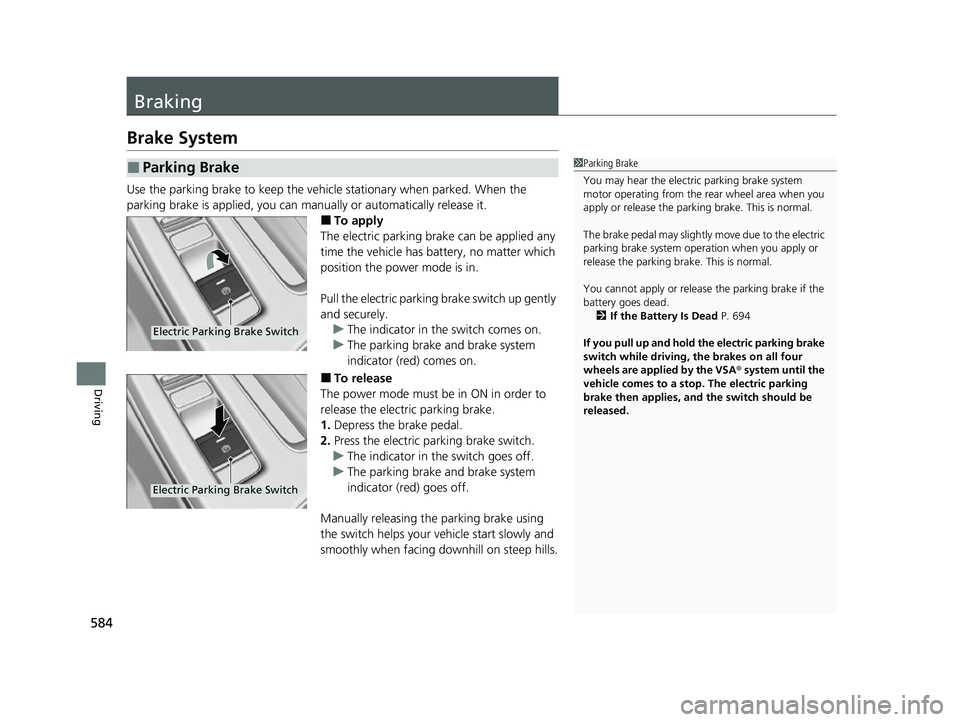
Use the parking brake to keep the vehicle stationary when parked. When the
parking brake is applied, you can manually or automatically release it.
■To apply
The electric parking brake can be applied any
time the vehicle has battery, no matter which
position the power mode is in.
Pull the electric parking brake switch up gently
and securely. u The indicator in th e switch comes on.
u The parking brake and brake system
indicator (red) comes on.
■To release
The power mode must be in ON in order to
release the electric parking brake.
1. Depress the brake pedal.
2. Press the electric parking brake switch.
u The indicator in th e switch goes off.
u The parking brake and brake system
indicator (red) goes off.
Manually releasing the parking brake using
the switch helps your ve hicle start slowly and
smoothly when facing downhill on steep hills.
■Parking Brake1 Parking Brake
You may hear the electric parking brake system
motor operating from the re ar wheel area when you
apply or release the parki ng brake. This is normal.
The brake pedal may slightly move due to the electric
parking brake system opera tion when you apply or
release the parking br ake. This is normal.
You cannot apply or release the parking brake if the
battery goes dead. 2 If the Battery Is Dead P. 694
If you pull up and hold the electric parking brake
switch while driving, the brakes on all four
wheels are applied by the VSA ® system until the
vehicle comes to a stop. The electric parking
brake then applies, and the switch should be
released.
Electric Parking Brake Switch
Electric Parking Brake Switch
23 ACURA INTEGRA-313S56000_03.book 584 ページ 2022年3月18日 金曜日 午前11時47分