USB ACURA INTEGRA 2023 User Guide
[x] Cancel search | Manufacturer: ACURA, Model Year: 2023, Model line: INTEGRA, Model: ACURA INTEGRA 2023Pages: 740, PDF Size: 22.94 MB
Page 234 of 740

232
uuAudio System uAudio Remote Controls
Features
Allow you to operate the audio system while driving. The information is shown on
the driver information interface.
VOL
(+/VOL(- (Volume) Switch
Press Up: To increase the volume.
Press Down: To decrease the volume.
/ (Seek/Skip) Buttons
• When listening to the radio
Press : To select the next preset radio station.
Press : To select the previous preset radio station.
Press and hold : To select the next strong station.
Press and hold : To select the previous strong station.
• When listening to an iPod, USB flash drive, Bluetooth® Audio, or Smartphone
Connection
Press : To skip to the next song.
Press : To go back to the beginning of the current or previous song.
• When listening to a USB flash drive
Press and hold : To skip to the next folder.
Press and hold : To go back to the previous folder.
Models with 9-in. Color Touchscreen
/ (Seek/Skip) Buttons
Left Selector
WheelVOL(+/VOL(-
(Volume) Switch
23 ACURA INTEGRA-313S56000_03.book 232 ページ 2022年3月18日 金曜日 午前11時47分
Page 235 of 740
233
uuAudio System uAudio Remote Controls
Features
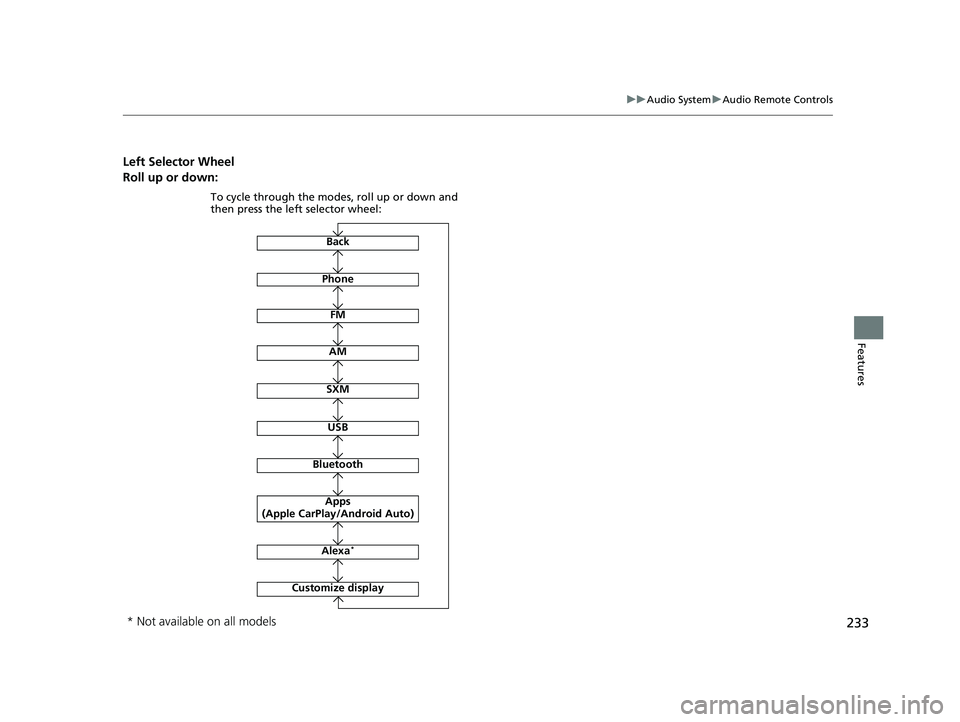
Left Selector Wheel
Roll up or down:
Back
Phone
FM
AM
SXM
To cycle through the modes, roll up or down and
then press the left selector wheel:
Customize display
Bluetooth
USB
Apps
(Apple CarPlay/Android Auto)
Alexa*
* Not available on all models
23 ACURA INTEGRA-313S56000_03.book 233 ページ 2022年3月18日 金曜日 午前11時47分
Page 241 of 740
239
uuAudio System Basic Operation uPlaying an iPod
Continued
Features
Playing an iPod
Using your USB connector, connect the iPod to the USB port, then select the iPod
mode.
2 USB Port(s) P. 227
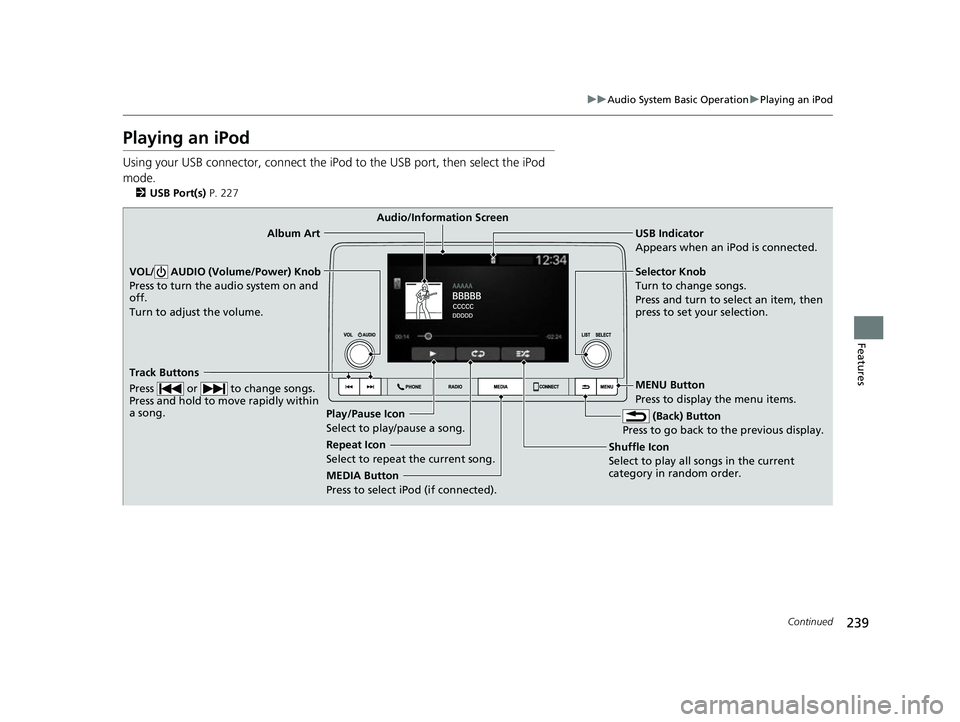
USB Indicator
Appears when an iPod is connected.
MEDIA Button
Press to select iPod (if connected). (Back) Button
Press to go back to the previous display.
Track Buttons
Press or to change songs.
Press and hold to move rapidly within
a song.
VOL/ AUDIO (Volume/Power) Knob
Press to turn the audio system on and
off.
Turn to adjust the volume.Selector Knob
Turn to change songs.
Press and turn to select an item, then
press to set your selection.
MENU Button
Press to display the menu items.
Audio/Information Screen
Album Art
Shuf
fle Icon
Selec t t
o play all songs in the current
category in random order.
Play/Pause Icon
Select to play/pause a song.
Repeat Icon
Select to repeat the current song.
23 ACURA INTEGRA-313S56000_03.book 239 ページ 2022年3月18日 金曜日 午前11時47分
Page 242 of 740
uuAudio System Basic Operation uPlaying an iPod
240
Features
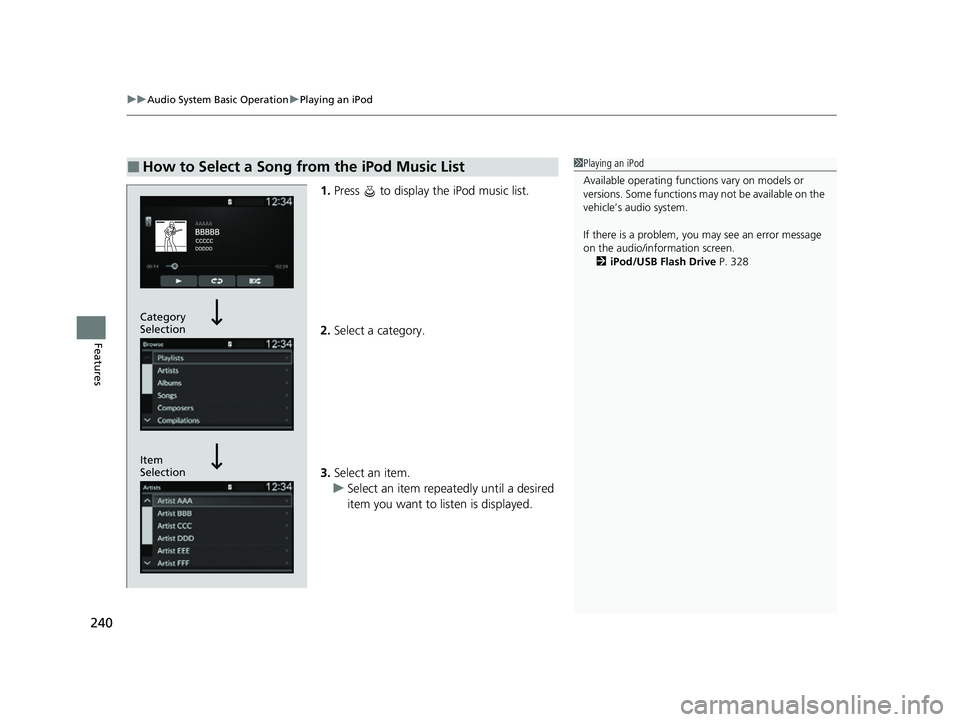
1. Press to display the iPod music list.
2. Select a category.
3. Select an item.
u Select an item repeatedly until a desired
item you want to listen is displayed.
■How to Select a Song from the iPod Music List1Playing an iPod
Available operating functi ons vary on models or
versions. Some functions ma y not be available on the
vehicle’s audio system.
If there is a problem, you may see an error message
on the audio/information screen. 2 iPod/USB Flash Drive P. 328
Item
Selection Category
Selection
23 ACURA INTEGRA-313S56000_03.book 240 ページ 2022年3月18日 金曜日 午前11時47分
Page 244 of 740
242
uuAudio System Basic Operation uPlaying a USB Flash Drive
Features
Playing a USB Flash Drive
Your audio system reads and plays sound fi les on a USB flash drive in either MP3,
WMA, AAC*1, FLAC, or WAV format.
Connect your USB flash drive to the USB port, then press the MEDIA button.
2USB Port(s) P. 227
*1:Only AAC format files recorded with iTunes are playable on this unit.
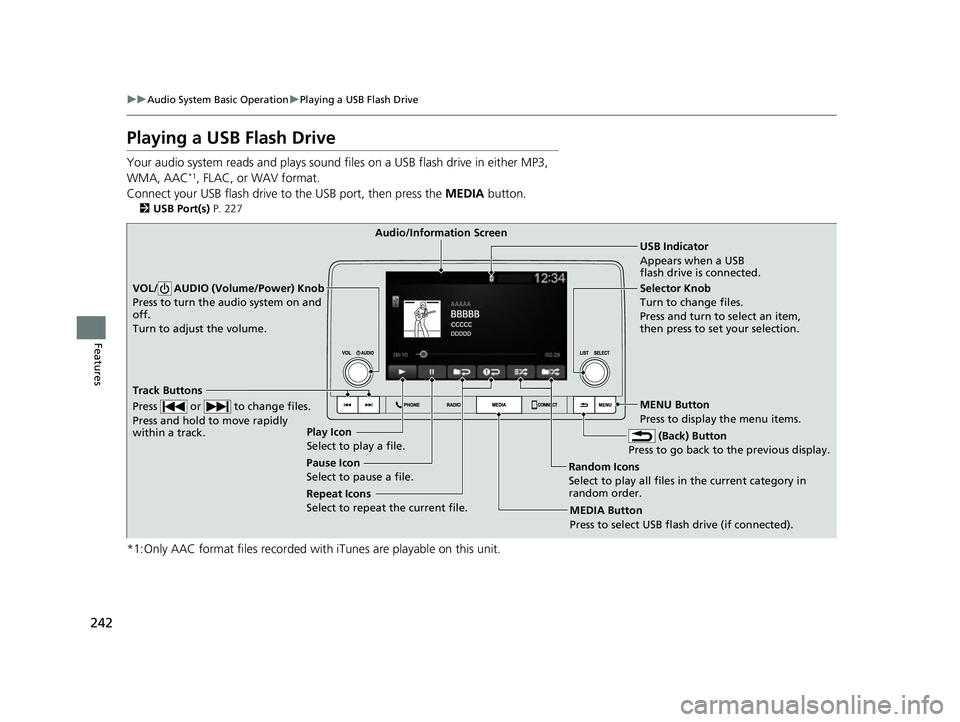
USB Indicator
Appears when a USB
flash drive is connected.
MEDIA Button
Press to select USB flash drive (if connected). (Back) Button
Press to go back to the previous display.
Track Buttons
Press or to change files.
Press and hold to move rapidly
within a track.
VOL/ AUDIO (Volume/Power) Knob
Press to turn the audio system on and
off.
Turn to adjust the volume.Selector Knob
Turn to change files.
Press and turn to select an item,
then press to set your selection.
MENU Button
Press to display the menu items.
Audio/Information Screen
Play Icon
Select to play a f ile
.
Random Icons
Select to play all files in the current category in
random order.
Pause Icon
Select to pause a file.
Repeat Icons
Select to repeat the current file.
23 ACURA INTEGRA-313S56000_03.book 242 ページ 2022年3月18日 金曜日 午前11時47分
Page 245 of 740
Continued243
uuAudio System Basic Operation uPlaying a USB Flash Drive
Features
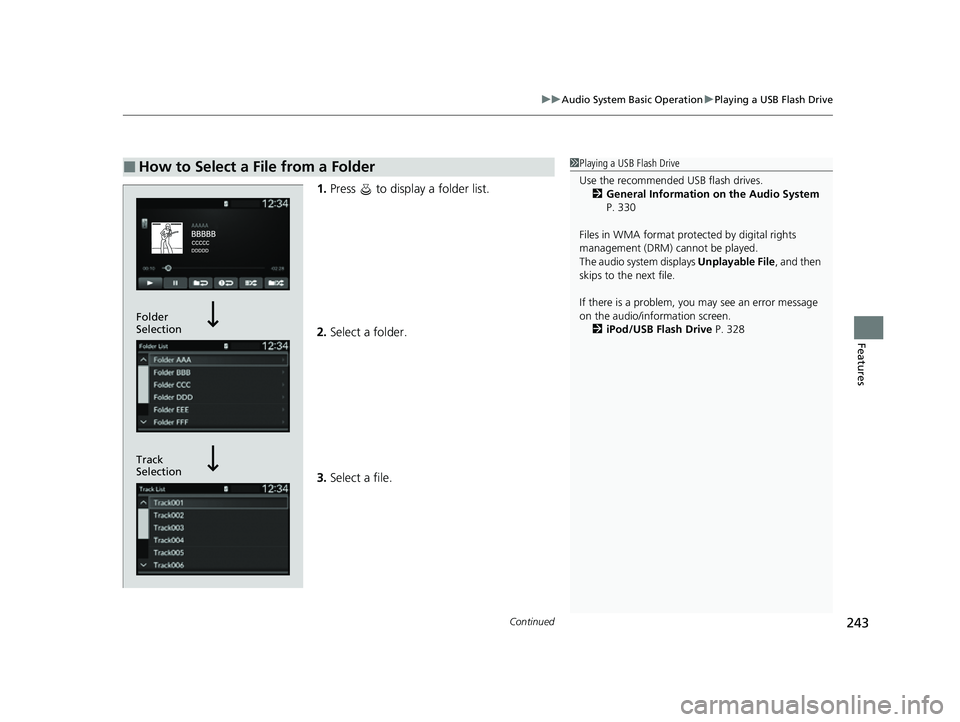
1. Press to display a folder list.
2. Select a folder.
3. Select a file.
■How to Select a File from a Folder1Playing a USB Flash Drive
Use the recommended USB flash drives.
2 General Information on the Audio System
P. 330
Files in WMA format prot ected by digital rights
management (DRM) cannot be played.
The audio system displays Unplayable File, and then
skips to the next file.
If there is a problem, you may see an error message
on the audio/information screen.
2 iPod/USB Flash Drive P. 328
Track
Selection Folder
Selection
23 ACURA INTEGRA-313S56000_03.book 243 ページ 2022年3月18日 金曜日 午前11時47分
Page 246 of 740
uuAudio System Basic Operation uPlaying a USB Flash Drive
244
Features
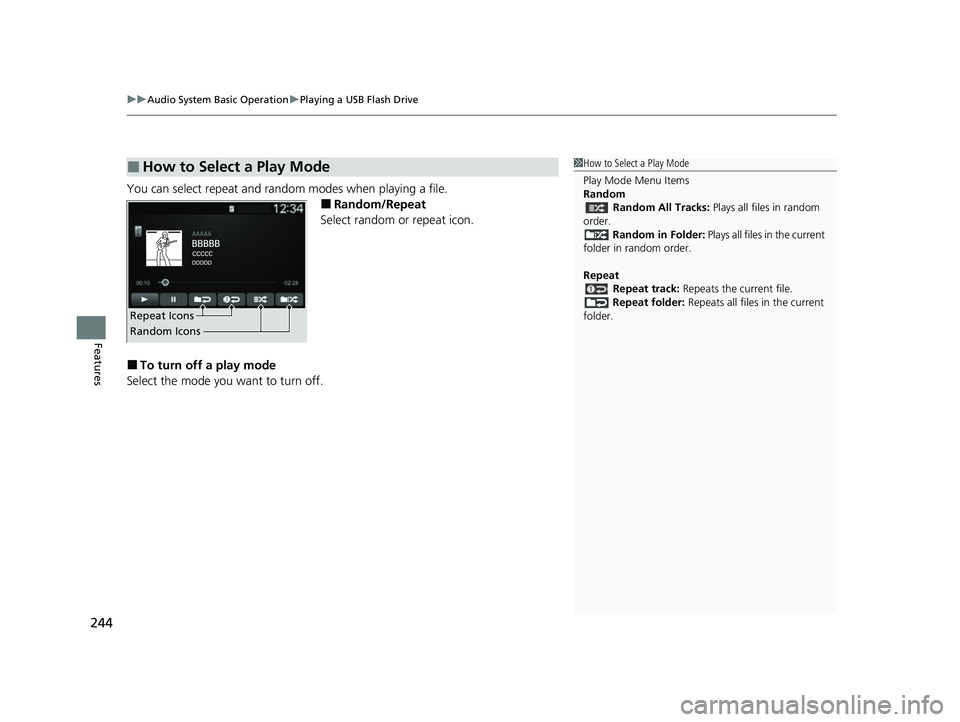
You can select repeat and random modes when playing a file.
■Random/Repeat
Select random or repeat icon.
■To turn off a play mode
Select the mode you want to turn off.
■How to Select a Play Mode1 How to Select a Play Mode
Play Mode Menu Items
Random
Random All Tracks: Plays all files in random
order. Random in Folder: Plays all files in the current
folder in random order.
Repeat Repeat track: Repeats the current file.
Repeat folder: Repeats all files in the current
folder.
Repeat Icons
Random Icons
23 ACURA INTEGRA-313S56000_03.book 244 ページ 2022年3月18日 金曜日 午前11時47分
Page 248 of 740
uuAudio System Basic Operation uPlaying Bluetooth ® Audio
246
Features
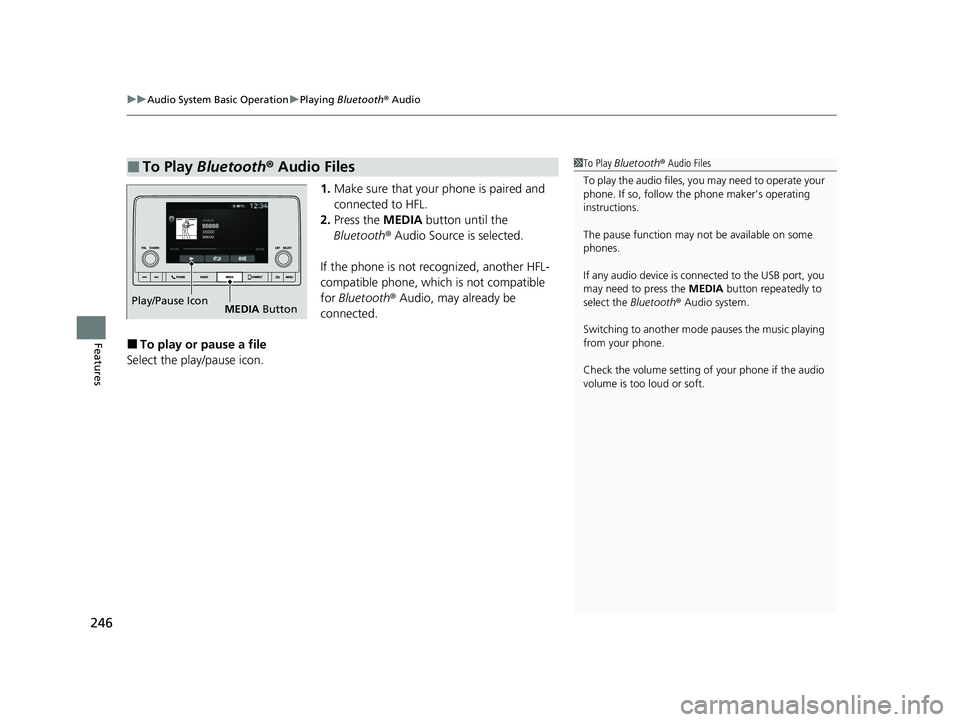
1. Make sure that your phone is paired and
connected to HFL.
2. Press the MEDIA button until the
Bluetooth ® Audio Source is selected.
If the phone is not recognized, another HFL-
compatible phone, which is not compatible
for Bluetooth ® Audio, may already be
connected.
■To play or pause a file
Select the play/pause icon.
■To Play Bluetooth ® Audio Files1 To Play Bluetooth ® Audio Files
To play the audio files, y ou may need to operate your
phone. If so, follow the phone maker's operating
instructions.
The pause function may no t be available on some
phones.
If any audio device is connected to the USB port, you
may need to press the MEDIA button repeatedly to
select the Bluetooth® Audio system.
Switching to another mode pauses the music playing
from your phone.
Check the volume setting of your phone if the audio
volume is too loud or soft.
Play/Pause Icon MEDIA Button
23 ACURA INTEGRA-313S56000_03.book 246 ページ 2022年3月18日 金曜日 午前11時47分
Page 253 of 740
251
uuAudio System Basic Operation uApple CarPlay
Continued
Features
Apple CarPlay
If you connect an Apple CarPlay-compatible iPhone to the system via the front USB,
you can use the audio/information screen, in stead of the iPhone display, to make a
phone call, listen to music, view maps (navigation), and access messages.
2USB Port(s) P. 227
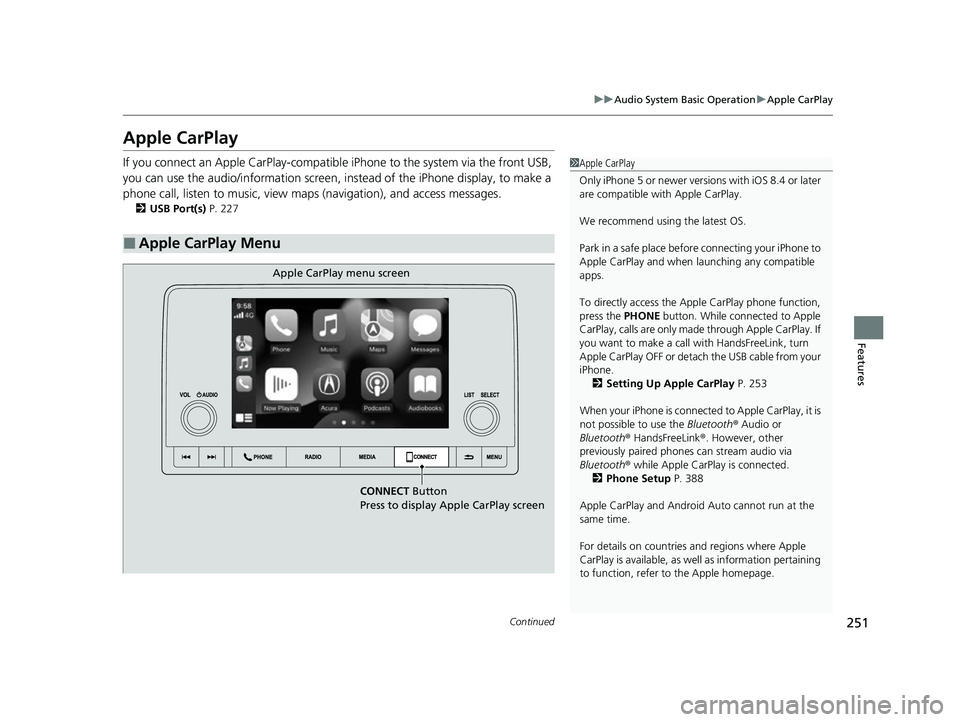
■Apple CarPlay Menu
1Apple CarPlay
Only iPhone 5 or newer versi ons with iOS 8.4 or later
are compatible with Apple CarPlay.
We recommend using the latest OS.
Park in a safe place before connecting your iPhone to
Apple CarPlay and when launching any compatible
apps.
To directly access the Appl e CarPlay phone function,
press the PHONE button. While connected to Apple
CarPlay, calls are only made through Apple CarPlay. If
you want to make a call with HandsFreeLink, turn
Apple CarPlay OFF or detach the USB cable from your
iPhone. 2 Setting Up Apple CarPlay P. 253
When your iPhone is connected to Apple CarPlay, it is
not possible to use the Bluetooth® Audio or
Bluetooth ® HandsFreeLink ®. However, other
previously paired phones can stream audio via
Bluetooth ® while Apple CarPlay is connected.
2 Phone Setup P. 388
Apple CarPlay and Android Auto cannot run at the
same time.
For details on c ountries and regions where Apple
CarPlay is available, as well as information pertaining
to function, refer to the Apple homepage.
CONNECT Button
Press to display Apple CarPlay screen
Apple CarPlay menu screen
23 ACURA INTEGRA-313S56000_03.book 251 ページ 2022年3月18日 金曜日 午前11時47分
Page 255 of 740

Continued253
uuAudio System Basic Operation uApple CarPlay
Features
After you have connected your iPhone to the system via the front USB, use the
following procedure to set up Apple CarPlay. Use of Apple CarPlay will result in the
transmission of certain user and vehicle information (such as vehicle location, speed,
and status) to your iPhone to enhance the Apple CarPlay experience. You will need
to consent to the sharing of this info rmation on the audio/information screen.
■Connecting Apple CarPlay Using the USB Cable to the USB Port
1. Connect the iPhone to the USB port using the USB cable.
2 USB Port(s) P. 227
uThe confirmation screen will be displayed.
2. Select Yes.
u If you do not want to connect Apple CarPlay, select No.
You may change the consent settings under the Smartphone Settings menu.
■Setting Up Apple CarPlay1Setting Up Apple CarPlay
Only initialize Apple CarP lay when you are safely
parked.
When Apple CarPlay first detects your iPhone, you
will need to set up your iPhone. Refer to the
instruction manual that came with your iPhone.
You can use the following procedure to disconnect or
delete the devices conn ecting Apple CarPlay:
Press the MENU button
Select Smartphone Settings Apple CarPlay
Select device
Use of user and vehicle information
The use and handling of user and vehicle information
transmitted to/from your iP hone by Apple CarPlay is
governed by the Apple iOS terms and conditions and
Apple’s Privacy Policy.
■Enabling Apple CarPlay
23 ACURA INTEGRA-313S56000_03.book 253 ページ 2022年3月18日 金曜日 午前11時47分