wipers ACURA INTEGRA 2023 User Guide
[x] Cancel search | Manufacturer: ACURA, Model Year: 2023, Model line: INTEGRA, Model: ACURA INTEGRA 2023Pages: 740, PDF Size: 22.94 MB
Page 489 of 740

487
uuAcuraWatchTMuCollision Mitigation Braking SystemTM (CMBSTM)
Continued
Driving
■Vehicle conditions
• The vehicle is tilted due to heavy load in the cargo area or rear seats.
• Tire chains are installed.
• Driving at night or in a dark place (e.g., a tunnel) with the headlights off.
• The front of the camera is covered by dirt, fog, rain, mud, wet snow, seals,
accessories, stickers, or film on the windshield.
• There is residue on the windshie ld from the windshield wipers.
• When lighting is weak due to dirt coveri ng the headlight lenses, or there is poor
visibility in a dark place due to the headlights being improperly adjusted.
• An abnormal tire or wheel condition (inco rrect sizes, varied sizes or construction,
improperly inflated, compact spare tire
*, etc.).
• The suspension has been modified.
* Not available on all models
23 ACURA INTEGRA-313S56000_03.book 487 ページ 2022年3月18日 金曜日 午前11時47分
Page 515 of 740

513
uuAcuraWatchTMuAdaptive Cruise Control (ACC) with Low Speed Follow*
Continued
Driving
■Roadway conditions
• Driving on curvy, winding, undulating, or sloping roads.
• Driving on rutted roads (snowy or unpaved roads, etc.).
• Puddles or a film of water is on the road surface.
• Your vehicle is strongly shaken on uneven road surfaces.
■Vehicle conditions
• The vehicle is tilted due to heavy load in the cargo area or rear seats.
• Tire chains are installed.
• The front of the camera is covered by dirt, fog, rain, mud, wet snow, seals,
accessories, stickers, or film of the windshield.
• Driving at night or in a dark place (e.g., a tunnel) with the headlights off.
• There is residue on the windshie ld from the windshield wipers.
• When lighting is weak due to dirt coveri ng the headlight lenses, or there is poor
visibility in a dark place due to the headlights being improperly adjusted.
• An abnormal tire or wheel condition (inco rrect sizes, varied sizes or construction,
improperly inflated, co mpact spare tire, etc.).
• The suspension has been modified.
23 ACURA INTEGRA-313S56000_03.book 513 ページ 2022年3月18日 金曜日 午前11時47分
Page 535 of 740
533
uuAcuraWatchTMuAdaptive Cruise Control (ACC)*
Continued
Driving
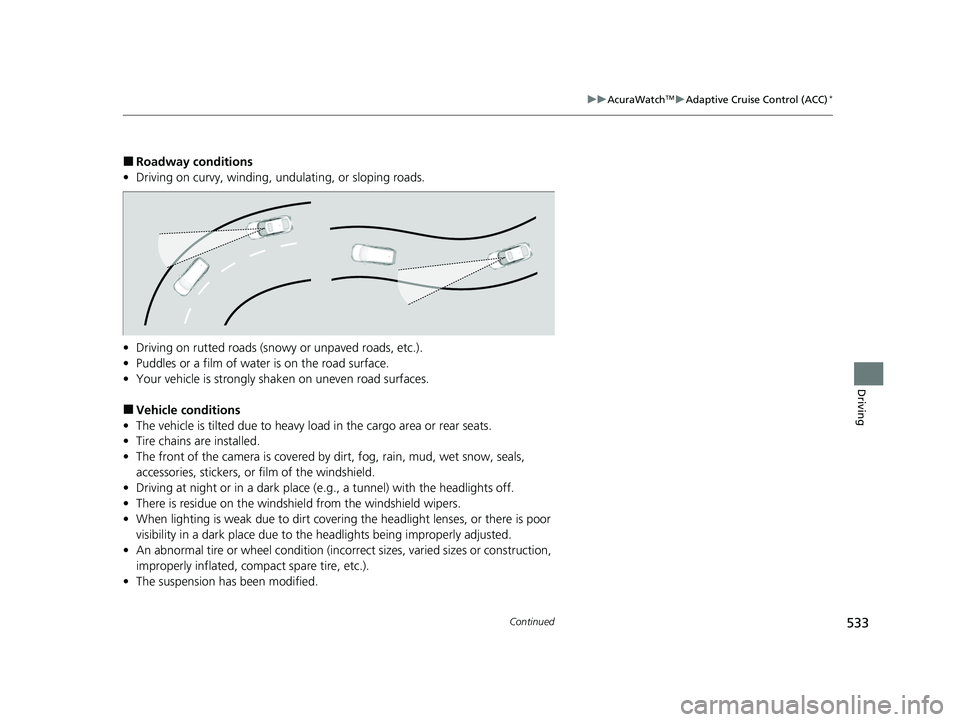
■Roadway conditions
• Driving on curvy, winding, undulating, or sloping roads.
• Driving on rutted roads (snowy or unpaved roads, etc.).
• Puddles or a film of water is on the road surface.
• Your vehicle is strongly shaken on uneven road surfaces.
■Vehicle conditions
• The vehicle is tilted due to heavy load in the cargo area or rear seats.
• Tire chains are installed.
• The front of the camera is covered by dirt, fog, rain, mud, wet snow, seals,
accessories, stickers, or film of the windshield.
• Driving at night or in a dark place (e.g., a tunnel) with the headlights off.
• There is residue on the windshie ld from the windshield wipers.
• When lighting is weak due to dirt coveri ng the headlight lenses, or there is poor
visibility in a dark place due to the headlights being improperly adjusted.
• An abnormal tire or wheel condition (inco rrect sizes, varied sizes or construction,
improperly inflated, co mpact spare tire, etc.).
• The suspension has been modified.
23 ACURA INTEGRA-313S56000_03.book 533 ページ 2022年3月18日 金曜日 午前11時47分
Page 558 of 740

556
uuAcuraWatchTMuLane Keeping Assist System (LKAS)
Driving
■Vehicle conditions
• When lighting is weak due to dirt covering the headlight lenses, or there is poor
visibility in a dark place due to th e headlights being improperly adjusted.
• The front of the camera is covered by dirt, fog, rain, mud, wet snow, seals,
accessories, stickers, or film on the windshield.
• Driving at night or in a dark place (e .g., a tunnel) with the headlights off.
• There is residue on the windshie ld from the windshield wipers.
• An abnormal tire or wheel condition (incor rect sizes, varied sizes or construction,
improperly inflated, comp act spare tire, etc.).
• The vehicle is tilted due to a heavy load in the cargo area or rear seats.
• The suspension ha s been modified.
• Tire chains are installed.
23 ACURA INTEGRA-313S56000_03.book 556 ページ 2022年3月18日 金曜日 午前11時47分
Page 567 of 740

565
uuAcuraWatchTMuTraffic Jam Assist*
Driving
■Vehicle conditions
• When lighting is weak due to dirt coveri ng the headlight lenses, or there is poor
visibility in a dark place due to the headlights being improperly adjusted.
• The front of the camera is covered by dirt, fog, rain, mud, wet snow, seals,
accessories, stickers, or film on the windshield.
• Driving at night or in a dark place (e.g., a tunnel) with the headlights off.
• There is residue on the windshie ld from the windshield wipers.
• An abnormal tire or wheel condition (inco rrect sizes, varied sizes or construction,
improperly inflated, co mpact spare tire, etc.).
• The vehicle is tilted due to a heavy load in the cargo area or rear seats.
• The suspension has been modified.
• Tire chains are installed.
23 ACURA INTEGRA-313S56000_03.book 565 ページ 2022年3月18日 金曜日 午前11時47分
Page 574 of 740

572
uuAcuraWatchTMuRoad Departure Mitigation System
Driving
■Vehicle conditions
• When lighting is weak due to dirt covering the headlight lenses, or there is poor
visibility in a dark place due to th e headlights being improperly adjusted.
• The front of the camera is covered by dirt, fog, rain, mud, wet snow, seals,
accessories, stickers, or film on the windshield.
• Driving at night or in a dark place (e .g., a tunnel) with the headlights off.
• When the driver operates the brake pedal and steering wheel.
• There is residue on the windshie ld from the windshield wipers.
• An abnormal tire or wheel condition (incor rect sizes, varied sizes or construction,
improperly inflated, comp act spare tire, etc.).
• The vehicle is tilted due to heavy lo ad in the cargo area or rear seats.
• Tire chains are installed.
• The suspension ha s been modified.
■Examples of limitations on detection due to the condition of oncoming
vehicles
• The oncoming vehicle or vehicle ahead of you is sideways.
• The oncoming vehicle jumps out in front of you.
• When the oncoming vehicle blends in with the background, preventing the
system from recognizing it.
• The headlights of an oncoming vehicle are lit on one side or not lit on either side
in a dark place.
• The distance between your vehicle an d the oncoming vehicle is too short.
• Part of the oncoming vehicle is not vi sible due to the vehicle ahead of you.
• There are multiple oncoming lanes or turning lanes.
• The vehicle in the adjacent lane is parked or moving at an extremely slow speed.
23 ACURA INTEGRA-313S56000_03.book 572 ページ 2022年3月18日 金曜日 午前11時47分
Page 579 of 740

Continued577
uuAcuraWatchTMuTraffic Sign Recognition System
Driving
The traffic sign recognition system may not be able to recognize a traffic sign in the
following cases.
■Environmental conditions
• Driving into low sunlight (e.g., at dawn or dusk).
• Strong light is reflec ted onto the roadway.
• Driving at night, in dark areas such as long tunnels.
• Driving in bad weather (rain, fog, snow, etc.).
• Sudden changes between light and dark, such as the entrance or exit of a tunnel
or the shadows of trees, buildings, etc.
• Water is sprayed by or snow blown from a vehicle ahead.
■Roadway conditions
• Your vehicle is strongly shaken on uneven road surfaces.
■Vehicle conditions
• When lighting is weak due to dirt coveri ng the headlight lenses, or there is poor
visibility in a dark place due to the headlights being improperly adjusted.
• The front of the camera is covered by dirt, fog, rain, mud, wet snow, seals,
accessories, stickers, or film on the windshield.
• There is residue on the windshie ld from the windshield wipers.
• An abnormal tire or wheel condition (inco rrect sizes, varied sizes or construction,
improperly inflated, co mpact spare tire, etc.).
• The vehicle is tilted due to heavy load in the cargo area or rear seats.
• The suspension has been modified.
• Tire chains are installed.
• Driving at night or in a dark place (e.g., a tunnel) with the headlights off.
■Traffic Sign Recognition System Conditions and Limitations1Traffic Sign Recognition System Conditions and Limitations
When the traffic sign recognition system
malfunctions, appears on the gauge and the
head-up display
*. If this message does not disappear,
have your vehicle ch ecked by a dealer.
Gauge
Head-up display*
* Not available on all models
23 ACURA INTEGRA-313S56000_03.book 577 ページ 2022年3月18日 金曜日 午前11時47分
Page 628 of 740

626
uuMaintenance Under the Hood uOpening the Hood
Maintenance
Opening the Hood
1. Park the vehicle on a level surface, and set
the parking brake.
2. Pull the hood release handle under the
driver’s side lower co rner of the dashboard.
u The hood will pop up slightly.
3. Push the hood latch lever (located under
the front edge of the hood to the center) to
the side and raise the hood. Once you have
raised the hood slightly, you can release the
lever.
4. Remove the support rod from the clamp
using the grip. Mount the support rod in
the hood.
When closing, remove the support rod, and
stow it in the clamp, then gently lower the
hood. Remove your hand at a height of
approximately 12 inches (30 cm) and let the
hood close.1 Opening the Hood
NOTICE
Do not open the hood when the wiper arms are
raised. The hood will strike the wipers, resulting in
possible damage to the hood and/or the wipers.
When closing the hood, check that the hood is
securely latchedM
If the hood latch lever moves stiffly, or if you can
open the hood without lifti ng the lever, the latch
mechanism should be cl eaned and lubricatedM
Do not open the hood while the Auto Idle Stop
function is activated.
3WARNING
The hood support rod can become very hot
due to heat from the engine.
To ensure against po ssible burns, do not
handle the metal section of the rod: Use
the foam grip instead.
Hood Release Handle
Pull
Lever
Support Rod
Grip
Clamp
23 ACURA INTEGRA-313S56000_03.book 626 ページ 2022年3月18日 金曜日 午前11時47分
Page 661 of 740

659
uuCleaning uExterior Care
Continued
Maintenance
Exterior Care
Dust off the vehicle body after you drive. Regularly inspect your vehicle for scratches
on painted surfaces. A scratch on a painted surface can result in body rust. If you
find a scratch, promptly repair it.
Wash the vehicle regularly. Wash more frequently when driving in the following
conditions:
• If driving on roads with road salt.
• If driving in coastal areas.
• If tar, soot, bird droppings, insects, or tree sap are stuck to painted surfaces.
• Make sure to follow the instructions indicated on the automated car wash.
• Fold in the door mirrors.
• For models equipped with automatic inte rmittent wipers, turn the wipers off.
• Keep sufficient distance between the cleaning nozzle and the vehicle body.
• Take particular care around the windows. Standing too close may cause water to
enter the vehicle interior.
• Do not spray high pressure water directly into the engine compartment. Instead,
use low pressure water and a mild detergent.
• Do not spray water directly onto the ca mera or the area around it. Water may
enter the lens and cause th e camera to malfunction.
■Washing the Vehicle
■Using an Automated Car Wash
■Using High Pressure Cleaners
1Washing the Vehicle
Do not spray water into the air intake vents. It can
cause a malfunction.
Do not spray water onto the fuel fill door directly. A
high-pressure spray ma y cause it to open.
Do not spray water onto the capless unit when the
fuel fill door is open. It ca n cause damage to the fuel
system or engine.
If you need to lift the wiper arms away from the
windshield, first set the wiper arms to the
maintenance position. 2 Changing the Wiper Blade P. 639
Air Intake Vents
23 ACURA INTEGRA-313S56000_03.book 659 ページ 2022年3月18日 金曜日 午前11時47分
Page 739 of 740

737
Index
USB Flash Drives............... 226, 242, 299, 331
USB Port(s) ................................................ 227
Using the Keyless Access System ............. 147
V
Vanity Mirrors.............................................. 9
Vehicle Identification Number ................ 718
Vehicle Settings ........................................ 126
Vehicle Stability Assist
TM (VSA® ).............. 466
Off Button .............................................. 467
Off Indicator ............................................. 92
System Indicator ....................................... 92
Viscosity (Oil) .................................... 627, 717
VSA ® (Vehicle Stability Assist
TM).............. 466
W
Wallpaper ................................................. 264
Warning Indicator On/Blinking ............... 699
Warning Labels .......................................... 82
Warnings .................................................. 125
Warranties (Warranty Manual provided
separately) .............................................. 723
Watts ........................................................ 716
Wear Indicators (Tire) .............................. 646
Wheel Nut Wrench (Jack Handle) ........... 685
Wi-Fi Connection ..................................... 312
Window Washers ..................................... 183
Adding/Refilling Fluid .............................. 636
Switch .................................................... 183 Windows (Opening and Closing)
............. 168
Windshield ................................................ 183
Cleaning .......................................... 657, 660
Defrosting/Defogging .............................. 220
Washer Fluid ........................................... 636
Wiper Blades ........................................... 639
Wipers and Washers ................................ 183
Winter Tires
Snow Tires ............................................... 649
Tire Chains .............................................. 649
Wipers and Washers ................................. 183
Checking and Replacing Wiper Blades ..... 639
Wireless Charger ....................................... 211
WMA ................................................. 242, 299
Worn Tires ................................................. 641
23 ACURA INTEGRA-313S56000_03.book 737 ページ 2022年3月18日 金曜日 午前11時47分