lights ACURA INTEGRA 2023 Workshop Manual
[x] Cancel search | Manufacturer: ACURA, Model Year: 2023, Model line: INTEGRA, Model: ACURA INTEGRA 2023Pages: 740, PDF Size: 22.94 MB
Page 527 of 740

525
uuAcuraWatchTMuAdaptive Cruise Control (ACC)*
Continued
Driving
Adaptive Cruise Control (ACC)*
Helps maintain a constant vehicle speed a nd a set following-interval behind a vehicle
detected ahead of yours, without you having to keep your foot on the brake or the
accelerator.
When ACC slows your vehicle by applying the brakes, your vehicle’s brake lights will
illuminate.1 Adaptive Cruise Control (ACC)*
Important Reminder
As with any system, there are limits to ACC. Use the
brake pedal whenever necessary, and always keep a
safe interval betw een your vehicle and other vehicles.
3WARNING
Improper use of ACC can lead to a crash.
Use ACC only when driving on expressways
or freeways and in go od road and weather
conditions.
3WARNING
ACC has limited braking capability.
When your vehicle speed drops below 22
mph (35 km/h), ACC will automatically
cancel and no longer will apply your
vehicle’s brakes.
Always be prepared to apply the brake
pedal when conditions require.
When to use
■Vehicle speed for adaptive cruise control: Desired speed in a range above
roughly 25 mph (40 km/h).
■Shift position for ACC: In ( 2 or higher position.
A front wide view camera is located
behind the rearview mirror.
* Not available on all models
23 ACURA INTEGRA-313S56000_03.book 525 ページ 2022年3月18日 金曜日 午前11時47分
Page 531 of 740

Continued529
uuAcuraWatchTMuAdaptive Cruise Control (ACC)*
Driving
■There is a vehicle ahead
ACC monitors if a vehicle ahead of you ente rs the ACC range. If a vehicle is detected
doing so, the ACC system maintains or decele rates your vehicle’s set speed in order
to keep the vehicle’s set followi ng-interval from the vehicle ahead.
2To Set or Change Following-interval P. 537
■When in Operation1When in Operation
If the vehicle ahead of you slows down abruptly, or if
another vehicle cuts in front of you, a beeper sounds,
a message appears on th e driver information
interface, and the head- up warning lights flash.
Depress the brake pedal, and keep an appropriate
interval from the vehicle ahead.
Beep Head-up Warning Lights
ACC Range: 394 ft. (120 m)
23 ACURA INTEGRA-313S56000_03.book 529 ページ 2022年3月18日 金曜日 午前11時47分
Page 535 of 740
533
uuAcuraWatchTMuAdaptive Cruise Control (ACC)*
Continued
Driving
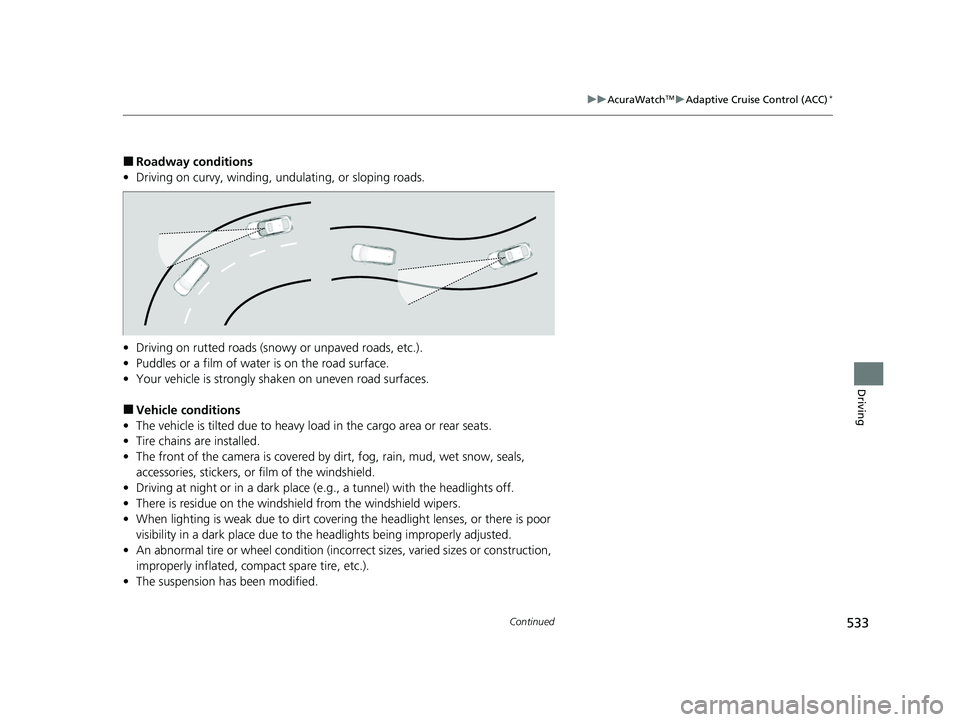
■Roadway conditions
• Driving on curvy, winding, undulating, or sloping roads.
• Driving on rutted roads (snowy or unpaved roads, etc.).
• Puddles or a film of water is on the road surface.
• Your vehicle is strongly shaken on uneven road surfaces.
■Vehicle conditions
• The vehicle is tilted due to heavy load in the cargo area or rear seats.
• Tire chains are installed.
• The front of the camera is covered by dirt, fog, rain, mud, wet snow, seals,
accessories, stickers, or film of the windshield.
• Driving at night or in a dark place (e.g., a tunnel) with the headlights off.
• There is residue on the windshie ld from the windshield wipers.
• When lighting is weak due to dirt coveri ng the headlight lenses, or there is poor
visibility in a dark place due to the headlights being improperly adjusted.
• An abnormal tire or wheel condition (inco rrect sizes, varied sizes or construction,
improperly inflated, co mpact spare tire, etc.).
• The suspension has been modified.
23 ACURA INTEGRA-313S56000_03.book 533 ページ 2022年3月18日 金曜日 午前11時47分
Page 536 of 740

534
uuAcuraWatchTMuAdaptive Cruise Control (ACC)*
Driving
■Examples of conditions under which the camera may not correctly detect
the vehicle ahead of you
• A vehicle suddenly crosses in front of you.
• The interval between your vehicle and the vehicle ahead of you is too short.
• When the vehicle ahead of you blends in with the background, preventing the
system from recognizing it.
• The headlights of the vehicle ahead of you are lit on one side or not lit on either
side in a dark place.
23 ACURA INTEGRA-313S56000_03.book 534 ページ 2022年3月18日 金曜日 午前11時47分
Page 558 of 740

556
uuAcuraWatchTMuLane Keeping Assist System (LKAS)
Driving
■Vehicle conditions
• When lighting is weak due to dirt covering the headlight lenses, or there is poor
visibility in a dark place due to th e headlights being improperly adjusted.
• The front of the camera is covered by dirt, fog, rain, mud, wet snow, seals,
accessories, stickers, or film on the windshield.
• Driving at night or in a dark place (e .g., a tunnel) with the headlights off.
• There is residue on the windshie ld from the windshield wipers.
• An abnormal tire or wheel condition (incor rect sizes, varied sizes or construction,
improperly inflated, comp act spare tire, etc.).
• The vehicle is tilted due to a heavy load in the cargo area or rear seats.
• The suspension ha s been modified.
• Tire chains are installed.
23 ACURA INTEGRA-313S56000_03.book 556 ページ 2022年3月18日 金曜日 午前11時47分
Page 567 of 740

565
uuAcuraWatchTMuTraffic Jam Assist*
Driving
■Vehicle conditions
• When lighting is weak due to dirt coveri ng the headlight lenses, or there is poor
visibility in a dark place due to the headlights being improperly adjusted.
• The front of the camera is covered by dirt, fog, rain, mud, wet snow, seals,
accessories, stickers, or film on the windshield.
• Driving at night or in a dark place (e.g., a tunnel) with the headlights off.
• There is residue on the windshie ld from the windshield wipers.
• An abnormal tire or wheel condition (inco rrect sizes, varied sizes or construction,
improperly inflated, co mpact spare tire, etc.).
• The vehicle is tilted due to a heavy load in the cargo area or rear seats.
• The suspension has been modified.
• Tire chains are installed.
23 ACURA INTEGRA-313S56000_03.book 565 ページ 2022年3月18日 金曜日 午前11時47分
Page 574 of 740

572
uuAcuraWatchTMuRoad Departure Mitigation System
Driving
■Vehicle conditions
• When lighting is weak due to dirt covering the headlight lenses, or there is poor
visibility in a dark place due to th e headlights being improperly adjusted.
• The front of the camera is covered by dirt, fog, rain, mud, wet snow, seals,
accessories, stickers, or film on the windshield.
• Driving at night or in a dark place (e .g., a tunnel) with the headlights off.
• When the driver operates the brake pedal and steering wheel.
• There is residue on the windshie ld from the windshield wipers.
• An abnormal tire or wheel condition (incor rect sizes, varied sizes or construction,
improperly inflated, comp act spare tire, etc.).
• The vehicle is tilted due to heavy lo ad in the cargo area or rear seats.
• Tire chains are installed.
• The suspension ha s been modified.
■Examples of limitations on detection due to the condition of oncoming
vehicles
• The oncoming vehicle or vehicle ahead of you is sideways.
• The oncoming vehicle jumps out in front of you.
• When the oncoming vehicle blends in with the background, preventing the
system from recognizing it.
• The headlights of an oncoming vehicle are lit on one side or not lit on either side
in a dark place.
• The distance between your vehicle an d the oncoming vehicle is too short.
• Part of the oncoming vehicle is not vi sible due to the vehicle ahead of you.
• There are multiple oncoming lanes or turning lanes.
• The vehicle in the adjacent lane is parked or moving at an extremely slow speed.
23 ACURA INTEGRA-313S56000_03.book 572 ページ 2022年3月18日 金曜日 午前11時47分
Page 579 of 740

Continued577
uuAcuraWatchTMuTraffic Sign Recognition System
Driving
The traffic sign recognition system may not be able to recognize a traffic sign in the
following cases.
■Environmental conditions
• Driving into low sunlight (e.g., at dawn or dusk).
• Strong light is reflec ted onto the roadway.
• Driving at night, in dark areas such as long tunnels.
• Driving in bad weather (rain, fog, snow, etc.).
• Sudden changes between light and dark, such as the entrance or exit of a tunnel
or the shadows of trees, buildings, etc.
• Water is sprayed by or snow blown from a vehicle ahead.
■Roadway conditions
• Your vehicle is strongly shaken on uneven road surfaces.
■Vehicle conditions
• When lighting is weak due to dirt coveri ng the headlight lenses, or there is poor
visibility in a dark place due to the headlights being improperly adjusted.
• The front of the camera is covered by dirt, fog, rain, mud, wet snow, seals,
accessories, stickers, or film on the windshield.
• There is residue on the windshie ld from the windshield wipers.
• An abnormal tire or wheel condition (inco rrect sizes, varied sizes or construction,
improperly inflated, co mpact spare tire, etc.).
• The vehicle is tilted due to heavy load in the cargo area or rear seats.
• The suspension has been modified.
• Tire chains are installed.
• Driving at night or in a dark place (e.g., a tunnel) with the headlights off.
■Traffic Sign Recognition System Conditions and Limitations1Traffic Sign Recognition System Conditions and Limitations
When the traffic sign recognition system
malfunctions, appears on the gauge and the
head-up display
*. If this message does not disappear,
have your vehicle ch ecked by a dealer.
Gauge
Head-up display*
* Not available on all models
23 ACURA INTEGRA-313S56000_03.book 577 ページ 2022年3月18日 金曜日 午前11時47分
Page 591 of 740

Continued589
uuBraking uBrake System
Driving
Keeps the brake applied after releasing the brake pedal until the accelerator pedal is
pressed. You can use this system while th e vehicle is temporarily stopped, like at
traffic lights and in heavy traffic.
■Turning on the system Fasten your seat belt properly, then start the
engine. Press the automatic brake hold
button.u The automatic brake hold system
indicator comes on. The system is turned
on.
■Activating the system
Depress the brake pedal to come to a
complete stop. The transmission must not be
in
(P or(R.
u The automatic brake hold indicator
comes on. Braking is kept for up to 10
minutes.
u Release the brake pedal after the
automatic brake hold indicator comes
on.
■Automatic Brake Hold1Automatic Brake Hold
3WARNING
Activating the automatic brake hold system
on steep hills or slippery roads may still
allow the vehicle to move if you remove
your foot from the brake pedal.
If a vehicle unexpectedly moves, it may
cause a crash resulting in serious injury or
death.
Never activate the automatic brake hold
system or rely on it to keep a vehicle from
moving when stopped on a steep hill or
slippery roads.
3WARNING
Using the automatic brake hold system to
park the vehicle may result in the vehicle
unexpectedly moving.
If a vehicle moves unexpectedly, it may
cause a crash, resulting in serious injury or
death.
Never leave the vehicle when braking is
temporarily kept by automatic brake hold
and always park the vehicle by putting the
transmission in
( P and applying the parking
brake.
Continuously variable transmission models
Continuously variable transmission models
Comes
On
Automatic Brake Hold
Button
On
Brake Pedal
Comes
On Comes
On
U.S.
Canada
23 ACURA INTEGRA-313S56000_03.book 589 ページ 2022年3月18日 金曜日 午前11時47分
Page 593 of 740

591
uuBraking uBrake System
Continued
Driving
Keeps the brake applied after releasing the brake pedal until you shift into one of
the gears other than
(N and:
• Release the clutch pedal on a level road or when facing downhill.
• Release the clutch pedal and depress the accelerator pedal when facing uphill.
You can use this system while the vehicle is temporarily stopped, like at traffic lights
and in heavy traffic.
■Turning on the system Fasten your seat belt properly, then start the
engine. Press the automatic brake hold
button.u The automatic brake hold system
indicator comes on. The system is turned
on.
■Activating the system
Depress the brake pedal to come to a
complete stop.u The automatic brake hold indicator
comes on. Braking is kept for up to 10
minutes.
u Release the brake pedal after the
automatic brake hold indicator comes
on.
Manual transmission models
Comes
On
Automatic Brake Hold
Button
On
Brake Pedal
Comes
On Comes
On
U.S.
Canada
23 ACURA INTEGRA-313S56000_03.book 591 ページ 2022年3月18日 金曜日 午前11時47分