lights ACURA INTEGRA 2023 User Guide
[x] Cancel search | Manufacturer: ACURA, Model Year: 2023, Model line: INTEGRA, Model: ACURA INTEGRA 2023Pages: 740, PDF Size: 22.94 MB
Page 105 of 740
103
uuIndicators u
Instrument Panel
IndicatorNameOn/BlinkingExplanation
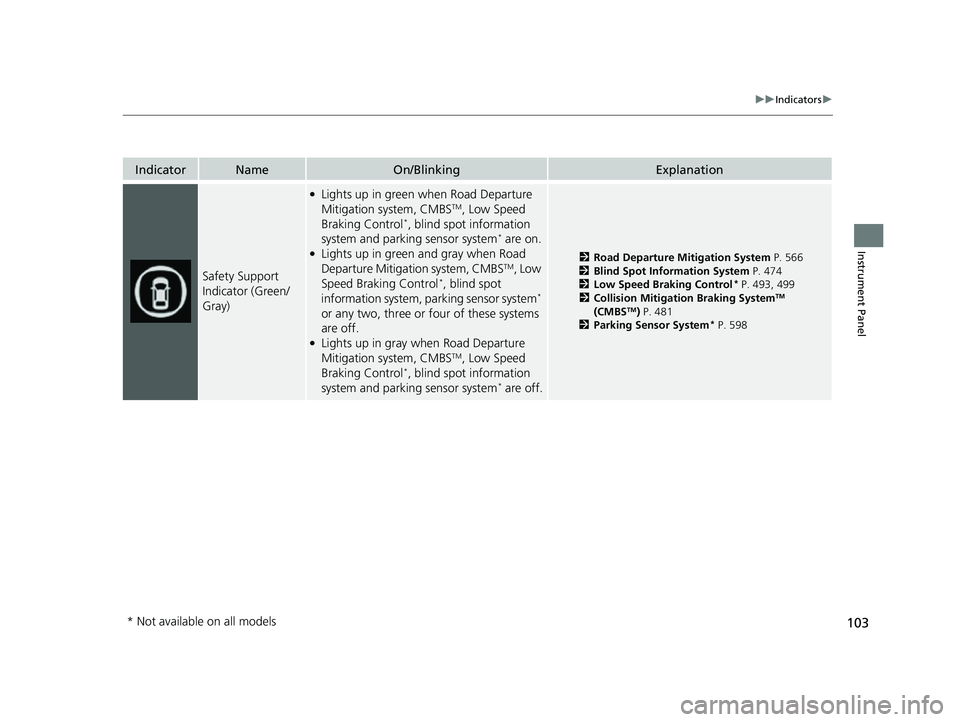
Safety Support
Indicator (Green/
Gray)
●Lights up in green when Road Departure
Mitigation system, CMBSTM, Low Speed
Braking Control*, blind spot information
system and parking sensor system* are on.●Lights up in green and gray when Road
Departure Mitigation system, CMBSTM, Low
Speed Braking Control*, blind spot
information system, parking sensor system*
or any two, three or four of these systems
are off.
●Lights up in gray when Road Departure
Mitigation system, CMBSTM, Low Speed
Braking Control*, blind spot information
system and parking sensor system* are off.
2 Road Departure Mitigation System P. 566
2 Blind Spot Information System P. 474
2 Low Speed Braking Control
* P. 493, 499
2 Collision Mitigation Braking SystemTM
(CMBSTM) P. 481
2 Parking Sensor System* P. 598
* Not available on all models
23 ACURA INTEGRA-313S56000_03.book 103 ページ 2022年3月18日 金曜日 午前11時47分
Page 120 of 740
118
uuGauges and Displays uDriver Information Interface (Right Side Area)
Instrument Panel
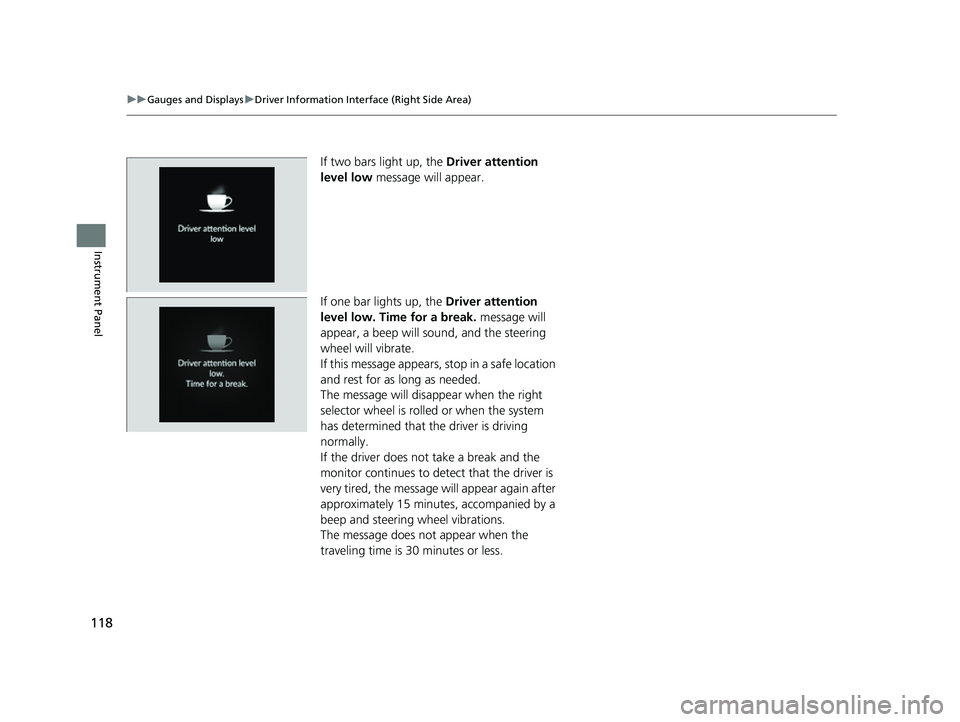
If two bars light up, the Driver attention
level low message will appear.
If one bar lights up, the Driver attention
level low. Time for a break. message will
appear, a beep will sound, and the steering
wheel will vibrate.
If this message appears, stop in a safe location
and rest for as long as needed.
The message will disa ppear when the right
selector wheel is rolled or when the system
has determined that the driver is driving
normally.
If the driver does not take a break and the
monitor continues to dete ct that the driver is
very tired, the message will appear again after
approximately 15 minutes, accompanied by a
beep and steering wheel vibrations.
The message does not appear when the
traveling time is 30 minutes or less.
23 ACURA INTEGRA-313S56000_03.book 118 ページ 2022年3月18日 金曜日 午前11時47分
Page 132 of 740
130
uuGauges and Displays uDriver Information Interface (Right Side Area)
Instrument Panel
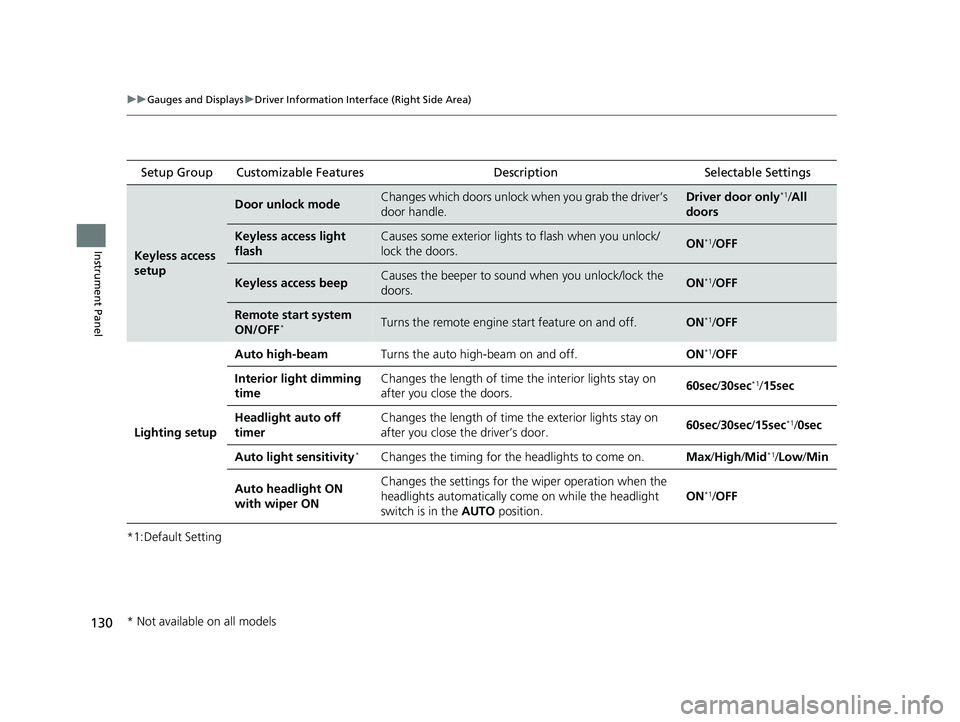
*1:Default Setting Setup Group Customizable Features
Description Selectable Settings
Keyless access
setup
Door unlock modeChanges which doors unlock when you grab the driver’s
door handle.Driver door only*1/All
doors
Keyless access light
flashCauses some exterior lights to flash when you unlock/
lock the doors.ON*1/ OFF
Keyless access beepCauses the beeper to soun d when you unlock/lock the
doors.ON*1/ OFF
Remote start system
ON/OFF*Turns the remote engine start feature on and off.ON*1/OFF
Lighting setup
Auto high-beamTurns the auto high-beam on and off.ON*1/OFF
Interior light dimming
timeChanges the length of time the interior lights stay on
after you close the doors.60sec /30sec*1/15sec
Headlight auto off
timerChanges the length of time the exterior lights stay on
after you close the driver’s door.60sec /30sec /15sec*1/0sec
Auto light sensitivity*Changes the timing for the headlights to come on.Max/High/ Mid*1/Low /Min
Auto headlight ON
with wiper ONChanges the settings for th e wiper operation when the
headlights automatically come on while the headlight
switch is in the AUTO position.
ON*1/OFF
* Not available on all models
23 ACURA INTEGRA-313S56000_03.book 130 ページ 2022年3月18日 金曜日 午前11時47分
Page 133 of 740
131
uuGauges and Displays uDriver Information Interface (Right Side Area)
Continued
Instrument Panel
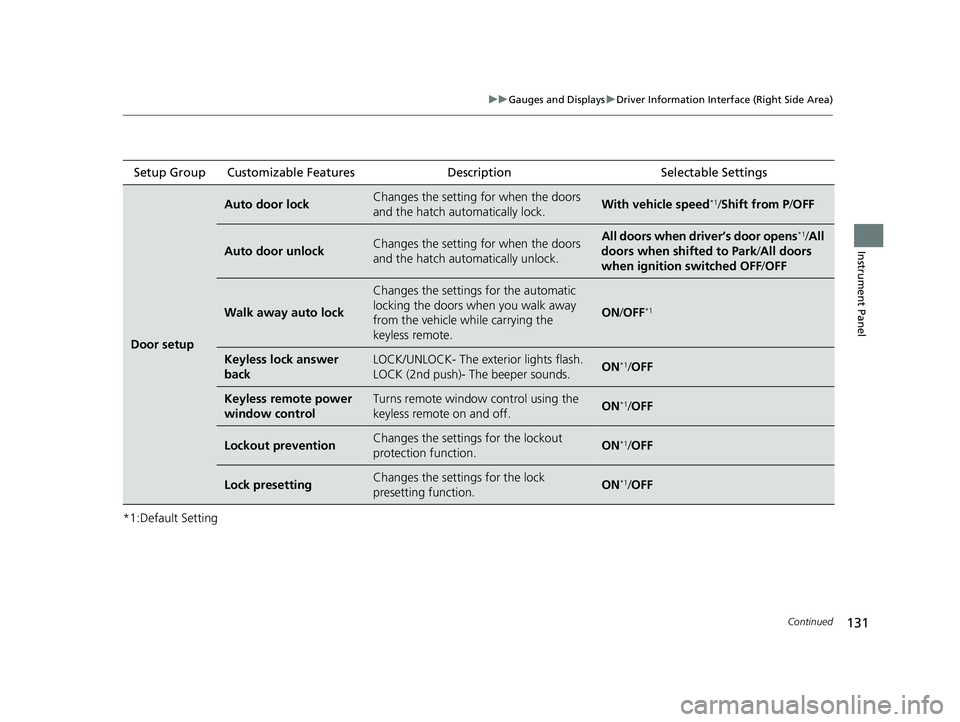
*1:Default SettingSetup Group Customizable Features
Description Selectable Settings
Door setup
Auto door lockChanges the setting for when the doors
and the hatch automatically lock.With vehicle speed*1/Shift from P/ OFF
Auto door unlockChanges the setting for when the doors
and the hatch automatically unlock.All doors when driver’s door opens*1/All
doors when shifted to Park /All doors
when ignition switched OFF /OFF
Walk away auto lock
Changes the settings for the automatic
locking the doors when you walk away
from the vehicle while carrying the
keyless remote.
ON /OFF*1
Keyless lock answer
backLOCK/UNLOCK- The exte rior lights flash.
LOCK (2nd push)- The beeper sounds.ON*1/ OFF
Keyless remote power
window controlTurns remote window control using the
keyless remote on and off.ON*1/ OFF
Lockout preventionChanges the settings for the lockout
protection function.ON*1/OFF
Lock presettingChanges the settings for the lock
presetting function.ON*1/OFF
23 ACURA INTEGRA-313S56000_03.book 131 ページ 2022年3月18日 金曜日 午前11時47分
Page 137 of 740

135
uuGauges and Displays uHead-Up Display*
Continued
Instrument Panel
Head-Up Display*
Shows the current mode for ACC with Low Speed Follow*, LKAS, and Traffic Jam
Assist*, traffic sign recognition system, or tu rn-by-turn directions along with the
vehicle speed. You can choose which item to be displayed using the driver
information interface. They are displayed when the power mode is in ON.
The display also shows the following
warnings.
•Lane Departure Warning: When your
vehicle is too close to the traffic lane lines,
the lane departure warning appears.
2 Lane Keeping Assist System (LKAS)
P. 545
• Head-up Warning Lights:
Flash when the BRAKE message appears
on the driver information interface.
2 Collision Mitigation Braking SystemTM
(CMBSTM) P. 481
2 Low Speed Braking Control
P. 493, 499
2 Adaptive Cruise Control (ACC) with
Low Speed Follow
* P. 504
2 Adaptive Cruise Control (ACC)* P. 525
Lane Departure Warning
* Not available on all models
23 ACURA INTEGRA-313S56000_03.book 135 ページ 2022年3月18日 金曜日 午前11時47分
Page 143 of 740
141
Controls
This chapter explains how to operate the various controls necessary for driving.
Clock.................................................. 142
Locking and Unlocking the Doors Key .................................................. 144
Low Keyless Remote Signal Strength 146
Locking/Unlocking the Doors from the Outside .......................................... 147
Locking/Unlocking the Doors from the Inside ............................................. 158
Childproof Door Locks ..................... 160
Auto Door Locking/Unlocking .......... 161
Hatch ................................................. 162
Security System
Immobilizer System .......................... 165 Security System Alarm...................... 165
Windows ........................................... 168
Moonroof .......................................... 171
Operating the Switches Around the Steering Wheel ENGINE START/STOP Button............. 172
Turn Signals ..................................... 175
Light Switches.................................. 176
Fog Lights
*...................................... 179
ChicaneTM Daytime Running Lights ... 179
Auto High-Beam .............................. 180
Wipers and Washers ........................ 183
Rear Defogger/Heated Door Mirror Button ........................................ 185
Driving Position Memory System*..... 186
Adjusting the Steering Wheel .......... 188
Mirrors Interior Rearview Mirror ................... 189
Power Door Mirrors ......................... 190
Seats .................................................. 191
Interior Convenience Items .............. 201
Climate Control System Using Automatic Climate Control .... 218
Automatic Climate Control Sensors......223
* Not available on all models
23 ACURA INTEGRA-313S56000_03.book 141 ページ 2022年3月18日 金曜日 午前11時47分
Page 149 of 740

147
uuLocking and Unlocking the Doors uLocking/Unlocking the Doors from the Outside
Continued
Controls
Locking/Unlocking the Doors from the Outside
When you carry the keyless remote, you can
lock/unlock the doors, fuel fill door and hatch.
You can lock/unlock the doors, fuel fill door
and hatch within a radius of about 32 inches
(80 cm) of the outside door handle or hatch
release button.
■Using the Keyless Access System1Locking/Unlocking the Doors from the Outside
If the interior light switch is in the door activated
position, the interior light s come on when you unlock
the doors and hatch.
No doors opened: The lights fade out after 30 seconds.
Doors and hatch reloc ked: The lights go off
immediately.
2 Interior Lights P. 201
1Using the Keyless Access System
If you do not open a door or the hatch within 30
seconds of unlocking the vehicle with the keyless
access system, the doors and hatch will automatically
relock.
You can lock or unlock doors using the keyless access
system only when the power mode is in VEHICLE OFF.
The keyless access system will not lock the vehicle
when a door is open.
23 ACURA INTEGRA-313S56000_03.book 147 ページ 2022年3月18日 金曜日 午前11時47分
Page 150 of 740

148
uuLocking and Unlocking the Doors uLocking/Unlocking the Doors from the Outside
Controls
■Locking the doors and hatch
Touch the door lock sensor on the front door
or press the lock button on the hatch.u All the doors and hatch lock and the
security system sets.
u Some exterior lights flash once and the
beeper sounds once.
Door Lock Sensor
Lock Button
23 ACURA INTEGRA-313S56000_03.book 148 ページ 2022年3月18日 金曜日 午前11時47分
Page 151 of 740
Continued149
uuLocking and Unlocking the Doors uLocking/Unlocking the Doors from the Outside
Controls
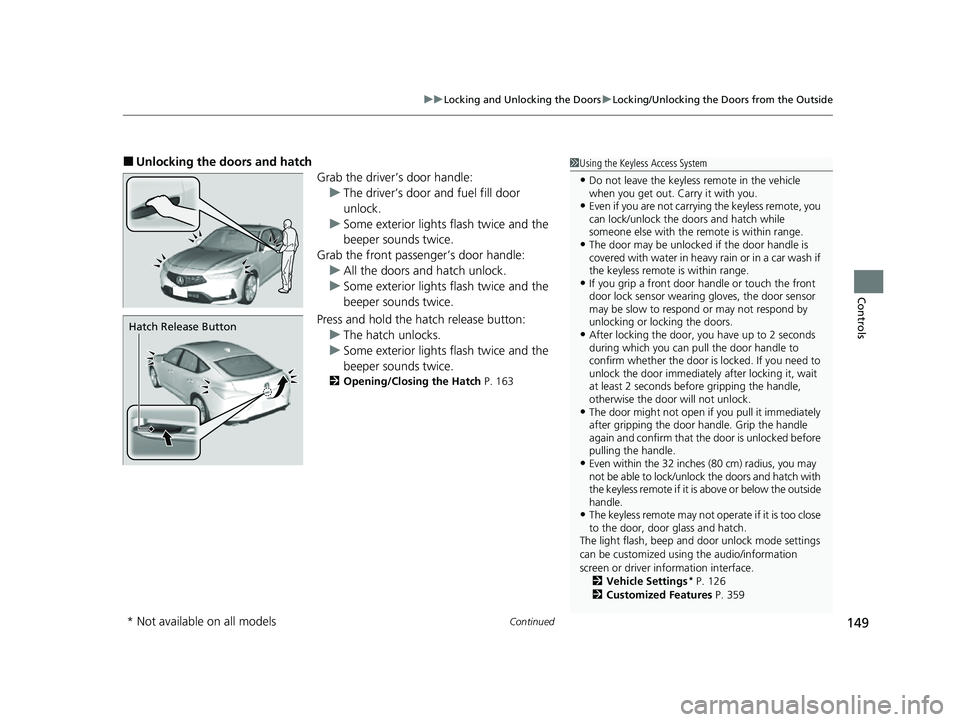
■Unlocking the doors and hatch
Grab the driver’s door handle:u The driver’s door and fuel fill door
unlock.
u Some exterior lights flash twice and the
beeper sounds twice.
Grab the front passenger’s door handle: u All the doors and hatch unlock.
u Some exterior lights flash twice and the
beeper sounds twice.
Press and hold the hatch release button:
u The hatch unlocks.
u Some exterior lights flash twice and the
beeper sounds twice.
2 Opening/Closing the Hatch P. 163
1Using the Keyless Access System
•Do not leave the keyless remote in the vehicle
when you get out. Carry it with you.
•Even if you are not carrying the keyless remote, you
can lock/unlock the do ors and hatch while
someone else with the remote is within range.
•The door may be unlocked if the door handle is
covered with water in heavy rain or in a car wash if
the keyless remote is within range.
•If you grip a front door handle or touch the front
door lock sensor wearing gloves, the door sensor
may be slow to respon d or may not respond by
unlocking or locking the doors.
•After locking the door, you have up to 2 seconds
during which you can pull the door handle to
confirm whether the door is locked. If you need to
unlock the door immediately after locking it, wait
at least 2 seconds befo re gripping the handle,
otherwise the door will not unlock.
•The door might not open if you pull it immediately
after gripping the door handle. Grip the handle
again and confirm that th e door is unlocked before
pulling the handle.
•Even within the 32 inches (80 cm) radius, you may
not be able to lock/unlock the doors and hatch with
the keyless remote if it is above or below the outside
handle.
•The keyless remote may not operate if it is too close
to the door, door glass and hatch.
The light flash, beep and door unlock mode settings
can be customized using the audio/information
screen or driver information interface. 2 Vehicle Settings
* P. 126
2 Customized Features P. 359
Hatch Release Button
* Not available on all models
23 ACURA INTEGRA-313S56000_03.book 149 ページ 2022年3月18日 金曜日 午前11時47分
Page 152 of 740
uuLocking and Unlocking the Doors uLocking/Unlocking the Doors from the Outside
150
Controls
■Locking the doors and hatch (Walk
away auto lock ®)
When you walk away from the vehicle with all
doors and hatch closed while carrying the
keyless remote, the doors will automatically
lock.
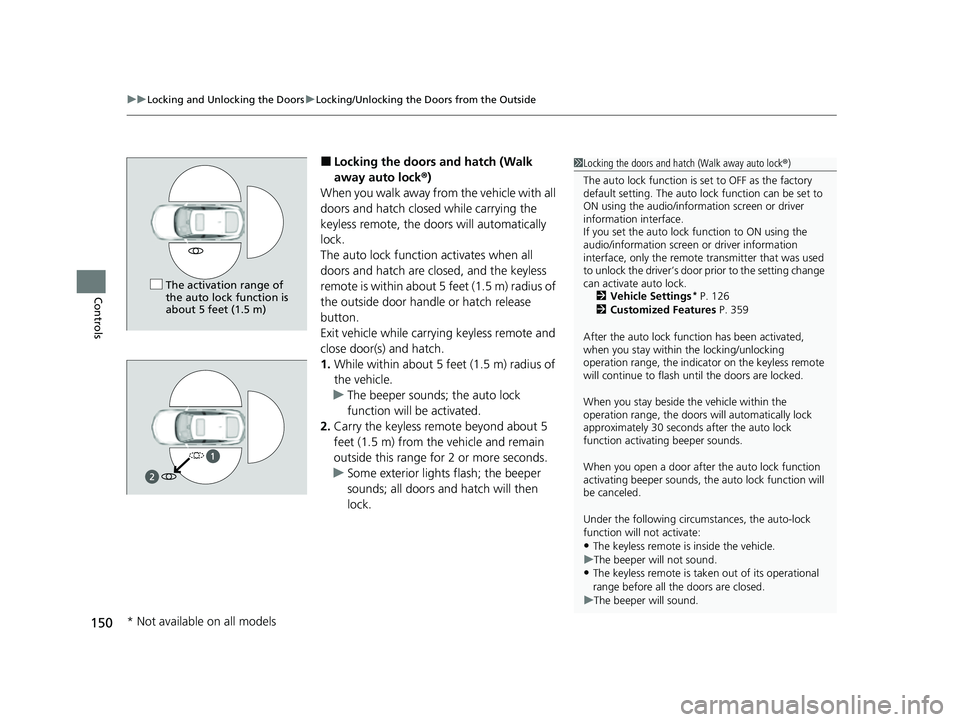
The auto lock function activates when all
doors and hatch are cl osed, and the keyless
remote is within about 5 feet (1.5 m) radius of
the outside door handle or hatch release
button.
Exit vehicle while carry ing keyless remote and
close door(s) and hatch.
1. While within about 5 feet (1.5 m) radius of
the vehicle.
u The beeper sounds; the auto lock
function will be activated.
2. Carry the keyless remote beyond about 5
feet (1.5 m) from the vehicle and remain
outside this range fo r 2 or more seconds.
u Some exterior lights flash; the beeper
sounds; all doors and hatch will then
lock.1Locking the doors and hatch (Walk away auto lock ®)
The auto lock function is set to OFF as the factory
default setting. The auto lo ck function can be set to
ON using the audio/inform ation screen or driver
information interface.
If you set the auto lock function to ON using the
audio/information screen or driver information
interface, only the remote transmitter that was used
to unlock the driver’s door prior to the setting change
can activate auto lock.
2 Vehicle Settings
* P. 126
2 Customized Features P. 359
After the auto lock function has been activated,
when you stay within the locking/unlocking
operation range, the indicato r on the keyless remote
will continue to flash until the doors are locked.
When you stay beside the vehicle within the
operation range, the doors wi ll automatically lock
approximately 30 seconds after the auto lock
function activating beeper sounds.
When you open a door after the auto lock function
activating beeper sounds, the auto lock function will
be canceled.
Under the following circumstances, the auto-lock
function will not activate:
•The keyless remote is inside the vehicle.
u The beeper will not sound.
•The keyless remote is taken out of its operational
range before all the doors are closed.
u The beeper will sound.
The activation range of
the auto lock function is
about 5 feet (1.5 m)
* Not available on all models
23 ACURA INTEGRA-313S56000_03.book 150 ページ 2022年3月18日 金曜日 午前11時47分