instrument panel ACURA INTEGRA 2023 Repair Manual
[x] Cancel search | Manufacturer: ACURA, Model Year: 2023, Model line: INTEGRA, Model: ACURA INTEGRA 2023Pages: 740, PDF Size: 22.94 MB
Page 140 of 740

uuGauges and Displays uHead-Up Display*
138
Instrument Panel
■Adjusting the head-up display brightness
Roll the right selector wheel to scroll to select HUD brightness, then press the right
selector wheel.
Brighten: Roll the right selector wheel up.
Dim : Roll the right selector wheel down.
Press the right selector wheel to exit.
■Adjusting the head-up display height
Roll the right selector wheel to scroll to select HUD height, then press the right
selector wheel.
Raise the head-up display : Roll the right selector wheel up.
Lower the head-up display : Roll the right selector wheel down.
Press the right selector wheel to exit.1 Adjusting the head-up display height
When you unlock and open the driver’s door with a
remote transmitter or keyless access system, the
head-up display adjusts auto matically to one of the
two preset positions.
23 ACURA INTEGRA-313S56000_03.book 138 ページ 2022年3月18日 金曜日 午前11時47分
Page 141 of 740
139
uuGauges and Displays uHead-Up Display*
Instrument Panel
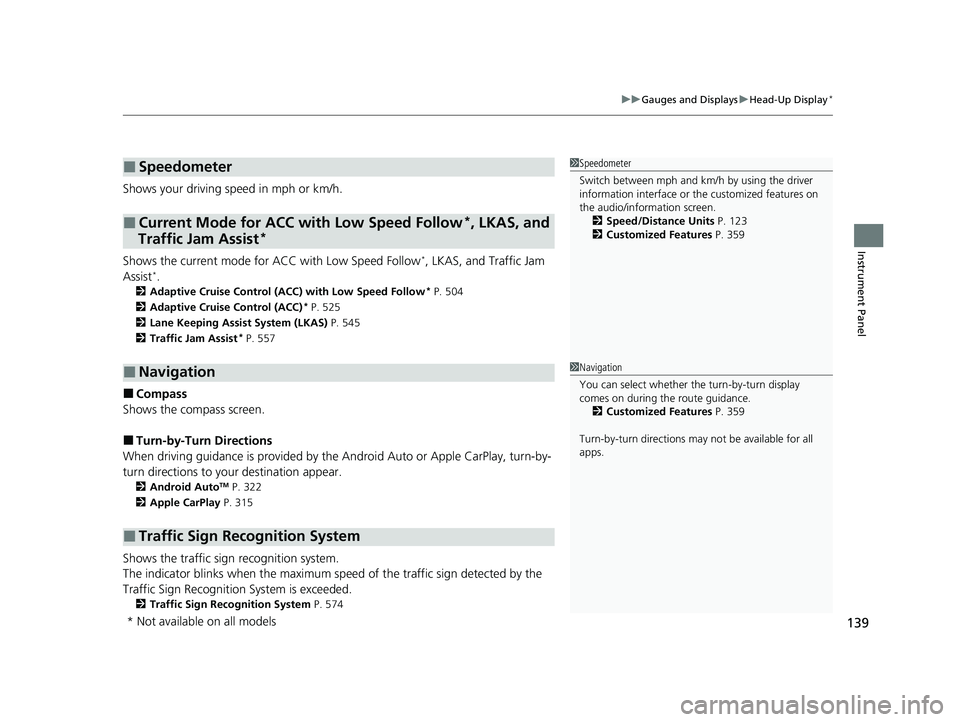
Shows your driving speed in mph or km/h.
Shows the current mode for ACC with Low Speed Follow
I, LKAS, and Traffic Jam
AssistIM
2 Adaptive Cruise Control (ACC) with Low Speed Follow* P. 504
2 Adaptive Cruise Control (ACC)
* P. 525
2 Lane Keeping Assist System (LKAS) P. 545
2 Traffic Jam Assist
* P. 557
■Compass
Shows the compass screen.
■Turn-by-Turn Directions
When driving guidance is provided by the Android Auto or Apple CarPlay, turn-by-
turn directions to your destination appear.
2 Android AutoTM P. 322
2 Apple CarPlay P. 315
Shows the traffic sign recognition system.
The indicator blinks when th e maximum speed of the traffic sign detected by the
Traffic Sign Recognition System is exceeded.
2 Traffic Sign Recognition System P. 574
■Speedometer
■Current Mode for ACC with Low Speed Follow*, LKAS, and
Traffic Jam Assist*
■Navigation
■Traffic Sign Recognition System
1 Speedometer
Switch between mph and km/h by using the driver
information interface or the customized features on
the audio/information screen.
2 Speed/Distance Units P. 123
2 Customized Features P. 359
1Navigation
You can select whether the turn-by-turn display
comes on during the route guidance.
2 Customized Features P. 359
Turn-by-turn directions may not be available for all
apps.
* Not available on all models
23 ACURA INTEGRA-313S56000_03.book 139 ページ 2022年3月18日 金曜日 午前11時47分
Page 168 of 740

uuSecurity System uSecurity System Alarm
166
Controls
■When the security sy stem alarm activates
The horn sounds intermittently, and some exterior lights flash.
■To deactivate the security system alarm
Unlock the vehicle using the key, remote transmitter or keyless access system, or set
the power mode to ON. The system, along with the horn and flashing lights, is
deactivated.
■Setting the security system alarm
The security system alarm automatically sets when the following conditions have
been met:
• The power mode is set to VEHICLE OFF.
• The hood is closed.
• All doors and hatch are locked from outs ide with the remote transmitter or
keyless access system.
■When the security system alarm sets
The security system alarm indicator in the instrument panel blinks and the blinking
interval changes after about 15 seconds.
■To cancel the security system alarm
The security system alarm is canceled when the vehicle is unlocked using the remote
transmitter or keyless access system, or wh en the power mode is set to ON. The
security system alarm indicator goes off at the same time.
1 Security System Alarm
Do not set the security system alarm when someone
is in the vehicle or a window is open. The system can
accidentally activate when:
•Unlocking the door with the lock tab.•Opening the hood with the hood release.
•Taking the transmission out of ( P.
If the battery goes dead after you have set the
security system alarm, the security alarm may go off
once the battery is re charged or replaced.
If this occurs, deactivate the security system alarm by
unlocking a door using the ke y, remote transmitter or
keyless access system.
Continuously variable transmission models
23 ACURA INTEGRA-313S56000_03.book 166 ページ 2022年3月18日 金曜日 午前11時47分
Page 176 of 740

uuOperating the Switches Around the Steering Wheel uENGINE START/STOP Button
174
Controls
When the power mode is set to any mode
other than OFF and yo u remove the keyless
remote from the vehicle and shut the door, an
alarm will sound. If th e alarm continues to
sound, place the keyless remote in another
location.
■When the power mode is in
ACCESSORY
The alarm will sound from outside the vehicle.
■When the power mode is in ON
An alarm will sound both inside and outside
the vehicle. In addition, a warning indicator
will appear on the instrument panel.
■Keyless Remote Reminder1 Keyless Remote Reminder
When the keyless remote is within the system’s
operational range, and all the doors are closed, the
warning function cancels.
If the keyless remote is taken out of the vehicle after
the engine has been st arted, you can no longer
change the ENGINE START/STOP button mode or
restart the engine. Always make sure if the keyless
remote is in your vehi cle when you operate the
ENGINE START/STOP button.
Removing the keyless remote from the vehicle
through a window does not activate the warning
buzzer.
Do not put the keyless remo te on the dashboard or in
the glove box. It may cause the warning buzzer to go
off. Under some other cond itions that can prevent
the vehicle from locating the keyless remote, the
warning buzzer may also go off even if the keyless
remote is within the system’s operational range.
23 ACURA INTEGRA-313S56000_03.book 174 ページ 2022年3月18日 金曜日 午前11時47分
Page 177 of 740
175
uuOperating the Switches Around the Steering Wheel uTurn Signals
Controls
Turn Signals
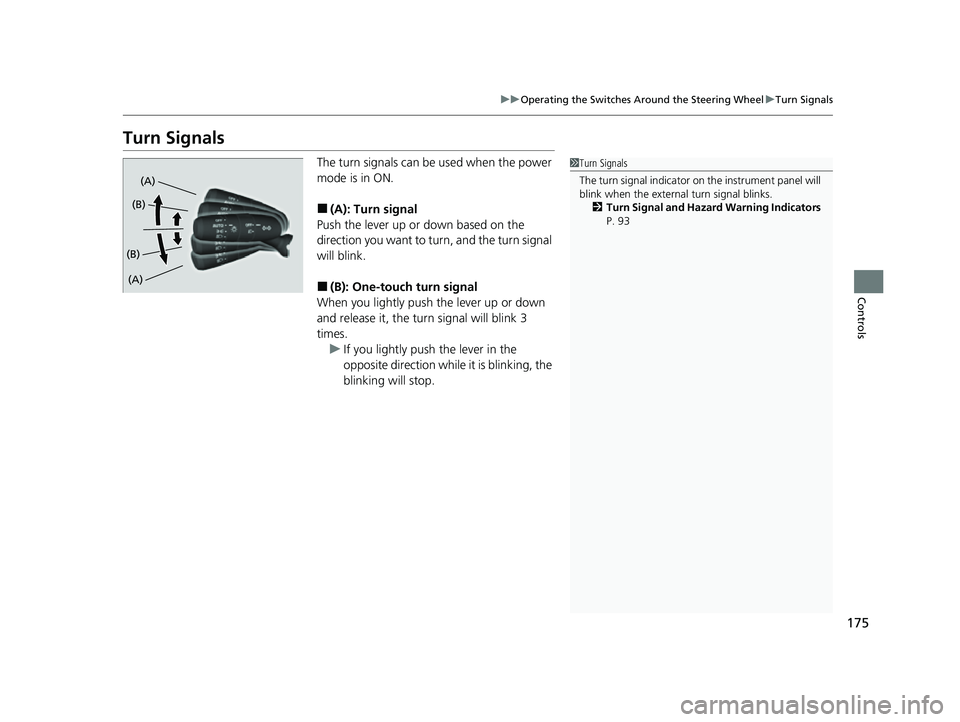
The turn signals can be used when the power
mode is in ON.
■(A): Turn signal
Push the lever up or down based on the
direction you want to turn, and the turn signal
will blink.
■(B): One-touc h turn signal
When you lightly push the lever up or down
and release it, the turn signal will blink 3
times.
u If you lightly push the lever in the
opposite direction while it is blinking, the
blinking will stop.
1Turn Signals
The turn signal indicator on the instrument panel will
blink when the external turn signal blinks.
2 Turn Signal and Hazard Warning Indicators
P. 93
(A)
(A) (B)
(B)
23 ACURA INTEGRA-313S56000_03.book 175 ページ 2022年3月18日 金曜日 午前11時47分
Page 180 of 740

uuOperating the Switches Around the Steering Wheel uLight Switches
178
Controls
The headlights automatically come on when the wipers are used several times within
a certain number of intervals wi th the headlight switch in AUTO.
The headlights automatically go off a few minutes later if the wipers are stopped.
The headlights, all other exterior lights, an d the instrument panel lights turn off 15
seconds after you set the power mode to VEHICLE OFF, and close the driver’s door.
If you set the power mode to VEHICLE OFF with the headlight switch on, but do not
open the door, the lights turn off after 10 minutes (3 minutes, if the switch is in the
AUTO position).
The lights turn on again when you unlock or open the driver’s door. If you unlock
the door, but do not open it within 15 seconds, the lights go off. If you open the
driver’s door, you will hear a reminder chime alerting you that the lights are on.
■Headlight Integration with Wipers
■Automatic Lighting Off Feature
1Automatic Operation (aut omatic lighting control)
You can adjust the auto li ght sensitivity as follows:
2 Vehicle Settings
* P. 126
2 Customized Features P. 359
SettingThe exterior lights come on
when the ambient light is at
Max
High
Mid
Low
Min
U.S. models
Bright
Dark
1 Headlight Integration with Wipers
This feature activates while the headlights are off in
AUTO .
The instrument panel br ightness does not change
when the headlights come on.
At dark ambient light levels, the automatic lighting
control feature turns on the headlights, regardless of
the number of wiper sweeps.
1 Automatic Lighting Off Feature
You can change the headlight auto off timer setting.
2 Vehicle Settings
* P. 126
2 Customized Features P. 359
* Not available on all models
23 ACURA INTEGRA-313S56000_03.book 178 ページ 2022年3月18日 金曜日 午前11時47分
Page 190 of 740

188
uuOperating the Switches Around the Steering Wheel uAdjusting the Steering Wheel
Controls
Adjusting the Steering Wheel
The steering wheel height and distance from your body can be adjusted so that you
can comfortably grip the steering wheel in an appropriate driving posture.
1.While the vehicle is stopped, push the
steering wheel adjustment lever down.
u The steering wheel adjustment lever is
under the steering column.
2. Move the steering wheel up or down, and
in or out.
u Make sure you can see the instrument
panel gauges and indicators.
3. Pull the steering wheel adjustment lever up
to lock the steering wheel in position.
u After adjusting the position, make sure
you have securely locked the steering
wheel in place by trying to move it up,
down, in, and out.1Adjusting the Steering Wheel
3WARNING
Adjusting the steering wheel position while
driving may cause you to lose control of the
vehicle and be seriously injured in a crash.
Adjust the steering wheel only when the
vehicle is stopped.
To adjust
To lock
Lever
23 ACURA INTEGRA-313S56000_03.book 188 ページ 2022年3月18日 金曜日 午前11時47分
Page 377 of 740

375
uuCustomized Features u
Continued
Features
■Driver Assist System Setup
*1:Default Setting
Customizable Features Description Selectable Settings
Forward Collision Warning
DistanceSelects distance for Forward Collision Warning audible and visual
alerts.
2Collision Mitigation Braking SystemTM (CMBSTM) P. 481
Long /Normal*1/Short
Head-up WarningTurn On/Off warning light for head-up flash alert. ON*1/OFF
ACC Forward Vehicle Detect
Beep
Turns On/Off audible notification when vehicle has moved in/out of
Adaptive Cruise Control with Low Speed Follow* range.
2 Adaptive Cruise Control (ACC) with Low Speed Follow* P. 504
2 Adaptive Cruise Control (ACC)* P. 525
ON /OFF*1
Road Departure Mitigation
Setting Selects operating mode of the Ro
ad Departure Mitigation system.
2Road Departure Mitigation System P. 566
Narrow /Normal*1/Wide /
Warning Only
Lane Keeping Assist
Suspend BeepSelects On/Off the LKAS alert for not detecting road lines.
2Lane Keeping Assist System (LKAS) P. 545ON/OFF*1
Blind Spot Info Selects On/Off the blind spot in
formation system audible alert.2Blind Spot Information System P. 474
Audible And Visual Alert*1/
Visual Alert
Traffic Sign Recognition
System Display SettingDisplays the traffic sign recognition system on instrument panel.
2 Traffic Sign Recognition System P. 574Display*1/None
* Not available on all models
23 ACURA INTEGRA-313S56000_03.book 375 ページ 2022年3月18日 金曜日 午前11時47分
Page 547 of 740
545
uuAcuraWatchTMuLane Keeping Assist System (LKAS)
Continued
Driving
Lane Keeping Assist System (LKAS)
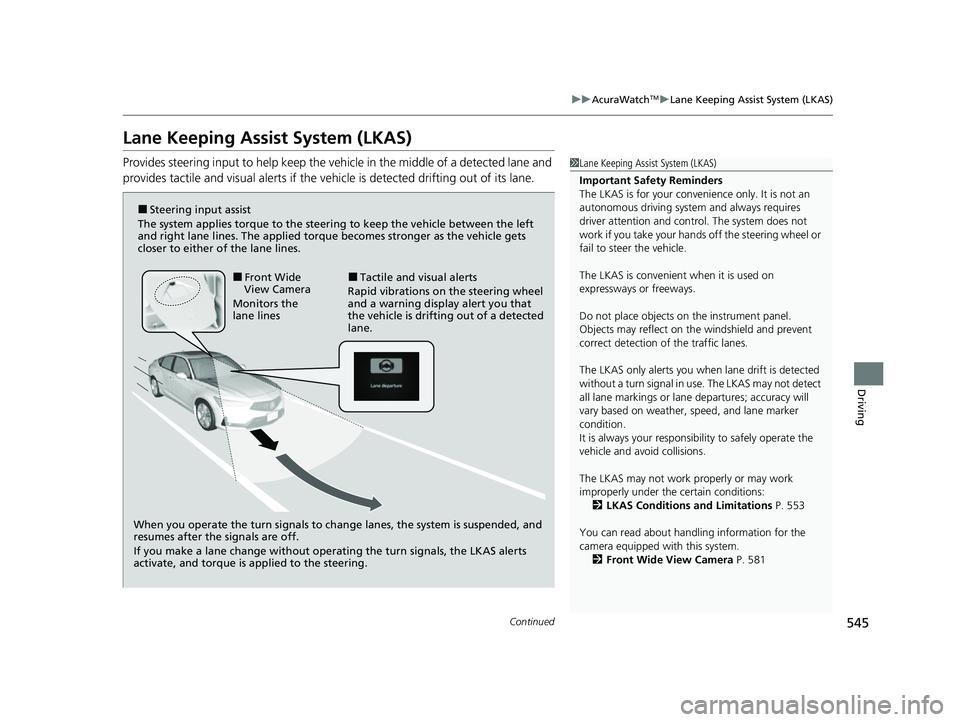
Provides steering input to help keep the vehicle in the middle of a detected lane and
provides tactile and visual al erts if the vehicle is detected drifting out of its lane.1Lane Keeping Assist System (LKAS)
Important Safety Reminders
The LKAS is for your convenience only. It is not an
autonomous driving system and always requires
driver attention and control. The system does not
work if you take your hands off the steering wheel or
fail to steer the vehicle.
The LKAS is convenient when it is used on
expressways or freeways.
Do not place objects on the instrument panel.
Objects may reflect on th e windshield and prevent
correct detection of the traffic lanes.
The LKAS only alerts you when lane drift is detected
without a turn signal in use. The LKAS may not detect
all lane markings or lane departures; accuracy will
vary based on weather, speed, and lane marker
condition.
It is always your responsibility to safely operate the
vehicle and avoid collisions.
The LKAS may not work properly or may work
improperly under the certain conditions:
2 LKAS Conditions and Limitations P. 553
You can read about handling information for the
camera equipped with this system. 2 Front Wide View Camera P. 581
When you operate the turn signals to chan ge lanes, the system is suspended, and
resumes after the signals are off.
If you make a lane change without operating the turn signals, the LKAS alerts
activate, and torque is applied to the steering.
■Front Wide
View Camera
Monitors the
lane lines■Tactile and visual alerts
Rapid vibrations on the steering wheel
and a warning display alert you that
the vehicle is drifting out of a detected
lane.
■Steering input assist
The system applies torque to the steering to keep the vehicle between the left
and right lane lines. The applied torque becomes stronger as the vehicle gets
closer to either of the lane lines.
23 ACURA INTEGRA-313S56000_03.book 545 ページ 2022年3月18日 金曜日 午前11時47分
Page 583 of 740

581
uuAcuraWatchTMuFront Wide View Camera
Continued
Driving
Front Wide View Camera
The camera, used in systems such as Lane Keeping Assist System (LKAS), Road
Departure Mitigation system, Adaptive Cruise Control (ACC) with Low Speed
Follow
*, Adaptive Cruise Control (ACC)*, Traffic Sign Recognition system, CMBSTM,
and Traffic Jam Assist*, is designed to detect an ob ject that triggers any of the
systems to operate their functions.
This camera is located behind the rearview
mirror.
To help reduce the likelihood that high interior
temperatures will cause the camera’s sensing
system to shut off, when parking, find a shady
area or face the front of the vehicle away from
the sun. If you use a reflective sun shade, do
not allow it to cover the camera housing.
Covering the camera can concentrate heat on
it.
■Camera Location and Handling Tips
1 Front Wide View Camera
Never apply a film or attach any objects to the
windshield, the hood, or th e front grille that could
obstruct the camera’s fiel d of vision and cause the
system to operate abnormally.
Scratches, nicks, and othe r damage to the windshield
within the camera’s fiel d of vision can cause the
system to operate abnormall y. If this occurs, we
recommend that you replac e the windshield with a
genuine Acura replacement windshield. Making even
minor repairs within the ca mera’s field of vision or
installing an aftermarke t replacement windshield
may also cause the system to operate abnormally.
After replacing the winds hield, have a dealer
recalibrate the camera. Pr oper calibration of the
camera is necessary for the system to operate
properly.
Do not place an object on the top of the instrument
panel. It may reflect onto the windshield and prevent
the system from detecting lane lines properly.
Front Wide
View Camera
* Not available on all models
23 ACURA INTEGRA-313S56000_03.book 581 ページ 2022年3月18日 金曜日 午前11時47分