Type s ACURA INTEGRA 2024 User Guide
[x] Cancel search | Manufacturer: ACURA, Model Year: 2024, Model line: INTEGRA, Model: ACURA INTEGRA 2024Pages: 766, PDF Size: 28.39 MB
Page 81 of 766

79
uuChild Safety uSafety of Infants and Small Children
Continued
Safe Driving
■Using an outer anchor
1. Remove the cargo area cover.
2 Cargo Area Cover P. 217
2.Locate the appropriate tether anchor point.
3. Route the tether strap over the top of the
head restraint. Make sure the strap is not
twisted.
4. Secure the tether strap hook to the anchor.
5. Tighten the tether strap as instructed by the
child seat manufacturer.
Anchor
Tether Strap Hook
Tether Strap Hook
Anchor
Straight top tether type in outer
position
Other top tether type in outer
position
24 ACURA INTEGRA-313S56100.book 79 ページ 2023年2月13日 月曜日 午後2時41分
Page 82 of 766
80
uuChild Safety uSafety of Infants and Small Children
Safe Driving
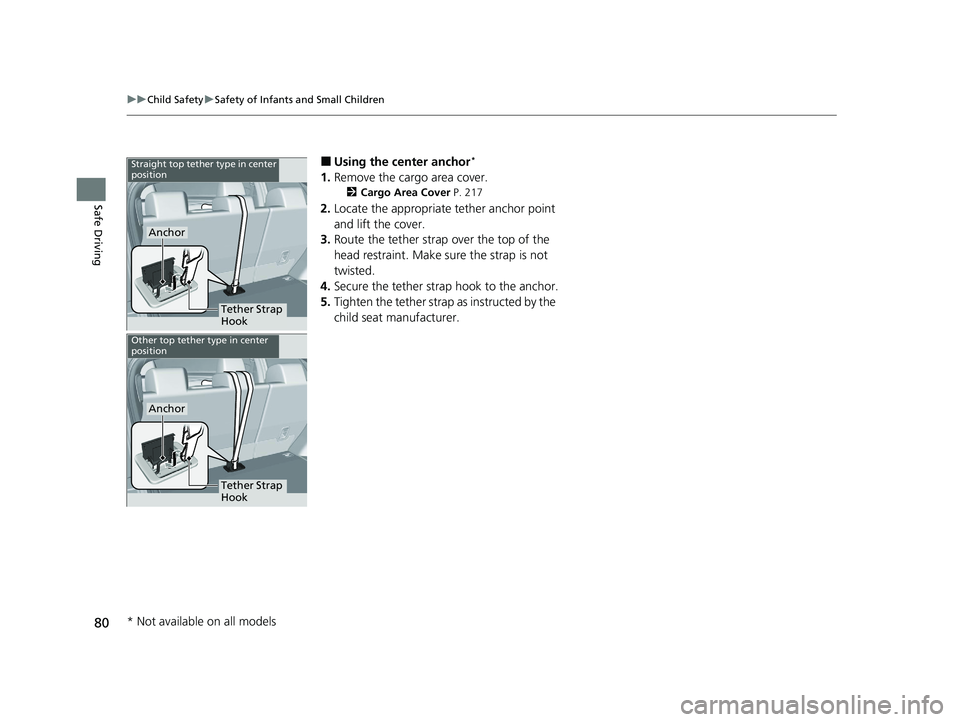
■Using the center anchor*
1. Remove the cargo area cover.
2 Cargo Area Cover P. 217
2.Locate the appropriate tether anchor point
and lift the cover.
3. Route the tether strap over the top of the
head restraint. Make sure the strap is not
twisted.
4. Secure the tether strap hook to the anchor.
5. Tighten the tether strap as instructed by the
child seat manufacturer.
Tether Strap
Hook
Anchor
Straight top tether type in center
position
Other top tether type in center
position
Tether Strap
Hook
Anchor
* Not available on all models
24 ACURA INTEGRA-313S56100.book 80 ページ 2023年2月13日 月曜日 午後2時41分
Page 84 of 766

uuChild Safety uSafety of Larger Children
82
Safe DrivingIf a lap/shoulder seat belt cannot be used
properly, position the child in a booster seat in
the rear seat. For the ch ild’s safety, check that
the child meets the booster seat
manufacturer’s recommendations.
Your vehicle has a rear seat where children can be properly restrained. If you ever
have to carry a group of children, and a child must ride in front:
• Make sure you read and fully understand the instructions and safety information
in this manual.
• Move the front passenger seat as far back as possible.
• Have the child sit upright and well back in the seat.
• Check that the seat belt is properly positi oned so that the child is secure in the
seat.
■Monitoring child passengers
We strongly recommend that you keep an eye on child passengers. Even older, more
mature children sometimes need to be remind ed to fasten their seat belts and sit up
properly.
■Booster Seats1 Booster Seats
When installing a booster seat , make sure to read the
instructions that came with it, and install the seat
accordingly.
There are high- and low-type booster seats. Choose a
booster seat that allows the child to wear the seat
belt correctly.
Some U.S. states, and Canadian provinces and
territories require children to use a booster seat until
they reach a given age or weight (e.g., 6 years or 60
lbs). Be sure to check current laws in the state,
province, or territory where you intend to drive.
■Protecting Larger Children - Final Checks
24 ACURA INTEGRA-313S56100.book 82 ページ 2023年2月13日 月曜日 午後2時41分
Page 119 of 766
117
uuGauges and Displays uDriver Information Interface (Right Side Area)
Continued
Instrument Panel
Driver Information Interfa ce (Right Side Area)
The driver information interface shows info rmation such as the estimated travelable
distance and fuel economy of the vehicle. It also displays messages such as warnings
and other helpful information.
When a warning message displays, please check the message and contact a dealer
to have the vehicle inspected if necessary. Please refer to the pages below if the
Engine oil pressure low or Engine temperature too hot message is displayed.
2If the Engine oil pressure low Warning Appears P. 722
2 Overheating P. 719
Roll the right selector wheel to view different types of content.
■Switching the Display1Switching the Display
You can add or delete the meter contents.
2 Gauge Display Settings P. 133
24 ACURA INTEGRA-313S56100.book 117 ページ 2023年2月13日 月曜日 午後2時41分
Page 153 of 766
151
uuClock uAdjusting the Clock
Controls
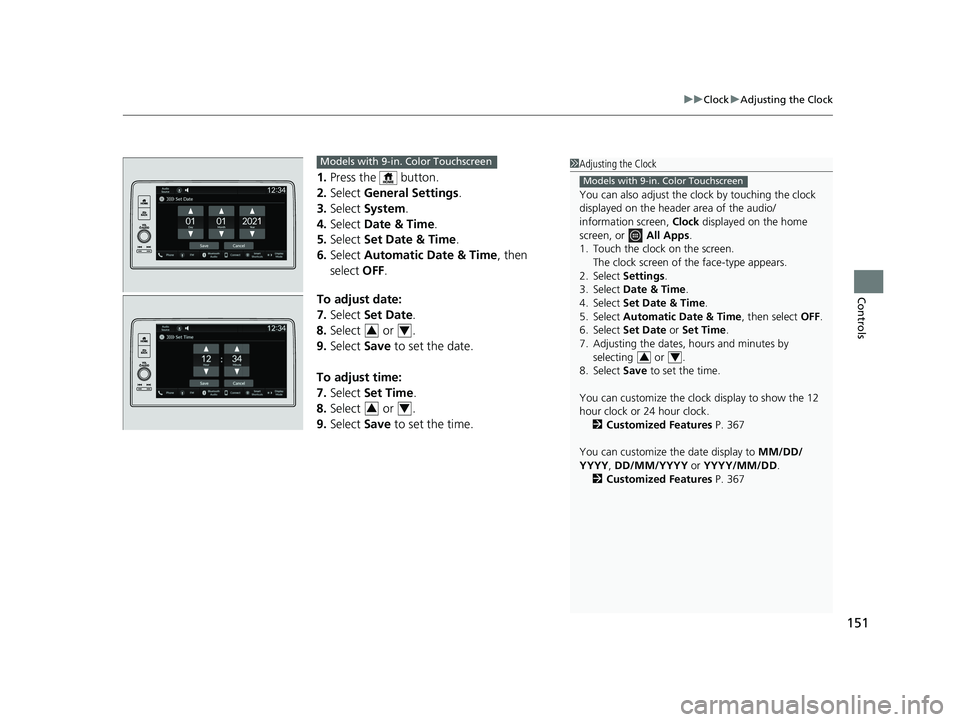
1. Press the button.
2. Select General Settings .
3. Select System.
4. Select Date & Time .
5. Select Set Date & Time .
6. Select Automatic Date & Time , then
select OFF.
To adjust date:
7. Select Set Date.
8. Select or .
9. Select Save to set the date.
To adjust time:
7. Select Set Time.
8. Select or .
9. Select Save to set the time.
1Adjusting the Clock
You can also adjust the clock by touching the clock
displayed on the header area of the audio/
information screen, Clock displayed on the home
screen, or All Apps.
1. Touch the clock on the screen. The clock screen of the face-type appears.
2. Select Settings .
3. Select Date & Time .
4. Select Set Date & Time .
5. Select Automatic Date & Time , then select OFF.
6. Select Set Date or Set Time.
7. Adjusting the dates, hours and minutes by selecting or .
8. Select Save to set the time.
You can customize the clock display to show the 12
hour clock or 24 hour clock. 2 Customized Features P. 367
You can customize the date display to MM/DD/
YYYY , DD/MM/YYYY or YYYY/MM/DD .
2 Customized Features P. 367
Models with 9-in. Color Touchscreen
34
Models with 9-in. Color Touchscreen
34
34
24 ACURA INTEGRA-313S56100.book 151 ページ 2023年2月13日 月曜日 午後2時41分
Page 179 of 766

Continued177
uuWindows uOpening/Closing the Power Windows
Controls
To open: Push the switch down.
To close: Pull the switch up.
Release the switch when the window reaches
the desired position.
To open: Press the unlock button, and then
within 10 seconds, press it again and hold it.
If the windows stop midway, repeat the
procedure.
■Opening/Closing the Windows without Auto-Open/Close
Function1 Opening/Closing the Power Windows
While driving with any of the windows open, you
may hear a booming, throbbi ng, or helicopter-type
noise or pressure. This is ca lled wind buffeting. This is
a normal occurrence th at can be minimized.
If you hear a wind buffeti ng noise with any of the
windows open, lower all of the other windows
slightly or open the moonroof
*.
Close
Open
■Opening the Windows with the Remote1 Opening the Windows with the Remote
If you open the windows with the remote, the
moonroof will open automati cally along with them.
You can turn off or on to open the windows with the
keyless remote setting usi ng the driver information
interface or audio/ information screen.
2 Vehicle Settings
* P. 134
2 Customized Features P. 367
Models with moonroof
Unlock Button
* Not available on all models
24 ACURA INTEGRA-313S56100.book 177 ページ 2023年2月13日 月曜日 午後2時41分
Page 204 of 766
uuSeats uFront Seats
202
Controls
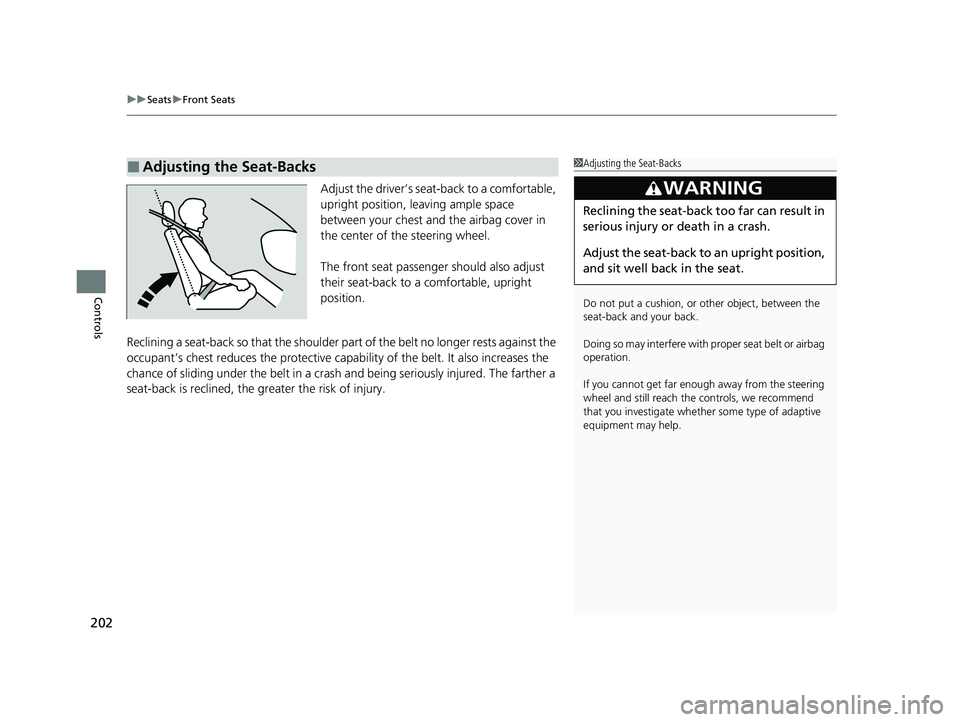
Adjust the driver’s seat-back to a comfortable,
upright position, leaving ample space
between your chest and the airbag cover in
the center of the steering wheel.
The front seat passenger should also adjust
their seat-back to a comfortable, upright
position.
Reclining a seat-back so that the shoulder part of the belt no longer rests against the
occupant’s chest reduces the protective capa bility of the belt. It also increases the
chance of sliding under the belt in a crash and being seriously injured. The farther a
seat-back is reclined, the greater the risk of injury.
■Adjusting the Seat-Backs1 Adjusting the Seat-Backs
Do not put a cushion, or other object, between the
seat-back and your back.
Doing so may interfere with proper seat belt or airbag
operation.
If you cannot get far e nough away from the steering
wheel and still reach th e controls, we recommend
that you investigate whether some type of adaptive
equipment may help.
3WARNING
Reclining the seat-back too far can result in
serious injury or death in a crash.
Adjust the seat-back to an upright position,
and sit well back in the seat.
24 ACURA INTEGRA-313S56100.book 202 ページ 2023年2月13日 月曜日 午後2時41分
Page 220 of 766
218
uuInterior Convenience Items uOther Interior Convenience Items
Controls
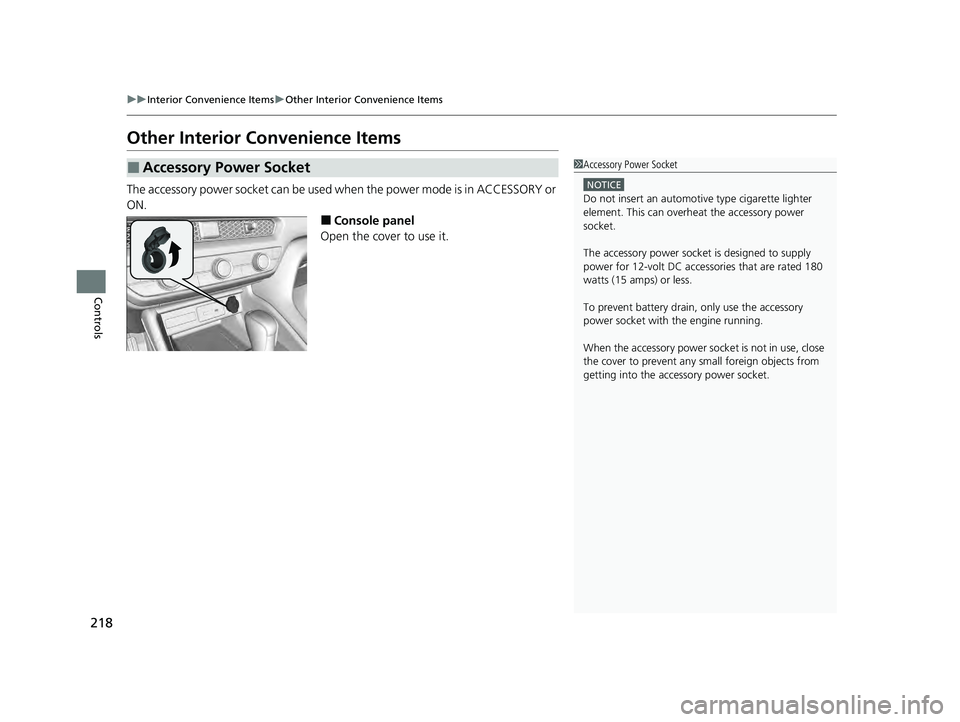
Other Interior Convenience Items
The accessory power socket can be used wh en the power mode is in ACCESSORY or
ON.
■Console panel
Open the cover to use it.
■Accessory Power Socket1 Accessory Power Socket
NOTICE
Do not insert an automotive type cigarette lighter
element. This can overheat the accessory power
socket.
The accessory power socket is designed to supply
power for 12-volt DC accessories that are rated 180
watts (15 amps) or less.
To prevent battery drain, only use the accessory
power socket with the engine running.
When the accessory power soc ket is not in use, close
the cover to prevent any small foreign objects from
getting into the accessory power socket.
24 ACURA INTEGRA-313S56100.book 218 ページ 2023年2月13日 月曜日 午後2時41分
Page 351 of 766

349
uuGeneral Information on the Audio System uHonda App License Agreement
Continued
Features
E. Information Collection and Storage
1. Information Collection , Use, Transmission and Storage of Data. Consent to Use of Data:
You agree that HONDA and PROVIDERS may
collect and use your information gathered in any manner as part of product support services related to the SOFTWARE or related services.
HONDA may share such information with third parties, including, without limitation, PR OVIDERS, third party software and services
suppliers, their affiliates and/or their designated agents, solely to improve their products or to provide services or technolo gies to you.
HONDA, third party software and syst ems suppliers, their affiliates and/or their de signated agent may disclose this information to others,
but not in a form that pe rsonally identifies you.
2. Information Storage.
Depending on the type of mult imedia system you have in your VEHICLE, certain information may be stored for ease
of use of the SOFTWARE including, without limitation, search hi story, location history in certain applications, previous and saved
destinations, map locations within certain applications, and device numbers and contact information.
(a) Vehicle Health Information.
Your VEHICLE may remotely transmit information re garding the status and health of your VEHICLE
(“VEHICLE INFORMATION”) to HONDA without notification to you. VEHICLE INFORMATION may contain VEHICLE maintenance and
malfunction status that is derived from VEHICLE diagnostic data and includes, but is not limited to, status of powered doors and windows,
battery life data, battery charging data, VE HICLE speed, coolant temperature, air comp ressor revolution, output power, warning codes,
diagnostic trouble codes, fuel injection volume, and engine rotati ons per minute. VEHICLE HEALTH INFORMATION may be used by HON DA
for research and development, to deliver HONDA SERVICES and informat ion to you, and to contact you, and is retained only for a period
of time necessary to fulfill these goals.
(b) VEHICLE Geolocation Data (non-navigation/map based).
If you opt-in to geolocation-based SERVICES, your vehicle’s geolocation data
(latitude and longitude) will be automatically sent from your VEHICLE to HONDA and PROVIDERS.
(c) You understand that the inputting or uploading of information to your VEHICLE’s multimedia system or the SOFTWARE or SERVIC ES is
at your own risk and that HONDA is not responsible for unauthori zed access to or use of any personal or other information. All information
uploaded to the SOFTWARE and SERVICES may be stored on your VEHICLES’s multimedia system and you understand that the security and
safety of your VEHICLE’s multimedia system is your sole responsibility.
24 ACURA INTEGRA-313S56100.book 349 ページ 2023年2月13日 月曜日 午後2時41分
Page 399 of 766

Continued397
uuBluetooth ® HandsFreeLink ®u HFL Menus
Features
When your phone is paired, the contents of its phonebook and call history are
automatically imported to HFL.
■Automatic Import of Cellular Phonebook and Call History1Automatic Import of Cellular Phonebook and Call History
When you select a person from the list in the cellular
phonebook, you can see up to five category icons.
The icons indicate what types of numbers are stored
for that name.
On some phones, it may no t be possible to import the
category icons to HFL.
The phonebook is updated af ter every connection.
Call history is updated after every connection or call.
Pref
Home
Mobile
Pager WorkFax
Car
Other Voice
24 ACURA INTEGRA-313S56100.book 397 ページ 2023年2月13日 月曜日 午後2時41分