cruise control ACURA INTEGRA 2024 Repair Manual
[x] Cancel search | Manufacturer: ACURA, Model Year: 2024, Model line: INTEGRA, Model: ACURA INTEGRA 2024Pages: 766, PDF Size: 28.39 MB
Page 580 of 766

uuAcuraWatchTMuRoad Departure Mitigation System
578
Driving
You can turn the system on and off us ing the driver information interface.
2Switching the Display P. 117
2 Safety Support P. 129
The Road Departure Mitigation system is in the previously selected on or off setting
each time you start the engine.
■Road Departure Mitigation system On and Off1Road Departure Mitigation system On and Off
When you have selected Warning Only , the system
does not operate the steering wheel.
2 Vehicle Settings
* P. 134
2 Customized Features P. 367
The Vehicle Stability Assist
TM (VSA ®) system, Adaptive
Cruise Control (ACC)*, Adaptive Cruise Control
(ACC) with Low Speed Follow* and safety support
indicators may come on in amber along with a
message in the gauge when you set the power mode
to ON after reconnecting the battery.
Drive a short distance at more than 12 mph (20 km/h).
Each indicator should go off. If any do not, have your
vehicle checked by a dealer.
Models with 7-in. Color Touchscreen
Models with 9-in. Color Touchscreen
* Not available on all models
24 ACURA INTEGRA-313S56100.book 578 ページ 2023年2月13日 月曜日 午後2時41分
Page 592 of 766
590
uuAcuraWatchTMuFront Wide View Camera
Driving
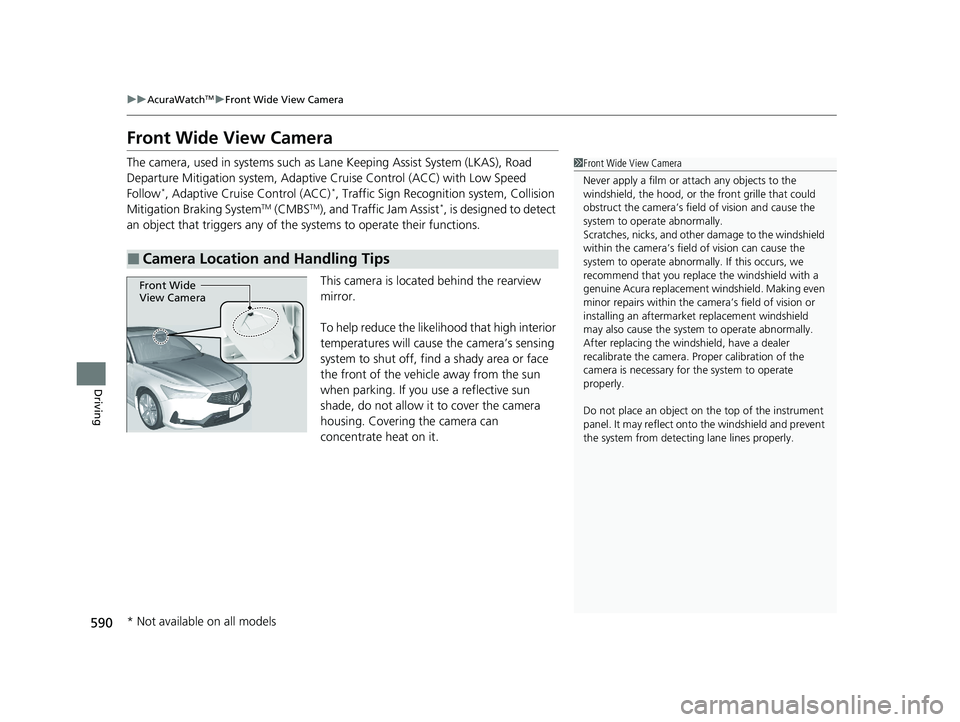
Front Wide View Camera
The camera, used in systems such as La ne Keeping Assist System (LKAS), Road
Departure Mitigation system, Adaptive Cruise Control (ACC) with Low Speed
Follow
*, Adaptive Cruise Control (ACC)*, Traffic Sign Recognition system, Collision
Mitigation Braking SystemTM (CMBSTM), and Traffic Jam Assist*, is designed to detect
an object that triggers any of the systems to operate their functions.
This camera is located behind the rearview
mirror.
To help reduce the likelihood that high interior
temperatures will cause the camera’s sensing
system to shut off, find a shady area or face
the front of the vehicle away from the sun
when parking. If you use a reflective sun
shade, do not allow it to cover the camera
housing. Covering the camera can
concentrate heat on it.
■Camera Location and Handling Tips
1Front Wide View Camera
Never apply a film or attach any objects to the
windshield, the hood, or th e front grille that could
obstruct the camera’s fiel d of vision and cause the
system to operate abnormally.
Scratches, nicks, and othe r damage to the windshield
within the camera’s fiel d of vision can cause the
system to operate abnormall y. If this occurs, we
recommend that you replac e the windshield with a
genuine Acura replacement windshield. Making even
minor repairs within the ca mera’s field of vision or
installing an aftermarke t replacement windshield
may also cause the system to operate abnormally.
After replacing the winds hield, have a dealer
recalibrate the camera. Pr oper calibration of the
camera is necessary for the system to operate
properly.
Do not place an object on the top of the instrument
panel. It may reflect onto the windshield and prevent
the system from detecting lane lines properly.
Front Wide
View Camera
* Not available on all models
24 ACURA INTEGRA-313S56100.book 590 ページ 2023年2月13日 月曜日 午後2時41分
Page 597 of 766

Continued595
uuBraking uBrake System
Driving
■Automatic parking brake feature operation
If the automatic parking brake feature has been activated:
• The parking brake is applied automatica lly when you set the power mode to
VEHICLE OFF.
• To confirm that the parking brake is applied, check if the parking brake and brake
system indicator (red) is on.
2 Activating and deactivating the automatic parking brake feature P. 597
■To release automatically
Depressing the accelerator pedal releases the parking brake.
Use the accelerator pedal to release the parking brake when you are starting the
vehicle facing uphill, or in a traffic jam. Gently depress the accelerator pedal.
When on a hill, it may require more
accelerator input to release.u The parking brake and brake system
indicator (red) goes off.
You can release the parking brake automatically when:
• You are wearing the driver’s seat belt.
• The engine is running.
• The transmission is not in
(P or (N.
1Parking Brake
In the following situations, the parking brake
automatically operates.
•When the vehicle stops with the automatic brake
hold system activated for more than 10 minutes.
•When the driver’s seat belt is unfastened while
your vehicle is stopped and brake hold is applied.
•When the engine is turned off, except by Auto Idle
Stop system, while brake hold system is applied.
•When there is a problem with the brake hold
system while brake hold is applied.
•When the vehicle stops more than 10 minutes
while Adaptive Cruise Control (ACC) with Low
Speed Follow is activated.
•When the driver’s seat belt is unfastened while
your vehicle is stopped au tomatically by ACC with
Low Speed Follow.
•When the engine is turned off, except by Auto Idle
Stop system, while ACC with Low Speed Follow is
activated.
Models with Adaptive Cruise Control (ACC)
with Low Speed Follow
Continuously variable transmission models
Continuously variable transmission models
Accelerator Pedal
24 ACURA INTEGRA-313S56100.book 595 ページ 2023年2月13日 月曜日 午後2時41分
Page 600 of 766
598
uuBraking uBrake System
Driving
If you need to temporarily deactivate the feature while putting your vehicle through
a conveyor type car wash, you can follow the procedure explained below.
1. Depress the brake pedal and bring the vehicle to a stop.
2. Set the power mode to VEHICLE OFF and then within two seconds push down the
electric parking brake switch.
u Activation and deactivation settings fo r the feature will not be affected.
u Before temporarily deactivating the feat ure, make sure to first turn off both
Adaptive Cruise Control (ACC) with Low Speed Follow and the automatic
brake hold system.
u To confirm that the parking brake is ap plied, check if the parking brake and
brake system indicator (red) is on.
24 ACURA INTEGRA-313S56100.book 598 ページ 2023年2月13日 月曜日 午後2時41分
Page 674 of 766

672
uuBattery uCharging the Battery
Maintenance
Charging the Battery
Disconnect both battery cables to prevent da maging your vehicle’s electrical system.
Always disconnect the negative (–) cable first, and reconnect it last.1 Battery
When you find corrosion, cl ean the battery terminals
by applying a baking powder and water solution.
Clean the terminals with a damp towel. Cloth/towel
dry the battery. Coat the terminals with grease to
help prevent future corrosion.
When replacing the battery, the replacement must be
of the same specifications.
Consult a dealer for more information.
The battery installed in this vehicle is specifically
designed for a model wi th Auto Idle Stop.
Using a battery other than this specified type may
shorten the battery life, a nd prevent Auto Idle Stop
from activating. If you need to replace the battery,
make sure to select the specified type and size. Ask a
dealer for more details.
The Vehicle Stability Assist
TM (VSA ®) system, Adaptive
Cruise Control (ACC)*, Adaptive Cruise Control
(ACC) with Low Speed Follow (LSF)*, and safety
support indicators may come on in amber along with
a message in the gauge when you set the power
mode to ON after re connecting the battery.
Drive a short distance at more than 12 mph (20 km/h).
Each indicator should go off. If any do not, have your
vehicle checked by a dealer.
Models with Auto Idle Stop
* Not available on all models
24 ACURA INTEGRA-313S56100.book 672 ページ 2023年2月13日 月曜日 午後2時41分
Page 719 of 766

717
uuIf the Battery Is Dead uJump Starting Procedure
Handling the Unexpected
Once your vehicle’s engine has started, re move the jumper cables in the following
order.
1. Disconnect the jumper cable from your vehicle’s ground.
2. Disconnect the other end of the jump er cable from the booster battery -
terminal.
3. Disconnect the jumper cable from your vehicle’s battery + terminal.
4. Disconnect the other end of the jump er cable from the booster battery +
terminal.
Have your vehicle inspected by a n earby service station or a dealer.
■What to Do After the Engine Starts1What to Do After the Engine Starts
The Vehicle Stability Assist
TM (VSA ®) system, Adaptive
Cruise Control (ACC)*, Adaptive Cruise Control
(ACC) with Low Speed Follow*, and safety support
indicators may come on in amber along with a
message in the gauge when you set the power mode
to ON after reconnecting th e battery. Drive a short
distance at more than 12 mph (20 km/h). Each
indicator should go off. If any do not, have your
vehicle checked by a dealer.
* Not available on all models
24 ACURA INTEGRA-313S56100.book 717 ページ 2023年2月13日 月曜日 午後2時41分
Page 749 of 766

747
uuEmissions Testing uTesting of Readiness Codes
Continued
Information
7. Select a nearby, lightly trav eled major highway where you can maintain a speed
of 50 to 60 mph (80 to 97 km/h) for at least 20 minutes. Drive on the highway
in
(D (continuously variable transmission) or 5th (manual). Do not use cruise
control. When traffic al lows, drive for 90 seconds without moving the
accelerator pedal. (Vehicle speed may vary slightly; this is okay.) If you cannot do
this for a continuous 90 seconds because of traffic conditions, drive for at least
30 seconds, then repeat it two more times (for a total of 90 seconds).
8. Drive in city or suburban traffic for at least 10 minutes. When traffic conditions
allow, let the vehicle coast for severa l seconds without using the accelerator
pedal or the brake pedal.
9. Park the vehicle and leave the engine off for 30 minutes.
1. Fill the gas tank to approximately 3/4 full.
2. Park the vehicle and leave the en gine off for 6 hours or more.
3. Make sure the ambient temperature is between 40°F and 95°F (4°C and 35°C).
4. Start the engine without touching the acce lerator pedal, and let it idle for 20
seconds.
5. Keep the vehicle in
(N. Increase the engine speed to 2,000 rpm, and hold it
there for about 3 minutes.
6. Let the engine idle with your foot off the accelerator for 20 seconds.
7. Drive in city or suburban traffic for at least 10 minutes. When traffic conditions
allow, let the vehicle coast for severa l seconds without using the accelerator
pedal or the brake pedal.
2.0 L engine models
24 ACURA INTEGRA-313S56100.book 747 ページ 2023年2月13日 月曜日 午後2時41分
Page 750 of 766

748
uuEmissions Testing uTesting of Readiness Codes
Information
8. Select a nearby, lightly traveled major highway where you can maintain a speed
of 50 to 60 mph (80 to 97 km/h) for at least 20 minutes. Drive on the highway
in 5th. Do not use cruise control. Wh en traffic allows, drive for 90 seconds
without moving the accelerator pedal. (Veh icle speed may vary slightly; this is
okay.) If you cannot do this for a continuous 90 seconds because of traffic
conditions, drive for at least 30 seconds, then repeat it two more times (for a
total of 90 seconds). While the vehicle is traveling in this speed range, shift to
6th gear and then accelerate and decelerate 5 times, each time making sure you
do not exceed 60 mph (97 km/h).
9. Park the vehicle and let the engine idle for 1 minute without using the
accelerator pedal.
10. Park the vehicle and leave the engine off for 30 minutes.
24 ACURA INTEGRA-313S56100.book 748 ページ 2023年2月13日 月曜日 午後2時41分
Page 757 of 766

Index
755
Index
Index
Numbers
7-Speed Manual Shift Mode................... 446
Operation ............................................... 447
A
ABS (Anti-lock Brake System) .................. 605
Accelerator Position Meter ..................... 126
Accessories and Modifications ................ 682
Accessory Power Socket ........................... 218
Acura Integrated Dynamics System ............................................. 452, 454
AcuraLink® .............................................. 316
AcuraWatch
TM.................................... 27, 486
Adaptive Cruise Control (ACC) ................ 533
Adaptive Cruise Control (ACC) with Low
Speed Follow .......................................... 512
Adding the Coolant ......................... 648, 651
Additives Coolant .......................................... 648, 651
Engine Oil ............................................... 640
Washer ................................................... 654
Additives, Engine Oil ............................... 640
Adjusting
Armrest .................................................. 208
Clock ...................................................... 150
Front Head Restraints .............................. 206
Front Seats.............................................. 199
Mirrors.................................................... 197
Rear Seats ............................................... 203
Sound ............................................. 243, 285 Steering Wheel ........................................ 196
Agile Handling Assist ............................... 476
Air Conditioning System (Climate Control System) .................................................... 226
Changing the Mode ........................ 226, 227
Defrosting the Windshield and Windows ............................................... 228
Dust and Pollen Filter ............................... 675
Recirculation/Fresh Air Mode ................... 227
Sensor ..................................................... 231
Synchronization Mode ............................. 230
Using Automatic Climate Control ............ 226
Air Pressure ....................................... 661, 741
Airbags ........................................................ 49
Advanced Airbags ..................................... 55
After a Collision ......................................... 52
Airbag Care ............................................... 67
Driver’s Knee Airbag .................................. 57
Event Data Recorder .................................... 0
Front Airbags (SRS) .................................... 52
Indicator .............................................. 64, 94
Passenger Airbag Off Indicator .................. 65
Sensors ...................................................... 49
Side Airbags .............................................. 60
Side Curtain Airbags .................................. 63
AM/FM Radio .................................... 245, 292
Android Auto
TM................................ 263, 333
Anti-lock Brake System (ABS) .................. 605
Indicator .................................................... 94
Apple CarPlay ................................... 259, 326
Armrest ..................................................... 208 Audio Remote Controls
........................... 238
Audio System ............................ 234, 242, 267
Adjusting the Sound........................ 243, 285
Alexa Built-In ........................................... 291
Android Auto
TM............................... 263, 333
Apple CarPlay.................................. 259, 326
Audio/Information Screen........................ 269
Display Setup .................................. 244, 286
Error Messages ........................................ 339
General Information ................................ 341
Home Screen........................................... 274
How to Update ....................................... 280
How to Update Wirelessly ....................... 283
How to Update with a USB Device........... 284
iPod ................................................ 247, 307
Limitations for Manual Operation .............................. 287, 387, 407
Radio Data System (RDS) ................. 246, 294
Reactivating ............................................ 237
Recommended Devices............................ 342
Remote Controls ..................................... 238
Security Code .......................................... 237
Selecting an Audio Source ....................... 287
Start Up .................................................. 268
Status Area ............................................. 279
System Updates....................................... 280
System Updates Settings ......................... 281
Theft Protection ...................................... 237
USB Flash Drives ...................................... 342
USB Port(s) .............................................. 235
Wallpaper Setup...................................... 272
24 ACURA INTEGRA-313S56100.book 755 ページ 2023年2月13日 月曜日 午後2時41分
Page 761 of 766
759
Index
I
Identification NumbersVehicle Identification............................... 742
Immobilizer System .................................. 173
Indicator ................................................... 98
Indicators .................................................... 86
Adaptive Cruise Control (ACC)................ 533
Adaptive Cruise Control (ACC) with
Low Speed Follow ......................... 101, 512
Adaptive Cruise Control (ACC) with Low Speed Follow Interval ............................ 102
Anti-lock Brake System (ABS) .................... 94
Auto High-Beam ....................................... 96
Auto Idle Stop (Green) .............................. 99
Auto Idle Stop OFF .................................... 99
Auto Idle Stop Suspend........................... 100
Auto Idle Stop System (Amber) ................. 99
Automatic Brake Hold ....................... 90, 600
Automatic Brake Hold System ........... 90, 600
Charging System............................... 91, 723
COMFORT Mode ...................................... 97
Cruise Mode ........................................... 102
Electric Power Steering (EPS) System ............................................ 94, 725
Fog Light .................................................. 96
Gear Position ............................................ 92
High Beam ................................................ 96
Immobilizer System ................................... 98
INDIVIDUAL Mode .................................... 97
Lane Keeping Assist System (LKAS) ......... 102
Lights On .................................................. 96 Low Fuel .................................................... 94
Low Tire Pressure/TPMS ............. 95, 480, 727
M (7-speed manual shift mode) Indicator/
Shift ........................................................ 91
Malfunction Indicator Lamp ............... 91, 723
NORMAL Mode ......................................... 97
Parking Brake and Brake System (Amber) ........................................... 90, 726
Parking Brake and Brake System (Red) ...................... 88, 89, 724, 726
Safety Support ................................. 103, 106
Seat Belt Reminder .............................. 42, 93
Security System Alarm ............................... 98
Shift Down ........................................ 92, 450
Shift Position ............................................. 91
Shift Up ............................................. 92, 450
SPORT Mode ............................................. 97
SPORT+ Mode ........................................... 97
Supplemental Restraint System ............ 64, 94
System Message ........................................ 97
Transmission System .................................. 92
Turn Signal and Haza rd Warning ............... 96
Vehicle Stability Assist
TM (VSA ®) OFF ... 95, 475
Vehicle Stability AssistTM (VSA ®)
System............................................. 95, 474
Information ............................................... 739
Instant Fuel Economy ............................... 120
Instrument Panel ........................................ 85
Integrated Dynamics System .................... 454
Dynamic Mode Switch ..................... 455, 456
Interior Lights ........................................... 209 Interior Rearview Mirror
.......................... 197
iPod ................................................... 247, 307
J
Jack (Wheel Nut Wrench) ........................ 707
Jump Starting ........................................... 715
K
Key Number Tag ....................................... 153
Keyless Access System .............................. 155
Keys ........................................................... 152
Number Tag ............................................ 153
Rear Door Won’t Open............................ 168
Remote Transmitter ................................. 161
Two-way Keyless Remote ........................ 162
Types and Functions ................................ 152
Kickdown (Continuously Variable Transmission) .......................................... 443
L
Lane Keeping Assist System (LKAS) ......... 553
LATCH (Child Seats) .................................... 73
24 ACURA INTEGRA-313S56100.book 759 ページ 2023年2月13日 月曜日 午後2時41分