cruise control ACURA INTEGRA 2024 Owner's Manual
[x] Cancel search | Manufacturer: ACURA, Model Year: 2024, Model line: INTEGRA, Model: ACURA INTEGRA 2024Pages: 766, PDF Size: 28.39 MB
Page 516 of 766
uuAcuraWatchTMuAdaptive Cruise Control (ACC) with Low Speed Follow*
514
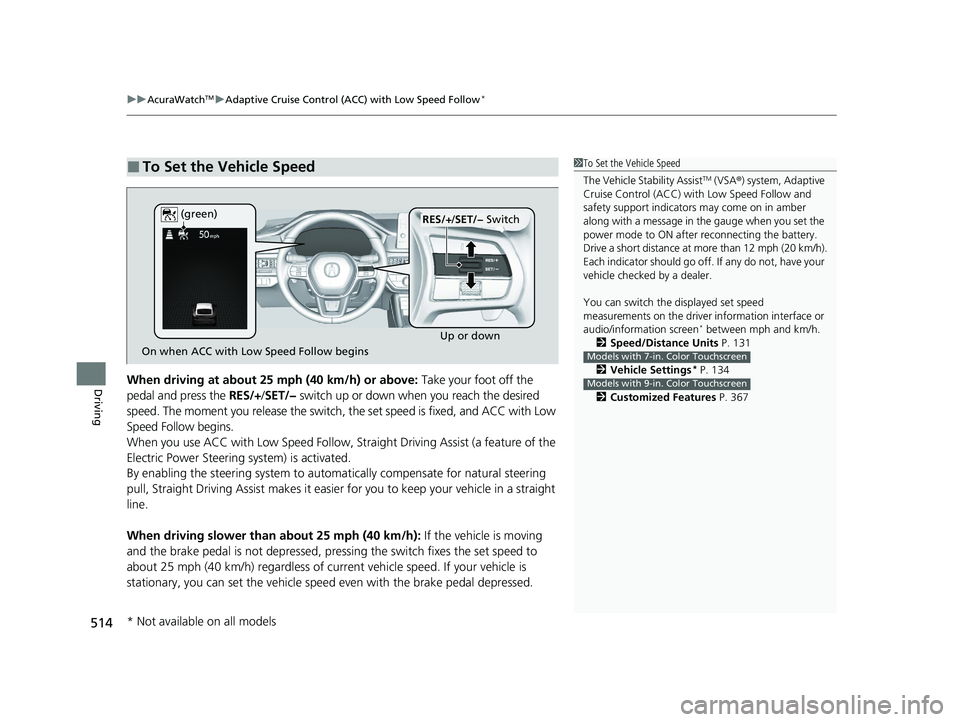
DrivingWhen driving at about 25 mph (40 km/h) or above: Take your foot off the
pedal and press the RES/+/SET/− switch up or down when you reach the desired
speed. The moment you release the switch, the set speed is fixed, and ACC with Low
Speed Follow begins.
When you use ACC with Low Speed Follow, Stra ight Driving Assist (a feature of the
Electric Power Steering system) is activated.
By enabling the steering system to automa tically compensate for natural steering
pull, Straight Driving Assist makes it easier for you to keep your vehicle in a straight
line.
When driving slower than about 25 mph (40 km/h): If the vehicle is moving
and the brake pedal is not depressed, pres sing the switch fixes the set speed to
about 25 mph (40 km/h) regardless of current vehicle speed. If your vehicle is
stationary, you can set the vehicle speed even with the brake pedal depressed.
■To Set the Vehicle Speed1 To Set the Vehicle Speed
The Vehicle Stability Assist
TM (VSA ®) system, Adaptive
Cruise Control (ACC) with Low Speed Follow and
safety support indicators may come on in amber
along with a message in the gauge when you set the
power mode to ON after reconnecting the battery.
Drive a short distance at more than 12 mph (20 km/h).
Each indicator should go off. If any do not, have your
vehicle checked by a dealer.
You can switch the displayed set speed
measurements on the driver information interface or
audio/information screen
* between mph and km/h.
2 Speed/Distance Units P. 131
2 Vehicle Settings
* P. 134
2 Customized Features P. 367
Models with 7-in. Color Touchscreen
Models with 9-in. Color Touchscreen
On when ACC with Low Speed Follow begins Up or down
RES/+
/SET/− Switch
(green)
* Not available on all models
24 ACURA INTEGRA-313S56100.book 514 ページ 2023年2月13日 月曜日 午後2時41分
Page 517 of 766
515
uuAcuraWatchTMuAdaptive Cruise Control (ACC) with Low Speed Follow*
Continued
Driving
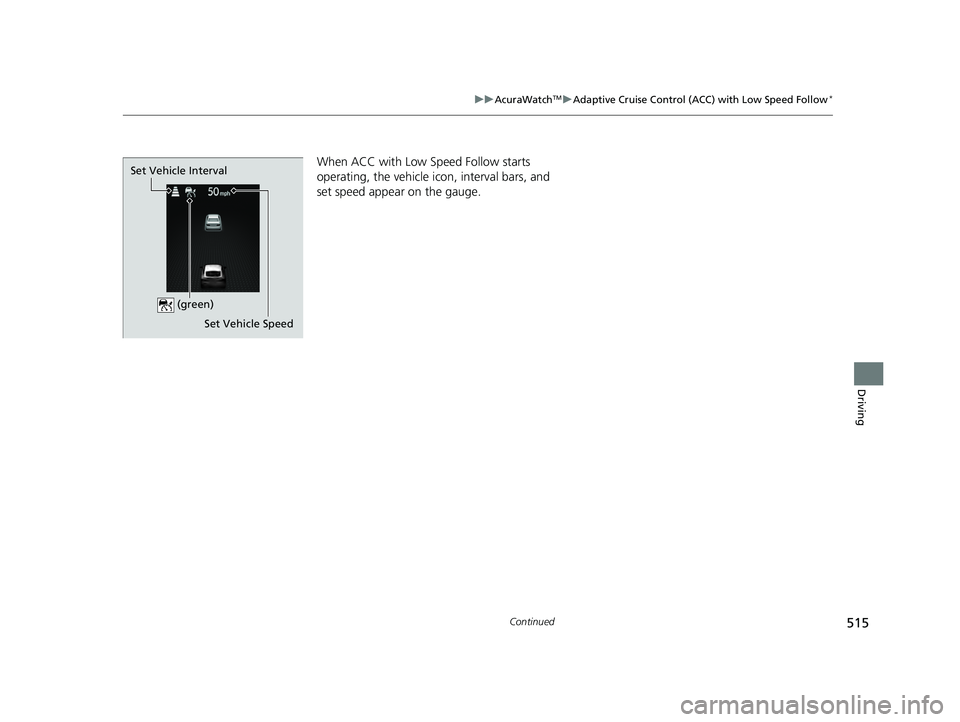
When ACC with Low Speed Follow starts
operating, the vehicle icon, interval bars, and
set speed appear on the gauge.
Set Vehicle Speed
Set Vehicle Interval
(green)
24 ACURA INTEGRA-313S56100.book 515 ページ 2023年2月13日 月曜日 午後2時41分
Page 518 of 766
uuAcuraWatchTMuAdaptive Cruise Control (ACC) with Low Speed Follow*
516
Driving
■There is a vehicle ahead
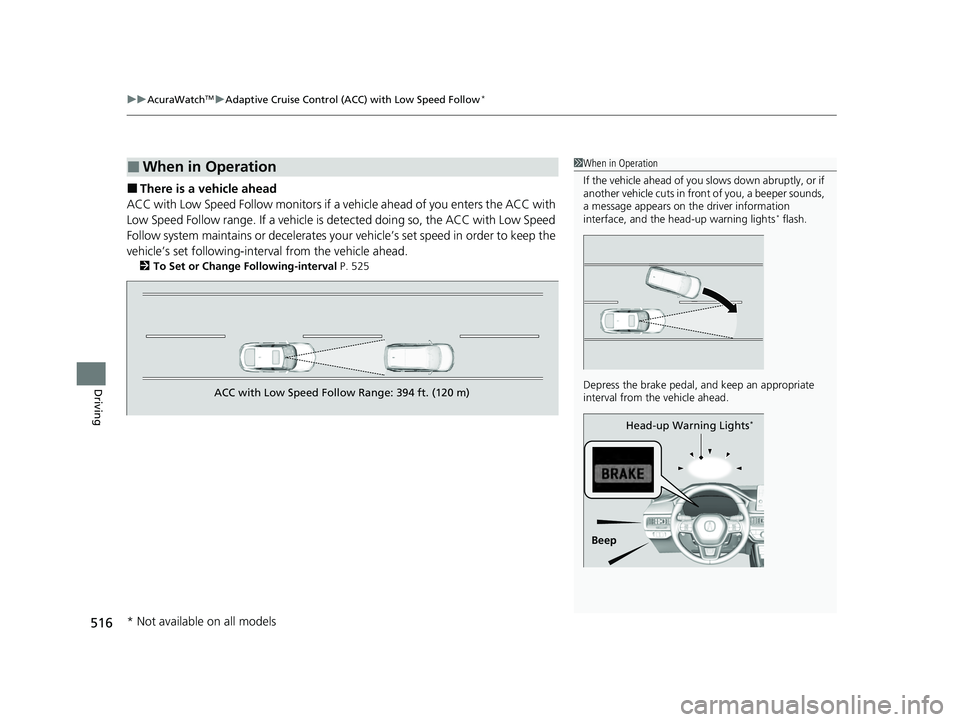
ACC with Low Speed Follow monitors if a ve hicle ahead of you enters the ACC with
Low Speed Follow range. If a vehicle is detected doing so, the ACC with Low Speed
Follow system maintains or decelerates your vehicle’s set speed in order to keep the
vehicle’s set followi ng-interval from the vehicle ahead.
2To Set or Change Following-interval P. 525
■When in Operation1When in Operation
If the vehicle ahead of you slows down abruptly, or if
another vehicle cuts in front of you, a beeper sounds,
a message appears on th e driver information
interface, and the he ad-up warning lights
* flash.
Depress the brake pedal, and keep an appropriate
interval from the vehicle ahead.
Beep Head-up Warning Lights
*
ACC with Low Speed Follow Range: 394 ft. (120 m)
* Not available on all models
24 ACURA INTEGRA-313S56100.book 516 ページ 2023年2月13日 月曜日 午後2時41分
Page 519 of 766
Continued517
uuAcuraWatchTMuAdaptive Cruise Control (ACC) with Low Speed Follow*
Driving
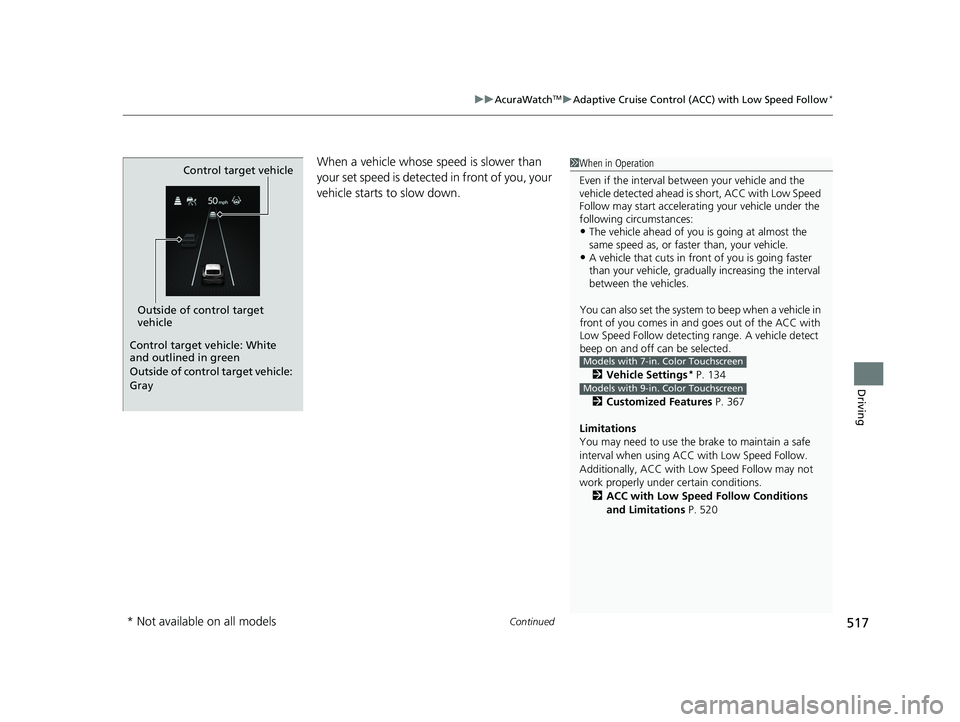
When a vehicle whose speed is slower than
your set speed is detected in front of you, your
vehicle starts to slow down.
Outside of control target
vehicle Control target vehicle
Control target vehicle: White
and outlined in green
Outside of control target vehicle:
Gray
1
When in Operation
Even if the interval betw een your vehicle and the
vehicle detected ahead is short, ACC with Low Speed
Follow may start accelerati ng your vehicle under the
following circumstances:
•The vehicle ahead of you is going at almost the
same speed as, or faster than, your vehicle.
•A vehicle that cuts in front of you is going faster
than your vehicle, gradua lly increasing the interval
between the vehicles.
You can also set the system to beep when a vehicle in
front of you comes in and goes out of the ACC with
Low Speed Follow detecting range. A vehicle detect
beep on and off can be selected.
2 Vehicle Settings
* P. 134
2 Customized Features P. 367
Limitations
You may need to use the brake to maintain a safe
interval when using ACC with Low Speed Follow.
Additionally, ACC with Lo w Speed Follow may not
work properly under certain conditions.
2 ACC with Low Speed Follow Conditions
and Limitations P. 520
Models with 7-in. Color Touchscreen
Models with 9-in. Color Touchscreen
* Not available on all models
24 ACURA INTEGRA-313S56100.book 517 ページ 2023年2月13日 月曜日 午後2時41分
Page 520 of 766
uuAcuraWatchTMuAdaptive Cruise Control (ACC) with Low Speed Follow*
518
Driving
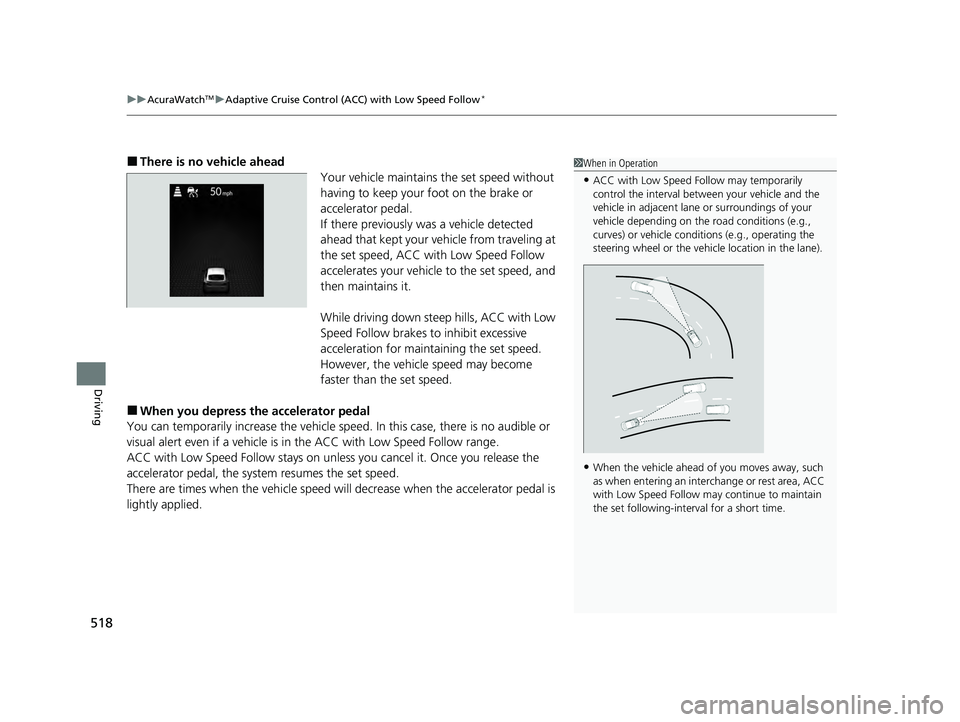
■There is no vehicle ahead
Your vehicle maintains the set speed without
having to keep your foot on the brake or
accelerator pedal.
If there previously was a vehicle detected
ahead that kept your vehicle from traveling at
the set speed, ACC with Low Speed Follow
accelerates your vehicle to the set speed, and
then maintains it.
While driving down steep hills, ACC with Low
Speed Follow brakes to inhibit excessive
acceleration for maintaining the set speed.
However, the vehicle speed may become
faster than the set speed.
■When you depress the accelerator pedal
You can temporarily increase the vehicle speed. In this ca se, there is no audible or
visual alert even if a vehicle is in the ACC with Low Speed Follow range.
ACC with Low Speed Follow stays on unless you cancel it. Once you release the
accelerator pedal, the system resumes the set speed.
There are times when the vehicle speed will decrease when the accelerator pedal is
lightly applied.
1 When in Operation
•ACC with Low Speed Follow may temporarily
control the interval between your vehicle and the
vehicle in adjacent lane or surroundings of your
vehicle depending on the road conditions (e.g.,
curves) or vehicle condi tions (e.g., operating the
steering wheel or the vehicle location in the lane).
•When the vehicle ahead of you moves away, such
as when entering an interchange or rest area, ACC
with Low Speed Follow may continue to maintain
the set following-interval for a short time.
24 ACURA INTEGRA-313S56100.book 518 ページ 2023年2月13日 月曜日 午後2時41分
Page 521 of 766
Continued519
uuAcuraWatchTMuAdaptive Cruise Control (ACC) with Low Speed Follow*
Driving
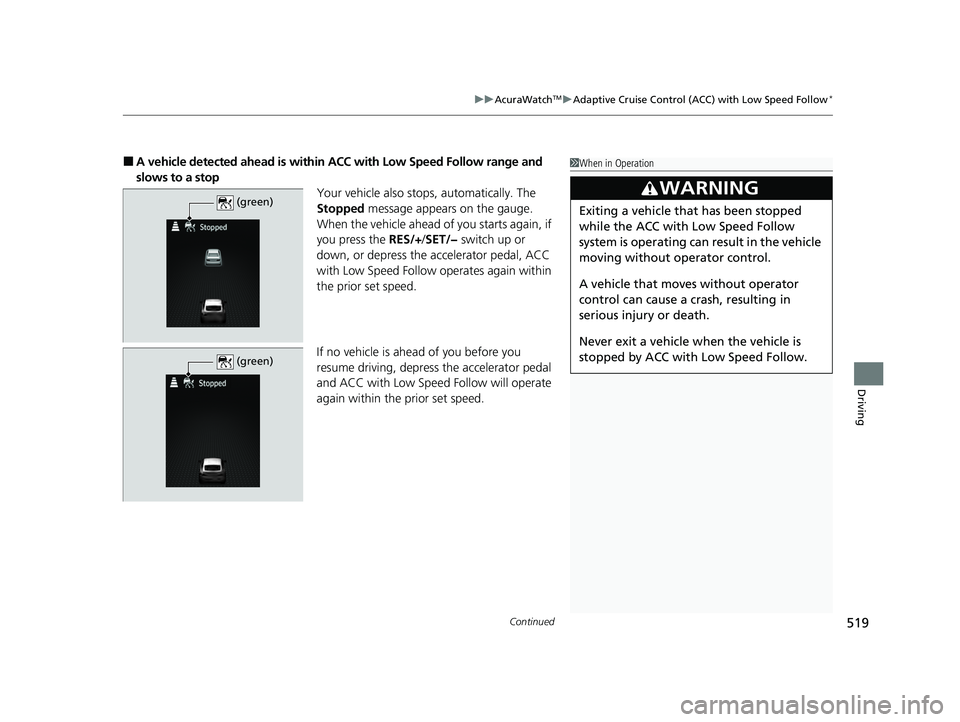
■A vehicle detected ahead is within ACC with Low Speed Follow range and
slows to a stop Your vehicle also stops, automatically. The
Stopped message appears on the gauge.
When the vehicle ahead of you starts again, if
you press the RES/+ /SET/− switch up or
down, or depress the accelerator pedal, ACC
with Low Speed Follow operates again within
the prior set speed.
If no vehicle is ahead of you before you
resume driving, depress the accelerator pedal
and ACC with Low Speed Follow will operate
again within the prior set speed.1 When in Operation
3WARNING
Exiting a vehicle that has been stopped
while the ACC with Low Speed Follow
system is operating can result in the vehicle
moving without operator control.
A vehicle that moves without operator
control can cause a crash, resulting in
serious injury or death.
Never exit a vehicle when the vehicle is
stopped by ACC with Low Speed Follow. (green)
(green)
24 ACURA INTEGRA-313S56100.book 519 ページ 2023年2月13日 月曜日 午後2時41分
Page 522 of 766
520
uuAcuraWatchTMuAdaptive Cruise Control (ACC) with Low Speed Follow*
Driving
The system may automatically shut off under certain conditions. Some examples of
these conditions are listed below. Other conditions may reduce some of the ACC
with Low Speed Follow functions.
2 Front Wide View Camera P. 590
■Environmental conditions
• Driving in bad weather (rain, fog, snow, etc.).
• Sudden changes between light and dark, such as the entrance or exit of a tunnel
or the shadows of trees, buildings, etc.
• Strong light is reflected onto vehicles or road surfaces.
• Water is sprayed by or snow blown from a vehicle ahead.
• Driving at night or in a dark place such as a tunnel (due to low-light conditions,
the whole vehicle may not be illuminated).
• Driving into low sunlight (e.g., at dawn or dusk).
■ACC with Low Speed Follow Conditions and Limitations
24 ACURA INTEGRA-313S56100.book 520 ページ 2023年2月13日 月曜日 午後2時41分
Page 523 of 766

521
uuAcuraWatchTMuAdaptive Cruise Control (ACC) with Low Speed Follow*
Continued
Driving
■Roadway conditions
• Driving on curvy, winding, undulating, or sloping roads.
• Driving on rutted roads (snowy or unpaved roads, etc.).
• Puddles or a film of water is on the road surface.
• Your vehicle is strongly shaken on uneven road surfaces.
■Vehicle conditions
• The vehicle is tilted due to heavy load in the cargo area or rear seats.
• Tire chains are installed.
• The front of the camera is covered by dirt, fog, rain, mud, wet snow, seals,
accessories, stickers, or film of the windshield.
• Driving at night or in a dark place (e.g., a tunnel) with the headlights off.
• There is residue on the windshie ld from the windshield wipers.
• When lighting is weak due to dirt coveri ng the headlight lenses, or there is poor
visibility in a dark place due to the headlights being improperly adjusted.
• An abnormal tire or wheel condition (inco rrect sizes, varied sizes or construction,
improperly inflated, co mpact spare tire, etc.).
• The suspension has been modified.
24 ACURA INTEGRA-313S56100.book 521 ページ 2023年2月13日 月曜日 午後2時41分
Page 524 of 766

522
uuAcuraWatchTMuAdaptive Cruise Control (ACC) with Low Speed Follow*
Driving
■Examples of conditions under which the camera may not correctly detect
the vehicle ahead of you
• A vehicle suddenly crosses in front of you.
• The interval between your vehicle and the vehicle ahead of you is too short.
• When the vehicle ahead of you blends in with the background, preventing the
system from recognizing it.
• The headlights of the vehicle ahead of you are lit on one side or not lit on either
side in a dark place.
24 ACURA INTEGRA-313S56100.book 522 ページ 2023年2月13日 月曜日 午後2時41分
Page 525 of 766
523
uuAcuraWatchTMuAdaptive Cruise Control (ACC) with Low Speed Follow*
Continued
Driving
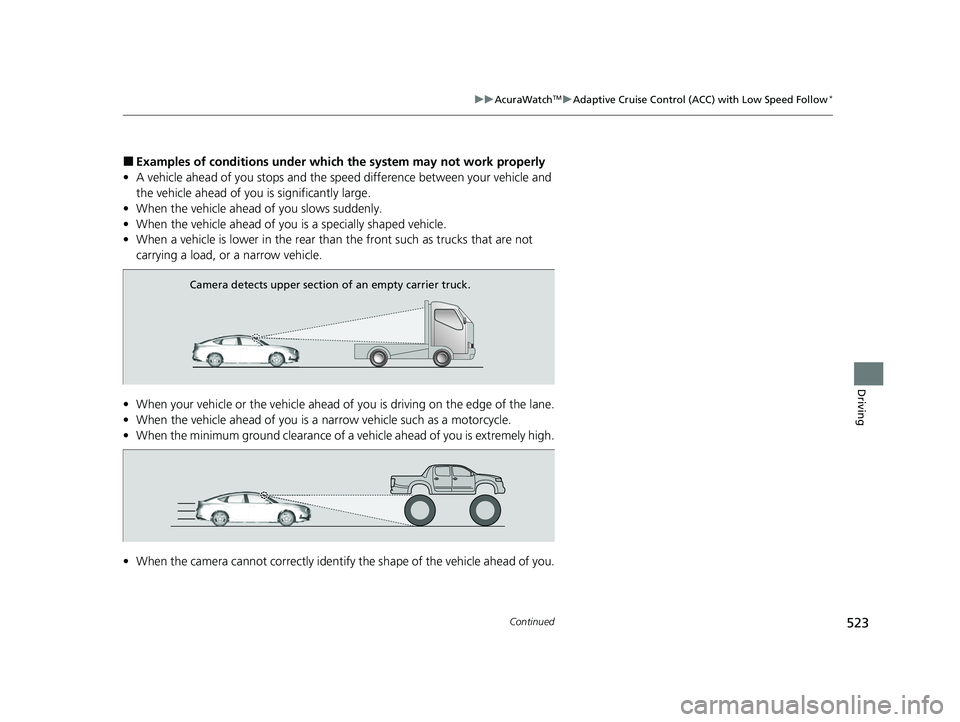
■Examples of conditions under whic h the system may not work properly
• A vehicle ahead of you stops and the speed difference between your vehicle and
the vehicle ahead of you is significantly large.
• When the vehicle ahead of you slows suddenly.
• When the vehicle ahead of you is a specially shaped vehicle.
• When a vehicle is lower in the rear than the front such as trucks that are not
carrying a load, or a narrow vehicle.
• When your vehicle or the vehicle ahead of you is driving on the edge of the lane.
• When the vehicle ahead of you is a narrow vehicle such as a motorcycle.
• When the minimum ground clearance of a vehicle ahead of you is extremely high.
• When the camera cannot correctly identify the shape of the vehicle ahead of you.
Camera detects upper section of an empty carrier truck.
24 ACURA INTEGRA-313S56100.book 523 ページ 2023年2月13日 月曜日 午後2時41分