instrument panel ACURA INTEGRA 2024 Manual PDF
[x] Cancel search | Manufacturer: ACURA, Model Year: 2024, Model line: INTEGRA, Model: ACURA INTEGRA 2024Pages: 766, PDF Size: 28.39 MB
Page 185 of 766
183
uuOperating the Switches Around the Steering Wheel uTurn Signals
Controls
Turn Signals
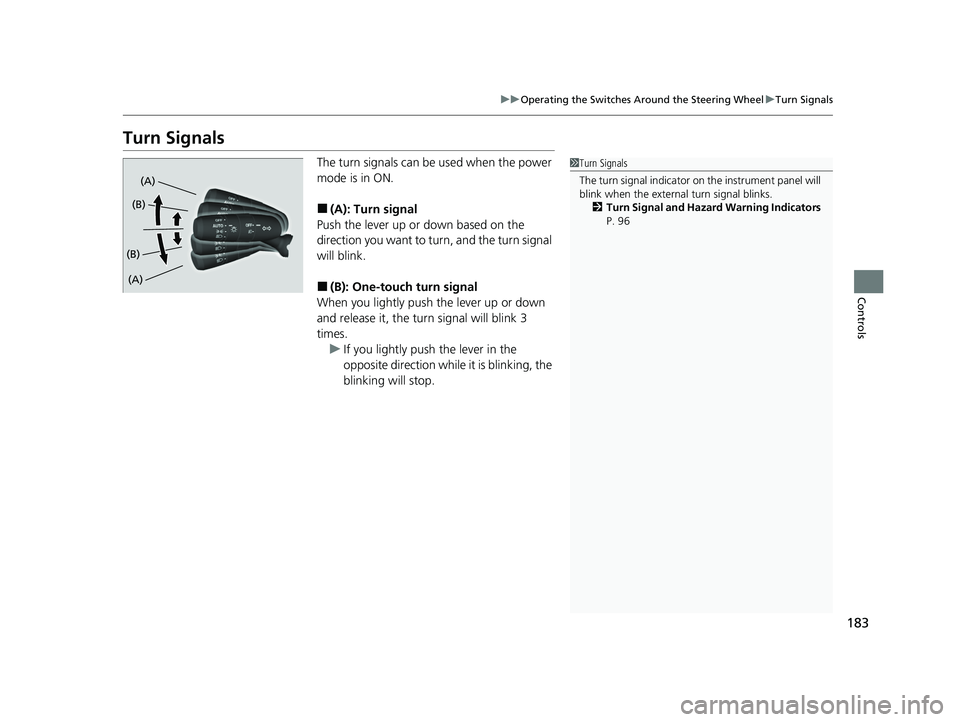
The turn signals can be used when the power
mode is in ON.
■(A): Turn signal
Push the lever up or down based on the
direction you want to turn, and the turn signal
will blink.
■(B): One-touc h turn signal
When you lightly push the lever up or down
and release it, the turn signal will blink 3
times.
u If you lightly push the lever in the
opposite direction while it is blinking, the
blinking will stop.
1Turn Signals
The turn signal indicator on the instrument panel will
blink when the external turn signal blinks.
2 Turn Signal and Hazard Warning Indicators
P. 96
(A)
(A) (B)
(B)
24 ACURA INTEGRA-313S56100.book 183 ページ 2023年2月13日 月曜日 午後2時41分
Page 188 of 766

uuOperating the Switches Around the Steering Wheel uLight Switches
186
Controls
The headlights automatically come on when the wipers are used several times within
a certain number of intervals wi th the headlight switch in AUTO.
The headlights automatically go off a few minutes later if the wipers are stopped.
The headlights, all other exterior lights, an d the instrument panel lights turn off 15
seconds after you set the power mode to VEHICLE OFF, and close the driver’s door.
If you set the power mode to VEHICLE OFF with the headlight switch on, but do not
open the door, the lights turn off after 10 minutes (3 minutes, if the switch is in the
AUTO position).
The lights turn on again when you unlock or open the driver’s door. If you unlock
the door, but do not open it within 15 seconds, the lights go off. If you open the
driver’s door, you will hear a reminder chime alerting you that the lights are on.
■Headlight Integration with Wipers
■Automatic Lighting Off Feature
1Automatic Operation (aut omatic lighting control)
You can adjust the auto li ght sensitivity as follows:
2 Vehicle Settings
* P. 134
2 Customized Features P. 367
SettingThe exterior lights come on
when the ambient light is at
Max
High
Mid
Low
Min
U.S. models
Bright
Dark
1 Headlight Integration with Wipers
This feature activates while the headlights are off in
AUTO .
The instrument panel br ightness does not change
when the headlights come on.
At dark ambient light levels, the automatic lighting
control feature turns on the headlights, regardless of
the number of wiper sweeps.
1 Automatic Lighting Off Feature
You can change the headlight auto off timer setting.
2 Vehicle Settings
* P. 134
2 Customized Features P. 367
* Not available on all models
24 ACURA INTEGRA-313S56100.book 186 ページ 2023年2月13日 月曜日 午後2時41分
Page 198 of 766
196
uuOperating the Switches Around the Steering Wheel uAdjusting the Steering Wheel
Controls
Adjusting the Steering Wheel
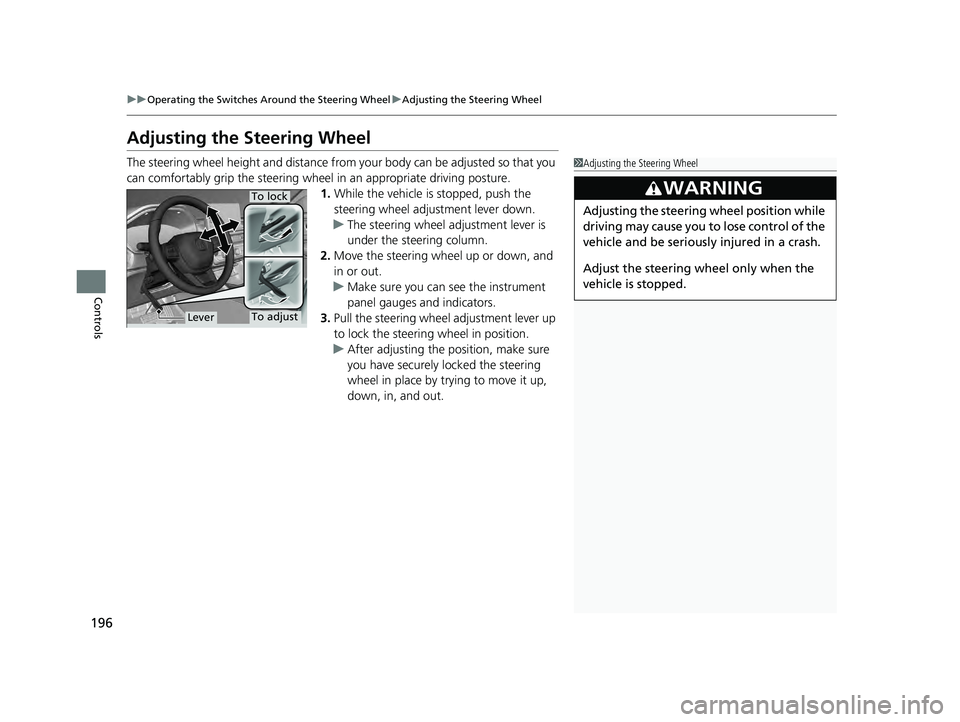
The steering wheel height and distance from your body can be adjusted so that you
can comfortably grip the steering wheel in an appropriate driving posture.
1.While the vehicle is stopped, push the
steering wheel adjustment lever down.
u The steering wheel adjustment lever is
under the steering column.
2. Move the steering wheel up or down, and
in or out.
u Make sure you can see the instrument
panel gauges and indicators.
3. Pull the steering wheel adjustment lever up
to lock the steering wheel in position.
u After adjusting the position, make sure
you have securely locked the steering
wheel in place by trying to move it up,
down, in, and out.1Adjusting the Steering Wheel
3WARNING
Adjusting the steering wheel position while
driving may cause you to lose control of the
vehicle and be seriously injured in a crash.
Adjust the steering wheel only when the
vehicle is stopped.
To adjust
To lock
Lever
24 ACURA INTEGRA-313S56100.book 196 ページ 2023年2月13日 月曜日 午後2時41分
Page 378 of 766

376
uuCustomized Features u
Features
■Driver Assist System Setup
*1:Default Setting
Customizable Features DescriptionSelectable Settings
Forward Collision Warning
DistanceChanges the distance at which Collision Mitigation Braking System
(CMBS) alerts.
2Collision Mitigation Braking SystemTM (CMBSTM) P. 489
Long/ Normal*1/Short
Head-up WarningToggles warning light for head-up flash alert. ON*1/OFF
ACC Forward Vehicle Detect
Beep
Toggles audible notification when vehicle has moved in/out of
Adaptive Cruise Control with Low Speed Follow* range.
2 Adaptive Cruise Control (ACC) with Low Speed Follow* P. 512
2 Adaptive Cruise Control (ACC)* P. 533
ON /OFF*1
Road Departure Mitigation
Setting Selects operating mode of the Ro
ad Departure Mitigation system.
2Road Departure Mitigation System P. 574
Narrow/Normal*1/Wide /
Warning Only
Lane Keeping Assist
Suspend BeepToggles the LKAS alert for not detecting road lines.
2 Lane Keeping Assist System (LKAS) P. 553ON /OFF*1
Blind Spot Info Toggles the blind spot inform
ation system audible alert.2Blind Spot Information System P. 482
Audible And Visual Alert*1/
Visual Alert
Traffic Sign Recognition
System Display SettingDisplays the traffic sign recognit ion system on instrument panel.
2Traffic Sign Recognition System P. 583Display*1/None
* Not available on all models
24 ACURA INTEGRA-313S56100.book 376 ページ 2023年2月13日 月曜日 午後2時41分
Page 555 of 766

553
uuAcuraWatchTMuLane Keeping Assist System (LKAS)
Continued
Driving
Lane Keeping Assist System (LKAS)
Provides steering input to help keep the vehicle in the middle of a detected lane and
provides tactile and visual al erts if the vehicle is detected drifting out of its lane.1Lane Keeping Assist System (LKAS)
Important Safety Reminders
The LKAS is for your convenience only. It is not an
autonomous driving system and always requires
driver attention and control. The system does not
work if you take your hands off the steering wheel or
fail to steer the vehicle.
The LKAS is convenient when it is used on
expressways or freeways.
Do not place objects on the instrument panel.
Objects may reflect on th e windshield and prevent
correct detection of the traffic lanes.
The LKAS only alerts you when lane drift is detected
without a turn signal in use. The LKAS may not detect
all lane markings or lane departures; accuracy will
vary based on weather, speed, and lane marker
condition.
It is always your responsibility to safely operate the
vehicle and avoid collisions.
The LKAS may not work properly or may work
improperly under the certain conditions: 2 LKAS Conditions and Limitations P. 561
You can read about handling information for the
camera equipped with this system. 2 Front Wide View Camera P. 590
When you operate the turn signals to chan ge lanes, the system is suspended, and
resumes after the signals are off.
If you make a lane change without operating the turn signals, the LKAS alerts
activate, and torque is applied to the steering.
■Front Wide
View Camera
Monitors the
lane lines■Tactile and visual alerts
Rapid vibrations on the steering wheel
and a warning display alert you that
the vehicle is drifting out of a detected
lane.
■Steering input assist
The system applies torque to the steering to keep the vehicle between the left
and right lane lines. The applied torque becomes stronger as the vehicle gets
closer to either of the lane lines.
24 ACURA INTEGRA-313S56100.book 553 ページ 2023年2月13日 月曜日 午後2時41分
Page 592 of 766
590
uuAcuraWatchTMuFront Wide View Camera
Driving
Front Wide View Camera
The camera, used in systems such as La ne Keeping Assist System (LKAS), Road
Departure Mitigation system, Adaptive Cruise Control (ACC) with Low Speed
Follow
*, Adaptive Cruise Control (ACC)*, Traffic Sign Recognition system, Collision
Mitigation Braking SystemTM (CMBSTM), and Traffic Jam Assist*, is designed to detect
an object that triggers any of the systems to operate their functions.
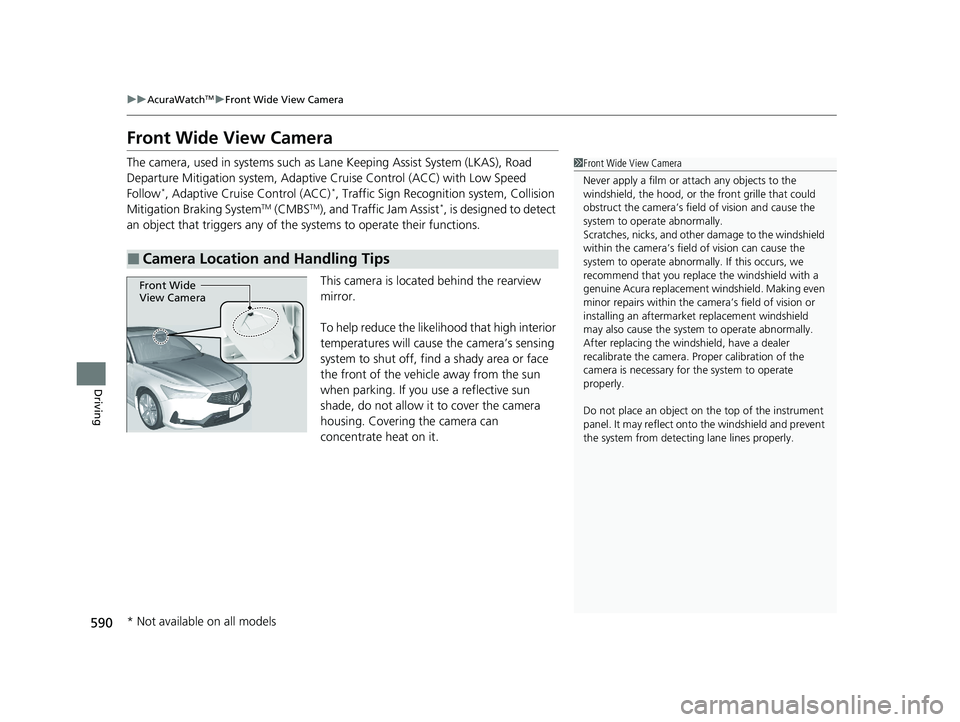
This camera is located behind the rearview
mirror.
To help reduce the likelihood that high interior
temperatures will cause the camera’s sensing
system to shut off, find a shady area or face
the front of the vehicle away from the sun
when parking. If you use a reflective sun
shade, do not allow it to cover the camera
housing. Covering the camera can
concentrate heat on it.
■Camera Location and Handling Tips
1Front Wide View Camera
Never apply a film or attach any objects to the
windshield, the hood, or th e front grille that could
obstruct the camera’s fiel d of vision and cause the
system to operate abnormally.
Scratches, nicks, and othe r damage to the windshield
within the camera’s fiel d of vision can cause the
system to operate abnormall y. If this occurs, we
recommend that you replac e the windshield with a
genuine Acura replacement windshield. Making even
minor repairs within the ca mera’s field of vision or
installing an aftermarke t replacement windshield
may also cause the system to operate abnormally.
After replacing the winds hield, have a dealer
recalibrate the camera. Pr oper calibration of the
camera is necessary for the system to operate
properly.
Do not place an object on the top of the instrument
panel. It may reflect onto the windshield and prevent
the system from detecting lane lines properly.
Front Wide
View Camera
* Not available on all models
24 ACURA INTEGRA-313S56100.book 590 ページ 2023年2月13日 月曜日 午後2時41分
Page 761 of 766
759
Index
I
Identification NumbersVehicle Identification............................... 742
Immobilizer System .................................. 173
Indicator ................................................... 98
Indicators .................................................... 86
Adaptive Cruise Control (ACC)................ 533
Adaptive Cruise Control (ACC) with
Low Speed Follow ......................... 101, 512
Adaptive Cruise Control (ACC) with Low Speed Follow Interval ............................ 102
Anti-lock Brake System (ABS) .................... 94
Auto High-Beam ....................................... 96
Auto Idle Stop (Green) .............................. 99
Auto Idle Stop OFF .................................... 99
Auto Idle Stop Suspend........................... 100
Auto Idle Stop System (Amber) ................. 99
Automatic Brake Hold ....................... 90, 600
Automatic Brake Hold System ........... 90, 600
Charging System............................... 91, 723
COMFORT Mode ...................................... 97
Cruise Mode ........................................... 102
Electric Power Steering (EPS) System ............................................ 94, 725
Fog Light .................................................. 96
Gear Position ............................................ 92
High Beam ................................................ 96
Immobilizer System ................................... 98
INDIVIDUAL Mode .................................... 97
Lane Keeping Assist System (LKAS) ......... 102
Lights On .................................................. 96 Low Fuel .................................................... 94
Low Tire Pressure/TPMS ............. 95, 480, 727
M (7-speed manual shift mode) Indicator/
Shift ........................................................ 91
Malfunction Indicator Lamp ............... 91, 723
NORMAL Mode ......................................... 97
Parking Brake and Brake System (Amber) ........................................... 90, 726
Parking Brake and Brake System (Red) ...................... 88, 89, 724, 726
Safety Support ................................. 103, 106
Seat Belt Reminder .............................. 42, 93
Security System Alarm ............................... 98
Shift Down ........................................ 92, 450
Shift Position ............................................. 91
Shift Up ............................................. 92, 450
SPORT Mode ............................................. 97
SPORT+ Mode ........................................... 97
Supplemental Restraint System ............ 64, 94
System Message ........................................ 97
Transmission System .................................. 92
Turn Signal and Haza rd Warning ............... 96
Vehicle Stability Assist
TM (VSA ®) OFF ... 95, 475
Vehicle Stability AssistTM (VSA ®)
System............................................. 95, 474
Information ............................................... 739
Instant Fuel Economy ............................... 120
Instrument Panel ........................................ 85
Integrated Dynamics System .................... 454
Dynamic Mode Switch ..................... 455, 456
Interior Lights ........................................... 209 Interior Rearview Mirror
.......................... 197
iPod ................................................... 247, 307
J
Jack (Wheel Nut Wrench) ........................ 707
Jump Starting ........................................... 715
K
Key Number Tag ....................................... 153
Keyless Access System .............................. 155
Keys ........................................................... 152
Number Tag ............................................ 153
Rear Door Won’t Open............................ 168
Remote Transmitter ................................. 161
Two-way Keyless Remote ........................ 162
Types and Functions ................................ 152
Kickdown (Continuously Variable Transmission) .......................................... 443
L
Lane Keeping Assist System (LKAS) ......... 553
LATCH (Child Seats) .................................... 73
24 ACURA INTEGRA-313S56100.book 759 ページ 2023年2月13日 月曜日 午後2時41分