brake ACURA INTEGRA 2024 Manual Online
[x] Cancel search | Manufacturer: ACURA, Model Year: 2024, Model line: INTEGRA, Model: ACURA INTEGRA 2024Pages: 766, PDF Size: 28.39 MB
Page 561 of 766
Continued559
uuAcuraWatchTMuLane Keeping Assist System (LKAS)
Driving
■The system operatio n is suspended if
you:
• Decrease the vehicle speed to about 40 mph
(64 km/h) or less.
u Increasing the vehicle speed to about 45
mph (72 km/h) or more resumes the
LKAS.
• Depress the brake pedal.
u The LKAS resumes and starts detecting
the lane lines again once you release the
brake pedal.
• Your vehicle is driving to the right or the left
of the lane.1To Cancel
You can change the setting for the LKAS.
LKAS suspended beep on and off can be selected.
2 Vehicle Settings
* P. 134
2 Customized Features P. 367
Models with 7-in. Color Touchscreen
Models with 9-in. Color Touchscreen
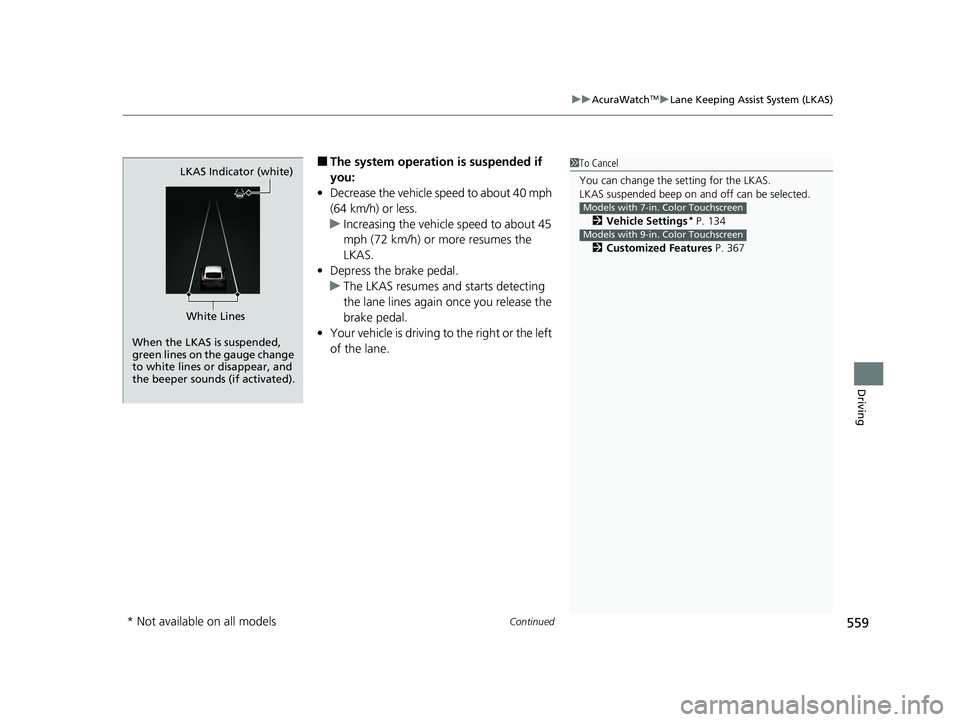
When the LKAS is suspended,
green lines on the gauge change
to white lines or disappear, and
the beeper sounds (if activated).LKAS Indicator (white)
White Lines
* Not available on all models
24 ACURA INTEGRA-313S56100.book 559 ページ 2023年2月13日 月曜日 午後2時41分
Page 571 of 766
Continued569
uuAcuraWatchTMuTraffic Jam Assist*
Driving
Press the LKAS button to ca ncel Traffic Jam Assist.
■Traffic Jam Assist may be au tomatically suspended when:
The system is automatically temporarily canceled under the follo wing circumstances.
• The system fails to detect lane lines.
• The steering wheel is turned sharply.
• You fail to steer the vehicle.
• You are driving through a sharp curve.
• The brake pedal is depressed.
Once these conditions no longer exist, Traffic Jam Assist automatically resumes.
■Traffic Jam Assist may be automatically canceled when:
The traffic lane lines will disappear from the screen, the beeper may sound, and
Traffic Jam Assist will be canceled under the following circumstances:
• The temperature of the front wide view camera is too high.
• The front wide view camera behind the rearview mirror, or the area around the
camera, including the windshield, is dirty.
■Canceling Traffic Jam Assist
1 Traffic Jam Assist may be au tomatically suspended when:
You are traveling over 45 mph (72 km/h).
u When the speed of the vehicle reaches 45 mph (72
km/h), Traffic Jam Assist is deactivated. Once the
speed of the vehicle drops to under 40 mph (64
km/h), Traffic Jam Assist is reactivated.
You can change the setting for the Traffic Jam Assist.
Traffic Jam Assist suspe nded beep on and off when
you select the Lane Keeping Assist Suspend Beep
on the audio/information screen.
2 Customized Features P. 367
24 ACURA INTEGRA-313S56100.book 569 ページ 2023年2月13日 月曜日 午後2時41分
Page 583 of 766

581
uuAcuraWatchTMuRoad Departure Mitigation System
Continued
Driving
■Vehicle conditions
• When lighting is weak due to dirt coveri ng the headlight lenses, or there is poor
visibility in a dark place due to the headlights being improperly adjusted.
• The front of the camera is covered by dirt, fog, rain, mud, wet snow, seals,
accessories, stickers, or film on the windshield.
• Driving at night or in a dark place (e.g., a tunnel) with the headlights off.
• When the driver operates the brake pedal and steering wheel.
• There is residue on the windshie ld from the windshield wipers.
• An abnormal tire or wheel condition (inco rrect sizes, varied sizes or construction,
improperly inflated, compact spare tire
*, etc.).
• The vehicle is tilted due to heavy load in the cargo area or rear seats.
• Tire chains
* are installed.
• The suspension has been modified.
■Examples of limitations on detectio n due to the condition of oncoming
vehicles
• The oncoming vehicle or vehicle ahead of you is sideways.
• The oncoming vehicle jumps out in front of you.
• When the oncoming vehicle blends in with the background, preventing the
system from recognizing it.
• The headlights of an oncoming vehicle are lit on one side or not lit on either side
in a dark place.
• The distance between your vehicle an d the oncoming vehicle is too short.
• Part of the oncoming vehicle is not visi ble due to the vehicle ahead of you.
• There are multiple oncoming lanes or turning lanes.
• The vehicle in the adjacent lane is parked or moving at an extremely slow speed.
* Not available on all models
24 ACURA INTEGRA-313S56100.book 581 ページ 2023年2月13日 月曜日 午後2時41分
Page 596 of 766
594
Driving
Braking
Brake System
Use the parking brake to keep the vehicle stationary when parked. When the
parking brake is applied, you can manually or automatically release it.
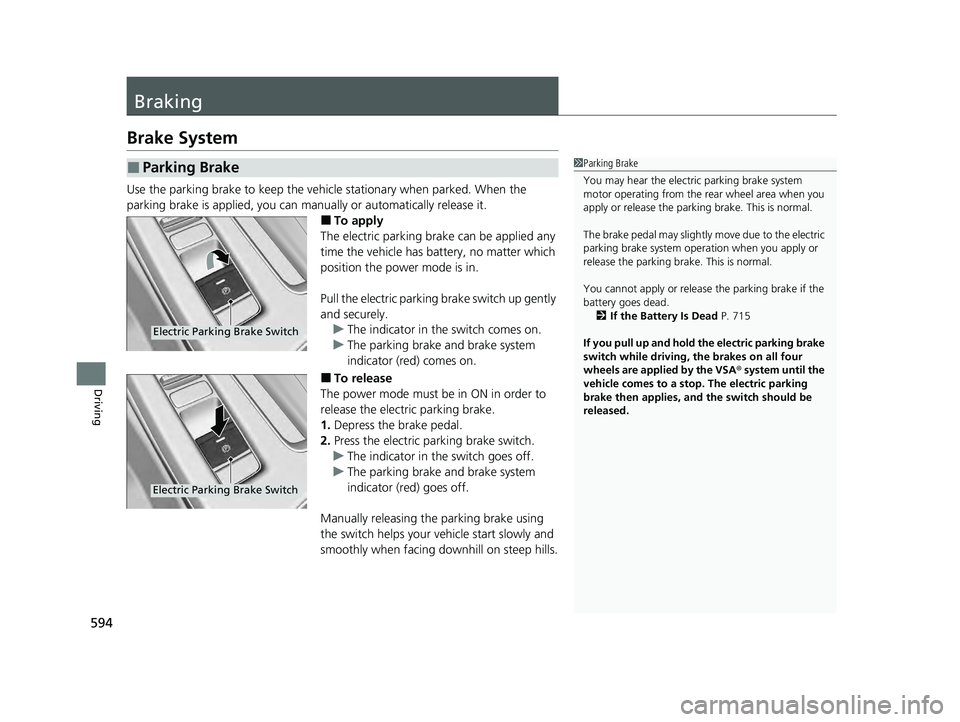
■To apply
The electric parking brake can be applied any
time the vehicle has battery, no matter which
position the power mode is in.
Pull the electric parking brake switch up gently
and securely. u The indicator in th e switch comes on.
u The parking brake and brake system
indicator (red) comes on.
■To release
The power mode must be in ON in order to
release the electric parking brake.
1. Depress the brake pedal.
2. Press the electric parking brake switch.
u The indicator in th e switch goes off.
u The parking brake and brake system
indicator (red) goes off.
Manually releasing the parking brake using
the switch helps your ve hicle start slowly and
smoothly when facing downhill on steep hills.
■Parking Brake1 Parking Brake
You may hear the electric parking brake system
motor operating from the re ar wheel area when you
apply or release the parki ng brake. This is normal.
The brake pedal may slightly move due to the electric
parking brake system opera tion when you apply or
release the parking br ake. This is normal.
You cannot apply or release the parking brake if the
battery goes dead. 2 If the Battery Is Dead P. 715
If you pull up and hold the electric parking brake
switch while driving, the brakes on all four
wheels are applied by the VSA ® system until the
vehicle comes to a stop. The electric parking
brake then applies, and the switch should be
released.
Electric Parking Brake Switch
Electric Parking Brake Switch
24 ACURA INTEGRA-313S56100.book 594 ページ 2023年2月13日 月曜日 午後2時41分
Page 597 of 766

Continued595
uuBraking uBrake System
Driving
■Automatic parking brake feature operation
If the automatic parking brake feature has been activated:
• The parking brake is applied automatica lly when you set the power mode to
VEHICLE OFF.
• To confirm that the parking brake is applied, check if the parking brake and brake
system indicator (red) is on.
2 Activating and deactivating the automatic parking brake feature P. 597
■To release automatically
Depressing the accelerator pedal releases the parking brake.
Use the accelerator pedal to release the parking brake when you are starting the
vehicle facing uphill, or in a traffic jam. Gently depress the accelerator pedal.
When on a hill, it may require more
accelerator input to release.u The parking brake and brake system
indicator (red) goes off.
You can release the parking brake automatically when:
• You are wearing the driver’s seat belt.
• The engine is running.
• The transmission is not in
(P or (N.
1Parking Brake
In the following situations, the parking brake
automatically operates.
•When the vehicle stops with the automatic brake
hold system activated for more than 10 minutes.
•When the driver’s seat belt is unfastened while
your vehicle is stopped and brake hold is applied.
•When the engine is turned off, except by Auto Idle
Stop system, while brake hold system is applied.
•When there is a problem with the brake hold
system while brake hold is applied.
•When the vehicle stops more than 10 minutes
while Adaptive Cruise Control (ACC) with Low
Speed Follow is activated.
•When the driver’s seat belt is unfastened while
your vehicle is stopped au tomatically by ACC with
Low Speed Follow.
•When the engine is turned off, except by Auto Idle
Stop system, while ACC with Low Speed Follow is
activated.
Models with Adaptive Cruise Control (ACC)
with Low Speed Follow
Continuously variable transmission models
Continuously variable transmission models
Accelerator Pedal
24 ACURA INTEGRA-313S56100.book 595 ページ 2023年2月13日 月曜日 午後2時41分
Page 598 of 766

uuBraking uBrake System
596
Driving
Depress the accelerator pedal while releasi ng the clutch pedal releases the parking
brake.
Use the accelerator pedal to release the parking brake when you are starting the
vehicle facing uphill, or in a traffic jam.
Gently depress the accelerator pedal and
release the clutch pedal.u The parking brake and brake system
indicator (red) goes off.
The parking brake automatically releases as
you depress the accelerator pedal when:
• You are wearing the driver’s seat belt.
• The engine is running.
• The transmission is not in
(N.
1Parking Brake
If the parking brake cannot be released
automatically, release it manually.
When the vehicle is travel ing uphill, the accelerator
pedal may need to be pressed farther to
automatically release the electric parking brake.
The parking brake cannot be released automatically
while the following indicators are on:
•Malfunction indicator lamp
•Transmission system indicator*
The parking brake may not be released automatically
while the following indicators are on:
•Parking brake and brake system indicator (red)
•VSA® system indicator•ABS indicator
•Supplemental restraint system indicator
Fully depress the clutch pe dal, gently depress the
accelerator pedal, then release the clutch pedal.
Manual transmission models
Manual transmission models
Clutch PedalAccelerator
Pedal
* Not available on all models
24 ACURA INTEGRA-313S56100.book 596 ページ 2023年2月13日 月曜日 午後2時41分
Page 599 of 766

Continued597
uuBraking uBrake System
Driving
■Activating and deactivating the automatic parking brake feature
With the power mode is in ON, carry out th e following steps to either activate or
deactivate the automatic parking brake feature.
1. Shift the select lever to
(P.
2. Without depressing the brake pedal, pull up and release the electric parking brake
switch.
u Check that the parking brake and brake sy stem indicator (red) has come on.
3. Pull up and hold the electric parking br ake switch. When you hear a beeping
sound, release the switch and within three seconds pull up and hold the switch
again.
4. When you hear a sound indicating that the procedure is completed, release the
switch.
u Two beeps indicates that the feature has been activated.
u One beep indicates that the feature has been deactivated.
u When you have completed activating the feature, the parking brake will
remain applied after you turn off the engine.
u To confirm that the parkin g brake is applied, check if the parking brake and
brake system indicator (red) is on.
1 Activating and deactivating the automatic parking brake feature
In cold climates, the parking brake may freeze in
place if applied.
When parking the vehicle, chock the wheels and
make sure the automatic parking brake feature is
deactivated.
Also, when putting your vehicle through a conveyor-
type car wash or when ha ving your vehicle towed,
deactivate the automatic parking brake feature and
leave the parking brake released.Continuously variable transmission models
24 ACURA INTEGRA-313S56100.book 597 ページ 2023年2月13日 月曜日 午後2時41分
Page 600 of 766
598
uuBraking uBrake System
Driving
If you need to temporarily deactivate the feature while putting your vehicle through
a conveyor type car wash, you can follow the procedure explained below.
1. Depress the brake pedal and bring the vehicle to a stop.
2. Set the power mode to VEHICLE OFF and then within two seconds push down the
electric parking brake switch.
u Activation and deactivation settings fo r the feature will not be affected.
u Before temporarily deactivating the feat ure, make sure to first turn off both
Adaptive Cruise Control (ACC) with Low Speed Follow and the automatic
brake hold system.
u To confirm that the parking brake is ap plied, check if the parking brake and
brake system indicator (red) is on.
24 ACURA INTEGRA-313S56100.book 598 ページ 2023年2月13日 月曜日 午後2時41分
Page 601 of 766

Continued599
uuBraking uBrake System
Driving
Your vehicle is equipped with disc brakes at all four wheels. A vacuum power assist
helps to reduce the effort needed on th e brake pedal. The brake assist system
increases the stopping force when you depress the brake pedal hard in an
emergency situation. The an ti-lock brake system (ABS) helps you retain steering
control when brak ing very hard.
2Brake Assist System P. 606
2 Anti-lock Brake System (ABS) P. 605
■Brake squeal
To satisfy the performance under a wide range of driving conditions, a high-
performance braking system is equipped on your vehicle. You may hear the brake
squeal under certain conditions, such as vehicle speed, deceleration, humidity, and
so on. This is not a malfunction.
■Foot Brake1 Foot Brake
Check the brakes after driving through deep water,
or if there is a buildup of road surface water. If
necessary, dry the brakes by lightly depressing the
pedal several times.
If you hear a continuous me tallic friction sound when
applying the brakes, this is caused by the brake wear
indicator rubbing on the brake rotor and indicates
that the brake pads need to be replaced. Have the
vehicle checked by a deal er. If you hear only an
occasional squeak or squeal when you initially apply
the brake pedal, this may be normal and caused by
high frequency vibr ation of the brake pads against
the rotating brake disc.
Constantly using the brake pedal while going down a
long hill builds up heat, which reduces the brake
effectiveness. Apply engine braking by taking your
foot off the accelerator pe dal and downshifting to a
lower gear/speed po sition. With manual
transmission, use a lower gear for greater engine
braking.
Do not rest your foot on the brake pedal while
driving, as it will lightly apply the brakes and cause
them to lose effectiveness over time and reduce pad
life. It will also conf use drivers behind you.
2.0 L engine models
24 ACURA INTEGRA-313S56100.book 599 ページ 2023年2月13日 月曜日 午後2時41分
Page 602 of 766

uuBraking uBrake System
600
Driving
Keeps the brake applied after releasing the br ake pedal until the accelerator pedal is
pressed. You can use this system while th e vehicle is temporarily stopped, like at
traffic lights and in heavy traffic.
■Turning on the system Fasten your seat belt properly, then start the
engine. Press the automatic brake hold
button.u The automatic brake hold system
indicator comes on. The system is turned
on.
■Activating the system
Depress the brake pedal to come to a
complete stop. The shift lever must not be in
(P or(R.
u The automatic brake hold indicator
comes on. Braking is kept for up to 10
minutes.
u Release the brake pedal after the
automatic brake hold indicator comes
on.
■Automatic Brake Hold1Automatic Brake Hold
3WARNING
Activating the automatic brake hold system
on steep hills or slippery roads may still
allow the vehicle to move if you remove
your foot from the brake pedal.
If a vehicle unexpectedly moves, it may
cause a crash resulting in serious injury or
death.
Never activate the automatic brake hold
system or rely on it to keep a vehicle from
moving when stopped on a steep hill or
slippery roads.
3WARNING
Using the automatic brake hold system to
park the vehicle may result in the vehicle
unexpectedly moving.
If a vehicle moves unexpectedly, it may
cause a crash, resulting in serious injury or
death.
Never leave the vehicle when braking is
temporarily kept by automatic brake hold
and always park the vehicle by putting the
transmission in
( P and applying the parking
brake.
Continuously variable transmission models
Continuously variable transmission models
Comes
On
Automatic Brake Hold
Button
On
Brake Pedal
Comes
On Comes
On
U.S.
Canada
24 ACURA INTEGRA-313S56100.book 600 ページ 2023年2月13日 月曜日 午後2時41分