brake ACURA INTEGRA 2024 Workshop Manual
[x] Cancel search | Manufacturer: ACURA, Model Year: 2024, Model line: INTEGRA, Model: ACURA INTEGRA 2024Pages: 766, PDF Size: 28.39 MB
Page 475 of 766

473
uuWhen Driving uAuto Idle Stop*
Driving
The clutch pedal is depressed.
■The engine automatically restarts even if the clutch pedal is not depressed
with the transmission in
(N when:
• The Auto Idle Stop OFF button is pressed.
• The pressure on the brake pedal is reduced and the vehicle starts moving while
stopped on an incline.
• The steering wheel is operated.
• The pressure on the brake pedal is repeat edly applied and released slightly during
a stop.
• The battery charge becomes low.
• is ON (indicator on).
• The climate control system is in use, and the difference between the set
temperature and actual interior temperature becomes significant.
• The climate control system is being used to dehumidify the interior.
• The Integrated Dynamics Sy stem mode is changed to SPORT mode.
• The Auto Idle Stop is set to off on INDIVIDUAL Setting screen.
2Customizing the INDIVIDUAL Settings P. 460
■The Engine Automatically Restarts When:1The Engine Automatically Restarts When:
If you are using an electroni c device during Auto Idle
Stop, the device may tempor arily be turned off when
the engine restarts.
The engine does not restart automatically when there
is a problem in the system. Follow the normal
procedure to start the engine. 2 Starting the Engine P. 433
The engine does not rest art automatically when:
•The driver’s seat belt is unlatched.
•The transmission is put in to a position other than
(N. Put the transmission into (N to restart the
engine.
NOTICE
Auto Idle Stop system also comes with stall recovery.
If you fully depress the clut ch pedal after stalling the
engine, the engine au tomatically restarts.
2 Starting to Drive P. 438
When the system stops ope rating, follow the normal
procedure to start the engine. 2 Starting the Engine P. 433
24 ACURA INTEGRA-313S56100.book 473 ページ 2023年2月13日 月曜日 午後2時41分
Page 476 of 766
474
uuWhen Driving uVehicle Stability AssistTM (VSA ®), aka Electronic Stability Control (ESC), System
Driving
Vehicle Stability AssistTM (VSA ®), aka Electronic
Stability Control (ESC), System
VSA ® helps stabilize the vehicle during cornering if the vehicle turns more or less
than what was intended. It also assists in maintaining traction on slippery surfaces.
It does so by regulating engine output and selectively applying the brakes.
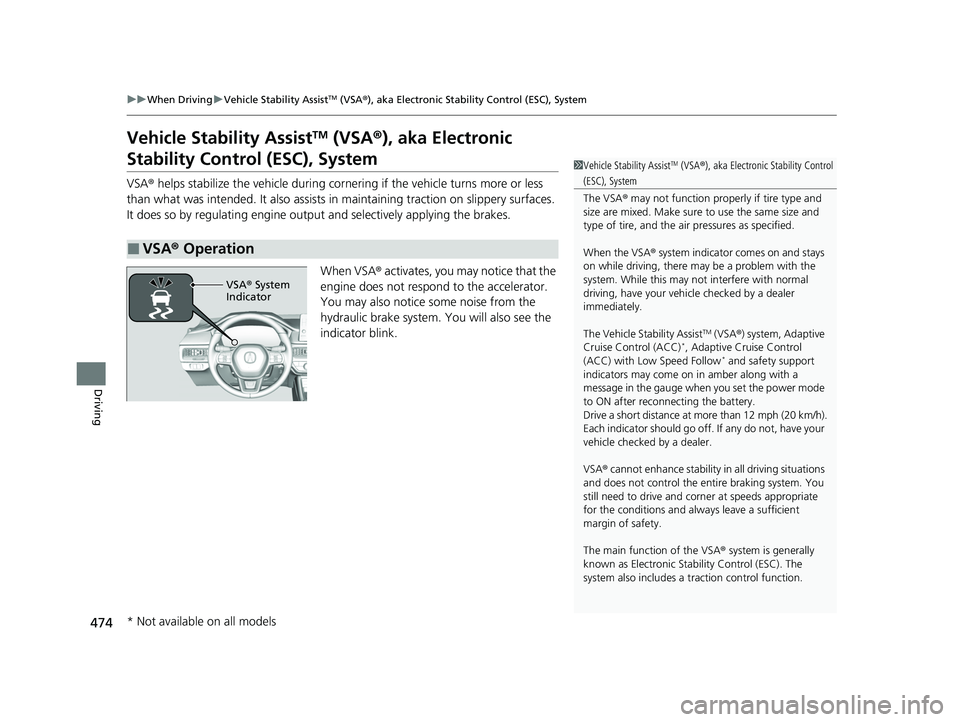
When VSA® activates, you may notice that the
engine does not respond to the accelerator.
You may also notice some noise from the
hydraulic brake system. You will also see the
indicator blink.
■VSA ® Operation
1 Vehicle Stability AssistTM (VSA ®), aka Electronic Stability Control
(ESC), System
The VSA ® may not function properl y if tire type and
size are mixed. Make sure to use the same size and
type of tire, and the air pressures as specified.
When the VSA ® system indicator comes on and stays
on while driving, there may be a problem with the
system. While this may not interfere with normal
driving, have your vehi cle checked by a dealer
immediately.
The Vehicle Stability Assist
TM (VSA ®) system, Adaptive
Cruise Control (ACC)*, Adaptive Cruise Control
(ACC) with Low Speed Follow* and safety support
indicators may come on in amber along with a
message in the gauge when you set the power mode
to ON after reconnecting the battery.
Drive a short distance at more than 12 mph (20 km/h).
Each indicator should go off. If any do not, have your
vehicle checked by a dealer.
VSA ® cannot enhance stability in all driving situations
and does not control the entire braking system. You
still need to drive and corner at speeds appropriate
for the conditions and always leave a sufficient
margin of safety.
The main function of the VSA ® system is generally
known as Electronic Stab ility Control (ESC). The
system also includes a traction control function.
VSA® System
Indicator
* Not available on all models
24 ACURA INTEGRA-313S56100.book 474 ページ 2023年2月13日 月曜日 午後2時41分
Page 478 of 766

476
uuWhen Driving uAgile Handling Assist
Driving
Agile Handling Assist
Lightly brakes the front wheel s, as needed, when you turn the steering wheel, and
helps support the vehicle’s stability and performance during cornering.1 Agile Handling Assist
The agile handling assist ca nnot enhance stability in
all driving situations. You still need to drive and
corner at speeds appropriate for the conditions and
always leave a sufficient margin of safety.
When the VSA ® system indicator comes on and stays
on while driving, the agil e handling assist does not
activate.
You may hear a sound coming from the engine
compartment while the agile handling assist is
activated. This is normal.
24 ACURA INTEGRA-313S56100.book 476 ページ 2023年2月13日 月曜日 午後2時41分
Page 491 of 766

489
uuAcuraWatchTMuCollision Mitigation Braking SystemTM (CMBSTM)
Continued
Driving
Collision Mitigation Braking SystemTM (CMBSTM)
The system can assist you when it determines there is a possibility of your vehicle
colliding with a vehicle (including moto rcycles) ahead from behind, an oncoming
vehicle in front, a pedestrian, or someone riding a bicycle (moving bicycle).
The CMBS
TM is designed to alert you when the potential for a collision is determined,
as well as assist in reducing speed, avoiding collisions, and reducing collision
severity.
1 Collision Mitigation Braking SystemTM (CMBSTM)
Important Safety Reminder
The CMBS
TM is designed to reduce the severity of an
unavoidable collision. It does not prevent collisions
nor stop the vehicle automati cally. It is still your
responsibility to operate the brake pedal and steering
wheel appropriately acco rding to the driving
conditions.
The CMBS
TM may not activate or may not detect a
vehicle in front of y our vehicle under certain
conditions:
2 CMBS
TM Conditions and Limitations P. 494
You can read about handling information for the
camera equipped with this system. 2 Front Wide View Camera P. 590
When the CMBS
TM is activated, it will continue to
operate even if the accele rator pedal is partially
depressed. However, it w ill be canceled if the
accelerator pedal is fully depressed.
When the CMBS
TM activates, the engine may stop
automatically. Start the engine by normal operation if
the engine stops. 2 Starting the Engine P. 433
Manual transmission models
24 ACURA INTEGRA-313S56100.book 489 ページ 2023年2月13日 月曜日 午後2時41分
Page 492 of 766
uuAcuraWatchTMuCollision Mitigation Braking SystemTM (CMBSTM)
490
Driving
■How the system works
The CMBS
TM will be canceled when your vehi cle stops or the system determines
there no longer is the potential for a collision.
The CMBS
TM may also be canceled when a driver operates the steering wheel and
the brake or accelerator pedal to avoid a collision.
1 How the system works
The camera in the CMBS
TM is also designed to detect
pedestrians.
However, this pedestrian detection feature may not
activate or may not detect a pedestrian in front of
your vehicle under certain conditions.
Refer to the ones indicating the pedestrian detection
limitations from the list. 2 CMBS
TM Conditions and Limitations P. 494
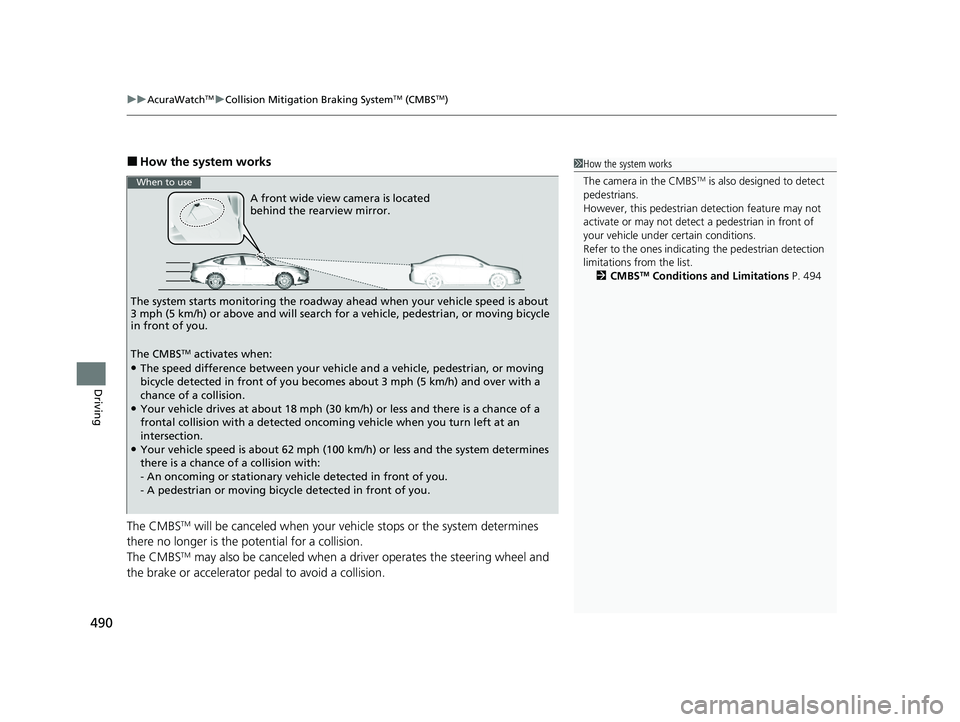
A front wide view camera is located
behind the rearview mirror.
The system starts monitoring the roadway ah ead when your vehicle speed is about
3 mph (5 km/h) or above and will search for a vehicle, pedestrian, or moving bicycle
in front of you.
The CMBS
TM activates when:●The speed difference between your vehicle and a vehicle, pedestrian, or moving
bicycle detected in front of you becomes about 3 mph (5 km/h) and over with a
chance of a collision.
●Your vehicle drives at about 18 mph (30 km/h) or less and there is a chance of a
frontal collision with a detected oncoming vehicle when you turn left at an
intersection.
●Your vehicle speed is about 62 mph (100 km/h) or less and the system determines
there is a chance of a collision with:
- An oncoming or stationary vehicle detected in front of you.
- A pedestrian or moving bicycle detected in front of you.
When to use
24 ACURA INTEGRA-313S56100.book 490 ページ 2023年2月13日 月曜日 午後2時41分
Page 493 of 766

Continued491
uuAcuraWatchTMuCollision Mitigation Braking SystemTM (CMBSTM)
Driving
■When the system activates
You can change the distance ( Long/Normal /Short ) between vehicles at which the
system’s earliest collision alert will come on.
2 Vehicle Settings* P. 134
2 Customized Features P. 367
1When the system activates
The head-up warning uses a lens located at the front
end of the dashboard.
Do not cover the lens or spill any liquid on it.
Models with Head-up display
Lens
The system provides visual and audible alerts of a possible collision, and stops if the
collision is avoided.
u Take appropriate action to prevent a collision (apply the brakes, change
lanes, etc.)
Visual Alerts
Beep
Audible Alert
Head-up Warning
Lights*
Models with 7-in. Color Touchscreen
Models with 9-in. Color Touchscreen
* Not available on all models
24 ACURA INTEGRA-313S56100.book 491 ページ 2023年2月13日 月曜日 午後2時41分
Page 499 of 766
497
uuAcuraWatchTMuCollision Mitigation Braking SystemTM (CMBSTM)
Continued
Driving
■Examples of other limitations on detection or system operation
• When the vehicle ahead of you is a small motorcycle, motorcycle with a sidecar,
wheelchair, or other sp ecially shaped vehicle.
• When a vehicle is lower in the rear than the front such as trucks that are not
carrying a load, or a narrow vehicle.
• When the vehicle ahead of you, oncoming vehicle, pedestrian or moving bicycle
is not in front of the vehicle.
• The speed difference between your ve hicle and the vehicle ahead of you,
oncoming vehicle, pedestrian or moving bicycle is significantly large.
• When the vehicle or moving bicycle in front of you slows suddenly.
• When the driver operates the brake peda l and steering wheel to avoid a collision.
• When you approach the vehicle ahead of you, oncoming vehicle, pedestrians or
moving bicycles while accelerating rapidly or operating the steering wheel (except
when turning left at an intersection. etc.)
*1
•When the moving bicycle is a child-sized bi cycle, folding bicycle, three-wheeler or
other bicycle with small tires, or a long bicycle like a tandem bicycle.
• When the camera cannot correctly identify the shape of the vehicle ahead of you,
oncoming vehicle, pedestrian, or moving bicycle.
• When the minimum ground clearance of a vehicle ahead of you is extremely high.
*1: When there is a possibility of a frontal co llision with the oncoming vehicle while turning
left, the CMBSTM is activated. However, it may not be activated if you suddenly turn the
steering wheel.
24 ACURA INTEGRA-313S56100.book 497 ページ 2023年2月13日 月曜日 午後2時41分
Page 500 of 766
498
uuAcuraWatchTMuCollision Mitigation Braking SystemTM (CMBSTM)
Driving
■Automatic shutoff
The CMBSTM may automatically shut itself o ff and the safety support indicator
(amber) comes and stays on when:
• You drive off-road or on a mountain road, or curved and wi nding road for an
extended period.
• Driving in bad weather (rain, fog, snow, etc.).
• Driving with the parking brake applied.
• The camera temperature gets too high.
• The front of the camera is covered by dirt, fog, rain, mud, wet snow, seals,
accessories, stickers, or film on the windshield.
• An abnormal tire condition is detected (incorrect tire size, flat tire, etc.).
Once the conditions that caused the CMBS
TM to shut off improve or are addressed
(e.g., cleaning), the system comes back on.
24 ACURA INTEGRA-313S56100.book 498 ページ 2023年2月13日 月曜日 午後2時41分
Page 503 of 766

501
uuAcuraWatchTMuLow Speed Braking Control*
Continued
Driving
Low Speed Braking Control*
Using sonar sensors located on the front an d rear bumpers and the front grille, this
system can detect if there is danger of a potential collision with a wall or other
obstacle during normal driving or when the accelerator pedal is depressed with too
much force. The system then assists in avoiding collisions and reducing damage
from impact through assistive braking a nd/or assistive driving power suppression.
1Low Speed Braking Control*
If the Low Speed Braking Control activates in a
situation where you do not want automatic brake
application (such as when the vehicle is between two
railroad crossing gates), si mply press the brake pedal
to deactivate the system and then continue to drive
as intended.
3WARNING
The Low Speed Braking Control System
cannot avoid all collisions and may not
reduce damage in each situation where the
accelerator is mistaken ly or aggressively
pressed. Overreliance on the system may
result in a collision with serious injury or
death. Always check your surroundings,
your shift position, and your pedal use.
Driver remains responsible for safely
operating the vehicle.
Continuously variable transmission models with parking sensor system
* Not available on all models
24 ACURA INTEGRA-313S56100.book 501 ページ 2023年2月13日 月曜日 午後2時41分
Page 504 of 766

uuAcuraWatchTMuLow Speed Braking Control*
502
Driving
■Assistive braking
Assistive braking provides a visual and audible alert when the vehicle is moving
between approximately 1 and 6 mph (2 and 10 km/h) and there is the possibility of
a collision with a detected wall or other ob stacles, as well as providing assistance
with braking.
If only the rear sensors are turned off using the parking sensor system, the assistive
braking will not work when reversing.
2 Customized Features P. 367
■How the System Works1Low Speed Braking Control*
For directions on the prop er handling of the sonar
sensors, please refer to the following page.
2 Sonar Sensors
* P. 592
The vehicle will release the brake and start moving a
few seconds after the system is activated. To keep the
vehicle stopped, keep the brake pedal depressed or
put the transmission into
( P.
In order to prevent the sy stem from activating when
not needed, always turn it off during vehicle
maintenance; when loading on ships, trucks, and so
on; when using a chassis dy namometer or free rollers
for inspection; or when washing the car in conveyor
type car wash machine.Audible Alert
Beep Beep
The vehicle
applies brake Driver
depresses
brake pedal
Release
brake after
maintaining
stationary
positionStop
* Not available on all models
24 ACURA INTEGRA-313S56100.book 502 ページ 2023年2月13日 月曜日 午後2時41分