Tcu ACURA INTEGRA 2024 Owners Manual
[x] Cancel search | Manufacturer: ACURA, Model Year: 2024, Model line: INTEGRA, Model: ACURA INTEGRA 2024Pages: 766, PDF Size: 28.39 MB
Page 4 of 766
System Updates Terms and Conditions*
General
Your vehicle has an application that allows your 9-in. Color
Touchscreen to automatically search for Acura software updates
that are specific to your 9-in. Color Touchscreen and its connected
devices (initially every one (1) week via Wi-Fi or every four (4) weeks
via Telematics Control Unit (TCU)
*, queries may occur more or less
frequently due to internet outages, retries, direct user action, WAP
push from the server or a chan ge in query policy on the Honda
servers). This application periodically transmits to our servers a
limited amount of vehicle and device information (Vehicle
Identification Number (VIN), th e Model Type (MT) Identification
Number, Hardware and Software Part Number, Serial Number,
Software Version, preferred lang uage, Internet Protocol (IP)
address, Transaction Log (alert or update viewing, update
download and installation, softw are status), etc.). When the
application finds an update from th e server, the application initially
asks permission to download and install the update. Where
available, in your settings menu you may elect to automatically
download and install these updates or you may elect to manually
update the system.
When your 9-in. Color Touchscr een searches our servers for
updates or alerts, we will auto matically provide you with the
opportunity to update your devices or transmit the update or alert
directly to your 9-in. Color Touchscreen. We will also maintain on
our servers a log of the updates or alerts that are installed.
Your Personal Data
Should the aforementioned info rmation transmitted to Honda
constitute personal information in y our region, please note that this
information will be treated in stri ct accordance with the rules and
regulations outlined in this notice as well as applicable data
protection law. The terms of our privacy notice are
incorporated into these terms by
reference and your use of system updates will be subject to the
privacy notice. Our privacy notice sets out information about how we
and any named third parties will pr ocess any personal data we collect
from you or that you provide to us, via the application.
For further details, see Acura’s connected product privacy notice at:U.S.: www.acura.com
Canada: www.honda.ca/privacy/vehicledata
Honda collects, uses and stores your personal data for the reasons
set out below:
●to deliver the system updates and related services to you;●to allow us to improve and optimize the system updates
products and services;
●to respond to user questions an d complaints; and for internal
record keeping.
●where necessary for Honda's legitimate interests, as listed below, and
where our interests are not overridden by your data protection rights.
Protecting our legitimate business interests and legal rights
includes, but is not limited to, use in connection with compliance,
regulatory, auditing, legal claims (including disclosure of such
information in connection with lega l process or litigation) and other
ethics and compliance reporting requirements.
Honda will also convert personal data into anonymous data and
use it (normally on an aggregated st atistical basis) for uses such as
market research and an alysis, to improve the system updates, to
analyze trends, and to assess th e success of software update
releases. Aggregated personal in formation does not personally
identify you or any other use of the system updates.
Honda may share this data with Honda's worldwide support
organization or affiliated Honda companies or other third parties
engaged by Honda for the purposes of rendering support services
in connection with system support.
* Not available on all models
24 ACURA INTEGRA-313S56100.book 2 ページ 2023年2月13日 月曜日 午後2時41分
Page 273 of 766
271
uuAudio System Basic Operation uAudio/Information Screen
Continued
Features
■Trip Computer
Displays the trip computer information.
• Current Drive tab: Displays the current trip information.
• Trip A /Trip B tab: Displays information for the current and three previous drives.
The information is stored ever y time you reset Trip A/B.
To reset the Trip A/B, select Settings, then select Delete Trip History .
To change the setting of how to reset Trip A/B, select Settings, then select “Trip A”
Reset Timing or “Trip B” Reset Timing .
■System Updates
Updates the software version of the audio system.
2 System Updates P. 280
■Clock
Displays the clock.
■Compass
Displays the compass screen.
■Smart Shortcuts
Displays the Smart Shortcuts screen.
2Smart Shortcuts P. 320
■Display Mode
Displays the brightness bar.
■Alexa*
Displays the Alexa screen.
2Alexa Built-In* P. 291
* Not available on all models
24 ACURA INTEGRA-313S56100.book 271 ページ 2023年2月13日 月曜日 午後2時41分
Page 280 of 766
uuAudio System Basic Operation uAudio/Information Screen
278
Features
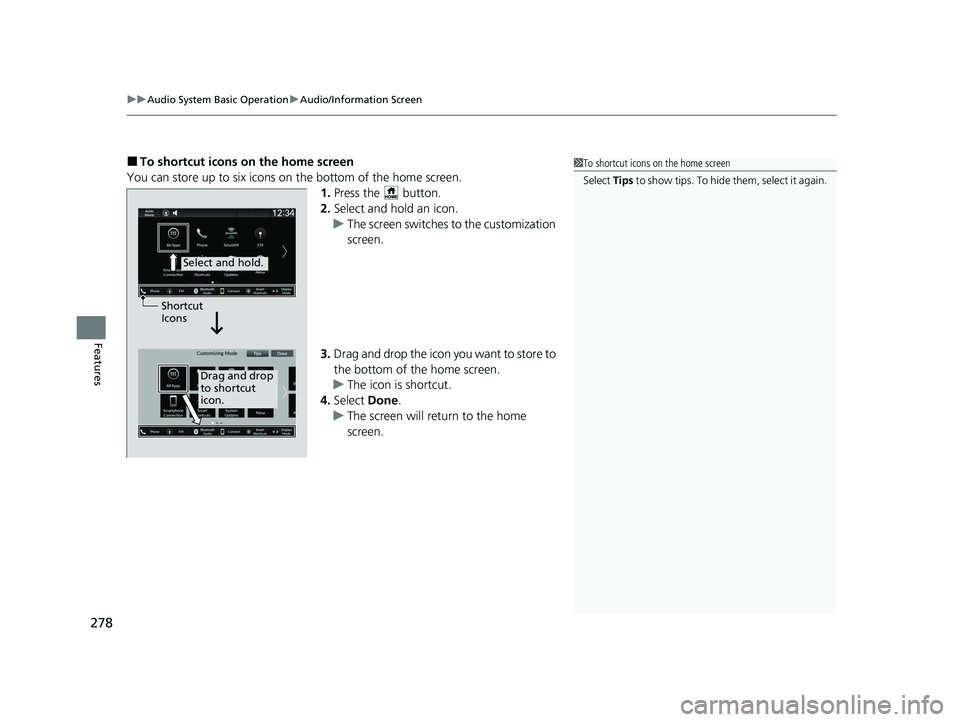
■To shortcut icons on the home screen
You can store up to six icons on the bottom of the home screen. 1.Press the button.
2. Select and hold an icon.
u The screen switches to the customization
screen.
3. Drag and drop the icon you want to store to
the bottom of the home screen.
u The icon is shortcut.
4. Select Done.
u The screen will return to the home
screen.1To shortcut icons on the home screen
Select Tips to show tips. To hide t h em , s e le c t i t a g ai n .
Select and hold.
Drag and drop
to shortcut
icon.
Shortcut
Icons
24 ACURA INTEGRA-313S56100.book 278 ページ 2023年2月13日 月曜日 午後2時41分
Page 320 of 766
318
uuAudio System Basic Operation uAcuraLink ®
Features
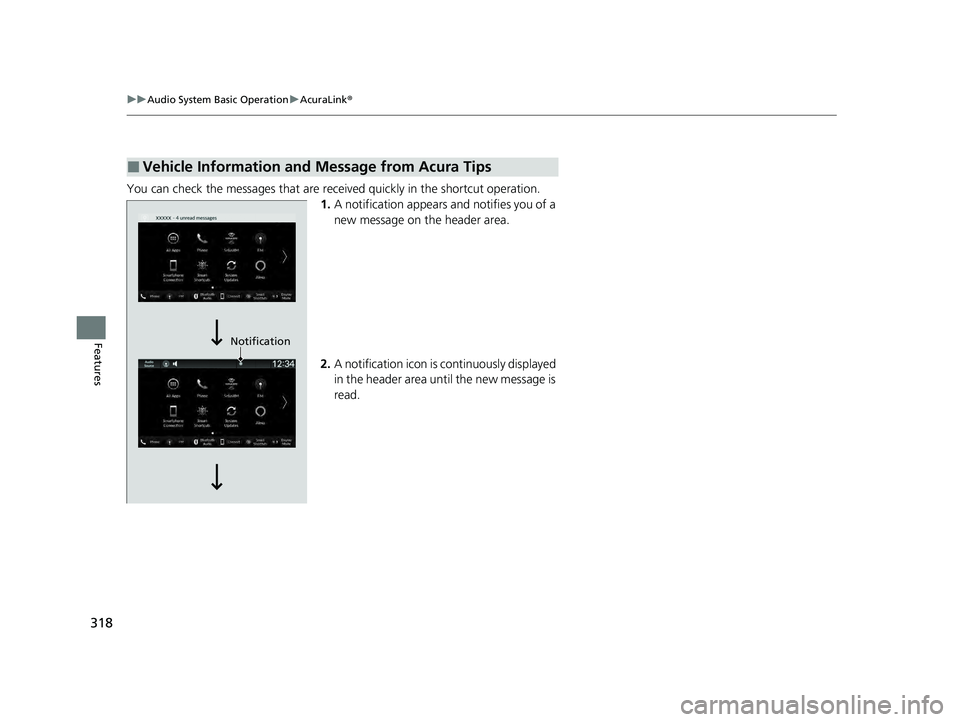
You can check the messages that are rece ived quickly in the shortcut operation.
1. A notification appears and notifies you of a
new message on the header area.
2. A notification icon is continuously displayed
in the header area until the new message is
read.
■Vehicle Information and Message from Acura Tips
Notification
24 ACURA INTEGRA-313S56100.book 318 ページ 2023年2月13日 月曜日 午後2時41分
Page 322 of 766
320
uuAudio System Basic Operation uSmart Shortcuts
Features
Smart Shortcuts
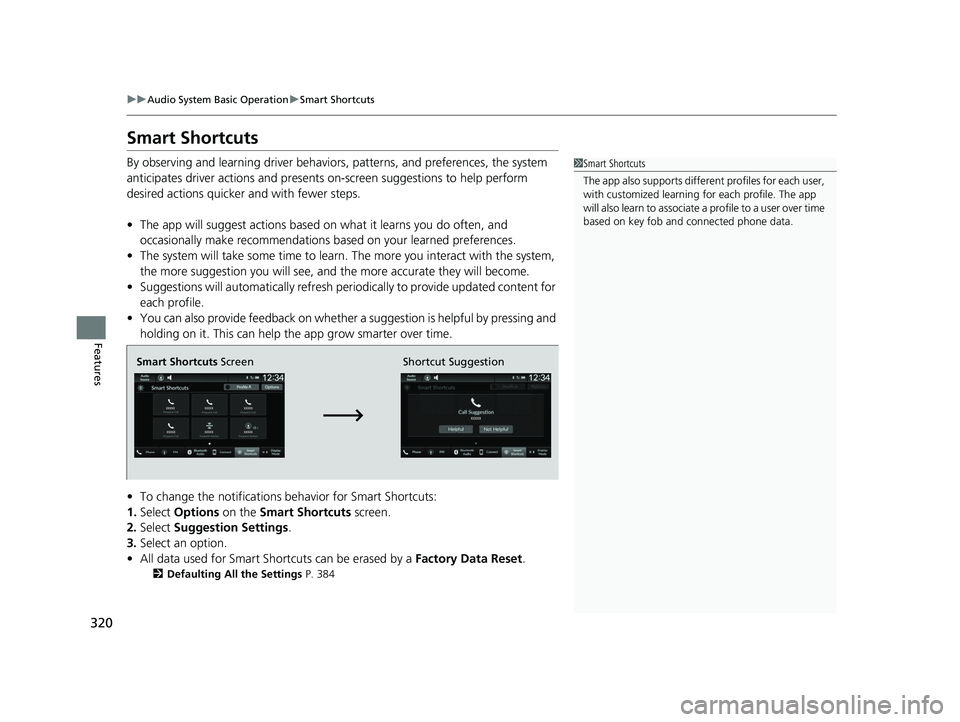
By observing and learning driver behaviors, patterns, and preferences, the system
anticipates driver actions and presents on-screen suggestions to help perform
desired actions quicker and with fewer steps.
• The app will suggest actions based on what it learns you do often, and
occasionally make recommendations ba sed on your learned preferences.
• The system will take some time to learn. The more you interact with the system,
the more suggestion you will see, and the more accurate they will become.
• Suggestions will automatically refresh peri odically to provide updated content for
each profile.
• You can also provide feedback on whether a suggestion is helpful by pressing and
holding on it. This can help the app grow smarter over time.
• To change the notifications behavior for Smart Shortcuts:
1. Select Options on the Smart Shortcuts screen.
2. Select Suggestion Settings .
3. Select an option.
• All data used for Smart Shortcuts can be erased by a Factory Data Reset.
2Defaulting All the Settings P. 384
1Smart Shortcuts
The app also supports different profiles for each user,
with customized learning for each profile. The app
will also learn to associate a profile to a user over time
based on key fob and connected phone data.
Smart Shortcuts Screen Shortcut Suggestion
24 ACURA INTEGRA-313S56100.book 320 ページ 2023年2月13日 月曜日 午後2時41分
Page 323 of 766
Continued321
uuAudio System Basic Operation uSmart Shortcuts
Features
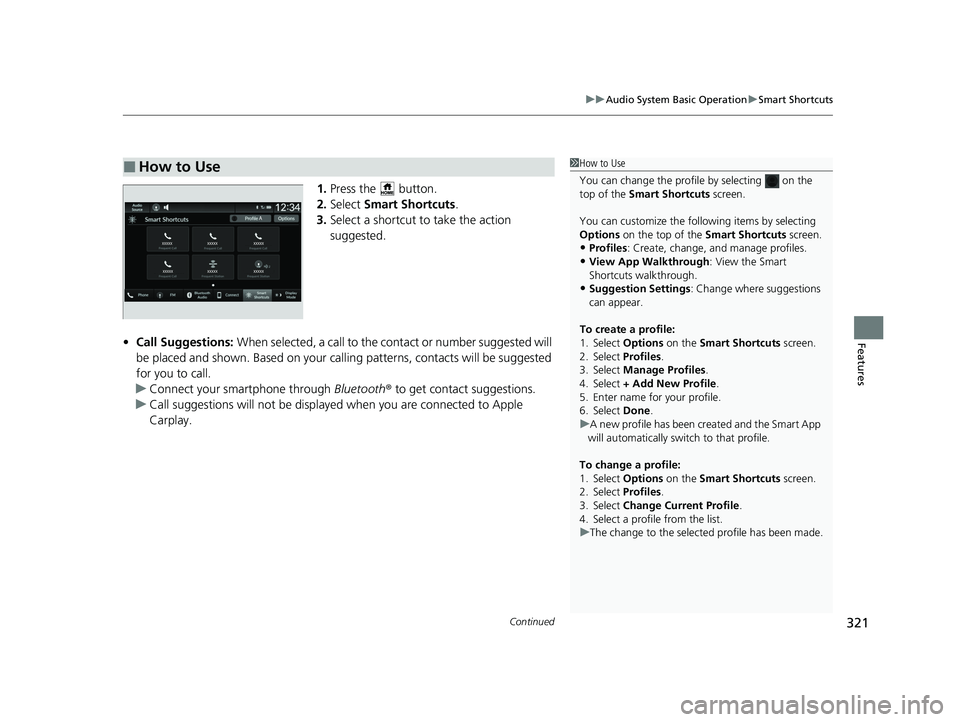
1. Press the button.
2. Select Smart Shortcuts .
3. Select a shortcut to take the action
suggested.
• Call Suggestions: When selected, a call to the cont act or number suggested will
be placed and shown. Based on your call ing patterns, contacts will be suggested
for you to call.
u Connect your smartphone through Bluetooth® to get contact suggestions.
u Call suggestions will not be displayed when you are connected to Apple
Carplay.
■How to Use1How to Use
You can change the profile by selecting on the
top of the Smart Shortcuts screen.
You can customize the foll owing items by selecting
Options on the top of the Smart Shortcuts screen.
•Profiles: Create, change, a nd manage profiles.
•View App Walkthrough : View the Smart
Shortcuts walkthrough.
•Suggestion Settings : Change where suggestions
can appear.
To create a profile:
1. Select Options on the Smart Shortcuts screen.
2. Select Profiles .
3. Select Manage Profiles .
4. Select + Add New Profile .
5. Enter name for your profile.
6. Select Done .
u A new profile has been cr eated and the Smart App
will automatically switch to that profile.
To change a profile:
1. Select Options on the Smart Shortcuts screen.
2. Select Profiles .
3. Select Change Current Profile .
4. Select a profile from the list.
u The change to the selected profile has been made.
24 ACURA INTEGRA-313S56100.book 321 ページ 2023年2月13日 月曜日 午後2時41分
Page 324 of 766

322
uuAudio System Basic Operation uSmart Shortcuts
Features
• Radio Suggestions: When selected, the corresponding radio app (FM, AM, or
SiriusXM ®) will open and it will start playing the station.
u From radio apps you can receive:
- FM, AM, SiriusXM ®: Most frequently listened stations you may like to play
next.
- FM, SiriusXM ®: Genre-based suggestions.
u Considerations:
- FM suggestions will appear only when they are within range, according to
your vehicle’s tuner signal.
- SiriusXM ® suggestions will be avai lable as long as there is an active account in
the vehicle.
24 ACURA INTEGRA-313S56100.book 322 ページ 2023年2月13日 月曜日 午後2時41分
Page 731 of 766

729
uuFuses uFuse Locations
Continued
Handling the Unexpected
■Circuit protected and fuse rating
Circuit ProtectedAmps
1BATTERY125 A
2 -40 A
-40 A
F/BOX OPTION 60 A -40 A
F/BOX OPTION2 40 A DC/DC2 30 A
F/BOX MAIN 60 A
3
-30 A
-30 A
-70 A
RR DEFROSTER30 A
-40 A
-30 A
HTR MTR40 A
4 -30 A
ABS/VSA MTR 40 A DC/DC 30 A
-3 0 A
IG MAIN 30 A
R/M1 30 A
R/M2 30 A
5
ST MAGNETIC SW30 A
WIPER30 A
EPS70 A
RFC*230 A*1
50 A*2
ABS/VSA FSR40 A
MAIN FAN30 A
F/BOX MAIN240 A
6 SUB FAN (30 A)
7 IG MAIN230 A
8 ACTIVE EXHAUST VALVE*2(7.5 A)
9EVP*(30 A)
10 AUDIO SUB*2(7.5 A)
11--
12 - -
13H/STRG BATT SNSR*10 A
14 - -
15FR FOG*(10 A)
16 MG CLUTCH 10 A
17WASHER15 A
18 HORN 15 A
19BACK UP15 A
20 AUDIO (15 A)
21RFC RLY CL+(7.5 A)
22 DBW 15 A
Circuit ProtectedAmps
*1:1.5 L engine models
*2:2.0 L engine models
23--
24 BACKUP FI-ECU 10 A
25IGP15 A
26 TCU*(15 A)
27LCM L15 A
28 INJ (15 A)
29STOP10 A
30 LCM R 15 A
31IG COIL15 A
32 - -
33HAZARD15 A
34 AUDIO SUB VST (7.5 A)
35--
36 AUDIO VST MAIN (30 A)
37BACKUP2(30 A)
38 - -
39IG1 MON2*2(7.5 A)
40 VBACT (10 A)
41IGPS [LAF]10 A
42 IG1 MON2*1(7.5 A)
Circuit ProtectedAmps
* Not available on all models
24 ACURA INTEGRA-313S56100.book 729 ページ 2023年2月13日 月曜日 午後2時41分
Page 746 of 766
744
uuDevices that Emit Radio Waves u
Information
FCC ID: HYQOGAY17
Co-location: This transmitter must not be co-located or operated in conjunction
with any other antenna or transmitter.
CAUTION: Radio Frequency Radiation Exposure
This equipment complies with FCC radiat ion exposure limits set forth for an
uncontrolled environment and meets the FCC radio frequency (RF) Exposure
Guidelines. This equipment sh ould be installed and operated keeping the radiator at
least 20 cm or more away from person’s body.
This device contains licence-exempt trans mitter(s)/receiver(s) that comply with
Innovation, Science and Economic Developm ent Canada’s licence-exempt RSS(s).
Operation is subject to the following two conditions:
(1) This device may not cause interference.
(2) This device must accept any interfer ence, including interference that may cause
undesired operation of the device.
The antenna cannot be removed (and changed) by user.
Co-location: This transmitter must not be co-located or operated in conjunction
with any other antenna or transmitter.
CAUTION: Radio Frequency Radiation Exposure
This equipment complies with ISED radi ation exposure limits set forth for an
uncontrolled environment and meets RSS-102 of the ISED radio frequency (RF)
Exposure rules. This eq uipment should be installed and operated keeping the
radiator at least 20 cm or more away from person’s body.
TCU*
* Not available on all models
24 ACURA INTEGRA-313S56100.book 744 ページ 2023年2月13日 月曜日 午後2時41分
Page 756 of 766

754
Information
Open Source Licenses
Meter Open Source License
The software embedded in this product includes open source software. Refer to the
following website for details rega rding the open source software.
https://www.nippon-seiki. co.jp/business_ic_meter/
TCU Open Source License
Free/Open Source Software Information
This product contains Free/Open Source Software(FOSS). The license information
and/or the source code of such FOSS can be found at the following URL.
https://www.denso.com/global/en/opensource/tcu/honda/
1.5 L engine models with 9-in. Color Touchscreen
24 ACURA INTEGRA-313S56100.book 754 ページ 2023年2月13日 月曜日 午後2時41分