ECU Acura MDX 2003 Owner's Manua
[x] Cancel search | Manufacturer: ACURA, Model Year: 2003, Model line: MDX, Model: Acura MDX 2003Pages: 420, PDF Size: 5.46 MB
Page 99 of 420
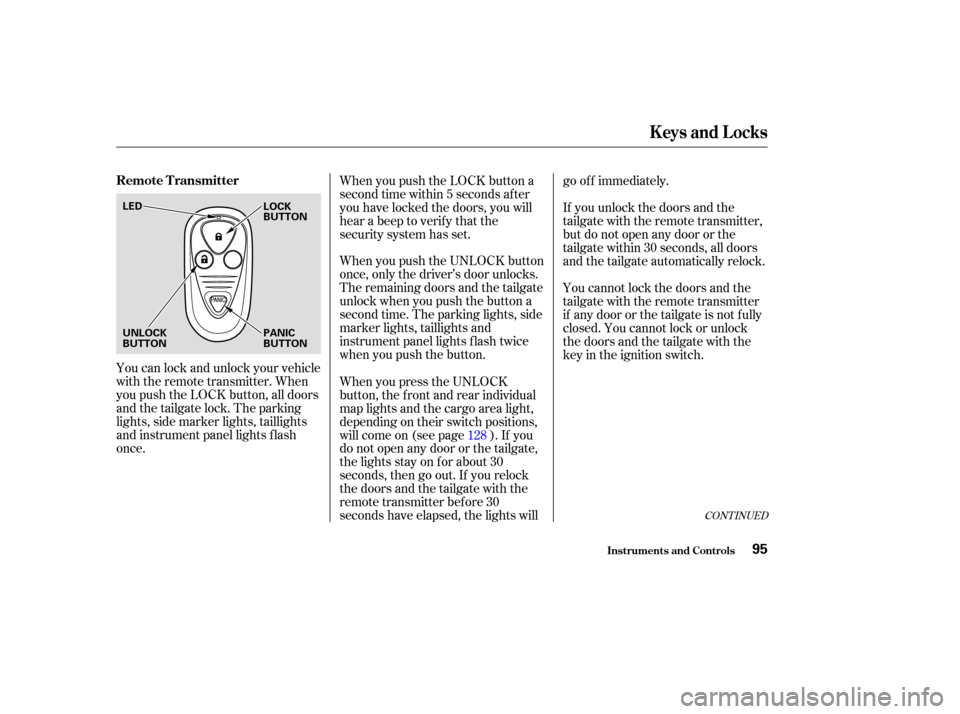
You can lock and unlock your vehicle
with the remote transmitter. When
you push the LOCK button, all doors
and the tailgate lock. The parking
lights, side marker lights, taillights
and instrument panel lights f lash
once.When you push the LOCK button a
second time within 5 seconds after
you have locked the doors, you will
hear a beep to verify that the
security system has set.
When you push the UNLOCK button
once, only the driver’s door unlocks.
The remaining doors and the tailgate
unlock when you push the button a
second time. The parking lights, side
marker lights, taillights and
instrument panel lights f lash twice
when you push the button.
If you unlock the doors and the
tailgate with the remote transmitter,
but do not open any door or the
tailgate within 30 seconds, all doors
and the tailgate automatically relock.
You cannot lock the doors and the
tailgate with the remote transmitter
if any door or the tailgate is not f ully
closed. You cannot lock or unlock
thedoorsandthetailgatewiththe
key in the ignition switch.
When you press the UNLOCK
button, the f ront and rear individual
map lights and the cargo area light,
depending on their switch positions,
will come on (see page ). If you
do not open any door or the tailgate,
the lights stay on for about 30
seconds, then go out. If you relock
thedoorsandthetailgatewiththe
remote transmitter before 30
seconds have elapsed, the lights will go of f immediately.
128
CONT INUED
Remote Transmitter
Keys and Locks
Inst rument s and Cont rols95
LED
UNLOCK
BUTTON PANIC
BUTTON LOCK
BUTTON
Page 110 of 420
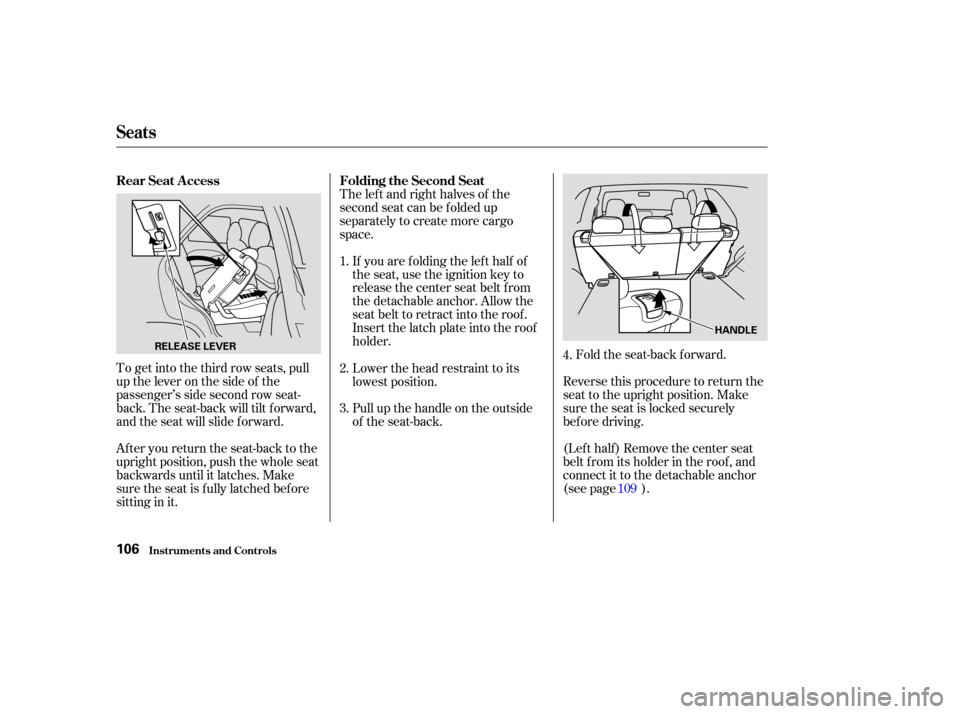
To get into the third row seats, pull
uptheleveronthesideof the
passenger’s side second row seat-
back. The seat-back will tilt f orward,
and the seat will slide f orward.
After you return the seat-back to the
upright position, push the whole seat
backwards until it latches. Make
sure the seat is f ully latched bef ore
sitting in it.The lef t and right halves of the
second seat can be f olded up
separately to create more cargo
space.
If you are f olding the lef t half of
the seat, use the ignition key to
release the center seat belt from
the detachable anchor. Allow the
seat belt to retract into the roof.
Insert the latch plate into the roof
holder. Fold the seat-back forward.
Reverse this procedure to return the
seat to the upright position. Make
sure the seat is locked securely
bef ore driving.
(Lef t half ) Remove the center seat
belt f rom its holder in the roof , and
connect it to the detachable anchor
(see page ).
Pull up the handle on the outside
of the seat-back. Lower the head restraint to its
lowest position.
2.
3.
1.
4.
109
Rear Seat A ccess
Folding the Second Seat
Seats
Inst rument s and Cont rols106
RELEASE LEVER HANDLE
Page 112 of 420
Make sure the outer shoulder belts
are positioned on each hook
whenever the third seat is f olded.
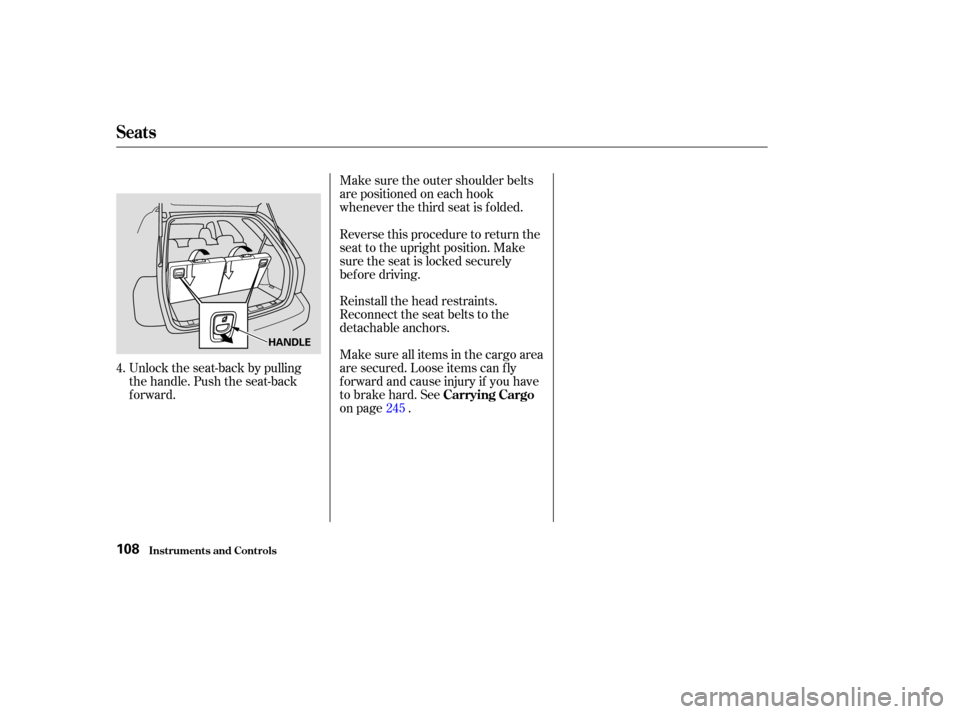
Unlock the seat-back by pulling
the handle. Push the seat-back
forward. Reinstall the head restraints.
Reconnect the seat belts to the
detachable anchors.
Make sure all items in the cargo area
are secured. Loose items can f ly
f orward and cause injury if you have
to brake hard. See
on page . Reverse this procedure to return the
seat to the upright position. Make
sure the seat is locked securely
bef ore driving.
4. 245Carrying Cargo
Seats
Inst rument s and Cont rols108
HANDLE
Page 113 of 420
The seat belts in the center seat of
thesecondrowandinbothof the
third row seats are equipped with a
detachable seat belt anchor that
allows the seat belt to be unlatched
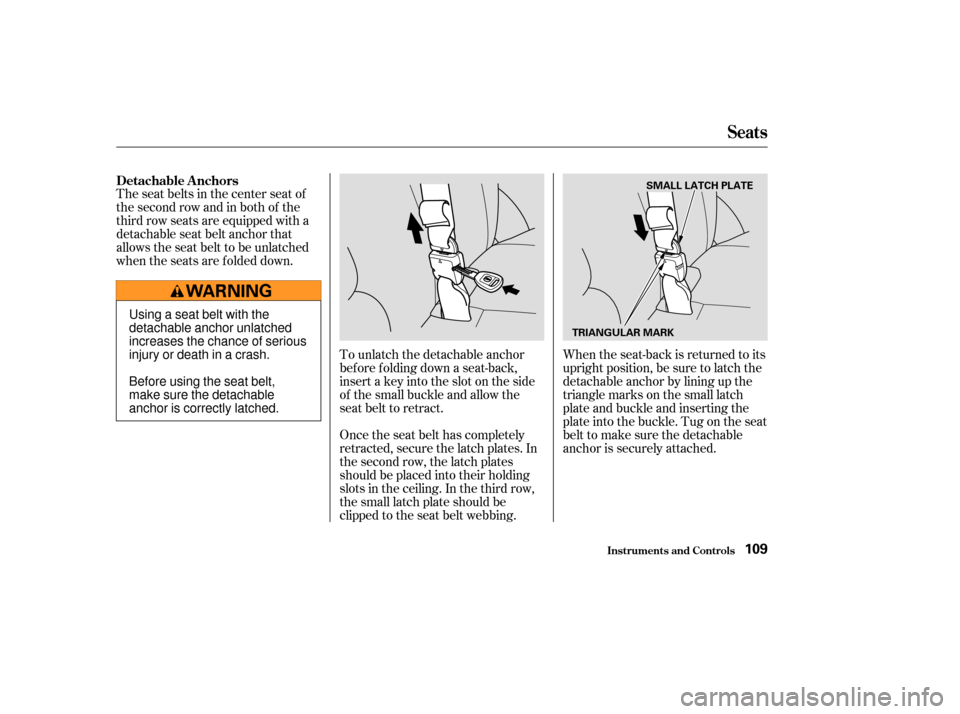
when the seats are f olded down.When the seat-back is returned to its
upright position, be sure to latch the
detachable anchor by lining up the
triangle marks on the small latch
plate and buckle and inserting the
plate into the buckle. Tug on the seat
belt to make sure the detachable
anchor is securely attached.
To unlatch the detachable anchor
before folding down a seat-back,
insert a key into the slot on the side
of the small buckle and allow the
seat belt to retract.
Once the seat belt has completely
retracted, secure the latch plates. In
the second row, the latch plates
should be placed into their holding
slots in the ceiling. In the third row,
the small latch plate should be
clipped to the seat belt webbing.
Detachable A nchors
Seats
Inst rument s and Cont rols109
SMALL LATCH PLATE
TRIANGULAR MARK
Using a seat belt with the
detachable anchor unlatched
increases the chance of serious
injury or death in a crash.
Before using the seat belt,
make sure the detachable
anchor is correctly latched.
Page 127 of 420
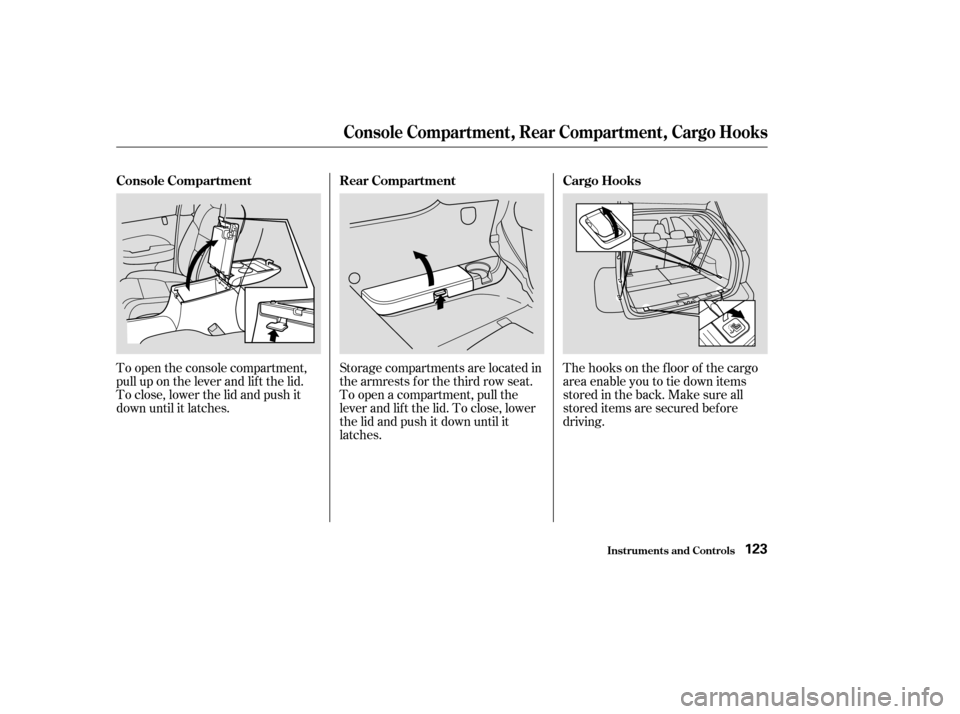
The hooks on the f loor of the cargo
area enable you to tie down items
stored in the back. Make sure all
stored items are secured bef ore
driving.
To open the console compartment,
pull up on the lever and lif t the lid.
To close, lower the lid and push it
down until it latches.
Storage compartments are located in
the armrests f or the third row seat.
To open a compartment, pull the
lever and lif t the lid. To close, lower
the lid and push it down until it
latches.
Console Compartment
Rear Compartment Cargo Hooks
Console Compart ment , Rear Compart ment , Cargo Hooks
Inst rument s and Cont rols123
Page 137 of 420
...............
Climate Control System . 134
.......
Fully-automatic Operation . 136
.......
Semi-automatic Operation . 137
........
Mode Button/Mode Icon . 139
Sunlight Sensor/ ............
Temperature Sensor . 141
...........................
Rear A/C Unit .142
................................
Audio System .145
AM/FM/Cassette/CD changer ........................
Audio System .145
.................
Operating the Radio . 146
.................
Adjusting the Sound . 149
............
Audio System Lighting . 149
..............................
Digital Clock .150
Operating the Cassette .....................................
Player .151
............
Tape Search Functions . 152
.....
Operating the CD Changer . 155
CD Changer Error .............................
Indications .162
................................
Audio System .163
AM/FM/Cassette/CD Stereo ........................
Audio System .163
.................
Operating the Radio . 164
.................
Adjusting the Sound . 168
............
Audio System Lighting . 169....................
Radio Frequencies . 169
........................
Radio Reception .169
.........
Operating the CD Player . 171
.....
Operating the CD Changer . 173
.......
Protecting Compact Discs . 174
....
CD Player Error Indications . 175
CD Changer Error .............................
Indications .176
Operating the Cassette .....................................
Player .177
............
Tape Search Functions . 178
Caring f or the Cassette .....................................
Player .180
...........
Remote Audio Controls . 181
.......................
Thef t Protection .182
Audio System (Optional on .....................
Touring model) .183
AM/FM/CD/DVD Audio ....................................
System .183
.................
Operating the Radio . 185
.................
Adjusting the Sound . 189
..............................
Digital Clock .190
............
Audio System Lighting . 190
Operating the Cassette .....................................
Player .191
.........
Operating the CD Player . 194 .....
Operating the CD Changer . 196
....
CD Player Error Indications . 197
CD Changer Error .............................
Indications .198
........
Rear Entertainment System . 199
............................
Security System .215
...............................
Cruise Control .216
..............................
Trip Computer .219
.
(Without Navigation System) . 219
HomeLink Universal .................................
Tranceiver .229
.
Rear View Camera and Monitor . 234
Comf ort and Convenience Features
Comf ort and Convenience Feat ures133
Page 219 of 420
The security system helps to protect
your vehicle and valuables f rom thef t.
The horn sounds and a combination
of headlights, parking lights, side
marker lights and taillights f lashes if
someone attempts to break into your
vehicleorremovetheradio.This
alarm continues f or two minutes,
then the system resets. To reset an
alarming system before the two
minutes have elapsed, unlock the
driver’s f ront door with the key or
the remote transmitter.Do not attempt to alter this system
or add other devices to it. The security system will not set if
the hood, tailgate, or any door is not
f ully closed. If the system will not set,
check the Door and Tailgate Open
Monitor on the instrument panel
(see page ) to see if the doors and
tailgate are f ully closed. Since it is
notpartofthemonitordisplay,
manually check the hood.
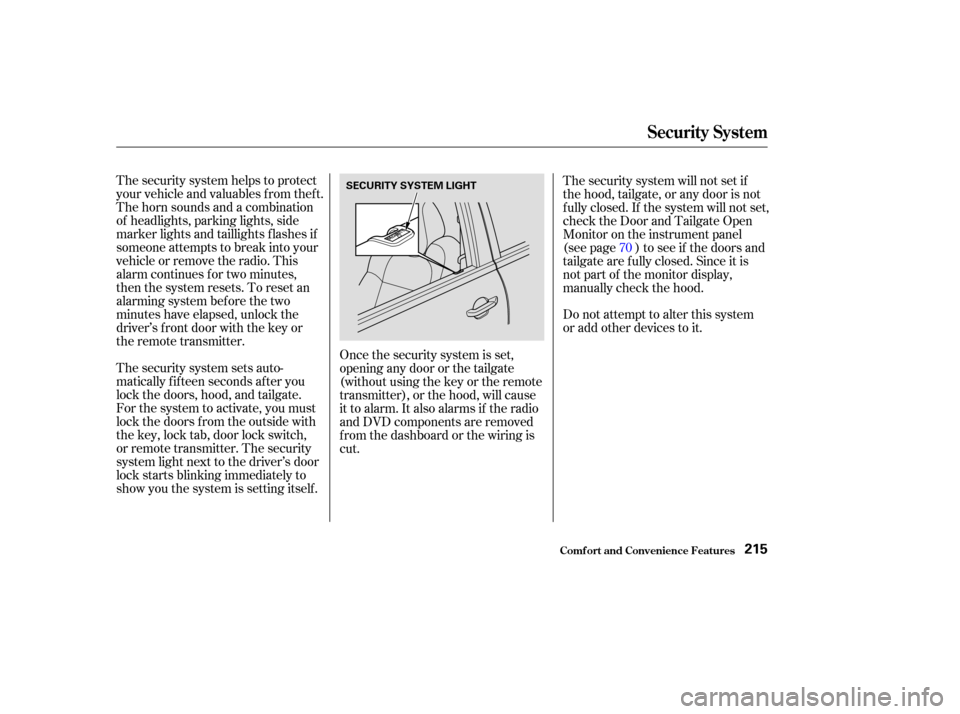
The security system sets auto-
matically fifteen seconds after you
lock the doors, hood, and tailgate.
For the system to activate, you must
lock the doors f rom the outside with
the key, lock tab, door lock switch,
or remote transmitter. The security
system light next to the driver’s door
lock starts blinking immediately to
show you the system is setting itself . Once the security system is set,
opening any door or the tailgate
(without using the key or the remote
transmitter), or the hood, will cause
it to alarm. It also alarms if the radio
and DVD components are removed
f rom the dashboard or the wiring is
cut. 70
Security System
Comf ort and Convenience Feat ures215
SECURITY SYSTEM LIGHT
Page 233 of 420

Always ref er to the operating
instructions and saf ety inf ormation
that came with your garage door
opener or other equipment you
intend to operate with the HomeLink
Universal Transceiver. If you do not
have this inf ormation, you should
contact the manuf acturer of the
equipment.
While training or using HomeLink,
make sure you have a clear view of
the garage door or gate, and that no
one will be injured by its movement.The HomeLink transceiver stores
the code in a permanent memory.
There should be no need to retrain
HomeLink if your car’s battery goes
dead or is disconnected.
If your garage door opener was
manuf actured bef ore April 1982, you
may not be able to program
HomeLink to operate it. Garage door
openers manuf actured bef ore that
date do not have a safety feature that
causes them to stop and reverse if an
obstacle is detected during closing,
increasing the risk of injury. If you
have questions, call (800) 355-3515.
If you are training HomeLink to
operate a garage door or gate, it is
recommended that you unplug the
motor f or that device during training.
Repeatedly pressing the remote
control button could burn out the
motor.
If you have problems with training
the HomeLink Universal Transceiver,
or would like inf ormation on home
products that can be operated by the
transmitter, call (800) 355-3515. On
the Internet, go to www.homelink.
com. The HomeLink Universal
Transceiver built into your vehicle
canbeprogrammedtooperate
remotely-controlled devices around
your home, such as garage doors,
lighting, or home security systems. It
can replace up to three remote
transmitters.
Important Saf ety Precautions
General Inf ormation
Customer Assistance
HomeL ink Universal T ransceiver
Comf ort and Convenience Feat ures229
Page 235 of 420

Canadian Owners:
The remote control you are training
from may stop transmitting after two
seconds. This is not long enough f or
HomeLink to learn the code. Release
and press the button on the remote
control every two seconds until
HomeLink has learned the code.For security purposes, newer garage
door opening systems use a ‘‘rolling’’
or variable code. Inf ormation f rom
the remote control and the garage
door opener are needed bef ore
HomeLink can operate the garage
door opener.
The ‘‘Training HomeLink’’
procedure trains HomeLink to the
proper garage door opener code.
The f ollowing procedure
synchronizes HomeLink to the
garage door opener so they send and
receive the correct codes.
The red light in HomeLink should
begin f lashing. It will f lash slowly
at first, then rapidly.
When the red light f lashes rapidly,
release both buttons. HomeLink
should have learned the code from
the remote control.
Plug in the garage door opener
motor, then test the HomeLink
transceiver button by pushing it. It
should operate the garage door.
If the button does not work, repeat
this procedure to train it again. If it
still does not work, you may have a variable or rolling code garage
door opener. Test this by pressing
and holding the HomeLink
transceiver button you just trained.
If the red light blinks f or two
seconds,thenstayson,youhavea
rolling code garage door opener.
You may be able to verify this with
the manufacturer’s documentation.
Go to ‘‘Training With a Rolling
Code System.’’
Repeat these steps to train the
other two HomeLink buttons to
operate any other remotely-
controlled devices around your
home (lighting, automatic gate,
security system, etc.).
5.
6.
8.
7.
CONT INUED
T raining With a Rolling Code
System
HomeL ink Universal T ransceiver
Comf ort and Convenience Feat ures231
Page 243 of 420
CONT INUED
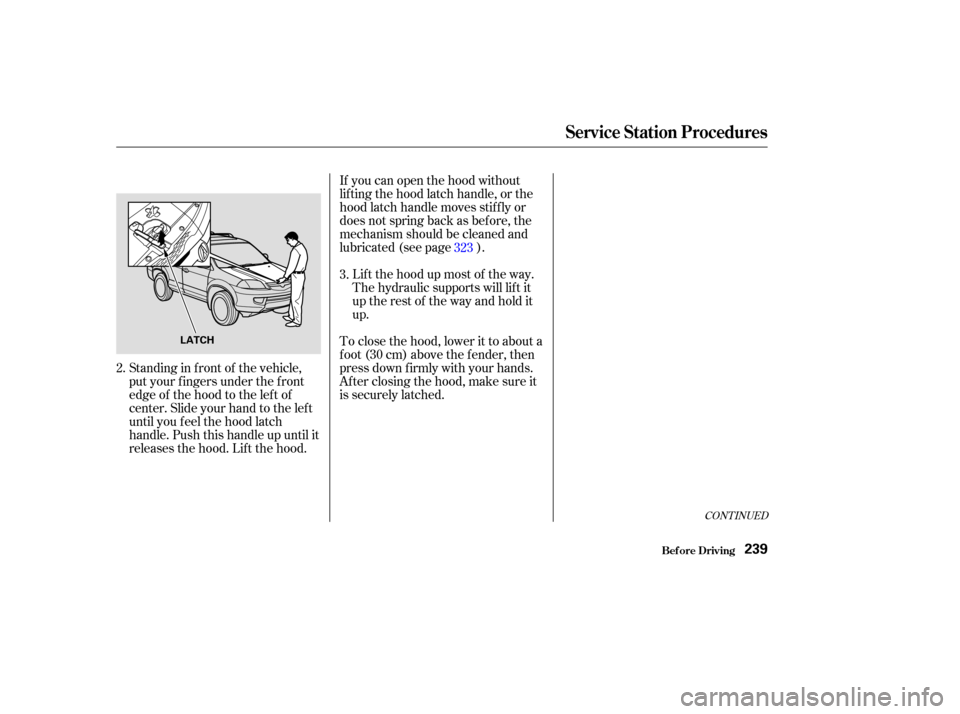
If you can open the hood without
lifting the hood latch handle, or the
hood latch handle moves stif f ly or
does not spring back as bef ore, the
mechanism should be cleaned and
lubricated (see page ).Lif t the hood up most of the way.
The hydraulic supports will lif t it
uptherestof thewayandholdit
up.
To close the hood, lower it to about a
f oot (30 cm) above the f ender, then
press down f irmly with your hands.
After closing the hood, make sure it
is securely latched.
Standing in f ront of the vehicle,
put your f ingers under the f ront
edge of the hood to the left of
center. Slide your hand to the lef t
until you f eel the hood latch
handle. Push this handle up until it
releases the hood. Lif t the hood. 3.
2. 323
Service Station Procedures
Bef ore Driving239
LATCH