bulb Acura MDX 2003 Owner's Manua
[x] Cancel search | Manufacturer: ACURA, Model Year: 2003, Model line: MDX, Model: Acura MDX 2003Pages: 420, PDF Size: 5.46 MB
Page 74 of 420

The lef t or right turn signal light
blinks when you signal a lane change
or turn. If the light does not blink or
blinks rapidly, it usually means one
of the turn signal bulbs is burned out
(see page ). Replace the bulb as
soon as possible, since other drivers
cannot see that you are signaling.
WhenyouturnontheHazard
Warning switch, both turn signal
lights blink. All turn signals on the
outside of the vehicle should f lash.The appropriate light comes on in
this display if the tailgate or any door
is not closed tightly.
All the lights in the monitor display
come on f or a f ew seconds when you
turn the ignition switch to ON (II).
If a brake light does not work, the
indicator comes on
when you push the brake pedal with
the ignition switch ON (II).
A burned out brake light is a hazard
when drivers behind you cannot tell
you are braking. Have your brake
lights repaired right away.
342
Indicator L ights
Inst rument s and Cont rols
Turn Signal and
Hazard Warning
Indicators Door and T ailgate Open Monitor
Brake L amp Indicator
70
BRAKE LAMP
Page 297 of 420
This section explains the importance
of keeping your vehicle well
maintained and why you should
f ollow basic maintenance saf ety
precautions.
This section also includes
Maintenance Schedules f or normal
driving and severe driving conditions,
a Maintenance Record, and instruc-
tions f or simple maintenance tasks
you may want to take care of
yourself .......................
Maintenance Saf ety .294
.
Important Safety Precautions . 295
.................
Maintenance Schedule . 296
...
Required Maintenance Record . 303
.......
Owner Maintenance Checks . 305
..............................
Fluid Locations .306
......................................
Engine Oil .307
..................................
Adding Oil .307
....................
Recommended Oil .307
..............................
Synthetic Oil .308
....................................
Additives .308
.....
Changing the Oil and Filter . 309
.............................
Cooling System .311
............
Adding Engine Coolant . 311
.......
Replacing Engine Coolant . 313
....................
Windshield Washers .316
....
Automatic Transmission Fluid . 317
..........................
Dif f erential Fluid .318
.............
Transf er Assembly Fluid . 318
....................................
Brake Fluid .319
............................
Brake System .319
..............................
Power Steering .320
.....................
Air Cleaner Element .321
....................................
Hood Latch .323
....................................
Spark Plugs .323
..............................
Replacement .323 ............................
Specif ications .325
...........................................
Battery .326
.................................
Wiper Blades .328
..............
Air Conditioning System . 330
..................
Dust and Pollen Filter . 331
.....................................
Drive Belts .331
....................................
Timing Belt .332
...............................................
Tires .332
......................................
Inf lation .332
..................................
Inspection .334
..............................
Maintenance .335
.............................
Tire Rotation .335
...
Replacing Tires and Wheels . 336
......................
Wheels and Tires .337
..........................
Winter Driving .337
.............................
Snow Tires .338
............................
Tire Chains .338
.............................................
Lights .339
.....................
Headlight Aiming .341
........................
Replacing Bulbs .341
....................
Storing Your Vehicle .349
If you have the skills and tools to per-
f orm more complex maintenance
tasks on your Acura, you may want
to purchase the Service Manual. See
page f or inf ormation on how to
obtain a copy, or see your Acura
dealer.
405
Maintenance
Maint enance293
Page 343 of 420
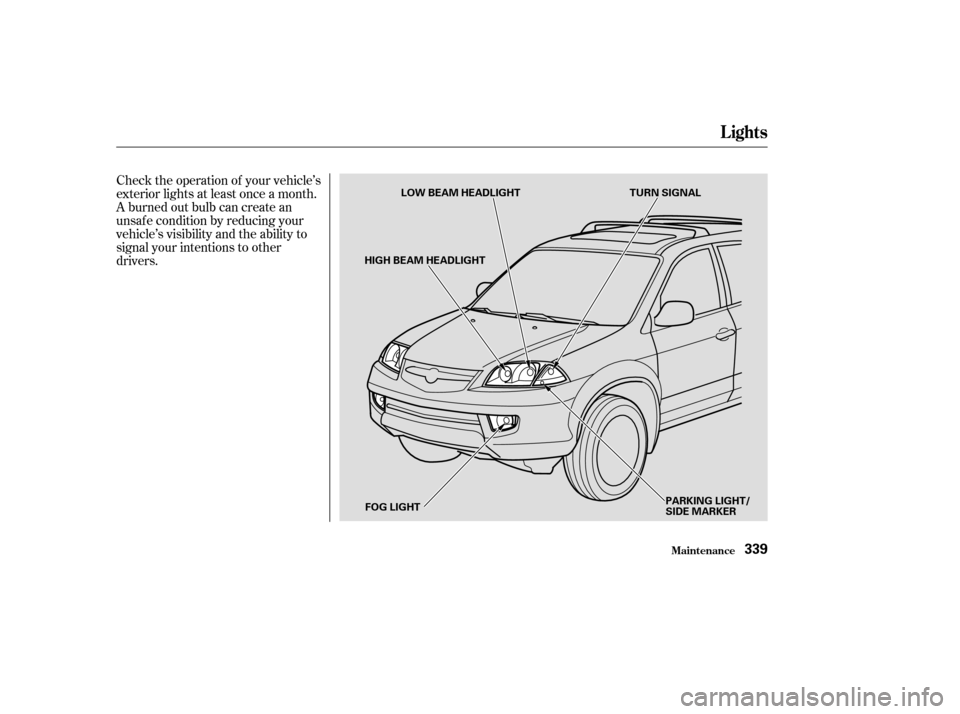
Check the operation of your vehicle’s
exterior lights at least once a month.
A burned out bulb can create an
unsaf e condition by reducing your
vehicle’s visibility and the ability to
signal your intentions to other
drivers.
Lights
Maint enance339
LOW BEAM HEADLIGHT
HIGH BEAM HEADLIGHT
FOG LIGHT PARKING LIGHT/
SIDE MARKER
TURN SIGNAL
Page 344 of 420
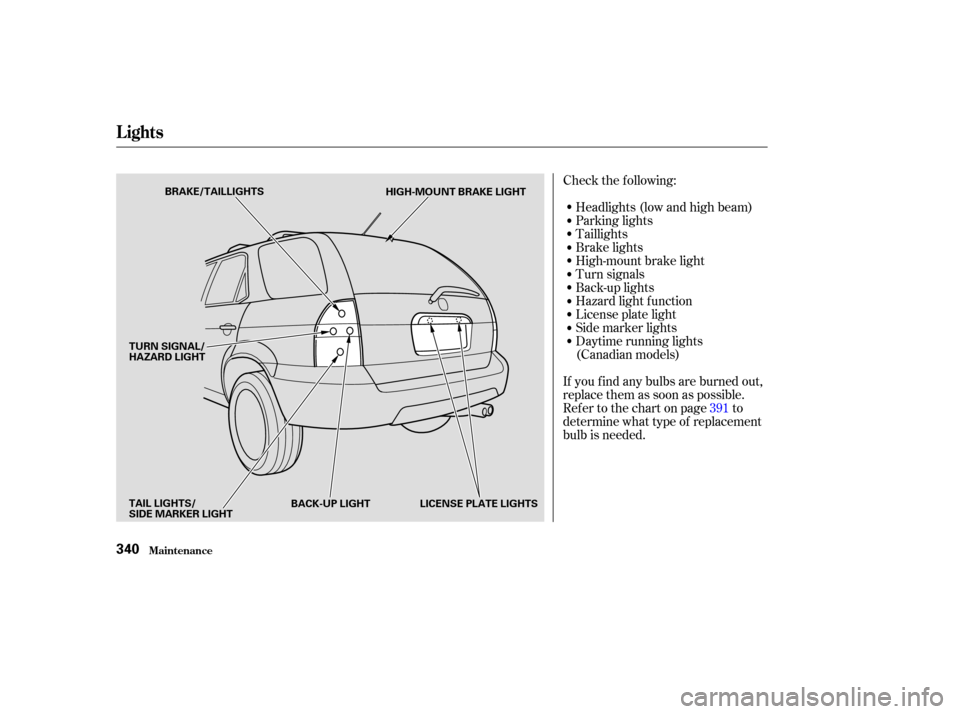
Check the f ollowing:Headlights (low and high beam)
Parking lights
Taillights
Brake lights
High-mount brake light
Turn signals
Back-up lights
Hazard light f unction
License plate light
Side marker lights
Daytime running lights
(Canadian models)
If you f ind any bulbs are burned out,
replace them as soon as possible.
Refer to the chart on page to
determine what type of replacement
bulb is needed. 391
Lights
Maint enance340
BRAKE/TAILLIGHTS
HIGH-MOUNT BRAKE LIGHT
LICENSE PLATE LIGHTS
BACK-UP LIGHT
TAIL LIGHTS/
SIDE MARKER LIGHT TURN SIGNAL/
HAZARD LIGHT
Page 345 of 420
Open the hood.
Theheadlightswereproperlyaimed
when your vehicle was new. If you
regularly carry heavy items in the
cargo area or pull a trailer,
readjustment may be required.
Adjustment of the headlights should
be perf ormed by a Acura technician
or other qualif ied mechanic.
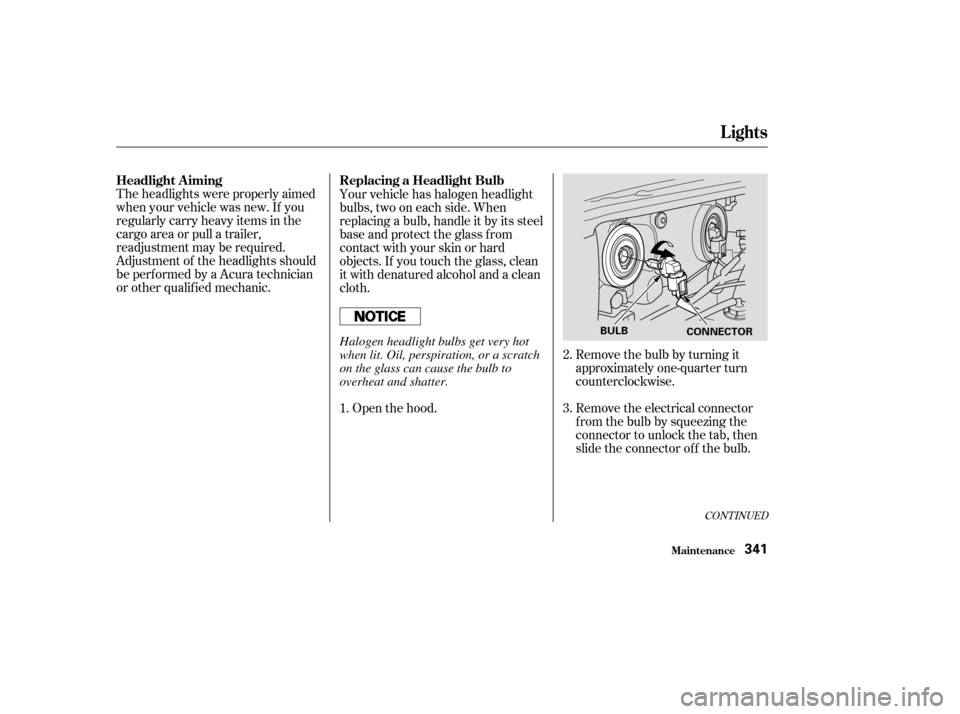
Remove the bulb by turning it
approximately one-quarter turn
counterclockwise.
Your vehicle has halogen headlight
bulbs, two on each side. When
replacing a bulb, handle it by its steel
base and protect the glass from
contactwithyourskinorhard
objects. If you touch the glass, clean
it with denatured alcohol and a clean
cloth.
Remove the electrical connector
fromthebulbbysqueezingthe
connector to unlock the tab, then
slide the connector of f the bulb.
1. 2.
3.
CONT INUED
Replacing a Headlight Bulb
Headlight A iming
Lights
Maint enance341
BULB
CONNECTORHalogen headlight bulbs get very hot
when lit. Oil, perspiration, or a scratch
on the glass can cause the bulb to
overheat and shatter.
Page 346 of 420
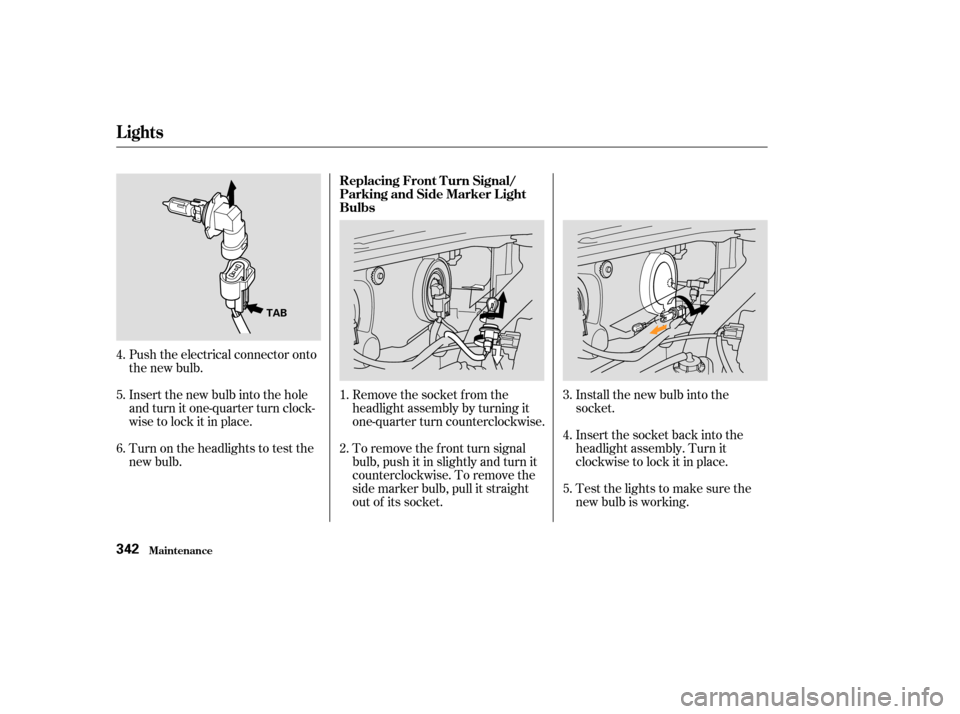
Remove the socket from the
headlight assembly by turning it
one-quarter turn counterclockwise.
To remove the f ront turn signal
bulb, push it in slightly and turn it
counterclockwise. To remove the
side marker bulb, pull it straight
out of its socket.Testthelightstomakesurethe
new bulb is working. Insert the socket back into the
headlight assembly. Turn it
clockwise to lock it in place. Install the new bulb into the
socket.
Push the electrical connector onto
the new bulb.
Insert the new bulb into the hole
and turn it one-quarter turn clock-
wise to lock it in place.
Turn on the headlights to test the
new bulb. 1.
2.
3.
4.
5.
4.
5.
6. Replacing Front Turn Signal/
Parking and Side Marker Light
Bulbs
Lights
Maint enance342
TAB
Page 347 of 420
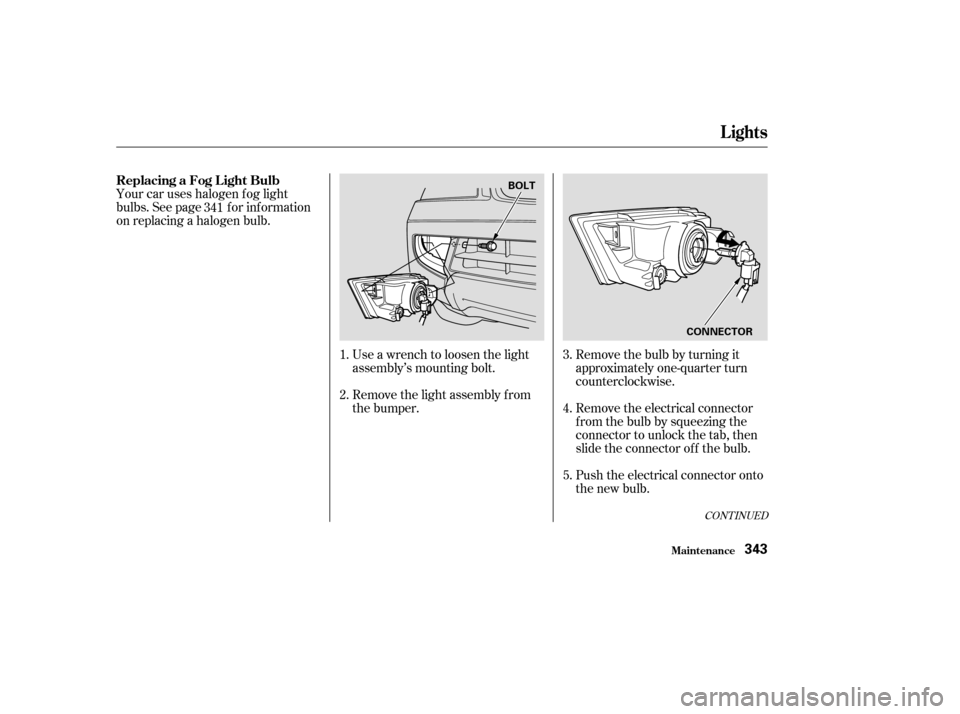
Remove the bulb by turning it
approximately one-quarter turn
counterclockwise.
Your car uses halogen f og light
bulbs. See page f or inf ormation
on replacing a halogen bulb.
Remove the electrical connector
fromthebulbbysqueezingthe
connector to unlock the tab, then
slide the connector of f the bulb.
Push the electrical connector onto
the new bulb.
Use a wrench to loosen the light
assembly’s mounting bolt.
Remove the light assembly f rom
the bumper.
1.
2.
3.
4.
5.
341
CONT INUED
ReplacingaFogLightBulb
Lights
Maint enance343
BOLT
CONNECTOR
Page 348 of 420
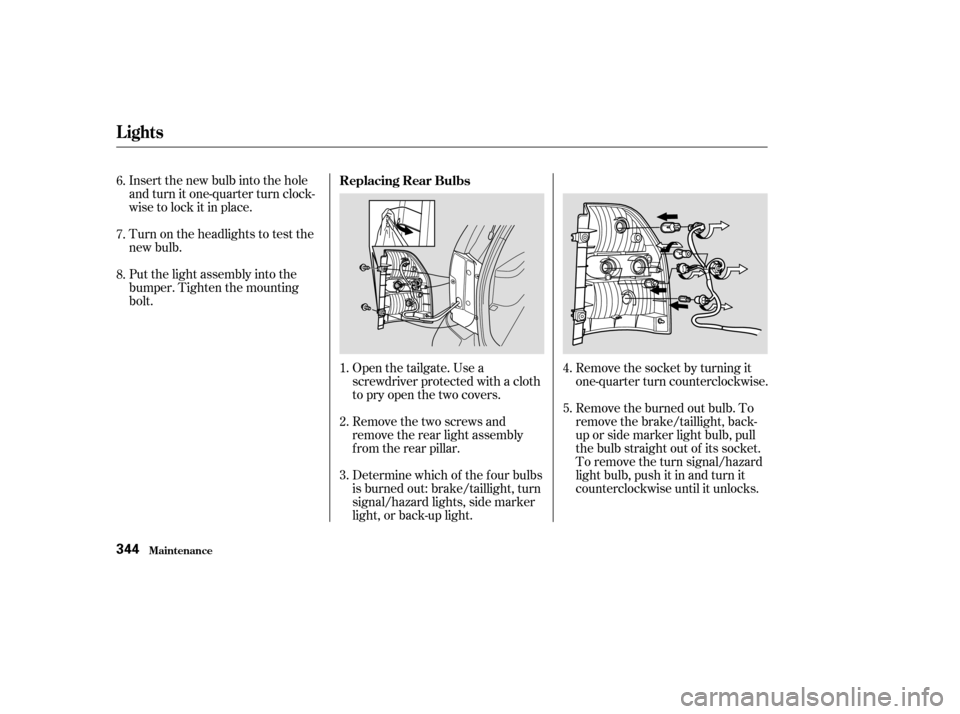
Turn on the headlights to test the
new bulb. Insert the new bulb into the hole
and turn it one-quarter turn clock-
wise to lock it in place.
Put the light assembly into the
bumper. Tighten the mounting
bolt.Remove the socket by turning it
one-quarter turn counterclockwise.
Open the tailgate. Use a
screwdriver protected with a cloth
to pry open the two covers.
Remove the two screws and
remove the rear light assembly
f rom the rear pillar.
Determine which of the f our bulbs
is burned out: brake/taillight, turn
signal/hazard lights, side marker
light, or back-up light. Remove the burned out bulb. To
remove the brake/taillight, back-
up or side marker light bulb, pull
the bulb straight out of its socket.
To remove the turn signal/hazard
light bulb, push it in and turn it
counterclockwise until it unlocks.
1.
2.
3.
4.
8. 6.
7.
5.
Replacing Rear Bulbs
Lights
Maint enance344
Page 349 of 420
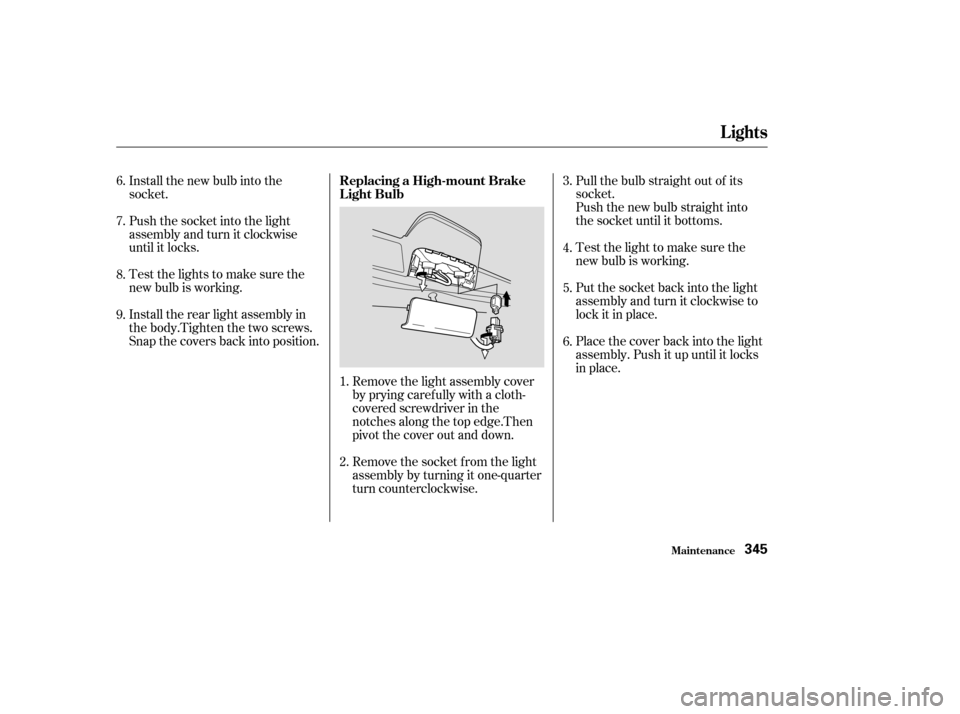
Put the socket back into the light
assembly and turn it clockwise to
lock it in place. Test the light to make sure the
new bulb is working. Pull the bulb straight out of its
socket.
Push the new bulb straight into
the socket until it bottoms.
Install the new bulb into the
socket.
Push the socket into the light
assembly and turn it clockwise
until it locks.
Testthelightstomakesurethe
new bulb is working.
Install the rear light assembly in
the body.Tighten the two screws.
Snap the covers back into position.
Remove the light assembly cover
by prying caref ully with a cloth-
covered screwdriver in the
notches along the top edge.Then
pivot the cover out and down.
Remove the socket f rom the light
assembly by turning it one-quarter
turn counterclockwise.Place the cover back into the light
assembly. Push it up until it locks
in place.
1. 4.
5.
6.
2. 3.
6.
7.
8.
9. Replacing a High-mount Brake
Light Bulb
Lights
Maint enance345
Page 350 of 420
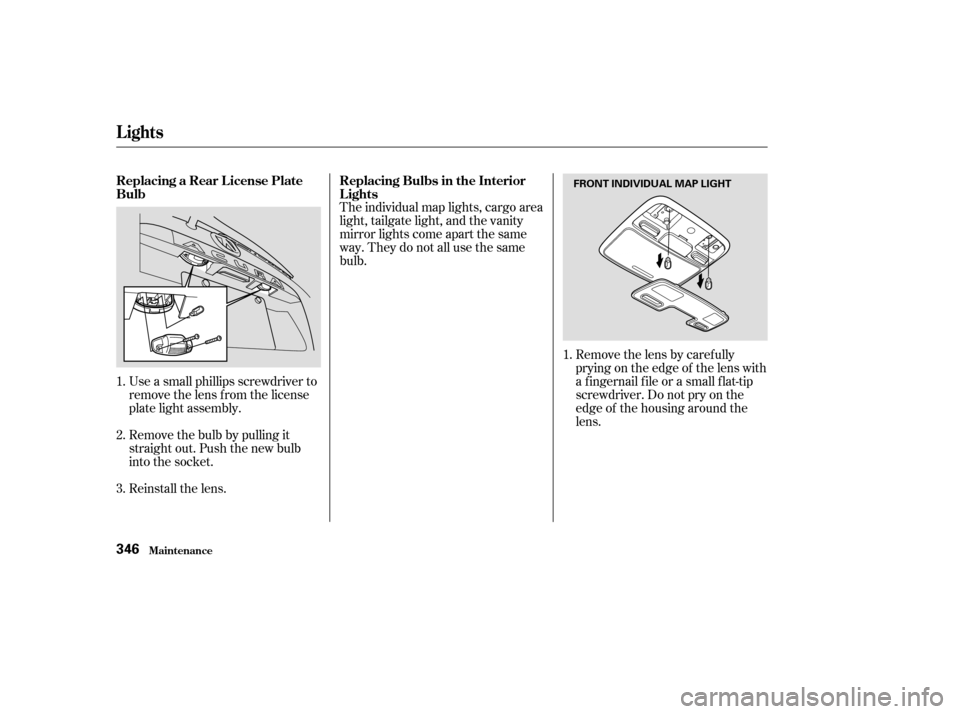
The individual map lights, cargo area
light, tailgate light, and the vanity
mirror lights come apart the same
way. They do not all use the same
bulb.Removethelensbycarefully
prying on the edge of the lens with
a f ingernail f ile or a small f lat-tip
screwdriver. Do not pry on the
edge of the housing around the
lens.
Use a small phillips screwdriver to
remove the lens f rom the license
plate light assembly.
Remove the bulb by pulling it
straight out. Push the new bulb
into the socket.
Reinstall the lens.
1.
2.
3. 1.
Replacing a Rear License Plate
Bulb
Replacing Bulbs in the Interior
Lights
Lights
Maint enance346
FRONT INDIVIDUAL MAP LIGHT