brake Acura MDX 2005 User Guide
[x] Cancel search | Manufacturer: ACURA, Model Year: 2005, Model line: MDX, Model: Acura MDX 2005Pages: 312, PDF Size: 4.1 MB
Page 97 of 312

Theinsidemirrorcanautomatically
darken to reduce glare. To turn on
this feature, press the button on the
bottom of the mirror. The AUTO
indicator comes on as a reminder.
When it is on, the mirror darkens
when it senses the headlights of a
vehicle behind you, then returns to
normal visibility when the lights are
gone. Press the button again to turn
of f this sensing.
Keeptheinsideandoutsidemirrors
clean and adjusted f or best visibility.
Be sure to adjust the mirrors bef ore
you start driving. Mirrors
Parking Brake, Mirrors
Inst rument s and Cont rols
95
AUTO SWITCH SENSOR INDICATOR
Driving the vehicle with the parking
brake applied can damage the rear
brakes and axles. A beeper will sound
if the vehicle is put into gear with the
parking brake on.
Page 148 of 312
Accelerate to the desired cruising
speedabove25mph(40km/h).
Cruise control allows you to maintain
asetspeedabove25mph(40km/h)
without keeping your f oot on the
accelerator pedal. It should be used
f or cruising on straight, open
highways. It is not recommended f or
city driving, winding roads, slippery
roads, heavy rain, or bad weather.
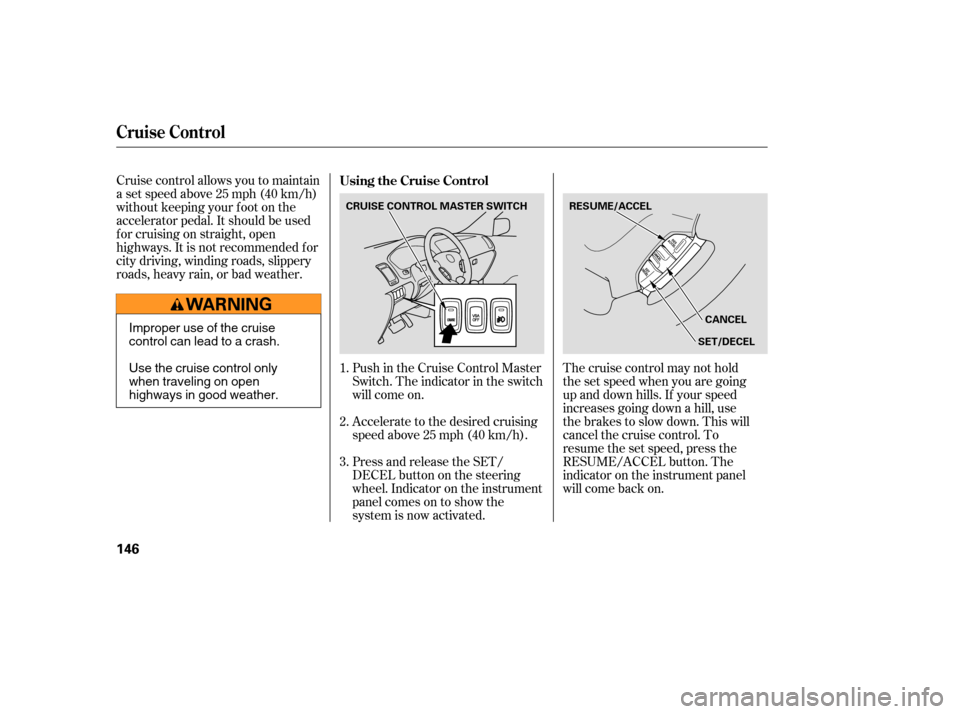
Press and release the SET/
DECELbuttononthesteering
wheel. Indicator on the instrument
panel comes on to show the
system is now activated. Push in the Cruise Control Master
Switch. The indicator in the switch
will come on.The cruise control may not hold
the set speed when you are going
up and down hills. If your speed
increases going down a hill, use
the brakes to slow down. This will
cancelthecruisecontrol.To
resume the set speed, press the
RESUME/ACCEL button. The
indicator on the instrument panel
will come back on.
1.
2.
3. Using the Cruise Control
Cruise Control
146
CRUISE CONTROL MASTER SWITCH
CANCEL
RESUME/ACCEL
SET/DECEL
Improper use of the cruise
control can lead to a crash.
Use the cruise control only
when traveling on open
highways in good weather.
Page 149 of 312

You can increase the set cruising
speed in any of these ways:Press and hold the RESUME/
ACCEL button. When you reach
the desired cruising speed, release
the button.
Push on the accelerator pedal.
Accelerate to the desired cruising
speed, and press the SET/DECEL
button.
To increase your speed in very
small amounts, tap the RESUME/
ACCEL button. Each time you do
this, the vehicle will speed up
about 1 mph (1.6 km/h). Even with the cruise control turned
on, you can still use the accelerator
pedal to speed up f or passing. Af ter
completing the pass, take your foot
of f the accelerator pedal. The vehicle
will return to the set cruising speed.
Resting your f oot on the brake pedal
causes cruise control to cancel.
You can decrease the set cruising
speed in any of these ways:
If you need to decrease your
speed quickly, use the brakes as you
normally would.
Press and hold the SET/DECEL
button. Release the button when
you reach the desired speed.
To slow down in very small
amounts, tap the SET/DECEL
button. Each time you do this,
your vehicle will slow down about
1 mph (1.6 km/h).
Tap the brake pedal lightly with
your f oot. The CRUISE
CONTROL indicator on the
instrument panel will go out.
When the vehicle slows to the
desired speed, press the SET/
DECEL button.
Changing the Set Speed
Cruise Control
Features
147
NOTE:
Page 150 of 312

Youcancancelthecruisecontrolin
any of these ways:Tap the brake pedal.
Push the CANCEL button on the
steering wheel.
Pushthecruisecontrolmaster
button. When you push the CANCEL button,
or tap the brake pedal, the system
will remember the previously set
cruising speed. To return to that
speed, accelerate to above 25 mph
(40 km/h) and then press and
release the RESUME/ACCEL
button. The CRUISE CONTROL
indicator comes on. The vehicle will
accelerate to the same cruising
speed as bef ore.
Pressing the Cruise Control Master
Switch turns the system completely
of f and erases the previous cruising
speed.
Cancelling the Cruise Control Resuming the Set Speed
Cruise Control
148
Page 188 of 312

Help assure your vehicle’s f uture
reliability and perf ormance by paying
extra attention to how you drive
during the f irst 600 miles (1,000 km).
During this period:Avoid full-throttle starts and rapid
acceleration.
Do not change the oil until the
scheduled maintenance time. Avoidhardbrakingforthefirst
200 miles (300 km).
Do not tow a trailer.
You should also f ollow these
recommendations with an
overhauled or exchanged engine, or
when the brakes are replaced. Use of gasoline with these additives
may adversely af f ect perf ormance,
and cause the Malfunction Indicator
Lamp on your instrument panel to
come on. If this happens, contact
your authorized Acura dealer f or
service.
Some gasoline today is blended with
oxygenates such as ethanol or
MTBE. Your vehicle is designed to
operate on oxygenated gasoline
containing up to 10 percent ethanol
by volume and up to 15 percent
MTBE by volume. Do not use
gasoline containing methanol.
If you notice any undesirable
operating symptoms, try another
service station or switch to another
brand of gasoline.
For f urther important f uel-related
inf ormation, please ref er to your
Quick Start Guide.
Use of a gasoline with a pump octane
less than 86 can lead to engine
damage.
In addition, in order to maintain good
perf ormance, f uel economy, and
emissions control, we strongly
recommend, in areas where it is
available, the use of gasoline that
does NOT contain manganese-based
f uel additives such as MMT. Your vehicle is designed to operate
on premium unleaded gasoline with a
pump octane number of 91 or higher.
Useof aloweroctanegasolinecan
cause occasional metallic knocking
noises in the engine and will result in
decreased engine perf ormance.
We recommended using a quality
gasoline containing detergent
additives that help prevent fuel
system and engine deposits.
Break-in Period
Fuel Recommendation
Break-in Period, Fuel Recommendation
186
Page 190 of 312
Screw the fuel fill cap back on
until it clicks at least three times.
If you do not properly tighten the
cap, the Malf unction Indicator
Lampmaycomeon(seepage).
Push the f uel f ill door closed until
it latches.
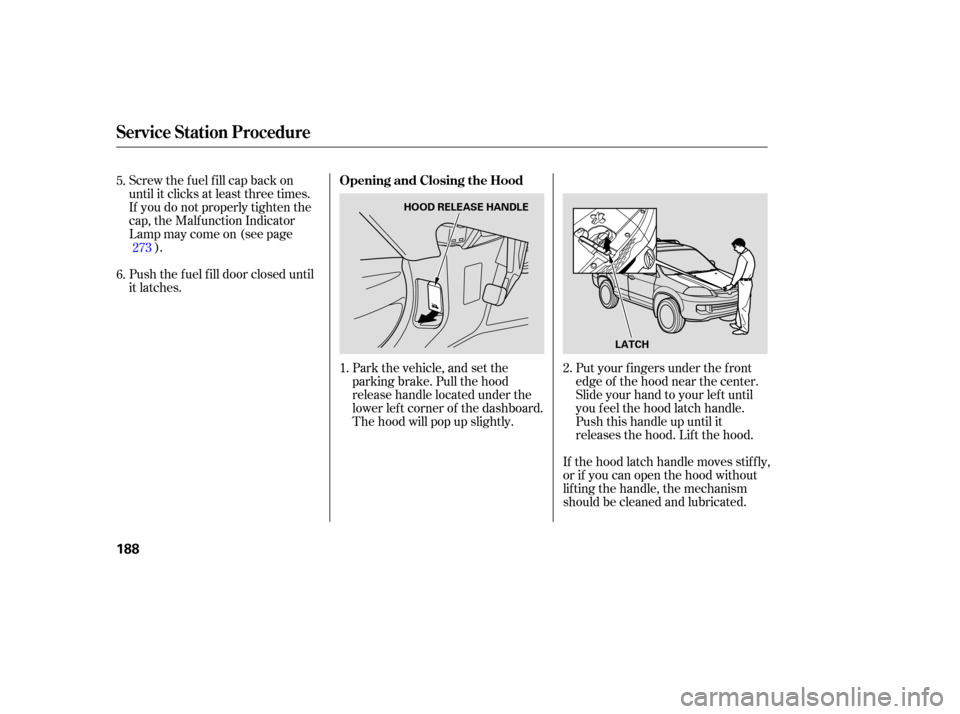
Park the vehicle, and set the
parking brake. Pull the hood
release handle located under the
lower lef t corner of the dashboard.
The hood will pop up slightly.Put your f ingers under the f ront
edge of the hood near the center.
Slide your hand to your lef t until
you f eel the hood latch handle.
Push this handle up until it
releases the hood. Lif t the hood.
If the hood latch handle moves stif f ly,
or if you can open the hood without
lifting the handle, the mechanism
should be cleaned and lubricated.
1.
5.
6.
2.
273
Service Station Procedure
Opening and Closing the Hood
188
HOOD RELEASE HANDLE
LATCH
Page 193 of 312
Modif ying your vehicle, or installing
some non-Acura accessories, can
make your vehicle unsaf e. Bef ore
you make any modif ications or add
anyaccessories,besuretoreadthe
f ollowing inf ormation.Bef ore installing any accessory:
Make sure the accessory does not
obscure any lights, or interf ere
with proper vehicle operation or
perf ormance.
Be sure electronic accessories do
not overload electrical circuits
(see page ) or interf ere with
proper operation of your vehicle.
Do not install accessories on the
side pillars or across the rear
windows as these may interf ere
with proper operation of the side
curtain airbags.
Your dealer has Acura accessories
that allow you to personalize your
vehicle. These accessories have
been designed and approved f or your
vehicle, and are covered by warranty.
Although aftermarket accessories
may f it on your vehicle, they may not
meet f actory specif ications, and
could adversely af f ect your vehicle’s
handling and stability.
When properly installed, cellular
phones, alarms, two-way radios, and
low-powered audio systems should
not interf ere with your vehicle’s
computer controlled systems, such
as your airbags, anti-lock brakes, and
Tire Pressure Monitoring System.
Bef ore installing any accessory,
have the installer contact your
dealer f or assistance.
If possible, have your dealer
inspect the f inal installation.280
A ccessories and Modif ications
A ccessories
Bef ore Driving
191
Improper accessories or
modifications can affect your
vehicle’s handling, stability, and
performance, and cause a
crash in which you can be hurt
or killed.
Follow all instructions in this
owner’s manual regarding
accessories and modifications.
Page 194 of 312

Some examples are:Lowering your vehicle with an
aftermarket suspension kit that
signif icantly reduces ground
clearance can allow the
undercarriage to hit speed bumps
or other raised objects, which
could cause the airbags to deploy.
Raising your vehicle with an
af termarket suspension kit can
af f ect handling and stability. Larger or smaller wheels and tires
can interf ere with the operation of
your vehicle’s anti-lock brakes and
other systems.
Removing parts f rom your vehicle,
or replacing components with
af termarket components could
seriously af f ect your vehicle’s
handling, stability, and reliability.
Af termarket wheels, because they
are a universal design, can cause
excessive stress on suspension
components and will not be
compatible with the tire Pressure
Monitoring System. Modif ying your steering wheel or
any other part of your vehicle’s
safety features can make the
systems inef f ective.
If you plan to modif y your vehicle,
consult your dealer.
A ccessories and Modif ications
Modif ying Your Vehicle
192
Page 199 of 312

This section gives you tips on
starting the engine under various
conditions, and how to operate the
automatic transmission. It also
includes important inf ormation on
parking your vehicle, the braking
system, the VTM-4System, the VSA
system, Tire Pressure Monitoring
System, and f acts you need if you are
planning to tow a trailer. ........................
Driving Guidelines .198
........................
Preparing to Drive .198
.......................
Starting the Engine .199
..............
Automatic Transmission . 200
Variable Torque Management ..............................
4WD System .204
..............................
VTM-4 Lock .204
Tire Pressure Monitoring System ......................................
(TPMS) .205
...........................................
Parking .207
.............................
Braking System .208
...........................
Anti-lock Brakes .209
Vehicle Stability Assist (VSA) ........................................
System .211
.................
Towing Weight Limits . 213
...........................
Towing a Trailer .214
Towing Your Vehicle Behind a ................................
Motorhome .222
..............
Of f -Highway Guidelines . 223
Driving
Driving
197
Page 201 of 312

Apply the parking brake.
In cold weather, turn of f all
electrical accessories to reduce
the drain on the battery.
Make sure the shif t lever is in
Park. Press on the brake pedal.Without touching the accelerator
pedal, turn the ignition key to the
START (III) position. Do not hold
the key in START (III) f or more
than 15 seconds at a time. If the
engine does not start right away,
pause f or at least 10 seconds
bef ore trying again.If the engine does not start within
15 seconds, or starts but stalls
right away, repeat step 4 with the
accelerator pedal pressed halfway
down. If the engine starts, release
pressure on the accelerator pedal
so the engine does not race.
If the engine still does not start,
press the accelerator pedal all the
way down and hold it there while
starting in order to clear f looding.
If the engine still does not start,
return to step 5.
5.
6.
1.
2.
3.
4.
Starting the Engine
Driving
199
Immobilizer System T he immobilizer system protects your
vehicle f rom thef t. If an improperly-
coded key (or other device) is used, the
engine’s f uel system is disabled. See
on page .
The engine is harder to start in cold
weather. Also, the thinner air f ound at
altitudes above 8,000 f eet (2,400
meters) adds to this problem.
80