change wheel Acura MDX 2009 User Guide
[x] Cancel search | Manufacturer: ACURA, Model Year: 2009, Model line: MDX, Model: Acura MDX 2009Pages: 489, PDF Size: 11.91 MB
Page 293 of 489

Making a Call
You can make calls using any phone
number, or by using a name in the
HFL phonebook. You can also redial
the last number called. During a call,
the HFL allows you to talk up to 30
minutes after you remove the key
from the ignition switch. Continuing
a call without running the engine
may discharge and weaken the
vehicle's battery.To make a call using a phone number,do this:1. With your phone on and the ignition in the ACCESSORY (I) or
ON (II) position, press and release
the Talk button. After the beep,
say ‘‘Call’’ or‘‘Dial.’’ The HFL
response is, ‘‘What name or
number would you like to call/
dial? ’’ 2. Press and release the Talk button.
After the beep, say the number
you want to call. For example, say
‘‘123 456 7891.’’ The HFL response
is ‘‘123 456 7891. Say call, dial, or
continue to add numbers.’’
On models with navigation systemYou can also make a call directly
from the list shown on the
navigation display.
3. Press and release the Talk button. After the beep, say ‘‘Call’’ or‘‘Dial.’’
The HFL response is ‘‘Calling ’’or
‘‘ Dialing. ’’Once connected, you
will hear the person you called
through the audio speakers. To
change the volume, use the audio
system volume knob, or the
steering wheel volume controls.
4. To end the call, press the Back button.
To make a call using a name in the HFL
phonebook, do this:1. With your phone on and the ignition in the ACCESSORY (I) or
ON (II) position, press and release
the Talk button. After the beep,
say ‘‘Call’’ or‘‘Dial. ’’The HFL
response is, ‘‘What name or
number would you like to call/
dial? ’’
2. Press and release the Talk button. After the beep, say the name you
want to call. For example, say
‘‘Eric. ’’The HFL response is
‘‘ Would you like to call Eric?’’
3. Press and release the Talk button. After the beep, say ‘‘Yes. ’’The
HFL response is ‘‘Calling ’’or
‘‘ Dialing. ’’Once connected, you
will hear the person you called
through the audio speakers. To
change the volume, use the audio
system volume knob, or the
steering wheel volume controls.
CONTINUED
Bluetooth
®HandsFreeLink
®
289
Feat ures
08/06/06 16:58:07 09 ACURA MDX MMC North America Owner's M 50 31STX620 enu
2009 MDX
Page 294 of 489

4. To end the call, press the Backbutton.
To redial the last number called by
the phone, press and release the Talk
button. After the beep, say ‘‘Redial. ’’
The HFL response is, ‘‘Redialing. ’’
Once connected, you will hear the
person you called through the audio
speakers. To change the volume, use
the audio system volume knob, or
the steering wheel volume controls. Sending Numbers or Names
During a Call
The HFL allows you to send
numbers or names during a call. This
is useful when you call a menu-
driven phone system. You can also
program account numbers into the
HFL phonebook for easy retrieval
during menu-driven calls.
To send a number during a call, do this:1. Press and release the Talk button.
After the beep, say ‘‘Send. ’’The
HFL response is, ‘‘What name or
number would you like to send? ’’
2. Press and release the Talk button. After the beep, say the number
you want to send. For example, say
‘‘1, 2, 3. ’’The HFL response is ‘‘1,
2, 3. Say send, or continue to add
numbers.’’
NOTE: To send a pound (# ), say
‘‘ pound.’’ To send a star (*), say
‘‘ star. ’’ 3. Press and release the Talk button.
After the beep, say ‘‘Send.’’ The
dial tones will be sent, and the call
will continue.
To send a name during a call, do this:1. Press and release the Talk button. After the beep, say ‘‘Send.’’ The
HFL response is, ‘‘What name or
number would you like to send? ’’
2. Press and release the Talk button. After the beep, say the name you
want to send. For example, say
‘‘Account number. ’’The HFL
response is ‘‘Would you like to
send account number? ’’
3. Press and release the Talk button. After the beep, say ‘‘Send.’’ The
dial tones will be sent, and the call
will continue.
Bluetooth
®HandsFreeLink
®
29008/06/06 16:58:07 09 ACURA MDX MMC North America Owner's M 50 31STX620 enu
2009 MDX
Page 297 of 489

5. Press and release the Talk button.After the beep, say ‘‘Enter. ’’The
HFL response is ‘‘The number has
been changed. Returning to the
main menu. ’’To delete a name, do this:1. Press and release the Talk button.
After the beep, say ‘‘Phonebook. ’’
The HFL response is ‘‘Phonebook
options are store, edit, delete,
receive contact, and list. ’’
2. Press and release the Talk button. After the beep, say ‘‘Delete.’’ The
HFL response is, ‘‘What name
would you like to delete? ’’
3. Press and release the Talk button. After the beep, say the name you
would like to delete. For example,
say ‘‘Eric. ’’The HFL response is
‘‘ Would you like to delete Eric? ’’4. Press and release the Talk button.
After the beep, say ‘‘Yes. ’’The
HFL response is, ‘‘The name has
been deleted. Returning to the
main menu.’’
To list all names in the phonebook, do this:1. Press and release the Talk button.
After the beep, say ‘‘Phonebook. ’’
The HFL response is, ‘‘The
Phonebook options are store, edit,
delete, receive contact, and list. ’’
2. Press and release the Talk button. After the beep, say ‘‘List. ’’The
HFL responds by listing the names
in the phonebook. When the end
of the list is reached, the HFL
response is, ‘‘The entire list has
been read. Returning to the main
menu.’’
To call a name from the phonebook list,
do this:1. Press and release the Talk button. After the beep, say ‘‘Phonebook. ’’
The HFL response is ‘‘Phonebook
options are store, edit, delete,
receive contact, and list. ’’
2. Press and release the Talk button. After the beep, say ‘‘List. ’’The
HFL responds by listing the names
in the phonebook. When it says
the name you want to call, for
example, Eric, press the Talk
button, and then say ‘‘Call. ’’The
HFL response is, ‘‘Would you like
to call Eric?’’
3. Press and release the Talk button. After the beep, say ‘‘Yes. ’’The
HFL response is ‘‘Calling.’’ Once
connected, you will hear the
person you called through the
audio speakers. To change the
volume, use the audio system
volume knob, or the steering
wheel volume controls.
CONTINUED
Bluetooth
®HandsFreeLink
®
293
Feat ures
08/06/06 16:58:07 09 ACURA MDX MMC North America Owner's M 50 31STX620 enu
2009 MDX
Page 352 of 489

The super handling-all wheel drive
(SH-AWD) system is a full time all-
wheel-drive system that
automatically controls and transfers
varying amounts of engine torque to
all wheels independently, according
to the driving conditions.
While the SH-AWD system helps to
enhance the vehicle's driving
stability in all situations, it is still
your responsibility to drive and
corner at reasonable speeds and to
leave a sufficient margin of safety.SH-AWD Torque Distribution
Monitor
The SH-AWD torque distribution
monitor on the multi-information
display shows you the amount of
torque being sent to the wheels.
Each wheel: right front (RF), left
front (LF), right rear (RR), and left
rear (LR), has its own torque
indicator.Each torque indicator is displayed as
a bar graph divided into 5 segments.
The number of segments represents
the amount of torque distributed to
each wheel.
When there is only a slight change in
torque distribution while driving,
such as cruising on level roads at the
same speed, the torque distribution
monitor may stop displaying the
amount of torque. This is not a
system problem. The monitor will
show the amount if the system
senses any change in torque
distribution.
TORQUE INDICATOR
TORQUE INDICATOR
Super Handling-All Wheel Drive
™(SH-AWD
®) System
34808/06/06 16:58:07 09 ACURA MDX MMC North America Owner's M 50 31STX620 enu
2009 MDX
Page 360 of 489

As required by the FCC:This device complies with Part 15 of theFCC rules. Operation is subject to the
following two conditions: (1) This devicemay not cause harmful interference, and(2) this device must accept any
interference received, includinginterference that may cause undesiredoperation.
Changes or modifications not expresslyapproved by the party responsible forcompliance could void the user's
authority to operate the equipment.This device complies with IndustryCanada Standard RSS-210.
Operation is subject to the following twoconditions: (1) this device may not cause
interference, and (2) this device mustaccept any interference that may causeundesired operation of the device.
Braking System
Your vehicle is equipped with disc
brakes at all four wheels. A power
assist helps reduce the effort needed
on the brake pedal. The emergency
brake assist system increases the
stopping force when you depress the
brake pedal hard in an emergency
situation. The anti-lock brake system
(ABS) helps you retain steering
control when braking very hard.
Resting your foot on the pedal keeps
the brakes applied lightly, builds up
heat, and reduces their effectiveness
and reduces brake pad life. In
addition, fuel economy can be
reduced. It also keeps your brake
lights on all the time, confusing
drivers behind you. Constant application of the brakes
when going down a long hill builds
up heat and reduces their
effectiveness. Use the engine to
assist the brakes by taking your foot
off the accelerator and downshifting
to a lower gear.
Check the brakes after driving
through deep water. Apply the
brakes moderately to see if they feel
normal. If not, apply them gently and
frequently until they do. Be extra
cautious in your driving.
Tire Pressure Monitoring System (TPMS), Braking System35608/06/06 16:58:07 09 ACURA MDX MMC North America Owner's M 50 31STX620 enu
2009 MDX
Page 362 of 489

ABS Indicator
If this indicator comes on, the anti-
lock function of the braking system
has shut down. The brakes still work
like a conventional system, but
without anti-lock. You should have
your dealer inspect your vehicle as
soon as possible.
You will also see a ‘‘CHECK ABS
SYSTEM ’’message on the multi-
information display (see page81).
If the indicator comes on while
driving, test the brakes as instructed
on page438. If the ABS indicator and the brake
system indicator come on together,
and the parking brake is fully
released, the EBD system may also
be shut down.
Test your brakes as instructed on
page438.If the brakes feel normal,
drive slowly and have your vehicle
repaired by your dealer as soon as
possible. Avoid sudden hard braking
which could cause the rear wheels to
lock up and possibly lead to a loss of
control.
The VSA indicator will come on
along with the ABS indicator.
Important Safety Reminders
ABS does not reduce the time or
distance it takes to stop the
vehicle.
It only helps with steering
control during braking.
ABS will not prevent a skid that
results from changing direction
abruptly, such as trying to take a
corner too fast or making a sudden
lane change. Always drive at a safe
speed for the road and weather
conditions.
ABS cannot prevent a loss of
stability. Always steer moderately
when you are braking hard. Severe
or sharp steering wheel movement
can still cause your vehicle to veer
into oncoming traffic or off the road.
A vehicle with ABS may require a
longer distance to stop on loose or
uneven surfaces, such as gravel or
snow, than a vehicle without anti-
lock.
Anti-lock Brakes (ABS)35808/06/06 16:58:07 09 ACURA MDX MMC North America Owner's M 50 31STX620 enu
2009 MDX
Page 388 of 489
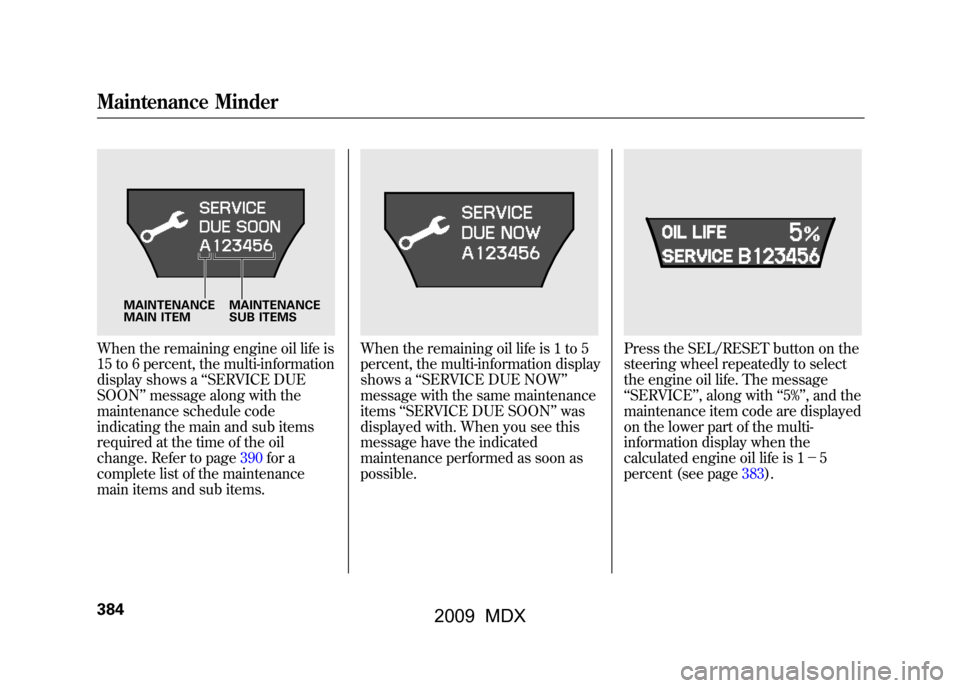
When the remaining engine oil life is
15 to 6 percent, the multi-information
display shows a‘‘SERVICE DUE
SOON ’’message along with the
maintenance schedule code
indicating the main and sub items
required at the time of the oil
change. Refer to page390for a
complete list of the maintenance
main items and sub items.
When the remaining oil life is 1 to 5
percent, the multi-information display
shows a ‘‘SERVICE DUE NOW ’’
message with the same maintenance
items ‘‘SERVICE DUE SOON’’ was
displayed with. When you see this
message have the indicated
maintenance performed as soon as
possible.
Press the SEL/RESET button on the
steering wheel repeatedly to select
the engine oil life. The message
‘‘ SERVICE ’’, along with ‘‘5% ’’, and the
maintenance item code are displayed
on the lower part of the multi-
information display when the
calculated engine oil life is 1- 5
percent (see page383).
MAINTENANCE
MAIN ITEM MAINTENANCE
SUB ITEMS
Maintenance Minder38408/06/06 16:58:07 09 ACURA MDX MMC North America Owner's M 50 31STX620 enu
2009 MDX
Page 432 of 489

12. Place the jack under the jackingpoint nearest the tire you need to
change. Turn the end bracket
clockwise until the top of the jack
contacts the jacking point. Make
sure the jacking point tab is
resting in the jack notch.
13. Use the extension and the wheelnut wrench as shown to raise the
vehicle until the flat tire is off the
ground.
14. Remove the wheel nuts, then remove the flat tire.
15. Before mounting the spare tire,wipe any dirt off the mounting
surface of the wheel and hub with
a clean cloth. Wipe the hub
carefully; it may be hot from
driving.
JACKING POINT
EXTENSION
WHEEL NUT WRENCH
BRAKE HUB
Changing a Flat Tire42808/06/06 16:58:07 09 ACURA MDX MMC North America Owner's M 50 31STX620 enu
2009 MDX
Page 456 of 489

DimensionsLength 190.7 in (4,844 mm)
Width 78.5 in (1,995 mm)
Height 68.2 in (1,733 mm)
Wheelbase 108.3 in (2,750 mm)
Track Front 67.7 in (1,720 mm) Rear 67.5 in (1,715 mm)
Weights Gross vehicle weight rating See the tire information label attached to the driver's doorjamb.
Gross combined weight
ꭧ 1
rating (GCWR) 10,053 lbs (4,560 kg)
ꭧ 1: The GCWR must be reduced 2 percent for every 1,000 feet (305
meters) of elevation.
Air Conditioning Refrigerant type HFC-134a (R-134a)
Charge quantity 21.2-22.9 oz (600 -650 g)
Lubricant type ND-OIL 8
Seating Capacities Total 7
Front 2
Second 3
Third 2Capacities
Fuel tank Approx.
21.00 US gal (79.5 L)
Engine
coolant Change
ꭧ
1
1.93 US gal (7.3 L)
Total 2.43 US gal (9.2 L)
Engine oil Change
ꭧ 2
4.5 US qt (4.3 L)
Including
filter
Without
filter 4.2 US qt (4.0 L)
Total 5.3 US qt (5.0 L)
Automatic
transmission
fluid Change
3.0 US qt (2.8 L)
Total 8.3 US qt (7.9 L)
Rear
differential
fluid Change
2.6 US qt (2.5 L)
Total 2.9 US qt (2.7 L)
Transfer
assembly
fluid Change
0.4 US qt (0.4 L)
Total 0.4 US qt (0.4 L)
Windshield
washer
reservoir U.S. vehicles 4.2 US qt (4.0 L)
Canadian
vehicles
6.1 US qt (5.8 L)
ꭧ 1: Including the coolant in the reserve tank and that remaining in the
engine
Reserve tank capacity:
0.18 US gal (0.7 L)
ꭧ 2: Excluding the oil remaining in the engine
Specifications45208/06/06 16:58:07 09 ACURA MDX MMC North America Owner's M 50 31STX620 enu
2009 MDX