change wheel Acura MDX 2009 Owner's Manual
[x] Cancel search | Manufacturer: ACURA, Model Year: 2009, Model line: MDX, Model: Acura MDX 2009Pages: 489, PDF Size: 11.91 MB
Page 77 of 489
The multi-information display in the
instrument panel displays various
information and messages when the
ignition switch is in the ON (II)
position. Some of the messages help
you operate your vehicle more
comfortably.Others help to keep you
aware of the periodic maintenance
your vehicle needs for continued
trouble-free driving.
When you open the driver's door, a
‘‘Welcome ’’message is shown on the
multi-information display. When you
turn the ignition switch from the ON
(II) position to the ACCESSORY (I)
position, a ‘‘Goodbye ’’message is
shown on the display.
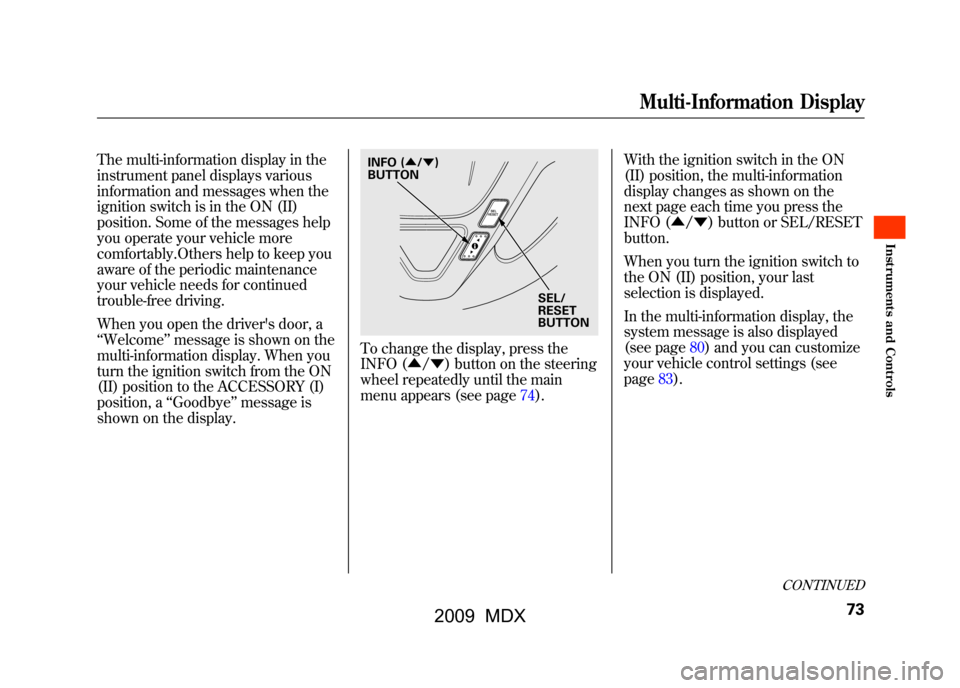
To change the display, press the
INFO (▲ /▼ ) button on the steering
wheel repeatedly until the main
menu appears (see page74). With the ignition switch in the ON
(II) position, the multi-information
display changes as shown on the
next page each time you press the
INFO (▲
/▼ ) button or SEL/RESET
button.
When you turn the ignition switch to
the ON (II) position, your last
selection is displayed.
In the multi-information display, the
system message is also displayed
(see page80)and you can customize
your vehicle control settings (see
page83).
SEL/
RESET
BUTTON
INFO (
▲/▼ )
BUTTON
CONTINUED
Multi-Information Display
73
Inst rument s and Cont rols
08/06/06 16:58:07 09 ACURA MDX MMC North America Owner's M 50 31STX620 enu
2009 MDX
Page 81 of 489
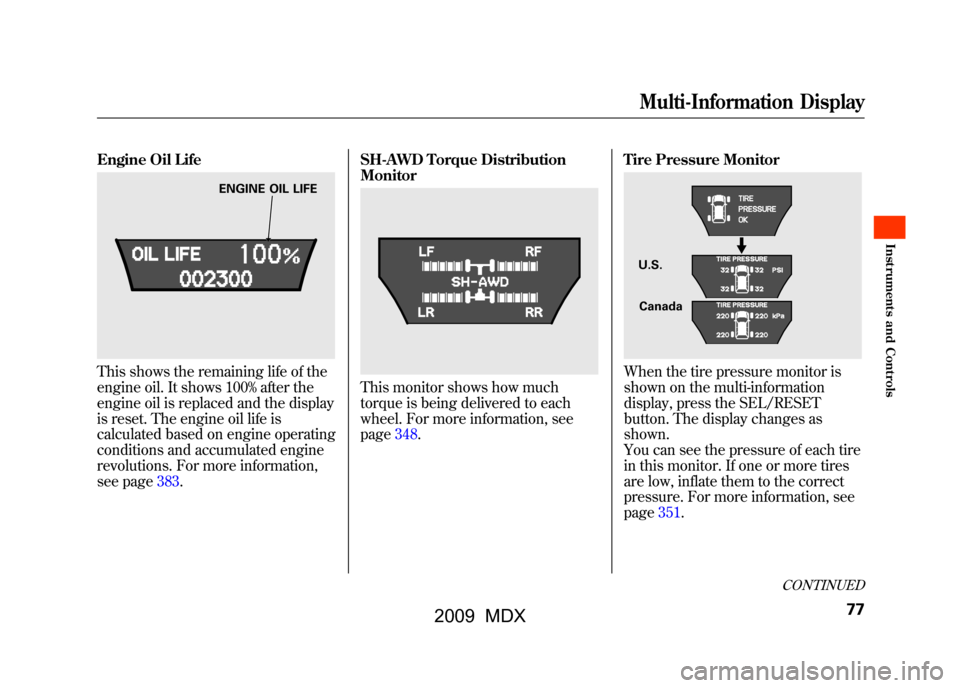
Engine Oil LifeThis shows the remaining life of the
engine oil. It shows 100% after the
engine oil is replaced and the display
is reset. The engine oil life is
calculated based on engine operating
conditions and accumulated engine
revolutions. For more information,
see page383.SH-AWD Torque Distribution
Monitor
This monitor shows how much
torque is being delivered to each
wheel. For more information, see
page348.
Tire Pressure Monitor
When the tire pressure monitor is
shown on the multi-information
display, press the SEL/RESET
button. The display changes as
shown.
You can see the pressure of each tire
in this monitor. If one or more tires
are low, inflate them to the correct
pressure. For more information, see
page351.
ENGINE OIL LIFE
U.S.
Canada
CONTINUED
Multi-Information Display
77
Inst rument s and Cont rols
08/06/06 16:58:07 09 ACURA MDX MMC North America Owner's M 50 31STX620 enu
2009 MDX
Page 88 of 489

Group SetupMenu Item DescriptionSetting OptionPage
METER SETUP
(P.89) LANGUAGE SELECTION Changes the language used in the display.
ENGLISH
ꭧ
90
FRENCH
SPANISH
ADJUST OUTSIDE
TEMP. DISPLAY Changes the outside temperature reading above or
below its current reading. -
5°F ~ꭗ0°F
ꭧ~5°F (U.S.)
91
- 3°C ~ꭗ0°Cꭧ~3°C
(Canada)
TRIP A & AVG. FUEL
RESET with REFUEL Causes trip meter A and the average fuel economy to
reset when you refuel. ON92
OFF
ꭧ
ADJUST
ALARM VOLUMEChanges the indicator alarm volumes into three levels. HIGH
93
MID
ꭧ
LOW
ELAPSED TIME RESET Resets the elapsed time of your current trip. MANUAL ONLY 94
IGN OFF
ꭧ
TRIP B
TRIP A
AUTO INTERIOR
ILLUMINATION Changes the interior light sensitivity to your liking. MAX LOW
95
HIGH MIN
MID
ꭧ
OFF
POSITION SETUP
(P.97) MEMORY POSITION LINK Changes the driver's seat, the steering wheel, and the
outside mirror positions to a stored setting. ON
ꭧ
98
OFF
AUTO TILT & TELESCOPE
STEERING WHEEL Moves the steering wheel fully in and up when the key
is removed. ON
ꭧ
99
OFF
ꭧ : Default setting
Multi-Information Display8408/06/06 16:58:07 09 ACURA MDX MMC North America Owner's M 50 31STX620 enu
2009 MDX
Page 101 of 489

Position Setup
Here are the two custom settings for
the position setup:●MEMORY POSITION LINK●AUTO TILT & TELESCOPE
STEERING WHEEL
While ‘‘POSITION SETUP ’’is
shown, press the SEL/RESET button
to enter the customize mode.
Each time you press the INFO
(▲ /▼ ) button, the screen changes
as shown in the illustration. Press the
INFO (▲ /▼ ) button until you see
the setting you want to customize,
then press the SEL/RESET button to
enter your selection.
SEL/RESET
BUTTON
NFO ( ▲or▼ )
BUTTON
CONTINUED
Multi-Information Display
97
Inst rument s and Cont rols
08/06/06 16:58:07 09 ACURA MDX MMC North America Owner's M 50 31STX620 enu
2009 MDX
Page 102 of 489
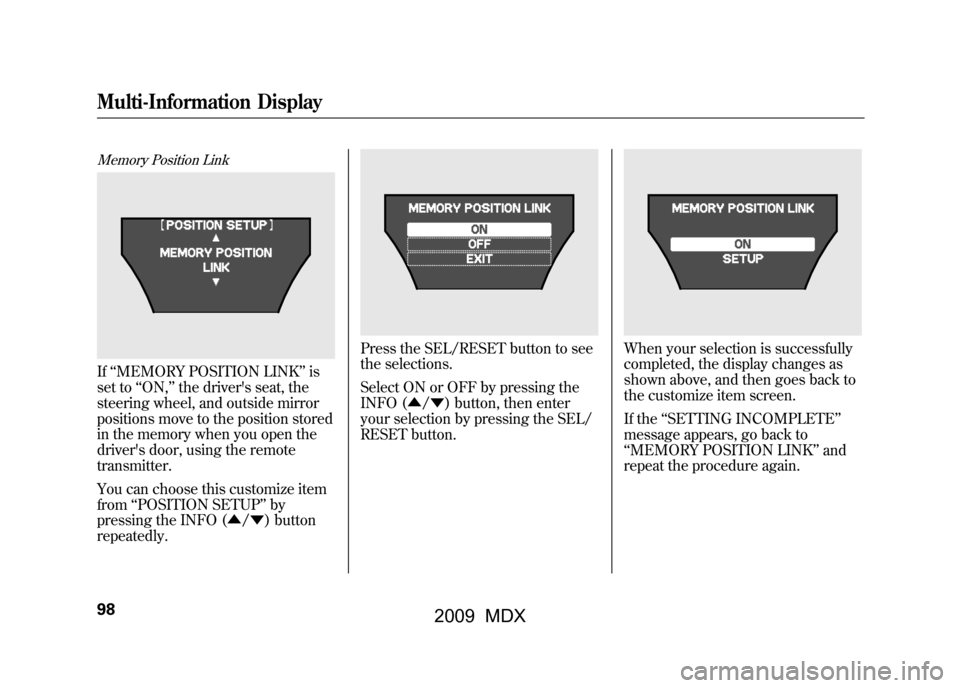
Memory Position LinkIf‘‘MEMORY POSITION LINK ’’is
set to ‘‘ON, ’’the driver's seat, the
steering wheel, and outside mirror
positions move to the position stored
in the memory when you open the
driver's door, using the remote
transmitter.
You can choose this customize item
from ‘‘POSITION SETUP ’’by
pressing the INFO (▲ /▼ ) button
repeatedly.
Press the SEL/RESET button to see
the selections.
Select ON or OFF by pressing the
INFO (▲ /▼ ) button, then enter
your selection by pressing the SEL/
RESET button.
When your selection is successfully
completed, the display changes as
shown above, and then goes back to
the customize item screen.
If the ‘‘SETTING INCOMPLETE ’’
message appears, go back to
‘‘ MEMORY POSITION LINK ’’and
repeat the procedure again.
Multi-Information Display9808/06/06 16:58:07 09 ACURA MDX MMC North America Owner's M 50 31STX620 enu
2009 MDX
Page 103 of 489

Auto Tilt & Telescope Steering WheelWhen‘‘AUTO TILT & TELESCOPE
STEERING WHEEL ’’is set to ‘‘ON, ’’
the steering wheel automatically
moves fully in and up when you turn
the ignition switch to the LOCK (0)
position and remove the key.
You can choose this customize item
from ‘‘POSITION SETUP ’’by
pressing the INFO (▲ /▼ ) button
repeatedly.
Press the SEL/RESET button to see
the selections.
Select ON or OFF by pressing the
INFO (▲ /▼ ) button, then enter
your selection by pressing the SEL/
RESET button.
When your selection is successfully
completed, the display changes as
shown above, and then goes back to
the customize item screen.
If the ‘‘SETTING INCOMPLETE ’’
message appears, go back to ‘‘AUTO
TILT & TELESCOPE STEERING
WHEEL ’’and repeat the procedure
again.
CONTINUED
Multi-Information Display
99
Inst rument s and Cont rols
08/06/06 16:58:07 09 ACURA MDX MMC North America Owner's M 50 31STX620 enu
2009 MDX
Page 129 of 489

When you remove the key from the
ignition switch, the steering wheel
automatically moves fully in and up.
To change the‘‘AUTO TILT &
TELESCOPE STEERING WHEEL ’’
setting, see page99.
The steering wheel then returns to
its original position when you insert
the key back in the ignition switch.
Steering wheel movement is also
controlled by the driving position
memory system (see page157). If your vehicle's battery is
disconnected or goes dead, or the
fuse for the power tilt and telescopic
steering wheel is removed, the
power tilt and telescopic steering
wheel system needs to be reset when
you reconnect the battery or install
the fuse.
Insert the key into the ignition
switch, and remove it. The steering
wheel automatically moves fully in
and up to let you know the system is
reset.
Steering Wheel Adjustments
125
Inst rument s and Cont rols
08/06/06 16:58:07 09 ACURA MDX MMC North America Owner's M 50 31STX620 enu
2009 MDX
Page 162 of 489

Doing any of the following after
pressing the MEMO button will
cancel the storing procedure.●Not pressing a memory button
within 5 seconds.●Readjusting the seat position.●Readjusting the outside mirror
position.
Each memory button stores only one
driving position. Storing a new
position erases the previous setting
stored in that button's memory. If
you want to add a new position while
retaining the current one, use the
other memory button. Selecting a Memorized Position
To select a memorized position, do
this:
1. Make sure the vehicle is parked.
2. Press the desired memory button
(1 or 2) until you hear a beep, then
release the button.
The system will move the seat,
steering wheel, and outside mirrors
to the memorized positions. The
indicator in the selected memory
button will flash during movement.
When the adjustments are complete,
you will hear two beeps, and the
indicator will remain on.
To change the ‘‘MEMORY
POSITION LINK ’’setting, see page
98. To stop the system's automatic
adjustment, do any of these actions:
●Press any button on the control
panel: MEMO, 1, or 2.●Push any of the adjustment
switches for the seat.●Shift out of Park.●Adjust the outside mirrors.
If desired, you can use the
adjustment switches to change the
positions of the seat, steering wheel
or outside mirrors after they are in
their memorized position. If you
change the memorized position, the
indicator in the memory button will
go out. To keep this driving position
for later use, you must store it in the
driving position memory.
Driving Position Memory System15808/06/06 16:58:07 09 ACURA MDX MMC North America Owner's M 50 31STX620 enu
2009 MDX
Page 237 of 489
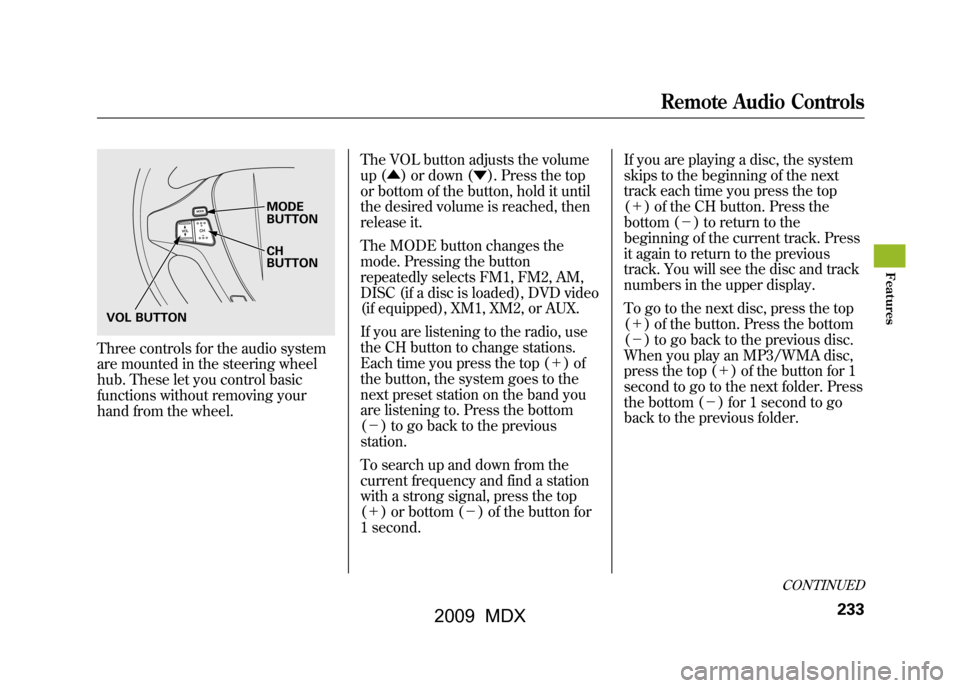
Three controls for the audio system
are mounted in the steering wheel
hub. These let you control basic
functions without removing your
hand from the wheel.The VOL button adjusts the volume
up (▲
) or down (▼). Press the top
or bottom of the button, hold it until
the desired volume is reached, then
release it.
The MODE button changes the
mode. Pressing the button
repeatedly selects FM1, FM2, AM,
DISC (if a disc is loaded), DVD video
(if equipped), XM1, XM2, or AUX.
If you are listening to the radio, use
the CH button to change stations.
Each time you press the top (+ )of
the button, the system goes to the
next preset station on the band you
are listening to. Press the bottom
(- ) to go back to the previous
station.
To search up and down from the
current frequency and find a station
with a strong signal, press the top
(+ ) or bottom (-) of the button for
1 second. If you are playing a disc, the system
skips to the beginning of the next
track each time you press the top
(+
) of the CH button. Press the
bottom (- ) to return to the
beginning of the current track. Press
it again to return to the previous
track. You will see the disc and track
numbers in the upper display.
To go to the next disc, press the top
(+ ) of the button. Press the bottom
(- ) to go back to the previous disc.
When you play an MP3/WMA disc,
press the top (+ ) of the button for 1
second to go to the next folder. Press
the bottom (- ) for 1 second to go
back to the previous folder.
MODE
BUTTON
CH
BUTTON
VOL BUTTON
CONTINUED
Remote Audio Controls
233
Feat ures
08/06/06 16:58:07 09 ACURA MDX MMC North America Owner's M 50 31STX620 enu
2009 MDX
Page 284 of 489
Microphone
The HFL microphone is on the
ceiling, between the front map lights
and the console buttons. On models
with navigation system, the
microphone is shared with the
navigation system.
Audio System
When the HFL is in use, the sound
comes through the vehicle's front
audio system speakers. If the audio
system is in use while operating
either of the HFL buttons or making
a call, the HFL over-rides the audio
system. To change the volume level,
use the audio system volume knob,
or the steering wheel volume
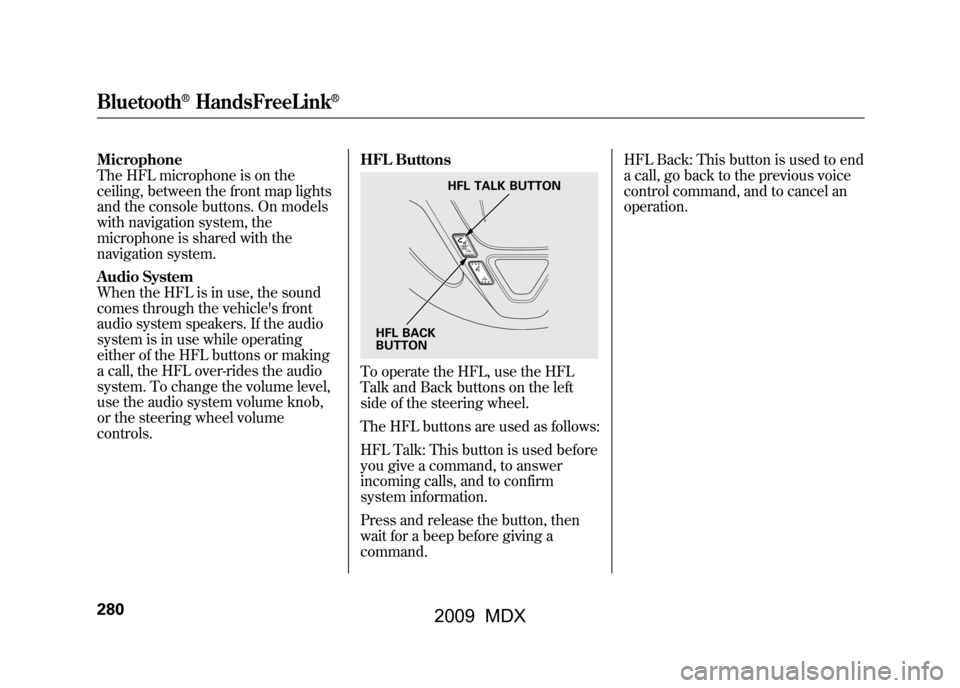
controls.HFL Buttons
To operate the HFL, use the HFL
Talk and Back buttons on the left
side of the steering wheel.
The HFL buttons are used as follows:
HFL Talk: This button is used before
you give a command, to answer
incoming calls, and to confirm
system information.
Press and release the button, then
wait for a beep before giving a
command.HFL Back: This button is used to end
a call, go back to the previous voice
control command, and to cancel an
operation.
HFL TALK BUTTON
HFL BACK
BUTTON
Bluetooth
®HandsFreeLink
®
28008/06/06 16:58:07 09 ACURA MDX MMC North America Owner's M 50 31STX620 enu
2009 MDX