phone Acura MDX 2009 User Guide
[x] Cancel search | Manufacturer: ACURA, Model Year: 2009, Model line: MDX, Model: Acura MDX 2009Pages: 489, PDF Size: 11.91 MB
Page 284 of 489
Microphone
The HFL microphone is on the
ceiling, between the front map lights
and the console buttons. On models
with navigation system, the
microphone is shared with the
navigation system.
Audio System
When the HFL is in use, the sound
comes through the vehicle's front
audio system speakers. If the audio
system is in use while operating
either of the HFL buttons or making
a call, the HFL over-rides the audio
system. To change the volume level,
use the audio system volume knob,
or the steering wheel volume
controls.HFL Buttons
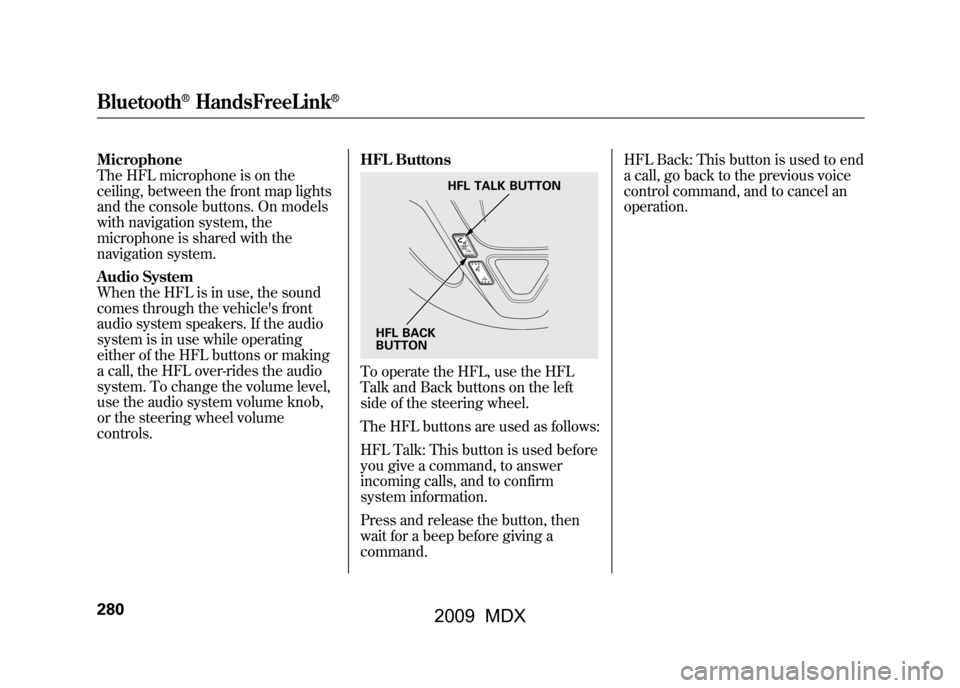
To operate the HFL, use the HFL
Talk and Back buttons on the left
side of the steering wheel.
The HFL buttons are used as follows:
HFL Talk: This button is used before
you give a command, to answer
incoming calls, and to confirm
system information.
Press and release the button, then
wait for a beep before giving a
command.HFL Back: This button is used to end
a call, go back to the previous voice
control command, and to cancel an
operation.
HFL TALK BUTTON
HFL BACK
BUTTON
Bluetooth
®HandsFreeLink
®
28008/06/06 16:58:07 09 ACURA MDX MMC North America Owner's M 50 31STX620 enu
2009 MDX
Page 285 of 489
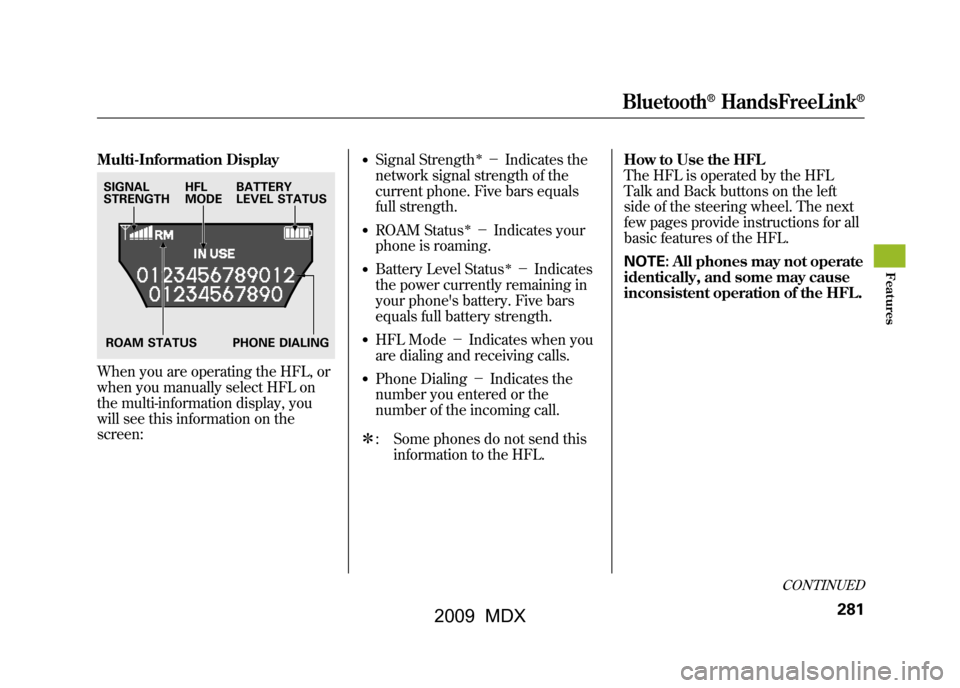
Multi-Information DisplayWhen you are operating the HFL, or
when you manually select HFL on
the multi-information display, you
will see this information on the
screen:
●Signal Strength
ꭧ-Indicates the
network signal strength of the
current phone. Five bars equals
full strength.
●ROAM Status
ꭧ- Indicates your
phone is roaming.
●Battery Level Status
ꭧ- Indicates
the power currently remaining in
your phone's battery. Five bars
equals full battery strength.
●HFL Mode -Indicates when you
are dialing and receiving calls.●Phone Dialing -Indicates the
number you entered or the
number of the incoming call.
ꭧ : Some phones do not send this
information to the HFL. How to Use the HFL
The HFL is operated by the HFL
Talk and Back buttons on the left
side of the steering wheel. The next
few pages provide instructions for all
basic features of the HFL.
NOTE:
All phones may not operate
identically, and some may cause
inconsistent operation of the HFL.
SIGNAL
STRENGTH HFL
MODEBATTERY
LEVEL STATUS
ROAM STATUS PHONE DIALING
CONTINUED
Bluetooth
®HandsFreeLink
®
281
Feat ures
08/06/06 16:58:07 09 ACURA MDX MMC North America Owner's M 50 31STX620 enu
2009 MDX
Page 286 of 489

Using Voice Control
Here are some guidelines for using
voice control:●To enter a command, press and
release the Talk button. Then,
after the beep, say your command
in a clear, natural tone.●Close the windows and the
moonroof.●When voice commands are used,
the fan speed will be automatically
adjusted to low. However, for
better voice recognition, lowering
the fan speed may be necessary.●Adjust the airflow from both the
dashboard and side vents so they
do not blow against the
microphone on the ceiling.
●Give a voice command in a clear
natural speaking voice without
pausing between words or
numbers. If the system cannot
recognize your command because
of the background noise, speak
louder.●If the microphone picks up voices
other than yours, the system may
not interpret your voice commands
correctly.●If the HFL does not recognize a
command, its response is,
‘‘Pardon. ’’If it doesn't recognize
the command a second time, its
response is, ‘‘Please repeat. ’’If it
doesn't recognize the command a
third time, it plays the Help
prompt.
●To hear a list of available options at
any time, press the Talk button,
wait for the beep, and say, ‘‘Hands
free link help.’’●Many commands can be spoken
together. For example, you can
say, ‘‘Dial 123-456-7891. ’’●To enter a string of numbers in a
Call or Dial command, you can say
them all at once, or you can
separate them in blocks of 3, 4, 7,
10, and 11.●To skip a voice prompt, press the
Talk button while the HFL is
speaking. The HFL will then begin
listening for your next command.
Bluetooth
®HandsFreeLink
®
28208/06/06 16:58:07 09 ACURA MDX MMC North America Owner's M 50 31STX620 enu
2009 MDX
Page 289 of 489

5. Press and release the Talk button.After the beep, say ‘‘Yes. ’’The
HFL response is ‘‘Security is on.
Each time the vehicle is turned on,
the passcode will be required to
use the system. The system setup
is complete. Returning to the main
menu. ’’
6. Press and release the Talk button. If you say ‘‘No. ’’after the beep, the
HFL response is ‘‘Security will not
be used. The system setup is
complete. ’’To enter your passcode, do this;Once a passcode is set, you can lock
the HFL so it only operates after the
passcode is entered. 1. The HFL will prompt you for your
passcode each time the ignition
switch is turned to the ON (II)
position and you press the Talk
button. You will only be asked for
the passcode once per ignition
cycle. If the passcode is set, its
response is ‘‘The system is locked.
What is the four-digit passcode?’’
2. Press and release the Talk button. After the beep, say your four-digit
passcode. For example, say ‘‘1, 2,
3, 4. ’’
3. If the passcode is correct, the HFL response is ‘‘Main menu. ’’If the
passcode is not correct, the HFL
response is ‘‘1, 2, 3, 4 is incorrect.
Please try again. ’’Go back to the
step 2.
If you forget your passcode and you
cannot activate the HFL, consult your
dealer to cancel the passcode. Pairing Your Phone
Your Bluetooth
®compatible phone
with HandsFree Profile must be
paired to the HFL before you can
make and receive hands-free calls.
To confirm that your phone is
Bluetooth compatible, visit
www.acura.com/handsfreelink,
or call
1-888-528-7876. In Canada, visit
www.acura.ca,
or call
1-888-9-ACURA-9. Your phone
retailer should also be able to
confirm that your phone is Bluetooth
compatible.
CONTINUED
Bluetooth
®HandsFreeLink
®
285
Feat ures
08/06/06 16:58:07 09 ACURA MDX MMC North America Owner's M 50 31STX620 enu
2009 MDX
Page 290 of 489

NOTE:●HFL does not allow you to pair
your phone if the vehicle is
moving.●For pairing, your phone must be in
its Discovery mode.●Up to six phones can be paired to
the HFL.●The following procedure works for
most phones. If you cannot pair
your phone to the HFL with this
procedure, refer to your phone's
operating manual, visitwww.acura.com/handsfreelink,
call
the Hands Free Link
®consumer
support at (888) 528-7876, or call
your phone retailer. In Canada,
visit
www.acura.ca
or call (888) 9-
ACURA-9.
●During the pairing process, turn
off any previously paired phones
before pairing a new phone. 1. With your phone on and the
ignition in the ACCESSORY (I) or
ON (II) position, press and release
the Talk button. After the beep,
say ‘‘Phone setup. ’’The HFL
response is ‘‘Phone setup options
are status, pair, edit, delete, and
list. ’’
2. Press and release the Talk button. After the beep, say ‘‘Pair. ’’The
HFL response is ‘‘The pairing
process requires operation of your
cell phone. For safety, only
perform this function while the
vehicle is stopped. State a four-
digit code for pairing. Note this
code. It will be requested by the
phone. ’’
3. Press and release the Talk button. After the beep, say the four-digit
code you want to use. For
example, say ‘‘1, 2, 3, 4. ’’The HFL
response is, ‘‘1, 2, 3, 4. Is this
correct? ’’ 4. Press and release the Talk button.
After the beep, say ‘‘Yes. ’’The
HFL response is ‘‘Searching for a
Bluetooth phone. ’’
NOTE: Steps 5 and 6 show a
common way to get your phone into
its Discovery mode. If these steps do
not work on your phone, refer to the
phone's operating manual.
5. Follow the prompts on your phone to get it into its Discovery mode.
The phone will search for the HFL.
When it comes up, select
HandsFreeLink from the list of
options displayed on your phone.
6. When asked by the phone, enter the four-digit code from step 3 into
your phone. The HFL response is
‘‘A new phone has been found.
What would you like to name this
phone?’’Bluetooth
®HandsFreeLink
®
28608/06/06 16:58:07 09 ACURA MDX MMC North America Owner's M 50 31STX620 enu
2009 MDX
Page 291 of 489

7. Press and release the Talk button.After the beep, say the name you
want to use. For example, say
‘‘Eric's phone. ’’The HFL response
is ‘‘Eric's phone has been
successfully paired. Returning to
the main menu. ’’
8. If you want to pair another phone, repeat steps 1 through 7.
Once the pairing process is
completed, AcuraLink may display a
connection confirmation screen. This
screen is used to create a data
connection between your cell phone
and the AcuraLink system. You can
choose to set up the data connection
now, or do it later. If you want to do it
now, exit the HFL menu by pressing
the HFL Back button one or more
times.
To rename a paired phone, do this:1. Press and release the Talk button. After the beep, say ‘‘Phone setup. ’’
The HFL response is ‘‘Phone setup
options are status, pair, edit,
delete, and list. ’’
2. Press and release the Talk button. After the beep, say ‘‘Edit. ’’The
HFL response is ‘‘Which phone
would you like to edit? ’’
3. Press and release the Talk button. After the beep, say the name of the
phone you want to rename. For
example, say ‘‘Eric's phone. ’’The
HFL response is ‘‘What is the new
name for Eric's phone?’’
4. Press and release the Talk button. After the beep, say the new name
of the phone. For example, say
‘‘Lisa's phone. ’’The HFL response
is, ‘‘The name has been changed.
Returning to the main menu. ’’
To delete a paired phone, do this:1. Press and release the Talk button.
After the beep, say ‘‘Phone setup. ’’
The HFL response is ‘‘Phone setup
options are status, pair, edit,
delete, and list. ’’
2. Press and release the Talk button. After the beep, say ‘‘Delete.’’ The
HFL response is, ‘‘Which phone
would you like to delete? ’’
3. Press and release the Talk button. After the beep, say the name of the
phone you want to delete. For
example say ‘‘Eric's phone. ’’The
HFL response is ‘‘Would you like
to delete Eric's phone?’’
4. Press and release the Talk button. After the beep, say ‘‘Yes. ’’The
HFL response is ‘‘Preparing to
delete Eric's phone. ’’Say ‘‘OK ’’to
continue. Otherwise, say ‘‘Go
back, ’’or ‘‘Cancel. ’’
CONTINUED
Bluetooth
®HandsFreeLink
®
287
Feat ures
08/06/06 16:58:07 09 ACURA MDX MMC North America Owner's M 50 31STX620 enu
2009 MDX
Page 292 of 489

5. Press and release the Talk button.If you say ‘‘OK ’’after the beep, the
HFL response is ‘‘The phone has
been deleted. Returning to the
main menu. ’’If you say ‘‘Go back, ’’
or ‘‘Cancel,’’ the phone will not be
deleted.To list all paired phones, do this:1. Press and release the Talk button. After the beep, say ‘‘Phone setup. ’’
The HFL response is ‘‘Phone setup
options are status, pair, edit,
delete, and list. ’’
2. Press and release the Talk button. After the beep, say ‘‘List. ’’The
HFL responds by listing the name
of each paired phone. When all
phones paired to the system have
been read, the HFL response is
‘‘ The entire list has been read.
Returning to the main menu.’’
To find out the status of the phone being
used, do this:1. Press and release the Talk button. After the beep, say ‘‘Phone setup. ’’
The HFL response is, ‘‘Phone
setup options are status, pair, edit,
delete, and list. ’’
2. Press and release the Talk button. After the beep, say ‘‘Status. ’’An
example of the HFL response is,
‘‘ Eric's phone is linked. Battery
strength is three bars. Signal
strength is five bars, and the
phone is roaming. Returning to the
main menu.’’
To change from the currently linked
phone to another paired phone, do this:1. Press and release the Talk button. After the beep, say ‘‘Next phone. ’’
The HFL response is ‘‘Searching
for the next phone. ’’The HFL then
disconnects the linked phone and
searches for another paired phone.
If no other phones are found, the
first phone remains linked.
Bluetooth
®HandsFreeLink
®
28808/06/06 16:58:07 09 ACURA MDX MMC North America Owner's M 50 31STX620 enu
2009 MDX
Page 293 of 489

Making a Call
You can make calls using any phone
number, or by using a name in the
HFL phonebook. You can also redial
the last number called. During a call,
the HFL allows you to talk up to 30
minutes after you remove the key
from the ignition switch. Continuing
a call without running the engine
may discharge and weaken the
vehicle's battery.To make a call using a phone number,do this:1. With your phone on and the ignition in the ACCESSORY (I) or
ON (II) position, press and release
the Talk button. After the beep,
say ‘‘Call’’ or‘‘Dial.’’ The HFL
response is, ‘‘What name or
number would you like to call/
dial? ’’ 2. Press and release the Talk button.
After the beep, say the number
you want to call. For example, say
‘‘123 456 7891.’’ The HFL response
is ‘‘123 456 7891. Say call, dial, or
continue to add numbers.’’
On models with navigation systemYou can also make a call directly
from the list shown on the
navigation display.
3. Press and release the Talk button. After the beep, say ‘‘Call’’ or‘‘Dial.’’
The HFL response is ‘‘Calling ’’or
‘‘ Dialing. ’’Once connected, you
will hear the person you called
through the audio speakers. To
change the volume, use the audio
system volume knob, or the
steering wheel volume controls.
4. To end the call, press the Back button.
To make a call using a name in the HFL
phonebook, do this:1. With your phone on and the ignition in the ACCESSORY (I) or
ON (II) position, press and release
the Talk button. After the beep,
say ‘‘Call’’ or‘‘Dial. ’’The HFL
response is, ‘‘What name or
number would you like to call/
dial? ’’
2. Press and release the Talk button. After the beep, say the name you
want to call. For example, say
‘‘Eric. ’’The HFL response is
‘‘ Would you like to call Eric?’’
3. Press and release the Talk button. After the beep, say ‘‘Yes. ’’The
HFL response is ‘‘Calling ’’or
‘‘ Dialing. ’’Once connected, you
will hear the person you called
through the audio speakers. To
change the volume, use the audio
system volume knob, or the
steering wheel volume controls.
CONTINUED
Bluetooth
®HandsFreeLink
®
289
Feat ures
08/06/06 16:58:07 09 ACURA MDX MMC North America Owner's M 50 31STX620 enu
2009 MDX
Page 294 of 489

4. To end the call, press the Backbutton.
To redial the last number called by
the phone, press and release the Talk
button. After the beep, say ‘‘Redial. ’’
The HFL response is, ‘‘Redialing. ’’
Once connected, you will hear the
person you called through the audio
speakers. To change the volume, use
the audio system volume knob, or
the steering wheel volume controls. Sending Numbers or Names
During a Call
The HFL allows you to send
numbers or names during a call. This
is useful when you call a menu-
driven phone system. You can also
program account numbers into the
HFL phonebook for easy retrieval
during menu-driven calls.
To send a number during a call, do this:1. Press and release the Talk button.
After the beep, say ‘‘Send. ’’The
HFL response is, ‘‘What name or
number would you like to send? ’’
2. Press and release the Talk button. After the beep, say the number
you want to send. For example, say
‘‘1, 2, 3. ’’The HFL response is ‘‘1,
2, 3. Say send, or continue to add
numbers.’’
NOTE: To send a pound (# ), say
‘‘ pound.’’ To send a star (*), say
‘‘ star. ’’ 3. Press and release the Talk button.
After the beep, say ‘‘Send.’’ The
dial tones will be sent, and the call
will continue.
To send a name during a call, do this:1. Press and release the Talk button. After the beep, say ‘‘Send.’’ The
HFL response is, ‘‘What name or
number would you like to send? ’’
2. Press and release the Talk button. After the beep, say the name you
want to send. For example, say
‘‘Account number. ’’The HFL
response is ‘‘Would you like to
send account number? ’’
3. Press and release the Talk button. After the beep, say ‘‘Send.’’ The
dial tones will be sent, and the call
will continue.
Bluetooth
®HandsFreeLink
®
29008/06/06 16:58:07 09 ACURA MDX MMC North America Owner's M 50 31STX620 enu
2009 MDX
Page 295 of 489

Receiving a Call
If you receive a call when you are not
on the phone, the HFL interrupts the
audio system (if it is on), and plays
the incoming call notification, if
activated. To answer the call, press
the Talk button and begin speaking.
If you don't want to answer the call,
press the Back button.
If your phone has Call Waiting, and
you receive a call when you are on
the phone, press and release the Talk
button to answer it. When you do
this, the original call is placed on
hold. To return to the original call,
press the Talk button again. If you
don't want to answer the new call,
disregard it, and continue with your
original call. If you want to hang up
the original call and answer the new
call, press the Back button.Transferring a Call
During a call, you can transfer it from
the HFL to your phone, or from your
phone to the HFL.
To transfer a call from the HFL to your
phone, do this:Press and release the Talk button.
After the beep, say ‘‘Transfer. ’’The
audio switches from the HFL to the
phone.To transfer a call from your phone to the
HFL, do this:Press and release the Talk button.
After the beep, say ‘‘Transfer. ’’The
audio switches from your phone to
the HFL. Muting a Call
During a call, you can mute or
unmute your voice to the person you
are talking to.
To mute your voice, do this:1. Press and release the Talk button.
After the beep, say ‘‘Mute. ’’The
HFL response is, ‘‘Mute is active.’’To unmute your voice, do this:2. Press and release the Talk button.
After the beep, say ‘‘Mute. ’’The
HFL response is, ‘‘Mute is
canceled. ’’
CONTINUED
Bluetooth
®HandsFreeLink
®
291
Feat ures
08/06/06 16:58:07 09 ACURA MDX MMC North America Owner's M 50 31STX620 enu
2009 MDX