phone Acura MDX 2009 Owner's Guide
[x] Cancel search | Manufacturer: ACURA, Model Year: 2009, Model line: MDX, Model: Acura MDX 2009Pages: 489, PDF Size: 11.91 MB
Page 306 of 489

To change a PIN number1. Select the phonebook that youwish to change the PIN number
for. The display will change as
shown above.
2. Enter your current PIN number.
3. Enter your new 4-digit PINnumber. You will be asked to re-
enter the PIN to verify.
Bluetooth
®HandsFreeLink
®
30208/06/06 16:58:07 09 ACURA MDX MMC North America Owner's M 50 31STX620 enu
2009 MDX
Page 307 of 489

Clearing the System
This operation clears the HFL of
your passcode, your paired phones,
all names in the HFL phonebook,
and all imported phonebooks.
Clearing is recommended before you
sell your vehicle.To clear the system, do this:1. Press and release the Talk button.After the beep, say ‘‘System. ’’The
HFL response is, ‘‘System options
are setup and clear.’’
2. Press and release the Talk button. After the beep, say ‘‘Clear. ’’The
HFL response is, ‘‘This process
will clear all paired phones, clear
all entries in the phonebook, clear
the passcode, and restore the
defaults in the system setup. Is
this what you would like to do? ’’3. Press and release the Talk button.
After the beep, say ‘‘Yes. ’’The
HFL response is ‘‘Preparing to
clear all paired phones, all
phonebook entries, the passcode,
and restore the defaults in the
system setup. Say OK to proceed,
otherwise say go back or cancel. ’’4. Press and release the Talk button.
After the beep, say ‘‘OK ’’to
proceed, or say ‘‘Go back ’’or
‘‘ Cancel.’’
5. If you said ‘‘OK, ’’the HFL
response is, ‘‘Please wait while the
system is cleared. ’’This may take
up to 2 minutes to complete, then
the HFL response is, ‘‘The system
has been cleared. Returning to the
main menu. ’’
CONTINUED
Bluetooth
®HandsFreeLink
®
303
Feat ures
08/06/06 16:58:07 09 ACURA MDX MMC North America Owner's M 50 31STX620 enu
2009 MDX
Page 308 of 489

Changing LanguageCanadian models onlyTo change from English to French, dothis:1. Press and release the Talk button. After the beep, say ‘‘Change
language. ’’The HFL response is
‘‘ English or French? ’’
2. Press and release the Talk button. After the beep, say ‘‘French. ’’The
HFL response is ‘‘Vous avez
selectionne Français. Les noms
enregistres en mode Anglais ne
seront pas accessible en mode
Français. Voulez-vous continuer?
You have selected French. Name
tags that were stored while in
English mode will not be
accessible in French mode. Would
you like to continue? ’’3. Press and release the Talk button.
After the beep, say ‘‘Oui ’’or ‘‘Yes. ’’
If there are no paired phones
without French name tags, the
HFL response is ‘‘Venillez attendre
que le systeme change de langue.
Please wait while the language is
changed. ’’ ‘‘La langue a ete
changee. Retour au menu
principal. ’’
NOTE: If there are paired phones
without French name tags, the
following prompts will continue.
If there are paired phones without
French name tags, the HFL response
is ‘‘Pour que le système identifie les
téléphones qui ont été jumelés dans
une autre langue, les noms des
téléphones doivent être ré-
enregistrés. ’’ 4. The HFL response is, for example,
‘‘Quel est le nom Français pour
< Paul's phone> ?’’Press and
release the Talk button. After the
beep, say ‘‘Téléphone de Paul. ’’
The HFL response is, ‘‘Quel est le
nom Français pour
< Pat's phone> ?’’Press and
release the Talk button. Say
‘‘ Téléphone de Pat. ’’After all
paired phones missing a French
name tag are re-recorded, the HFL
will prompt, ‘‘Retour au menu
principal. ’’Bluetooth
®HandsFreeLink
®
30408/06/06 16:58:07 09 ACURA MDX MMC North America Owner's M 50 31STX620 enu
2009 MDX
Page 309 of 489

To change from French to English, dothis:1. Press and release the Talk button. After the beep, say ‘‘Changer
Langue. ’’The HFL response is,
‘‘ Anglais ou Français?’’
2. Press and release the Talk button. After the beep, say ‘‘Anglais.’’ The
HFL response is, ‘‘You have
selected English. Name tags that
were stored while in French mode
will not be accessible in English
mode. Would you like to continue?
Vous avez selectionne Anglais. Les
noms enregistres en mode
Français ne seront pas accessible
en mode Anglais. Voulez-vous
contnuez? ’’ 3. Press and release the Talk button.
After the beep, say ‘‘Yes ’’or ‘‘Oui. ’’
If there are no paired phones
without English name tags, the
HFL response is ‘‘Please wait while
the language is changed. Venillez
attendre que le systeme change de
langue. ’’ ‘‘The language has been
changed. Returning to the main
menu.’’
NOTE: If there are paired phones
without English name tags, the
following prompts will continue.
If there are paired phones without
English name tags, the HFL
response is ‘‘The language has been
changed. For the system to identify
phones that were paired while in
another language, the phone names
need to be re-recorded. ’’4. The HFL says, for example,
‘‘What
is the English name for
< Téléphone de Paul >?’’ Press
and release the Talk button. After
the beep, say ‘‘Paul's phone. ’’The
HFL response is ‘‘What is the
English name for <Téléphone de
Pat >?’’ Press and release the Talk
button. After the beep, say ‘‘Pat's
phone. ’’After all paired phones
missing an English name tag are
re-recorded, the HFL will say
‘‘ Returning to the main menu. ’’
HFL Limitations
In addition, you cannot use the HFL
while using AcuraLink.
CONTINUED
Bluetooth
®HandsFreeLink
®
305
Feat ures
08/06/06 16:58:07 09 ACURA MDX MMC North America Owner's M 50 31STX620 enu
2009 MDX
Page 314 of 489

Delete-Select this button to delete
the current message.
Voice -Select this button to hear a
voice read the entire message. This
gives you more information than the
screen can display at one time. When
you select the Voice button, it
changes to a Stop Reading button.
Select the button again to stop the
voice.
Call -Select this button to call a
phone number embedded in the
message. When you select Call,the
Bluetooth
®HandsFreeLink
®(HFL)
dials the number for you.
To make a call, your
Bluetooth
®compatible phone must be
paired to the vehicle's
HandsFreeLink system, powered on,
and located within the vehicle (see
page278). Find Nearest Acura Dealer
-
Select this button to find the nearest
Acura dealer using the navigation
system.
Call Your Acura Dealer -Select
this button to call the Acura dealer
you purchased your vehicle from.
AcuraLink also directs you to this
dealer so you can schedule a
maintenance appointment or receive
information about a message. If your
assigned servicing dealer changes,
AcuraLink will reset to call that
dealer. Diagnostic Info
-Select this
button to get more information about
the current diagnostic message. To
use this option, your cellphone must
be paired with the HFL. In addition,
the paired phone must have a
compatible data service and be set up
with the AcuraLink system to make a
data connection. Access the
handsfreelink.com website to find
out which data services are currently
compatible with AcuraLink.
Message Preferences
To set your AcuraLink preferences
(the types of messages you want to
receive, if any), visit the My Acura
website at
www.owners.acura.com,
and
choose what you would like to
receive. If you do not have internet
access, call Acura Client Services at
(800) 382-2238; they can set your
message preferences for you.
AcuraLink
®(U.S. models only)
31008/06/06 16:58:07 09 ACURA MDX MMC North America Owner's M 50 31STX620 enu
2009 MDX
Page 321 of 489
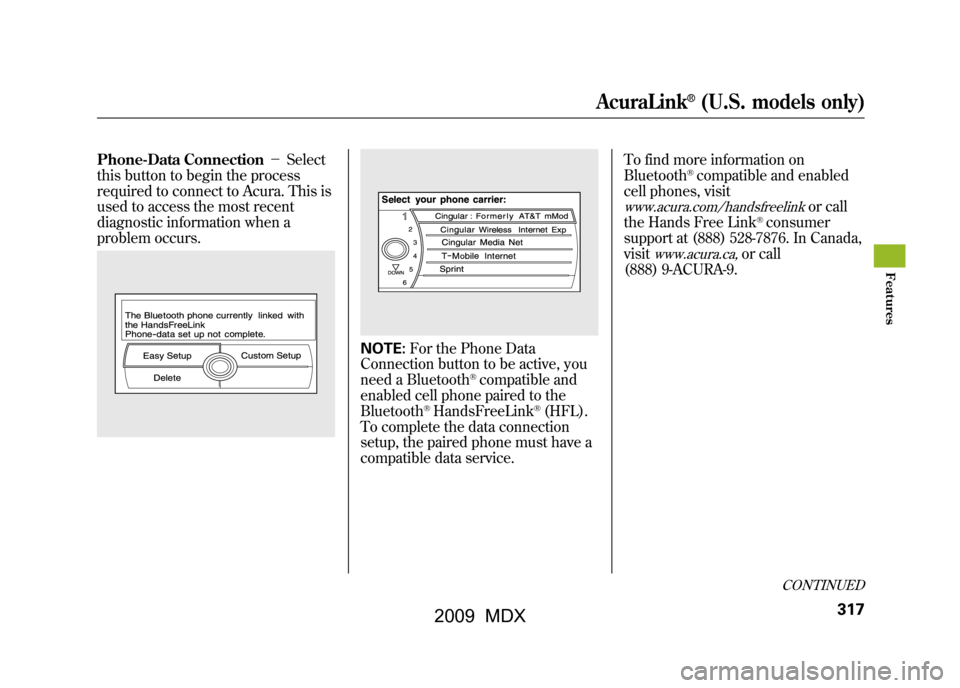
Phone-Data Connection-Select
this button to begin the process
required to connect to Acura. This is
used to access the most recent
diagnostic information when a
problem occurs.
NOTE: For the Phone Data
Connection button to be active, you
need a Bluetooth
®compatible and
enabled cell phone paired to the
Bluetooth
®HandsFreeLink
®(HFL).
To complete the data connection
setup, the paired phone must have a
compatible data service. To find more information on
Bluetooth
®compatible and enabled
cell phones, visit
www.acura.com/handsfreelink
or call
the Hands Free Link
®consumer
support at (888) 528-7876. In Canada,
visit
www.acura.ca,
or call
(888) 9-ACURA-9.
CONTINUED
AcuraLink
®(U.S. models only)
317
Feat ures
08/06/06 16:58:07 09 ACURA MDX MMC North America Owner's M 50 31STX620 enu
2009 MDX
Page 322 of 489

Connect to the Acura Server-
The default setting is prompt. When
a diagnostic info message appears,
and you select the Check Now
button, the system will prompt you
before connecting to the Acura
server. If you do not wish to connect
at that time, select No at the prompt,
and you will see the information from
the onboard database. The ‘‘Auto ’’
setting will remove the prompt when
you select the Check Now button
and will automatically connect to the
Acura server. This setting only
applies when you have a Bluetooth
®
enabled phone that is paired with the
HFL and you have completed the
Phone-Data Connection setup.
As required by the FCC:
This device complies with Part 15 of theFCC rules. Operation is subject to the
following two conditions: (1) This devicemay not cause harmful interference, and(2) this device must accept any
interference received, includinginterference that may cause undesiredoperation.
Changes or modifications not expresslyapproved by the party responsible for
compliance could void the user'sauthority to operate the equipment.
This device complies with IndustryCanada Standard RSS-210.
Operation is subject to the following twoconditions: (1) this device may not causeinterference, and (2) this device must
accept any interference that may causeundesired operation of the device.
AcuraLink
®(U.S. models only)
31808/06/06 16:58:07 09 ACURA MDX MMC North America Owner's M 50 31STX620 enu
2009 MDX
Page 334 of 489
Modifying your vehicle, or installing
some non-Acura accessories, can
make your vehicle unsafe. Before
you make any modifications or add
any accessories, be sure to read the
following information.
Accessories
Your dealer has Acura accessories
that allow you to personalize your
vehicle. These accessories have been
designed and approved for your
vehicle, and are covered by warranty.
Although non-Acura accessories may
fit on your vehicle, they may not
meet factory specifications, and could
adversely affect your vehicle's
handling and stability.
Improper accessories or
modifications can affect your
vehicle's handling, stability, and
performance, and cause a
crash in which you can be hurt
or killed.
Follow all instructions in this
owner's manual regarding
accessories and modifications.
When properly installed, cellular
phones, alarms, two-way radios, and
low-powered audio systems should
not interfere with your vehicle's
computer controlled systems, such
as your airbags, anti-lock brakes, and
tire pressure monitoring system. Before installing any accessory:
●Make sure the accessory does not
obscure any lights, or interfere
with proper vehicle operation or
performance.●Be sure electronic accessories do
not overload electrical circuits (see
page440)or interfere with proper
operation of your vehicle.●Do not install accessories on the
side pillars or across the rear
windows. Accessories installed in
these areas may interfere with
proper operation of the side
curtain airbags.●Before installing any electronic
accessory, have the installer
contact your dealer for assistance.
If possible, have your dealer
inspect the final installation.
Accessories and Modifications33008/06/06 16:58:07 09 ACURA MDX MMC North America Owner's M 50 31STX620 enu
2009 MDX
Page 369 of 489

Gross Vehicle Weight Rating
(GVWR)-The maximum allowable
weight of the vehicle, all occupants,
all accessories, all cargo and the
tongue load is 5,952 lbs (2,700 kg).
Gross Axle Weight Ratings
(GAWR) -The maximum allowable
weight of the vehicle, all occupants,
all accessories, all cargo, and the
tongue load must not exceed 2,888
lbs (1,310 kg) on the front axle, and
3,175 lbs (1,440 kg) on the rear axle.
Gross Combined Weight Rating
(GCWR) -The maximum allowable
weight of the fully loaded vehicle and
trailer is 10,053 lbs (4,560 kg) with
the proper hitch. The GCWR must be
reduced 2 percent for every 1,000
feet (305 meters) of elevation. Estimating Loads
The best way to confirm that all loads
are within limits is to check them at a
public scale. For public scales in your
area, check your local phone book,
or contact your trailer dealer or
rental agency for assistance.
To help ensure a safe drive to a scale,
or if you cannot get to a public scale,
we recommend that you estimate
your total trailer weight and tongue
load as described.
To Estimate the Total Trailer WeightAdd the weight of your trailer (as
quoted by the manufacturer) with
everything in or on the trailer. Then
check the tables on page366to make
sure you do not exceed the limit for
your conditions.
To Estimate the Tongue Load1. Park the vehicle on level ground.
2. Measure and record the distance
from the ground to the bottom of
the trailer hitch.
3. Connect the fully loaded trailer to the hitch.
4. Measure again from the ground to the same spot on the bottom of the
hitch.
5. Subtract the second measurement from the first measurement, then
refer to the following table.
CONTINUED
Towing a Trailer
365
Driving
08/06/06 16:58:07 09 ACURA MDX MMC North America Owner's M 50 31STX620 enu
2009 MDX
Page 470 of 489

Acura dealership personnel are
trained professionals. They should
be able to answer all your questions.
If you encounter a problem that your
dealership does not solve to your
satisfaction, please discuss it with the
dealership's management. The
service manager or general manager
can help. Almost all problems are
solved in this way.
If you are dissatisfied with the
decision made by the dealership's
management, contact Acura Client
Services.
U.S. Owners:American Honda Motor Co., Inc.
Acura Client Services
Mail Stop 500-2N-7E
1919 Torrance Blvd.
Torrance, CA 90501-2746
Tel: (800) 382-2238
Canadian Owners:Acura Client Services
Honda Canada Inc.
715 Milner Avenue
Toronto, ON
M1B 2K8
Tel: 1-888-9-ACURA-9
Fax: Toll-free 1-877-939-0909Toronto (416) 287-4776In Puerto Rico and the U.S. Virgin
Islands:Vortex Motor Corp.
Bella International
P.O. Box 190816
San Juan, PR 00919-0816
Tel: (787) 620-7546
When you call or write, please give
us this information:●Vehicle Identification Number (see
page450)●Name and address of the dealer
who services your vehicle●Date of purchase●Mileage on your vehicle●Your name, address, and
telephone number●A detailed description of the
problem●Name of the dealer who sold the
vehicle to you
Client Service Information46608/06/06 16:58:07 09 ACURA MDX MMC North America Owner's M 50 31STX620 enu
2009 MDX