transmission Acura MDX 2009 User Guide
[x] Cancel search | Manufacturer: ACURA, Model Year: 2009, Model line: MDX, Model: Acura MDX 2009Pages: 489, PDF Size: 11.91 MB
Page 346 of 489

To shift from:Do this:
PtoR Press the brake pedal, and
press the shift lever release
button.
RtoP
NtoR
DtoD3 Press the shift lever release
button.
D3 to D DtoN
NtoD
RtoN Move the shift lever.Park (P)
-This position
mechanically locks the transmission.
Use Park whenever you are turning
off or starting the engine. To shift out
of Park, you must press on the brake
pedal and press the release button on
the shift lever. Make sure your foot is
off the accelerator pedal.
If you have done all of the above and
still cannot move the lever out of
Park, see Shift Lock Release on
page346. To avoid transmission damage, come
to a complete stop before shifting
into Park. The shift lever must be in
Park before you can remove the key
from the ignition switch.
Reverse (R)
-Press the brake
pedal and press the release button on
the front of the shift lever to shift
from Park to reverse. To shift from
reverse to neutral, come to a
complete stop, and then shift. Press
the release button before shifting
into reverse from neutral.
Neutral (N) -Use neutral if you
need to restart a stalled engine, or if
it is necessary to stop briefly with the
engine idling. Shift to the Park
position if you need to leave your
vehicle for any reason. Press on the
brake pedal when you are moving
the shift lever from neutral to
another gear. Drive (D)
-Use this position for
your normal driving. The
transmission automatically selects a
suitable gear (1 through 5) for your
speed and acceleration. You may
notice the transmission shifting up at
higher engine speeds when the
engine is cold. This helps the engine
warm up faster.Automatic Transmission34208/06/06 16:58:07 09 ACURA MDX MMC North America Owner's M 50 31STX620 enu
2009 MDX
Page 347 of 489
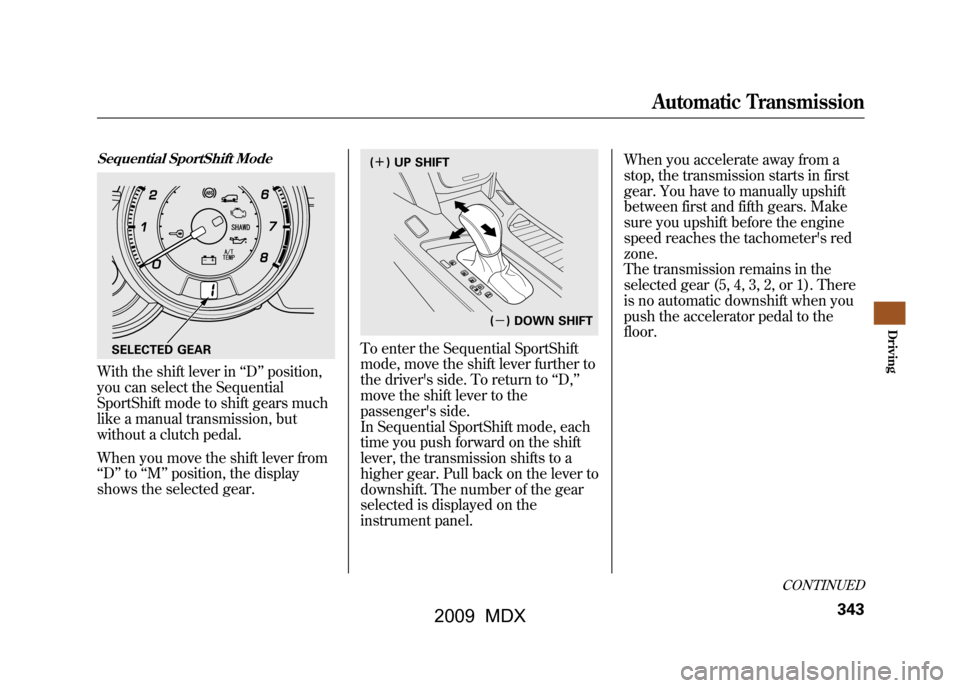
Sequential SportShift ModeWith the shift lever in‘‘D ’’position,
you can select the Sequential
SportShift mode to shift gears much
like a manual transmission, but
without a clutch pedal.
When you move the shift lever from
‘‘ D ’’to ‘‘M’’ position, the display
shows the selected gear.
To enter the Sequential SportShift
mode, move the shift lever further to
the driver's side. To return to ‘‘D, ’’
move the shift lever to the
passenger's side.
In Sequential SportShift mode, each
time you push forward on the shift
lever, the transmission shifts to a
higher gear. Pull back on the lever to
downshift. The number of the gear
selected is displayed on the
instrument panel. When you accelerate away from a
stop, the transmission starts in first
gear. You have to manually upshift
between first and fifth gears. Make
sure you upshift before the engine
speed reaches the tachometer's red
zone.
The transmission remains in the
selected gear (5, 4, 3, 2, or 1). There
is no automatic downshift when you
push the accelerator pedal to the
floor.
SELECTED GEAR
(
ꬽ ) UP SHIFT
(ꭥ ) DOWN SHIFT
CONTINUED
Automatic Transmission
343
Driving
08/06/06 16:58:07 09 ACURA MDX MMC North America Owner's M 50 31STX620 enu
2009 MDX
Page 348 of 489

The transmission may automatically
downshift from the higher gear to
the lower gear under these
conditions:
Driving on level roads and downhillTo shift from Speed range
4→ 3 under 19 mph
(31 km/h)
5 → 4 under 38 mph
(60 km/h)
Driving uphill To shift from Speed range
4→ 3 under 34 mph
(55 km/h)
5 → 4 under 47 mph
(75 km/h) Downshifting gives you more power
when climbing, and provides engine
braking when going down a steep
hill.
The transmission also shifts
automatically as the vehicle comes to
a complete stop. It downshifts to first
gear when the vehicle speed is under
10 mph (16 km/h).
If you try to manually downshift at a
speed that would cause the engine to
exceed the redline in a lower gear,
the transmission does not downshift.
The gear indicator will flash the
number of the lower gear several
times, then return to the higher gear.
If the vehicle speed slows to below
the redline of the selected lower gear
position while the indicator is
flashing, the transmission
downshifts, and the display shows
the selected lower gear.Automatic Transmission34408/06/06 16:58:07 09 ACURA MDX MMC North America Owner's M 50 31STX620 enu
2009 MDX
Page 349 of 489

The table shows the speed ranges for
upshifting and downshifting.To shift from Speed range
1→ 2 over 0 mph
(0 km/h)
2 → 3 over 10 mph
(16 km/h)
3 → 4 over 19 mph
(31 km/h)
4 → 5 over 37 mph
(60 km/h) To shift from Speed range
3→ 2 under 60 mph
(96 km/h)
4 → 3 under 93 mph
(150 km/h)
5 → 4 under 118 mph
(190 km/h)
Starting in Second GearWhen you are in Sequential
SportShift mode, and the vehicle is
stopped, push forward on the shift
lever to shift to second gear. You will
see‘‘2’’ in the display. Starting out in
second gear will help to reduce
wheelspin in deep snow or on a
slippery surface.
If you start out in second gear, the
transmission will be fixed in that
gear.
The transmission will not
automatically downshift to first gear
even when the vehicle speed is
under 10 mph (16 km/h). You need
to shift down to first gear manually.
CONTINUED
Automatic Transmission
345
Driving
08/06/06 16:58:07 09 ACURA MDX MMC North America Owner's M 50 31STX620 enu
2009 MDX
Page 350 of 489

Drive (D
3)- This position is similar
to D, except only the first three gears
are selected. Use D
3when towing a
trailer in hilly terrain, or to provide
engine braking when going down a
steep hill. D
3can also keep the
transmission from cycling between
third, fourth, and fifth gears in stop-
and-go driving.
For faster acceleration when in D
3or
D, you can get the transmission to
automatically downshift by pushing
the accelerator pedal to the floor.
The transmission will shift down one,
two, or three gears, depending on
your speed. Engine Speed Limiter
If you exceed the maximum speed
for the gear you are in, the engine
speed will enter into the
tachometer's red zone. If this occurs,
you may feel the engine cut in and
out. This is caused by a limiter in the
engine's computer controls. The
engine will run normally when you
reduce the rpm below the red zone.
Before downshifting, make sure the
engine will not go into the
tachometer's red zone.
Shift Lock Release
This allows you to move the shift
lever out of Park if the normal
method of pushing on the brake
pedal and pressing the release button
does not work.
1. Set the parking brake.
2. Remove the key from the ignition
switch.
Automatic Transmission34608/06/06 16:58:07 09 ACURA MDX MMC North America Owner's M 50 31STX620 enu
2009 MDX
Page 351 of 489

3. Put a cloth on the edge of the shiftlock release slot cover. Use a small
flat-tipped screwdriver or metal
fingernail file to carefully pry up
the edge of the cover and remove
it from the slot.
4. Insert a key into the shift lockrelease slot.
5. Push down on the key while you press the release button on the
front of the shift lever and move
the shift lever out of Park to
neutral. 6. Remove the key from the shift lock
release slot, then reinstall the
cover. Make sure the notch on the
cover is on the driver's side. Press
the brake pedal, and restart the
engine.
If you need to use the shift lock
release, it means your vehicle is
developing a problem. Have the
vehicle checked by a dealer.
COVER
RELEASE
BUTTON
SHIFT LOCK RELEASE SLOT
Automatic Transmission
347
Driving
08/06/06 16:58:07 09 ACURA MDX MMC North America Owner's M 50 31STX620 enu
2009 MDX
Page 354 of 489

Always use the parking brake when
you park your vehicle. Make sure the
parking brake is set firmly, or your
vehicle may roll if it is parked on an
incline.
Set the parking brake before you put
the transmission in Park. This keeps
the vehicle from moving and putting
pressure on the parking mechanism
in the transmission.Parking Tips
●Make sure the moonroof and the
windows are closed.●Turn off the lights.●Place any packages, valuables, etc.
in the cargo area or take them with
you.●Lock the doors and the tailgate.
●Never park over dry leaves, tall
grass, or other flammable
materials. The hot three way
catalytic converter could cause
these materials to catch on fire.●If the vehicle is facing uphill, turn
the front wheels away from the
curb.●If the vehicle is facing downhill,
turn the front wheels toward the
curb.●Check the indicator on the
instrument panel to verify that the
security system is set.●Make sure the parking brake is
fully released before driving away.
Driving with the parking brake
partially set can overheat or
damage the rear brakes.
Parking35008/06/06 16:58:07 09 ACURA MDX MMC North America Owner's M 50 31STX620 enu
2009 MDX
Page 378 of 489

Towing Speeds and GearsDrive slower than normal in all
driving situations, and obey posted
speed limits for vehicles with trailers.
Use the D position when towing a
trailer on level roads. D
3is the proper
shift lever position to use when
towing a trailer in hilly terrain. (See
‘‘
Driving on Hills
’’ on the next page
for additional gear information.)
When towing a fixed-sided trailer (e.
g., camper), do not exceed 55 mph
(88 km/h). At higher speeds, the
trailer may sway or affect vehicle
handling. When driving uphill and downhill,
use the Sequential SportShift mode
to provide the proper engine power
and engine braking on each gear.
Select fourth, third, second, or first
gear, depending on the vehicle
speeds and road condition. Do not
use fifth gear. The recommended
speed range for each gear position is
shown in the table.
Gear position Speed range
10 -19 mph
(0 - 30 km/h)
219 -31 mph
(30 -50 km/h)
331 -41 mph
(50 -65 km/h)
4 over 41 mph
(over 65 km/h) If the automatic transmission fluid
temperature increases and exceeds
the specified limit, the A/T
temperature indicator comes on (see
page68).You will also see a
‘‘A/T
TEMP HIGH ’’message on the multi-
information display.
Making Turns and BrakingMake turns more slowly and wider
than normal. The trailer tracks a
smaller arc than your vehicle, and it
can hit or run over something the
vehicle misses.
Allow more time and distance for
braking. Do not brake or turn
suddenly as this could cause the
trailer to jackknife or turn over.
Towing a Trailer37408/06/06 16:58:07 09 ACURA MDX MMC North America Owner's M 50 31STX620 enu
2009 MDX
Page 379 of 489

Driving on HillsWhen climbing hills, closely watch
your temperature gauge. If it nears
the red (Hot) mark, turn the air
conditioning off, reduce speed and, if
necessary, pull to the side of the road
to let the engine cool.
If the transmission shifts frequently
while going up a hill, shift to D
3.
If you must stop when facing uphill,
use the foot brake or parking brake.
Do not try to hold the vehicle in place
by pressing on the accelerator, as
this can cause the automatic
transmission to overheat.
When driving down hills, reduce
your speed and shift down to D3.Do
not ‘‘ride ’’the brakes. Remember, it
takes longer to slow down and
stop when towing a trailer.
Handling Crosswinds and BuffetingCrosswinds and air turbulence
caused by passing trucks can disrupt
your steering and cause the trailer to
sway. When being passed by a large
vehicle, keep a constant speed, and
steer straight ahead. Do not try to
make quick steering or braking
corrections.Backing UpAlways drive slowly and have
someone guide you when backing
up. Grip the
bottom
of the steering
wheel, then turn the wheel to the left
to get the trailer to move to the left.
Turn the wheel to the right to move
the trailer to the right.
ParkingFollow all normal precautions when
parking, including putting the
transmission in Park and firmly
setting the parking brake. Also, place
wheel chocks at each of the trailer's
tires.
Retrieving a BoatIf the vehicle tires slip when
retrieving a boat from the water,
keep the transmission in the D
position and do not use the
sequential sport shift mode. This
prevents the transmission damage.
Towing Your Vehicle
Your vehicle is not designed to be
towed behind a motor home. If your
vehicle needs to be towed in an
emergency, see page446.
Towing a Trailer
375
Driving
08/06/06 16:58:07 09 ACURA MDX MMC North America Owner's M 50 31STX620 enu
2009 MDX
Page 384 of 489

●The banks are sloped so you can
drive out.●The water is not flowing too fast.
Deep rushing water can sweep you
downstream. Even very shallow
rushing water can wash the
ground from under your tires and
cause you to lose traction and
possibly roll over.●The banks and surface under the
water provide good traction. The
water may hide hazards such as
rocks, holes, or mud.
If you decide it is safe to drive
through water, choose a suitable
speed, and proceed without shifting,
changing speeds, stopping, or
shutting off the engine.
After driving through water, test your
brakes. If they got wet, gently
‘‘ pump ’’them while driving slowly
until they operate normally. If the water is deeper than the wheel
hubs, some additional service may be
required. This service is not covered
by your warranties.
If You Get Stuck
If you get stuck, carefully try to go in
the direction (forward or reverse)
that you think will get you unstuck.
Do not spin the tires at high speeds.
It will not help you get out and may
cause damage to the transmission or
SH-AWD system.
If you are still unable to free yourself,
your vehicle is equipped with front
and rear tow hooks designed for this
purpose.
Use a nylon strap to attach the MDX
to the recovery vehicle and carefully
take out the slack in the strap. Once
the strap is tight, the recovery
vehicle should apply force.
Remember that the recovery vehicle
needs good traction to avoid
becoming stuck, too.You should never use a jack to try to
get unstuck. Your vehicle could
easily slip off the jack and hurt you or
someone else.
Towing a Trailer Off-Road
You may be able to safely tow a
lightweight trailer (such as a
motorcycle or small tent trailer) off-
road if you follow these guidelines:
●Do not exceed 1,000 lbs (450 kg)
or a tongue weight of 100 lbs (45
kg).●Stay on smooth, level dirt roads,
and avoid driving in hilly terrain.●Allow extra room for starting,
stopping, and turning.●Slow down if you encounter bumps
or other obstacles.
Off-Highway Driving Guidelines38008/06/06 16:58:07 09 ACURA MDX MMC North America Owner's M 50 31STX620 enu
2009 MDX