change time Acura MDX 2009 Owner's Guide
[x] Cancel search | Manufacturer: ACURA, Model Year: 2009, Model line: MDX, Model: Acura MDX 2009Pages: 489, PDF Size: 11.91 MB
Page 198 of 489
To Change or Select Tracks/FilesUse the seek buttons while a disc is
playing to select passages and
change tracks (files in MP3 or WMA
mode).
In MP3 or WMA mode, use the
TUNE knob to select folders in the
disc and use either seek button to
change files.
To select a different disc, use the
appropriate preset buttons (1
through 6). If you select an empty
position, the system will go into the
loading sequence (see page192).
SEEK/SKIP-Each time you press
and release the +seek button, the
player skips forward to the beginning
of the next track (file in MP3 or
WMA mode). Press and release the
- seek button to skip backward to
the beginning of the current track.
Press it again to skip to the
beginning of the previous track. To move rapidly within a track or file,
press and hold the
+or- seek
button.
In MP3 or WMA modeFOLDER SELECTION -To select
a different folder, turn the TUNE
knob to move to the beginning of the
next folder. Turn the knob to the
right until it clicks once to skip to the
next folder, and to the left to move to
the beginning of the current folder.
Turn it again to skip to the beginning
of the previous folder. Turning the
TUNE knob more than two clicks
skips several folders. REPEAT (Track Repeat)
-To
continuously replay a track (file in
MP3 or WMA mode), press and
release the RPT button. You will see
RPT in the display. Press and hold
the RPT button to turn it off.
Pressing either seek button also
turns off the repeat feature.
Playing Discs (Models without navigation system)19408/06/06 16:58:07 09 ACURA MDX MMC North America Owner's M 50 31STX620 enu
2009 MDX
Page 199 of 489

In MP3 or WMA modeFOLDER REPEAT-This feature,
when activated, replays all the files
on the selected folder in the order
they are compressed in MP3 or
WMA. To activate folder repeat
mode, press and release the RPT
button repeatedly until you see F-
RPT in the display. The system
continuously replays the current
folder. Press and hold the RPT
button to turn it off. Pressing the
RDM button, or selecting a different
folder with the TUNE knob also
turns off the repeat feature.
DISC REPEAT -This feature
continuously replays the current
disc. To activate disc repeat, press
and release the RPT button
repeatedly until you see D-RPT in the
display. Press and hold the RPT
button again to turn it off. Each time you press and release the
RPT button, the mode changes from
file repeat to folder repeat, to disc
repeat then to normal playing.
RANDOM (Random within a disc)
-
This feature plays the tracks
within a disc (the files in MP3 or
WMA mode) in random order. To
activate random play, press and
release the RDM button. In MP3 or
WMA mode, press the RDM button
repeatedly to select RDM (within a
disc random play). You will see RDM
in the display. Press the RDM button
for 2 seconds to return to normal
play.
In MP3 or WMA modeFOLDER RANDOM -This
feature, when activated, plays the
files within a current folder in
random order, rather than in the
order they are compressed in MP3
or WMA. To activate folder random
play, press and release the RDM
button repeatedly. You will see F-
RDM in the display. The system will
then select and play files randomly.
This continues until you deactivate
folder random play by pressing and
holding the RDM button again, or
you select a different folder with the
TUNE knob.
Each time you press and release the
RDM button, the mode changes from
folder random play, to within a disc
random play, then to normal play.
CONTINUED
Playing Discs (Models without navigation system)
195
Feat ures
08/06/06 16:58:07 09 ACURA MDX MMC North America Owner's M 50 31STX620 enu
2009 MDX
Page 201 of 489

D-SCAN-This feature, when
activated, samples the first track in
each disc in order (the first file in the
main folder on each disc in MP3 or
WMA mode). To activate the disc
scan feature, press and release the
SCAN button repeatedly until
D-SCAN shows in the display. The
system will then play the first track/
file in the first main folder in the first
disc for about 10 seconds. If you do
nothing, the system will then play the
following first tracks/files for 10
seconds each. When it plays a track/
file that you want to continue
listening to, press and hold the
SCAN button again. When the first track in the last disc,
or the first file in the last main folder
in the last disc begins to play, the
disc scan mode will be canceled.
Pressing either seek button or
selecting a different folder with the
TUNE knob also turns off the scan
feature.
Each time you press and release the
SCAN button, the mode changes
from scan, disc scan, then to normal
playing.
In MP3 or WMA modeEach time you press and release the
SCAN button, the mode changes
from file scan, folder scan, disc scan,
then to normal playing.To Stop Playing a Disc
Press the eject button (
)to
remove the disc. If you eject the disc,
but do not remove it from the slot,
the system will automatically reload
the disc after 10 seconds. To begin
playing, press the DISC button.
You can also eject the disc when the
ignition switch is off.
To play the radio when a disc is
playing, press the AM or FM button.
Press the DISC button again to
switch back to the disc changer.CONTINUED
Playing Discs (Models without navigation system)
197
Feat ures
08/06/06 16:58:07 09 ACURA MDX MMC North America Owner's M 50 31STX620 enu
2009 MDX
Page 206 of 489
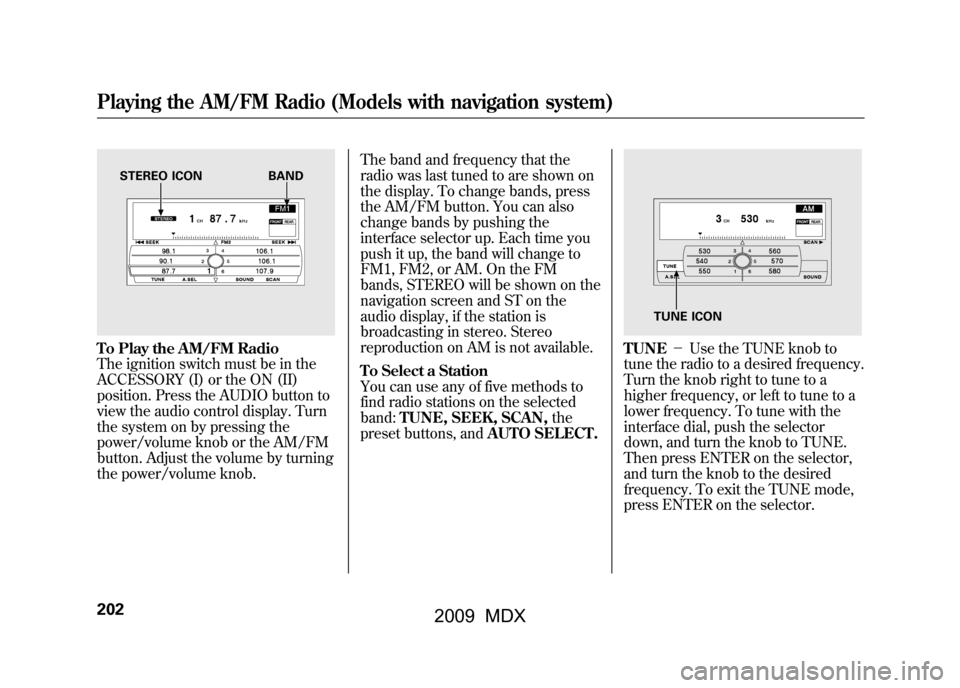
To Play the AM/FM Radio
The ignition switch must be in the
ACCESSORY (I) or the ON (II)
position. Press the AUDIO button to
view the audio control display. Turn
the system on by pressing the
power/volume knob or the AM/FM
button. Adjust the volume by turning
the power/volume knob.The band and frequency that the
radio was last tuned to are shown on
the display. To change bands, press
the AM/FM button. You can also
change bands by pushing the
interface selector up. Each time you
push it up, the band will change to
FM1, FM2, or AM. On the FM
bands, STEREO will be shown on the
navigation screen and ST on the
audio display, if the station is
broadcasting in stereo. Stereo
reproduction on AM is not available.
To Select a Station
You can use any of five methods to
find radio stations on the selected
band:
TUNE, SEEK, SCAN, the
preset buttons, and AUTO SELECT.
TUNE-Use the TUNE knob to
tune the radio to a desired frequency.
Turn the knob right to tune to a
higher frequency, or left to tune to a
lower frequency. To tune with the
interface dial, push the selector
down, and turn the knob to TUNE.
Then press ENTER on the selector,
and turn the knob to the desired
frequency. To exit the TUNE mode,
press ENTER on the selector.
STEREO ICON BAND
TUNE ICON
Playing the AM/FM Radio (Models with navigation system)20208/06/06 16:58:07 09 ACURA MDX MMC North America Owner's M 50 31STX620 enu
2009 MDX
Page 216 of 489

MODE-To switch between the
category mode and channel mode,
press and hold the DISP/MODE
button until the mode changes. The
CATEGORY or CHANNEL mode is
displayed on the screen. To switch
the mode with the interface dial,
scroll down, select MODE, and press
ENTER on the selector. In the category mode, such as Jazz,
Rock, Classical, etc., you can
navigate through all of the channels
within that category. In the channel
mode, you can select all of the
available channels.
Each time you press and release the
DISP/MODE button, the audio
display changes in the following
sequence: channel name, channel
number, category, artist name, and
music title.
On the screen, you will see the
selected CHANNEL (number),
CATEGORY, NAME (artist name),
and TITLE (music title).TUNE
-Turn the TUNE knob to
change channel selections. Turn the
knob right for higher numbered
channels and left for lower numbered
channels. You can also change
channels with the interface selector,
push down the interface selector to
choose TUNE and press ENTER on
the selector. Turn the interface knob
to the same directions. In the
category mode, you can only select
channels within that category.Playing the XM
®Satellite Radio (Models with navigation system)
21208/06/06 16:58:07 09 ACURA MDX MMC North America Owner's M 50 31STX620 enu
2009 MDX
Page 225 of 489
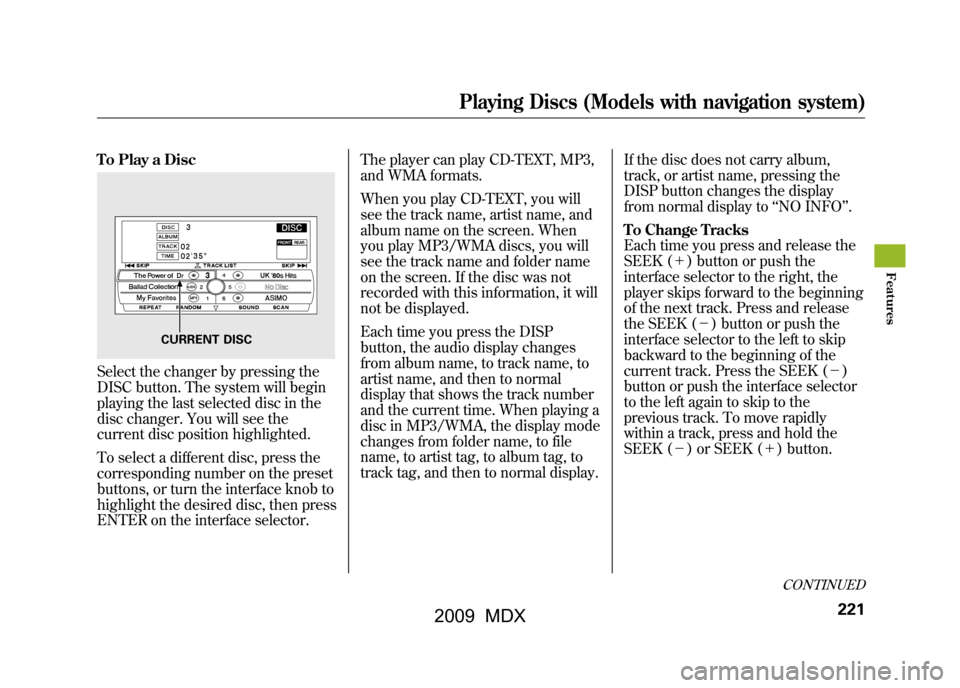
To Play a DiscSelect the changer by pressing the
DISC button. The system will begin
playing the last selected disc in the
disc changer. You will see the
current disc position highlighted.
To select a different disc, press the
corresponding number on the preset
buttons, or turn the interface knob to
highlight the desired disc, then press
ENTER on the interface selector.The player can play CD-TEXT, MP3,
and WMA formats.
When you play CD-TEXT, you will
see the track name, artist name, and
album name on the screen. When
you play MP3/WMA discs, you will
see the track name and folder name
on the screen. If the disc was not
recorded with this information, it will
not be displayed.
Each time you press the DISP
button, the audio display changes
from album name, to track name, to
artist name, and then to normal
display that shows the track number
and the current time. When playing a
disc in MP3/WMA, the display mode
changes from folder name, to file
name, to artist tag, to album tag, to
track tag, and then to normal display.
If the disc does not carry album,
track, or artist name, pressing the
DISP button changes the display
from normal display to
‘‘NO INFO ’’.
To Change Tracks
Each time you press and release the
SEEK (+ ) button or push the
interface selector to the right, the
player skips forward to the beginning
of the next track. Press and release
the SEEK (-) button or push the
interface selector to the left to skip
backward to the beginning of the
current track. Press the SEEK (- )
button or push the interface selector
to the left again to skip to the
previous track. To move rapidly
within a track, press and hold the
SEEK (- ) or SEEK (+ ) button.
CURRENT DISC
CONTINUED
Playing Discs (Models with navigation system)
221
Feat ures
08/06/06 16:58:07 09 ACURA MDX MMC North America Owner's M 50 31STX620 enu
2009 MDX
Page 231 of 489

Removing Discs from the Changer
To remove the disc that is currently
playing, press the eject button. You
will see‘‘EJECT ’’in the audio
display. When you remove the disc
from the slot, the system
automatically enters the previous
mode AM, FM1, FM2, or XM
Satellite Radio. The system also
begins the load sequence so you can
load another disc. If you do not load
another disc, the load sequence is
canceled, and the system continues
playing in the previous mode.
If you do not remove the disc from
the slot, the system will reload the
disc after 10 seconds. To begin
playing the disc, press the disc
button. To remove a different disc from the
changer, first select it by pressing
the corresponding number on the
preset button or turning the interface
knob, and pressing ENTER on the
interface selector. When that disc
begins playing, press the eject
button.
When you press the eject button
while listening to the radio, or with
the audio system turned off, the disc
that was last selected is ejected. After
that disc is ejected, pressing the eject
button again will eject the next disc
in numerical order. By doing this six
times, you can remove all the discs
from the changer.
You can also eject discs when the
ignition switch is off:
To eject one disc, press and release
the eject button.
To eject all discs, press and hold the
eject button.
Playing Discs (Models with navigation system)
227
Feat ures
08/06/06 16:58:07 09 ACURA MDX MMC North America Owner's M 50 31STX620 enu
2009 MDX
Page 237 of 489
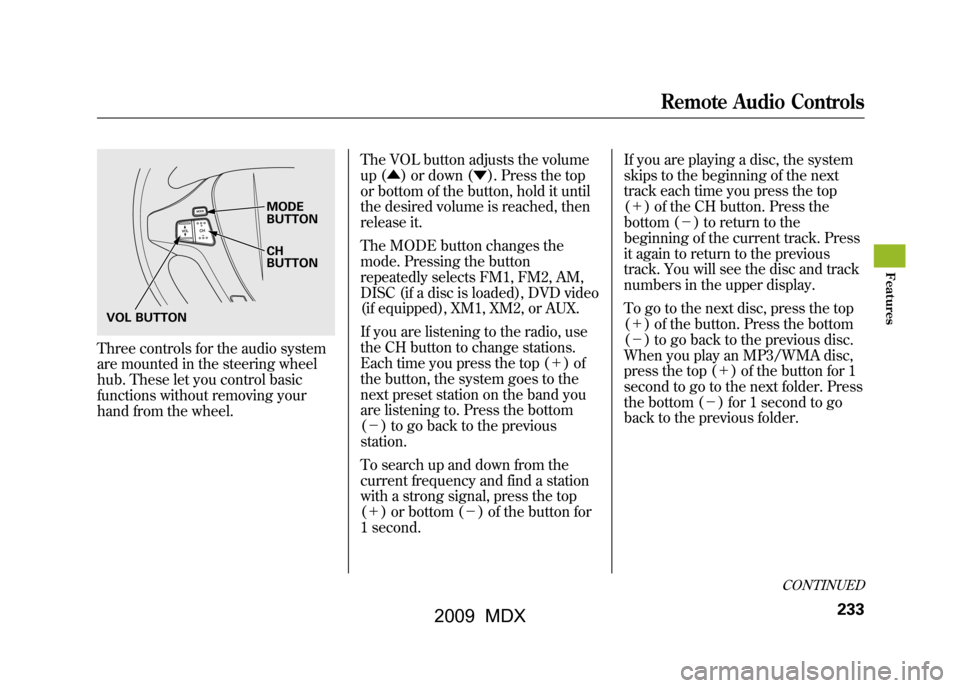
Three controls for the audio system
are mounted in the steering wheel
hub. These let you control basic
functions without removing your
hand from the wheel.The VOL button adjusts the volume
up (▲
) or down (▼). Press the top
or bottom of the button, hold it until
the desired volume is reached, then
release it.
The MODE button changes the
mode. Pressing the button
repeatedly selects FM1, FM2, AM,
DISC (if a disc is loaded), DVD video
(if equipped), XM1, XM2, or AUX.
If you are listening to the radio, use
the CH button to change stations.
Each time you press the top (+ )of
the button, the system goes to the
next preset station on the band you
are listening to. Press the bottom
(- ) to go back to the previous
station.
To search up and down from the
current frequency and find a station
with a strong signal, press the top
(+ ) or bottom (-) of the button for
1 second. If you are playing a disc, the system
skips to the beginning of the next
track each time you press the top
(+
) of the CH button. Press the
bottom (- ) to return to the
beginning of the current track. Press
it again to return to the previous
track. You will see the disc and track
numbers in the upper display.
To go to the next disc, press the top
(+ ) of the button. Press the bottom
(- ) to go back to the previous disc.
When you play an MP3/WMA disc,
press the top (+ ) of the button for 1
second to go to the next folder. Press
the bottom (- ) for 1 second to go
back to the previous folder.
MODE
BUTTON
CH
BUTTON
VOL BUTTON
CONTINUED
Remote Audio Controls
233
Feat ures
08/06/06 16:58:07 09 ACURA MDX MMC North America Owner's M 50 31STX620 enu
2009 MDX
Page 238 of 489

If you are listening to XM Satellite
Radio, use the CH button to change
channels. Each time you press the
top (+) of the button, the system
goes to the next preset channel.
Press the bottom (- ) to go back to
the previous preset channel.
To go to the next channel of the
category you are listening to, press
the top (+ ) of the button for 1
second. Press the bottom (- ) for 1
second to go back to the previous
channel. If you are playing a DVD video, use
the channel button to change
chapters. Each time you press the
top (+
) of the button, the system
goes to the next chapter. Press the
bottom (- ) to return to the
beginning of the current chapter.
Press it again to return to the
previous chapter.Remote Audio Controls23408/06/06 16:58:07 09 ACURA MDX MMC North America Owner's M 50 31STX620 enu
2009 MDX
Page 240 of 489
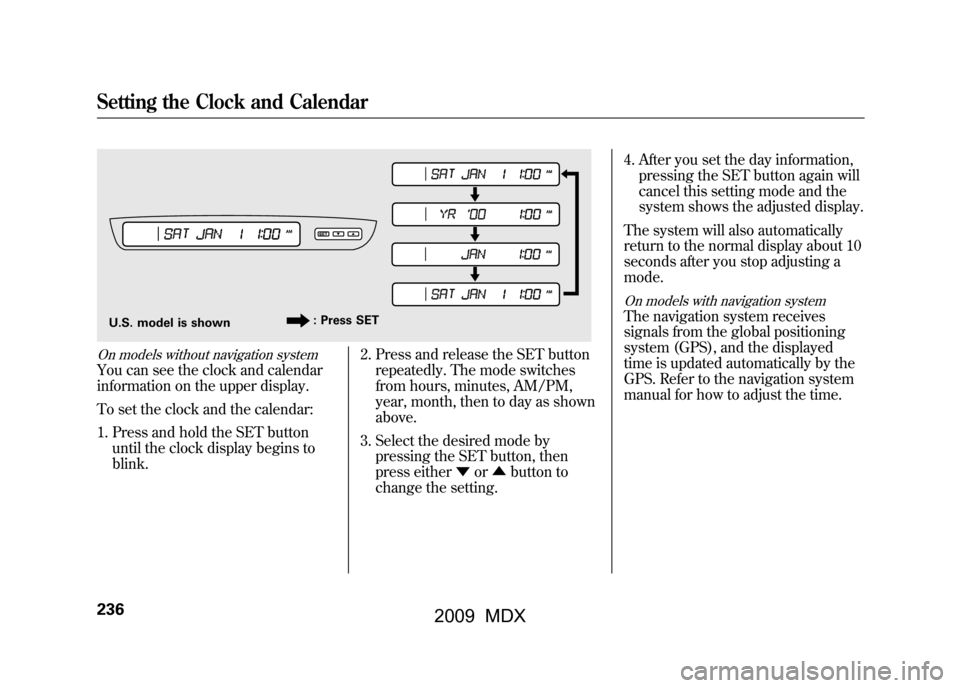
On models without navigation systemYou can see the clock and calendar
information on the upper display.
To set the clock and the calendar:1. Press and hold the SET button until the clock display begins to
blink. 2. Press and release the SET button
repeatedly. The mode switches
from hours, minutes, AM/PM,
year, month, then to day as shown
above.
3. Select the desired mode by pressing the SET button, then
press either ▼or▲ button to
change the setting. 4. After you set the day information,
pressing the SET button again will
cancel this setting mode and the
system shows the adjusted display.
The system will also automatically
return to the normal display about 10
seconds after you stop adjusting a
mode.
On models with navigation systemThe navigation system receives
signals from the global positioning
system (GPS), and the displayed
time is updated automatically by the
GPS. Refer to the navigation system
manual for how to adjust the time.
U.S. model is shown : Press SETSetting the Clock and Calendar23608/06/06 16:58:07 09 ACURA MDX MMC North America Owner's M 50 31STX620 enu
2009 MDX