radio Acura MDX 2009 Owner's Guide
[x] Cancel search | Manufacturer: ACURA, Model Year: 2009, Model line: MDX, Model: Acura MDX 2009Pages: 489, PDF Size: 11.91 MB
Page 223 of 489
Your vehicle's audio system has an
in-dash disc changer with the same
controls used for the radio. To
operate the disc changer, the ignition
switch must be in the ACCESSORY
(I) or the ON (II) position.
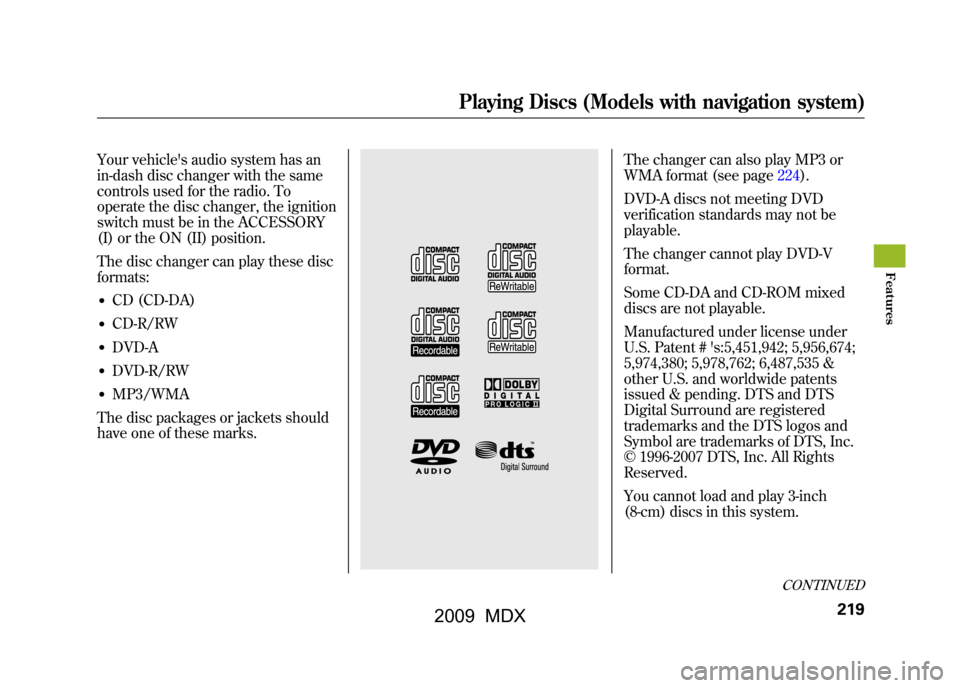
The disc changer can play these disc
formats:●CD (CD-DA)●CD-R/RW●DVD-A●DVD-R/RW●MP3/WMA
The disc packages or jackets should
have one of these marks.
The changer can also play MP3 or
WMA format (see page224).
DVD-A discs not meeting DVD
verification standards may not be
playable.
The changer cannot play DVD-V
format.
Some CD-DA and CD-ROM mixed
discs are not playable.
Manufactured under license under
U.S. Patent # 's:5,451,942; 5,956,674;
5,974,380; 5,978,762; 6,487,535 &
other U.S. and worldwide patents
issued & pending. DTS and DTS
Digital Surround are registered
trademarks and the DTS logos and
Symbol are trademarks of DTS, Inc.
© 1996-2007 DTS, Inc. All Rights
Reserved.
You cannot load and play 3-inch
(8-cm) discs in this system.
CONTINUED
Playing Discs (Models with navigation system)
219
Feat ures
08/06/06 16:58:07 09 ACURA MDX MMC North America Owner's M 50 31STX620 enu
2009 MDX
Page 231 of 489

Removing Discs from the Changer
To remove the disc that is currently
playing, press the eject button. You
will see‘‘EJECT ’’in the audio
display. When you remove the disc
from the slot, the system
automatically enters the previous
mode AM, FM1, FM2, or XM
Satellite Radio. The system also
begins the load sequence so you can
load another disc. If you do not load
another disc, the load sequence is
canceled, and the system continues
playing in the previous mode.
If you do not remove the disc from
the slot, the system will reload the
disc after 10 seconds. To begin
playing the disc, press the disc
button. To remove a different disc from the
changer, first select it by pressing
the corresponding number on the
preset button or turning the interface
knob, and pressing ENTER on the
interface selector. When that disc
begins playing, press the eject
button.
When you press the eject button
while listening to the radio, or with
the audio system turned off, the disc
that was last selected is ejected. After
that disc is ejected, pressing the eject
button again will eject the next disc
in numerical order. By doing this six
times, you can remove all the discs
from the changer.
You can also eject discs when the
ignition switch is off:
To eject one disc, press and release
the eject button.
To eject all discs, press and hold the
eject button.
Playing Discs (Models with navigation system)
227
Feat ures
08/06/06 16:58:07 09 ACURA MDX MMC North America Owner's M 50 31STX620 enu
2009 MDX
Page 237 of 489
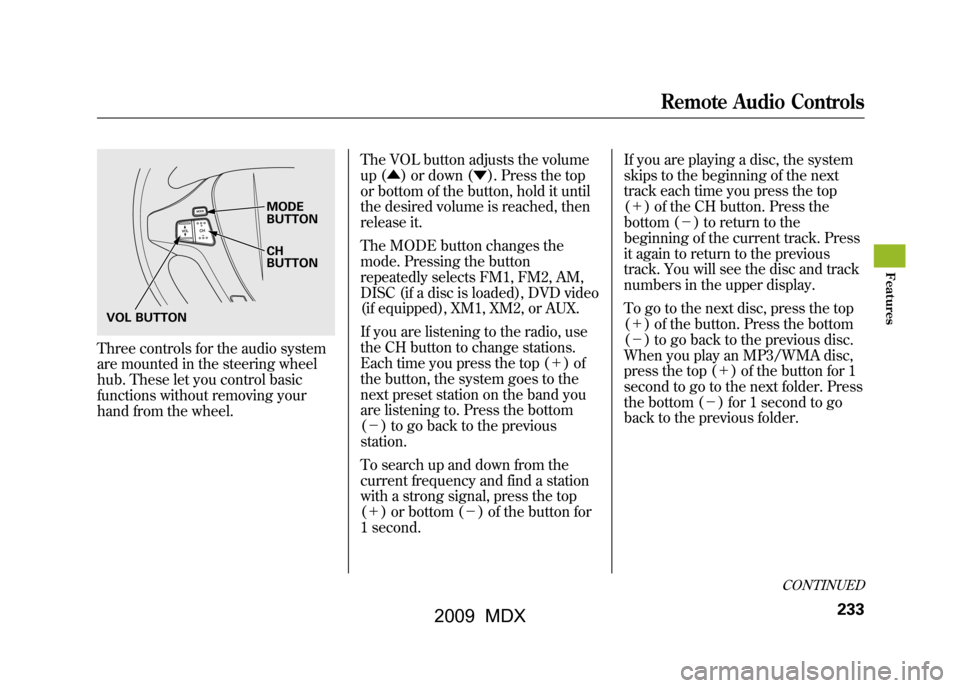
Three controls for the audio system
are mounted in the steering wheel
hub. These let you control basic
functions without removing your
hand from the wheel.The VOL button adjusts the volume
up (▲
) or down (▼). Press the top
or bottom of the button, hold it until
the desired volume is reached, then
release it.
The MODE button changes the
mode. Pressing the button
repeatedly selects FM1, FM2, AM,
DISC (if a disc is loaded), DVD video
(if equipped), XM1, XM2, or AUX.
If you are listening to the radio, use
the CH button to change stations.
Each time you press the top (+ )of
the button, the system goes to the
next preset station on the band you
are listening to. Press the bottom
(- ) to go back to the previous
station.
To search up and down from the
current frequency and find a station
with a strong signal, press the top
(+ ) or bottom (-) of the button for
1 second. If you are playing a disc, the system
skips to the beginning of the next
track each time you press the top
(+
) of the CH button. Press the
bottom (- ) to return to the
beginning of the current track. Press
it again to return to the previous
track. You will see the disc and track
numbers in the upper display.
To go to the next disc, press the top
(+ ) of the button. Press the bottom
(- ) to go back to the previous disc.
When you play an MP3/WMA disc,
press the top (+ ) of the button for 1
second to go to the next folder. Press
the bottom (- ) for 1 second to go
back to the previous folder.
MODE
BUTTON
CH
BUTTON
VOL BUTTON
CONTINUED
Remote Audio Controls
233
Feat ures
08/06/06 16:58:07 09 ACURA MDX MMC North America Owner's M 50 31STX620 enu
2009 MDX
Page 238 of 489

If you are listening to XM Satellite
Radio, use the CH button to change
channels. Each time you press the
top (+) of the button, the system
goes to the next preset channel.
Press the bottom (- ) to go back to
the previous preset channel.
To go to the next channel of the
category you are listening to, press
the top (+ ) of the button for 1
second. Press the bottom (- ) for 1
second to go back to the previous
channel. If you are playing a DVD video, use
the channel button to change
chapters. Each time you press the
top (+
) of the button, the system
goes to the next chapter. Press the
bottom (- ) to return to the
beginning of the current chapter.
Press it again to return to the
previous chapter.Remote Audio Controls23408/06/06 16:58:07 09 ACURA MDX MMC North America Owner's M 50 31STX620 enu
2009 MDX
Page 239 of 489

Your vehicle's audio system may
disable itself if it is disconnected
from electrical power for any reason.
To make it work again, you must
enter a specific five-digit code with
the preset buttons. Because there are
hundreds of number combinations
possible from the five digits, making
the system work without knowing
the exact code is nearly impossible.
You should have received a card that
lists your audio system code number
and serial number. It is best to store
this card in a safe place at home. In
addition, you should write the audio
system's serial number in this
owner's manual.
If you lose the card, you must obtain
the code number from your dealer.
To do this, you will need the audio
system's serial number.If your vehicle's battery is
disconnected or goes dead, or the
radio fuse is removed, the audio
system will disable itself. If this
happens, you will see
‘‘
’’in
the audio display the next time you
turn on the system. Use the preset
buttons to enter the five-digit code.
The code is located on the radio code
card included in your owner's
manual kit. When it is entered
correctly, the radio will start playing.
If you make a mistake entering the
code, do not start over; complete the
five-digit sequence, then enter the
correct code. You have 10 tries to
enter the correct code. If you are
unsuccessful in 10 attempts, you
must then leave the system on for 1
hour before trying again. The system will retain your AM and
FM presets even if power is
disconnected.
Radio Theft Protection
235
Feat ures
08/06/06 16:58:07 09 ACURA MDX MMC North America Owner's M 50 31STX620 enu
2009 MDX
Page 241 of 489

Available on U.S. Entertainment Packageand Canadian Elite Package modelsYour vehicle is equipped with a rear
entertainment system that includes a
DVD player for the enjoyment of the
rear passengers.
With this system, the rear
passengers can enjoy a different
entertainment source (radio, disc
changer, DVD player, XM Radio, or
optional CD changer/tape player)
than the front seat occupants. The
audio is broadcast through the
supplied wireless headphones.
The ignition switch must be in the
ACCESSORY (I) or the ON (II)
position to operate the rear
entertainment system. To Turn On the System
Press the REAR PWR button. The
indicator on the REAR PWR button
will come on, as well as the indicator
on the FRONT SOURCE button. The
rear seat passengers can then
operate the rear system from the
control panel in the ceiling. The rear
control panel can also be detached
and used as a remote control, by
pushing the RELEASE button, and
pulling the remote toward you.
Pressing the REAR CTRL OFF
button disables rear control. The
indicator in the button comes on and
your passengers can no longer
operate the system with the rear
control panel. When the button is
pressed, the
‘‘CTRL OFF ’’message
appears in the overhead screen to let
your passengers know that the
control panel is disabled. The rear system selects the source it
was last set to. If that source has
been removed (the DVD has been
ejected from the player, for example),
you will see
‘‘DVD EJECT ’’in the
display. You should select another
source or insert a DVD.
Rear Speakers
When you turn on the system, the rear
speakers are automatically turned off if
the rear system selects a different
entertainment source than the front
system. You will see the Rear Speakers
Off icon both in the audio display and the
overhead screen. The sound for the rear
system is sent to the wireless
headphones.
If you want to turn the rear speakers on
again, press and hold the REAR PWR
button until the Rear Speakers Off icon
goes off.
NOTE: The rear speakers are connected
to the front system, so they will always
play the source that the front system is
set to.
CONTINUED
Rear Entertainment System
237
Feat ures
08/06/06 16:58:07 09 ACURA MDX MMC North America Owner's M 50 31STX620 enu
2009 MDX
Page 243 of 489
To Select Rear Entertainment
from the Front Control Panel
To operate the rear entertainment
system from the front panel, press
the REAR SOURCE button. You will
hear two beeps and the indicator in
the button comes on to show that the
control panel is enabled.
If you do not operate the rear
entertainment system from the front
panel within 10 seconds, the
indicator goes off and the FRONT
SOURCE indicator comes on
automatically.
To play the radio, the buttons for the
front entertainment system have the
same functions.
If discs are loaded in the disc
changer of the upper part, select the
6 DISC button. If a disc is loaded in
the lower player, select the DVD
button.Operating the DVD Player from
the Front Control Panel
The DVD player in your rear
entertainment system can play DVD
video discs, audio CDs MP3/WMA
discs and DTS CDs.
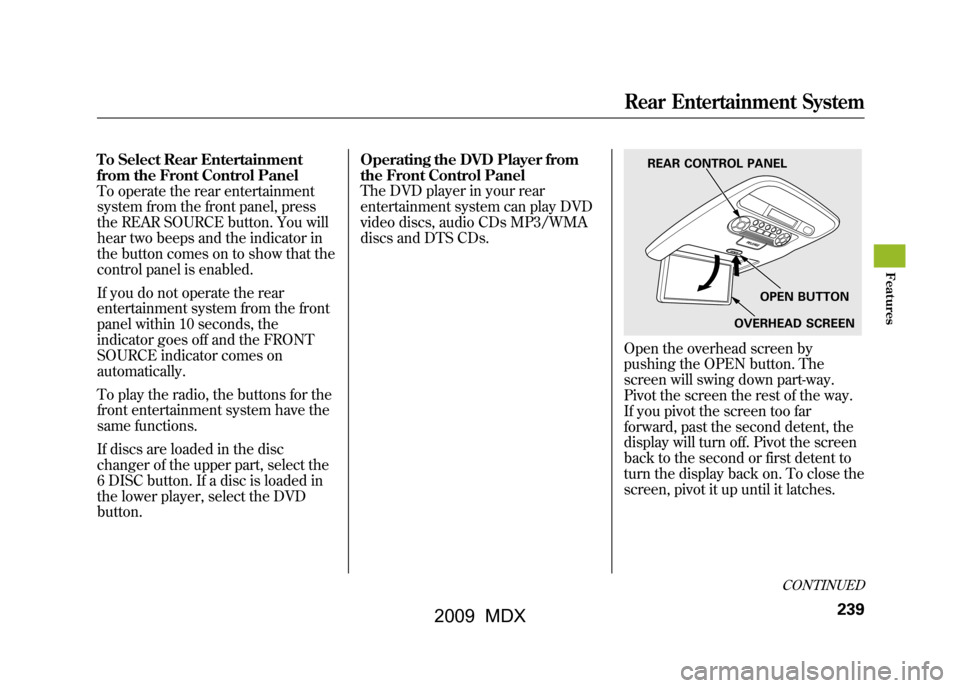
Open the overhead screen by
pushing the OPEN button. The
screen will swing down part-way.
Pivot the screen the rest of the way.
If you pivot the screen too far
forward, past the second detent, the
display will turn off. Pivot the screen
back to the second or first detent to
turn the display back on. To close the
screen, pivot it up until it latches.
REAR CONTROL PANEL
OPEN BUTTON
OVERHEAD SCREEN
CONTINUED
Rear Entertainment System
239
Feat ures
08/06/06 16:58:07 09 ACURA MDX MMC North America Owner's M 50 31STX620 enu
2009 MDX
Page 245 of 489

SEEK/SKIP-Press and hold the
+ button to move forward; you will
see the time elapsed shown in the
overhead screen advancing rapidly.
Press and hold the -button to move
backward; you will see the time
elapsed shown in the overhead
screen decreasing. Release the
button when the system reaches the
point you want.
Each time you press the +button
and release it, the system skips
forward to the beginning of the next
track or chapter. Press and release
the -button to skip backward to the
beginning of the current track. Press
and release it again to skip to the
beginning of the previous track or
chapter. EJECT
-Press the eject button to
remove the DVD from the drive.
To Return to Front Audio Controls
To return front panel control to the
front audio system. Press the
FRONT SOURCE button. You will
hear a beep and the indicator in the
button comes on. The indicator also
comes on automatically, when you do
not operate the rear entertainment
system for 10 seconds. Using the Rear Control Panel
To turn on the rear entertainment
system from the rear control panel,
press the PWR button. Use the AM/
FM button, XM RADIO button, 6
DISC button, DVD button, or AUX
button to select the entertainment
source. The selected source will be
shown in the display. Make sure the
rear control operation has not been
disabled with the REAR CTRL button
on the front panel. When the audio
system is off or the front side rear
power is off, the rear control panel
cannot be turned on.
CONTINUED
Rear Entertainment System
241
Feat ures
08/06/06 16:58:07 09 ACURA MDX MMC North America Owner's M 50 31STX620 enu
2009 MDX
Page 246 of 489
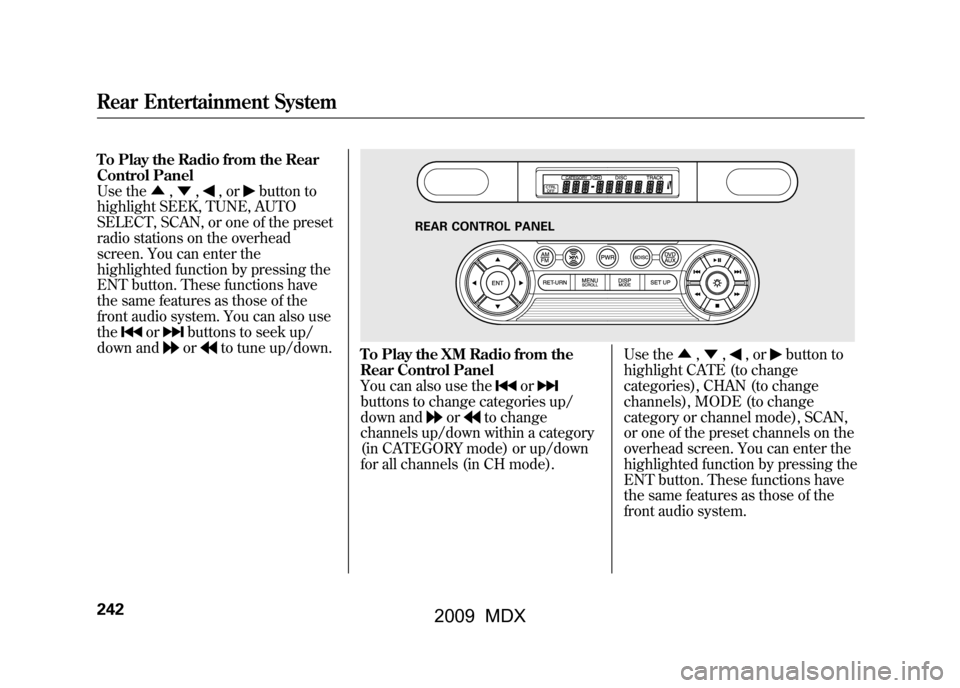
To Play the Radio from the Rear
Control Panel
Use the▲,▼ ,
,or
button to
highlight SEEK, TUNE, AUTO
SELECT, SCAN, or one of the preset
radio stations on the overhead
screen. You can enter the
highlighted function by pressing the
ENT button. These functions have
the same features as those of the
front audio system. You can also use
the
or
buttons to seek up/
down andor
to tune up/down.
To Play the XM Radio from the
Rear Control Panel
You can also use the
or
buttons to change categories up/
down and
or
to change
channels up/down within a category
(in CATEGORY mode) or up/down
for all channels (in CH mode). Use the
▲,▼ ,
,or
button to
highlight CATE (to change
categories), CHAN (to change
channels), MODE (to change
category or channel mode), SCAN,
or one of the preset channels on the
overhead screen. You can enter the
highlighted function by pressing the
ENT button. These functions have
the same features as those of the
front audio system.
REAR CONTROL PANEL
Rear Entertainment System24208/06/06 16:58:07 09 ACURA MDX MMC North America Owner's M 50 31STX620 enu
2009 MDX
Page 247 of 489

While the overhead screen is closed,
you can see the XM radio
information in the subsidiary display
in the ceiling. Pressing the DISP
MODE button repeatedly changes
the subsidiary display from the
channel number, to the category
name, to the music title, to the artist
name, and to the channel name, and
then back to the channel number.
To change mode, press and hold the
DISP MODE button for 5 seconds.To Play a Disc in the 6-Disc
Changer from the Rear Control
Panel
If discs are loaded in the disc
changer, select them by pressing the
6 DISC button.
Use the
▲,▼ ,
,or
button to
highlight REPEAT, RANDOM,
SCAN,
,
(skip),
,or
(cue) on the overhead screen. You
can enter the highlighted function by
pressing the ENT button. These
functions have the same features as
those of the front audio system. To change the disc currently playing,
use the
▲,▼ ,
,or
button to
highlight your selected disc icon, and
press ENT.
If CDs are loaded in the CD changer
and the overhead screen is not open,
pressing the ▲or▼ button changes
the discs.CONTINUED
Rear Entertainment System
243
Feat ures
08/06/06 16:58:07 09 ACURA MDX MMC North America Owner's M 50 31STX620 enu
2009 MDX