brake light Acura MDX 2009 Owner's Manual
[x] Cancel search | Manufacturer: ACURA, Model Year: 2009, Model line: MDX, Model: Acura MDX 2009Pages: 489, PDF Size: 11.91 MB
Page 8 of 489
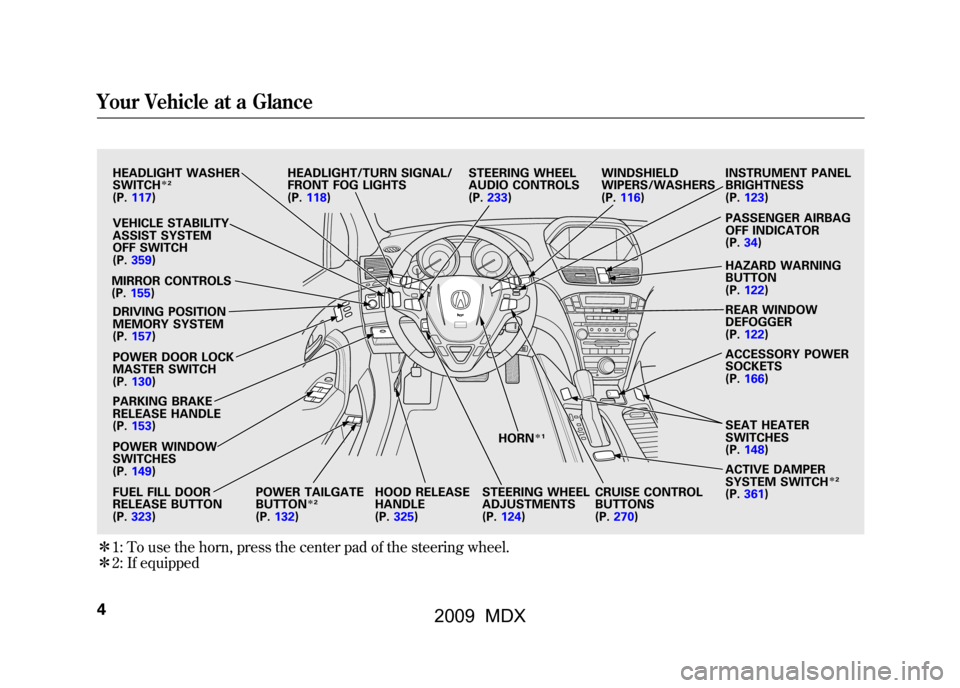
ꭧ1:To use the horn, press the center pad of the steering wheel.
ꭧ 2: If equipped
HEADLIGHT WASHER
SWITCH
ꭧ 2
(P. 117)
VEHICLE STABILITY
ASSIST SYSTEM
OFF SWITCH
(P. 359)
MIRROR CONTROLS
(P. 155)
DRIVING POSITION
MEMORY SYSTEM
(P. 157)
POWER DOOR LOCK
MASTER SWITCH
(P. 130)
PARKING BRAKE
RELEASE HANDLE
(P. 153)
POWER WINDOW
SWITCHES
(P. 149)
FUEL FILL DOOR
RELEASE BUTTON
(P. 323) POWER TAILGATE
BUTTON
ꭧ
2
(P. 132) HOOD RELEASE
HANDLE
(P.
325) HORN
ꭧ
1
STEERING WHEEL
ADJUSTMENTS
(P. 124)
HEADLIGHT/TURN SIGNAL/
FRONT FOG LIGHTS
(P.
118) STEERING WHEEL
AUDIO CONTROLS
(P.
233) WINDSHIELD
WIPERS/WASHERS
(P.
116) INSTRUMENT PANEL
BRIGHTNESS
(P.
123)
PASSENGER AIRBAG
OFF INDICATOR
(P. 34)
HAZARD WARNING
BUTTON
(P. 122)
REAR WINDOW
DEFOGGER
(P. 122)
ACCESSORY POWER
SOCKETS
(P. 166)
SEAT HEATER
SWITCHES
(P. 148)
ACTIVE DAMPER
SYSTEM SWITCH
ꭧ 2
(P. 361)
CRUISE CONTROL
BUTTONS
(P.
270)
Your Vehicle at a Glance408/06/06 16:58:07 09 ACURA MDX MMC North America Owner's M 50 31STX620 enu
2009 MDX
Page 65 of 489
This section gives information about
the controls and displays that
contribute to the daily operation of
your vehicle. All the essential
controls are within easy reach.Control Locations
..........................
62
Instrument Panel
..........................
63
Instrument Panel Indicators
..........
64
Gauges
..........................................
72
Multi-Information Display
.............
73
Controls Near the Steering
Wheel
.....................................
115
Windshield Wipers and Washers
..............................
116
Rear Window Wiper and Washer
...............................
117
Turn Signal and Headlights
........
118
Hazard Warning Button
..............
122
Rear Window Defogger
...............
122
Instrument Panel
Brightness
..............................
123
Steering Wheel Adjustments
.......
124
Keys and Locks
...........................
126
Immobilizer System
....................
128
Ignition Switch
............................
129
Door Locks
.................................
130
Childproof Door Locks
............
131
Tailgate
.......................................
131
Power Tailgate
........................
132
Remote Transmitter
....................
135 Seats
...........................................
140
Detachable Anchor
.................
146
Seat Heaters
................................
148
Power Windows
..........................
149
Moonroof
....................................
152
Parking Brake
.............................
153
Mirrors
.......................................
154
Driving Position Memory System
....................................
157
Interior Lights
.............................
159
Interior Convenience Items
.........
162
Beverage Holders
...................
163
Console Compartment
............
164
Storage Compartment
.............
164
Glove Box
...............................
164
Sunglasses Holder
..................
165
Cargo Hooks
...........................
165
Sun Visor
................................
166
Vanity Mirror
..........................
166
Accessory Power Sockets
.......
166
AC Power Outlet
.....................
167
Instruments and Controls
61
Inst rument s and Cont rols
08/06/06 16:58:07 09 ACURA MDX MMC North America Owner's M 50 31STX620 enu
2009 MDX
Page 67 of 489
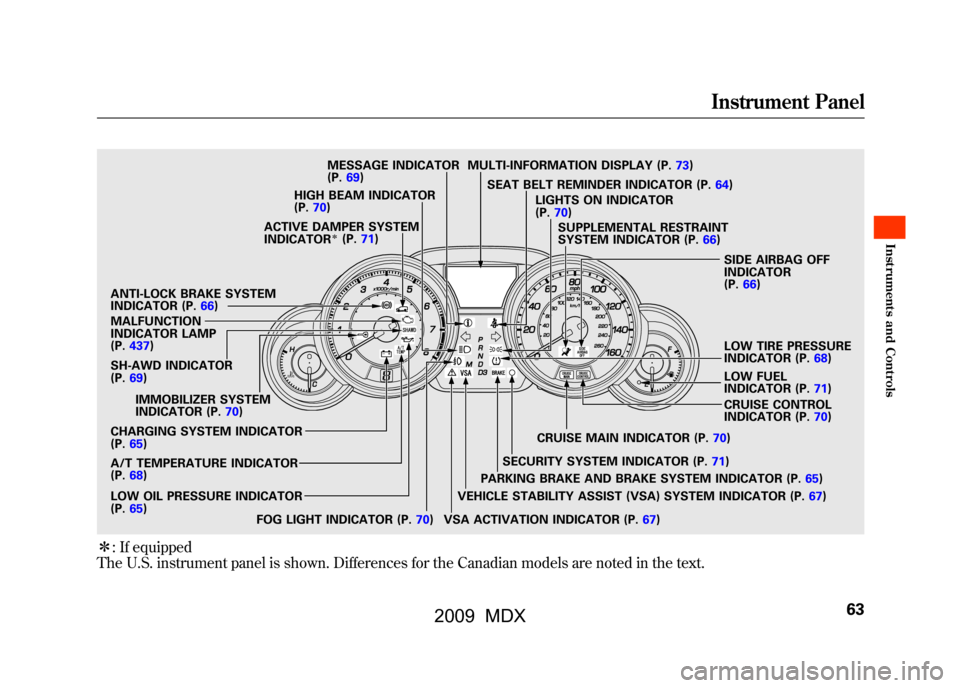
ꭧ: If equipped
The U.S. instrument panel is shown. Differences for the Canadian models are noted in the text.SH-AWD INDICATOR
(P. 69)
IMMOBILIZER SYSTEM
INDICATOR (P. 70)
CHARGING SYSTEM INDICATOR
(P. 65)
A/T TEMPERATURE INDICATOR
(P. 68)
LOW OIL PRESSURE INDICATOR
(P. 65)
FOG LIGHT INDICATOR (P. 70)CRUISE MAIN INDICATOR (P.
70)
SECURITY SYSTEM INDICATOR (P. 71)
PARKING BRAKE AND BRAKE SYSTEM INDICATOR (P. 65)
VEHICLE STABILITY ASSIST (VSA) SYSTEM INDICATOR (P. 67)
VSA ACTIVATION INDICATOR (P. 67)CRUISE CONTROL
INDICATOR (P.
70)
LOW FUEL
INDICATOR (P.
71)
LOW TIRE PRESSURE
INDICATOR (P.
68)
SIDE AIRBAG OFF
INDICATOR
(P.
66)
SUPPLEMENTAL RESTRAINT
SYSTEM INDICATOR (P.
66)
LIGHTS ON INDICATOR
(P.
70)
SEAT BELT REMINDER INDICATOR (P.
64)
MULTI-INFORMATION DISPLAY (P.
73)
MESSAGE INDICATOR
(P. 69)
HIGH BEAM INDICATOR
(P. 70)
ACTIVE DAMPER SYSTEM
INDICATOR
ꭧ(P. 71)
ANTI-LOCK BRAKE SYSTEM
INDICATOR (P. 66)
MALFUNCTION
INDICATOR LAMP
(P. 437)
Instrument Panel
63
Inst rument s and Cont rols
08/06/06 16:58:07 09 ACURA MDX MMC North America Owner's M 50 31STX620 enu
2009 MDX
Page 124 of 489
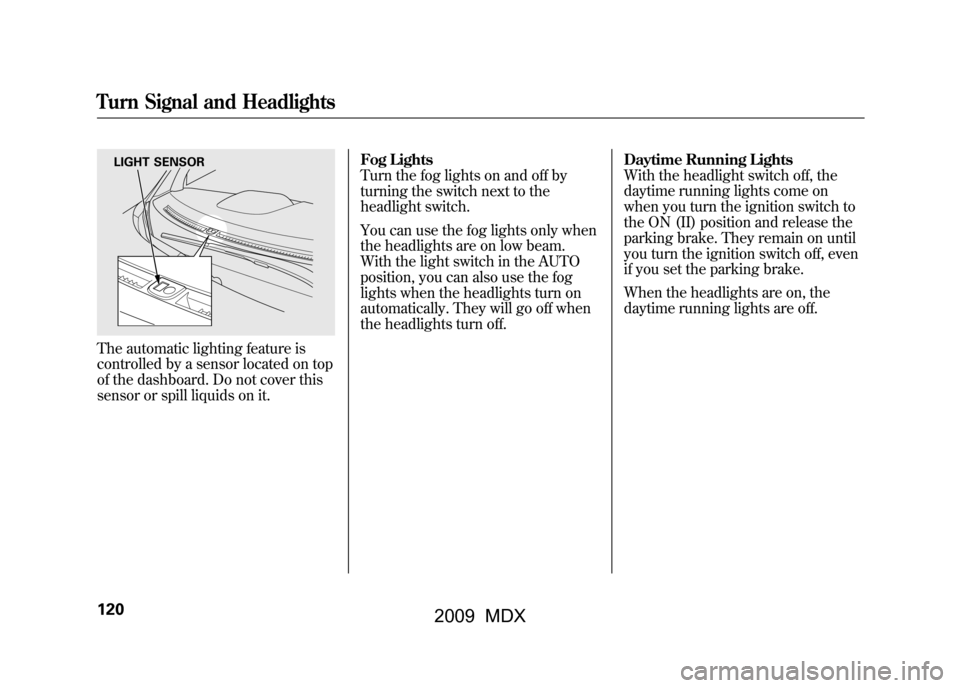
The automatic lighting feature is
controlled by a sensor located on top
of the dashboard. Do not cover this
sensor or spill liquids on it.Fog Lights
Turn the fog lights on and off by
turning the switch next to the
headlight switch.
You can use the fog lights only when
the headlights are on low beam.
With the light switch in the AUTO
position, you can also use the fog
lights when the headlights turn on
automatically. They will go off when
the headlights turn off.
Daytime Running Lights
With the headlight switch off, the
daytime running lights come on
when you turn the ignition switch to
the ON (II) position and release the
parking brake. They remain on until
you turn the ignition switch off, even
if you set the parking brake.
When the headlights are on, the
daytime running lights are off.
LIGHT SENSOR
Turn Signal and Headlights12008/06/06 16:58:07 09 ACURA MDX MMC North America Owner's M 50 31STX620 enu
2009 MDX
Page 158 of 489

Driving the vehicle with the parking
brake applied can damage the rear
brakes and axles. A beeper will sound if
the vehicle is driven with the parking
brake on.Mirrors
Keep the inside and outside mirrors
clean and adjusted for best visibility.
Be sure to adjust the mirrors before
you start driving.
The inside mirror can automatically
darken to reduce glare. To turn on
this feature, press the button on the
bottom of the mirror. The AUTO
indicator comes on as a reminder.
When it is on, the mirror darkens
when it senses the headlights of a
vehicle behind you, then returns to
normal visibility when the lights are
gone. Press the button again to turn
off this feature.INDICATOR
AUTO BUTTON SENSOR
Parking Brake, Mirrors15408/06/06 16:58:07 09 ACURA MDX MMC North America Owner's M 50 31STX620 enu
2009 MDX
Page 275 of 489

Cruise control may not hold the set
speed when you are going up and
down hills. If your vehicle speed
increases going down a hill, use the
brakes to slow down. This will cancel
the cruise control. To resume the set
speed, press the RES/ACCEL
button. The CRUISE CONTROL
indicator on the instrument panel will
come back on.
When climbing a steep hill, the
automatic transmission may
downshift to hold the set speed.Changing the Set Speed
You can increase the set cruising
speed in any of these ways:
●Press and hold the RES/ACCEL
button. When you reach the
desired cruising speed, release the
button.●Push on the accelerator pedal.
Accelerate to the desired cruising
speed, then press the SET/
DECEL button.●To increase the speed in very
small amounts, tap the RES/
ACCEL button. Each time you do
this, your vehicle will speed up
about 1 mph (1.6 km/h).You can decrease the set cruising
speed in any of these ways:
●Press and hold the SET/DECEL
button. Release the button when
you reach the desired speed.●To slow down in very small
amounts, tap the SET/DECEL
button. Each time you do this,
your vehicle will slow down about
1 mph (1.6 km/h).●Tap the brake pedal lightly with
your foot. The CRUISE CONTROL
indicator on the instrument panel
will go out. When the vehicle
slows to the desired speed, press
the SET/DECEL button.
CONTINUED
Cruise Control
271
Feat ures
08/06/06 16:58:07 09 ACURA MDX MMC North America Owner's M 50 31STX620 enu
2009 MDX
Page 329 of 489
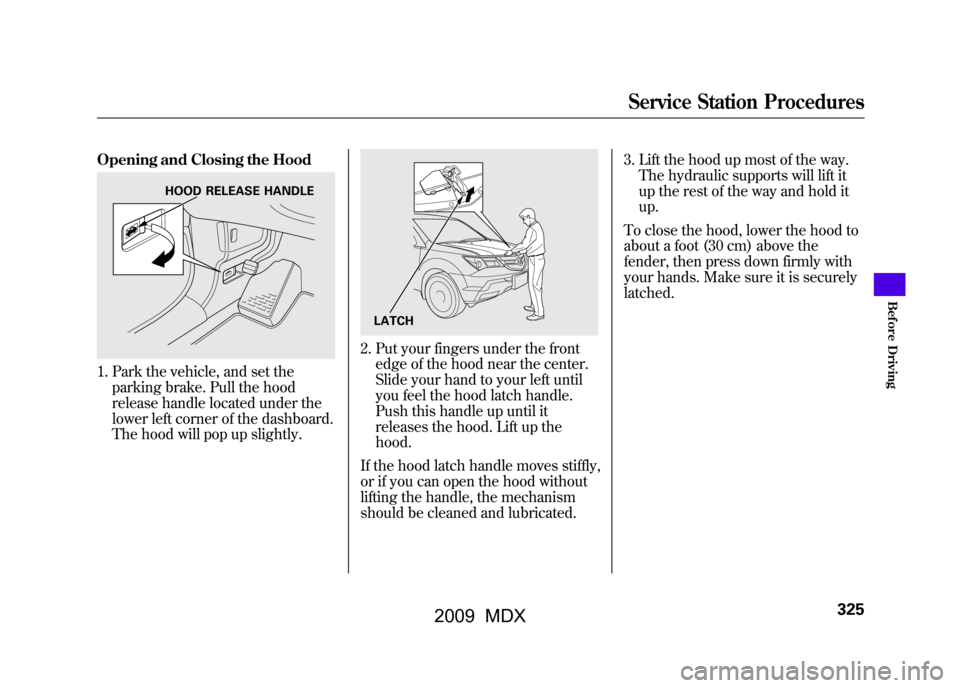
Opening and Closing the Hood1. Park the vehicle, and set theparking brake. Pull the hood
release handle located under the
lower left corner of the dashboard.
The hood will pop up slightly.
2. Put your fingers under the frontedge of the hood near the center.
Slide your hand to your left until
you feel the hood latch handle.
Push this handle up until it
releases the hood. Lift up the
hood.
If the hood latch handle moves stiffly,
or if you can open the hood without
lifting the handle, the mechanism
should be cleaned and lubricated. 3. Lift the hood up most of the way.
The hydraulic supports will lift it
up the rest of the way and hold it
up.
To close the hood, lower the hood to
about a foot (30 cm) above the
fender, then press down firmly with
your hands. Make sure it is securely
latched.
HOOD RELEASE HANDLE
LATCH
Service Station Procedures
325
Bef ore Driving
08/06/06 16:58:07 09 ACURA MDX MMC North America Owner's M 50 31STX620 enu
2009 MDX
Page 334 of 489

Modifying your vehicle, or installing
some non-Acura accessories, can
make your vehicle unsafe. Before
you make any modifications or add
any accessories, be sure to read the
following information.
Accessories
Your dealer has Acura accessories
that allow you to personalize your
vehicle. These accessories have been
designed and approved for your
vehicle, and are covered by warranty.
Although non-Acura accessories may
fit on your vehicle, they may not
meet factory specifications, and could
adversely affect your vehicle's
handling and stability.
Improper accessories or
modifications can affect your
vehicle's handling, stability, and
performance, and cause a
crash in which you can be hurt
or killed.
Follow all instructions in this
owner's manual regarding
accessories and modifications.
When properly installed, cellular
phones, alarms, two-way radios, and
low-powered audio systems should
not interfere with your vehicle's
computer controlled systems, such
as your airbags, anti-lock brakes, and
tire pressure monitoring system. Before installing any accessory:
●Make sure the accessory does not
obscure any lights, or interfere
with proper vehicle operation or
performance.●Be sure electronic accessories do
not overload electrical circuits (see
page440)or interfere with proper
operation of your vehicle.●Do not install accessories on the
side pillars or across the rear
windows. Accessories installed in
these areas may interfere with
proper operation of the side
curtain airbags.●Before installing any electronic
accessory, have the installer
contact your dealer for assistance.
If possible, have your dealer
inspect the final installation.
Accessories and Modifications33008/06/06 16:58:07 09 ACURA MDX MMC North America Owner's M 50 31STX620 enu
2009 MDX
Page 354 of 489

Always use the parking brake when
you park your vehicle. Make sure the
parking brake is set firmly, or your
vehicle may roll if it is parked on an
incline.
Set the parking brake before you put
the transmission in Park. This keeps
the vehicle from moving and putting
pressure on the parking mechanism
in the transmission.Parking Tips
●Make sure the moonroof and the
windows are closed.●Turn off the lights.●Place any packages, valuables, etc.
in the cargo area or take them with
you.●Lock the doors and the tailgate.
●Never park over dry leaves, tall
grass, or other flammable
materials. The hot three way
catalytic converter could cause
these materials to catch on fire.●If the vehicle is facing uphill, turn
the front wheels away from the
curb.●If the vehicle is facing downhill,
turn the front wheels toward the
curb.●Check the indicator on the
instrument panel to verify that the
security system is set.●Make sure the parking brake is
fully released before driving away.
Driving with the parking brake
partially set can overheat or
damage the rear brakes.
Parking35008/06/06 16:58:07 09 ACURA MDX MMC North America Owner's M 50 31STX620 enu
2009 MDX
Page 360 of 489

As required by the FCC:This device complies with Part 15 of theFCC rules. Operation is subject to the
following two conditions: (1) This devicemay not cause harmful interference, and(2) this device must accept any
interference received, includinginterference that may cause undesiredoperation.
Changes or modifications not expresslyapproved by the party responsible forcompliance could void the user's
authority to operate the equipment.This device complies with IndustryCanada Standard RSS-210.
Operation is subject to the following twoconditions: (1) this device may not cause
interference, and (2) this device mustaccept any interference that may causeundesired operation of the device.
Braking System
Your vehicle is equipped with disc
brakes at all four wheels. A power
assist helps reduce the effort needed
on the brake pedal. The emergency
brake assist system increases the
stopping force when you depress the
brake pedal hard in an emergency
situation. The anti-lock brake system
(ABS) helps you retain steering
control when braking very hard.
Resting your foot on the pedal keeps
the brakes applied lightly, builds up
heat, and reduces their effectiveness
and reduces brake pad life. In
addition, fuel economy can be
reduced. It also keeps your brake
lights on all the time, confusing
drivers behind you. Constant application of the brakes
when going down a long hill builds
up heat and reduces their
effectiveness. Use the engine to
assist the brakes by taking your foot
off the accelerator and downshifting
to a lower gear.
Check the brakes after driving
through deep water. Apply the
brakes moderately to see if they feel
normal. If not, apply them gently and
frequently until they do. Be extra
cautious in your driving.
Tire Pressure Monitoring System (TPMS), Braking System35608/06/06 16:58:07 09 ACURA MDX MMC North America Owner's M 50 31STX620 enu
2009 MDX