tires Acura MDX 2009 Owner's Manual
[x] Cancel search | Manufacturer: ACURA, Model Year: 2009, Model line: MDX, Model: Acura MDX 2009Pages: 489, PDF Size: 11.91 MB
Page 5 of 489

2009 MDX Online Reference Owner's Manual
Contents
Owner's Identification Form
Introduction
.............................................................................................................................\
............................. i
A Few Words About Safety ......................................................................\
........................................................ iii
Important Handling Information ........................................................................\
............................................ iv
Your Vehicle at a Glance (main controls) ....................................................\
................................................ 3
Driver and Passenger Safety (seat belts, SRS, and child protection) ......................\
.............................. 5
Instruments and Controls
(indicators, gauges, multi-information display, dashboard, and steering column)
..... 61
Features
(
climate control,audio,rear entertainment,steering wheel,security,cruise \
control,and other convenience items
)
......... 169
Before Driving
(fuel, vehicle break- in, and cargo loading) ................\
..................................................... 321
Driving
(engine and transmission operation) .........................................\
....................................................... 337
Maintenance
(minder, fluid checking, minor services, and vehicle storage)........................................... 381
Taking Care of the Unexpected
(flat tire, dead battery, overheating, and fuses) ............................... 423
Technical Information
(vehicle specifications, tires, and emissions controls) ....................................... 449
Warranty and C
lient Relations (U. S. and Canada only) (warranty and contact information) .......... 465
Index ........................................................................\
....................................................... ................\
........................ I
Service Information Summary
( fluid capacities and tire pressures)
\
\
1 00X31-STX-6200
Page 69 of 489

Low Oil Pressure
Indicator
The engine can be severely damaged
if this indicator flashes or stays on
when the engine is running, or if a
‘‘ CHECK ENGINE OIL LEVEL’’
message is on the multi-information
display. For more information, see
page436.Charging System
Indicator
If this indicator comes on when the
engine is running, the battery is not
being charged, and you will also see
a ‘‘CHECK CHARGING SYSTEM ’’
message on the multi-information
display. For more information, see
page436.Malfunction Indicator
Lamp
You will also see a ‘‘CHECK
EMISSION SYSTEM’’ message on
the multi-information display. For
more information, see page437.
U.S. Canada
Parking Brake
and Brake
System Indicator
This indicator has two functions:
1. It comes on when you turn the ignition switch to the ON (II)
position. It is a reminder to check
the parking brake. Driving with
the parking brake not fully
released can damage the rear
brakes, axles, and tires.
If you drive without releasing the
parking brake, a beeper will
sound, and you will also see a
‘‘RELEASE PARKING BRAKE ’’
message on the multi-information
display (see page81). 2. If it stays on after you have fully
released the parking brake while
the engine is running, or if it
comes on while driving, it can
indicate a problem in the brake
system. You will also see a ‘‘LOW
BRAKE FLUID ’’or ‘‘CHECK
BRAKE SYSTEM ’’message on the
multi-information display (see
pages81).For more information,
see page438.
CONTINUED
Instrument Panel Indicators
65
Inst rument s and Cont rols
08/06/06 16:58:07 09 ACURA MDX MMC North America Owner's M 50 31STX620 enu
2009 MDX
Page 72 of 489

Low Tire Pressure/
TPMS Indicator
This indicator normally comes on for
a few seconds when you turn the
ignition switch to the ON (II)
position.
This indicator has two functions:
1. If it comes on while driving, it indicates that one or more of your
vehicle's tires are significantly low
on pressure.
You will also see a ‘‘CHECK TIRE
PRESSURE ’’message on the multi-
information display (see page82).
Check the tire pressure monitor on
the multi-information display and
determine the cause (see page352). If this happens, pull to the side of the
road when it is safe, check which tire
has lost pressure on the multi-
information display, and determine
the cause. If it is because of a flat tire,
have the flat tire repaired as soon as
possible. If two or more tires are
underinflated, call a professional
towing service. For more
information, see page446.
2. If this indicator begins to flash,
there is a problem with the tire
pressure monitoring system
(TPMS). You will also see a
‘‘CHECK TPMS SYSTEM’’
message on the multi-information
display. The indicator continues to
flash for a while (approximately 1
minute), then stays on. If this
happens, have your dealer check
the system as soon as possible.
For more information, see page
354.
A/T Temperature
Indicator
This indicator monitors the
temperature of the automatic
transmission fluid. It should come on
for a few seconds when you turn the
ignition switch to the ON (II)
position. If it comes on while driving,
it means the transmission fluid
temperature is too high. Pull to the
side of the road when it is safe, shift
to Park, and let the engine idle until
the indicator goes out.
You will also see an ‘‘A/T TEMP
HIGH ’’message on the multi-
information display (see page82).
Continuing to drive with the A/T
temperature indicator on may cause
serious damage to the transmission.
Instrument Panel Indicators6808/06/06 16:58:07 09 ACURA MDX MMC North America Owner's M 50 31STX620 enu
2009 MDX
Page 81 of 489
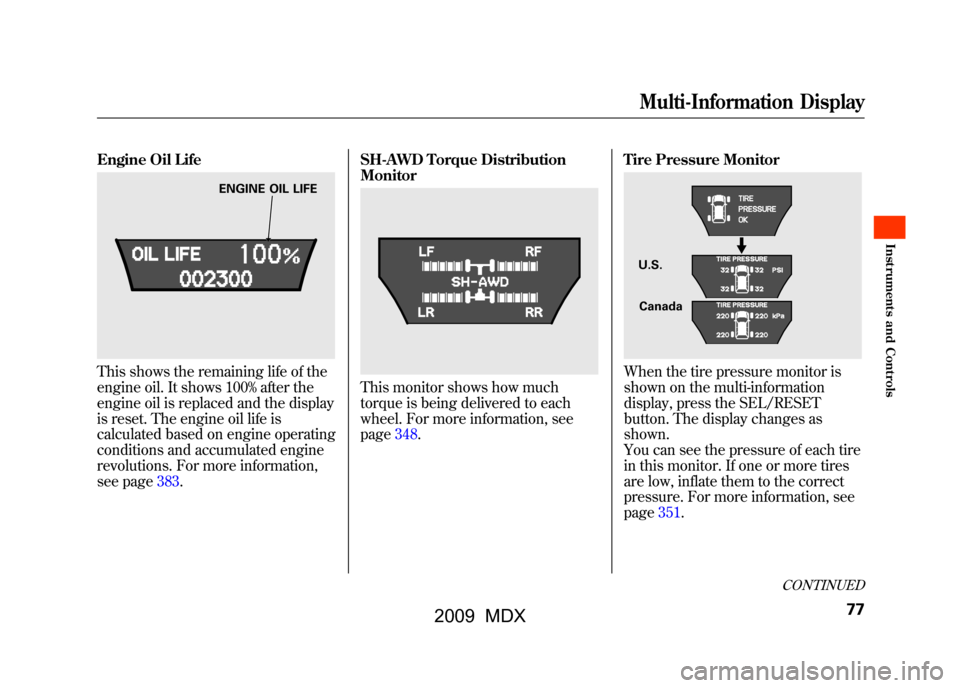
Engine Oil LifeThis shows the remaining life of the
engine oil. It shows 100% after the
engine oil is replaced and the display
is reset. The engine oil life is
calculated based on engine operating
conditions and accumulated engine
revolutions. For more information,
see page383.SH-AWD Torque Distribution
Monitor
This monitor shows how much
torque is being delivered to each
wheel. For more information, see
page348.
Tire Pressure Monitor
When the tire pressure monitor is
shown on the multi-information
display, press the SEL/RESET
button. The display changes as
shown.
You can see the pressure of each tire
in this monitor. If one or more tires
are low, inflate them to the correct
pressure. For more information, see
page351.
ENGINE OIL LIFE
U.S.
Canada
CONTINUED
Multi-Information Display
77
Inst rument s and Cont rols
08/06/06 16:58:07 09 ACURA MDX MMC North America Owner's M 50 31STX620 enu
2009 MDX
Page 332 of 489

Fuel Economy Factors
The following factors can lower your
vehicle's fuel economy:●Aggressive driving (hard
acceleration and braking)●Excessive idling, accelerating and
braking in stop-and-go traffic●Cold engine operation (engines
are more efficient when warmed
up)●Driving with a heavy load or the air
conditioner running●Improperly inflated tiresImproving Fuel EconomyVehicle MaintenanceA properly maintained vehicle
maximizes fuel economy. Poor
maintenance can significantly reduce
fuel economy. Always maintain your
vehicle according to the maintenance
messages displayed on the information
display (seeOwner's Maintenance
Checks on page389).For example:
●Use the recommended viscosity
motor oil, displaying the API
Certification Seal (see page393).●Maintain proper tire inflation -
An under-inflated tire increases
‘‘ rolling resistance, ’’which reduces
fuel economy.●Avoid carrying excess weight in
your vehicle -It puts a heavier
load on the engine, increasing fuel
consumption.●Keep your vehicle clean -In
particular, a build-up of snow or mud
on your vehicle's underside adds
weight and rolling resistance.
Frequent cleaning helps your fuel
economy.Drive Efficiently●Drive moderately -Rapid
acceleration, abrupt cornering, and
hard braking increase fuel
consumption.
●Observe the speed limit -
Aerodynamic drag has a big effect
on fuel mileage at speeds above 45
mph (75 km/h). Reduce your
speed and you reduce the drag.
Trailers, car top carriers, roof
racks and bike racks are also big
contributors to increased drag.●Avoid excessive idling -Idling
results in 0 miles per gallon.
Fuel Economy32808/06/06 16:58:07 09 ACURA MDX MMC North America Owner's M 50 31STX620 enu
2009 MDX
Page 335 of 489

Modifying Your Vehicle
Removing parts from your vehicle, or
replacing components with
aftermarket components could
seriously affect your vehicle's
handling, stability, and reliability.
Some examples are:●Lowering your vehicle with a non-
Acura suspension kit that
significantly reduces ground
clearance can allow the
undercarriage to hit speed bumps
or other raised objects, which
could cause the airbags to deploy.●Raising your vehicle with a non-
Acura suspension kit can affect the
handling and stability.●Non-Acura wheels, because they
are a universal design, can cause
excessive stress on suspension
components and will not be
compatible with the tire pressure
monitoring system (TPMS).
●Larger or smaller wheels and tires
can interfere with the operation of
your vehicle's anti-lock brakes and
other systems.
Modifying your steering wheel or
any other part of your vehicle's safety
features can make the systems
ineffective.
If you plan to modify your vehicle,
consult your dealer.
CONTINUED
Accessories and Modifications
331
Bef ore Driving
08/06/06 16:58:07 09 ACURA MDX MMC North America Owner's M 50 31STX620 enu
2009 MDX
Page 336 of 489

Your vehicle has several convenient
storage areas:●Glove box●Door and seat-back pockets●Rear cargo area, including the
second and third row seats when
folded flat●Console compartment●Storage compartment●Rear compartment●Roof-rack (if equipped)
However, carrying too much cargo,
or improperly storing it, can affect
your vehicle's handling, stability,
stopping distance, and tires, and
make it unsafe. Before carrying any
type of cargo, be sure to read the
following pages.
STORAGE COMPARTMENT SEAT-BACK POCKETS
CARGO AREA
REAR COMPARTMENT
DOOR POCKETS
CONSOLE COMPARTMENT
GLOVE BOX
Carrying Cargo33208/06/06 16:58:07 09 ACURA MDX MMC North America Owner's M 50 31STX620 enu
2009 MDX
Page 342 of 489

Driving Guidelines
Your vehicle has higher ground
clearance that allows you to travel
over bumps, obstacles, and rough
terrain. It also provides good
visibility so you can anticipate
problems earlier.
Because your vehicle rides higher off
the ground, it has a high center of
gravity that can cause it to roll over if
you make abrupt turns. Utility
vehicles have a significantly higher
roll over rate than other types of
vehicles.
To prevent rollovers or loss of
control:●Take corners at slower speeds
than you would with a passenger
vehicle.●Avoid sharp turns and abrupt
maneuvers whenever possible.
●Do not modify your vehicle in any
way that would raise the center of
gravity.●Do not carry heavy cargo on the
roof.Seepage 378for off-highway driving
guidelines.
Preparing to Drive
You should do the following checks
and adjustments before you drive
your vehicle.
1. Make sure all windows, mirrors, and outside lights are clean and
unobstructed. Remove frost, snow,
or ice.
2. Check that the hood is fully closed.
3. Visually check the tires. If a tire looks low, use a gauge to check its
pressure.
4. Check that any items you may be carrying are stored properly or
fastened down securely.
5. Check the seat adjustment (see page 140).
Driving Guidelines, Preparing to Drive33808/06/06 16:58:07 09 ACURA MDX MMC North America Owner's M 50 31STX620 enu
2009 MDX
Page 355 of 489

Your vehicle is equipped with a tire
pressure monitoring system (TPMS)
that turns on every time you start the
engine and monitors the pressure in
your tires while driving.
Each tire has its own pressure
sensor. If the air pressure of a tire
becomes significantly low, the sensor
in that tire immediately sends a
signal that causes the low tire
pressure/TPMS indicator in the
instrument panel to come on. If this
happens, you will see which tire is
losing pressure on the multi-
information display along with a
‘‘CHECK TIRE PRESSURE ’’
message.
Low Tire Pressure/
TPMS Indicator
When the low tire pressure/TPMS
indicator is on, one or more of your
tires is significantly underinflated.
You should stop and check your tires
as soon as possible, and inflate them
to the proper pressure as indicated
on the vehicle's tire information
placard.
It is possible that the pressures
shown on the multi-information
display and the pressures you
manually measure are slightly
different.
If the difference is significant or you
cannot make the low tire pressure/
TPMS indicator and message on the
multi-information display go out after
inflating the tires to the specified
values, have your dealer check the
system as soon as possible. If you think you can safely drive a
short distance to a service station,
proceed slowly to the station, then
inflate the tire to the recommended
pressure.
If the tire is flat, or if the tire pressure
is too low to continue driving, replace
the tire with the compact spare tire
(see page425).
Driving on a significantly under-
inflated tire causes the tire to
overheat and can lead to tire failure.
Under-inflation also reduces fuel
efficiency and tire tread life, and may
affect the vehicle's handling and
stopping ability.
Because tire pressure varies by
temperature and other conditions,
the low tire pressure/TPMS
indicator may come on unexpectedly.
CONTINUED
Tire Pressure Monitoring System (TPMS)
351
Driving
08/06/06 16:58:07 09 ACURA MDX MMC North America Owner's M 50 31STX620 enu
2009 MDX
Page 356 of 489

For example, if you check and fill
your tires in a warm area, then drive
in extremely cold weather, the tire
pressure will be lower than
measured and could be underinflated
and cause the low tire pressure/
TPMS indicator to come on. Or, if
you check and adjust your tire
pressure in cooler conditions, and
drive into extremely hot conditions,
the tire may become overinflated.
However, the low tire pressure/
TPMS indicator will not come on if
the tires are overinflated.
Refer to page415for tire inflation
guidelines.
If there is a problem with the TPMS,
this indicator begins to flash. It stops
flashing after approximately 1
minute, then stays on. You will also
see a‘‘CHECK TPMS SYSTEM’’
message on the multi-information
display (see page 82). Although your tire pressure is
monitored, you must manually check
the tire pressures monthly.
Each tire, including the spare, should
be checked monthly when the
vehicle is cold, and set to the
recommended inflation pressure as
specified on the vehicle placard and
in the owner's manual (see page
416).
Tire Pressure Monitor
To select the tire pressure monitor,
press the INFO button several times
with the ignition switch in the ON
(II) position.
You will see the above display on the
multi-information display when all
tire pressures are normal.
Tire Pressure Monitoring System (TPMS)35208/06/06 16:58:07 09 ACURA MDX MMC North America Owner's M 50 31STX620 enu
2009 MDX