console Acura MDX 2011 User Guide
[x] Cancel search | Manufacturer: ACURA, Model Year: 2011, Model line: MDX, Model: Acura MDX 2011Pages: 609, PDF Size: 12.7 MB
Page 282 of 609
Use only compatible iPods with the
latest software. iPods that are not
compatible will not work in this audio
unit.
NOTE:●
Do not connect your iPod using a
hub.
●
Do not keep the iPod and dock
connector cable in the vehicle.
Direct sunlight and high heat will
damage it.
●
Do not use an extension cable
between the USB adapter cable
equipped with your vehicle and
your dock connector.
●
We recommend backing up your
data before playing it.
●
Some devices cannot be powered
or charged via the USB adapter, if
this is the case use the accessory
adapter to supply power to your
device.
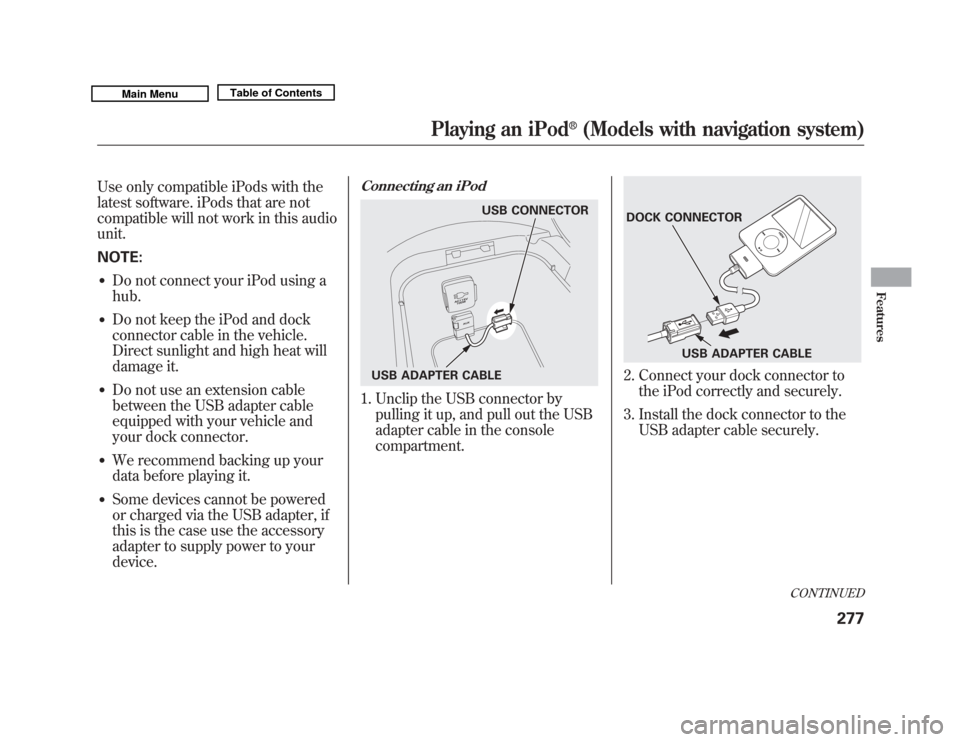
Connecting an iPod1. Unclip the USB connector bypulling it up, and pull out the USB
adapter cable in the console
compartment.
2. Connect your dock connector tothe iPod correctly and securely.
3. Install the dock connector to the USB adapter cable securely.
USB CONNECTOR
USB ADAPTER CABLE
DOCK CONNECTOR USB ADAPTER CABLE
CONTINUED
Playing an iPod
®
(Models with navigation system)
277
Features
10/06/29 11:59:04 11 ACURA MDX MMC North America Owner's M 50 31STX640 enu
Page 290 of 609
To Play a USB Flash Memory
Device
This audio system can select and
play the audio files on a USB flash
memory device with the same
controls used for the disc player. To
play a USB flash memory device,
connect it to the USB adapter cable
in the console compartment, then
press the USB/AUX button until you
see‘‘USB’’ in the display. The
ignition switch must be in
ACCESSORY (I) or ON (II) position. The audio system reads and plays
the audio files on the USB flash
memory device in MP3, WMA or
ACC
ꭧ
formats. The USB flash
memory device limit is up to 700
folders or up to 15000 files.
ꭧ : Only AAC format files recorded
with iTunes are playable on this
audio unit.
The recommended USB flash
memory devices are 256 MB or
higher, and formatted with the FAT
file system. Some digital audio
players may be compatible as well.
Some USB flash memory devices
(such as devices with security
lockout features, etc.) will not work
in this audio unit.
NOTE:
●
Do not use a device such as a card
reader or hard drive as it or your
files may be damaged.
●
Do not connect your USB flash
memory device using a hub.
●
Do not use an extension cable to
the USB adapter cable equipped
with your vehicle.
●
Do not keep a USB flash memory
device in the vehicle. Direct
sunlight and high heat will damage
it.
●
We recommend backing up your
data before playing a USB flash
memory device.
●
Some devices cannot be powered
or charged via the USB adapter, if
this is the case use the accessory
adapter to supply power to your
device.
●
Depending on the type and
number of files, it may take some
time before they begin to play.
CONTINUED
Playing a USB Flash Memory Device (Models with navigation system)
285
Features
10/06/29 11:59:04 11 ACURA MDX MMC North America Owner's M 50 31STX640 enu
Page 291 of 609
●
Depending on the software the
files were made with, it may not be
possible to play some files, or
display some text data.
●
Depending on the type of
encoding and writing software
used, there may be cases where
character information does not
display properly.
●
The order of files in USB playback
may be different from the order of
files displayed in PC or other
devices etc. Files are played in the
order stored in USB flash memory
device.
Voice Control SystemYou can select the AUX mode by
using the voice control buttons, but
cannot operate the play mode
functions.Even if recorded in MP3, WMA or
AAC format, a file with unsupported
version cannot be played. If the
system finds it, the audio unit
displays UNSUPPORTED, and then
skips to the next file.
Combining a low sampling frequency
with a low bitrate may result in
extremely degraded sound quality.
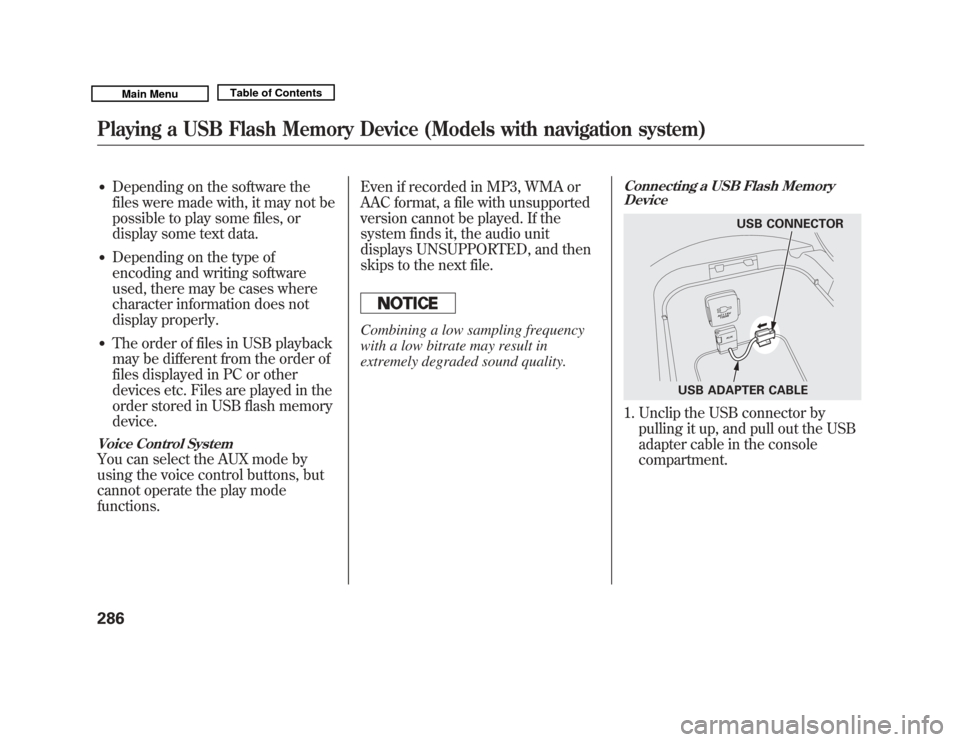
Connecting a USB Flash Memory
Device1. Unclip the USB connector by
pulling it up, and pull out the USB
adapter cable in the console
compartment.
USB CONNECTOR
USB ADAPTER CABLE
Playing a USB Flash Memory Device (Models with navigation system)28610/06/29 11:59:04 11 ACURA MDX MMC North America Owner's M 50 31STX640 enu
Page 309 of 609

Auxiliary Input JackThe auxiliary input jack is inside the
console compartment. The system
will accept auxiliary input from
standard audio accessories using a
1/8 inch (3.5 mm) stereo miniplug.
When a compatible audio unit is
connected to the jack, press the
USB/AUX button (DISC/AUX
button on models without navigation
system) to select it.
On models with Rear EntertainmentSystemAuxiliary input jacks and headphone
connectors for the rear
entertainment system are on the
back of the center console
compartment.
For more information, see page 336.
Auxiliary Input Jack30410/06/29 11:59:04 11 ACURA MDX MMC North America Owner's M 50 31STX640 enu
Page 341 of 609
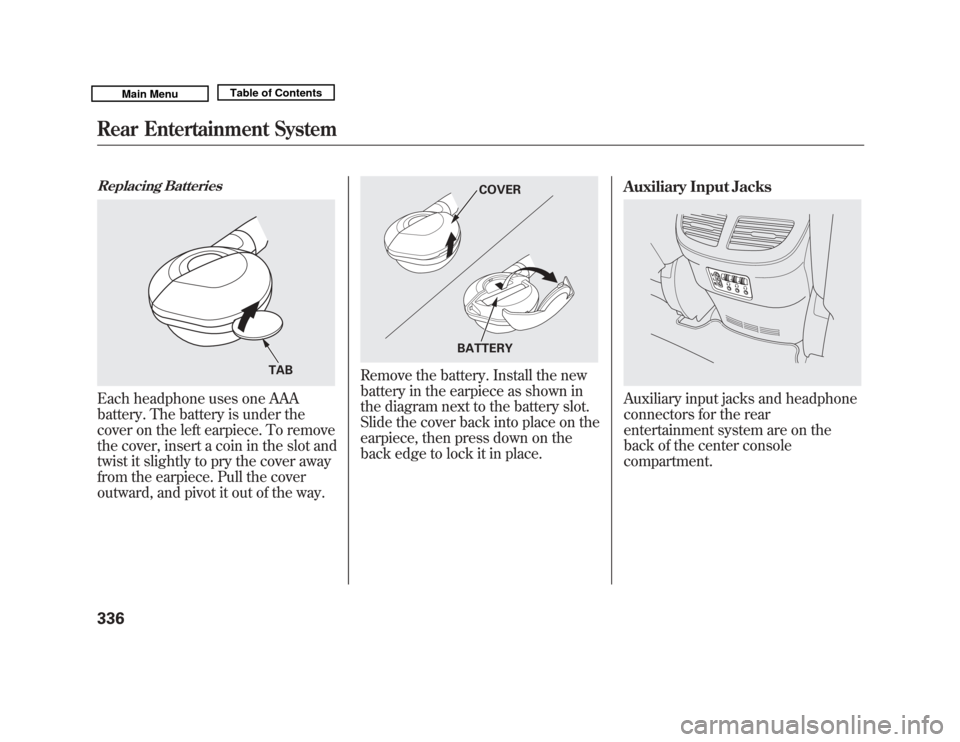
Replacing BatteriesEach headphone uses one AAA
battery. The battery is under the
cover on the left earpiece. To remove
the cover, insert a coin in the slot and
twist it slightly to pry the cover away
from the earpiece. Pull the cover
outward, and pivot it out of the way.
Remove the battery. Install the new
battery in the earpiece as shown in
the diagram next to the battery slot.
Slide the cover back into place on the
earpiece, then press down on the
back edge to lock it in place.Auxiliary Input Jacks
Auxiliary input jacks and headphone
connectors for the rear
entertainment system are on the
back of the center console
compartment.
TAB
COVER
BATTERY
Rear Entertainment System33610/06/29 11:59:04 11 ACURA MDX MMC North America Owner's M 50 31STX640 enu
Page 433 of 609
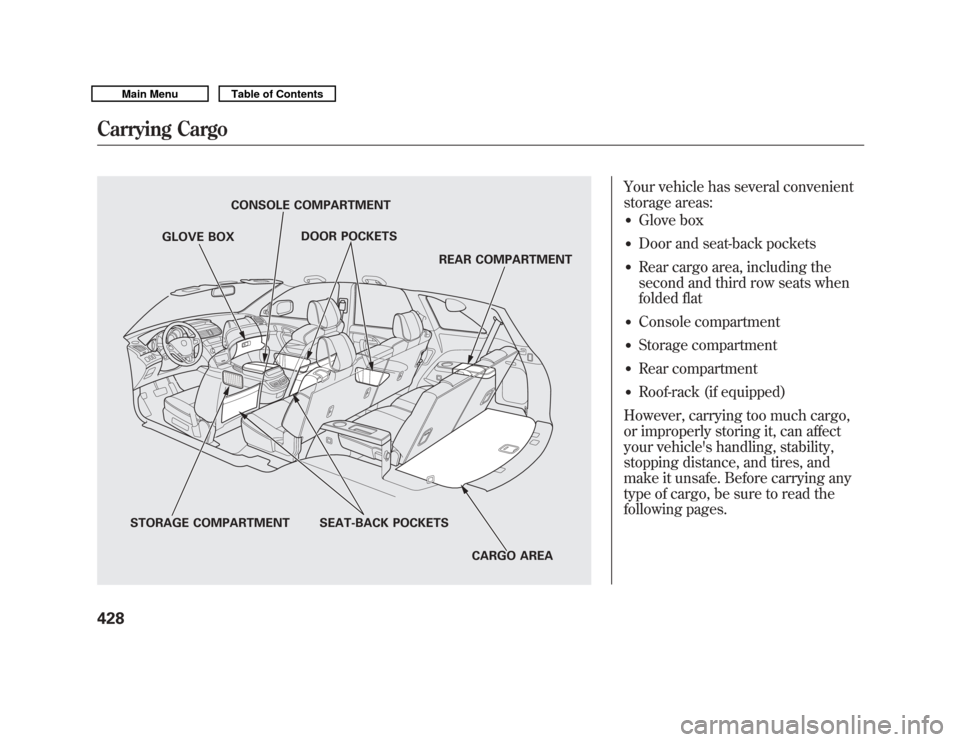
Your vehicle has several convenient
storage areas:●
Glove box
●
Door and seat-back pockets
●
Rear cargo area, including the
second and third row seats when
folded flat
●
Console compartment
●
Storage compartment
●
Rear compartment
●
Roof-rack (if equipped)
However, carrying too much cargo,
or improperly storing it, can affect
your vehicle's handling, stability,
stopping distance, and tires, and
make it unsafe. Before carrying any
type of cargo, be sure to read the
following pages.
STORAGE COMPARTMENT SEAT-BACK POCKETS
CARGO AREA
REAR COMPARTMENT
DOOR POCKETS
CONSOLE COMPARTMENT
GLOVE BOX
Carrying Cargo42810/06/29 11:59:04 11 ACURA MDX MMC North America Owner's M 50 31STX640 enu
Page 484 of 609
The system provides two selectable
modes.
Sport mode: The system prioritizes
handling response, vehicle body
control and tire-to-road adhesion to
allow for higher performance
handling.
Comfort mode: The system
prioritizes road isolation to allow for a
more comfortable ride.
Either mode can be used in any type
of operating conditions, but the mode
may change temporarily to suit a
change in road surface.
To switch between comfort and sport
mode, press and release the active
damper system button located on the
center console to choose the desired
mode.
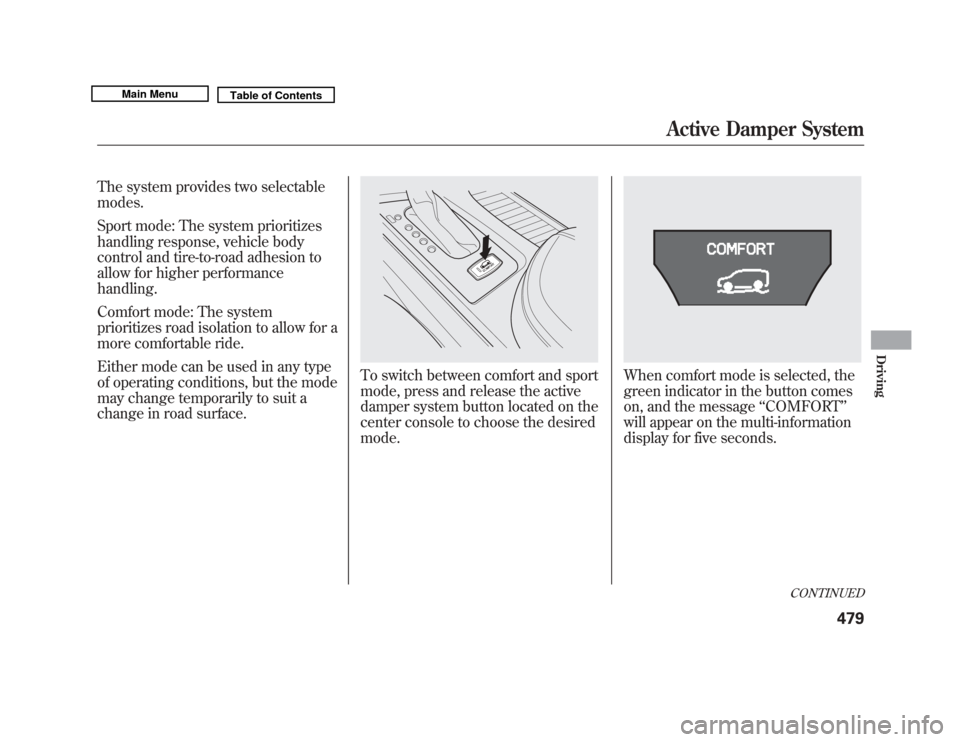
When comfort mode is selected, the
green indicator in the button comes
on, and the message‘‘COMFORT ’’
will appear on the multi-information
display for five seconds.
CONTINUED
Active Damper System
479
Driving
10/06/29 11:59:04 11 ACURA MDX MMC North America Owner's M 50 31STX640 enu
Page 597 of 609
BrakesAnti-lock Brakes (ABS)
...........
455
Break-in, New Linings
.............
418
Bulb Replacement
...................
525
Fluid
.......................................
519
Parking
...................................
163
System Design
........................
455
System Indicator
...............
67, 558
Wear Indicators
.......................
455
Braking System
..........................
454
Break-in, New Vehicle
................
418
Brightness Control,
Instruments
............................
132
Bulb Replacement Back-up Lights
................
525, 526
Brake Lights
...........................
525
Front Parking Lights
...............
523
Front Side Marker Lights
........
523
Headlights
..............................
521
Rear Bulbs
..............................
525
Rear License Plate Lights
........
527
Specifications
..........................
573
Taillights
.................................
525
Turn Signal Lights
..........
523, 525
Bulbs, Halogen
..........................
521 C
Capacities Chart
.........................
572
Carbon Monoxide Hazard
............
60
Cargo
.........................................
428
Cargo Hooks
..............................
432
Cargo, How to Carry
..................
428
Carrying Cargo
..........................
428
CAUTION, Explanation of
............
iii
CD Care
.....................................
244
CD Error Messages
...................
243
CD Player
..................................
232
Certification Label
......................
570
Chains, Tires
..............................
540
Changing a Flat Tire
..................
545
Changing Oil How to
....................................
512
When to
..................................
501
Charging System Indicator
...........................
67, 556
Checklist, Before Driving
...........
435
Childproof Door Locks
...............
140
Child Safety
..................................
39
Booster Seats
...........................
57
Child Seats
....................
44, 45, 47 Important Safety Reminders
.....
43
Infants
......................................
44
Larger Children
.......................
56
LATCH
.....................................
49
Risks with Airbags
...................
40
Small Children
.........................
45
Tethers
....................................
53
Warning Labels
........................
41
Where Should a Child Sit?
........
40
Child Seats
.............................
39, 47
LATCH Anchorage Points
........
49
Tether Anchorage Points
.........
53
Cleaning the Seat Belts
..............
528
Client Service Information
..........
586
Climate Control System
.............
180
Clock
..........................................
306
Code, Audio System
...................
305
CO in the Exhaust
................
60, 580
Cold Weather, Starting in
...........
436
Collision Mitigation Braking System ™(CMBS ™)
...............
457
Compact Spare Tire
....................
544
Compass Operation
....................
338
Console Compartment
...............
173
Consumer Information
...............
586
Controls, Instruments and
............
63
IndexII10/06/29 11:59:04 11 ACURA MDX MMC North America Owner's M 50 31STX640 enu