front brake Acura MDX 2011 User Guide
[x] Cancel search | Manufacturer: ACURA, Model Year: 2011, Model line: MDX, Model: Acura MDX 2011Pages: 609, PDF Size: 12.7 MB
Page 446 of 609
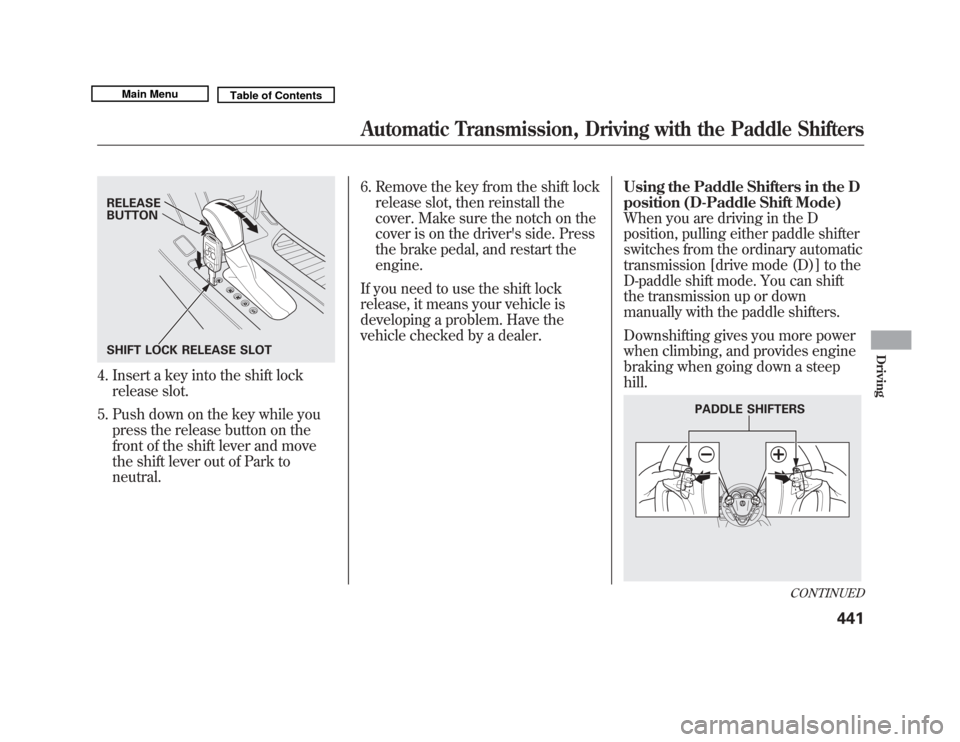
4. Insert a key into the shift lockrelease slot.
5. Push down on the key while you press the release button on the
front of the shift lever and move
the shift lever out of Park to
neutral. 6. Remove the key from the shift lock
release slot, then reinstall the
cover. Make sure the notch on the
cover is on the driver's side. Press
the brake pedal, and restart the
engine.
If you need to use the shift lock
release, it means your vehicle is
developing a problem. Have the
vehicle checked by a dealer. Using the Paddle Shifters in the D
position (D-Paddle Shift Mode)
When you are driving in the D
position, pulling either paddle shifter
switches from the ordinary automatic
transmission [drive mode (D)] to the
D-paddle shift mode. You can shift
the transmission up or down
manually with the paddle shifters.
Downshifting gives you more power
when climbing, and provides engine
braking when going down a steep
hill.RELEASE
BUTTON
SHIFT LOCK RELEASE SLOT
PADDLE SHIFTERS
CONTINUED
Automatic Transmission, Driving with the Paddle Shifters
441
Driving
10/06/29 11:59:04 11 ACURA MDX MMC North America Owner's M 50 31STX640 enu
Page 453 of 609
Always use the parking brake when
you park your vehicle. Make sure the
parking brake is set firmly, or your
vehicle may roll if it is parked on an
incline.
Set the parking brake before you put
the transmission in Park. This keeps
the vehicle from moving and putting
pressure on the parking mechanism
in the transmission.Parking Tips
●
Make sure the moonroof and the
windows are closed.
●
Turn off the lights.
●
Place any packages, valuables, etc.
in the cargo area or take them with
you.
●
Lock the doors and the tailgate.
●
Never park over dry leaves, tall
grass, or other flammable
materials. The hot three way
catalytic converter could cause
these materials to catch on fire.
●
If the vehicle is facing uphill, turn
the front wheels away from the
curb.
●
If the vehicle is facing downhill,
turn the front wheels toward the
curb.
●
Check the indicator on the
instrument panel to verify that the
security system is set.
●
Make sure the parking brake is
fully released before driving away.
Driving with the parking brake
partially set can overheat or
damage the rear brakes.
Parking44810/06/29 11:59:04 11 ACURA MDX MMC North America Owner's M 50 31STX640 enu
Page 460 of 609
Braking System Design
The hydraulic system that operates
the brakes has two separate circuits.
Each circuit works diagonally across
the vehicle (the left-front brake is
connected with the right-rear brake,
etc.). If one circuit should develop a
problem, you will still have braking
at two wheels.
Brake Wear Indicators
All four brakes have audible brake
wear indicators.
If the brake pads need replacing, you
will hear a distinctive, metallic
screeching sound when you apply
the brake pedal. If you do not have
the brake pads replaced, they will
screech all the time. It is normal for
the brakes to occasionally squeal or
squeak when you apply them.Anti-lock Brakes (ABS)
The anti-lock brake system (ABS)
helps prevent the wheels from
locking up, and helps you retain
steering control by pumping the
brakes rapidly, much faster than a
person can do it.
The electronic brake distribution
(EBD) system, which is part of the
ABS, also balances the front-to-rear
braking distribution according to
vehicle loading.
You should never pump the brake pedal.Let the ABS work for you by always
keeping firm, steady pressure on the
brake pedal. This is sometimes
referred to as
‘‘stomp and steer. ’’You will feel a pulsation in the brake
pedal when the ABS activates, and
may hear some noise. This is normal:
it is the ABS rapidly pumping the
brakes. On dry pavement, you will
need to press on the brake pedal
very hard before the ABS activates.
However, you may feel the ABS
activate immediately if you are trying
to stop on snow or ice.
CONTINUED
Braking System, Anti-lock Brakes (ABS)
455
Driving
10/06/29 11:59:04 11 ACURA MDX MMC North America Owner's M 50 31STX640 enu
Page 462 of 609

OverviewIf equippedThe collision Mitigation braking
system™(CMBS ™) can assist the
driver when there is a possibility of
colliding with the vehicle in front of
yours. It is designed to reduce the
speed of your vehicle before an
unavoidable collision occurs and, if
possible, to alert you to a potential
collision while there is time for the
driver to prevent it. Here is a brief
description of what the CMBS can
do: When your speed is above 10 mph
(15 km/h), the CMBS is monitoring
the vehicle ahead of you with radar.
When your vehicle is approaching
the vehicle ahead of yours too
quickly, the system may activate one
or more of the following: a visual
alert, an audible alert, apply the
brakes and e-pretensioners to tighten
the front seat belts - first as a
warning, then to prepare for an
impending crash. (see page 24).
The CMBS consists of a radar sensor
in the front grille, a brake actuator in
the engine compartment, an
indicator on the instrument panel,
seat belt e-pretensioners on the front
seats, and an on/off button on the
dashboard.RADAR SENSOR
BRAKE
ACTUATOR SEAT BELT
e-PRETENSIONERS
CONTINUED
Collision Mitigation Braking System
™(CMBS™ )
457
Driving
10/06/29 11:59:04 11 ACURA MDX MMC North America Owner's M 50 31STX640 enu
Page 465 of 609
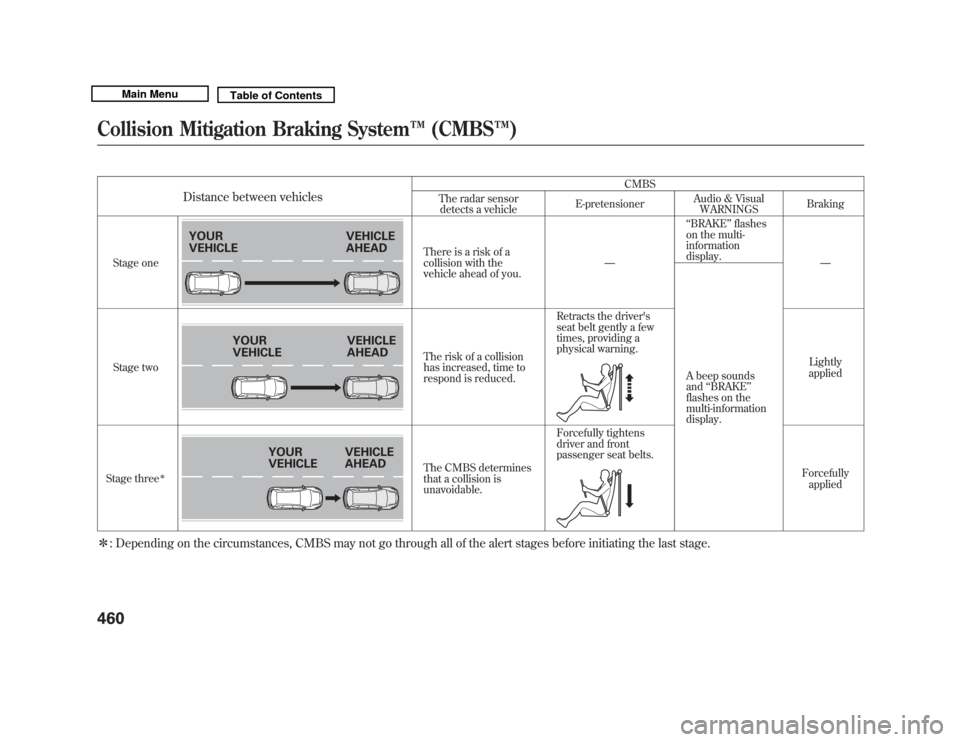
Distance between vehicles
CMBS
The radar sensor detects a vehicle E-pretensioner
Audio & Visual
WARNINGS Braking
Stage one There is a risk of a
collision with the
vehicle ahead of you.
—
‘‘
BRAKE ’’flashes
on the multi-
information
display.
—
A beep sounds
and ‘‘BRAKE ’’
flashes on the
multi-information
display.
Stage two
The risk of a collision
has increased, time to
respond is reduced.Retracts the driver's
seat belt gently a few
times, providing a
physical warning.
Lightly
applied
Stage three
ꭧ
The CMBS determines
that a collision is
unavoidable. Forcefully tightens
driver and front
passenger seat belts.
Forcefullyapplied
ꭧ : Depending on the circumstances, CMBS may not go through all of the alert stages before initiating the last stage.
YOUR
VEHICLE VEHICLE
AHEAD
YOUR
VEHICLEVEHICLE
AHEAD
YOUR
VEHICLE
VEHICLE
AHEAD
Collision Mitigation Braking System
™(CMBS™ )46010/06/29 11:59:04 11 ACURA MDX MMC North America Owner's M 50 31STX640 enu
Page 466 of 609
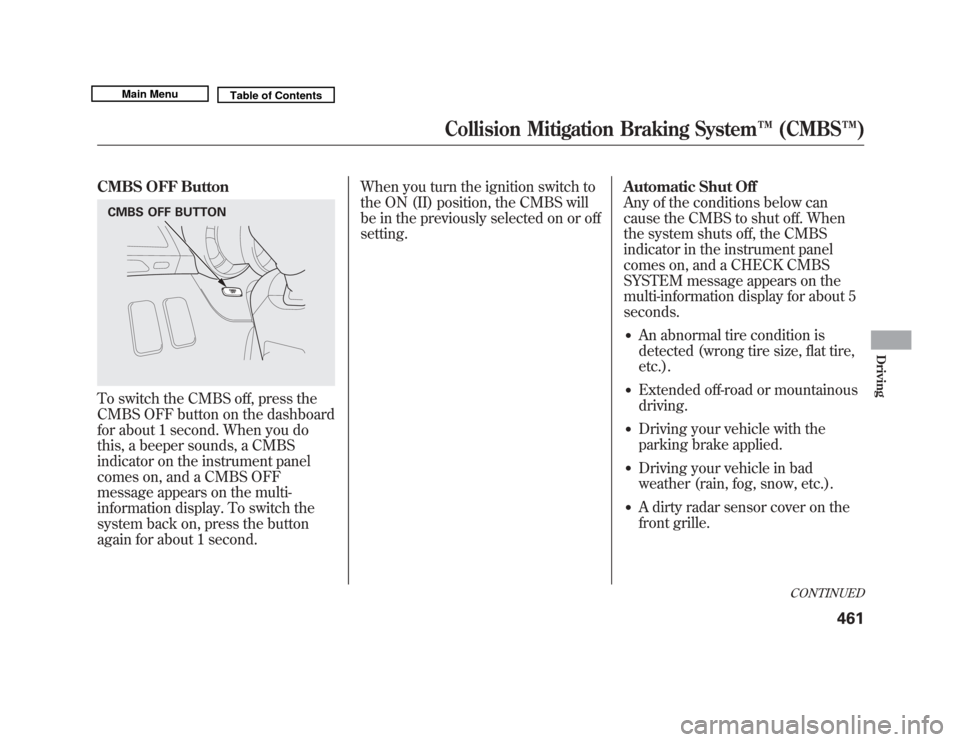
CMBS OFF ButtonTo switch the CMBS off, press the
CMBS OFF button on the dashboard
for about 1 second. When you do
this, a beeper sounds, a CMBS
indicator on the instrument panel
comes on, and a CMBS OFF
message appears on the multi-
information display. To switch the
system back on, press the button
again for about 1 second.When you turn the ignition switch to
the ON (II) position, the CMBS will
be in the previously selected on or off
setting.
Automatic Shut Off
Any of the conditions below can
cause the CMBS to shut off. When
the system shuts off, the CMBS
indicator in the instrument panel
comes on, and a CHECK CMBS
SYSTEM message appears on the
multi-information display for about 5
seconds.
●
An abnormal tire condition is
detected (wrong tire size, flat tire,
etc.).
●
Extended off-road or mountainous
driving.
●
Driving your vehicle with the
parking brake applied.
●
Driving your vehicle in bad
weather (rain, fog, snow, etc.).
●
A dirty radar sensor cover on the
front grille.
CMBS OFF BUTTON
CONTINUED
Collision Mitigation Braking System
™(CMBS™ )
461
Driving
10/06/29 11:59:04 11 ACURA MDX MMC North America Owner's M 50 31STX640 enu
Page 468 of 609

●
When the VSA system indicator
comes on (see page 467).
●
When you turn the ignition switch
to the ON (II) position, the CMBS
indicator should come on for a few
seconds, then go off. If the
indicator comes on at any other
time and a CHECK CMBS
SYSTEM message appears on the
multi-information display, there is
a problem with the CMBS. You
can still drive your vehicle, but
CMBS will not be operating. Have
your vehicle checked by a dealer.Limitations
The CMBS may not activate under
some conditions. Here are a few
examples:
●
The distance between your vehicle
and the vehicle ahead of you is too
short.
●
A vehicle cuts in front of you at a
slow speed, or it brakes suddenly.
●
When you accelerate rapidly and
approach the vehicle ahead of you
at high speed.
●
Immediately after you begin
driving.
YOUR VEHICLE
CONTINUED
Collision Mitigation Braking System
™(CMBS™ )
463
Driving
10/06/29 11:59:04 11 ACURA MDX MMC North America Owner's M 50 31STX640 enu
Page 513 of 609
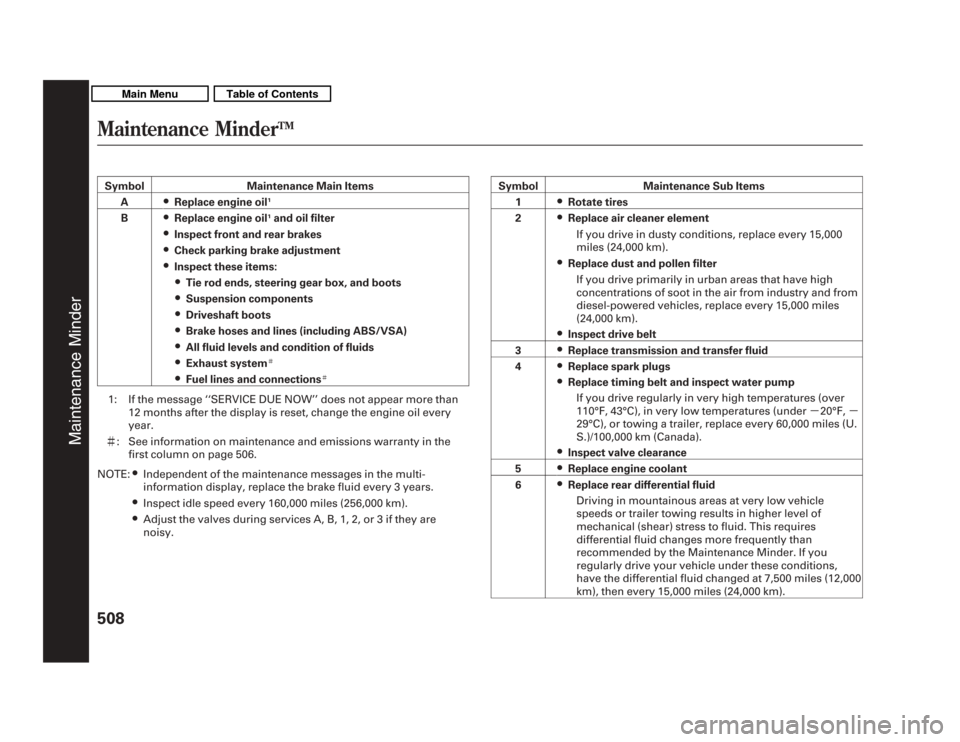
SymbolMaintenance Main Items
A
●Replace engine oil
1
B
●Replace engine oil
1and oil filter
●Inspect front and rear brakes●Check parking brake adjustment●Inspect these items:●Tie rod ends, steering gear box, and boots●Suspension components●Driveshaft boots●Brake hoses and lines (including ABS/VSA)●All fluid levels and condition of fluids●Exhaust system
#
●Fuel lines and connections
#
1: If the message ‘‘SERVICE DUE NOW ’’does not appear more than
12 months after the display is reset, change the engine oil every
year.
# : See information on maintenance and emissions warranty in the
first column on page 506.
NOTE:
●Independent of the maintenance messages in the multi-
information display, replace the brake fluid every 3 years.●Inspect idle speed every 160,000 miles (256,000 km).●Adjust the valves during services A, B, 1, 2, or 3 if they are
noisy. Symbol Maintenance Sub Items
1
●Rotate tires
2●Replace air cleaner element
If you drive in dusty conditions, replace every 15,000
miles (24,000 km).●Replace dust and pollen filterIf you drive primarily in urban areas that have high
concentrations of soot in the air from industry and from
diesel-powered vehicles, replace every 15,000 miles
(24,000 km).●Inspect drive belt
3●Replace transmission and transfer fluid
4●Replace spark plugs●Replace timing belt and inspect water pump If you drive regularly in very high temperatures (over
110°F, 43°C), in very low temperatures (under -20°F, -
29°C), or towing a trailer, replace every 60,000 miles (U.
S.)/100,000 km (Canada).●Inspect valve clearance
5●Replace engine coolant
6●Replace rear differential fluid Driving in mountainous areas at very low vehicle
speeds or trailer towing results in higher level of
mechanical (shear) stress to fluid. This requires
differential fluid changes more frequently than
recommended by the Maintenance Minder. If you
regularly drive your vehicle under these conditions,
have the differential fluid changed at 7,500 miles (12,000
km), then every 15,000 miles (24,000 km).
Maintenance Minder
TM
Maintenance Minder
50810/06/29 11:59:04 11 ACURA MDX MMC North America Owner's M 50 31STX640 enu
Page 545 of 609
Snow Tires
If you mount snow tires on your
vehicle, make sure they are radial
tires of the same size and load range
as the original tires. Mount snow
tires on all four wheels. The traction
provided by snow tires on dry roads
may be lower than your original tires.
Check with the tire dealer for
maximum speed recommendations.
Tire Chains
Mount tire chains on your tires when
required by driving conditions or
local laws. Install them only on the
front tires.
Because your vehicle has limited tire
clearance, Acura strongly
recommends using the chains listed
below.
SCC Super Z-6#SC 435 When installing chains, follow the
manufacturer's instructions and
mount them as tightly as you can.
Drive slowly with chains installed. If
you hear them contacting the body
or chassis, stop and investigate.
Make sure the chains are installed
tightly, and that they are not
contacting the brake lines or
suspension. Remove the chains as
soon as you start driving on cleared
roads.
Using the wrong chains, or not
properly installing chains, can
damage the brake lines and
cause a crash in which you can
be seriously injured or killed.
Follow all instructions in this
owner's manual regarding the
selection and use of tire chains.
Traction devices that are the wrong size
or improperly installed can damage
your vehicle's brake lines, suspension,
body, and wheels. Stop driving if they
are hitting any part of the vehicle.
Wheels
Clean the wheels as you would the
rest of the exterior. Wash them with
the same solution, and rinse them
thoroughly.
Aluminum alloy wheels have a
protective clear-coat that keeps the
aluminum from corroding and
tarnishing. Cleaning the wheels with
harsh chemicals (including some
commercial wheel cleaners) or a stiff
brush can damage the clear-coat. To
clean the wheels, use a mild
detergent and a soft brush or sponge.
Tires54010/06/29 11:59:04 11 ACURA MDX MMC North America Owner's M 50 31STX640 enu
Page 547 of 609

If you need to park your vehicle for
an extended period (more than 1
month), there are several things you
should do to prepare it for storage.
Proper preparation helps prevent
deterioration and makes it easier to
get your vehicle back on the road. If
possible, store your vehicle indoors.●
Fill the fuel tank.
●
Wash and dry the exterior
completely.
●
Clean the interior. Make sure the
carpeting, floor mats, etc., are
completely dry.
●
Leave the parking brake off. Put
the transmission in Park.
●
Block the rear wheels.
●
If the vehicle is to be stored for a
longer period, it should be
supported on jackstands so the
tires are off the ground.
●
Leave one window open slightly (if
the vehicle is being stored
indoors).
●
Disconnect the battery.
●
Support the front and rear wiper
blade arms with a folded towel or
rag so they do not touch the
windshield.
●
To minimize sticking, apply a
silicone spray lubricant to all door
and tailgate seals. Also, apply a
vehicle body wax to the painted
surfaces that mate with the door
and tailgate seals.
●
Cover the vehicle with a
‘‘breathable’’ cover, one made from
a porous material such as cotton.
Non-porous materials, such as
plastic sheeting, trap moisture,
which can damage the paint.
●
If possible, periodically run the
engine until it reaches full
operating temperature (the cooling
fans cycle on and off twice).
Preferably, do this once a month.
Vehicle Storage54210/06/29 11:59:04 11 ACURA MDX MMC North America Owner's M 50 31STX640 enu