ad blue Acura MDX 2011 Workshop Manual
[x] Cancel search | Manufacturer: ACURA, Model Year: 2011, Model line: MDX, Model: Acura MDX 2011Pages: 609, PDF Size: 12.7 MB
Page 400 of 609
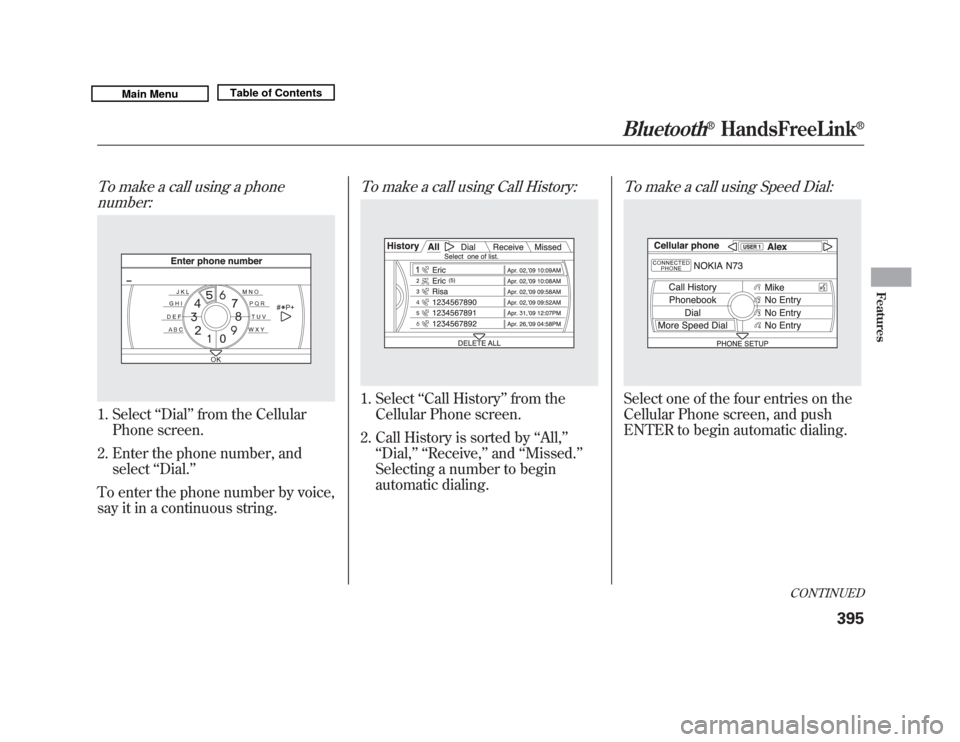
To make a call using a phonenumber:1. Select ‘‘Dial ’’from the Cellular
Phone screen.
2. Enter the phone number, and select ‘‘Dial.’’
To enter the phone number by voice,
say it in a continuous string.
To make a call using Call History:1. Select ‘‘Call History ’’from the
Cellular Phone screen.
2. Call History is sorted by ‘‘All, ’’
‘‘ Dial, ’’ ‘‘Receive, ’’and ‘‘Missed. ’’
Selecting a number to begin
automatic dialing.
To make a call using Speed Dial:Select one of the four entries on the
Cellular Phone screen, and push
ENTER to begin automatic dialing.
CONTINUED
Bluetooth
®
HandsFreeLink
®
395
Features
10/06/29 11:59:04 11 ACURA MDX MMC North America Owner's M 50 31STX640 enu
Page 401 of 609
To make a call using More SpeedDial:1. Select ‘‘More Speed Dial ’’on the
Cellular Phone screen.
2. A list of up to 20 stored speed dial entries is shown. Select the entry
you want to call, and push ENTER
to begin automatic dialing.
NOTE: Any voice-tagged speed dial
entry can be dialed by voice from the
Cellular Phone screen. Receiving a Call
When you receive a call, a
notification appears on the screen.
(see page 381).
To answer the call, press the PICK-
UP button on the steering wheel.
To end or decline the call, press the
HANG-UP button.
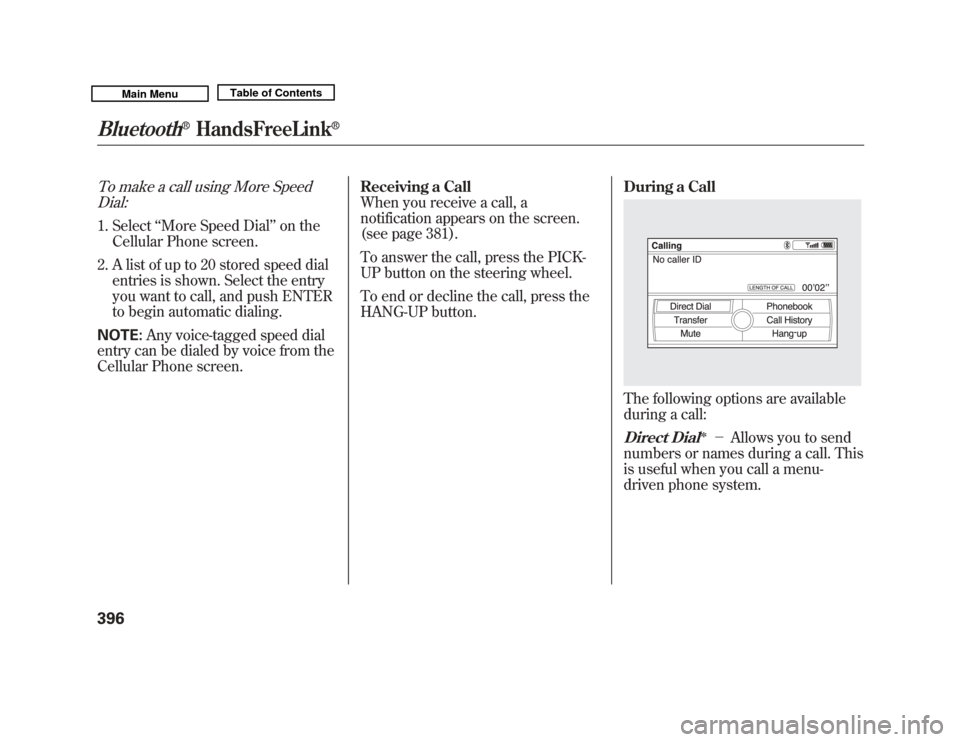
During a Call
The following options are available
during a call:Direct Dial
ꭧ
-
Allows you to send
numbers or names during a call. This
is useful when you call a menu-
driven phone system.
Bluetooth
®
HandsFreeLink
®
39610/06/29 11:59:04 11 ACURA MDX MMC North America Owner's M 50 31STX640 enu
Page 402 of 609
Transfer
-Allows you to transfer a
call from HFL to your phone, or from
your phone to HFL.
Mute
- Allows you to mute your
voice.
ꭧAvailable on some phones
Call WaitingIf your phone has Call Waiting, press
and release the PICK-UP button to
put the original call on hold and
answer the incoming call.
To return to the original call, press
the PICK-UP button again. If you
don't want to answer the incoming
call, disregard it and continue with
your original call. If you want to hang
up the original call and answer the
new call, press the HANG-UP button.
Bluetooth
®Wireless Technology
The
Bluetooth
®name and logos are
registered trademarks owned by
Bluetooth SIG, Inc., and any use of
such marks by Honda Motor Co.,
Ltd., is under license. Other
trademarks and trade names are
those of their respective owners.
CONTINUED
Bluetooth
®
HandsFreeLink
®
397
Features
10/06/29 11:59:04 11 ACURA MDX MMC North America Owner's M 50 31STX640 enu
Page 403 of 609
As required by the FCC:This device complies with Part 15 of theFCC rules. Operation is subject to the
following two conditions: (1) This devicemay not cause harmful interference, and(2) this device must accept any
interference received, includinginterference that may cause undesiredoperation.
Changes or modifications not expresslyapproved by the party responsible for
compliance could void the user'sauthority to operate the equipment.
This device complies with IndustryCanada Standard RSS-210.
Operation is subject to the following twoconditions: (1) this device may not causeinterference, and (2) this device must
accept any interference that may causeundesired operation of the device.
AcuraLink
®(U.S. models only)
On models with navigation systemAcuraLink enhances your ownership
experience by providing a direct
communication link between your
vehicle and the Acura Server.
Working through the XM radio
satellite, AcuraLink works in
conjunction with the navigation
system,
Bluetooth
®HandsFreeLink
®
(HFL), and audio system in your
vehicle. It displays and receives
several kinds of messages, including:●
Operating tips and information on
your vehicle's features.
●
Important recall and safety
information.
●
Maintenance information to keep
your vehicle in top condition.
●
Diagnostic information to provide
information about any problems
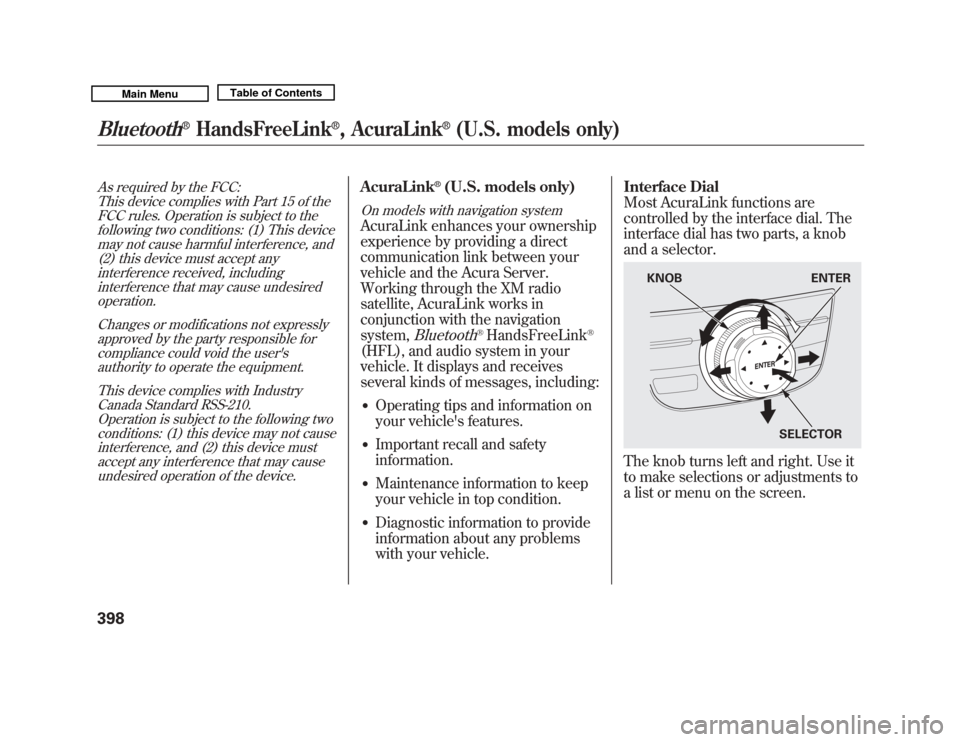
with your vehicle. Interface Dial
Most AcuraLink functions are
controlled by the interface dial. The
interface dial has two parts, a knob
and a selector.
The knob turns left and right. Use it
to make selections or adjustments to
a list or menu on the screen.
KNOB
ENTER
SELECTOR
Bluetooth
®
HandsFreeLink
®, AcuraLink
®
(U.S. models only)
39810/06/29 11:59:04 11 ACURA MDX MMC North America Owner's M 50 31STX640 enu
Page 406 of 609
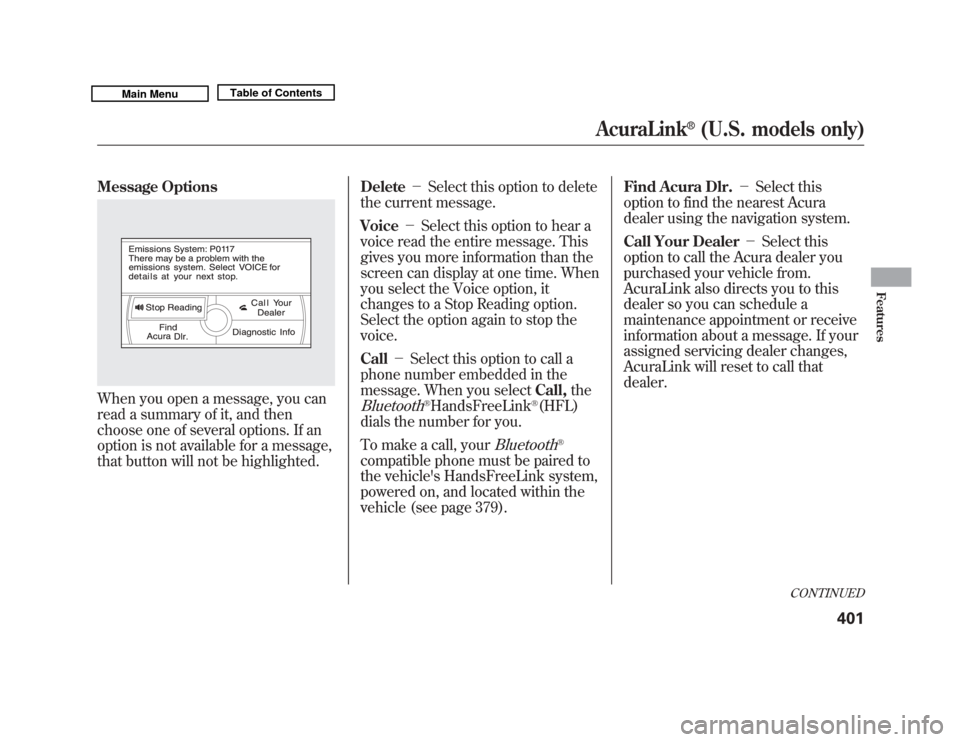
Message OptionsWhen you open a message, you can
read a summary of it, and then
choose one of several options. If an
option is not available for a message,
that button will not be highlighted.Delete
-Select this option to delete
the current message.
Voice -Select this option to hear a
voice read the entire message. This
gives you more information than the
screen can display at one time. When
you select the Voice option, it
changes to a Stop Reading option.
Select the option again to stop the
voice.
Call -Select this option to call a
phone number embedded in the
message. When you select Call,the
Bluetooth
®HandsFreeLink
®(HFL)
dials the number for you.
To make a call, your
Bluetooth
®
compatible phone must be paired to
the vehicle's HandsFreeLink system,
powered on, and located within the
vehicle (see page 379). Find Acura Dlr.
-Select this
option to find the nearest Acura
dealer using the navigation system.
Call Your Dealer -Select this
option to call the Acura dealer you
purchased your vehicle from.
AcuraLink also directs you to this
dealer so you can schedule a
maintenance appointment or receive
information about a message. If your
assigned servicing dealer changes,
AcuraLink will reset to call that
dealer.
CONTINUED
AcuraLink
®
(U.S. models only)
401
Features
10/06/29 11:59:04 11 ACURA MDX MMC North America Owner's M 50 31STX640 enu
Page 410 of 609
Automated AppointmentYou can make an appointment with
your dealer through the AcuraLink
when you receive a Maintenance
Minder message.
To use the automated appointment
function, you should visit the My
Acura website atwww.owners.acura.com
, register some
required settings, and complete the
Phone-Data Connection set-up (see
page 412). Your
Bluetooth
®
compatible phone should also be
paired and linked to your vehicle'sBluetooth
®HFL (see page 385).
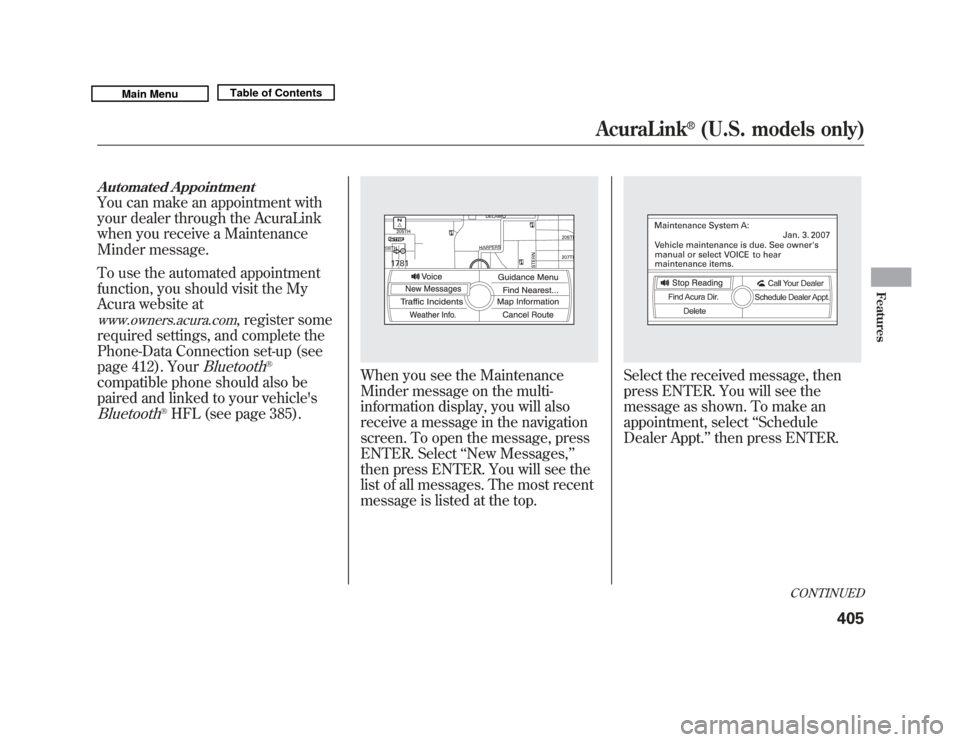
When you see the Maintenance
Minder message on the multi-
information display, you will also
receive a message in the navigation
screen. To open the message, press
ENTER. Select ‘‘New Messages, ’’
then press ENTER. You will see the
list of all messages. The most recent
message is listed at the top.
Select the received message, then
press ENTER. You will see the
message as shown. To make an
appointment, select ‘‘Schedule
Dealer Appt. ’’then press ENTER.
CONTINUED
AcuraLink
®
(U.S. models only)
405
Features
10/06/29 11:59:04 11 ACURA MDX MMC North America Owner's M 50 31STX640 enu
Page 417 of 609
New Message Notification-
Select ON if you want to be notified
of new messages (envelope icon
appears on the navigation screen).
Select OFF if you do not want to be
notified of new messages (envelope
icon does not appear on the screen).
Messages can still be accessed using
the INFO menu. If you would like to
stop receiving messages, visit the My
Acura website at
www.owners.acura.
com
to change your messaging
preferences.
Auto Reading -Select ON to have
the system automatically read each
message to you. Select OFF to
manually select the Voice button
when you want a message read to
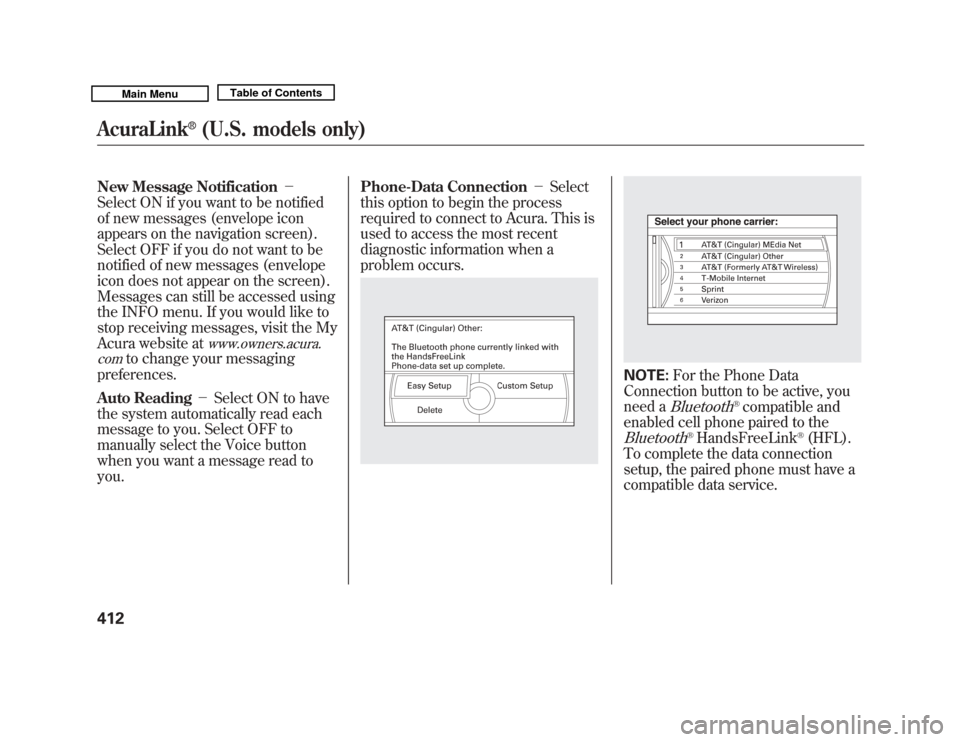
you. Phone-Data Connection
-Select
this option to begin the process
required to connect to Acura. This is
used to access the most recent
diagnostic information when a
problem occurs.
NOTE: For the Phone Data
Connection button to be active, you
need a
Bluetooth
®compatible and
enabled cell phone paired to the
Bluetooth
®HandsFreeLink
®(HFL).
To complete the data connection
setup, the paired phone must have a
compatible data service.
AcuraLink
®
(U.S. models only)
41210/06/29 11:59:04 11 ACURA MDX MMC North America Owner's M 50 31STX640 enu
Page 418 of 609

To find more information onBluetooth
®compatible and enabled
cell phones, visit
www.acura.com/handsfreelink
or call
the HandsFreeLink
®consumer
support at 1-888-528-7876. Connect to the Acura Server
-
The default setting is prompt. When
a diagnostic info message appears,
and you select the Check Now
option, the system will prompt you
before connecting to the Acura
server. If you do not wish to connect
at that time, select No at the prompt,
and you will see the information from
the onboard database. The ‘‘Auto ’’
setting will remove the prompt when
you select the Check Now option and
will automatically connect to the
Acura server. This setting only
applies when you have a
Bluetooth
®
enabled phone that is paired with the
HFL and you have completed the
Phone-Data Connection setup.
As required by the FCC:
This device complies with Part 15 of theFCC rules. Operation is subject to the
following two conditions: (1) This devicemay not cause harmful interference, and(2) this device must accept any
interference received, includinginterference that may cause undesiredoperation.
Changes or modifications not expresslyapproved by the party responsible for
compliance could void the user'sauthority to operate the equipment.
AcuraLink
®
(U.S. models only)
413
Features
10/06/29 11:59:04 11 ACURA MDX MMC North America Owner's M 50 31STX640 enu
Page 493 of 609
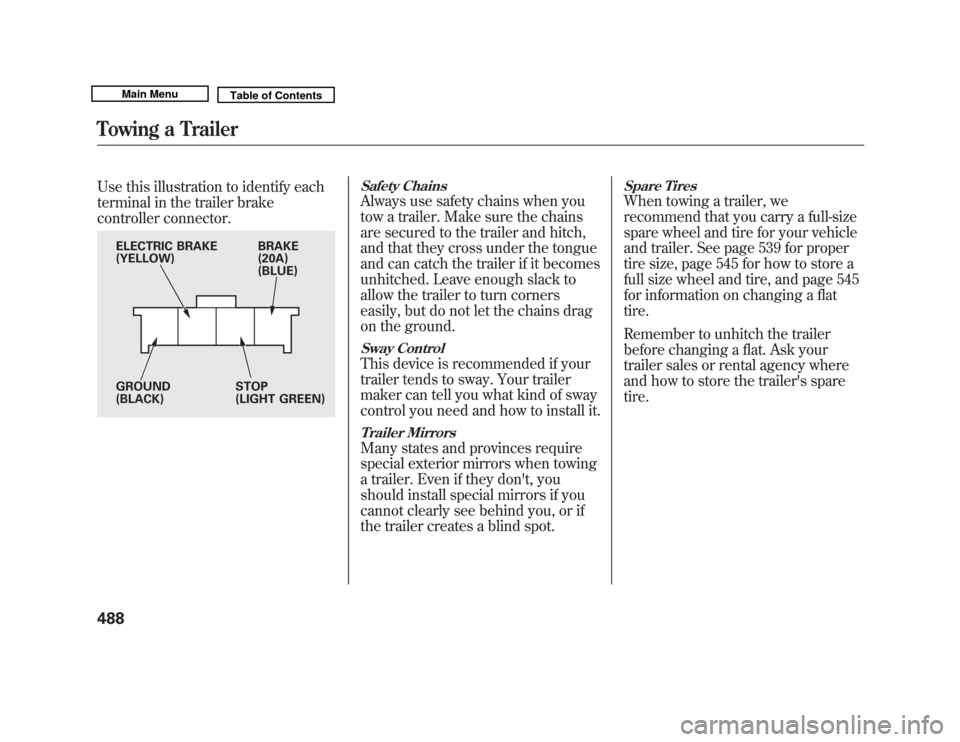
Use this illustration to identify each
terminal in the trailer brake
controller connector.
Safety ChainsAlways use safety chains when you
tow a trailer. Make sure the chains
are secured to the trailer and hitch,
and that they cross under the tongue
and can catch the trailer if it becomes
unhitched. Leave enough slack to
allow the trailer to turn corners
easily, but do not let the chains drag
on the ground.Sway ControlThis device is recommended if your
trailer tends to sway. Your trailer
maker can tell you what kind of sway
control you need and how to install it.Trailer MirrorsMany states and provinces require
special exterior mirrors when towing
a trailer. Even if they don't, you
should install special mirrors if you
cannot clearly see behind you, or if
the trailer creates a blind spot.
Spare TiresWhen towing a trailer, we
recommend that you carry a full-size
spare wheel and tire for your vehicle
and trailer. See page 539 for proper
tire size, page 545 for how to store a
full size wheel and tire, and page 545
for information on changing a flat
tire.
Remember to unhitch the trailer
before changing a flat. Ask your
trailer sales or rental agency where
and how to store the trailer's spare
tire.
BRAKE
(20A)
(BLUE)
ELECTRIC BRAKE
(YELLOW)
GROUND
(BLACK)
STOP
(LIGHT GREEN)
Towing a Trailer48810/06/29 11:59:04 11 ACURA MDX MMC North America Owner's M 50 31STX640 enu
Page 596 of 609
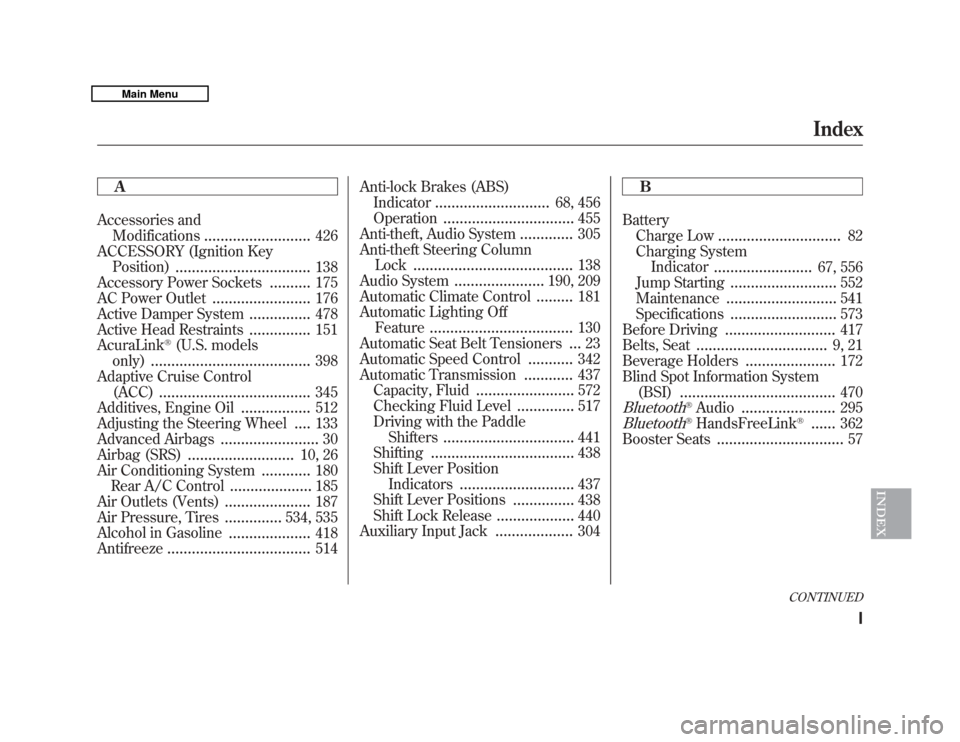
A
Accessories andModifications
..........................
426
ACCESSORY (Ignition Key Position)
.................................
138
Accessory Power Sockets
..........
175
AC Power Outlet
........................
176
Active Damper System
...............
478
Active Head Restraints
...............
151
AcuraLink
®(U.S. models
only)
.......................................
398
Adaptive Cruise Control (ACC)
.....................................
345
Additives, Engine Oil
.................
512
Adjusting the Steering Wheel
....
133
Advanced Airbags
........................
30
Airbag (SRS)
..........................
10, 26
Air Conditioning System
............
180
Rear A/C Control
....................
185
Air Outlets (Vents)
.....................
187
Air Pressure, Tires
..............
534, 535
Alcohol in Gasoline
....................
418
Antifreeze
...................................
514 Anti-lock Brakes (ABS)
Indicator
............................
68, 456
Operation
................................
455
Anti-theft, Audio System
.............
305
Anti-theft Steering Column Lock
.......................................
138
Audio System
......................
190, 209
Automatic Climate Control.........
181
Automatic Lighting Off Feature
...................................
130
Automatic Seat Belt Tensioners...
23
Automatic Speed Control
...........
342
Automatic Transmission
............
437
Capacity, Fluid
........................
572
Checking Fluid Level
..............
517
Driving with the Paddle Shifters
................................
441
Shifting
...................................
438
Shift Lever Position Indicators
............................
437
Shift Lever Positions
...............
438
Shift Lock Release
...................
440
Auxiliary Input Jack
...................
304 B
Battery
Charge Low
..............................
82
Charging System Indicator
........................
67, 556
Jump Starting
..........................
552
Maintenance
...........................
541
Specifications
..........................
573
Before Driving
...........................
417
Belts, Seat
................................
9, 21
Beverage Holders
......................
172
Blind Spot Information System (BSI)
......................................
470
Bluetooth
®Audio
.......................
295
Bluetooth
®HandsFreeLink
®
......
362
Booster Seats
...............................
57
CONTINUED
Index
I
INDEX
10/06/29 11:59:04 11 ACURA MDX MMC North America Owner's M 50 31STX640 enu