Door lock Acura MDX 2012 User Guide
[x] Cancel search | Manufacturer: ACURA, Model Year: 2012, Model line: MDX, Model: Acura MDX 2012Pages: 621, PDF Size: 11.15 MB
Page 81 of 621

Immobilizer System
Indicator
This indicator comes on briefly when
you turn the ignition switch to the
ON (II) position. It will then go off if
you have inserted a properly coded
ignition key. If it is not a properly
coded key, the indicator will blink,
and the engine's fuel system will be
disabled (see page 138).
Lights On Indicator
This indicator reminds you that the
exterior lights are on. It comes on
when the light switch is in either the
or
position. This indicator will
also come on when the light switch is
in AUTO and the lights turn on
automatically. If you turn the ignition
switch to the ACCESSORY (I) or the
LOCK (0) position without turning
off the light switch, this indicator will
remain on. A reminder chime will
also sound when you open the
driver's door.
Fog Light Indicator
This indicator comes on when you
turn on the fog lights. For more
information, see page 130.High Beam Indicator
This indicator comes on with the
high beam headlights. For more
information, see page 128.
Instrument Panel Indicators74
Page 99 of 621

Group Setup Menu Item Description Setting Option Page
LIGHTING SETUP
(P. 110)INTERIOR LIGHT
DIMMING TIMEChanges how long (in seconds) the interior lights stay
on after you close the doors and the tailgate.60 sec 15 sec 111
30 sec
ᤳ
HEADLIGHT
AUTO OFF TIMERChanges how long (in seconds) the exterior lights stay
on after you close the driver's door.60 sec
112 30 sec 0 sec
15 sec
ᤳ
AUTO LIGHT
SENSITIVITYChanges the timing of when the headlights come on.
The headlight switch needs to be in the AUTO
position.MAX LOW
113 HIGH MIN
MID
ᤳ
DOOR/WINDOW
SETUP
(P. 115)AUTO DOOR LOCK Changes the setting of when to automatically lock the
doors.SHIFT FROM P
116 WITH VEH SPD
ᤳ
OFF
AUTO DOOR UNLOCK Changes the setting of when to automatically unlock
the driver's/all the doors.SHIFT TO P
ᤳ
DRIVER
DOOR/ALL
DOORS
117 IGN OFF
OFF
KEY AND REMOTE
UNLOCK MODEChanges which doors unlock with the remote
transmitter on a first push.DRIVER DOOR
ᤳ
119
ALL DOORS
KEYLESS LOCK
ACKNOWLEDGMENTThe exterior lights flash each time you press the
LOCK or UNLOCK button. A beeper will also sound
when you press the LOCK button twice.ON
ᤳ
120 OFF
SECURITY RELOCK TIMER Changes how long it takes (in seconds) for the doors
to relock and the security system to set after you
unlock but do not open the door.90 sec
121 60 sec
30 sec
ᤳ
WIPER SETUP
(P. 123)WIPER ACTION Changes the wiper operation between two settings
when the wiper switch is in the INT position.INTERMITTENT 123
WITH VEH SPD
ᤳ
DEFAULT ALL
(P. 93)Set/Cancel all the customized settings as default. SET 93
CANCEL
ᤳ: Default setting
Multi-Information Display92
Page 122 of 621

Door/Window Setup
Here are the five custom settings for
the door/window setup:●
AUTO DOOR LOCK
●
AUTO DOOR UNLOCK
●
KEY AND REMOTE UNLOCK
MODE
●
KEYLESS LOCK
ACKNOWLEDGMENT
●
SECURITY RELOCK TIMER
While‘‘DOOR/WINDOW SETUP’’is
shown, press the SEL/RESET button
to enter the customize mode.
Each time you press the INFO
(/
) button, the screen changes as
shown in the illustration. Press the
INFO (
/
) button until you see the
setting you want to customize, then
press the SEL/RESET button to
enter your selection.
SEL/RESET
BUTTON
INFO (▲or▼)
BUTTON
CONTINUED
Multi-Information Display
115
Instruments and Controls
Page 123 of 621

Auto Door LockThere are three settings you can
choose from:
SHIFT FROM P-
The doors lock whenever you move
the shift lever out of Park.
WITH VEH SPD-
The doors lock when the vehicle
speed reaches about 10 mph (about
16 km/h).
OFF-
The auto door lock is deactivated all
the time.
You can choose this customizable
item from‘‘DOOR/WINDOW
SETUP’’by pressing the INFO (
/
) button repeatedly.
Press the SEL/RESET button to see
the selections.
Select the desired setting by
pressing the INFO (
/
) button,
then enter your selection by pressing
the SEL/RESET button.
Multi-Information Display116
Page 124 of 621

When your selection is successfully
completed, the display changes as
shown above, and then goes back to
the customize item screen.
If the‘‘SETTING INCOMPLETE’’
message appears, go back to‘‘AUTO
DOOR LOCK’’and repeat the
procedure again.
Auto Door UnlockThere are three settings you can
choose from:
SHIFT TO P-The driver's door or
all the doors, depending on the door
lock mode setting (see page 116),
unlock when you move the shift lever
to Park with the brake pedal
depressed.
IGN OFF-The driver's door or all
the doors, depending on the door
lock mode setting (see page 116),
unlock when you turn the ignition
switch to the LOCK (0) position.
OFF-The auto door unlock is
deactivated all the time. This is the
factory default setting.
You can choose this customizable
item from‘‘DOOR/WINDOW
SETUP’’by pressing the INFO (
/
) button repeatedly.
CONTINUED
Multi-Information Display
117
Instruments and Controls
Page 125 of 621
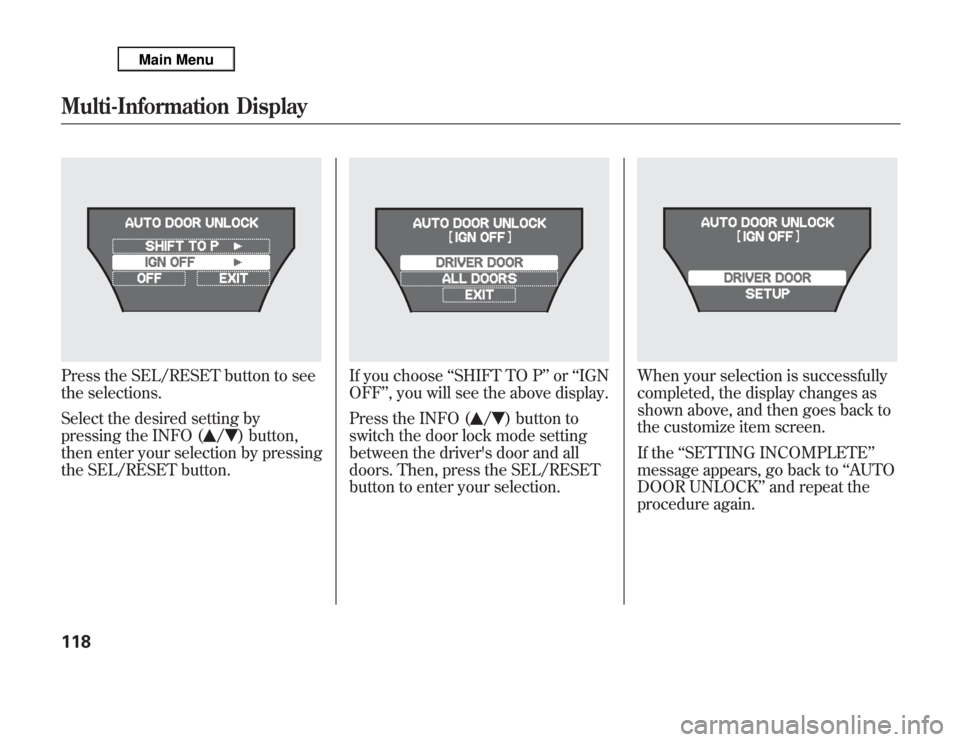
Press the SEL/RESET button to see
the selections.
Select the desired setting by
pressing the INFO (
/
) button,
then enter your selection by pressing
the SEL/RESET button.
If you choose‘‘SHIFT TO P’’or‘‘IGN
OFF’’, you will see the above display.
Press the INFO (
/
) button to
switch the door lock mode setting
between the driver's door and all
doors. Then, press the SEL/RESET
button to enter your selection.
When your selection is successfully
completed, the display changes as
shown above, and then goes back to
the customize item screen.
If the‘‘SETTING INCOMPLETE’’
message appears, go back to‘‘AUTO
DOOR UNLOCK’’and repeat the
procedure again.
Multi-Information Display118
Page 126 of 621

Key and Remote Unlock ModeTo select whether the driver's or all
doors unlock when the remote
transmitter or key is used, follow
these instructions.
You can choose this customizable
item from‘‘DOOR/WINDOW
SETUP’’by pressing the INFO (
/
) button repeatedly.
Press the SEL/RESET button to see
the selections.
Select the desired setting by
pressing the INFO (
/
) button,
then enter your selection by pressing
the SEL/RESET button.
When your selection is successfully
completed, the display changes as
shown above, and then goes back to
the customize item screen.
If the‘‘SETTING INCOMPLETE’’
message appears, go back to‘‘KEY
AND REMOTE UNLOCK MODE’’
and repeat the procedure again.
CONTINUED
Multi-Information Display
119
Instruments and Controls
Page 127 of 621

Keyless Lock AcknowledgmentWhen you push the LOCK button on
the remote transmitter, some
exterior lights flash, and a beeper
sounds when you push the LOCK
button again within 5 seconds to
verify that the doors and the tailgate
are locked and the security system
has set (see page 341). You can
customize the exterior lights not to
flash and the beeper not to sound.
You can choose this customizable
item from‘‘DOOR/WINDOW
SETUP’’by pressing the INFO (
/
) button repeatedly.
Press the SEL/RESET button to see
the selections.
Select ON or OFF by pressing the
INFO (
/
) button, then enter your
selection by pressing the SEL/
RESET button.
Multi-Information Display120
Page 128 of 621

When your selection is successfully
completed, the display changes as
shown above, and then goes back to
the customize item screen.
If the‘‘SETTING INCOMPLETE’’
message appears, go back to
‘‘KEYLESS LOCK
ACKNOWLEDGMENT’’and repeat
the procedure again.
Security Relock TimerIf you unlock the doors and the
tailgate with the remote transmitter,
but do not open any of the doors or
the tailgate within 30 seconds, the
doors and the tailgate automatically
relock and the security system sets.
You can change this relock time from
30 seconds to 60 or 90 seconds.
You can choose this customizale item
from‘‘DOOR/WINDOW SETUP’’by
pressing the INFO (
/
) button
repeatedly.CONTINUED
Multi-Information Display
121
Instruments and Controls
Page 135 of 621
3. When you turn the wiper switch to
the‘‘OFF’’position, the wiper will
return to its parked position.
4. Rotate the switch
counterclockwise to spray the
window washer.
When you shift the transmission to
the reverse position with the front
windshield wipers activated, the
rear window wiper operates
automatically.
When the wiper control lever
position is INT, the rear wiper
operates intermittently. When it is
LO or HI, the rear wiper operates
continuously.
The rear window washer uses the
same fluid reservoir as the
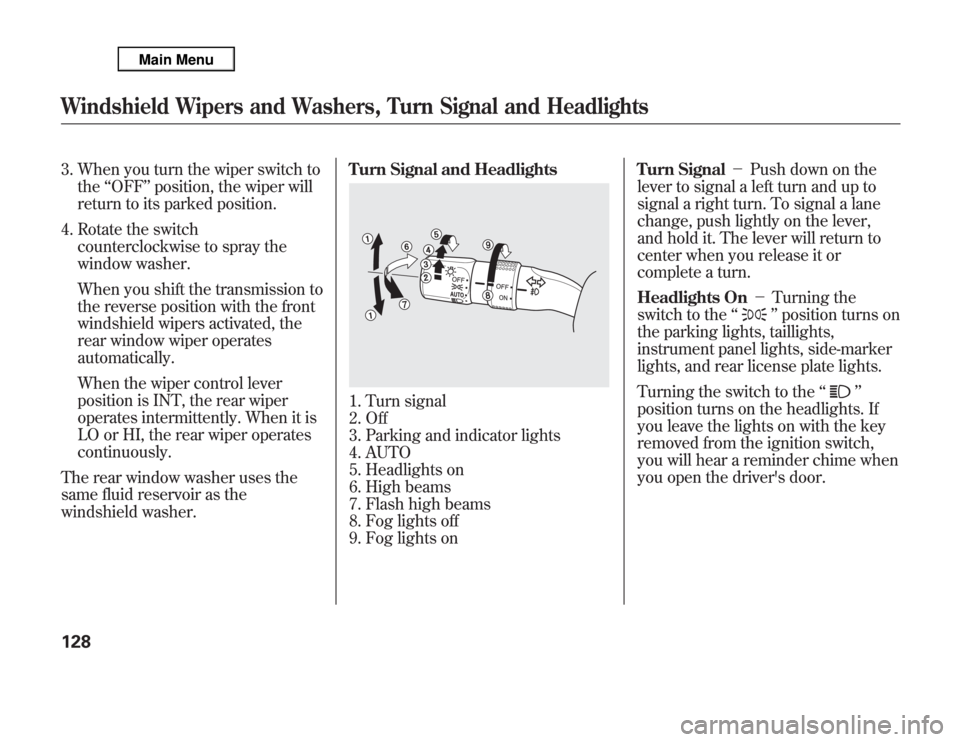
windshield washer.Turn Signal and Headlights
1. Turn signal
2. Off
3. Parking and indicator lights
4. AUTO
5. Headlights on
6. High beams
7. Flash high beams
8. Fog lights off
9. Fog lights onTurn Signal-Push down on the
lever to signal a left turn and up to
signal a right turn. To signal a lane
change, push lightly on the lever,
and hold it. The lever will return to
center when you release it or
complete a turn.
Headlights On-Turning the
switch to the‘‘
’’position turns on
the parking lights, taillights,
instrument panel lights, side-marker
lights, and rear license plate lights.
Turning the switch to the‘‘
’’
position turns on the headlights. If
you leave the lights on with the key
removed from the ignition switch,
you will hear a reminder chime when
you open the driver's door.
Windshield Wipers and Washers, Turn Signal and Headlights128