ignition Acura MDX 2012 User Guide
[x] Cancel search | Manufacturer: ACURA, Model Year: 2012, Model line: MDX, Model: Acura MDX 2012Pages: 621, PDF Size: 11.15 MB
Page 80 of 621

Message Indicator
This indicator comes on when there
is a system message on the multi-
information display. Press the INFO
button on the steering wheel (see
page 79) to see the message (see
page 87).
Most of the time, this indicator
comes on along with other indicators
in the instrument panel such as the
seat belt reminder indicator, SRS
indicator, VSA system indicator, etc.
Super Handling-All
Wheel Drive (SH-AWD)
Indicator
This indicator normally comes on for
a few seconds when you turn the
ignition switch to the ON (II)
position. If this indicator comes on at
any other time, there is a problem in
the SH-AWD system. You will also
see a‘‘CHECK SH-AWD SYSTEM’’
message on the multi-information
display (see page 88). Take your
vehicle to a dealer to have it checked.
For more information, see page 452.If the indicator blinks while driving,
it indicates the differential
temperature is too high.
You will also see a‘‘SH-AWD DIFF
TEMP. HIGH’’message on the multi-
information display (see page 88).
Pull to the side of the road when it is
safe, shift to Park, and let the engine
idle until the indicator goes out.
Continuing to drive with the SH-AWD
indicator blinking may cause serious
damage to the system.
CONTINUED
Instrument Panel Indicators
73
Instruments and Controls
Page 81 of 621

Immobilizer System
Indicator
This indicator comes on briefly when
you turn the ignition switch to the
ON (II) position. It will then go off if
you have inserted a properly coded
ignition key. If it is not a properly
coded key, the indicator will blink,
and the engine's fuel system will be
disabled (see page 138).
Lights On Indicator
This indicator reminds you that the
exterior lights are on. It comes on
when the light switch is in either the
or
position. This indicator will
also come on when the light switch is
in AUTO and the lights turn on
automatically. If you turn the ignition
switch to the ACCESSORY (I) or the
LOCK (0) position without turning
off the light switch, this indicator will
remain on. A reminder chime will
also sound when you open the
driver's door.
Fog Light Indicator
This indicator comes on when you
turn on the fog lights. For more
information, see page 130.High Beam Indicator
This indicator comes on with the
high beam headlights. For more
information, see page 128.
Instrument Panel Indicators74
Page 82 of 621

Adaptive Cruise Control
(ACC) Indicator
On models with adaptive cruise control
(ACC)This indicator normally comes on for
a few seconds when you turn the
ignition switch to the ON (II)
position.
When you push the MAIN button on
the steering wheel, this indicator
comes on green. You will also see
‘‘ACC’’on the multi-information
display.
If the indicator comes on amber,
there is a problem with the ACC
system. You will also see a‘‘CHECK
ACC SYSTEM’’message on the
multi-information display (see page
88). Take your vehicle to your dealer
to have it checked. For more
information, see page 348.
Cruise Main Indicator
On models without adaptive cruise
control (ACC)This indicator comes on when you
turn on the cruise control system by
pressing the CRUISE button (see
page 345).
Cruise Control Indicator
On models without adaptive cruise
control (ACC)This indicator comes on when you
set the cruise control. See page 345
for information on operating the
cruise control.
Collision Mitigation
Braking System™
(CMBS™) Indicator
On models with collision mitigation
braking system™(CMBS™)This indicator normally comes on for
a few seconds when you turn the
ignition switch to the ON (II)
position. It also comes on as a
reminder that you have turned off the
collision mitigation braking system™
(CMBS™).
The CMBS indicator also comes on if
dirt or other debris blocks the radar
sensor in the front grille. You will
also see a‘‘CHECK CMBS RADAR
SENSOR’’message on the multi-
information display. When you clean
the radar sensor, the indicator
should go off the next time you turn
the ignition switch to the ON (II)
position.
CONTINUED
Instrument Panel Indicators
75
Instruments and Controls
Page 83 of 621

If the indicator comes on at any other
time, there is a problem with the
CMBS. You will also see a‘‘CHECK
CMBS SYSTEM’’message on the
multi-information display. If this
happens, take your vehicle to your
dealer, and have it checked. For
more information, see page 463.
When this indicator is on, the CMBS
is not working.
Door/Tailgate Open
Indicator
This indicator comes on red if any
door or the tailgate is not closed
tightly.
You will also see a corresponding
indicator(s) on the multi-information
display to indicate which door and/
or the tailgate is not closed tightly
(see page 12).
Blind Spot Information
System (BSI) Indicator
On models with blind spot information
system (BSI)This indicator normally comes on for
a few seconds when you turn the
ignition switch to the ON (II)
position.
The BSI indicator also comes on if
the rear bumper becomes dirty while
driving. You will see a‘‘BLIND SPOT
NOT AVAILABLE’’message on the
multi-information display.
When you clean the rear bumper, the
indicator should go off after you
begin driving again.
When you turn the system on, the
indicator will turn off.If the indicator comes on at any other
time, there is a problem with BSI.
You will also see a‘‘CHECK BLIND
SPOT SYSTEM’’message on the
multi-information display. If this
happens, take your vehicle to a
dealer, and have it checked (For
more information, see page 482).
When this indicator is on, BSI is not
working.
Instrument Panel Indicators76
Page 84 of 621

Active Damper System
Indicator
If equippedThis indicator comes on briefly when
you turn the ignition switch to the
ON (II) position. If this indicator
comes on at any other time, there is a
problem in the system. While this
indicator is on, the comfort button
will not work, and the system will
remain in the sport mode. You will
also see a‘‘CHECK ADS SYSTEM’’
message on the multi-information
display. Have the vehicle checked by
your dealer as soon as possible. For
more information, see page 484.Low Fuel Indicator
This indicator comes on as a
reminder that you must refuel soon.
When the indicator comes on, there
is about 2.9 U.S. gal (10.8 L) of fuel
remaining in the tank.
When the needle reaches E, there is
a very small amount of fuel in the
tank.Security System Indicator
This indicator comes on when the
security system is set. See page 341
for more information on the security
system.
LOW FUEL INDICATOR
SECURITY SYSTEM INDICATOR
Instrument Panel Indicators
77
Instruments and Controls
Page 86 of 621

The multi-information display in the
instrument panel displays various
information and messages when the
ignition switch is in the ON (II)
position. Some of the messages help
you operate your vehicle more
comfortably. Others help to keep you
aware of the periodic maintenance
your vehicle needs for continued
trouble-free driving.
When you open the driver's door, a
‘‘Welcome’’message is shown on the
multi-information display.
To change the display, press the
INFO (
/
) button on the steering
wheel repeatedly until the main
menu appears (see page 80).With the ignition switch in the ON
(II) position, the multi-information
display changes as shown on the
next page each time you press the
INFO (
/
) button or SEL/RESET
button.
When you turn the ignition switch to
the ON (II) position, your last
selection is displayed.
In the multi-information display, the
system message is also displayed
(see page 86) and you can customize
your vehicle control settings (see
page 90).
SEL/
RESET
BUTTON INFO (▲/▼)
BUTTON
CONTINUED
Multi-Information Display
79
Instruments and Controls
Page 92 of 621

RANGEThis shows the estimated distance
you can travel on the fuel remaining
in the fuel tank. This distance is
estimated from the fuel economy you
received over the last several miles
(U.S.) or kilometers (Canada), so it
will vary with changes in speed,
traffic, etc.
AVERAGE SPEEDThis shows the average speed you
are traveling in miles per hour (mph)
for U.S. models or kilometers per
hour (km/h) for Canadian models.
To reset the AVERAGE SPEED you
have traveled, press and hold the
SEL/RESET button until the number
resets.
ELAPSED TIMEThis shows the time passed traveled
since you last reset it. When you turn
the ignition switch to the ON (II)
position, ELAPSED TIME is reset.
If you want to reset the ELAPSED
TIME manually, go to the trip
computer's ELAPSED TIME display,
and press and hold the SEL/RESET
button until the number resets.
You can customize the ELAPSED
TIME reset condition on the multi-
information display (see page 104).
CONTINUED
Multi-Information Display
85
Instruments and Controls
Page 97 of 621

Customize SettingsWhen the main menu displays
‘‘Keyless Memory Settings™,’’you
can customize some vehicle control
settings.
To enter the customizing mode,
press the SEL/RESET button.
To change the settings, the ignition
switch must be in the ON (II)
position, and the vehicle must be
stopped with the transmission in
Park.If you turn the ignition switch to the
ACCESSORY (I) or the LOCK (0)
position, or move the shift lever out
of Park, the display will change to the
normal screen.
You can customize some vehicle
control settings for‘‘DRIVER 1’’and
‘‘DRIVER 2’’separately. If‘‘DRIVER
1’’or‘‘DRIVER 2’’is not displayed,
customizing is not possible.
To have the driver's ID detected,
make sure your remote transmitter is
linked to the system (see Keyless
Memory Settings™on page 148).
If you want the settings as they were
when the vehicle left the factory,
select DEFAULT ALL, as described
on page 93.
If you want to change any vehicle
control settings, select CHG
SETTING, then press the SEL/
RESET button.
Refer to the table on the following
pages about the settings you want to
customize.
Multi-Information Display90
Page 111 of 621
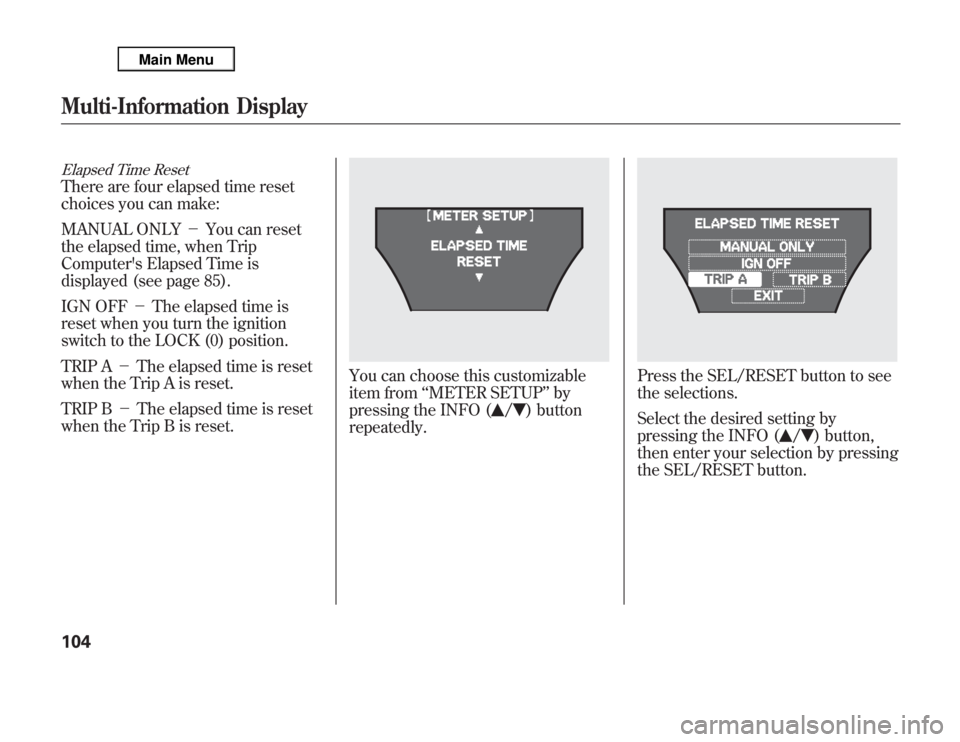
Elapsed Time ResetThere are four elapsed time reset
choices you can make:
MANUAL ONLY-You can reset
the elapsed time, when Trip
Computer's Elapsed Time is
displayed (see page 85).
IGN OFF-The elapsed time is
reset when you turn the ignition
switch to the LOCK (0) position.
TRIP A-The elapsed time is reset
when the Trip A is reset.
TRIP B-The elapsed time is reset
when the Trip B is reset.
You can choose this customizable
item from‘‘METER SETUP’’by
pressing the INFO (
/
) button
repeatedly.
Press the SEL/RESET button to see
the selections.
Select the desired setting by
pressing the INFO (
/
) button,
then enter your selection by pressing
the SEL/RESET button.
Multi-Information Display104
Page 116 of 621

Auto Tilt & Telescope Steering WheelWhen‘‘AUTO TILT & TELESCOPE
STEERING WHEEL’’is set to‘‘ON,’’
the steering wheel automatically
moves fully in and up when you turn
the ignition switch to the LOCK (0)
position and remove the key.
You can choose this customizable
item from‘‘POSITION SETUP’’by
pressing the INFO (
/
) button
repeatedly.
Press the SEL/RESET button to see
the selections.
Select ON or OFF by pressing the
INFO (
/
) button, then enter your
selection by pressing the SEL/
RESET button.
When your selection is successfully
completed, the display changes as
shown above, and then goes back to
the customize item screen.
If the‘‘SETTING INCOMPLETE’’
message appears, go back to‘‘AUTO
TILT & TELESCOPE STEERING
WHEEL’’and repeat the procedure
again.
CONTINUED
Multi-Information Display
109
Instruments and Controls