instrument panel Acura MDX 2012 Owner's Guide
[x] Cancel search | Manufacturer: ACURA, Model Year: 2012, Model line: MDX, Model: Acura MDX 2012Pages: 621, PDF Size: 11.15 MB
Page 84 of 621

Active Damper System
Indicator
If equippedThis indicator comes on briefly when
you turn the ignition switch to the
ON (II) position. If this indicator
comes on at any other time, there is a
problem in the system. While this
indicator is on, the comfort button
will not work, and the system will
remain in the sport mode. You will
also see a‘‘CHECK ADS SYSTEM’’
message on the multi-information
display. Have the vehicle checked by
your dealer as soon as possible. For
more information, see page 484.Low Fuel Indicator
This indicator comes on as a
reminder that you must refuel soon.
When the indicator comes on, there
is about 2.9 U.S. gal (10.8 L) of fuel
remaining in the tank.
When the needle reaches E, there is
a very small amount of fuel in the
tank.Security System Indicator
This indicator comes on when the
security system is set. See page 341
for more information on the security
system.
LOW FUEL INDICATOR
SECURITY SYSTEM INDICATOR
Instrument Panel Indicators
77
Instruments and Controls
Page 86 of 621

The multi-information display in the
instrument panel displays various
information and messages when the
ignition switch is in the ON (II)
position. Some of the messages help
you operate your vehicle more
comfortably. Others help to keep you
aware of the periodic maintenance
your vehicle needs for continued
trouble-free driving.
When you open the driver's door, a
‘‘Welcome’’message is shown on the
multi-information display.
To change the display, press the
INFO (
/
) button on the steering
wheel repeatedly until the main
menu appears (see page 80).With the ignition switch in the ON
(II) position, the multi-information
display changes as shown on the
next page each time you press the
INFO (
/
) button or SEL/RESET
button.
When you turn the ignition switch to
the ON (II) position, your last
selection is displayed.
In the multi-information display, the
system message is also displayed
(see page 86) and you can customize
your vehicle control settings (see
page 90).
SEL/
RESET
BUTTON INFO (▲/▼)
BUTTON
CONTINUED
Multi-Information Display
79
Instruments and Controls
Page 93 of 621

System MessagesIf there is a problem with your
vehicle, for example, the engine oil
level is low or a door is not fully
closed, the multi-information display
will show you the problem. It does
this by interrupting the current
display with one or more messages.The system message(s) triggers the
appropriate indicator(s) on the
instrument panel, including the
system message indicator, to come
on. The system message indicator
does not go off until the problem(s)
is corrected.
You will also hear a beep when the
system message comes on for the
first time.
Most of the messages are displayed
for about 5 seconds, and then the
normal display returns. If there are
several system messages to be
shown, the display switches these
messages every 5 seconds.To cancel the message(s) before 5
seconds have elapsed, press the
INFO (
/
) button on the steering
wheel.
Even if you press the INFO (
/
)
button, some messages stay on or
come on again at regular intervals
until the problem is corrected.
You can see the message(s) again by
pressing the INFO (
/
) button
repeatedly if the system message
indicator remains lit on the
instrument panel.
Here is a list of all messages:
SYSTEM MESSAGE INDICATOR
Multi-Information Display86
Page 132 of 621
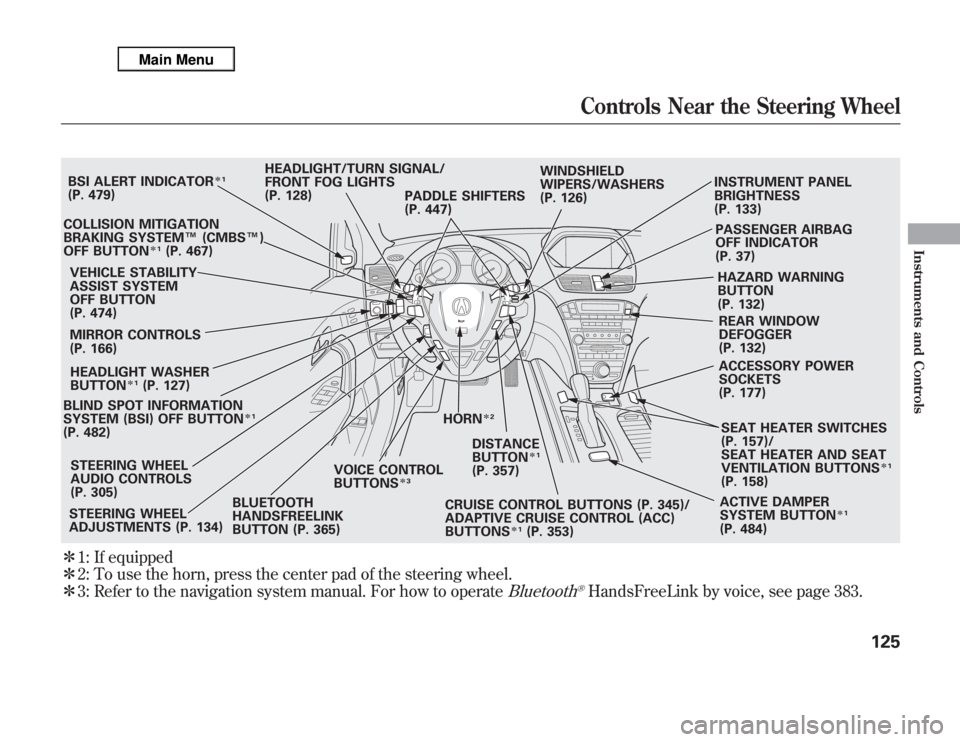
ᤳ1: If equipped
ᤳ2: To use the horn, press the center pad of the steering wheel.
ᤳ3: Refer to the navigation system manual. For how to operate
Bluetooth
®HandsFreeLink by voice, see page 383.
BLIND SPOT INFORMATION
SYSTEM (BSI) OFF BUTTON
ᤳ1
(P. 482)VEHICLE STABILITY
ASSIST SYSTEM
OFF BUTTON
(P. 474)
MIRROR CONTROLS
(P. 166)HEADLIGHT/TURN SIGNAL/
FRONT FOG LIGHTS
(P. 128)
STEERING WHEEL
ADJUSTMENTS (P. 134)CRUISE CONTROL BUTTONS (P. 345)/
ADAPTIVE CRUISE CONTROL (ACC)
BUTTONS
ᤳ1
(P. 353) STEERING WHEEL
AUDIO CONTROLS
(P. 305)WINDSHIELD
WIPERS/WASHERS
(P. 126)INSTRUMENT PANEL
BRIGHTNESS
(P. 133)
PASSENGER AIRBAG
OFF INDICATOR
(P. 37)
HAZARD WARNING
BUTTON
(P. 132)
REAR WINDOW
DEFOGGER
(P. 132)
ACCESSORY POWER
SOCKETS
(P. 177)
SEAT HEATER SWITCHES
(P. 157)/
SEAT HEATER AND SEAT
VENTILATION BUTTONS
ᤳ1
(P. 158)
ACTIVE DAMPER
SYSTEM BUTTON
ᤳ1
(P. 484) HORN
ᤳ2
BSI ALERT INDICATOR
ᤳ1
(P. 479)
COLLISION MITIGATION
BRAKING SYSTEM™(CMBS™)
OFF BUTTON
ᤳ1
(P. 467)
HEADLIGHT WASHER
BUTTON
ᤳ1
(P. 127)
DISTANCE
BUTTON
ᤳ1
(P. 357) PADDLE SHIFTERS
(P. 447)
BLUETOOTH
HANDSFREELINK
BUTTON (P. 365)VOICE CONTROL
BUTTONS
ᤳ3
Controls Near the Steering Wheel
125
Instruments and Controls
Page 135 of 621
3. When you turn the wiper switch to
the‘‘OFF’’position, the wiper will
return to its parked position.
4. Rotate the switch
counterclockwise to spray the
window washer.
When you shift the transmission to
the reverse position with the front
windshield wipers activated, the
rear window wiper operates
automatically.
When the wiper control lever
position is INT, the rear wiper
operates intermittently. When it is
LO or HI, the rear wiper operates
continuously.
The rear window washer uses the
same fluid reservoir as the
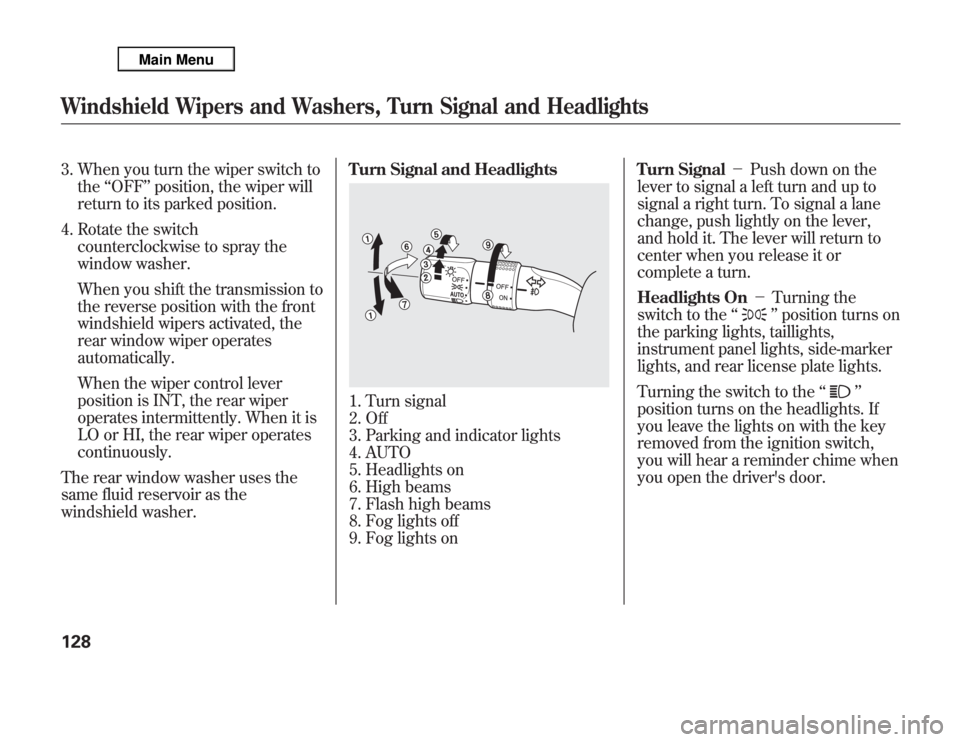
windshield washer.Turn Signal and Headlights
1. Turn signal
2. Off
3. Parking and indicator lights
4. AUTO
5. Headlights on
6. High beams
7. Flash high beams
8. Fog lights off
9. Fog lights onTurn Signal-Push down on the
lever to signal a left turn and up to
signal a right turn. To signal a lane
change, push lightly on the lever,
and hold it. The lever will return to
center when you release it or
complete a turn.
Headlights On-Turning the
switch to the‘‘
’’position turns on
the parking lights, taillights,
instrument panel lights, side-marker
lights, and rear license plate lights.
Turning the switch to the‘‘
’’
position turns on the headlights. If
you leave the lights on with the key
removed from the ignition switch,
you will hear a reminder chime when
you open the driver's door.
Windshield Wipers and Washers, Turn Signal and Headlights128
Page 138 of 621

If you see a‘‘CHECK DRL SYSTEM’’
message on the multi-information
display, there is a problem with the
daytime running light system. Take
your vehicle to a dealer to have it
checked.
When the multi-information display
shows a‘‘DRL OFF’’message, the
daytime running lights are off.
Follow the procedure in the left
column to turn them on.Automatic Lighting Off Feature
This feature turns off the headlights,
all other exterior lights, and the
instrument panel lights within 15
seconds after you remove the key
and close the driver's door.
To change the‘‘HEADLIGHT AUTO
OFF TIMER’’setting, see page 112.
The automatic lighting off feature
activates if you leave the headlight
switch in the‘‘
’’or‘‘
’’
position or if the lights are turned on
by setting the switch in the‘‘AUTO’’
position, and you remove the key,
then open and close the driver's
door.If you turn the ignition switch to the
LOCK (0) position with the headlight
switch on, but do not open the door
the lights turn off after 10 minutes (3
minutes, if the switch is in the
‘‘AUTO’’position).
The lights turn on again when you
unlock or open the driver's door.
If you unlock the door, but do not
open it within 15 seconds, the lights
go off. With the driver's door open,
you will hear a lights-on reminder
chime.
Turn Signal and Headlights
131
Instruments and Controls
Page 139 of 621

Hazard Warning ButtonPush the button between the center
vents to turn on the hazard warning
lights (four-way flashers). This
causes all four outside turn signals
and both indicators in the instrument
panel to flash. Use the hazard
warning lights if you need to park in
a dangerous area near heavy traffic,
or if your vehicle is disabled.Rear Window Defogger
The rear window defogger will clear
fog, frost, and thin ice from the
window. Push the defogger button to
turn it on and off. The indicator in the
button lights to show the defogger is
on. If you do not turn it off, the
defogger will shut itself off after
about 15 minutes. It also shuts off
when you turn off the ignition. You
have to turn it on again when you
restart the vehicle.Make sure the rear window is clear
and you have good visibility before
starting to drive.
The defogger wires on the inside of
the rear window can be accidentally
damaged. When cleaning the glass,
always wipe side-to-side.
Pushing this button also turns the
mirror heaters on or off. For more
information, see page 167.
Hazard Warning Button, Rear Window Defogger132
Page 140 of 621

Adjust the brightness of the
instrument panel by pressing the+
or-button. Press the+button to
increase the brightness and the-
button to decrease it. The brightness
can be set differently for when the
headlights are on, and when they are
off.
The level of brightness is shown on
the multi-information display while
you adjust it. It goes out 5 seconds
after you finish adjusting.To reduce glare at night, the
instrument panel illumination dims
when you turn the light switch to
or
. To cancel the glare reduction
function, set the brightness to the
highest level, then press the+
button. You will hear a beep when it
is canceled.
You can customize when the glare
reduction function starts. To change
‘‘AUTO INTERIOR
ILLUMINATION’’, see page 105 for
more information.
Instrument Panel Brightness
133
Instruments and Controls
Page 141 of 621

Make any steering wheel adjustment
before you start driving.
Adjusting the steering wheel
position while driving may
cause you to lose control of the
vehicle and be seriously injured
in a crash.
Adjust the steering wheel only
when the vehicle is stopped.
Move the steering wheel in, out, up,
or down by pushing and holding the
adjustment switch in that direction.Release the switch when the steering
wheel reaches the desired position.
Make sure the steering wheel points
towards your chest, not toward your
face, and that you can see the
instrument panel gauges and
indicators.
ADJUSTMENT SWITCH
Steering Wheel Adjustments134
Page 146 of 621

The ignition switch has four positions:
LOCK (0), ACCESSORY (I), ON (II),
and START (III).
LOCK (0)-You can insert or remove
the key only in this position. To turn
the key to the LOCK (0) position, the
shift lever must be in Park, and you
must push the key in slightly.
If the front wheels are turned, the anti-
theft lock may make it difficult to turn
the key. Firmly turn the steering wheel
to the left or right as you turn the key.
ACCESSORY (I)-You can operate
the audio system and the accessory
power sockets in this position.
ON (II)-This is the normal key
position when driving. Several of the
indicators on the instrument panel
come on as a test when you turn the
ignition switch from the
ACCESSORY (I) to the ON (II)
position.
START (III)-Use this position
only to start the engine. The switch
returns to the ON (II) position when
you let go of the key.You will hear a reminder beeper if
you leave the key in the ignition
switch in the LOCK (0) or the
ACCESSORY (I) position and open
the driver's door. Remove the key to
turn off the beeper.
The shift lever must be in Park
before you can remove the key from
the ignition switch.
Ignition Switch
139
Instruments and Controls