steering wheel Acura MDX 2012 Owner's Guide
[x] Cancel search | Manufacturer: ACURA, Model Year: 2012, Model line: MDX, Model: Acura MDX 2012Pages: 621, PDF Size: 11.15 MB
Page 360 of 621

Using the ACC1. Push the MAIN button on the
steering wheel. The ACC indicator
on the instrument panel comes on,
and‘‘ACC’’is shown on the multi-
information display.
2. Accelerate to the desired speed
above 25 mph (40 km/h).
3. Press and release the SET/
DECEL button on the steering
wheel, then release the accelerator
pedal.
If you press the SET/DECEL button
when the vehicle speed is below 25
mph (40 km/h), you will hear a beep
for about 1 second. This means ACC
is not activated, and you cannot set
your speed.
When your speed reaches 25 mph
(40 km/h), ACC goes into wait
mode, and‘‘ACC’’is shown on the
multi-information display.
MAIN BUTTON
SET/DECEL BUTTON
CONTINUED
Adaptive Cruise Control (ACC)
353
Features
Page 365 of 621

Canceling the ACCACC is canceled whenever you do
any of these actions:●
Push the CANCEL button on the
steering wheel.
●
Tap the brake pedal.
●
Press the MAIN button. The ACC
indicator in the instrument panel
goes off.When you push the CANCEL button
or tap the brake pedal to cancel ACC,
the set cruising speed stays in
memory. When you turn on ACC
again, the speed is shown on the
multi-information display. To return
to that speed, accelerate to over 25
mph (40 km/h), then press the RES/
ACCEL button.
If you cancel ACC by pressing the
MAIN button, the previously set
cruising speed is erased from
memory.Automatic ACC Cancelation
When ACC is automatically canceled,
the beeper sounds for about 1
second, and the ACC OFF message
appears on the multi-information
display for 3 seconds.
Any of these conditions may cause
ACC to cancel:
●
The vehicle speed decreases
below 22 mph (35 km/h).
●
Poor weather (rain, fog, snow, etc.)
●
When the radar sensor in the front
grille gets dirty.
●
The vehicle ahead of you cannot
be detected.
●
An abnormal tire condition is
detected, or the tires are skidding.
CANCEL BUTTON
Adaptive Cruise Control (ACC)358
Page 366 of 621

●
Driving on a mountainous road, or
driving off road for extended
periods.
●
Abrupt steering wheel movement.
●
When the ABS or VSA is activated.
●
When the VSA indicator comes on.
If ACC is canceled by any these
conditions, wait until the condition
improves, then press the RES/
ACCEL button to restore ACC. When
you do this, the vehicle will resume
its set cruising speed.
If you turn the ignition switch to the
ACCESSORY (I) or LOCK (0)
position after ACC was automatically
canceled, the set speed is erased,
and you must enter it again (see page
353).ACC Indicator
The ACC amber indicator normally
comes on for a few seconds when
you turn the ignition switch to the
ON (II) position. If it comes on at any
other time, there is a problem in the
ACC system. If this happens, take
the vehicle to your dealer to have it
checked.
The ACC system cannot be used
while this amber indicator is on.
ACC INDICATOR
CONTINUED
Adaptive Cruise Control (ACC)
359
Features
Page 369 of 621

Switching to Cruise ControlTo switch from ACC to cruise
control, press the distance button on
the steering wheel, and hold it for 1
second.
When you press the button, you will
see CRUISE MODE SELECTED on
the multi-information display for 2
seconds. To switch back to ACC,
press and hold the distance button
again for 1 second.When the cruise control is selected,
ACC does not sound a beeper or
display a message on the multi-
information display. Make sure to
keep a safe distance from the vehicle
ahead of you.
Always be aware which mode is
selected.
DISTANCE BUTTON
Press the distance button.
Adaptive Cruise Control (ACC)362
Page 374 of 621

●
To change the volume level of
HFL, use the audio system volume
knob or the steering wheel volume
controls.
Help Features●
To hear general HFL information,
including help on pairing a phone
or setting up the system, say
‘‘Tutorial.’’
●
For help at any time, including a
list of available commands, say
‘‘Hands free help.’’
Information DisplayAs an incoming call notification, you
will see the following display:SIGNAL
STRENGTHHFL
MODEBATTERY
LEVEL STATUS
PHONE DIALING ROAM STATUS
CONTINUED
Bluetooth
®
HandsFreeLink
®
(Models without navigation system)
367
Features
Page 391 of 621

HFL ButtonsPICK-UP Button-Press and
release to answer a call, or press to
go directly to the Cellular Phone
screen.
HANG-UP Button-Press and
release to end or decline a call.
TALK Button-Press and release
to give a command.
BACK Button-Press and release
to go back to the previous command,
or cancel the command.
Voice Control Tips●
Air or wind noise from the
dashboard and side vents, and all
windows may interfere with the
microphone. Adjust or close them
as necessary.
●
Press and release the Talk button
each time you want to make a
command. After the beep, speak in
a clear, natural tone.
●
Try to reduce all background
noise. If the microphone picks up
voices other than yours,
commands may be misinterpreted.
●
To change the volume level of
HFL, use the audio system volume
knob or the steering wheel volume
controls.
Help FeatureFor help at any time, including a list
of available options, say‘‘Help.’’LanguageRefer to the navigation system
manual for how to change the
system's language between English,
French, and Spanish.
PICK-UP
BUTTONHANG-UP
BUTTON
BACK
BUTTON TALK
BUTTON
MICROPHONE
Bluetooth
®
HandsFreeLink
®
(Models with navigation system)
384
Page 393 of 621

How to Use HFL
The ignition switch must be in the ACCESSORY (I) or ON (II) position.
‘‘Cellular
Phone’’
‘‘Phone
Setup’’
‘‘Delete’’ ‘‘Delete Phone’’
Delete a previously paired phone. (See page 391) Set a‘‘Fixed’’or‘‘Random’’pass-key
code for phone pairing. (See page 391)
Create a user name for a paired phone. (See page 392)
‘‘Name’’ ‘‘Setup
Bluetooth
Phone’’
Delete a user name and settings for
a paired phone. (See page 393) Pair your phone to the system. (See page 390)
‘‘Pair Phone’’
Create a PIN number for a paired phone. (See page 393) ‘‘Search
for Next
Phone’’
‘‘Edit User/PIN’’
‘‘PIN’’ ‘‘Pass-Key’’
Voice commands can be used for all above options. Voice commands for the HFL system can only be used
from the Cellular Phone screen. To quickly access the Cellular Phone screen, press the Pick-Up button on
the steering wheel. Press and release the Talk button each time you give a command.
ᤙ
Switch from a currently linked phone to another paired phone. (See page 392)Bluetooth
®
HandsFreeLink
®
(Models with navigation system)
386
Page 394 of 621

Voice commands can be used for all above options. Voice commands for the HFL system can only be used
from the Cellular Phone screen. To quickly access the Cellular Phone screen, press the Pick-Up button on
the steering wheel. Press and release the Talk button each time you give a command.
Select a number from Call History or
Phonebook to store as a speed dial number. (See page 395) ‘‘Cellular
Phone’’
‘‘Phone Setup’’
Delete a previously imported phonebook. (See page 397)
‘‘Register Voice Tag’’
Delete a voice tag for a speed dial number. (See page 396) Create a voice tag for a speed dial number. (See page 396)
‘‘Register Speed Dial’’‘‘Delete Speed Dial’’
‘‘Import
Cellular
Phonebook’’
Delete a previously stored speed dial number. (See page 397) Import your entire cell phone's phonebook data to the system. (See page 394)
‘‘Edit
Speed
Dial’’
‘‘Delete
Imported
Phonebook’’
‘‘Delete Voice Tag’’
CONTINUED
Bluetooth
®
HandsFreeLink
®
(Models with navigation system)
387
Features
Page 395 of 621

Voice commands can be used for all above options. Voice commands for the HFL system can only be used
from the Cellular Phone screen. To quickly access the Cellular Phone screen, press the Pick-Up button on
the steering wheel. Press and release the Talk button each time you give a command.
‘‘Phone Book’’ ‘‘Cellular
Phone’’
Speed dial
entries
‘‘Lisa’’ ‘‘Transfer’’Mute your voice during a call. (See page 400) Send numbers or names during a call. (See page 400)
‘‘Eric’’
‘‘Mike’’ ‘‘Dial’’
The first 4 speed dial numbers are
shown on the Cellular Phone screen. (See page 399) Enter a phone number to dial.
‘‘Direct Dial’’‘‘Dial’’
‘‘Call History’’
‘‘More Speed
Dial’’‘‘John’’ ‘‘Mute’’
Display a list of all 20 speed dial entries. (See page 399)Transfer a call from HFL to your phone,
or from your phone to HFL. (See page 400)
Display the paired phone's previously imported phonebook
(or import a new one). (See page 398)
Display the last 30 incoming, outgoing, or missed calls. (See page 399)
Bluetooth
®
HandsFreeLink
®
(Models with navigation system)
388
Page 407 of 621
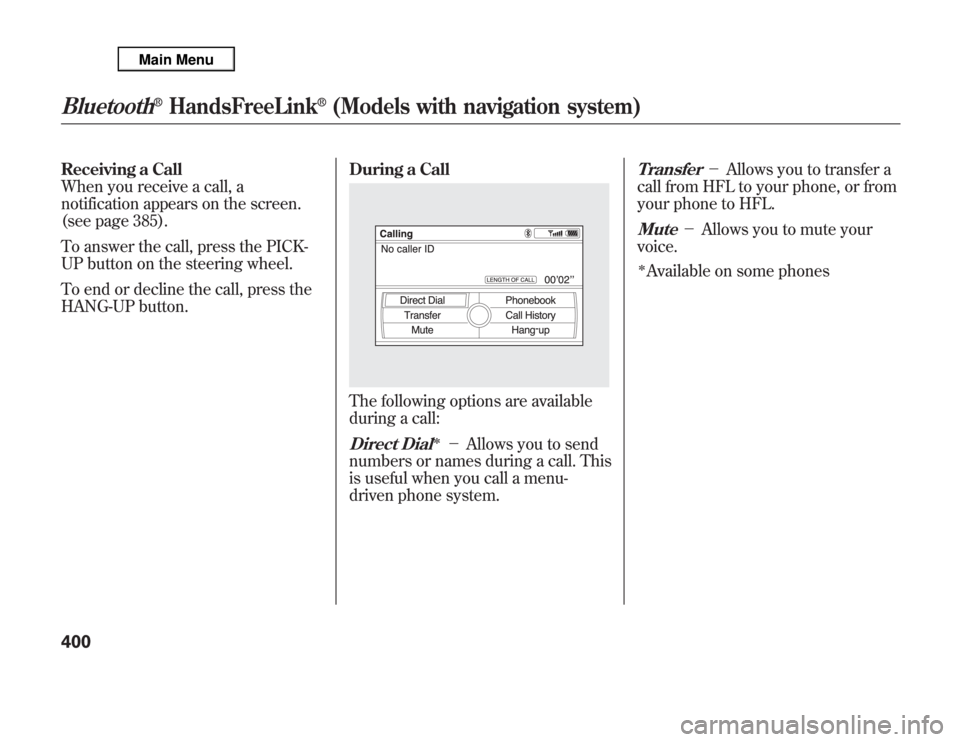
Receiving a Call
When you receive a call, a
notification appears on the screen.
(see page 385).
To answer the call, press the PICK-
UP button on the steering wheel.
To end or decline the call, press the
HANG-UP button.During a Call
The following options are available
during a call:Direct Dial
ᤳ
-Allows you to send
numbers or names during a call. This
is useful when you call a menu-
driven phone system.
Transfer
-Allows you to transfer a
call from HFL to your phone, or from
your phone to HFL.
Mute
-Allows you to mute your
voice.
ᤳAvailable on some phones
Bluetooth
®
HandsFreeLink
®
(Models with navigation system)
400