steering wheel Acura MDX 2012 Workshop Manual
[x] Cancel search | Manufacturer: ACURA, Model Year: 2012, Model line: MDX, Model: Acura MDX 2012Pages: 621, PDF Size: 11.15 MB
Page 515 of 621

When the remaining engine oil life is
15 to 6 percent, the multi-information
display shows a‘‘SERVICE DUE
SOON’’message along with the
maintenance schedule code
indicating the main and sub items
required at the time of the oil
change. Refer to page 514 for a
complete list of the maintenance
main items and sub items.
When the remaining oil life is 1 to 5
percent, the multi-information display
shows a‘‘SERVICE DUE NOW’’
message with the same maintenance
items‘‘SERVICE DUE SOON’’was
displayed with. When you see this
message have the indicated
maintenance performed as soon as
possible.
Press the SEL/RESET button on the
steering wheel repeatedly to select
the engine oil life. The message
‘‘SERVICE’’, along with‘‘5%’’, and the
maintenance item code are displayed
on the lower part of the multi-
information display when the
calculated engine oil life is 1-5
percent (see page 507).
MAINTENANCE
MAIN ITEMMAINTENANCE
SUB ITEMS
Maintenance Minder
TM
508
Page 516 of 621

If the indicated maintenance service
is not done and the remaining engine
oil life reaches 0%, the multi-
information display will show the
message‘‘SERVICE PAST DUE’’and
the maintenance item code(s). This
message is displayed again when the
total distance traveled is less than 10
miles (for U.S. models) or 10 km (for
Canadian models) after the engine
oil life became 0%.These messages will come on every
time you turn the ignition switch to
the ON (II) position.
Immediately have the service
performed, and make sure to reset
the oil life minder as previously
described.
The message will be canceled if the
INFO (
/
) button on the steering
wheel is pressed. Press the INFO
(
/
) button to see the message
again.
Press the SEL/RESET button on the
steering wheel repeatedly to select
the engine oil life. The message
‘‘SERVICE’’, along with‘‘0%’’, and the
maintenance item code are displayed
on the lower part of the multi-
information display when the
calculated engine oil life is 0-1%.
CONTINUED
Maintenance Minder
TM
509
Maintenance
Page 517 of 621

If the indicated required service is
not done and the remaining engine
oil life becomes 0%, the multi-
information display will show a
‘‘SERVICE PAST DUE’’message, the
total distance traveled after the
remaining oil life became 0%, and the
maintenance item code(s).This message is displayed when you
drive over 10 miles (for U.S. models)
or 10 km (for Canadian models) after
seeing the 0% message.
Immediately have the service
performed, and make sure to reset
the display as previously described.
The message will be canceled if the
INFO (
/
) button on the steering
wheel is pressed. Press the INFO
(
/
) button to see the message
again.
When you press the SEL/RESET
button to select the engine oil life,
the message‘‘SERVICE’’, along with
the maintenance item code and the
total negative mileage after the oil life
became 0%, will be displayed on the
lower part of the multi-information
display.
TOTAL PAST DUE
DISTANCE TRAVELED
U.S.
MAINTENANCE CODE
CANADA
U.S.
CANADA
TOTAL PAST DUE MILEAGE
Maintenance Minder
TM
510
Page 518 of 621

Maintenance Main Items and Sub
ItemsAll the maintenance items displayed
in the multi-information display are in
code.
For an explanation of the
maintenance codes, see page 514.Resetting the Engine Oil Life
Display
Your dealer will reset the display
after completing the required
maintenance service. You will see
‘‘OIL LIFE 100%’’on the display the
next time you turn the ignition
switch to the ON (II) position.
If maintenance service is done by
someone other than your dealer,
reset the Maintenance Minder as
follows:
1. Turn the ignition switch to the ON (II)
position.
2. If the engine oil life is not displayed,
press the SEL/RESET button on the
steering wheel repeatedly until the
multi-information display shows blank,
SH-AWD and tire pressure.
3. Press and hold the SEL/RESET button
on the steering wheel for more than 10
seconds. The remaining engine oil life
reset mode will be shown on the multi-
information display.
4. Select‘‘RESET’’by pressing the INFO
(
/
) button, then press the SEL/
RESET button to reset the engine oil
life display. The maintenance item
code(s) will disappear, and the engine
oil life will reset to‘‘100.’’If you want to
cancel the oil life reset mode, select
‘‘CANCEL.’’
MAINTENANCE
SUB ITEMS MAINTENANCE
MAIN ITEM MAINTENANCE
MAIN ITEMMAINTENANCE
SUB ITEMS
CONTINUED
Maintenance Minder
TM
511
Maintenance
Page 533 of 621

Power Steering FluidCheck the level on the side of the
reservoir when the engine is cold.
The fluid should be between the
UPPER LEVEL and LOWER LEVEL.
If not add power steering fluid to the
UPPER LEVEL mark.
Pour the fluid slowly and carefully so
you do not spill any. Clean up any
spills immediately; it could damage
components in the engine
compartment.Always use Acura Power Steering
Fluid. You may use another power
steering fluid as an emergency
replacement, but have the power
steering system flushed and refilled
with Acura PSF as soon as possible.
A low power steering fluid level can
indicate a leak in the system. Check
the fluid level frequently, and have
the system inspected as soon as
possible.
If you are not sure how to add fluid,
contact your dealer.
Turning the steering wheel to full left or
right lock and holding it there can
damage the power steering pump.Timing Belt
The timing belt should be replaced at
the intervals shown in the
Maintenance Minder schedule.
Replace the timing belt every 60,000
miles (U.S.) or every 100,000 km
(Canada) if you regularly drive your
vehicle in any of the following
conditions:
●
In very high temperatures
(over 110°F, 43°C).
●
In very low temperatures
(under-20°F,-29°C).
●
Frequently tow a trailer.
UPPER LEVEL
LOWER LEVEL
Power Steering Fluid, Timing Belt526
Page 537 of 621
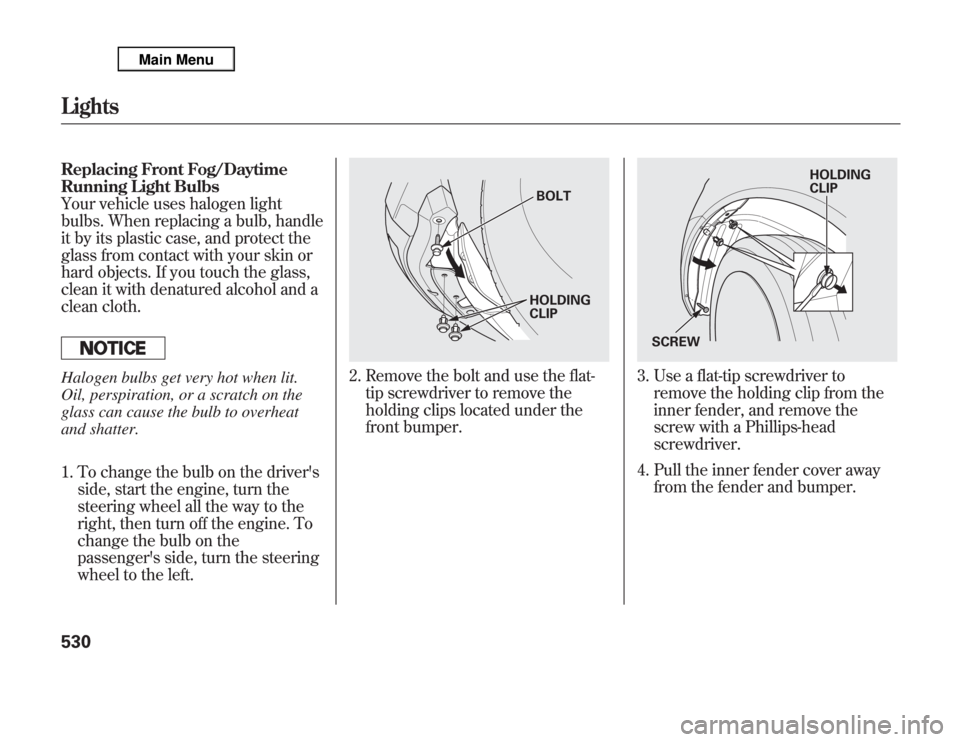
Replacing Front Fog/Daytime
Running Light Bulbs
Your vehicle uses halogen light
bulbs. When replacing a bulb, handle
it by its plastic case, and protect the
glass from contact with your skin or
hard objects. If you touch the glass,
clean it with denatured alcohol and a
clean cloth.Halogen bulbs get very hot when lit.
Oil, perspiration, or a scratch on the
glass can cause the bulb to overheat
and shatter.
1. To change the bulb on the driver's
side, start the engine, turn the
steering wheel all the way to the
right, then turn off the engine. To
change the bulb on the
passenger's side, turn the steering
wheel to the left.
2. Remove the bolt and use the flat-
tip screwdriver to remove the
holding clips located under the
front bumper.
3. Use a flat-tip screwdriver to
remove the holding clip from the
inner fender, and remove the
screw with a Phillips-head
screwdriver.
4. Pull the inner fender cover away
from the fender and bumper.
BOLT
HOLDING
CLIP
HOLDING
CLIP
SCREW
Lights530
Page 551 of 621
Tire Maintenance
In addition to proper inflation, correct
wheel alignment helps to decrease
tire wear. If you find a tire is worn
unevenly, have your dealer check the
wheel alignment.
Have your dealer check the tires if
you feel a consistent vibration while
driving. A tire should always be
rebalanced if it is removed from the
wheel. When you have new tires
installed, make sure they are
balanced. This increases riding
comfort and tire life. For best results,
have the installer perform a dynamic
balance.Improper wheel weights can damage
your vehicle's aluminum wheels. Use
only Acura wheel weights for
balancing.Tire Rotation
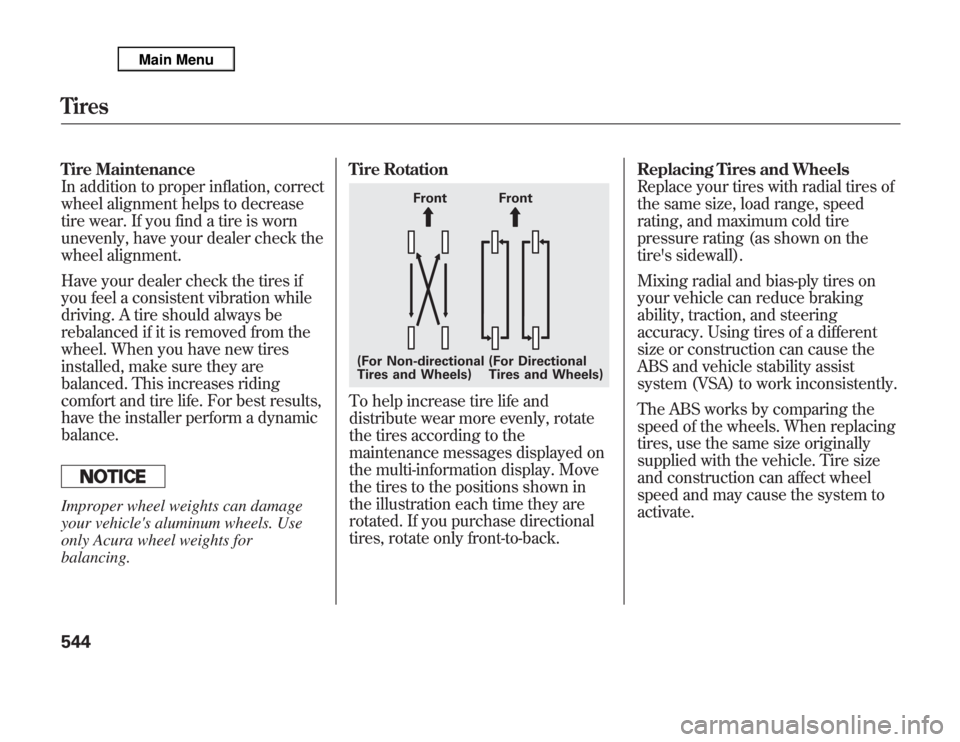
To help increase tire life and
distribute wear more evenly, rotate
the tires according to the
maintenance messages displayed on
the multi-information display. Move
the tires to the positions shown in
the illustration each time they are
rotated. If you purchase directional
tires, rotate only front-to-back.Replacing Tires and Wheels
Replace your tires with radial tires of
the same size, load range, speed
rating, and maximum cold tire
pressure rating (as shown on the
tire's sidewall).
Mixing radial and bias-ply tires on
your vehicle can reduce braking
ability, traction, and steering
accuracy. Using tires of a different
size or construction can cause the
ABS and vehicle stability assist
system (VSA) to work inconsistently.
The ABS works by comparing the
speed of the wheels. When replacing
tires, use the same size originally
supplied with the vehicle. Tire size
and construction can affect wheel
speed and may cause the system to
activate.
Front Front
(For Non-directional
Tires and Wheels)(For Directional
Tires and Wheels)
Tires544
Page 576 of 621

PRIMARY UNDER-HOOD FUSE BOX
No. Amps. Circuits Protected
1 120 A Main fuse
-Not Used
2-1 30 A ADS
ᤳ2
2-2 30 A SH-AWD
2-3 30 A Rear Blower Motor
2-4 40 A ABS VSA
2-5 40 A Trailer Main
2-6 40 A Power Seats, Driver's Position
Memory System, Subwoofer,
Telescopic Steering Wheel
2-7 40 A Front Heated Seat, TPMS,
Moonroof, Driver's Lumbar
Support
2-8--
3-1 60 A Fog Lights, Front Blower
Motor, Interior Light
3-2 40 A Headlights, Daytime Running
Lights
3-3 60 A Cooling Fan, Condenser Fan,
MG Clutch, Headlight
Washer
ᤳ1
3-4 50 A Ignition Switch Main
ᤳ1: Canadian model
ᤳ2: If equippedNo. Amps. Circuits Protected
3-5 50 A Power Window
3-6 60 A Power Tailgate Opener/Closer,
Rear ACC Socket, Interior
Light,
Rear Defroster
3-7 30 A ECU (PCM)
3-8 30 A TECH
4 40 A Audio, Door Lock, Interior
Lights, Front ACC Socket
5 30 A EPT-L
ᤳ2
6 30 A EPT-R
ᤳ2
7 30 A FI ECU
8 30 A Audio Amplifier
9 7.5 A Battery Sensor
10 15 A Hazard
11 15 A Horn, Stop
12 20 A ABS VSA
13 20 A Trailer (Brake)
14 20 A Rear Heated Seat
ᤳ2
15 20 A A/C Inverter
CONTINUED
Fuse Locations
569
Taking Care of the Unexpected
Page 578 of 621

INTERIOR FUSE BOXNo. Amps. Circuits Protected
1 7.5 A TPMS
2 10 A Driver's Lumbar Support
Motor
3 15 A Moonroof
4 20 A Front Heated Seats
5 10 A Audio
6 7.5 A Interior Light
7 10 A Back Up
8 20 A Door Lock
9 15 A ACC Socket
10 15 A IG Coil
11 30 A Windshield Wiper
12 10 A Subwoofer
13 20 A Passenger's Power ReclineNo. Amps. Circuits Protected
14 20 A Driver's Power Slide
15 20 A Telescopic Steering Wheel
16 20 A Driver's Power Recline
17 20 A Passenger's Power Slide
18 10 A Alternator
19 20 A Fuel Pump
20 10 A SH-AWD, ODS
21 7.5 A Gauges
22 10 A SRS
23-Not Used
24 20 A Left Rear Power Window
25 20 A Right Rear Power Window
26 30 A Passenger's Power Window
27 30 A Driver's Power Window
28 20 A Tilt Steering Wheel
29 10 A ABS VSA
30 10 A A/C
31 15 A Washer
32 10 A ACC
33-Not Used
Auxiliary (Holder1)No. Amps. Circuits Protected
1 7.5 A Starter DIAG
2 7.5 A SH-AWDAuxiliary (Holder2)No. Amps. Circuits Protected
1 7.5 A STS
2 7.5 A ODS
Auxiliary
(Holder1)Auxiliary
(Holder2)
Fuse Locations
571
Taking Care of the Unexpected
Page 606 of 621

A
Accessories and
Modifications
..........................
431
ACCESSORY (Ignition Key
Position)
.................................
139
Accessory Power Sockets
..........
177
AC Power Outlet
........................
178
Active Damper System
...............
484
Active Head Restraints
...............
152
AcuraLink
®(U.S. models
only)
.......................................
402
Adaptive Cruise Control
(ACC)
.....................................
348
Additives, Engine Oil
.................
518
Adjusting the Steering Wheel
....
134
Advanced Airbags
........................
31
Airbag (SRS)
..........................
10, 27
Air Conditioning System
............
182
Rear A/C Control
....................
187
Air Outlets (Vents)
.....................
189
Air Pressure, Tires
..............
540, 541
Alcohol in Gasoline
....................
422
Antifreeze
...................................
520Anti-lock Brakes (ABS)
Indicator
............................
70, 462
Operation
................................
461
Anti-theft, Audio System
.............
308
Anti-theft Steering Column
Lock
.......................................
139
Audio System
......................
192, 212
Automatic Climate Control
.........
183
Automatic Lighting Off
Feature
...................................
131
Automatic Seat Belt Tensioners...
23
Automatic Speed Control
...........
345
Automatic Transmission
............
443
Capacity, Fluid
........................
578
Checking Fluid Level
..............
523
Driving with the Paddle
Shifters
................................
447
Shifting
...................................
444
Shift Lever Position
Indicators
............................
443
Shift Lever Positions
...............
444
Shift Lock Release
...................
446
Auxiliary Input Jack
...................
307B
Battery
Charging System
Indicator
........................
69, 562
Jump Starting
..........................
558
Maintenance
...........................
547
Specifications
..........................
579
Before Driving
...........................
421
Belts, Seat
................................
9, 21
Beverage Holders
......................
174
Blind Spot Information System
(BSI)
......................................
476
Bluetooth
®Audio
.......................
298
Bluetooth
®HandsFreeLink
®
(Models with navigation
system)
...............................
383
Bluetooth
®HandsFreeLink
®
(Models without navigation
system)
...............................
365
Booster Seats
...............................
58
CONTINUED
Index
I
INDEX