air condition Acura MDX 2014 User Guide
[x] Cancel search | Manufacturer: ACURA, Model Year: 2014, Model line: MDX, Model: Acura MDX 2014Pages: 500, PDF Size: 11.72 MB
Page 326 of 500
Continued
325
uuWhen DrivinguStarting the Engine
Driving
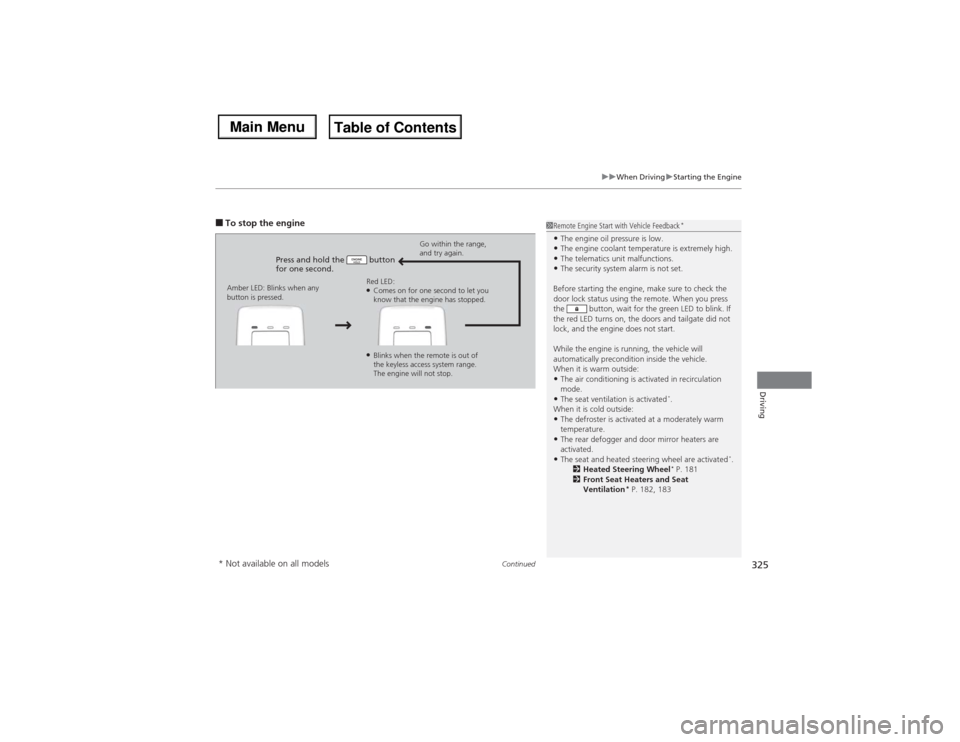
■To stop the engine
Press and hold the button
for one second.
Go within the range,
and try again.
Amber LED: Blinks when any
button is pressed.Red LED:
●Comes on for one second to let you
know that the engine has stopped.●Blinks when the remote is out of
the keyless access system range.
The engine will not stop.
1Remote Engine Start with Vehicle Feedback
*
•The engine oil pressure is low.•The engine coolant temperature is extremely high.•The telematics unit malfunctions.•The security system alarm is not set.
Before starting the engine, make sure to check the
door lock status using the remote. When you press
the button, wait for the green LED to blink. If
the red LED turns on, the doors and tailgate did not
lock, and the engine does not start.
While the engine is running, the vehicle will
automatically precondition inside the vehicle.
When it is warm outside:•The air conditioning is activated in recirculation
mode.•The seat ventilation is activated
*.
When it is cold outside:
•The defroster is activated at a moderately warm
temperature.•The rear defogger and door mirror heaters are
activated.•The seat and heated steering wheel are activated
*.
2Heated Steering Wheel
* P. 181
2Front Seat Heaters and Seat
Ventilation
* P. 182, 183
* Not available on all models
Page 353 of 500
352
uuWhen DrivinguLane Departure Warning (LDW)
*
Driving
LDW may not activate or may not recognize lanes, and may activate even when
keeping in the middle of a lane, under the following conditions.■LDW Limitations
Condition
●When you drive in bad weather (rain, fog, etc.).●A heavy load in the rear or modifications to the suspension tilts your vehicle.●An abnormal tire condition is detected (wrong tire size, flat tire, etc.).●When the windshield is blocked by dirt, mud, leaves, wet snow, etc.●When the temperature inside the system is high.●A sudden change between light and dark such as an entrance or exit of a tunnel.●You drive into the sunlight (e.g. at dawn or dusk).●When the windshield is dirty or cloudy.●When you drive in the shadows of trees, buildings, etc.●When your vehicle is towing a trailer.●When you drive on a wet road surface following another vehicle.uThe camera may perceive the tire tracks in the water as lane lines.
●When there is snow or wheel tracks on the side of the road.●When the road has many repaired area or an erased lane line.●When the vehicle is running over painted signs or crosswalk markings.●When you drive in a lane with worn-out lane markings.
Page 354 of 500
353
uuWhen DrivinguLane Keeping Assist System (LKAS)
*
Continued
Driving
Lane Keeping Assist System (LKAS)
*
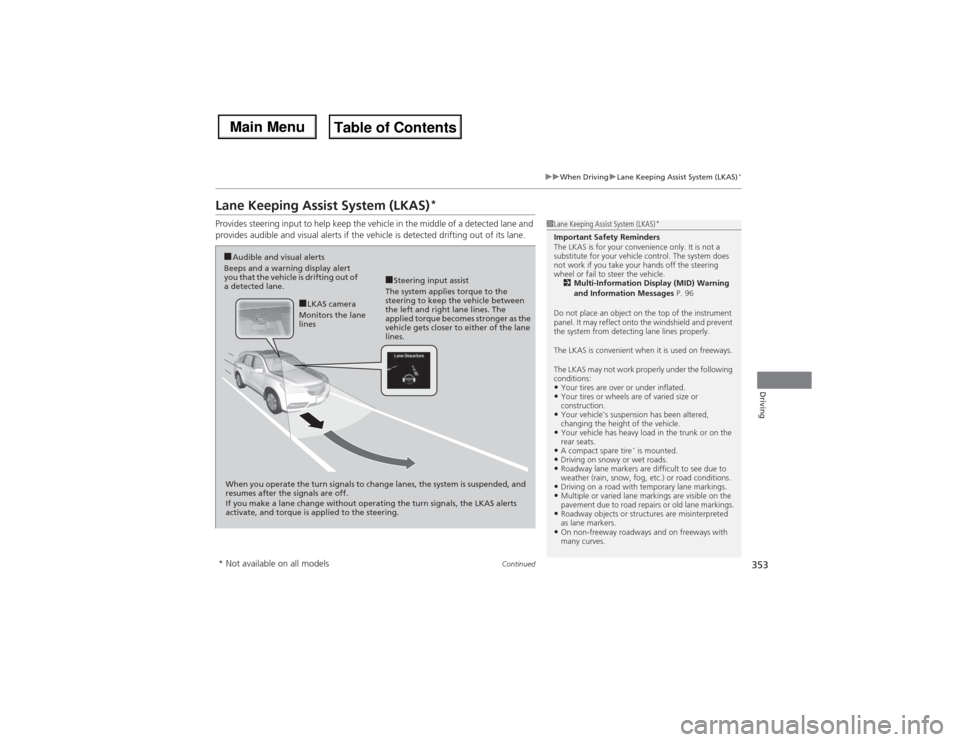
Provides steering input to help keep the vehicle in the middle of a detected lane and
provides audible and visual alerts if the vehicle is detected drifting out of its lane.
1Lane Keeping Assist System (LKAS)
*
Important Safety Reminders
The LKAS is for your convenience only. It is not a
substitute for your vehicle control. The system does
not work if you take your hands off the steering
wheel or fail to steer the vehicle.
2Multi-Information Display (MID) Warning
and Information Messages P. 96
Do not place an object on the top of the instrument
panel. It may reflect onto the windshield and prevent
the system from detecting lane lines properly.
The LKAS is convenient when it is used on freeways.
The LKAS may not work properly under the following
conditions:•Your tires are over or under inflated.•Your tires or wheels are of varied size or
construction.•Your vehicle’s suspension has been altered,
changing the height of the vehicle.•Your vehicle has heavy load in the trunk or on the
rear seats.•A compact spare tire
* is mounted.
•Driving on snowy or wet roads.•Roadway lane markers are difficult to see due to
weather (rain, snow, fog, etc.) or road conditions.•Driving on a road with temporary lane markings.•Multiple or varied lane markings are visible on the
pavement due to road repairs or old lane markings.•Roadway objects or structures are misinterpreted
as lane markers.•On non-freeway roadways and on freeways with
many curves.
■Steering input assist
The system applies torque to the
steering to keep the vehicle between
the left and right lane lines. The
applied torque becomes stronger as the
vehicle gets closer to either of the lane
lines.
■Audible and visual alerts
Beeps and a warning display alert
you that the vehicle is drifting out of
a detected lane.
When you operate the turn signals to change lanes, the system is suspended, and
resumes after the signals are off.
If you make a lane change without operating the turn signals, the LKAS alerts
activate, and torque is applied to the steering.
■LKAS camera
Monitors the lane
lines
* Not available on all models
Page 355 of 500
uuWhen DrivinguLane Keeping Assist System (LKAS)
*
354Driving
The system can be used when the following conditions are met.
•The lane you are driving in has detectable lane markers on both sides, and your
vehicle is in the center of the lane.
•The vehicle speed is between 45 and 90 mph (72 and 145 km/h).
•You are driving on a straight or slightly curved road.
•The turn signals are off.
•The brake pedal is not depressed.
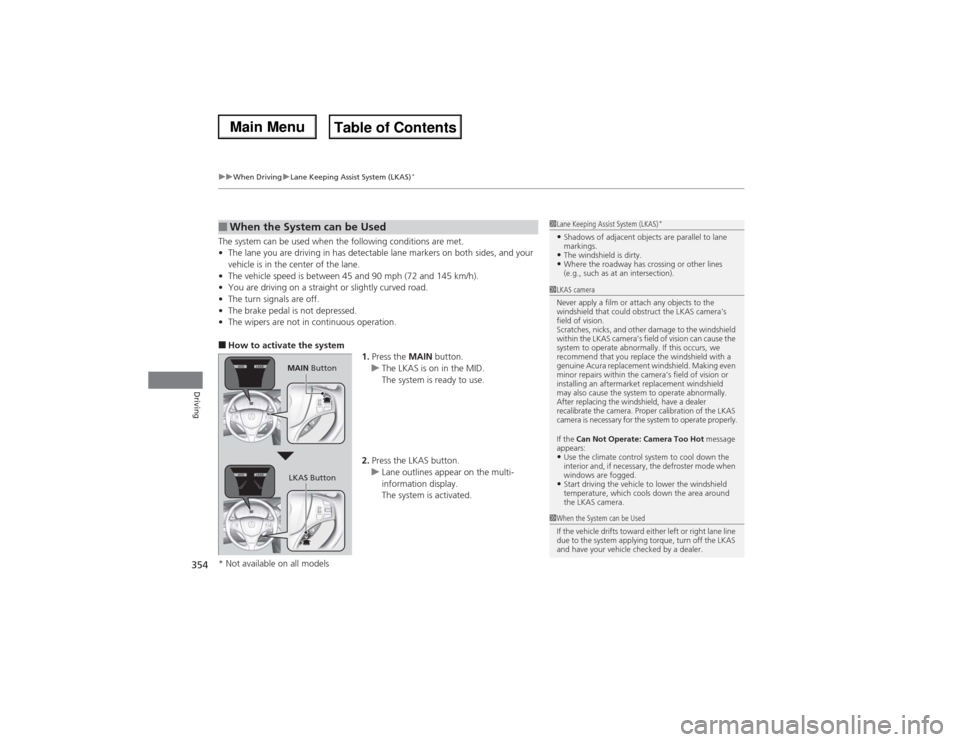
•The wipers are not in continuous operation.■How to activate the system
1.Press the MAIN button.
uThe LKAS is on in the MID.
The system is ready to use.
2.Press the LKAS button.
uLane outlines appear on the multi-
information display.
The system is activated.■When the System can be Used
1Lane Keeping Assist System (LKAS)
*
•Shadows of adjacent objects are parallel to lane
markings.•The windshield is dirty.•Where the roadway has crossing or other lines
(e.g., such as at an intersection).
1LKAS camera
Never apply a film or attach any objects to the
windshield that could obstruct the LKAS camera’s
field of vision.
Scratches, nicks, and other damage to the windshield
within the LKAS camera’s field of vision can cause the
system to operate abnormally. If this occurs, we
recommend that you replace the windshield with a
genuine Acura replacement windshield. Making even
minor repairs within the camera’s field of vision or
installing an aftermarket replacement windshield
may also cause the system to operate abnormally.
After replacing the windshield, have a dealer
recalibrate the camera. Proper calibration of the LKAS
camera is necessary for the system to operate properly.
If the Can Not Operate: Camera Too Hot message
appears:•Use the climate control system to cool down the
interior and, if necessary, the defroster mode when
windows are fogged.•Start driving the vehicle to lower the windshield
temperature, which cools down the area around
the LKAS camera.
1When the System can be Used
If the vehicle drifts toward either left or right lane line
due to the system applying torque, turn off the LKAS
and have your vehicle checked by a dealer.
MAIN Button
LKAS Button
* Not available on all models
Page 358 of 500

357
uuWhen DrivinguLane Keeping Assist System (LKAS)
*
Driving
The system may not detect lane markings and the position of your vehicle properly
under the following conditions.■LKAS Limitations
Condition
●The vehicle interior is reflected onto the front windshield.●Headlight lenses are dirty or the headlights are not properly adjusted.●The windshield is fogged.●Driving on snowy or wet roads.●The ambient brightness suddenly changes (e.g., at the entrance or exit of a tunnel).●You drive into the low sun (e.g., at dawn or dusk).●A strong light is reflected onto the roadway.●Roadway lane markers are difficult to see due to weather (rain, snow, fog, etc.) or road conditions.●Driving on a road with temporary lane markings.●Multiple or varied lane markings are visible on the roadway due to road repairs or old lane markings.●Roadway objects or structures are misinterpreted as lane markers.●There is little contrast between lane lines and the roadway surface.●The vehicle in front of you is driving near the lane lines.●Driving over bumps.●Where marked lanes merge or split.●Where the lane is extremely narrow, wide or changing.●Where the road is hilly or the vehicle is approaching the crest of a hill.
Page 359 of 500
358
uuWhen DrivinguVSA® (Vehicle Stability Assist), aka ESC (Electronic Stability Control), System
Driving
VSA® (Vehicle Stability Assist), aka ESC (Electronic Stability Control), SystemVSA® helps to stabilize the vehicle during cornering if the vehicle turns more or less
than what was intended. It also assists in maintaining traction on slippery surfaces.
It does so by regulating engine output and selectively applying the brakes.
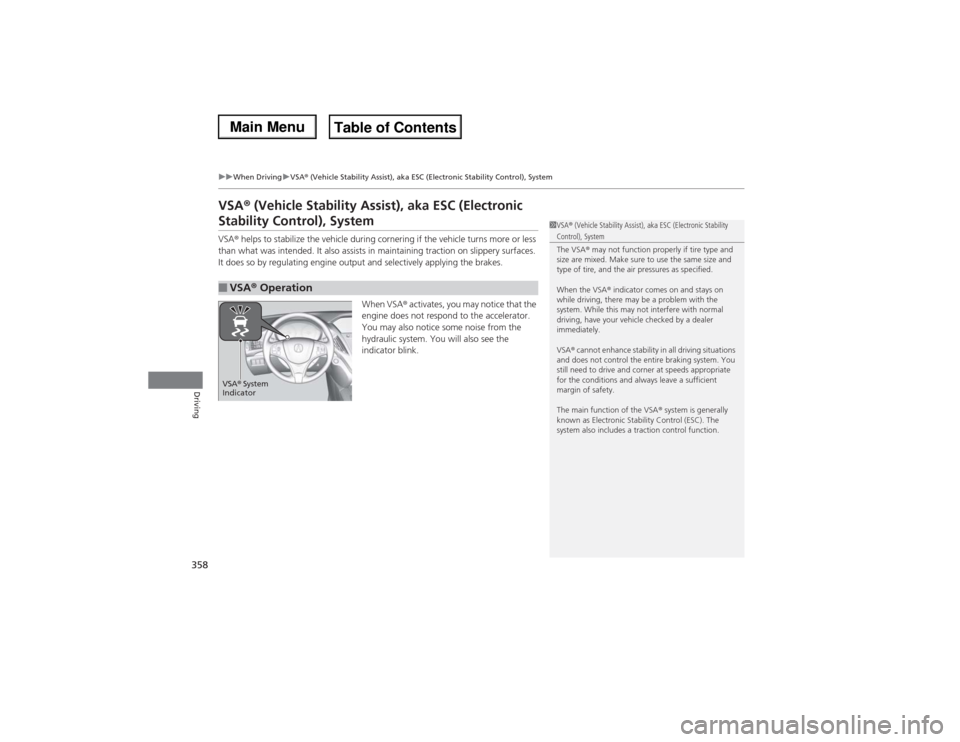
When VSA® activates, you may notice that the
engine does not respond to the accelerator.
You may also notice some noise from the
hydraulic system. You will also see the
indicator blink.■VSA® Operation
1VSA® (Vehicle Stability Assist), aka ESC (Electronic Stability Control), System
The VSA® may not function properly if tire type and
size are mixed. Make sure to use the same size and
type of tire, and the air pressures as specified.
When the VSA® indicator comes on and stays on
while driving, there may be a problem with the
system. While this may not interfere with normal
driving, have your vehicle checked by a dealer
immediately.
VSA® cannot enhance stability in all driving situations
and does not control the entire braking system. You
still need to drive and corner at speeds appropriate
for the conditions and always leave a sufficient
margin of safety.
The main function of the VSA® system is generally
known as Electronic Stability Control (ESC). The
system also includes a traction control function.
VSA® System
Indicator
Page 364 of 500
363
uuWhen DrivinguSuper Handling-All Wheel Drive
TM (SH-AWD®)
*
Continued
Driving
Super Handling-All Wheel Drive
TM (SH-AWD®)
*
The system controls and transfers varying amounts of engine torque to each wheel
in accordance with the driving conditions.
SH-AWD® helps to enhance driving stability, and lets you handle situations like
slippery surfaces, such as snow, sand, mud, and steep hills, better than when driving
with two wheel drive. However, the system does not help to enhance braking. Be
precautious about the following:
•It is still your responsibility to drive safely when you steer, accelerate, and apply
brakes.
•Leave a sufficient margin when braking on slippery surfaces.Tire Pressure Monitoring System (TPMS)
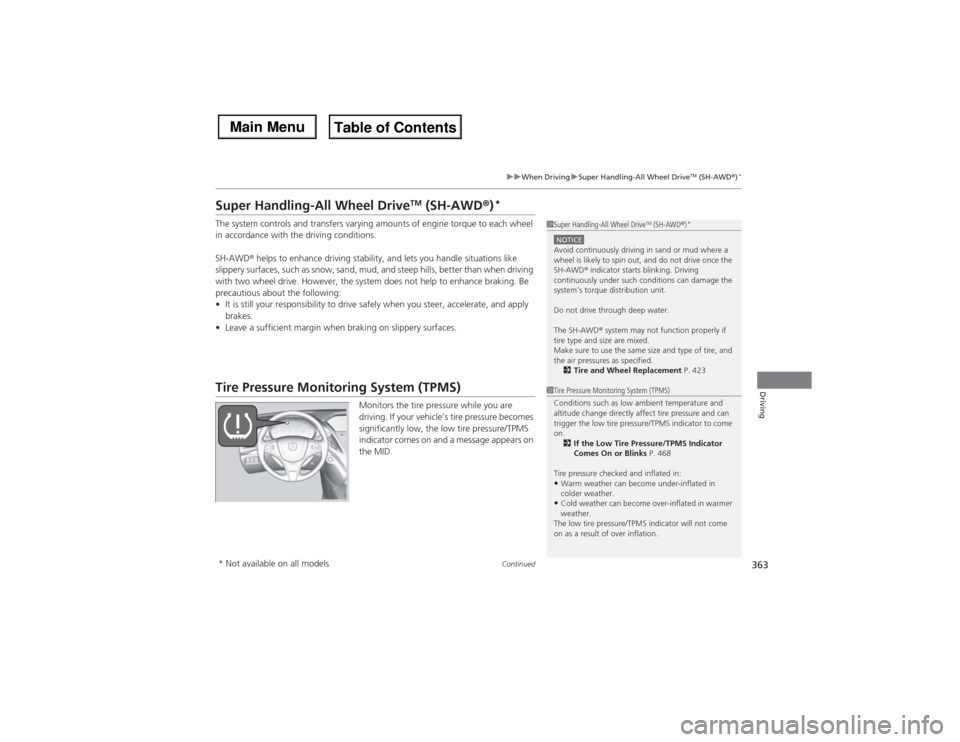
Monitors the tire pressure while you are
driving. If your vehicle’s tire pressure becomes
significantly low, the low tire pressure/TPMS
indicator comes on and a message appears on
the MID.
1Super Handling-All Wheel Drive
TM (SH-AWD®)
*
NOTICEAvoid continuously driving in sand or mud where a
wheel is likely to spin out, and do not drive once the
SH-AWD® indicator starts blinking. Driving
continuously under such conditions can damage the
system’s torque distribution unit.
Do not drive through deep water.
The SH-AWD® system may not function properly if
tire type and size are mixed.
Make sure to use the same size and type of tire, and
the air pressures as specified.
2Tire and Wheel Replacement P. 4231Tire Pressure Monitoring System (TPMS)
Conditions such as low ambient temperature and
altitude change directly affect tire pressure and can
trigger the low tire pressure/TPMS indicator to come
on.
2If the Low Tire Pressure/TPMS Indicator
Comes On or Blinks P. 468
Tire pressure checked and inflated in:•Warm weather can become under-inflated in
colder weather.•Cold weather can become over-inflated in warmer
weather.
The low tire pressure/TPMS indicator will not come
on as a result of over inflation.
* Not available on all models
Page 377 of 500

uuBrakinguCollision Mitigation Braking System
TM (CMBS
TM)*
376Driving
The CMBS
TM may activate even when you are aware of a vehicle ahead of you, or
when there is no vehicle ahead. Some examples of this are:
■When Passing
Your vehicle approaches another vehicle ahead of you and you change lanes to pass.■At an intersection
Your vehicle approaches or passes another vehicle that is making a left or right turn.■Through a low bridge at high speed
You drive under a low or narrow bridge at high speed.■Speed bumps, road work sites, train tracks, roadside objects, etc.
You drive over speed bumps, steel road plates, etc., or your vehicle approaches train
tracks or roadside objects [such as a traffic sign and guard rail] on a curve.■With Little Chance of a Collision
1Collision Mitigation Braking System
TM (CMBS
TM)*
Avoid the following conditions that may cause the
radar aim to be temporarily out of range and prevent
the CMBS
TM from working properly.
•A heavy load in the rear or modifications to the
suspension tilts your vehicle.•The tire pressures are not correct, the tire sizes are
incorrect, the tire types are different, and/or the
tires are not in good condition.
For the CMBS
TM to work properly:
•Always keep the radar sensor cover clean.•Never use chemical solvents or polishing powder
for cleaning the sensor cover. Clean it with water
or a mild detergent.
Do not put a sticker on the emblem or replace the
emblem.
Take your vehicle to a dealer if you need the radar
sensor to be repaired, or removed, or the radar
sensor cover is strongly impacted.
* Not available on all models
Page 387 of 500
386Driving
Accessories and ModificationsAccessoriesWhen installing accessories, check the following:
•Do not install accessories on the windshield. They can obstruct your view and
delay your reaction to driving conditions.
•Do not install any accessories over areas marked SRS Airbag, on the sides or backs
of the front seats, on front or side pillars, or near the side windows. Accessories
installed in these areas may interfere with proper operation of the vehicle’s
airbags or may be propelled into you or another occupant if the airbags deploy.
•Be sure electronic accessories do not overload electrical circuits or interfere with
proper operation of your vehicle.
2Fuses P. 469
•Before installing any electronic accessory, have the installer contact a dealer for
assistance. If possible, have a dealer inspect the final installation.ModificationsDo not modify your vehicle or use non-Acura components that can affect its
handling, stability, and reliability.
Overall vehicle performance can be affected. Always make sure all equipment is
properly installed and maintained, and that it meets federal, state, province,
territory, and local regulations.
1Accessories and Modifications
Acura Genuine accessories are recommended to
ensure proper operation on your vehicle.
3
WARNING
Improper accessories or modifications can
affect your vehicle’s handling, stability, and
performance, and cause a crash in which
you can be seriously hurt or killed.
Follow all instructions in this owner’s
manual regarding accessories and
modifications.
Page 389 of 500
388Maintenance
Before Performing MaintenanceInspection and MaintenanceFor your safety, perform all listed inspections and maintenance to keep your vehicle
in good condition. If you become aware of any abnormality (noise, smell, insufficient
brake fluid, oil residue on the ground, etc.), have your vehicle inspected by a dealer.
(Note, however, that service at a dealer is not mandatory to keep your warranties in
effect.) Refer to the separate maintenance booklet for detailed maintenance and
inspection information.■Daily inspections
Perform inspections before long distance trips, when washing the vehicle, or when
refueling.■Periodic inspections
•Check the brake fluid level monthly.2Checking the Brake Fluid P. 406
•Check the tire pressure monthly. Examine the tread for wear and foreign objects.
2Checking and Maintaining Tires P. 417
•Check the operation of the exterior lights monthly.
2Replacing Light Bulbs P. 407
•Check the condition of the wiper blades at least every six months.
2Checking and Maintaining Wiper Blades P. 413
■Types of Inspection and Maintenance
1Inspection and Maintenance
Maintenance, replacement, or repair of
emissions control devices and systems may be
done by any automotive repair establishment or
individuals using parts that are “certified” to
EPA standards.
According to state and federal regulations, failure to
perform maintenance on the maintenance main
items marked with # will not void your emissions
warranties. However, all maintenance services should
be performed in accordance with the intervals
indicated by the multi-information display (MID).
2Maintenance Service Items P. 393
If you want to perform complex maintenance tasks
that require more skills and tools, you can purchase a
subscription to the Service Express website at
www.techinfo.honda.com.
2Authorized Manuals P. 489
If you want to perform maintenance yourself, make
sure that you have the necessary tools and skills first.
After performing maintenance, update the records in
the separate maintenance booklet.U.S. models