brake Acura MDX 2014 User Guide
[x] Cancel search | Manufacturer: ACURA, Model Year: 2014, Model line: MDX, Model: Acura MDX 2014Pages: 500, PDF Size: 11.72 MB
Page 71 of 500

70Instrument Panel
IndicatorsIndicator
Name
On/Blinking
Explanation
Message
Parking Brake
and Brake
System Indicator
(Red)
●Comes on for a few seconds when
you set the power mode to ON,
then goes off.●Comes on when the parking brake
is applied, and goes off when it is
released.●Comes on when the brake fluid
level is low.●Comes on if there is a problem with
the brake system.●The beeper sounds and the
indicator comes on if you drive with
the parking brake not fully released.
●Comes on while driving - Make sure the
parking brake is released. Check the brake
fluid level.
2Wh at to d o w hen t he in di cat o r co mes
on while driving P. 467
●Comes on along with the ABS indicator
- Have your vehicle checked by a dealer.
2If the Brake System Indicator (Red)
Comes On P. 467
Brake System
Indicator
(Amber)
●Comes on for a few seconds when
you set the power mode to ON,
then goes off.●Comes on if there is a problem with
a system related to braking other
than the conventional brake
system.
●Comes on while driving - Have your
vehicle checked by a dealer.●With this indicator on, your vehicle still has
normal braking ability.
U.S.Canada(Red)U.S.Canada(Amber)
U.S.Canada
Page 75 of 500

74
uuIndicatorsu
Instrument Panel
Indicator
Name
On/Blinking
Explanation
Message
Anti-lock Brake
System (ABS)
Indicator
●Comes on for a few seconds when
you set the power mode to ON,
then goes off.●If it comes on at any other time,
there is a problem with the ABS.
●Stays on constantly - Have your vehicle
checked by a dealer. With this indicator on,
your vehicle still has normal braking ability
but no anti-lock function.
2Anti-lock Brake System (ABS) P. 369
Supplemental
Restraint System
Indicator
●Comes on for a few seconds when
you set the power mode to ON,
then goes off.●Comes on if a problem with any of
the following is detected:
-Supplemental restraint system
-Side airbag system
-Side curtain airbag system
-Seat belt tensioner
●Stays on constantly or does not come
on at all - Have your vehicle checked by a
dealer.
Page 76 of 500

75
uuIndicatorsu
Continued
Instrument Panel
Indicator
Name
On/Blinking
Explanation
Message
Vehicle Stability
Assist (VSA®)
System Indicator
●Comes on for a few seconds when
you set the power mode to ON,
then goes off.●Blinks when VSA®, or trailer stability
assist is active.●Comes on if there is a problem with
the VSA®, hill start assist, trailer
stability assist or brake lighting
system.
●Stays on constantly - Have your vehicle
checked by a dealer.
2VSA® (Vehicle Stability Assist), aka
ESC (Electronic Stability Control),
System P. 358
2Trailer Stability Assist
* P. 317
2Hill start assist system P. 326
●When Trailer Stability Assist Problem is
displayed on the MID, the VSA® does not
activate.
VSA® OFF
Indicator
●Comes on for a few seconds when
you set the power mode to ON,
then goes off.●Comes on when you deactivate
VSA®.
2VSA® On and Off P. 359
—
* Not available on all models
Page 84 of 500

83
uuIndicatorsu
Instrument Panel
Indicator
Name
On/Blinking
Explanation
Message
Blind Spot
Information (BSI)
Indicator
*
●Comes on for a few seconds when
you set the power mode to ON,
then goes off.●Stays on while BSI is turned off.
—
●Comes on when mud, snow, or ice
accumulates in the vicinity of
sensor.
●Comes on while driving - Remove the
obstacle in the vicinity of sensor.
2Blind Spot Information (BSI) System
*
P. 361
●Comes on if there is a problem with
the system.
●Comes on while driving - Have your
vehicle checked by a dealer.
Collision
Mitigation Brake
System
TM
(CMBSTM)
Indicator*
●Comes on for a few seconds when
you set the power mode to ON,
then goes off.●Comes on when you deactivate the
CMBS
TM. A MID message appears
for a few seconds.
●Comes on if there is a problem with
the CMBS
TM.
●Stays on constantly without the
CMBS
TM off - Have your vehicle checked
by a dealer.
2Collision Mitigation Braking System
TM
(CMBS
TM)* P. 371
* Not available on all models
Page 89 of 500
88
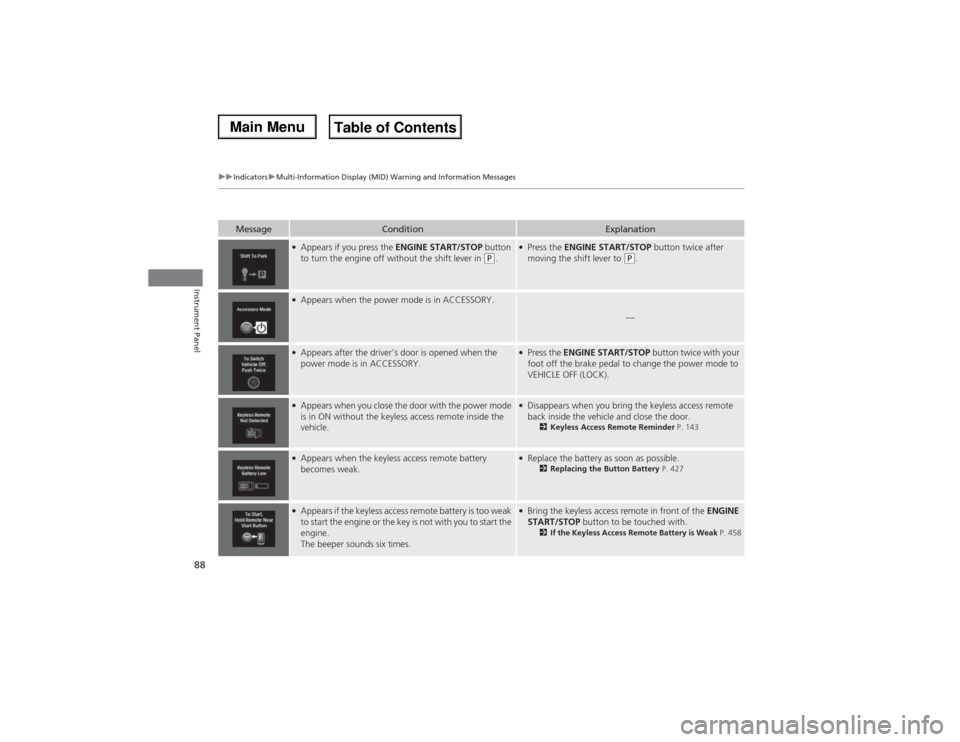
uuIndicatorsuMulti-Information Display (MID) Warning and Information Messages
Instrument Panel
Message
Condition
Explanation
●Appears if you press the ENGINE START/STOP button
to turn the engine off without the shift lever in
(P.
●Press the ENGINE START/STOP button twice after
moving the shift lever to
(P.
●Appears when the power mode is in ACCESSORY.
—
●Appears after the driver’s door is opened when the
power mode is in ACCESSORY.
●Press the ENGINE START/STOP button twice with your
foot off the brake pedal to change the power mode to
VEHICLE OFF (LOCK).
●Appears when you close the door with the power mode
is in ON without the keyless access remote inside the
vehicle.
●Disappears when you bring the keyless access remote
back inside the vehicle and close the door.
2Keyless Access Remote Reminder P. 143
●Appears when the keyless access remote battery
becomes weak.
●Replace the battery as soon as possible.
2Replacing the Button Battery P. 427
●Appears if the keyless access remote battery is too weak
to start the engine or the key is not with you to start the
engine.
The beeper sounds six times.
●Bring the keyless access remote in front of the ENGINE
START/STOP button to be touched with.
2If the Keyless Access Remote Battery is Weak P. 458
Page 91 of 500
90
uuIndicatorsuMulti-Information Display (MID) Warning and Information Messages
Instrument Panel
Message
Condition
Explanation
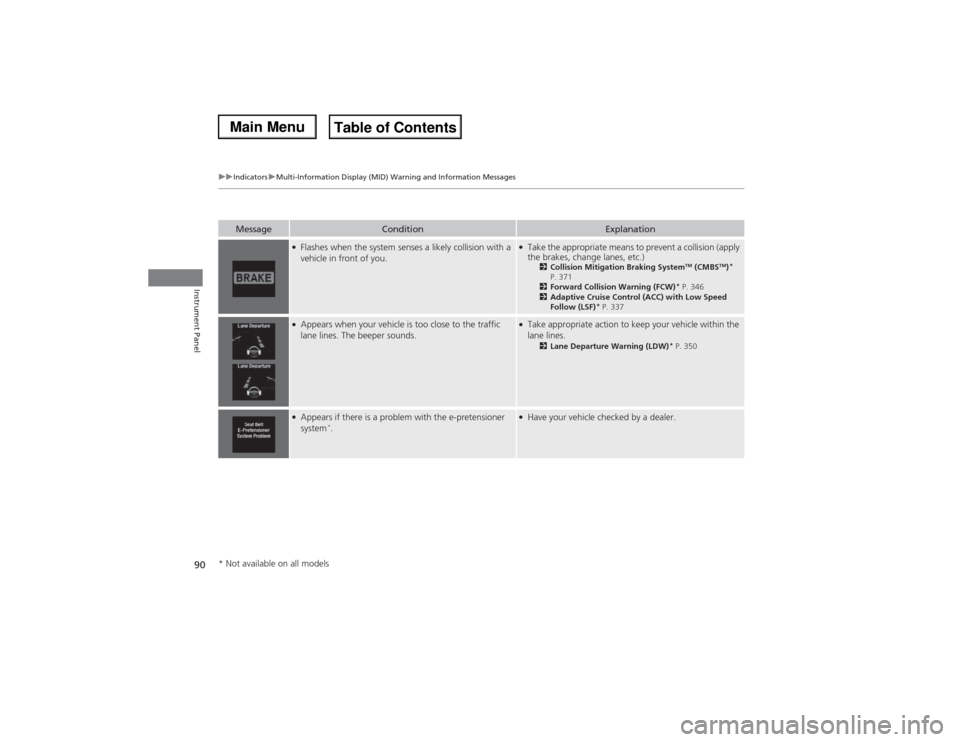
●Flashes when the system senses a likely collision with a
vehicle in front of you.
●Take the appropriate means to prevent a collision (apply
the brakes, change lanes, etc.)
2Collision Mitigation Braking System
TM (CMBS
TM)*
P. 371
2Forward Collision Warning (FCW)
* P. 346
2Adaptive Cruise Control (ACC) with Low Speed
Follow (LSF)
* P. 337
●Appears when your vehicle is too close to the traffic
lane lines. The beeper sounds.
●Take appropriate action to keep your vehicle within the
lane lines.
2Lane Departure Warning (LDW)
* P. 350
●Appears if there is a problem with the e-pretensioner
system
*.
●Have your vehicle checked by a dealer.
* Not available on all models
Page 94 of 500
93
uuIndicatorsuMulti-Information Display (MID) Warning and Information Messages
Continued
Instrument Panel
Message
Condition
Explanation
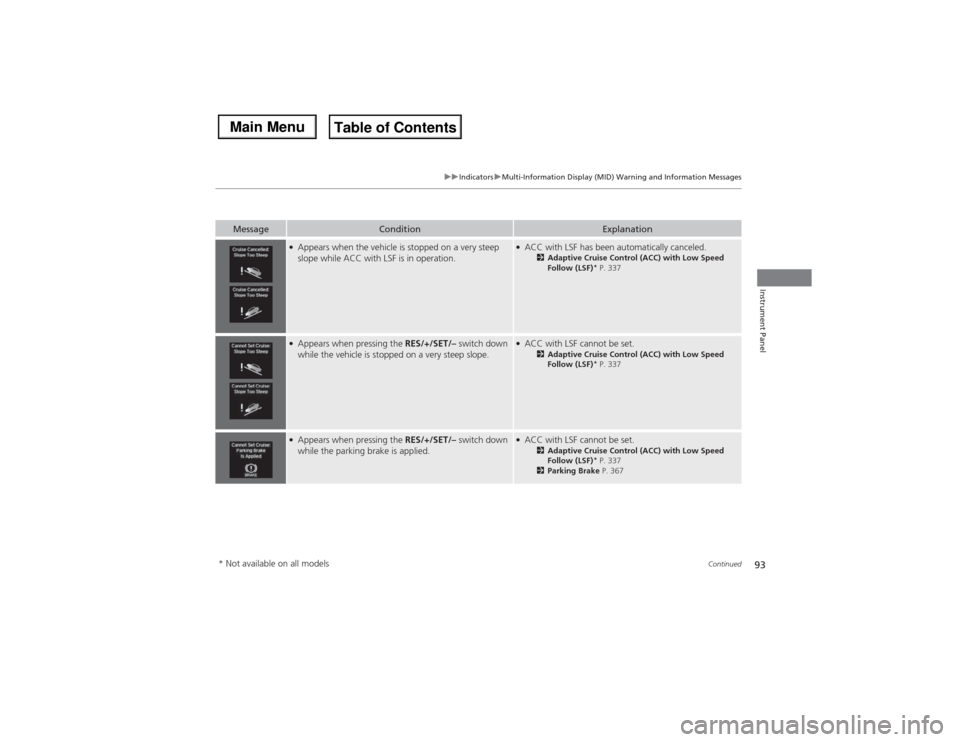
●Appears when the vehicle is stopped on a very steep
slope while ACC with LSF is in operation.
●ACC with LSF has been automatically canceled.
2Adaptive Cruise Control (ACC) with Low Speed
Follow (LSF)
* P. 337
●Appears when pressing the RES/+/SET/– switch down
while the vehicle is stopped on a very steep slope.
●ACC with LSF cannot be set.
2Adaptive Cruise Control (ACC) with Low Speed
Follow (LSF)
* P. 337
●Appears when pressing the RES/+/SET/– switch down
while the parking brake is applied.
●ACC with LSF cannot be set.
2Adaptive Cruise Control (ACC) with Low Speed
Follow (LSF)
* P. 337
2Parking Brake P. 367
* Not available on all models
Page 95 of 500
94
uuIndicatorsuMulti-Information Display (MID) Warning and Information Messages
Instrument Panel
Message
Condition
Explanation
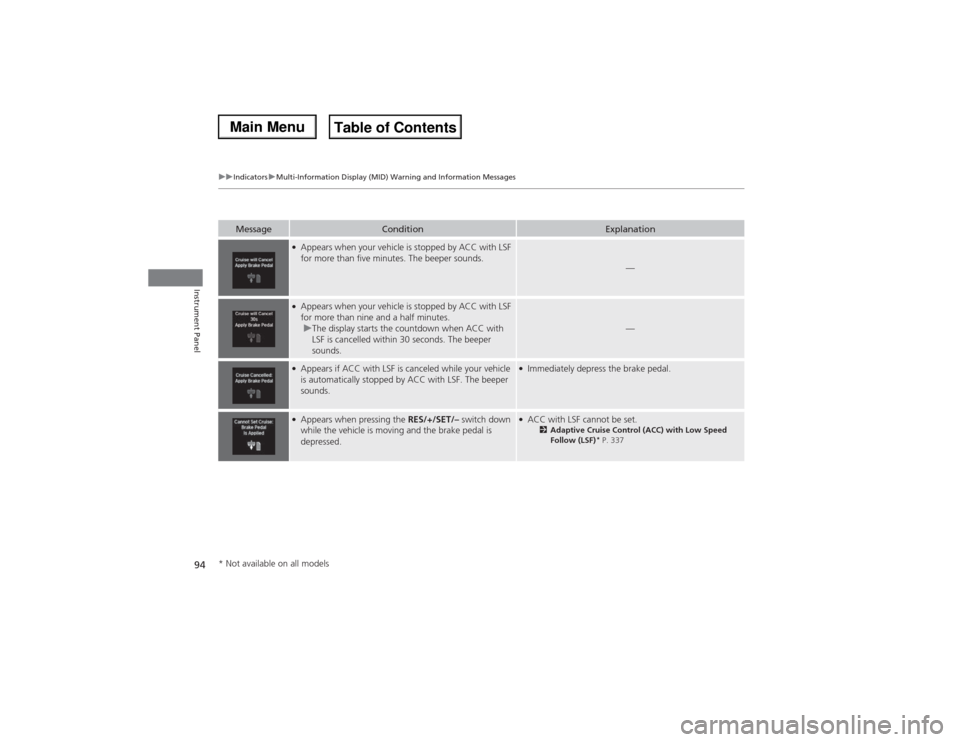
●Appears when your vehicle is stopped by ACC with LSF
for more than five minutes. The beeper sounds.
—
●Appears when your vehicle is stopped by ACC with LSF
for more than nine and a half minutes.
uThe display starts the countdown when ACC with
LSF is cancelled within 30 seconds. The beeper
sounds.
—
●Appears if ACC with LSF is canceled while your vehicle
is automatically stopped by ACC with LSF. The beeper
sounds.
●Immediately depress the brake pedal.
●Appears when pressing the RES/+/SET/– switch down
while the vehicle is moving and the brake pedal is
depressed.
●ACC with LSF cannot be set.
2Adaptive Cruise Control (ACC) with Low Speed
Follow (LSF)
* P. 337
* Not available on all models
Page 97 of 500

96
uuIndicatorsuMulti-Information Display (MID) Warning and Information Messages
Instrument Panel
Message
Condition
Explanation
●Appears when the vehicle is driving out of a detected
line. The beeper sounds simultaneously if selected by
customization.
●Keep the vehicle within the lane you are driving.●The color of either line changes from white to amber as
the vehicle gets closer to that side of the lane line.
●Blinks when you fail to steer the vehicle. The beeper
sounds simultaneously if selected by customization.
●Operate the steering wheel to resume the LKAS.
●Appears when the LKAS is in operation, or the LKAS
button is pressed, but there is a problem with a system
related to the LKAS. The LKAS cancels automatically.
The beeper sounds simultaneously if selected by
customization.
●If any other system indicators come on, such as the
VSA®, ABS and brake system, take appropriate action.
2Indicators P. 70
●Appears when the LKAS is in operation, or the LKAS
button is pressed, but there the temperature inside the
LKAS camera is too high. The LKAS cancels
automatically. The beeper sounds simultaneously if
selected by customization.
●Use the climate control system to cool down the
camera.●Goes off - The camera has been cooled down. Pressing
the LKAS button can resume the system.
2LKAS camera P. 354
Models with LKAS
Page 142 of 500

141
Continued
Controls
Operating the Switches Around the Steering WheelENGINE START/STOP Button■Changing the Power Mode
1ENGINE START/STOP Button
ENGINE START/STOP Button Operating Range
You can start the engine when the keyless access
remote is inside the vehicle.
The engine may also run if the keyless access remote
is close to the door or window, even if it is outside the
vehicle.
ON mode:
Indicator in the button is off, if the engine is running.
If the keyless access remote battery is weak, beeper
sounds and the To Start, Hold Remote Near Start
Button message appears on the MID.
2If the Keyless Access Remote Battery is
Weak P. 458
If the power mode does not change from VEHICLE
OFF to ACCESSORY, press the ENGINE START/STOP
button while moving the steering wheel left and
right. The steering wheel will unlock, allowing the
mode to change.
Operating Range
VEHICLE OFF (LOCK)
Indicator in the button is off.
The steering wheel is locked. The power to all electrical
components is turned off.
ACCESSORY
Indicator in the button is on.
Indicator in the button blinks (from ON to ACCESSORY).
Operate the audio system and other accessories in this
position.
ON
Indicator in the button is on.
All electrical components can be used.
Press the button. Press the button without the
shift lever in (P.
Shift to
(P, then press the button. Indicator
Without pressing the brake pedal