fuel Acura MDX 2014 User Guide
[x] Cancel search | Manufacturer: ACURA, Model Year: 2014, Model line: MDX, Model: Acura MDX 2014Pages: 500, PDF Size: 11.72 MB
Page 102 of 500

Continued
101
uuGauges and Multi-Information Display (MID)uMID
Instrument Panel
Shows the instant fuel economy as a bar graph in mpg (U.S.) or l/100 km (Canada).
Shows the estimated distance you can travel on the remaining fuel. This distance is
estimated from the fuel economy of your trips in the past.
Shows the time elapsed since the last time Trip A or Trip B was reset.
Shows the average speed in mph (U.S.) or km/h (Canada) since the last time Trip A
or Trip B was reset.■Instant Fuel Economy■Range■Elapsed Time■Average Speed
1Elapsed Time
You can change when to reset the elapsed time.
2Customized Features P. 1041Average Speed
You can change when to reset the average speed.
2Customized Features P. 104
Page 108 of 500

107
uuGauges and Multi-Information Display (MID)uMID
Continued
Instrument Panel
■List of customizable options
*1:Default SettingSetup Group Customizable Features Description Selectable SettingsDriver Assist
System
Setup
*
Forward Collision
Warning Distance
*
Changes at which distance FCW
* or CMBS
TM * alerts, or
turns FCW
* on and off.
Long/Normal
*1/Short/Off
ACC Forward Vehicle
Detect Beep
*
Causes the system to beep when the system detects a
vehicle, or when the vehicle goes out of the ACC with
LSF range.
On/Off
*1
ACC Display Speed Unit
*
Changes the speed unit for ACC with LSF on the MID.
mph
*1/km/h (U.S.)
mph/km/h
*1 (Canada)
Lane Keeping Assist
Suspend Beep
*
Causes the system to beep when the LKAS is suspended.
On/Off
*1
Blind Spot Info
*
Changes the setting for the blind spot information.
Audible And Visual
Alert
*1/Visual Alert/Off
Meter SetupLanguage SelectionChanges the displayed language.English*1/Francais/Español
Adjust Outside Temp.
DisplayAdjusts the temperature reading by a few degrees.-5°F ~ ±0°F*1 ~ +5°F (U.S.)
-3°C
~ ±0°C
*1 ~ +3°C
(Canada)
“Trip A” Reset TimingChanges the setting of how to reset trip meter A, average
fuel economy A, average speed A, and elapsed time A.When Refueled/IGN Off/
Manually Reset
*1
“Trip B” Reset TimingChanges the setting of how to reset trip meter B, average
fuel economy B, average speed B, and elapsed time B.When Refueled/IGN Off/
Manually Reset
*1
Turn by Turn Display
*
Select whether the turn-by-turn display comes on during
the route guidance.On
*1/Off
* Not available on all models
Page 112 of 500

111
uuGauges and Multi-Information Display (MID)uMID
Continued
Instrument Panel
■Example of customization settings
The steps for changing the “Trip A” Reset Timing setting to When Refueled are
shown below. The default setting for “Trip A” Reset Timing is Manually Reset.
1.Roll the multi-function steering-wheel
controls to select Vehicle Settings, then
push the multi-function steering-wheel
controls.
2.Roll the multi-function steering-wheel
controls until Meter Setup appears on the
display.
3.Push the multi-function steering-wheel
controls.
uLanguage Selection appears first on
the display.
Page 113 of 500

112
uuGauges and Multi-Information Display (MID)uMID
Instrument Panel
4.Roll the multi-function steering-wheel
controls until “Trip A” Reset Timing
appears on the display, then push the multi-
function steering-wheel controls.
uThe display switches to the
customization setup screen, where you
can select When Refueled, IGN Off,
Manually Reset, or Exit.
5.Roll the multi-function steering-wheel
controls and select When Refueled, then
push the multi-function steering-wheel
controls.
uThe When Refueled Setup screen
appears, then the display returns to the
customization menu screen.
6.Roll the multi-function steering-wheel
controls until Exit appears on the display,
then push the multi-function steering-
wheel controls.
7.Repeat Step 6 until you return to the
normal screen.
Page 213 of 500
212
uuAudio System Basic OperationuAudio/Information Screen
Features
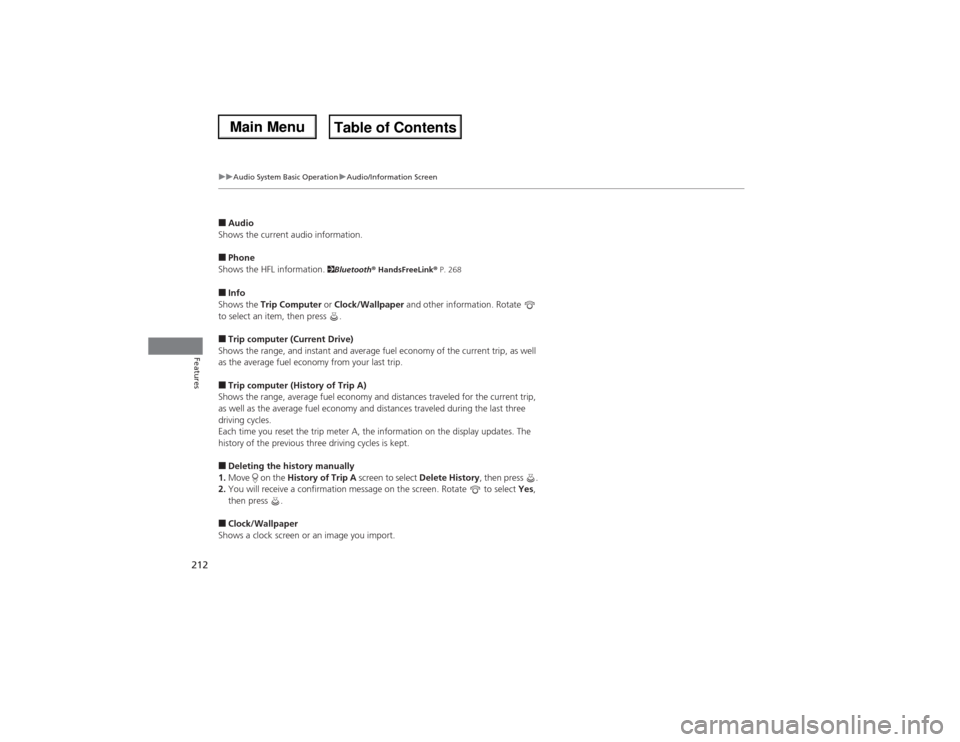
■Audio
Shows the current audio information.■Phone
Shows the HFL information.
2Bluetooth® HandsFreeLink® P. 268
■Info
Shows the Trip Computer or Clock/Wallpaper and other information. Rotate
to select an item, then press .■Trip computer (Current Drive)
Shows the range, and instant and average fuel economy of the current trip, as well
as the average fuel economy from your last trip.■Trip computer (History of Trip A)
Shows the range, average fuel economy and distances traveled for the current trip,
as well as the average fuel economy and distances traveled during the last three
driving cycles.
Each time you reset the trip meter A, the information on the display updates. The
history of the previous three driving cycles is kept.■Deleting the history manually
1.Move on the History of Trip A screen to select Delete History, then press .
2.You will receive a confirmation message on the screen. Rotate to select Yes,
then press .■Clock/Wallpaper
Shows a clock screen or an image you import.
Page 258 of 500
257
uuCustomized Featuresu
Continued
Features
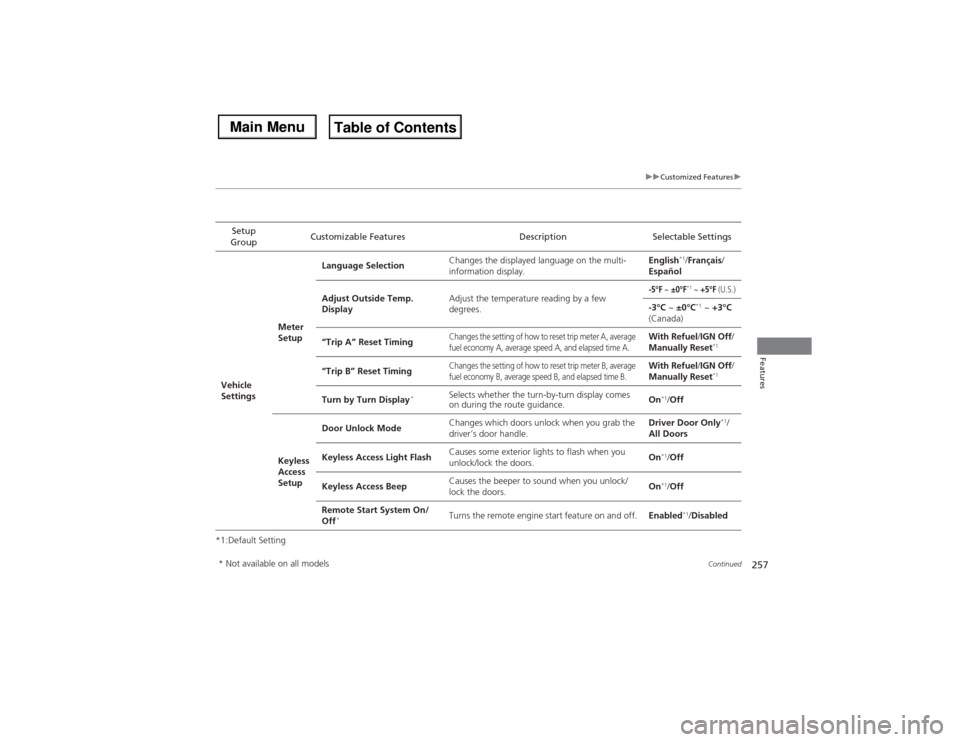
*1:Default SettingSetup
GroupCustomizable Features Description Selectable SettingsVehicle
SettingsMeter
SetupLanguage SelectionChanges the displayed language on the multi-
information display.English
*1/Français/
Español
Adjust Outside Temp.
DisplayAdjust the temperature reading by a few
degrees.
-5°F
~ ±0°F
*1 ~ +5°F
(U.S.)
-3°C ~ ±0°C
*1 ~ +3°C
(Canada)
“Trip A” Reset Timing
Changes the setting of how to reset trip meter A, average
fuel economy A, average speed A, and elapsed time A.
With Refuel/IGN Off/
Manually Reset
*1
“Trip B” Reset Timing
Changes the setting of how to reset trip meter B, average
fuel economy B, average speed B, and elapsed time B.
With Refuel/IGN Off/
Manually Reset
*1
Turn by Turn Display
*
Selects whether the turn-by-turn display comes
on during the route guidance.On
*1/Off
Keyless
Access
SetupDoor Unlock ModeChanges which doors unlock when you grab the
driver’s door handle.Driver Door Only
*1/
All Doors
Keyless Access Light FlashCauses some exterior lights to flash when you
unlock/lock the doors.On
*1/Off
Keyless Access BeepCauses the beeper to sound when you unlock/
lock the doors.On*1/Off
Remote Start System On/
Off
*
Turns the remote engine start feature on and off.Enabled
*1/Disabled
* Not available on all models
Page 304 of 500

303
Driving
This chapter discusses driving, refueling, and information on items such as accessories.
Before Driving
Driving Preparation .......................... 304
Maximum Load Limit........................ 307
Towing a Trailer................................ 309
Off-Highway Driving Guidelines..... 320
When Driving
Starting the Engine .......................... 322
Precautions While Driving................. 327
Automatic Transmission ................... 328
Shifting ............................................ 329
Integrated Dynamics System (IDS)..... 333
Cruise Control ................................. 334
Adaptive Cruise Control (ACC) with Low
Speed Follow (LSF)
*......................... 337Forward Collision Warning (FCW)
*.. 346
Lane Departure Warning (LDW)
*..... 350
Lane Keeping Assist System (LKAS)*.. 353
VSA® (Vehicle Stability Assist), aka ESC
(Electronic Stability Control), System .. 358Agile Handling Assist System............ 360
Blind Spot Information (BSI) System
*... 361
Super Handling-All Wheel DriveTM (SH-
AWD®)
*......................................... 363
Tire Pressure Monitoring System (TPMS) ... 363Tire Pressure Monitoring System (TPMS) -
Required Federal Explanation ......... 365
Braking
Brake System ................................... 367Anti-lock Brake System (ABS) ........... 369
Brake Assist System ......................... 370
Collision Mitigation Braking System
TM
(CMBS
TM)*..................................... 371
Parking Your Vehicle
When Stopped ................................ 377
Parking Sensor System
*................... 378
Multi-View Rear Camera*................ 382
Refueling
Fuel Information .............................. 383
How to Refuel ................................. 384
Fuel Economy.................................... 385
Accessories and Modifications........ 386
* Not available on all models
Page 324 of 500
Continued
323
uuWhen DrivinguStarting the Engine
Driving
You can turn the engine off when the vehicle is completely stopped.
1.Shift to
(P.
2.Press the ENGINE START/STOP button with your foot on the brake pedal.
■Stopping the Engine
1Starting the Engine
The immobilizer system protects your vehicle from
theft.
If an improperly coded device is used, the engine’s
fuel system is disabled.
2Immobilizer System P. 135
Page 331 of 500
uuWhen DrivinguShifting
330Driving
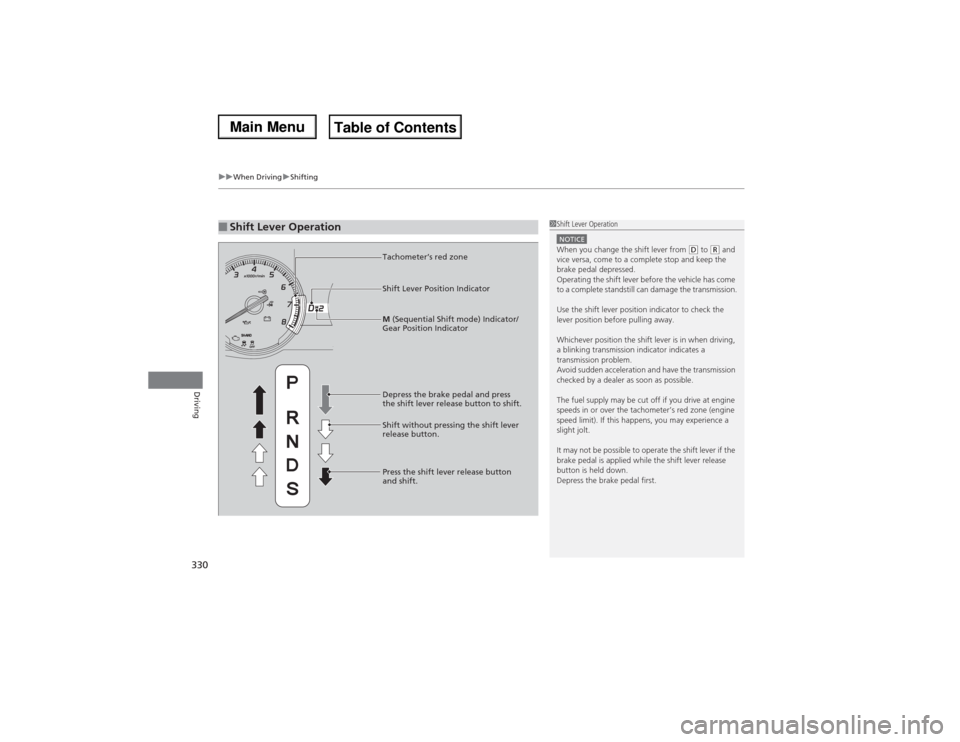
■Shift Lever Operation
1Shift Lever OperationNOTICEWhen you change the shift lever from
(D to (R and
vice versa, come to a complete stop and keep the
brake pedal depressed.
Operating the shift lever before the vehicle has come
to a complete standstill can damage the transmission.
Use the shift lever position indicator to check the
lever position before pulling away.
Whichever position the shift lever is in when driving,
a blinking transmission indicator indicates a
transmission problem.
Avoid sudden acceleration and have the transmission
checked by a dealer as soon as possible.
The fuel supply may be cut off if you drive at engine
speeds in or over the tachometer’s red zone (engine
speed limit). If this happens, you may experience a
slight jolt.
It may not be possible to operate the shift lever if the
brake pedal is applied while the shift lever release
button is held down.
Depress the brake pedal first.
Tachometer’s red zone
Shift Lever Position Indicator
Depress the brake pedal and press
the shift lever release button to shift.
Shift without pressing the shift lever
release button.
Press the shift lever release button
and shift.M (Sequential Shift mode) Indicator/
Gear Position Indicator
Page 333 of 500

uuWhen DrivinguShifting
332Driving
■Second gear lock mode
If you pull the
(+ paddle shifter while stopped or driving at 6 mph (10 km/h) or less,
the gear position will be locked in 2nd gear. This makes it easier to pull away on
slippery surfaces such as snow covered roads.
To cancel the 2nd gear lock mode, pull the
(- paddle shifter, or move the shift lever
from
(S to
(D.
■Sequential Shift Mode Operation
1Sequential Shift Mode Operation
Each paddle shift operation makes a single gear
change.
To change gears continuously, release the paddle
shifter before pulling it again for the next gear.
Recommended Shift Points
Use this table as a guideline for efficient fuel
economy and effective emission control.
The gear position indicator blinks when you cannot
shift up or down. It indicates that your vehicle speed
is not in its allowable gear shifting range.
Slightly accelerate to shift up and decelerate to shift
down while the indicator is blinking.Shift Up Normal Acceleration1st to 2nd
15 mph (24 km/h)
2nd to 3rd 25 mph (40 km/h)
3rd to 4th
40 mph (64 km/h)
4th to 5th 45 mph (72 km/h)
5th to 6th
50 mph (80 km/h)
Paddle Shifter (Shift down)
Downshifting when pulling
the
(- paddle shifter.
(Changes to a lower gear.)Upshifting when pulling
the
(+ paddle shifter.
(Changes to a higher gear.)
(-(+
Paddle Shifter (Shift up)