steering Acura MDX 2014 User Guide
[x] Cancel search | Manufacturer: ACURA, Model Year: 2014, Model line: MDX, Model: Acura MDX 2014Pages: 500, PDF Size: 11.72 MB
Page 43 of 500
42
uuAirbagsuTypes of Airbags
Safe Driving
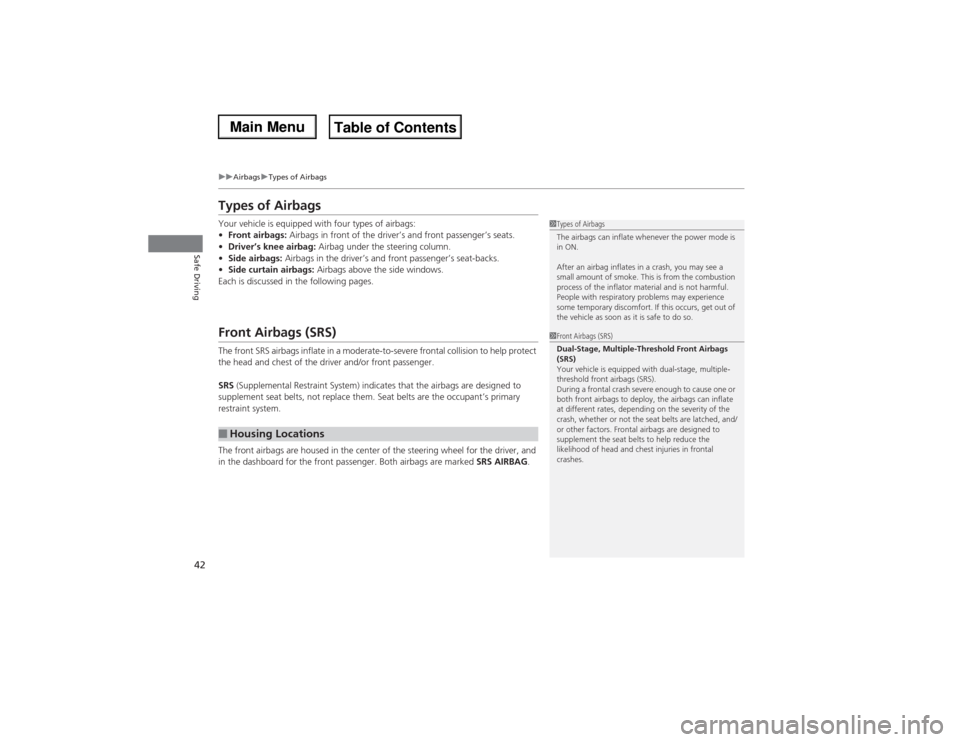
Types of AirbagsYour vehicle is equipped with four types of airbags:
•Front airbags: Airbags in front of the driver’s and front passenger’s seats.
•Driver’s knee airbag: Airbag under the steering column.
•Side airbags: Airbags in the driver’s and front passenger’s seat-backs.
•Side curtain airbags: Airbags above the side windows.
Each is discussed in the following pages.Front Airbags (SRS)The front SRS airbags inflate in a moderate-to-severe frontal collision to help protect
the head and chest of the driver and/or front passenger.
SRS (Supplemental Restraint System) indicates that the airbags are designed to
supplement seat belts, not replace them. Seat belts are the occupant’s primary
restraint system.
The front airbags are housed in the center of the steering wheel for the driver, and
in the dashboard for the front passenger. Both airbags are marked SRS AIRBAG.■Housing Locations
1Types of Airbags
The airbags can inflate whenever the power mode is
in ON.
After an airbag inflates in a crash, you may see a
small amount of smoke. This is from the combustion
process of the inflator material and is not harmful.
People with respiratory problems may experience
some temporary discomfort. If this occurs, get out of
the vehicle as soon as it is safe to do so.1Front Airbags (SRS)
Dual-Stage, Multiple-Threshold Front Airbags
(SRS)
Your vehicle is equipped with dual-stage, multiple-
threshold front airbags (SRS).
During a frontal crash severe enough to cause one or
both front airbags to deploy, the airbags can inflate
at different rates, depending on the severity of the
crash, whether or not the seat belts are latched, and/
or other factors. Frontal airbags are designed to
supplement the seat belts to help reduce the
likelihood of head and chest injuries in frontal
crashes.
Page 47 of 500

46
uuAirbagsuDriver’s Knee Airbag
Safe Driving
Driver’s Knee AirbagThe driver’s knee SRS airbag inflates in a moderate to severe frontal collision to help
keep the driver in the proper position and to help maximize the benefit provided by
the vehicles other safety features.
SRS (Supplemental Restraint System) indicates that the airbag is designed to
supplement seat belts, not replace them. Seat belts are the occupant’s primary
restraint system.
The driver’s knee airbag is housed under the
steering column for the driver.
The airbag is marked SRS AIRBAG.
When the driver’s front airbag inflates, the
driver’s knee airbag also inflates.■Housing Locations
1Driver’s Knee Airbag
Do not attach accessories on or near the driver’s knee
airbag. They can interfere with the proper operation
of the airbag, or hurt someone if an airbag inflates.
Housing
Location
■Operation
When
inflated
Knee
Airbag
Page 77 of 500
76
uuIndicatorsu
Instrument Panel
Indicator
Name
On/Blinking
Explanation
Message
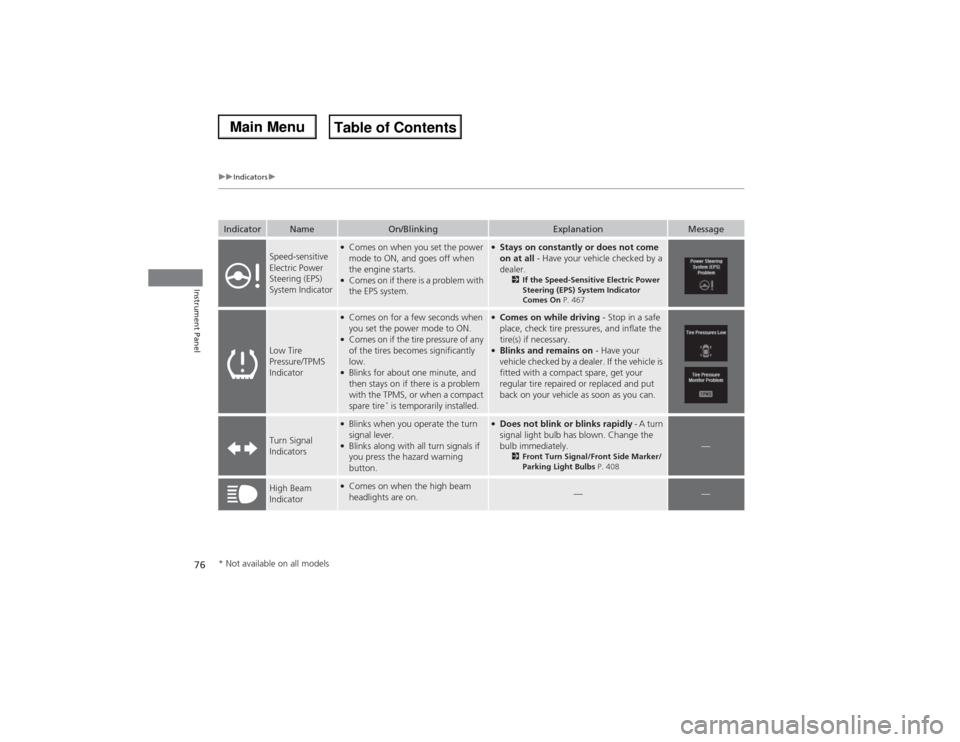
Speed-sensitive
Electric Power
Steering (EPS)
System Indicator
●Comes on when you set the power
mode to ON, and goes off when
the engine starts.●Comes on if there is a problem with
the EPS system.
●Stays on constantly or does not come
on at all - Have your vehicle checked by a
dealer.
2If the Speed-Sensitive Electric Power
Steering (EPS) System Indicator
Comes On P. 467
Low Tire
Pressure/TPMS
Indicator
●Comes on for a few seconds when
you set the power mode to ON.●Comes on if the tire pressure of any
of the tires becomes significantly
low.●Blinks for about one minute, and
then stays on if there is a problem
with the TPMS, or when a compact
spare tire
* is temporarily installed.
●Comes on while driving - Stop in a safe
place, check tire pressures, and inflate the
tire(s) if necessary.●Blinks and remains on - Have your
vehicle checked by a dealer. If the vehicle is
fitted with a compact spare, get your
regular tire repaired or replaced and put
back on your vehicle as soon as you can.
Turn Signal
Indicators
●Blinks when you operate the turn
signal lever.●Blinks along with all turn signals if
you press the hazard warning
button.
●Does not blink or blinks rapidly - A turn
signal light bulb has blown. Change the
bulb immediately.
2Front Turn Signal/Front Side Marker/
Parking Light Bulbs P. 408
—
High Beam
Indicator
●Comes on when the high beam
headlights are on.
—
—
* Not available on all models
Page 79 of 500
78
uuIndicatorsu
Instrument Panel
Indicator
Name
On/Blinking
Explanation
Message
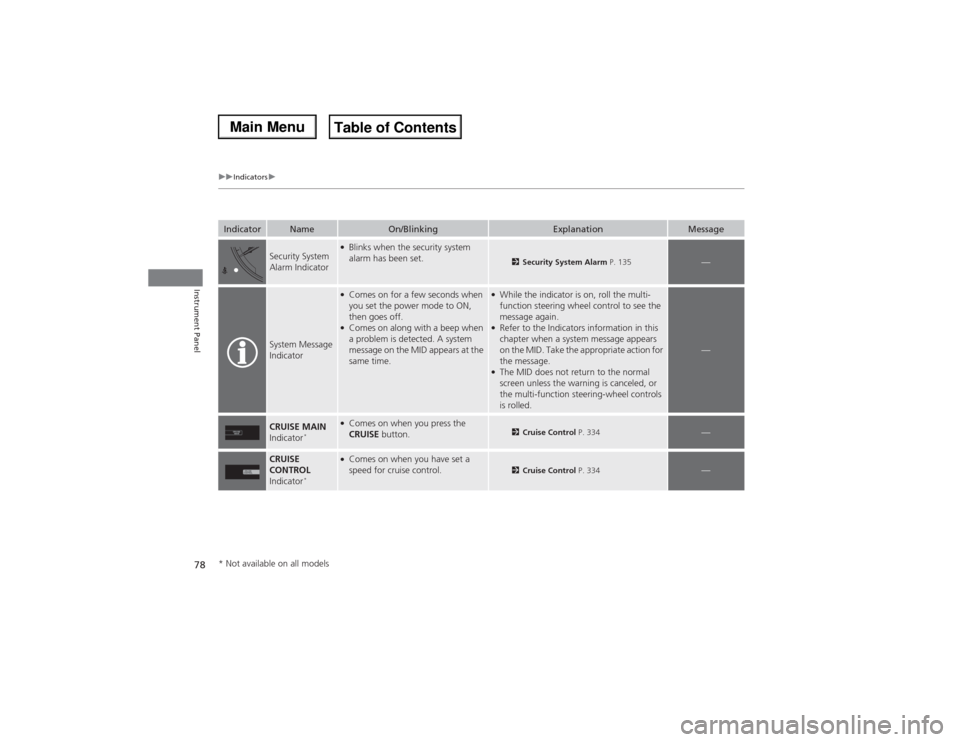
Security System
Alarm Indicator
●Blinks when the security system
alarm has been set.
2Security System Alarm P. 135
—
System Message
Indicator
●Comes on for a few seconds when
you set the power mode to ON,
then goes off.●Comes on along with a beep when
a problem is detected. A system
message on the MID appears at the
same time.
●While the indicator is on, roll the multi-
function steering wheel control to see the
message again.●Refer to the Indicators information in this
chapter when a system message appears
on the MID. Take the appropriate action for
the message.●The MID does not return to the normal
screen unless the warning is canceled, or
the multi-function steering-wheel controls
is rolled.
—
CRUISE MAIN
Indicator
*
●Comes on when you press the
CRUISE button.
2Cruise Control P. 334
—
CRUISE
CONTROL
Indicator
*
●Comes on when you have set a
speed for cruise control.
2Cruise Control P. 334
—
* Not available on all models
Page 85 of 500
84
uuIndicatorsuMulti-Information Display (MID) Warning and Information Messages
Instrument Panel
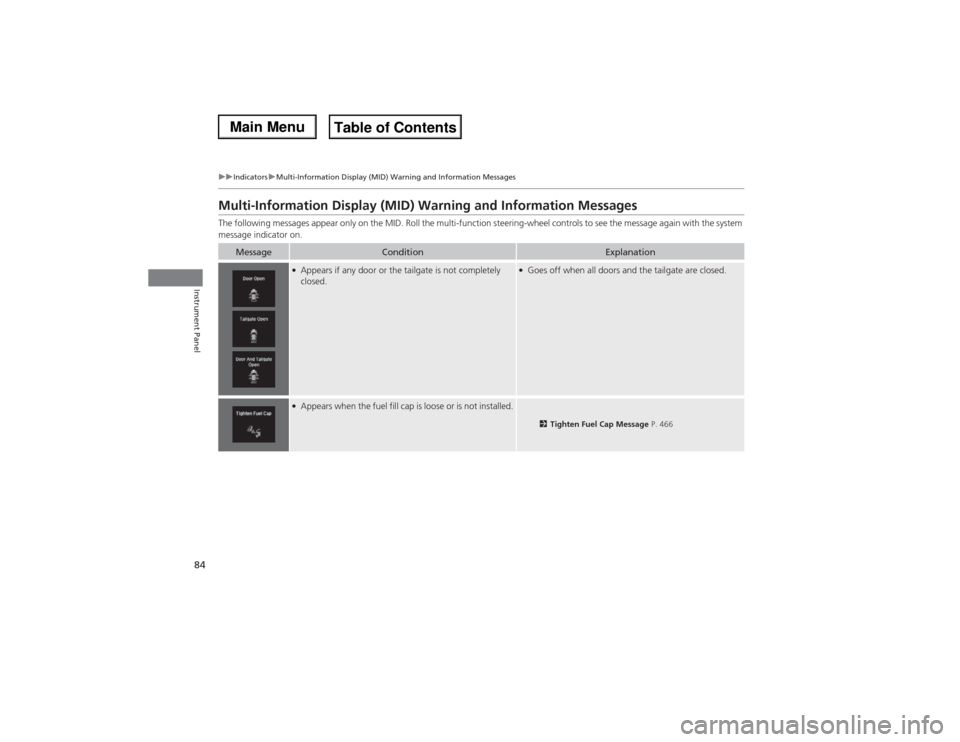
Multi-Information Display (MID) Warning and Information MessagesThe following messages appear only on the MID. Roll the multi-function steering-wheel controls to see the message again with the system
message indicator on.
Message
Condition
Explanation
●Appears if any door or the tailgate is not completely
closed.
●Goes off when all doors and the tailgate are closed.
●Appears when the fuel fill cap is loose or is not installed.
2Tighten Fuel Cap Message P. 466
Page 88 of 500

87
uuIndicatorsuMulti-Information Display (MID) Warning and Information Messages
Continued
Instrument Panel
Message
Condition
Explanation
●Appears if there is a problem with the starting system.
●Hold the ENGINE START/STOP button up to 15
seconds to start the engine.
2Starting the Engine P. 322
Have your vehicle checked by a dealer.
●Appears when you set the power mode to ACCESSORY
or ON.
2Starting the Engine P. 322
●Appears when the steering wheel is locked.
●Move the steering wheel left and right after pressing the
ENGINE START/STOP button.
U.S.Canada
Page 97 of 500

96
uuIndicatorsuMulti-Information Display (MID) Warning and Information Messages
Instrument Panel
Message
Condition
Explanation
●Appears when the vehicle is driving out of a detected
line. The beeper sounds simultaneously if selected by
customization.
●Keep the vehicle within the lane you are driving.●The color of either line changes from white to amber as
the vehicle gets closer to that side of the lane line.
●Blinks when you fail to steer the vehicle. The beeper
sounds simultaneously if selected by customization.
●Operate the steering wheel to resume the LKAS.
●Appears when the LKAS is in operation, or the LKAS
button is pressed, but there is a problem with a system
related to the LKAS. The LKAS cancels automatically.
The beeper sounds simultaneously if selected by
customization.
●If any other system indicators come on, such as the
VSA®, ABS and brake system, take appropriate action.
2Indicators P. 70
●Appears when the LKAS is in operation, or the LKAS
button is pressed, but there the temperature inside the
LKAS camera is too high. The LKAS cancels
automatically. The beeper sounds simultaneously if
selected by customization.
●Use the climate control system to cool down the
camera.●Goes off - The camera has been cooled down. Pressing
the LKAS button can resume the system.
2LKAS camera P. 354
Models with LKAS
Page 99 of 500
98
uuGauges and Multi-Information Display (MID)uMID
Instrument Panel
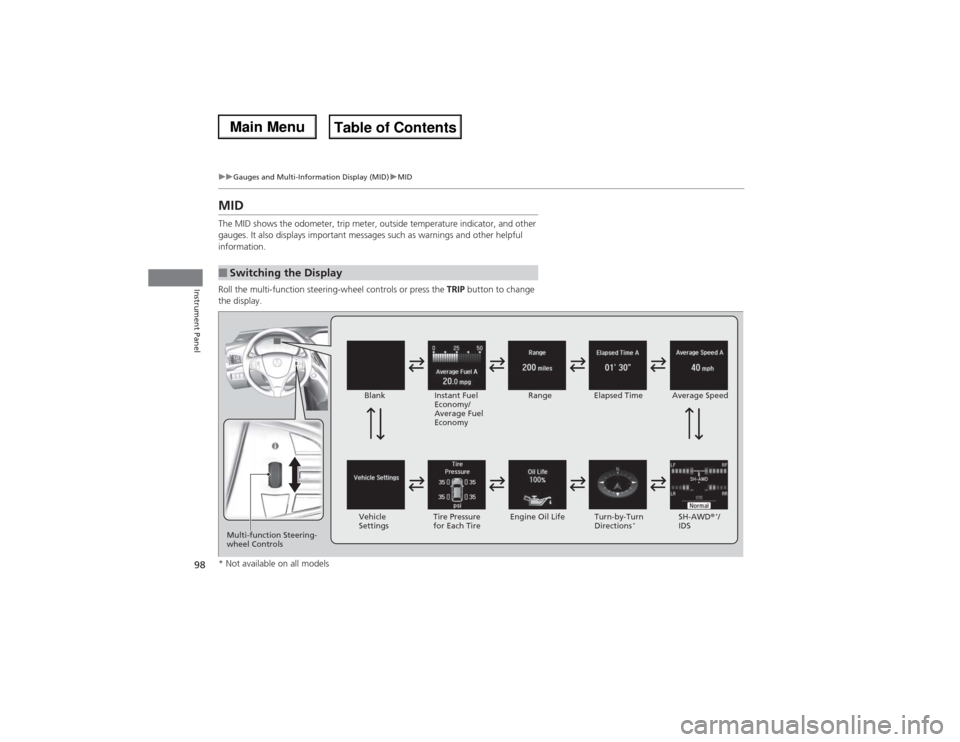
MIDThe MID shows the odometer, trip meter, outside temperature indicator, and other
gauges. It also displays important messages such as warnings and other helpful
information.
Roll the multi-function steering-wheel controls or press the TRIP button to change
the display.■Switching the Display
Blank
Instant Fuel
Economy/
Average Fuel
EconomyRange Elapsed Time Average Speed
SH-AWD®
*/
IDS Vehicle
SettingsTire Pressure
for Each TireEngine Oil Life Turn-by-Turn
Directions
*
Multi-function Steering-
wheel Controls* Not available on all models
Page 105 of 500

uuGauges and Multi-Information Display (MID)uMID
104Instrument Panel
Use the MID to customize certain features.■How to customize
Select the Vehicle Settings screen by rolling the multi-function steering-wheel
controls while the power mode is in ON, and the vehicle is at a complete stop. Push
the multi-function steering-wheel controls.■Customized Features
1Customized Features
To customize other features, roll the multi-function
steering-wheel controls.
2List of customizable options P. 107
2Example of customization settings P. 111
Customization is possible when you see the driver’s
ID (Driver 1 or Driver 2) on the screen.
The driver’s ID indicates which remote transmitter
you have used to unlock the driver’s door. The
customized settings are recalled every time you
unlock the driver’s door with that remote.
Shift to
(P before you attempt to change any
customized setting.
Multi-function Steering-
wheel Controls
Roll: Changes the
customize menus and
items.
Push: Enter the selected
item. MID: Goes to Vehicle Settings.
Page 106 of 500
105
uuGauges and Multi-Information Display (MID)uMID
Continued
Instrument Panel
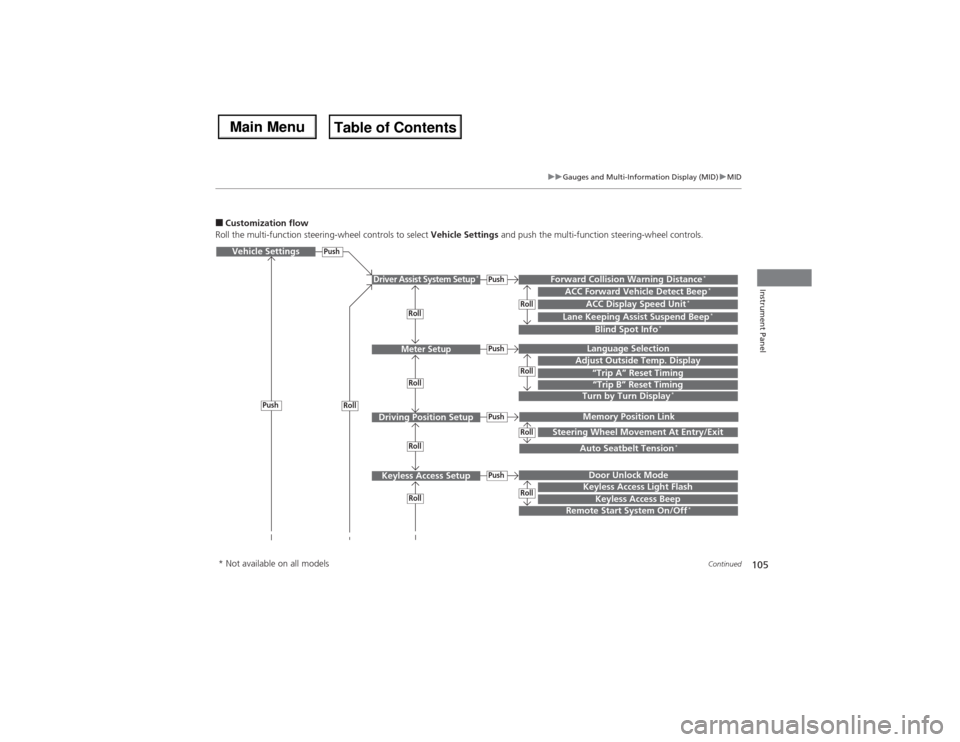
■Customization flow
Roll the multi-function steering-wheel controls to select Vehicle Settings and push the multi-function steering-wheel controls.Vehicle Settings
“Trip A” Reset TimingLanguage SelectionAdjust Outside Temp. DisplayMemory Position LinkDoor Unlock ModeKeyless Access Beep
Driver Assist System Setup
*
Meter Setup
Driving Position SetupKeyless Access Setup
“Trip B” Reset TimingTurn by Turn Display
*
Forward Collision Warning Distance
*
ACC Forward Vehicle Detect Beep
*
ACC Display Speed Unit
*
Roll
Push
Push
PushPushPush
Roll
Lane Keeping Assist Suspend Beep
*
Blind Spot Info
*
Steering Wheel Movement At Entry/Exit
Auto Seatbelt Tension
*
Roll
Roll
Remote Start System On/Off
*
Roll
Push
Keyless Access Light Flash
RollRollRollRoll
* Not available on all models