steering wheel Acura MDX 2014 User Guide
[x] Cancel search | Manufacturer: ACURA, Model Year: 2014, Model line: MDX, Model: Acura MDX 2014Pages: 500, PDF Size: 11.72 MB
Page 85 of 500
84
uuIndicatorsuMulti-Information Display (MID) Warning and Information Messages
Instrument Panel
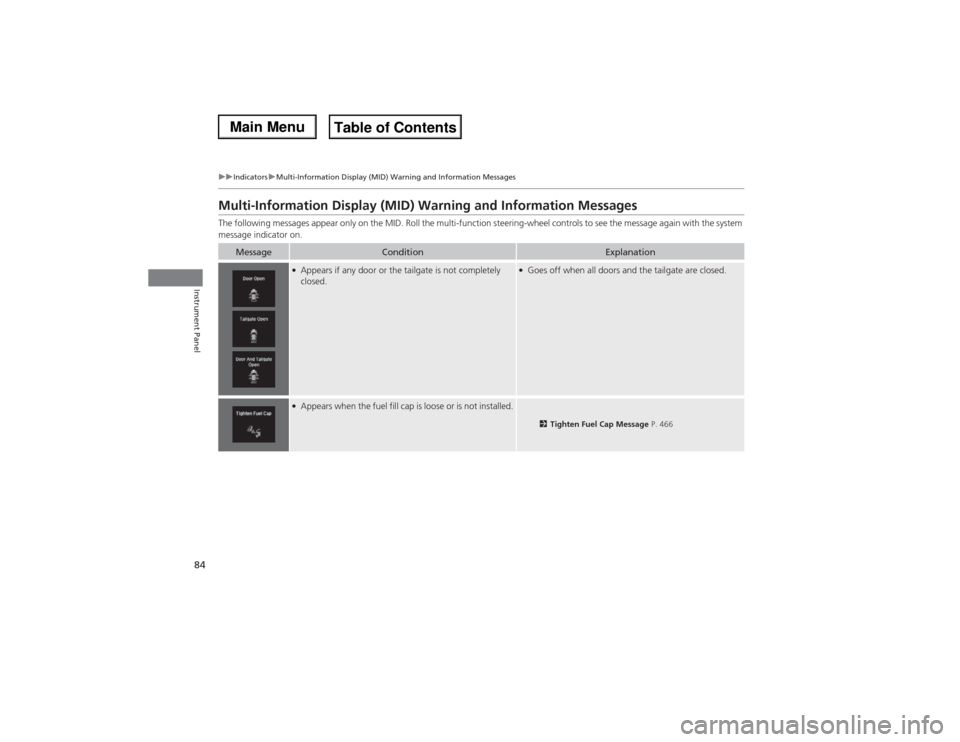
Multi-Information Display (MID) Warning and Information MessagesThe following messages appear only on the MID. Roll the multi-function steering-wheel controls to see the message again with the system
message indicator on.
Message
Condition
Explanation
●Appears if any door or the tailgate is not completely
closed.
●Goes off when all doors and the tailgate are closed.
●Appears when the fuel fill cap is loose or is not installed.
2Tighten Fuel Cap Message P. 466
Page 88 of 500

87
uuIndicatorsuMulti-Information Display (MID) Warning and Information Messages
Continued
Instrument Panel
Message
Condition
Explanation
●Appears if there is a problem with the starting system.
●Hold the ENGINE START/STOP button up to 15
seconds to start the engine.
2Starting the Engine P. 322
Have your vehicle checked by a dealer.
●Appears when you set the power mode to ACCESSORY
or ON.
2Starting the Engine P. 322
●Appears when the steering wheel is locked.
●Move the steering wheel left and right after pressing the
ENGINE START/STOP button.
U.S.Canada
Page 97 of 500

96
uuIndicatorsuMulti-Information Display (MID) Warning and Information Messages
Instrument Panel
Message
Condition
Explanation
●Appears when the vehicle is driving out of a detected
line. The beeper sounds simultaneously if selected by
customization.
●Keep the vehicle within the lane you are driving.●The color of either line changes from white to amber as
the vehicle gets closer to that side of the lane line.
●Blinks when you fail to steer the vehicle. The beeper
sounds simultaneously if selected by customization.
●Operate the steering wheel to resume the LKAS.
●Appears when the LKAS is in operation, or the LKAS
button is pressed, but there is a problem with a system
related to the LKAS. The LKAS cancels automatically.
The beeper sounds simultaneously if selected by
customization.
●If any other system indicators come on, such as the
VSA®, ABS and brake system, take appropriate action.
2Indicators P. 70
●Appears when the LKAS is in operation, or the LKAS
button is pressed, but there the temperature inside the
LKAS camera is too high. The LKAS cancels
automatically. The beeper sounds simultaneously if
selected by customization.
●Use the climate control system to cool down the
camera.●Goes off - The camera has been cooled down. Pressing
the LKAS button can resume the system.
2LKAS camera P. 354
Models with LKAS
Page 99 of 500
98
uuGauges and Multi-Information Display (MID)uMID
Instrument Panel
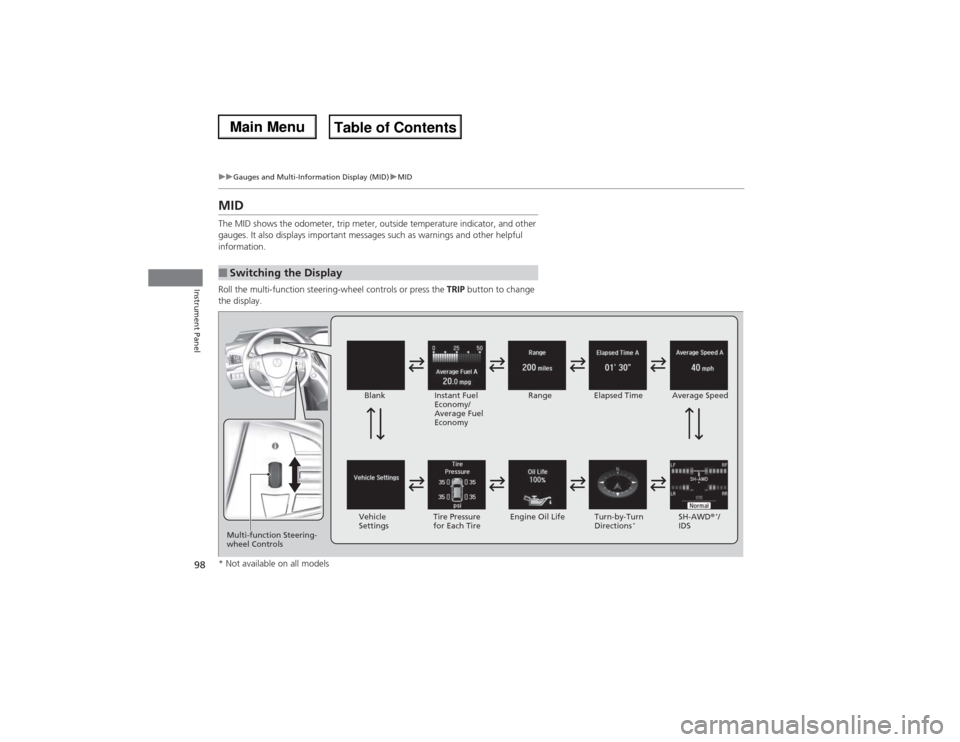
MIDThe MID shows the odometer, trip meter, outside temperature indicator, and other
gauges. It also displays important messages such as warnings and other helpful
information.
Roll the multi-function steering-wheel controls or press the TRIP button to change
the display.■Switching the Display
Blank
Instant Fuel
Economy/
Average Fuel
EconomyRange Elapsed Time Average Speed
SH-AWD®
*/
IDS Vehicle
SettingsTire Pressure
for Each TireEngine Oil Life Turn-by-Turn
Directions
*
Multi-function Steering-
wheel Controls* Not available on all models
Page 105 of 500

uuGauges and Multi-Information Display (MID)uMID
104Instrument Panel
Use the MID to customize certain features.■How to customize
Select the Vehicle Settings screen by rolling the multi-function steering-wheel
controls while the power mode is in ON, and the vehicle is at a complete stop. Push
the multi-function steering-wheel controls.■Customized Features
1Customized Features
To customize other features, roll the multi-function
steering-wheel controls.
2List of customizable options P. 107
2Example of customization settings P. 111
Customization is possible when you see the driver’s
ID (Driver 1 or Driver 2) on the screen.
The driver’s ID indicates which remote transmitter
you have used to unlock the driver’s door. The
customized settings are recalled every time you
unlock the driver’s door with that remote.
Shift to
(P before you attempt to change any
customized setting.
Multi-function Steering-
wheel Controls
Roll: Changes the
customize menus and
items.
Push: Enter the selected
item. MID: Goes to Vehicle Settings.
Page 106 of 500
105
uuGauges and Multi-Information Display (MID)uMID
Continued
Instrument Panel
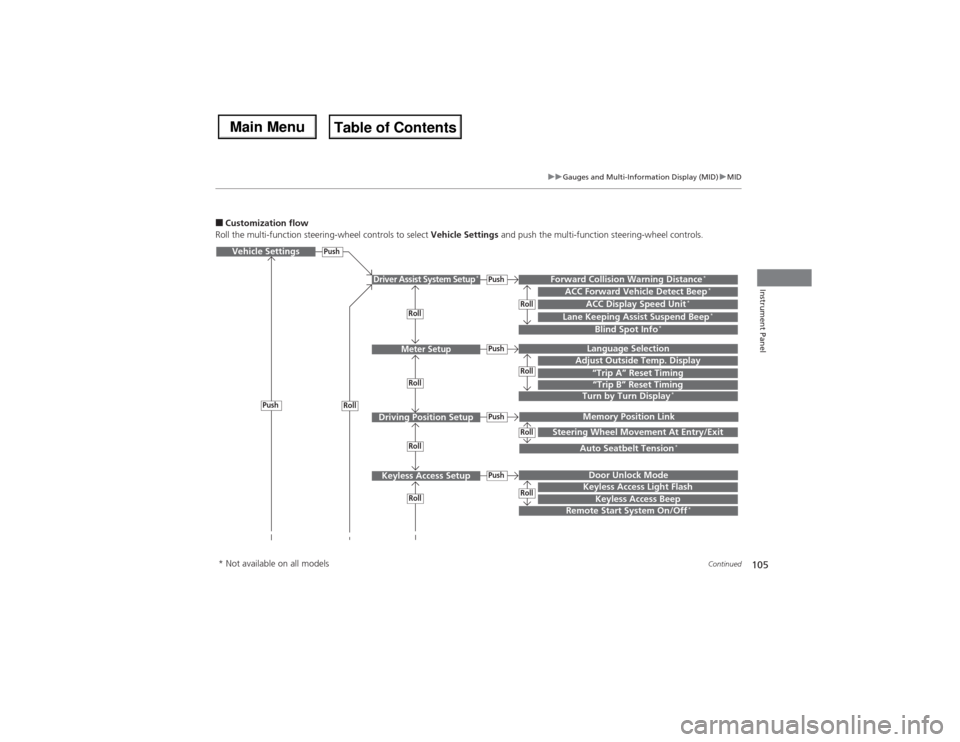
■Customization flow
Roll the multi-function steering-wheel controls to select Vehicle Settings and push the multi-function steering-wheel controls.Vehicle Settings
“Trip A” Reset TimingLanguage SelectionAdjust Outside Temp. DisplayMemory Position LinkDoor Unlock ModeKeyless Access Beep
Driver Assist System Setup
*
Meter Setup
Driving Position SetupKeyless Access Setup
“Trip B” Reset TimingTurn by Turn Display
*
Forward Collision Warning Distance
*
ACC Forward Vehicle Detect Beep
*
ACC Display Speed Unit
*
Roll
Push
Push
PushPushPush
Roll
Lane Keeping Assist Suspend Beep
*
Blind Spot Info
*
Steering Wheel Movement At Entry/Exit
Auto Seatbelt Tension
*
Roll
Roll
Remote Start System On/Off
*
Roll
Push
Keyless Access Light Flash
RollRollRollRoll
* Not available on all models
Page 109 of 500
108
uuGauges and Multi-Information Display (MID)uMID
Instrument Panel
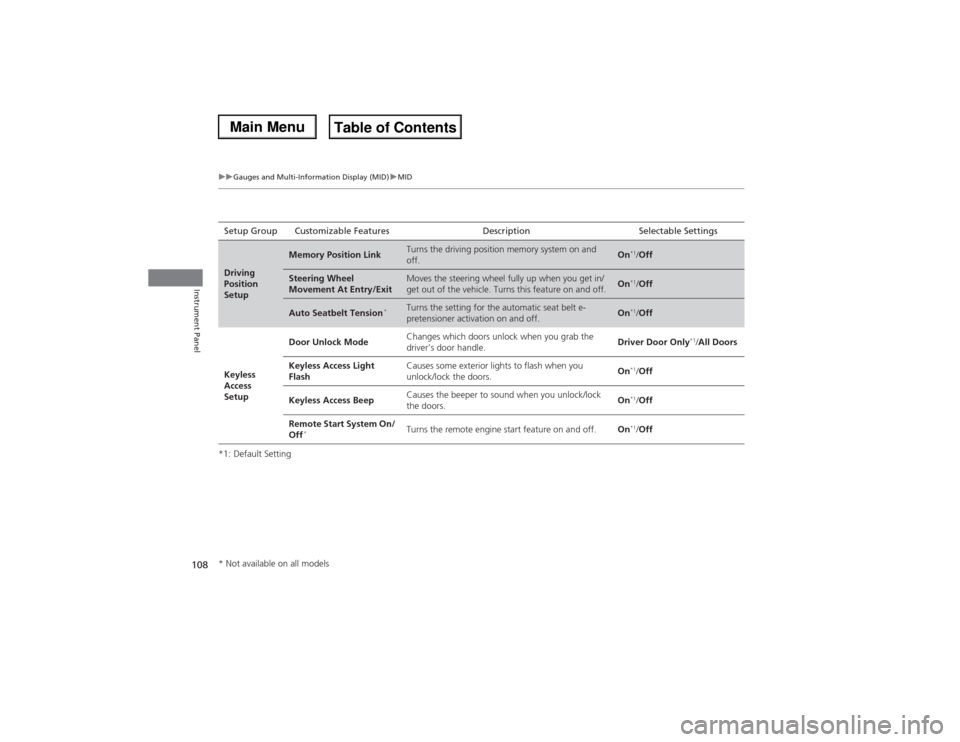
*1: Default SettingSetup Group Customizable Features Description Selectable SettingsDriving
Position
Setup
Memory Position Link
Turns the driving position memory system on and
off.
On
*1/Off
Steering Wheel
Movement At Entry/Exit
Moves the steering wheel fully up when you get in/
get out of the vehicle. Turns this feature on and off.
On
*1/Off
Auto Seatbelt Tension
*
Turns the setting for the automatic seat belt e-
pretensioner activation on and off.
On
*1/Off
Keyless
Access
SetupDoor Unlock ModeChanges which doors unlock when you grab the
driver’s door handle.Driver Door Only
*1/All Doors
Keyless Access Light
FlashCauses some exterior lights to flash when you
unlock/lock the doors.On
*1/Off
Keyless Access BeepCauses the beeper to sound when you unlock/lock
the doors.On*1/Off
Remote Start System On/
Off
*
Turns the remote engine start feature on and off.On
*1/Off
* Not available on all models
Page 112 of 500

111
uuGauges and Multi-Information Display (MID)uMID
Continued
Instrument Panel
■Example of customization settings
The steps for changing the “Trip A” Reset Timing setting to When Refueled are
shown below. The default setting for “Trip A” Reset Timing is Manually Reset.
1.Roll the multi-function steering-wheel
controls to select Vehicle Settings, then
push the multi-function steering-wheel
controls.
2.Roll the multi-function steering-wheel
controls until Meter Setup appears on the
display.
3.Push the multi-function steering-wheel
controls.
uLanguage Selection appears first on
the display.
Page 113 of 500

112
uuGauges and Multi-Information Display (MID)uMID
Instrument Panel
4.Roll the multi-function steering-wheel
controls until “Trip A” Reset Timing
appears on the display, then push the multi-
function steering-wheel controls.
uThe display switches to the
customization setup screen, where you
can select When Refueled, IGN Off,
Manually Reset, or Exit.
5.Roll the multi-function steering-wheel
controls and select When Refueled, then
push the multi-function steering-wheel
controls.
uThe When Refueled Setup screen
appears, then the display returns to the
customization menu screen.
6.Roll the multi-function steering-wheel
controls until Exit appears on the display,
then push the multi-function steering-
wheel controls.
7.Repeat Step 6 until you return to the
normal screen.
Page 114 of 500
113
Controls
This chapter explains how to operate the various controls necessary for driving.
Clock.................................................. 114
Locking and Unlocking the Doors
Key Types and Functions .................. 115
Locking/Unlocking the Doors from the
Outside .......................................... 117
Low Keyless Access Remote Signal
Strength......................................... 123
Locking/Unlocking the Doors from the
Inside ............................................. 124
Childproof Door Locks ..................... 126
Auto Door Locking/Unlocking .......... 127
Opening and Closing the Tailgate... 128
Security System
Immobilizer System .......................... 135Security System Alarm...................... 135
Opening and Closing the Windows... 138
Opening and Closing the Moonroof
.. 140
Operating the Switches Around the
Steering Wheel
ENGINE START/STOP Button............. 141
Turn Signals ..................................... 144
Light Switches.................................. 145
Daytime Running Lights ................... 148
Wipers and Washers ........................ 149
Brightness Control ........................... 153
Defogger/Heated Door Mirror .......... 154
Driving Position Memory System ...... 155
Adjusting the Steering Wheel........... 157Adjusting the Mirrors
Interior Rearview Mirror ................... 158
Power Door Mirrors ......................... 159
Adjusting the Seats
Adjusting the Seat Positions ............. 161
Rear Seats........................................ 168
Armrest ........................................... 171
Interior Lights/Interior Convenience Items
Interior Lights .................................. 172
Interior Convenience Items .............. 174
Climate Control System
Using Automatic Climate Control .... 185
Rear Climate Control System ........... 192
Automatic Climate Control Sensors ... 196